Quick answer
Learn desktop Excel first for office, accounts and computer operator jobs, since those roles exchange .xlsx files and test macros, Goal Seek and pivot tables. Learn Google Sheets early for freelancing and shared online work. Core formulas transfer between them, so practise each exercise in both tools.
Key takeaways
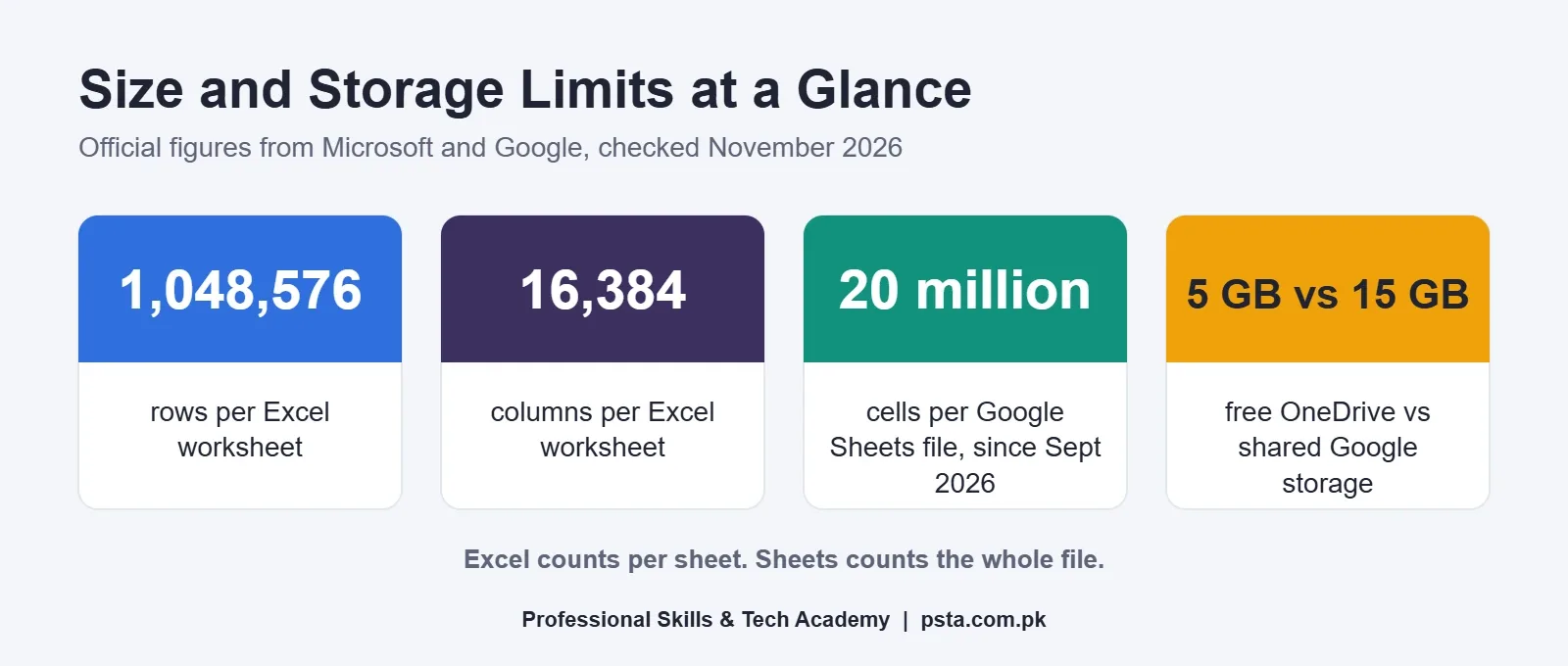
- • Excel allows 1,048,576 rows by 16,384 columns per worksheet; Google Sheets allows up to 20 million cells per file since September 2026.
- • Both have free versions, but Excel for the web can't create VBA macros, Power Pivot models or run Goal Seek and Solver.
- • Desktop Excel works fully offline; Sheets needs Chrome or Edge plus the Docs Offline extension, set up in advance.
- • For office and computer operator jobs, start with desktop Excel; for freelancing and team work, learn Sheets early.
- • SUM, IF, VLOOKUP and pivot tables transfer between the two, so build each exercise in both tools.
Table of contents 15 sections
- Google Sheets vs Excel: The Short Answer
- How Big Can Your Data Get in Each Tool?
- What Does Each One Cost You?
- Paid Plans in Brief
- Sharing a File vs Owning a File
- What Happens When the Internet Goes Down?
- Set Up Sheets Offline in Four Steps
- Formulas and Functions: How Much Carries Over?
- Which Advanced Tools Are Missing From the Free Versions?
- AI Helpers: Copilot in Excel and Gemini in Sheets
- Which Should You Learn First for a Job in Pakistan?
- A Four-Week Plan to Get Comfortable in Both
- Common Mix-Ups When Switching Between the Two
- Where PSTA's Office Automation Course Fits
- Open the Same File in Both Tools Today
Example scenario: Hina has just joined a school office in Abbottabad. On day one, the principal emails her a fee register as an .xlsx file. On day two, a teacher sends a Google Sheets link and asks her to fill in attendance with three colleagues at the same time. Same rows and columns, two different tools, and she wonders which one she was supposed to learn.
That is the real Google Sheets vs Excel question for most people in Pakistan. It isn't about which product is "better." It's about which one your next job, client or classroom will hand you, and how much of your skill moves from one to the other. The good news is that most of it does.
In this comparison, you will find:
- The hard limits of each tool, taken from Microsoft's and Google's own pages
- What you can do for free, and where each free version stops
- How offline work, sharing and AI helpers differ in daily office life
- A simple way to decide which to learn first for your situation
- A four-week plan that leaves you comfortable in both
Google Sheets vs Excel: The Short Answer
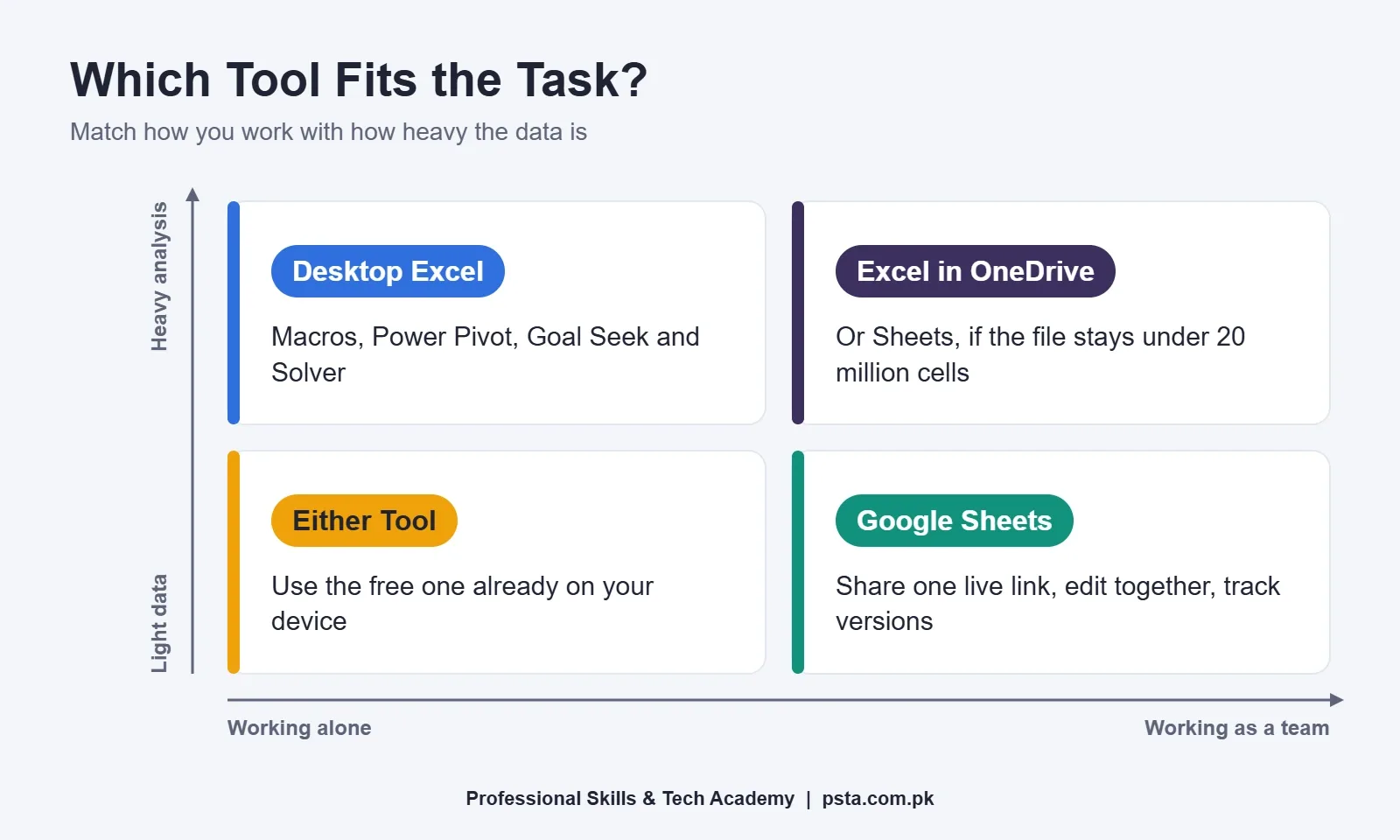
Learn Excel first if you are aiming for office, accounts, data entry or computer operator jobs, because those roles usually exchange .xlsx files and expect the desktop app. Learn Google Sheets first if your work is mostly shared online, such as freelancing for foreign clients, school coordination or a small team tracking orders together.
Either way, don't treat them as two separate subjects. Cell references, SUM, IF, sorting, filtering, charts and pivot tables work in nearly the same way in both. A student who understands why a formula breaks in one tool will fix it in the other within minutes.
| Point | Microsoft Excel | Google Sheets |
|---|---|---|
| Where it runs | Desktop app, plus a free web version | Web browser, plus mobile apps |
| Free option | Excel for the web with a Microsoft account | Full Sheets with any Google account |
| Free cloud storage | 5 GB OneDrive | 15 GB shared with Gmail and Photos |
| Size limit | 1,048,576 rows by 16,384 columns per sheet | Up to 20 million cells per spreadsheet |
| Offline work | Desktop app works fully offline | Possible in Chrome or Edge after setup |
| Automation | VBA macros (desktop only) | Apps Script and recorded macros |
| Live co-editing | Yes, when the file is saved in OneDrive | Yes, built in from the start |
| AI helper | Copilot in paid Personal and Family plans | Gemini in higher Workspace plans |
How Big Can Your Data Get in Each Tool?
Microsoft's Excel specifications page sets each worksheet at 1,048,576 rows by 16,384 columns, and a single cell can hold up to 32,767 characters. The number of sheets in a workbook is limited only by your computer's memory.
Google counts differently. Sheets caps the whole file, not each tab. On September 10, 2026, Google's Workspace Updates blog announced that the limit had doubled from 10 million to 20 million cells. The change covers personal Google accounts as well as paid Workspace customers, and it applies to new, existing and imported files.
What does that mean in practice? A student record with 20 columns would fit about one million rows in a Sheets file before you hit the cap. That's far more than a school, shop or small office will ever need. Size only becomes a real deciding factor when you work with large exports from banks, telecoms or e-commerce stores.
What Does Each One Cost You?
On price, Google Sheets vs Excel starts as a tie, because you can use both for free. Microsoft's free web Office page offers Word, Excel and PowerPoint in the browser through Microsoft 365 for the web, with 5 GB of OneDrive storage. A Google account gets up to 15 GB of storage, but that pool is shared across Gmail, Google Drive and Google Photos, so a phone full of backed-up photos can eat your spreadsheet space.
The difference is what "free" includes. Google Sheets in the browser is the full product. Excel for the web is a lighter version of desktop Excel, and some of the features office jobs expect live only in the paid desktop app. If your employer provides a licensed computer, this matters less. If you're practising at home on a free account, it decides what you can and can't try.
Paid Plans in Brief
Microsoft 365 Personal and Family subscriptions include the desktop apps. Google Workspace plans for teams add more pooled storage per user, from 30 GB on Starter upward, and the higher plans add Gemini features. Prices change by region and billing cycle, so check the official plan page at the time you buy rather than trusting a figure from a forum or a reseller's ad.
Sharing a File vs Owning a File
Google built Sheets around sharing. You send a link, choose who can view, comment or edit, and everyone works in the same copy. Version history shows who changed what, which saves a lot of arguments in a busy office.
Excel can do live co-editing too, but only when the workbook is saved in and shared from OneDrive. Many offices in Pakistan still email .xlsx attachments back and forth instead. That habit creates the familiar mess of "Final," "Final 2" and "Final new" copies, and nobody is sure which one is current.
Google's own guide to switching from Excel is honest about this split. It suggests Sheets when you need to edit with your team at the same time and your dataset is 20 million cells or fewer. It suggests staying in Excel if you rely on the Hyperion add-on or rare charts such as 3D pyramid or pie-of-pie charts.
What Happens When the Internet Goes Down?
For anyone working through load shedding or patchy mobile data, this is often the deciding point. Desktop Excel doesn't care about your connection. You open the file, work, save and email it later.
Sheets can work offline, but you have to set it up while you're still connected. According to Google's offline help page, you need Chrome or Microsoft Edge, the Google Docs Offline extension, and enough free space on your device. Private or incognito windows aren't supported, only one account per browser profile can use offline access, and very large files may fail to sync.
Excel for the web, on the other hand, needs a live connection. Microsoft's Excel for the web service description says plainly that offline work requires the desktop app.
Set Up Sheets Offline in Four Steps
- Install the Google Docs Offline extension in Chrome or Edge.
- Open Google Drive, click the gear icon, then Settings, and turn on Offline.
- For important files, open the file and choose File, then Make available offline.
- Test it once by switching off Wi-Fi and opening the file before you actually need it.
Formulas and Functions: How Much Carries Over?
Almost everything a beginner learns carries over. SUM, AVERAGE, COUNTIF, IF, VLOOKUP, conditional formatting and pivot tables appear in both tools with the same logic. If you've already followed our VLOOKUP vs XLOOKUP guide or built a report from the pivot table walkthrough, you can repeat the same exercise in Sheets without relearning anything.
Sheets does have a few functions you won't find in Excel. Google's function differences page lists these among them:
- IMPORTRANGE pulls cells from another spreadsheet, handy when each branch keeps its own file.
- QUERY filters and summarises a range with a short query, a bit like SQL.
- GOOGLETRANSLATE converts text between languages inside a cell.
- GOOGLEFINANCE fetches market data from Google Finance.
- SPARKLINE draws a tiny chart within one cell.
Going the other way, Excel files open in Sheets with few problems. Google's switching guide notes that in Chrome you can edit an Excel file directly and your changes are saved in the original Excel format. Excel pivot tables and tables also come across when you import.
Which Advanced Tools Are Missing From the Free Versions?
This is where desktop Excel pulls ahead, and where many job tests quietly go. Microsoft's service description lists several things you can't do in Excel for the web:
- Create VBA macros (you can open files that contain them without breaking the code)
- Build Power Pivot data models
- Run Goal Seek, Data Tables or Solver
- Create or edit slicers
- Create new external data connections
Sheets has its own automation. Google's macro help page explains that recording a macro in Sheets creates an Apps Script behind it. Sheets also handles shared online work very well. But if an interview asks you to record a macro, link a Power Pivot model or run Goal Seek on a loan sheet, you'll need desktop Excel. For data analyst roles, these features also lead naturally into Power BI, which uses the same Power Query and data model ideas.
AI Helpers: Copilot in Excel and Gemini in Sheets
Both companies now put an AI assistant inside the spreadsheet. On January 16, 2025, Microsoft announced that Copilot was included in Microsoft 365 Personal and Family, with a monthly allowance of AI credits for apps including Excel. Its example was asking Copilot to review a budget sheet and suggest ideas for the year ahead.
On Google's side, the Workspace pricing page shows that the Starter plan doesn't support Gemini inside Docs, Sheets and Slides, while the Standard and Plus plans do.
A word of caution from the classroom: AI helpers are useful for drafting a formula or summarising a column. They're much less useful if you can't check whether the answer is right. Learn the formulas yourself first, then use the assistant to save time.
Which Should You Learn First for a Job in Pakistan?
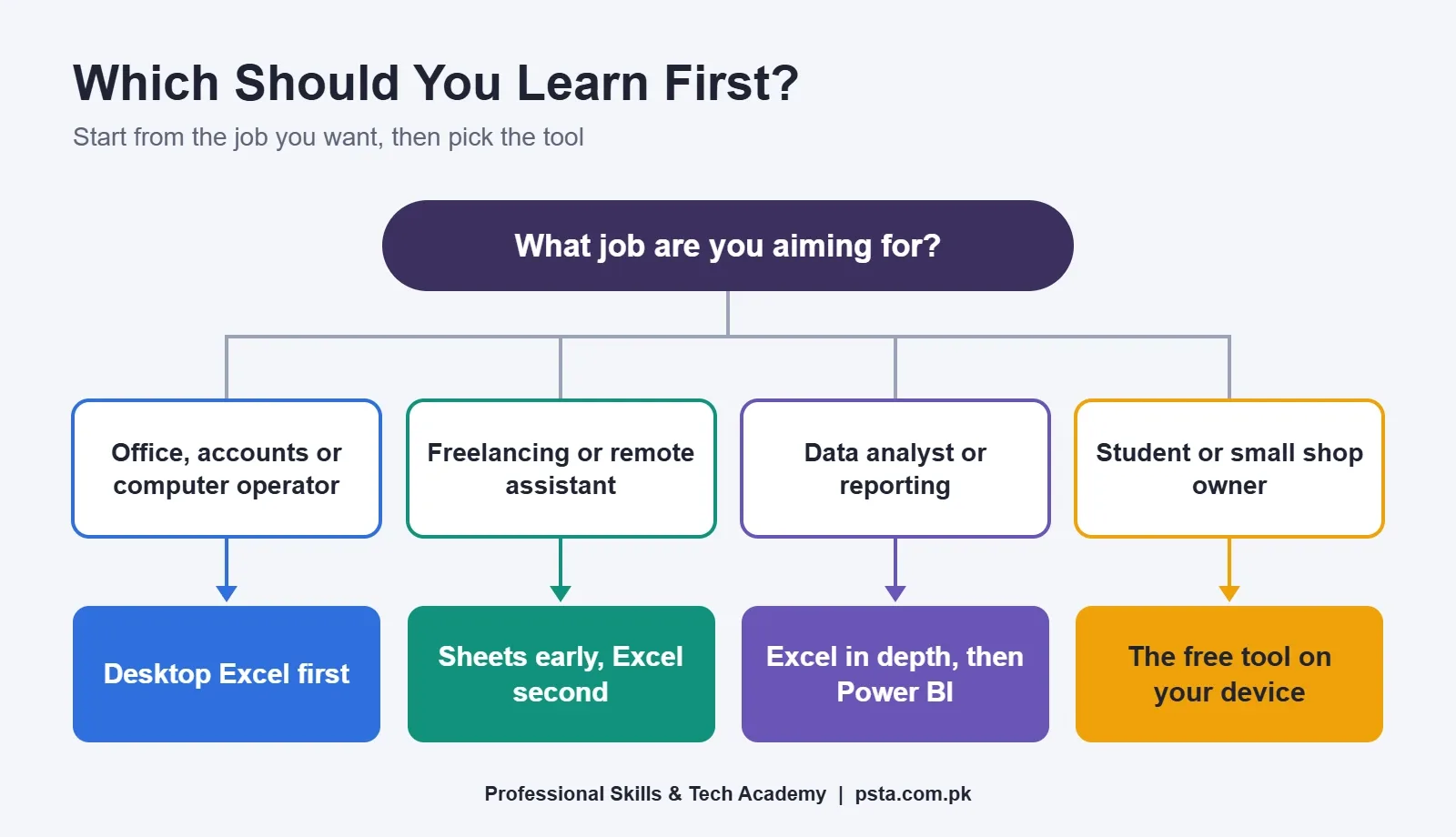
The Google Sheets vs Excel choice gets much easier when you start with the job you want, not the tool. Read three or four real ads for that role and note which software they name. Then use the guide below.
- Government or private office, accounts, clerk, computer operator: start with desktop Excel. Ads in these areas usually name MS Office, and practical tests are often set in Excel.
- Freelancing, virtual assistance or remote data entry: learn Sheets early, because clients may send you a shared link instead of a file. Keep Excel as your second tool.
- Data analyst or reporting roles: go deep in desktop Excel, including Power Query and pivot tables, then move to Power BI.
- Students and small shop owners: begin with whichever is free on your device, since the core skills transfer.
A Four-Week Plan to Get Comfortable in Both
You don't need two separate courses. Build each exercise twice, once in each tool, and you'll learn the differences by feeling them.
- Week 1, basics: make a monthly expense sheet with SUM, AVERAGE, formatting and one chart. Rebuild it in Sheets and compare the menus.
- Week 2, lookups and logic: add IF, COUNTIF and VLOOKUP to a student or product list. Share the Sheets copy with a friend and edit it together.
- Week 3, summaries: create a pivot table from 200 rows of sales data in both tools. In Sheets, try QUERY on the same data.
- Week 4, desktop extras: record one simple macro, run Goal Seek on a loan payment and set up Sheets offline mode.
Spend 30 to 45 minutes a day and keep a short notes file of anything that works differently. Before an interview, revise with our Excel interview questions and practise the Excel shortcut keys until they feel automatic.
Common Mix-Ups When Switching Between the Two
- Expecting Excel keyboard shortcuts everywhere: many work in Sheets, but some browser shortcuts take over. Check Help, then Keyboard shortcuts, in Sheets.
- Sharing the wrong permission: "Anyone with the link can edit" on a salary or fee sheet is a privacy risk. Share with named people instead.
- Losing macros on conversion: Sheets macros run on Apps Script, not VBA. If your .xlsm file contains macros, keep the original Excel copy.
- Trusting free storage blindly: when your 15 GB Google pool fills up, new files can't be saved. Clear old photos or email attachments before a deadline.
Where PSTA's Office Automation Course Fits
Our Office Automation course is a 12-week beginner program covering computer basics, English and Urdu typing, Word, Excel and PowerPoint. In the Excel part, you work on tables, formulas, formatting and charts, then build a monthly expense or sales sheet and finish a timed data entry task, the kind of work many office jobs test.
Right now the course costs Rs. 12,000 instead of the regular Rs. 15,000, and you can split that into two installments. Classes run at our Mandian campus in Abbottabad, live online for students in other cities, or as a hybrid of both. A practical exam closes the 12 weeks, and the PSTA certificate you earn can be checked by any employer at psta.com.pk/certificate. Planning a longer qualification? Our one-year DIT diploma covers MS Office as well, alongside networking, programming and web design.
Batch dates and the enrolment process are on the admission page, and you can compare options on all courses. For a quick reply about timings, WhatsApp +92 314 5424399 works best.
Open the Same File in Both Tools Today
Here's a 15-minute test that teaches more than any feature list. Make a small sheet in Excel with 10 rows, one SUM and one chart. Upload it to Google Drive, open it in Sheets, and change one number. Note what looks the same, what moved and what broke. That single comparison will tell you more about Google Sheets vs Excel than another week of reading, and it's exactly the kind of flexibility an office manager notices.
Frequently asked questions
Is Google Sheets enough for an office job in Pakistan?
It can be enough for offices that already work in Google Workspace, but many government and private offices still exchange .xlsx files and test candidates in desktop Excel. If the ad names MS Office or Excel, practise in Excel before the test. Your Sheets skills will still help, because formulas, sorting and pivot tables work in a very similar way.
Can I use Excel for free?
Yes. Microsoft offers Excel for the web free with a Microsoft account, along with 5 GB of OneDrive storage. It handles formulas, formatting, charts and sharing well. It can't create VBA macros or Power Pivot models, and tools such as Goal Seek and Solver need the desktop app, which comes with a paid Microsoft 365 plan.
How many rows can Google Sheets handle in 2026?
Google Sheets doesn't limit rows on their own. It limits the whole file to 20 million cells, a cap Google doubled in September 2026 for personal and Workspace accounts. With 20 columns, that's about one million rows. Excel instead allows 1,048,576 rows by 16,384 columns on each worksheet.
Do Excel formulas work in Google Sheets?
Most common ones do. SUM, AVERAGE, IF, COUNTIF, VLOOKUP and similar functions behave the same way, and Excel files open in Sheets with their formulas intact. A few Excel-only features, such as VBA macros, don't run in Sheets, and Sheets adds functions like QUERY and IMPORTRANGE that Excel doesn't have.
Can I use Google Sheets without internet?
Yes, if you prepare in advance. Use Chrome or Microsoft Edge, install the Google Docs Offline extension and turn on Offline in Google Drive settings while you're connected. Then mark important files as available offline. Incognito windows aren't supported, and very large files may not sync, so test it before you depend on it.
Which is better for freelancers, Excel or Google Sheets?
Learn both, but expect Sheets more often in remote work, because clients like to share one live link that several people edit at once. Keep desktop Excel for clients who send .xlsx files, macros or heavy reports. Being comfortable in both lets you accept more kinds of tasks without asking the client to change tools.
Does PSTA teach Google Sheets?
PSTA's Office Automation course focuses on Microsoft Word, Excel and PowerPoint, along with typing and computer basics. The Excel skills you build there, such as formulas, formatting, charts and data entry, carry over directly to Google Sheets. Ask on WhatsApp if you'd like guidance on practising the same exercises in Sheets alongside the course.
Sources & references
- Excel specifications and limits support.microsoft.com
- Doubled cell limits in Google Sheets now generally available workspaceupdates.googleblog.com
- Excel for the web service description learn.microsoft.com
- Free Microsoft 365 for the web microsoft.com
- Switch from Excel to Sheets support.google.com
- Work on Google Docs, Sheets and Slides offline support.google.com
- Functions unique to Google Sheets support.google.com
- Copilot is now included in Microsoft 365 Personal and Family microsoft.com
Last reviewed & updated on by Umar Qureshi. Written by the PSTA team in Abbottabad, Pakistan.

Umar Qureshi

Certified Office Automation Course: Master MS Office & Computer Basics
Turn this guide into a career: hands-on training with real projects, online across Pakistan or on-campus in Abbottabad · 12 Weeks.
Comments
No comments yet — ask a question or share your experience.