Quick answer
Start with DaVinci Resolve's free version if you have no software budget; it has no time limit and handles Ultra HD at 60 fps. Learn Premiere Pro, now called Adobe Premiere, if you want agency or Adobe-based client work. Premiere costs $263.88 a year prepaid, while Resolve Studio is a one-time $295.
Key takeaways
- • DaVinci Resolve 21 has a free version with no time limit that handles Ultra HD at up to 60 fps.
- • Adobe renamed Premiere Pro to Adobe Premiere in January 2026; it is sold only through a paid plan.
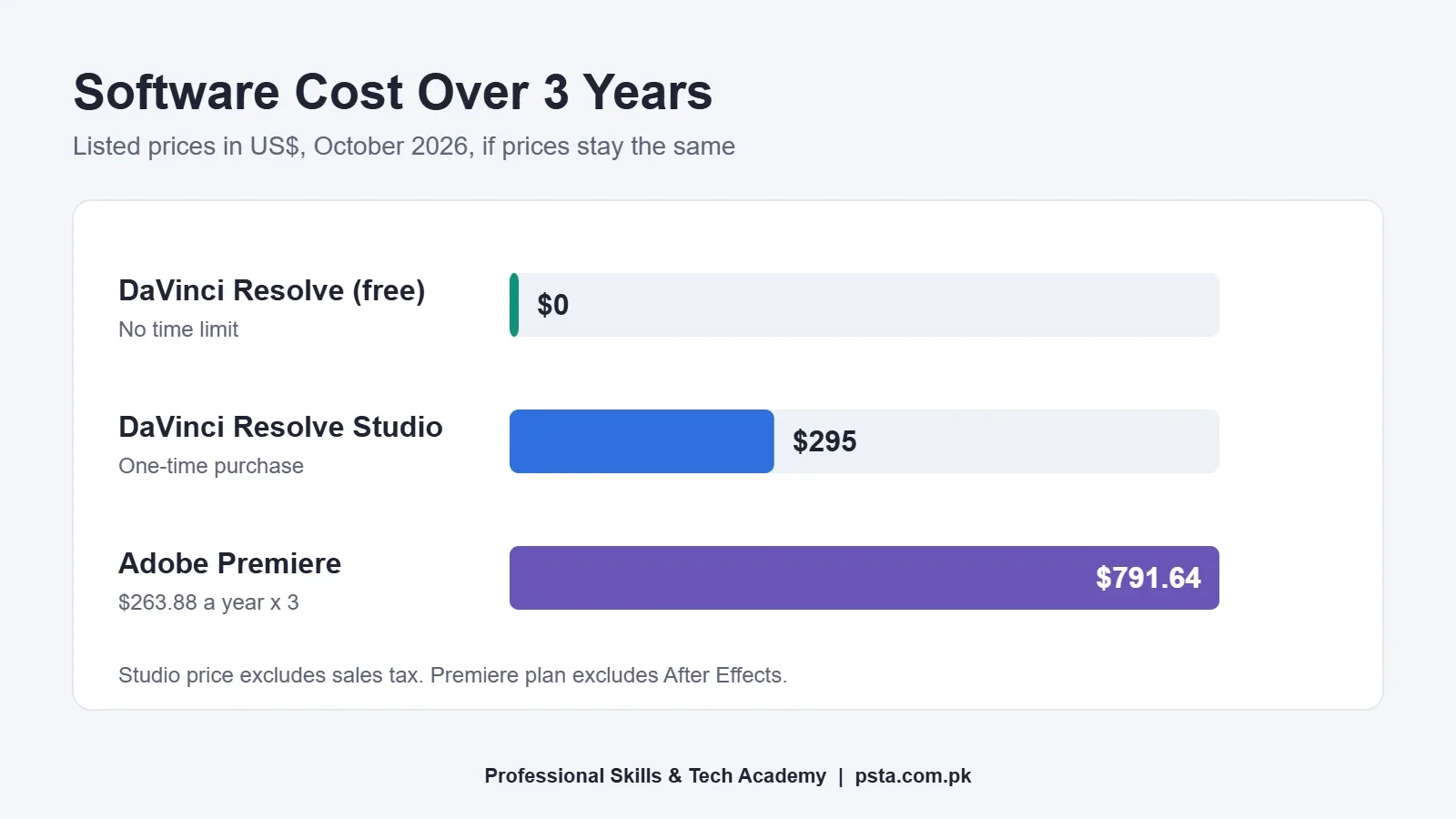
- • Over three years, Premiere's prepaid plan totals $791.64, while Resolve Studio is a one-time $295.
- • After Effects is not in the Premiere-only plan; Resolve includes Fusion for effects at no extra cost.
- • Resolve needs at least 16GB of RAM, so check your laptop before choosing either app.
Table of contents 19 sections
- Premiere Pro vs DaVinci Resolve: The Short Version
- What Changed in 2026 for Both Apps?
- How Much Does Each One Cost?
- Adobe Premiere
- DaVinci Resolve
- What Can the Free Version of DaVinci Resolve Do?
- When Do You Actually Need Studio?
- How Do the Two Workflows Compare?
- Feature-by-Feature Comparison
- Will Your Laptop Handle It?
- Which One Should You Pick? Four Common Situations
- You Have No Budget and Want to Start Today
- You Want Agency or Studio Jobs
- You Edit for YouTubers or Local Shops
- You Love Color and Cinematic Looks
- What Do Freelance Clients Usually Ask For?
- Common Mistakes When Choosing an Editor
- What You Practice in PSTA's Video Editing Course
- Edit the Same 60-Second Clip in Both Apps
Many beginners believe the free copy of DaVinci Resolve is a trial that stops working or stamps a watermark on your videos. That belief is wrong, and it shapes the whole Premiere Pro vs DaVinci Resolve decision. The free version of Resolve 21 runs on Windows, Mac and Linux with no time limit, while Premiere Pro (renamed Adobe Premiere in January 2026) is sold only through a paid plan. So the real question is not which app is better. It is which one fits your budget, your laptop and the kind of editing work you want.
I teach editing every week, and this is the question I hear most from new students. Here is what this comparison covers:
- What each app costs in 2026, and what that adds up to over three years
- What the free Resolve version can and cannot do before you need Studio
- How the two apps differ in workflow, effects, color and audio
- Which laptop specs matter before you install either one
- Which app makes more sense for freelancing, YouTube and studio jobs in Pakistan
Premiere Pro vs DaVinci Resolve: The Short Version
Both are serious choices of video editing software for beginners who plan to do paid work. They differ in how you pay and how the tools are organized.
Premiere Pro is a subscription. You edit in Premiere, then open After Effects (a separate Adobe app) for motion graphics and heavier effects. Many agencies, YouTube teams and freelance clients who already use Adobe tools will expect it.
DaVinci Resolve puts editing, visual effects, color grading and audio inside one program. The free version is enough for most beginners. The paid DaVinci Resolve Studio is a one-time purchase that adds higher resolutions, extra effects and AI tools.
If you have no budget and a decent laptop, start with Resolve. If you want to work for clients and agencies that send Adobe project files, learn Premiere. Many working editors end up comfortable in both, and the cutting skills carry across.
What Changed in 2026 for Both Apps?
Two updates matter if you are reading older tutorials or comparisons.
First, the name. According to the Wikipedia entry on the software, Adobe dropped the "Pro" suffix on January 20, 2026, with version 26.0, and the app is now called Adobe Premiere. Adobe's own Premiere plans page uses the new name throughout. Job ads and clients still say "Premiere Pro", so you will see both names for a while. It is the same program.
Second, Resolve moved to version 21. Blackmagic Design's What's New page for DaVinci Resolve 21 lists a new Photo page for grading still images, AI IntelliSearch for finding clips by their content, more than 70 new motion graphics in Fusion, and audio track folders in Fairlight. The free version of Resolve 21 is still available.
How Much Does Each One Cost?
Price is where the two apps differ most. Here are the Premiere Pro price and the Resolve price as listed in October 2026.
Adobe Premiere
Adobe's Premiere pricing page lists the annual prepaid plan at US$263.88 a year, which works out to about $22 a month. The same page says Premiere is available only with a membership plan, and that students and teachers can save over 71% on Premiere plus 20 or more Creative Cloud apps. The plans page shows a 7-day free trial and 100GB of cloud storage with the individual Premiere plan.
One detail catches many beginners: After Effects is not included in the Premiere-only plan. You get it with Creative Cloud Pro, the bundle of 20+ apps, which costs more.
DaVinci Resolve
The free version costs nothing. Blackmagic's DaVinci Resolve Studio page lists Studio at $295 as a one-time purchase, with the note that the price excludes sales tax and shipping.
Here is how that looks over three years, assuming today's prices stay the same:
| Option | How you pay | Listed price | 3-year total |
|---|---|---|---|
| DaVinci Resolve (free) | Free download | $0 | $0 |
| DaVinci Resolve Studio | One-time purchase | $295 | $295 |
| Adobe Premiere (annual prepaid) | Yearly subscription | $263.88 a year | $791.64 |
Paying from Pakistan is another practical point. Adobe plans and Resolve Studio are billed in foreign currency online, so you need a debit or credit card enabled for international payments. Check this with your bank before the trial ends, not after.
What Can the Free Version of DaVinci Resolve Do?
More than most beginners need for their first year. According to Blackmagic, the DaVinci Resolve free version handles projects up to 60 frames per second at resolutions as high as Ultra HD (3840 x 2160). That covers YouTube videos, Instagram Reels, wedding highlights and most client work in Pakistan.
You also get all six main pages of the program: Cut, Edit, Fusion for effects, Color for grading, Fairlight for audio and Deliver for exporting. Nothing is locked behind a timer.
When Do You Actually Need Studio?
Blackmagic's Studio page lists what the paid version adds. The extras that matter most to a working editor are:
- Support for up to 120 fps and resolutions up to 32K
- Multiple GPUs, plus hardware-accelerated H.264 and H.265 decoding and encoding
- 10-bit encoding and more professional camera formats
- AI features from the DaVinci Neural Engine, such as facial recognition, Super Scale upscaling, speed warp and voice isolation
- 45 extra Resolve FX, including AI UltraNR noise reduction
A sensible rule: stay on the free version until a paying client needs one of these, or until playback of phone or camera footage feels slow on your machine. Then buy Studio with money from that work.
How Do the Two Workflows Compare?
The biggest daily difference is where each task happens. In Resolve, one project moves through pages inside the same program. In Premiere, you edit, color and mix in Premiere, then send motion graphics work to After Effects.
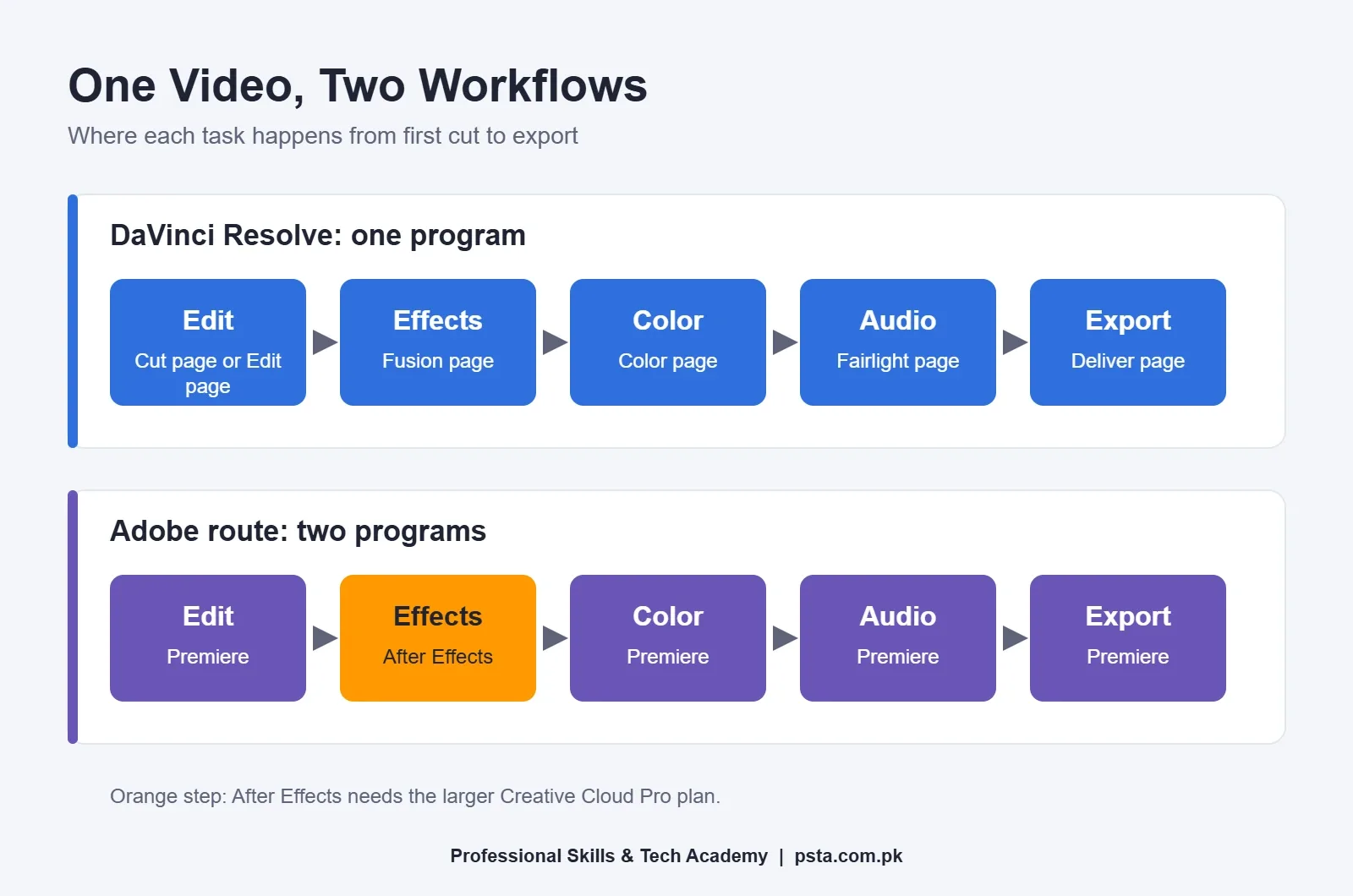
Neither approach is wrong. The Adobe route makes sense if you already use Photoshop or Illustrator, because assets and habits move between those apps easily. Resolve's single-app route is lighter on your budget and keeps a beginner's project in one place, which means fewer files to lose.
A small example: say a Peshawar bakery wants a 30-second Instagram Reel with an animated price tag. In Resolve, you cut the clips on the Edit page, build the price tag in Fusion, balance the colors on the Color page and export from Deliver. In Premiere, you cut and color in Premiere, design the animated tag in After Effects, then bring it back into your timeline. Both finish the job. The second route needs the bigger Adobe plan.
Feature-by-Feature Comparison
This table sums up the practical differences for a beginner.
| Area | Adobe Premiere | DaVinci Resolve |
|---|---|---|
| Price model | Subscription only | Free version, or $295 one-time for Studio |
| Free trial | 7 days | No time limit on the free version |
| Motion graphics | After Effects (separate app, bigger plan) | Fusion page, built in |
| Color grading | Built-in color tools | Color page, Blackmagic's specialty |
| Audio post | Built-in audio tools | Fairlight page, built in |
| Cloud storage | 100GB with the individual plan | Not included |
| Best fit | Agency jobs and Adobe-based clients | Self-taught editors, color work, tight budgets |
For a wider look at design and editing software at different budgets, see our guide to the best graphic design software for beginners.
Will Your Laptop Handle It?
This matters more in Pakistan than any feature list, because many students edit on a shared family laptop or a used business model.
For Resolve, the DaVinci Resolve Club summary of the 21.1 readme gives a minimum of 16GB of RAM, rising to 32GB if you use Fusion, plus a graphics processor with at least 4GB of video memory. Resolve leans heavily on the GPU, so a laptop with weak integrated graphics can struggle even when it has enough RAM.
Premiere also has published minimum and recommended specs on Adobe's help site, and they change with each release. Check the current list before you subscribe, then use the 7-day trial to test your own footage on your own machine.
Before you buy or borrow a laptop for editing, run through these checks:
- Confirm the RAM. An 8GB laptop is below Resolve's listed minimum, so treat 16GB as your floor.
- Check the graphics chip and its video memory in Task Manager, under the Performance tab.
- Use an SSD for the operating system and your current project. A spinning hard drive slows everything down.
- Keep free space. Video files, cache and exports fill a 256GB drive quickly.
- Test with a real 4K phone clip before you commit. Smooth playback matters more than any spec sheet.
If your laptop is slow, both apps let you create lighter proxy copies of heavy footage for editing. Learn this early. It saves a lot of frustration.
Which One Should You Pick? Four Common Situations
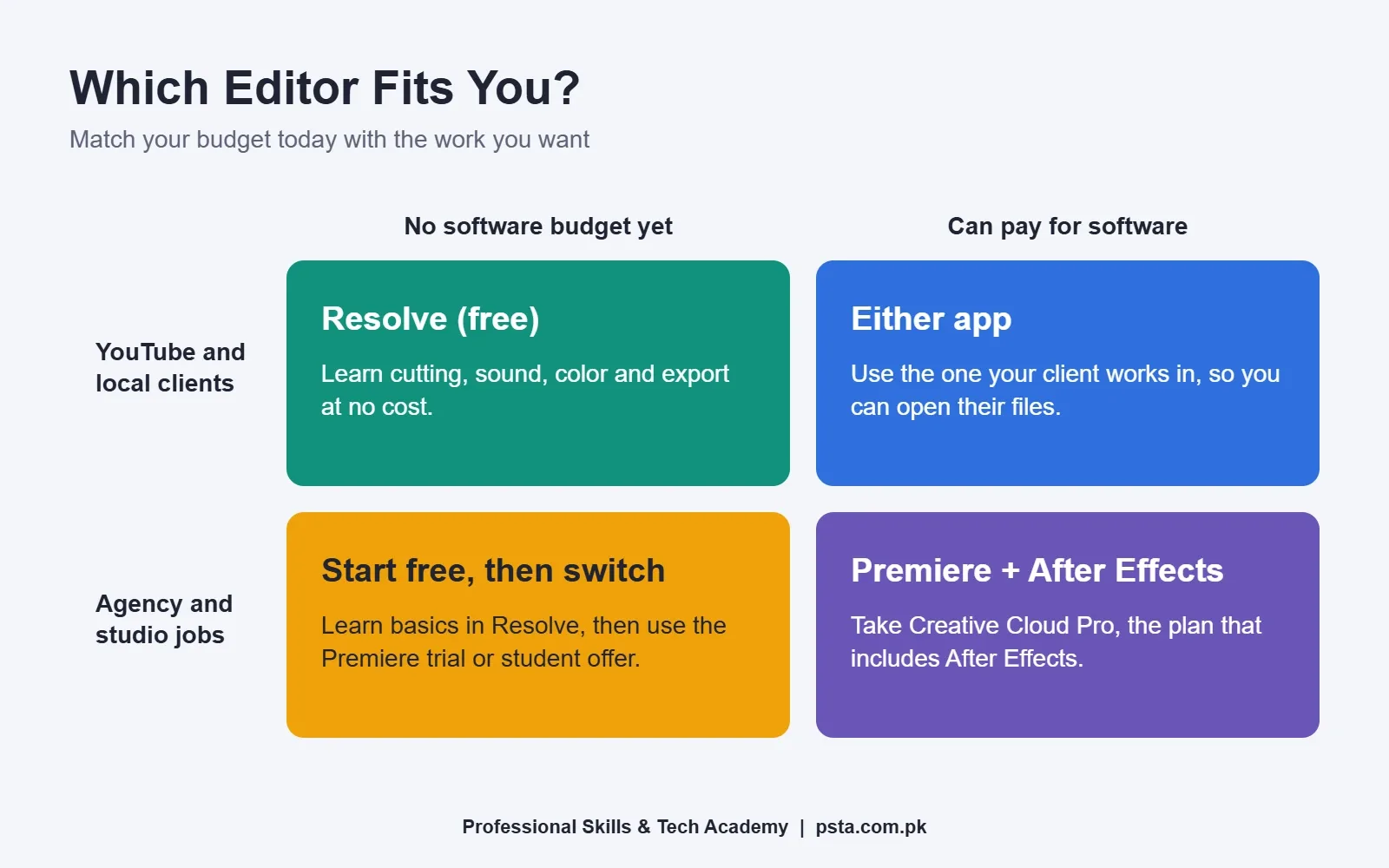
Your choice depends on two things: whether you can pay for software right now, and the kind of work you want. This grid covers the four combinations I see most often among students, and the last case below adds one more.
You Have No Budget and Want to Start Today
Install the free version of Resolve. Learn cutting, audio balance, basic color and export. These skills transfer to every editor you use later.
You Want Agency or Studio Jobs
Learn Premiere and After Effects. Production houses, marketing agencies and media teams that already run Adobe software will usually ask for them by name. Use the trial and the student discount if you qualify.
You Edit for YouTubers or Local Shops
Either works. Clients care about the finished video, captions and turnaround time, not your software. If a client sends you a project file, though, you must open it in the same app. Ask before you accept the job. Our post on YouTube monetization requirements in Pakistan explains what creators need from their channels.
You Love Color and Cinematic Looks
Spend time on Resolve's Color page. Blackmagic describes it as Hollywood's favorite color corrector, and it is where many editors first learn node-based grading.
What Do Freelance Clients Usually Ask For?
On Fiverr and Upwork, most video editing buyers describe the result they want: short-form Reels, podcast cuts, YouTube edits with captions, or product ads. Some name a tool, often because they plan to reuse your project file or hand it to another editor.
That gives you a practical rule for gig listings. Name the software you use in your gig description, and show finished samples, not screenshots of a timeline. A strong one-minute showreel sells better than a long list of software logos.
If you are still learning the vocabulary clients use in briefs, such as J-cut, B-roll and LUT, keep our plain-English glossary of video editing terms open while you read job posts.
Common Mistakes When Choosing an Editor
A few habits waste beginners' time more than the software choice itself:
- Switching apps every week. Pick one for your first 8 to 10 weeks. Shortcuts and muscle memory need repetition.
- Using cracked software. Cracked copies are a security risk and can carry malware. The free Resolve version and Adobe's trial remove any reason to take that risk.
- Buying Studio too early. Most first projects never touch the features Studio adds.
- Ignoring audio. Viewers forgive average footage much faster than bad sound. Practice mixing in whichever app you choose.
What You Practice in PSTA's Video Editing Course
If you are comparing options for a video editing course in Pakistan, here is how ours handles this choice. At PSTA, the video editing and VFX course is built on Premiere Pro for editing and After Effects for motion graphics and VFX, because those are the tools most agencies and clients ask for by name. Once you understand timelines, cuts, color and audio there, picking up Resolve on your own becomes much easier.
Over 12 weeks you move from your first import to a finished showreel, and you don't need any earlier editing practice. The listed fee is Rs. 22,000 (regular Rs. 25,000), payable in 2 installments. The outline moves from storytelling and rough cuts to color grading, sound design, green screen compositing, motion graphics, and choosing the right export for each social platform. It ends with a capstone showreel you can put on your Fiverr or Upwork profile.
Classes meet at our campus opposite FIMS College, Old College Road, Mandian, in Abbottabad, and students in other cities join the same sessions live. If you also design thumbnails and ads, the Graphic Designing course pairs well with editing. The full list of programs, with fees, is on our courses page.
Edit the Same 60-Second Clip in Both Apps
The fastest way to settle the Premiere Pro vs DaVinci Resolve question is a small test on your own laptop. Record one minute of phone footage this week. Install Resolve's free version, then start Adobe's 7-day Premiere trial. Cut the same clip in each, add music and a title, and export it for Instagram. Note which one felt smoother and which one you understood faster.
When you are ready for guided practice with feedback on every project, the admission page takes a few minutes to fill in. Questions about which slot suits your college hours? Our WhatsApp line, +92 314 5424399, is the quickest way to reach us.
Frequently asked questions
Is DaVinci Resolve really free to use?
Yes. Blackmagic Design offers a free version of DaVinci Resolve 21 for Windows, Mac and Linux with no time limit. It handles projects up to 60 frames per second in Ultra HD. The paid Studio version, listed at $295 as a one-time purchase, adds higher resolutions, extra effects and AI tools that most beginners do not need in their first year.
Is there a free version of Premiere Pro?
No. Premiere Pro, now called Adobe Premiere, is available only through a paid membership plan. Adobe offers a 7-day free trial, and students and teachers can get a large discount on Creative Cloud. In October 2026, Adobe's pricing page lists the annual prepaid Premiere plan at $263.88 a year.
Is DaVinci Resolve harder to learn than Premiere Pro?
Basic cutting feels similar in both. Resolve looks busier at first because editing, effects, color and audio sit on separate pages inside one program. Premiere keeps editing simpler but sends advanced motion graphics to After Effects. Most beginners who practice a few hours a week get comfortable with either in a couple of months.
Which is better for editing YouTube videos?
Either app can produce professional YouTube videos. The free version of Resolve already exports Ultra HD, which covers most channels. If you edit for a creator who shares Premiere project files, use Premiere so you can open their work. Viewers judge pacing, audio and captions, not the software name.
How much RAM do I need for DaVinci Resolve?
A summary of Blackmagic's 21.1 readme lists 16GB of RAM as the minimum, or 32GB if you use Fusion for effects, plus a graphics card with at least 4GB of video memory. Laptops with 8GB of RAM will struggle. Test a real 4K phone clip before you buy or borrow a laptop for editing.
Do I need After Effects if I learn Premiere Pro?
For cutting, color and audio, Premiere alone is enough. For animated titles, logo reveals and heavier visual effects, most Adobe users add After Effects. It is not included in the Premiere-only plan, so you need Creative Cloud Pro, which bundles more than 20 Adobe apps and costs more.
Which software does the PSTA video editing course teach?
The PSTA course teaches Premiere Pro for editing and After Effects for motion graphics and VFX over 12 weeks. Students practice on real projects, including a YouTube vlog edit, a color-graded scene and a green screen promo. Once you understand these tools, learning Resolve on your own becomes much easier.
Sources & references
- DaVinci Resolve Studio blackmagicdesign.com
- What's New in DaVinci Resolve 21 blackmagicdesign.com
- DaVinci Resolve overview blackmagicdesign.com
- Adobe Premiere pricing and membership plans adobe.com
- Compare Premiere plans adobe.com
- Adobe Premiere Pro (Wikipedia) en.wikipedia.org
- DaVinci Resolve System Requirements 2026 davinciresolveclub.com
Last reviewed & updated on by Umar Qureshi. Written by the PSTA team in Abbottabad, Pakistan.

Umar Qureshi

Mastering Video Editing & Visual Effects (VFX)
Turn this guide into a career: hands-on training with real projects, online across Pakistan or on-campus in Abbottabad · 12 Weeks.
Comments
No comments yet — ask a question or share your experience.