Quick answer
Yes, you can run a Shopify store in Pakistan, but Shopify Payments isn't available here. Start on the Basic plan ($39 a month, or $29 billed yearly), turn on cash on delivery as a manual method, add Raast or cards through a local gateway such as Safepay, connect a courier app and complete one test order before launch.
Key takeaways
- • Shopify Payments isn't offered in Pakistan, so online payments run through third-party gateways.
- • On the Basic plan, Shopify adds 2% to every third-party gateway sale, while manual methods such as COD carry no such fee.
- • SBP reports that account- and wallet-based channels made up 93% of online e-commerce transactions in FY25.
- • Courier apps such as Courierify book, label and track parcels from your Shopify admin.
- • Complete one real test order before you run ads or share your store link.
Table of contents 17 sections
- Can You Run a Shopify Store in Pakistan in 2026?
- Checklist Item 1: Pick a Plan and Know the Full Monthly Cost
- The Fee Most Beginners Miss
- Billing Card
- Checklist Item 2: Decide How Customers Will Pay
- Option A: Cash on Delivery
- Option B: Raast Through Safepay
- Option C: Card Payments Through Safepay
- Which Payment Setup Fits Your First 50 Orders?
- Checklist Item 3: Connect a Courier Before Your First Order
- Checklist Item 4: Set Up Checkout for Pakistani Addresses
- Checklist Item 5: Write Policies Customers Can Trust
- Checklist Item 6: Domain, Theme and Product Pages
- The Shopify Store in Pakistan Checklist at a Glance
- What Usually Goes Wrong in the First Month?
- Building a Live Store in PSTA's E-Commerce Course
- Place One Test Order Before You Tell Anyone
Try this quick self-test before you start a Shopify store in Pakistan. Answer yes or no to each line, and be strict with yourself.
- Do you have a debit or credit card that can pay a monthly bill in US dollars?
- Have you decided how a buyer in Multan or Mardan will pay you?
- Do you know which courier will pick up your parcels, and how you'll book them?
- Have you written a return policy that you could follow on a bad day?
- Could you ship a test order to a friend tomorrow?
If you answered "no" more than twice, don't worry. Most people who sign up for Shopify in Pakistan get stuck on exactly these points, and none of them needs coding. This checklist covers each one in the order I'd set them up.
In this guide, you'll find out:
- Whether Shopify actually works for Pakistani sellers in 2026, and where the gaps are
- What each plan costs, including the fee most beginners miss
- How to accept cash on delivery, Raast and card payments
- Which apps connect your store to Pakistani couriers
- A one-page checklist you can print and tick before launch day
Can You Run a Shopify Store in Pakistan in 2026?
Yes. You can sign up from Pakistan, build a store, list products, sell to local buyers and ship them with local couriers. The gap is in payments.
Shopify's own payment system, Shopify Payments, isn't offered here. Its supported countries list covers places such as the UAE, the UK, the US and Singapore, but not Pakistan. For sellers in countries that aren't listed, Shopify points you to third-party payment providers instead.
That one fact shapes most of the decisions below. It affects which plan makes sense, which fee you'll pay on every online sale, and why cash on delivery stays so important for a new store.
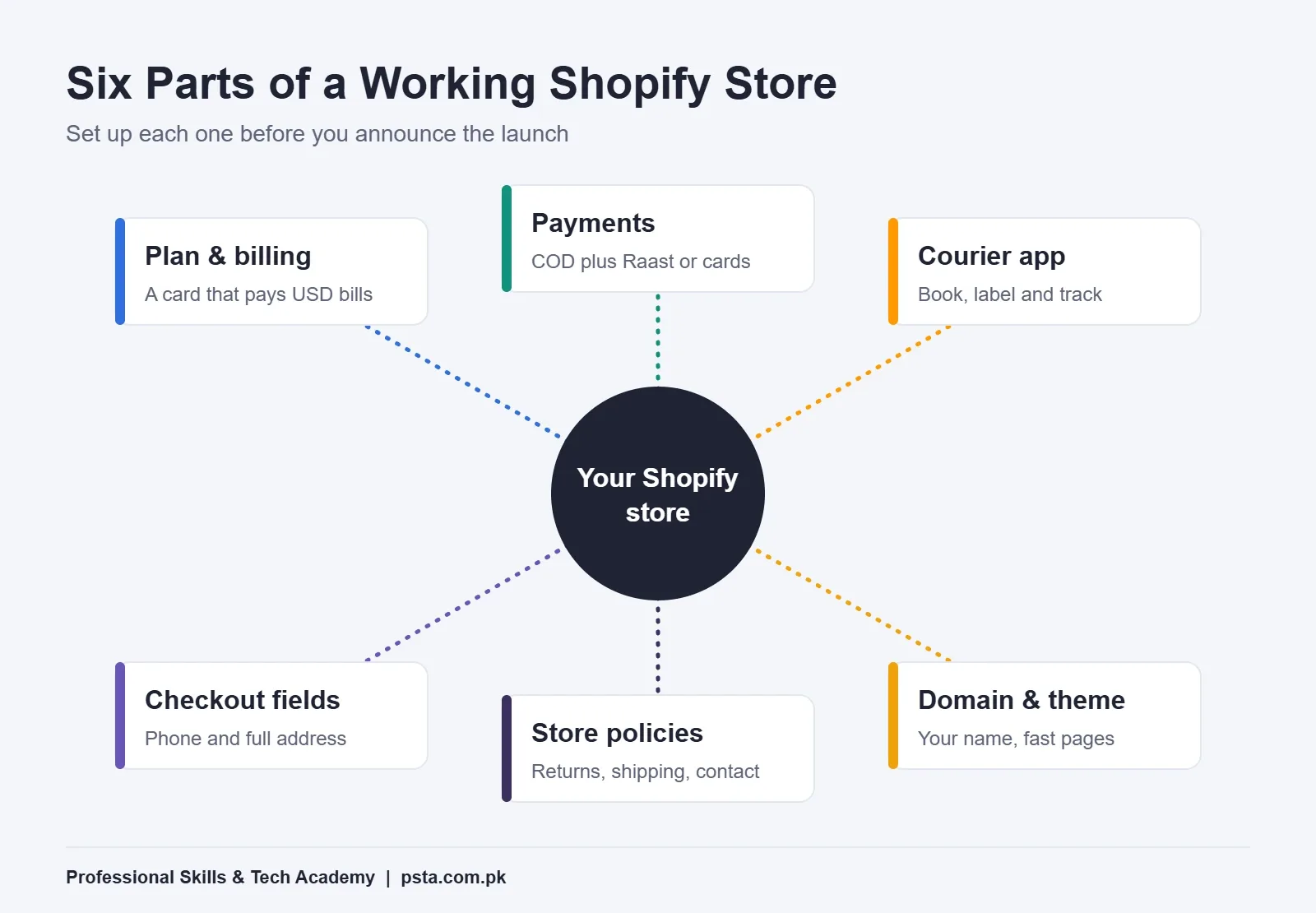
Think of your store as six connected parts. Each one has to work before your first real order, or that order turns into a support headache.
Checklist Item 1: Pick a Plan and Know the Full Monthly Cost
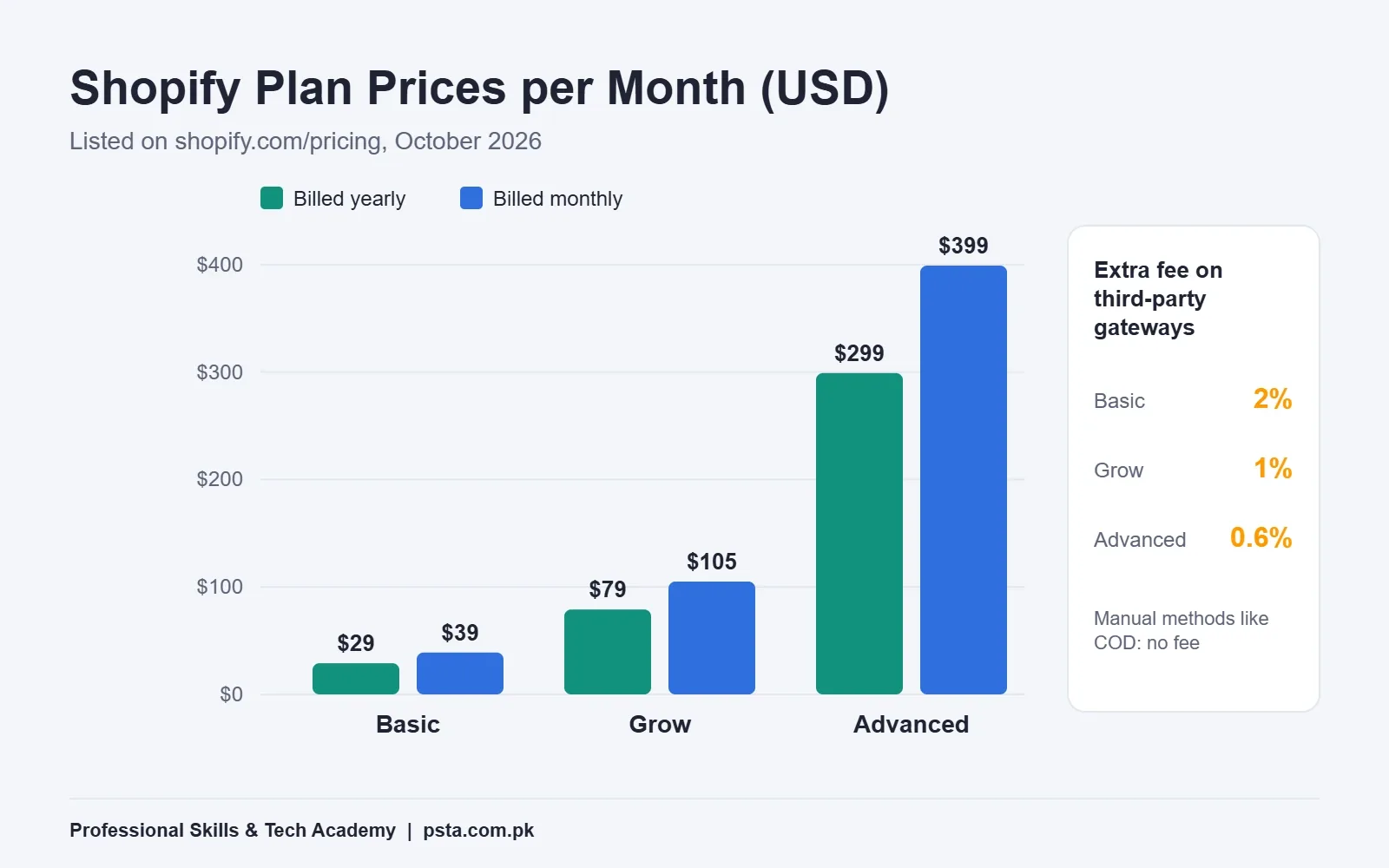
Shopify bills in US dollars. On its pricing page, checked in October 2026, the main plans look like this:
| Plan | Monthly billing | Yearly billing (per month) | Third-party transaction fee |
|---|---|---|---|
| Basic | $39 | $29 | 2% |
| Grow | $105 | $79 | 1% |
| Advanced | $399 | $299 | 0.6% |
The same page offers a three-day free trial, then $1 a month for three months. Offers and local prices can change by country, so check the figure shown on your own sign-up screen before you subscribe.
The Fee Most Beginners Miss
Look at the last column. Because Shopify Payments isn't available here, any online payment you take goes through a third-party provider. On the Basic plan, Shopify adds 2% to each of those sales. Your payment provider charges its own fee on top.
Manual methods are different. Shopify's help page on manual payment methods says you aren't charged third-party transaction fees for them. Cash on delivery and bank transfer both count as manual.
For a new seller, Basic is almost always enough. Move up only when your online-payment volume is large enough that the lower percentage saves more than the higher subscription costs.
Billing Card
Since the bill is in dollars, use a card that your bank allows for foreign online purchases. Check with the bank about any spending cap on such purchases before the trial ends, so the store doesn't pause on day four.
Checklist Item 2: Decide How Customers Will Pay
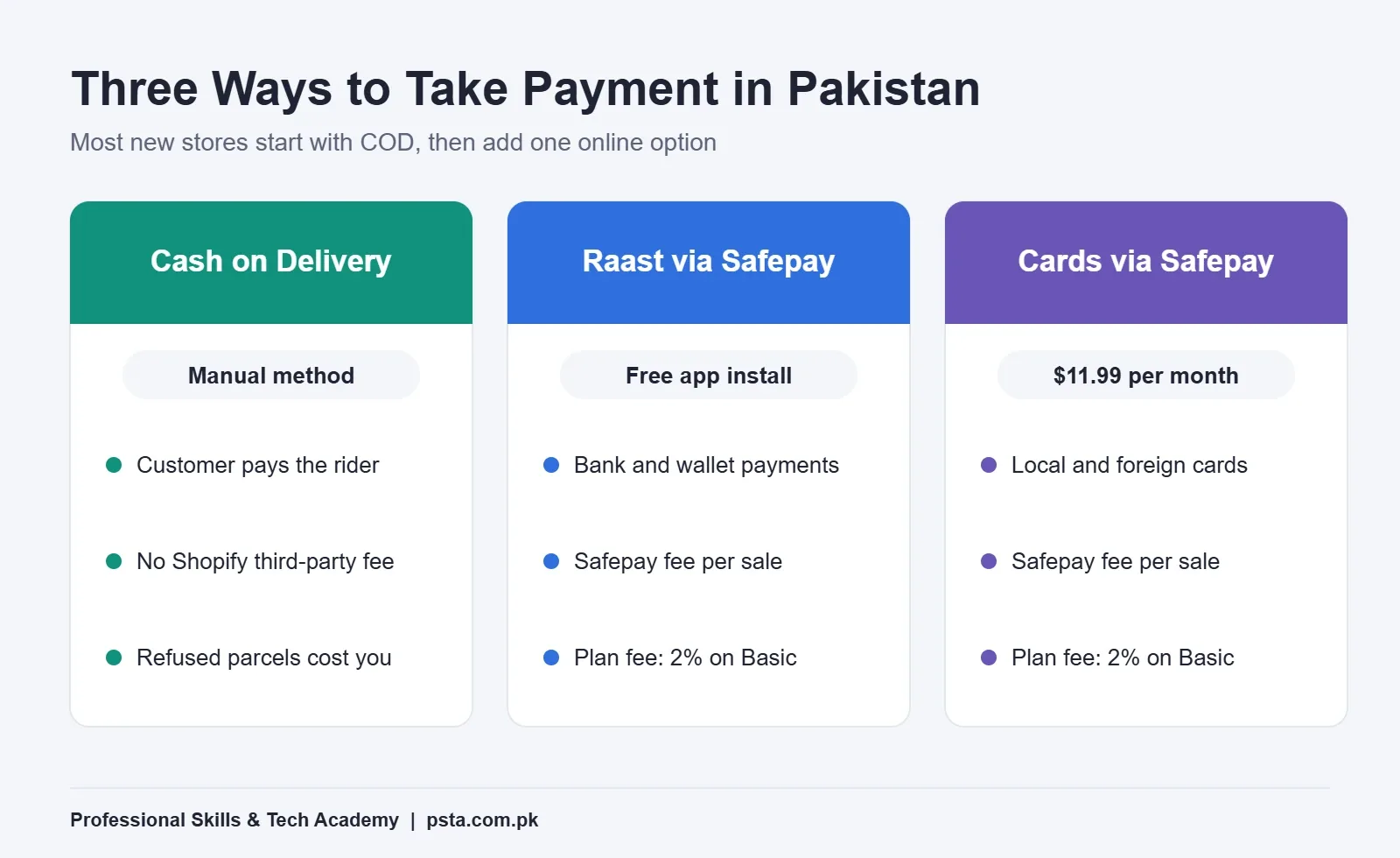
Many shoppers here still prefer to see the parcel before handing over money. So, for a new store, cash on delivery comes first and online options come second.
The online side is shifting, though. The State Bank of Pakistan's FY25 payment systems press release says account- and wallet-based channels made up 93% of online e-commerce transactions. It also reports that Raast transaction count and value more than doubled during the year. In plain terms, a buyer who pays online is more likely to use a bank app or wallet than a card.
Option A: Cash on Delivery
In your admin, go to Settings > Payments and activate Cash on Delivery under manual methods. Add a short instruction, such as "Please keep exact change ready." Orders stay marked unpaid until you mark them paid, usually after your courier settles the cash.
Option B: Raast Through Safepay
Safepay, a Karachi-based company, lists a Safepay Checkout Raast app on the Shopify App Store. It lets customers pay from supported banks and wallets without leaving your store. The listing says the install is free and Safepay charges a per-transaction fee.
Option C: Card Payments Through Safepay
Safepay also lists Safepay Checkout Onsite for cards, local and international. Its listing shows $11.99 a month with a seven-day free trial, plus a per-transaction fee.
Both Safepay options count as third-party gateways, so the Shopify fee for your plan applies too. Payment companies usually ask for business details and bank documents before they go live, so contact them early.
Which Payment Setup Fits Your First 50 Orders?
Here's how I'd decide, based on what you sell.
- Low-price items under a few thousand rupees: start with COD only. Add Raast later, once buyers start asking for it.
- Higher-value items like gadgets or furniture: offer COD and Raast. Some buyers prefer to pay first when the parcel is expensive.
- Buyers abroad, such as overseas Pakistanis sending gifts home: you'll need card payments, because they can't pay cash at the door.
Whatever you pick, place one real test payment yourself and refund it. That's the only way to know the money actually reaches your bank account.
Checklist Item 3: Connect a Courier Before Your First Order
Typing every address into a courier portal by hand works for five orders a day. It falls apart at 30. A courier app books the parcel from your Shopify admin, prints the label and pulls tracking back into the order.
Two examples from the Shopify App Store:
- Courierify lists BlueEx, Dex, Leopards, PostEx, TCS and Trax among its supported couriers. Its free plan covers up to 300 bookings a month, and paid plans start at $9.99 a month.
- Leopards Courier also has a dedicated Pakistan app built by a Lahore developer, useful if you only ship with Leopards.
Before you install anything, open an account with the courier itself. The app only connects your store to that account; it can't create one for you. Then compare the courier's COD settlement schedule, because that decides how long your cash is stuck in transit.
If refused parcels already worry you, read our walkthrough on how to reduce COD returns in Pakistan before launch.
Checklist Item 4: Set Up Checkout for Pakistani Addresses
Couriers here depend on a working phone number and a clear address. A checkout that only asks for an email loses both.
- Open Settings > Checkout in your admin.
- Make the phone number required, since the rider will call before delivery.
- Keep the second address line visible for a nearby landmark, such as "near Jamia Masjid."
- Open Settings > Shipping and delivery and limit shipping to Pakistan until you're ready for exports.
- Set a delivery rate that matches your courier's charges, or a free-delivery threshold if your margins allow it.
Then place an order on your phone over mobile data. Most of your buyers will check out that way, so test it the way they'll use it.
Checklist Item 5: Write Policies Customers Can Trust
Shopify can draft your policies for you. Under Settings > Policies, the store policies help page explains that automated text is available for returns and refunds, terms of service, shipping and contact information. Shopify also says these templates aren't legal advice.
So treat the draft as a starting point. Edit it to answer the questions buyers in Pakistan actually ask:
- Can I open the parcel before paying the rider?
- How many days do I have to report a wrong size or a damaged item?
- Who pays the delivery charge on a return?
- Will I get a refund to my bank account, my wallet or as store credit?
Short, specific answers build more trust than a long legal page nobody reads.
Checklist Item 6: Domain, Theme and Product Pages
A store on a free myshopify.com address looks unfinished. Connect your own domain before you spend anything on ads.
For the theme, pick a free one that loads quickly on mobile, and resist the urge to add ten apps at once. Every extra script can slow pages down on a 4G connection.
For each product page, check five things: real photos taken in daylight, the price in rupees, size or variant details, delivery time by city, and a clear note on returns. If you're still weighing a WooCommerce store instead, our WordPress website cost guide breaks down that budget.
The Shopify Store in Pakistan Checklist at a Glance
Print this table and tick each line before you share your store link anywhere.
| Area | Done when |
|---|---|
| Plan and billing | Basic plan active, card approved for USD payments |
| Payments | COD active, plus one tested online option if you need it |
| Courier | Courier account open and app booking a test parcel |
| Checkout | Phone required, Pakistan shipping zones and rates set |
| Policies | Return, shipping and contact pages edited for your store |
| Domain and theme | Own domain connected, mobile pages load quickly |
| Products | Real photos, rupee prices and delivery times on every page |
| Test order | One order placed, shipped, delivered and marked paid |
What Usually Goes Wrong in the First Month?
From watching beginners set up stores, the same problems repeat:
- Running ads before the test order. Ads bring traffic to a checkout that hasn't been tried. If you're planning Facebook ads, our comparison of Boost Post vs Ads Manager explains where to start.
- Forgetting the per-sale fees. The Shopify fee, the gateway fee and the courier's COD charge all come out of your margin. Price products with all three in mind.
- Copying supplier photos. Buyers have often seen the same image on five other pages. Your own photos set you apart.
- No reply plan. Buyers will message you on WhatsApp before ordering. Decide who answers, and how fast.
Selling abroad instead? Amazon has a very different cost model, covered in our guide to Amazon FBA fees.
Building a Live Store in PSTA's E-Commerce Course
If you'd like guidance while you build, our E-Commerce course covering Amazon FBA, Shopify and dropshipping walks through this whole setup in class. The course is pitched at beginners, lasts 12 weeks, and its page lists the current fee as Rs. 25,000.
Over those weeks you build Shopify and WooCommerce stores, research and source products, plan Facebook and Google campaigns, and work through a dedicated module on gateways, couriers and stock. Classes happen in person in Mandian, Abbottabad, or live over the internet for students in other cities, and a hybrid mix is allowed. Fresh batches begin each month.
If ads are the part you want to go deeper on, the Social Media Marketing and Meta Ads course pairs well with it. All programs sit side by side on the courses page, while the admission page explains how to enroll. Want to talk it through before deciding? Our WhatsApp line is +92 314 5424399.
Place One Test Order Before You Tell Anyone
Pick one product, set up COD, connect a courier and order it to a friend's address in another city. Watch every step: the confirmation message, the booking, the tracking update, the rider's call and the cash settlement.
When that single parcel arrives without a problem, your store is ready for real buyers.
Frequently asked questions
Is Shopify Payments available in Pakistan?
No. Pakistan isn't on Shopify's list of supported countries for Shopify Payments, so sellers here use third-party gateways for online payments, such as Safepay's Raast or card apps on the Shopify App Store. You can still offer cash on delivery and bank transfer as manual payment methods, which Shopify doesn't charge a third-party transaction fee on.
How much does a Shopify store cost per month?
Shopify's pricing page lists the Basic plan at $39 a month, or $29 a month when billed yearly. Grow costs $105 monthly or $79 yearly. On top of the plan, budget for a domain, any paid apps, your gateway's per-sale fee and courier charges. Check the price shown on your own sign-up screen, because offers can vary by country.
Can I offer cash on delivery on Shopify?
Yes. In your admin, open Settings, then Payments, and activate Cash on Delivery under manual payment methods. Add short instructions for the buyer. Each COD order stays marked unpaid until you mark it paid, which you'd normally do after your courier settles the cash into your account.
Do I need a registered business to start?
You can open a Shopify account and build the store without a company. Payment gateways and some couriers set their own requirements, though, and they often ask for business or bank documents before approving a merchant account. Contact your chosen gateway early so approval doesn't hold up your launch date.
Which Pakistani couriers can connect to Shopify?
Several apps on the Shopify App Store link stores to local couriers. Courierify, for example, lists BlueEx, Dex, Leopards, PostEx, TCS and Trax, and Leopards also has its own Pakistan app. You still need an account with the courier itself; the app only books parcels and syncs tracking.
What is the 2% fee on Shopify's Basic plan?
It's Shopify's third-party transaction fee. Because Shopify Payments isn't available in Pakistan, every online payment through an outside gateway attracts this charge on the Basic plan, falling to 1% on Grow and 0.6% on Advanced. Your gateway's own fee is separate. Manual methods like cash on delivery aren't charged this fee.
How long does it take to set up a Shopify store?
A simple store with a handful of products, COD and a courier app can be ready within a few days if your photos and descriptions are prepared. Online payment approval from a gateway can take longer, so start that paperwork first and launch with cash on delivery while you wait.
Sources & references
- Shopify Pricing shopify.com
- Shopify Help Center: Shopify Payments Supported Countries help.shopify.com
- Shopify Help Center: Manual Payment Methods help.shopify.com
- Shopify Help Center: Store Policies help.shopify.com
- Safepay Checkout Raast (Shopify App Store) apps.shopify.com
- Safepay Checkout Onsite (Shopify App Store) apps.shopify.com
- Courierify: Pakistani Couriers (Shopify App Store) apps.shopify.com
- State Bank of Pakistan: Annual Payment Systems Review FY25 Press Release sbp.org.pk
Last reviewed & updated on by Umar Qureshi. Written by the PSTA team in Abbottabad, Pakistan.

Umar Qureshi

Master E-Commerce & Build Your Online Empire: Amazon FBA, Shopify & Dropshipping
Turn this guide into a career: hands-on training with real projects, online across Pakistan or on-campus in Abbottabad · 12 Weeks.
Comments
No comments yet — ask a question or share your experience.