Quick answer
Stay on the free WhatsApp Business app if one or two people can answer your chats by hand. Move to the API when software must send messages, such as order confirmations, or when you need a chatbot or many agents. Since October 1, 2026, Meta charges per delivered template and gives 1,000 free service messages per number monthly.
Key takeaways
- • The Business app is free and supports up to five devices, or ten with Meta Verified.
- • The API has no chat screen; software, an inbox tool or a chatbot sends the messages.
- • Meta bills per delivered message, and the rate depends on category and the customer's country.
- • From October 1, 2026, each number gets 1,000 free service messages a month, and utility messages inside the window are charged.
- • New API accounts start at 250 unique users per 24 hours outside the service window.
- • Moving a number to the API usually means deleting it from the app, unless a partner offers coexistence.
Table of contents 12 sections
- WhatsApp Business App vs API at a Glance
- What the Free Business App Handles Well
- What Changes When You Move to the WhatsApp Business API?
- How WhatsApp API Pricing Works in 2026
- What Does the WhatsApp Business API Cost in Pakistan?
- Messaging Limits: Why You Can't Message 10,000 Numbers on Day One
- Can You Keep Your Number on Both the App and the API?
- Which One Fits Your Business? Four Example Scenarios
- Building a First WhatsApp Chatbot With n8n
- Five Checks Before You Switch
- Learning WhatsApp Automation in PSTA's AI Automation Course
- Start by Counting Last Week's Chats
Many shop owners believe the WhatsApp Business API is simply the free app with a chatbot bolted on. It isn't. The WhatsApp Business app vs API choice is really a choice between a phone app your staff type into and a paid messaging service your software talks to, with its own rules, limits and per-message bills.
I get this question every month from students who run family shops, clinics or online stores, and from freelancers whose clients want "a WhatsApp bot." The right answer depends on how many chats you handle, who replies to them and whether you need automation at all.
In this comparison you will find:
- What the free Business app does well, and where it starts to strain
- How Meta's per-message pricing works after the October 2026 changes
- Realistic costs for a Pakistani business, with the numbers you can verify
- Messaging limits, number migration and the coexistence option
- A short decision path and a first chatbot plan in n8n
WhatsApp Business App vs API at a Glance
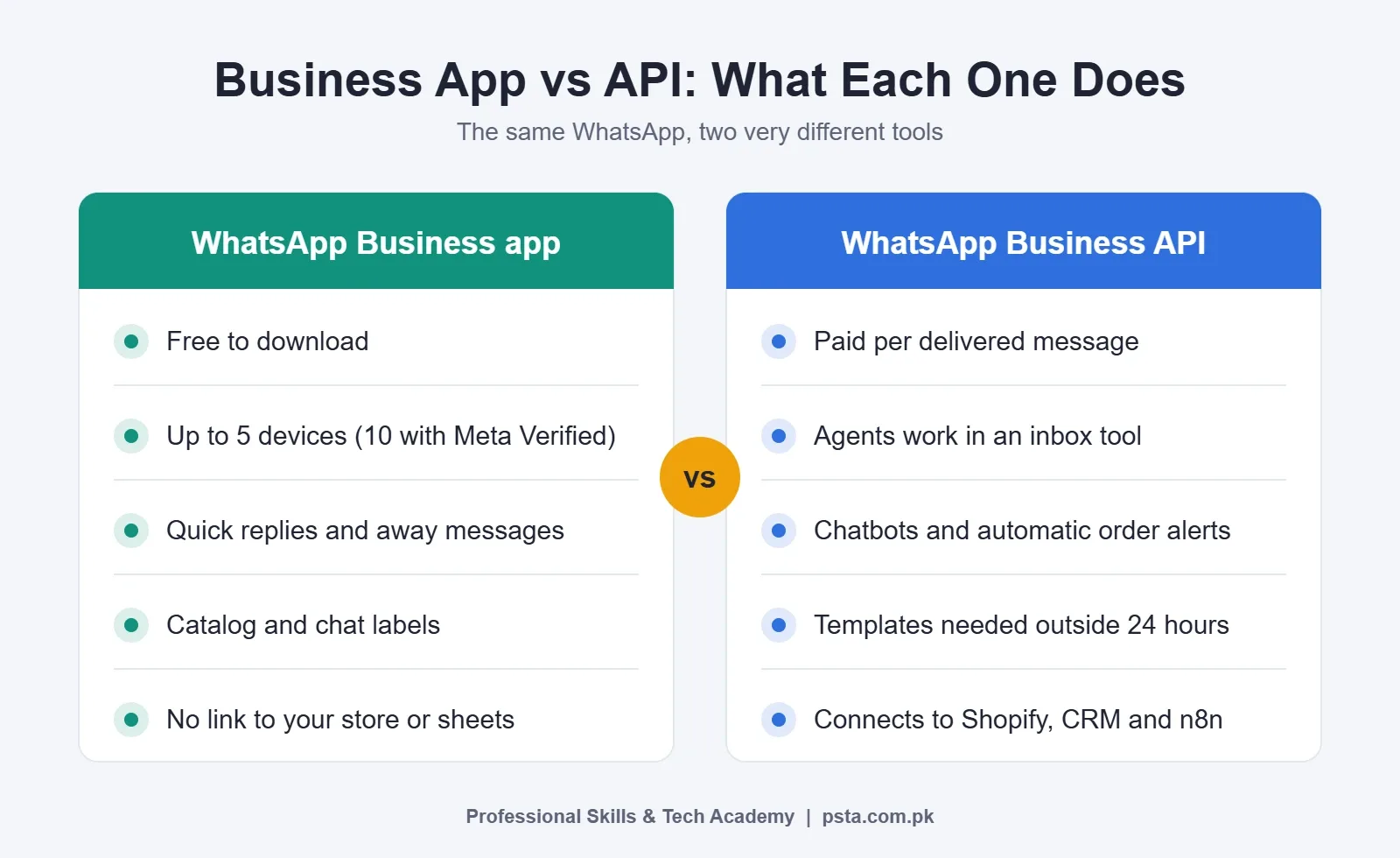
Here's the WhatsApp Business app vs API comparison in short before we go deeper. The table compares the two on the points that usually decide the matter for a small or mid-sized business in Pakistan.
| Point | WhatsApp Business app | WhatsApp Business API (Cloud API) |
|---|---|---|
| Cost to start | Free to download | Per delivered message, plus any provider fee |
| Who sends messages | People typing on phones or linked devices | Your software, a chatbot or a team inbox tool |
| Devices or agents | Up to five devices in total (10 with Meta Verified) | No phone needed; agents work through an inbox tool |
| Automation | Greeting, away messages and quick replies | Full chatbots, order alerts, CRM and sheet updates |
| Starting a chat with a customer | Type a normal message | Must use a pre-approved template outside the 24-hour window |
| Bulk messaging | Limited, manual | Starts at 250 unique users per 24 hours, then scales |
| Setup effort | Ten minutes on a phone | Meta Business account, a number, webhooks or a provider |
What the Free Business App Handles Well
For a single owner or a small counter team, the app is hard to beat. According to its App Store listing, it gives you a product catalog, labels to sort chats, automated away messages and quick replies. The same listing says you can use a total of five web-based devices or phones on one account, and Meta Verified raises that to ten.
That covers a lot of real businesses. A tailoring shop in Abbottabad can tag chats as "measurement pending" or "ready for pickup," send a catalog photo of fabric, and reply with saved answers for prices and timings. Nobody pays per message.
The strain shows up in three places:
- Volume. When 200 people message after a sale post, five devices and typed replies can't keep up.
- Accountability. Everyone shares one account, so you can't easily see who answered which customer or how fast.
- Connections. The app doesn't talk to your Shopify store, Google Sheet or booking system. Every order detail is copied by hand.
If none of these hurt yet, stay on the app. Switching early only adds bills and setup work.
What Changes When You Move to the WhatsApp Business API?
The API, which most businesses now reach through the WhatsApp Cloud API, has no chat screen of its own. Messages arrive at a webhook, and you read and answer them through software: a provider's shared inbox, a CRM, or an automation tool such as n8n or Make. That one difference explains almost everything else.
Because software sits in the middle, you can do things the app can't. An order placed on your website can trigger a confirmation message with the order number. A chatbot can answer the 20 questions customers ask every day and pass the rest to a person. Ten agents can work from one number, each with their own login.
The trade-off is structure. Outside the 24-hour customer service window, you can only start a conversation with a template Meta has approved. Templates fall into three categories (marketing, utility and authentication), and each has its own price. You also need a payment method on file.
How WhatsApp API Pricing Works in 2026
Meta moved from conversation-based billing to per-message billing on July 1, 2025. Its pricing documentation sets out the rules that matter for a business:
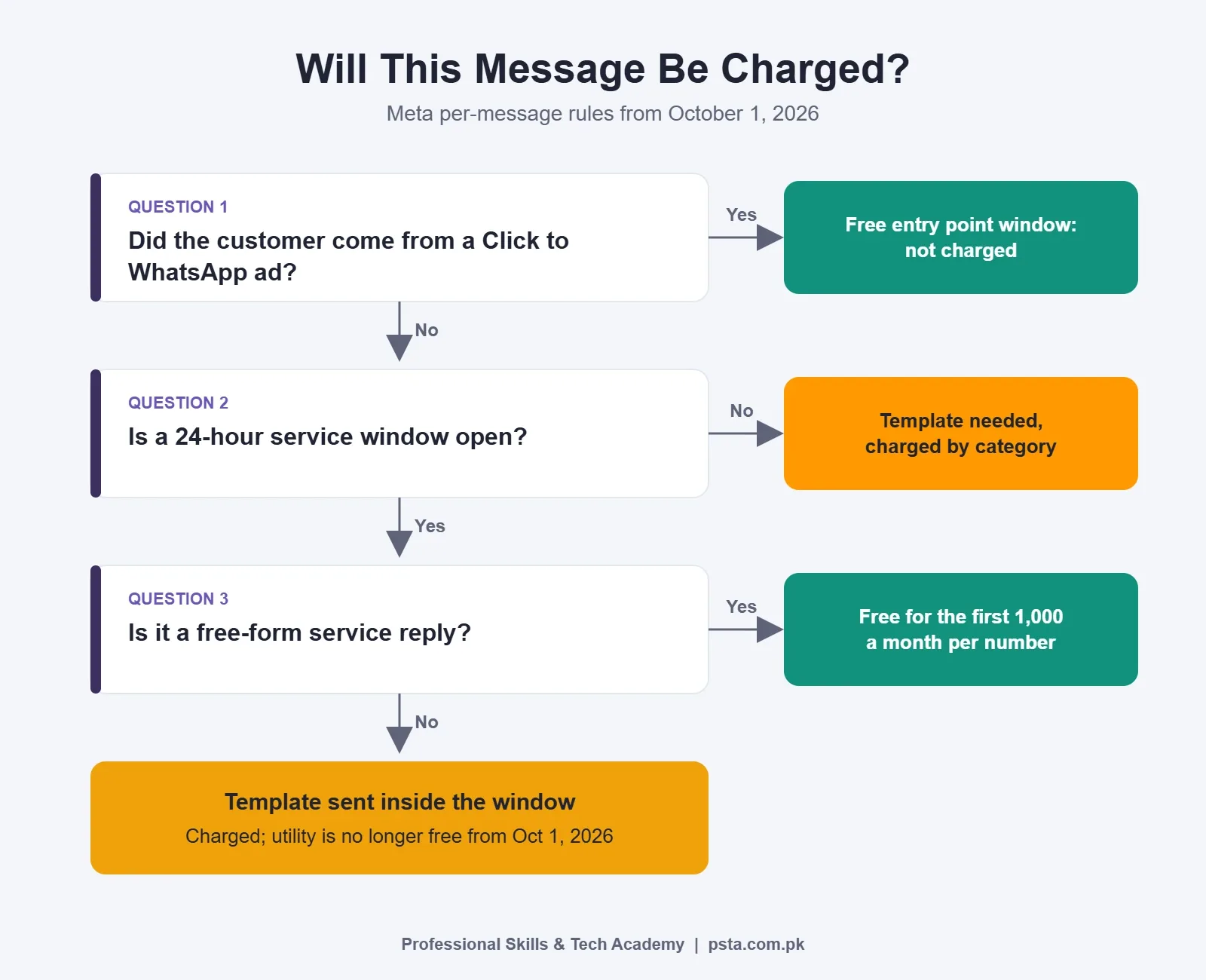
- You pay only when a message is delivered. Messages customers send you are free.
- The rate depends on the message category and on the customer's country code, not yours.
- When a customer messages or calls you, a 24-hour customer service window opens, and each new customer message resets it to 24 hours.
- Inside that window you can send free-form "service" replies. Outside it, you need a template.
- Utility and authentication messages get volume discounts as your monthly count grows. Marketing messages don't.
Two changes took effect on October 1, 2026, and they catch many older guides off guard. First, service messages are no longer unlimited and free: each business phone number gets 1,000 free service messages a month, unused ones don't roll over, and Meta charges from the 1,001st. Second, utility messages sent inside an open window, which used to be free, are now charged at the regular rate.
There's one notable exception. When a customer reaches you through a Click to WhatsApp ad, a free entry point window opens, and Meta doesn't charge for any category of message during it. If you already run those ads, our walkthrough on Click to WhatsApp ads for Pakistani shops explains the setup.
What Does the WhatsApp Business API Cost in Pakistan?
Pakistan is listed as its own market on Meta's rate card, so your customers' +92 numbers have their own prices. Meta's notes show that Pakistan's utility and authentication rates went up on April 1, 2026 and again on October 1, 2026. That's why you should read the live figure in WhatsApp Manager or the official rate card before you budget, rather than trusting a screenshot from last year.
For a rough marketing figure, one Pakistani provider, WeTarseel, lists an indicative rate of $0.0473 (about Rs. 13.15) per marketing message to Pakistani numbers. Treat it as a planning number, not a quote. The same page lists utility rates that predate Meta's October increase, which shows how fast these tables age.
Your total bill usually has three parts:
| Cost part | What it is | Example from a fetched source |
|---|---|---|
| Meta message charges | Per delivered template or extra service message | About $0.0473 per marketing message (WeTarseel, indicative) |
| Provider or platform fee | Shared inbox, chatbot builder, support | WeTarseel lists plans from Rs. 14,000 a month on monthly billing |
| Your own hosting (DIY route) | A server for n8n or your own code | Varies with the VPS plan you pick |
Here's a worked example using that indicative rate. A clothing brand sends one promotional template to 1,000 past buyers. At $0.0473 per delivered message, that is about $47.30 for the send, before any platform fee. If the same brand mainly sends order confirmations and delivery updates instead, its bill depends on the utility rate, which you should check live.
The cheapest pattern is to let customers start the chat. Inbound messages are free, and the first 1,000 service replies each month cost nothing.
Messaging Limits: Why You Can't Message 10,000 Numbers on Day One
New API accounts are throttled. Meta's page on WhatsApp messaging limits says a newly created business portfolio can message 250 unique users outside the customer service window in a moving 24-hour period. The tiers then step up to 2,000, 10,000, 100,000 and unlimited.
You reach the 2,000 tier in one of two ways: verify your business with Meta, or deliver 2,000 template messages to unique numbers within 30 days using high-quality templates. After that, the limit can rise automatically if your quality stays high and you use at least half of your current limit over seven days.
One detail surprises people: the limit is set for the whole business portfolio and shared by every number in it. A careless campaign on one number can eat the capacity of all of them. Messages people never asked for also drag down your quality rating, which Meta checks before raising your limit, so send only to people who opted in.
Can You Keep Your Number on Both the App and the API?
Usually, no, unless you onboard through the right partner. Meta's number migration guide lays out the paths:
- A normal WhatsApp number must delete its WhatsApp account before it can be registered with the Cloud API.
- A WhatsApp Business app number can either delete the account, or onboard through a partner that supports business app numbers. That second route, called WhatsApp coexistence, keeps your chat history and lets the app and the partner's tool run side by side.
- Deleting erases history. Back up chats first. After deletion, the number can take up to three minutes to become available for registration.
For a shop whose number is printed on signboards and visiting cards, coexistence is often the safer move. If you'd rather keep the old number untouched, use a fresh SIM for the API and announce it to customers.
Which One Fits Your Business? Four Example Scenarios
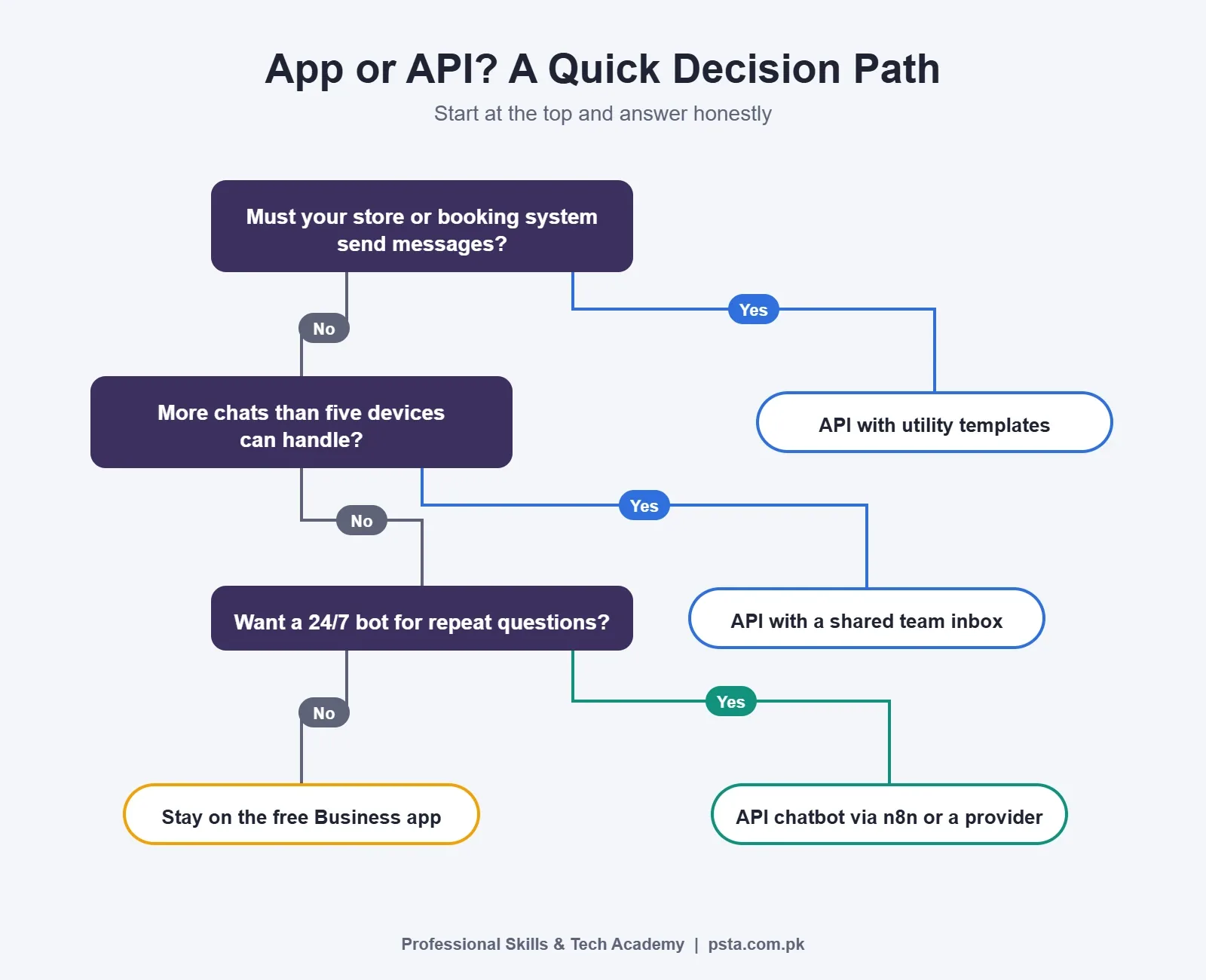
These are illustrative examples, not case studies, but they show how the WhatsApp Business app vs API decision plays out for the kinds of businesses students bring to class.
A home baker taking 15 orders a week. Stay on the app. Use a catalog, a greeting message and labels for "paid" and "delivered." There's nothing to automate that would pay back an API bill.
A dental clinic with two receptionists. The app still works, with two linked devices. Move to the API only if you want automatic appointment reminders from your booking system, which would go out as utility templates.
A Shopify store doing cash on delivery. This is the classic API case. Order confirmation messages that ask "Reply 1 to confirm" can cut fake orders, and the replies can update the order sheet without anyone typing.
An academy answering admission questions. A chatbot can answer fees, timings and batch dates around the clock, then hand serious leads to a counselor. Most of these chats are customer-started, so they sit inside the free service allowance.
Building a First WhatsApp Chatbot With n8n
If you'd like to build rather than rent, n8n is a sensible tool, and we've compared it with other platforms in n8n vs Zapier vs Make. Its WhatsApp Trigger documentation shows the node listens for incoming messages and other account events using WhatsApp Business Cloud credentials. A first project usually follows these steps:
- Create a Meta developer app and add the WhatsApp product, using Meta's test number first.
- Run n8n on a server with a public HTTPS address. Our guide to self-hosting n8n on a VPS covers this.
- Add the WhatsApp Trigger node, set the Messages event and connect your Cloud credentials.
- Subscribe your Meta app to your WhatsApp Business Account. Publishing the workflow alone doesn't do this, and without it no messages reach n8n.
- Route messages with a Switch node: keywords like "fee" or "timing" get saved answers, and everything else goes to an AI node or a person.
- Log every chat to Google Sheets so you can review what the bot got wrong.
- Only then request a real number, create templates and go live.
Watch one limitation the n8n docs point out: WhatsApp allows only one webhook per app. Switching between n8n's test and production URLs overwrites it, so keep a separate Meta app for testing. For more practice ideas, see these n8n projects for beginners.
Five Checks Before You Switch
- Count last month's chats. If you're under a few dozen a day with one or two people replying, the app is likely enough.
- List what you want automated. "Faster replies" isn't a use case; "send a confirmation when an order lands in Shopify" is.
- Decide who will own the templates and their approval, since a rejected template stops a campaign.
- Confirm the live Pakistan rate for each category you'll send, and add the provider fee.
- Plan your number: coexistence through a partner, or a new SIM for the API.
Context helps here too. DataReportal's Digital 2026 report for Pakistan counts 117 million internet users at the end of 2025, which works out to 45.6% penetration. Those users are increasingly reachable on chat, but that doesn't make every business an API business.
Learning WhatsApp Automation in PSTA's AI Automation Course
Our AI Automation course is an 8-week, beginner-level program. One of its projects is a WhatsApp customer support bot that answers common questions for a shop, clinic or academy and hands hard queries to a human. Another is a lead capture workflow where a form lead lands in Google Sheets and a WhatsApp follow-up goes out automatically.
Classes run on our Abbottabad campus, as live online sessions for students anywhere in Pakistan, or as a hybrid of both. Right now the course costs Rs. 22,000 (its listed regular price is Rs. 28,000), payable in two parts, and a new group begins each month. If your work leans toward ads that feed WhatsApp, the Social Media Marketing and Meta Ads course pairs well with it. Admission steps are on the admission page, and everything else we teach is listed on the courses page. Questions about timings are welcome on WhatsApp at +92 314 5424399.
Start by Counting Last Week's Chats
Before you pay anyone for an API plan, open your WhatsApp Business app and count how many chats came in last week and how many got a reply within an hour. Write down the five questions you answered most often. If those numbers are small and the answers are simple, quick replies will do. If they're large, you've settled the WhatsApp Business app vs API question for yourself, and you know exactly what your first chatbot needs to handle.
Frequently asked questions
Is the WhatsApp Business API free in Pakistan?
No. Meta charges per delivered template message, and the rate depends on the category and the customer's country code. Customer-initiated chats help: messages customers send you are free, and from October 1, 2026 each business number gets 1,000 free service replies a month. Most businesses also pay a provider or hosting fee on top of Meta's charges.
Can I use the WhatsApp Business app and the API on the same number?
Only through a partner that supports coexistence. Meta's migration guide says a normal number must delete its WhatsApp account before joining the Cloud API, and a Business app number can either be deleted or onboarded through a supporting partner. Coexistence keeps your chat history and lets both run side by side.
How many people can use one WhatsApp Business app account?
According to the app's App Store listing, you can have a total of five web-based devices or phones on one account, and Meta Verified raises that to ten. All of them share the same chats, so it suits small teams but makes it hard to track who replied to which customer.
Do I need coding skills to use the WhatsApp Business API?
Not always. Many providers offer a ready inbox and chatbot builder that you set up through forms. Building your own bot in n8n or Make takes no traditional coding, but you do need to understand webhooks, credentials and message templates. A beginner can usually learn these with guided practice over a few weeks.
Why can my new API account only message 250 people a day?
Meta starts every new business portfolio at 250 unique users per moving 24-hour period for messages sent outside the service window. You move to 2,000 by verifying your business or sending 2,000 high-quality template messages within 30 days. Higher tiers then unlock automatically if quality stays good.
What changed in WhatsApp API pricing on October 1, 2026?
Two things. Service messages are no longer unlimited and free; each business number now gets 1,000 free ones a month, with charges from the 1,001st. Utility messages sent inside an open customer service window, which used to be free, are now charged at the regular rate. Pakistan's utility and authentication rates also rose on that date.
Should a small shop in Pakistan switch to the WhatsApp API?
Usually not at first. If one or two people answer fewer than a few dozen chats a day, the free app with quick replies, labels and a catalog is enough. Switching makes sense when your store or booking system needs to send messages automatically, or when chat volume outgrows five devices.
Sources & references
- WhatsApp Business Platform pricing (Meta for Developers) developers.facebook.com
- WhatsApp messaging limits (Meta for Developers) developers.facebook.com
- Migrate an existing WhatsApp number to a business account (Meta) developers.facebook.com
- WhatsApp Business on the App Store apps.apple.com
- WhatsApp Trigger node (n8n Docs) docs.n8n.io
- WhatsApp API pricing in Pakistan (WeTarseel) wetarseel.ai
- Digital 2026: Pakistan (DataReportal) datareportal.com
Last reviewed & updated on by Umar Qureshi. Written by the PSTA team in Abbottabad, Pakistan.

Umar Qureshi

AI Automation Course: Beginner to Pro (Dominate Workflows)
Turn this guide into a career: hands-on training with real projects, online across Pakistan or on-campus in Abbottabad · 8 Weeks.
Comments
No comments yet — ask a question or share your experience.