Quick answer
Amazon PPC means you pay only when a shopper clicks your ad. Start with one automatic Sponsored Products campaign, dynamic bids down only and a modest daily budget. After about two weeks, move proven search terms into manual exact or phrase match, and judge results by comparing ACOS with your break-even margin.
Key takeaways
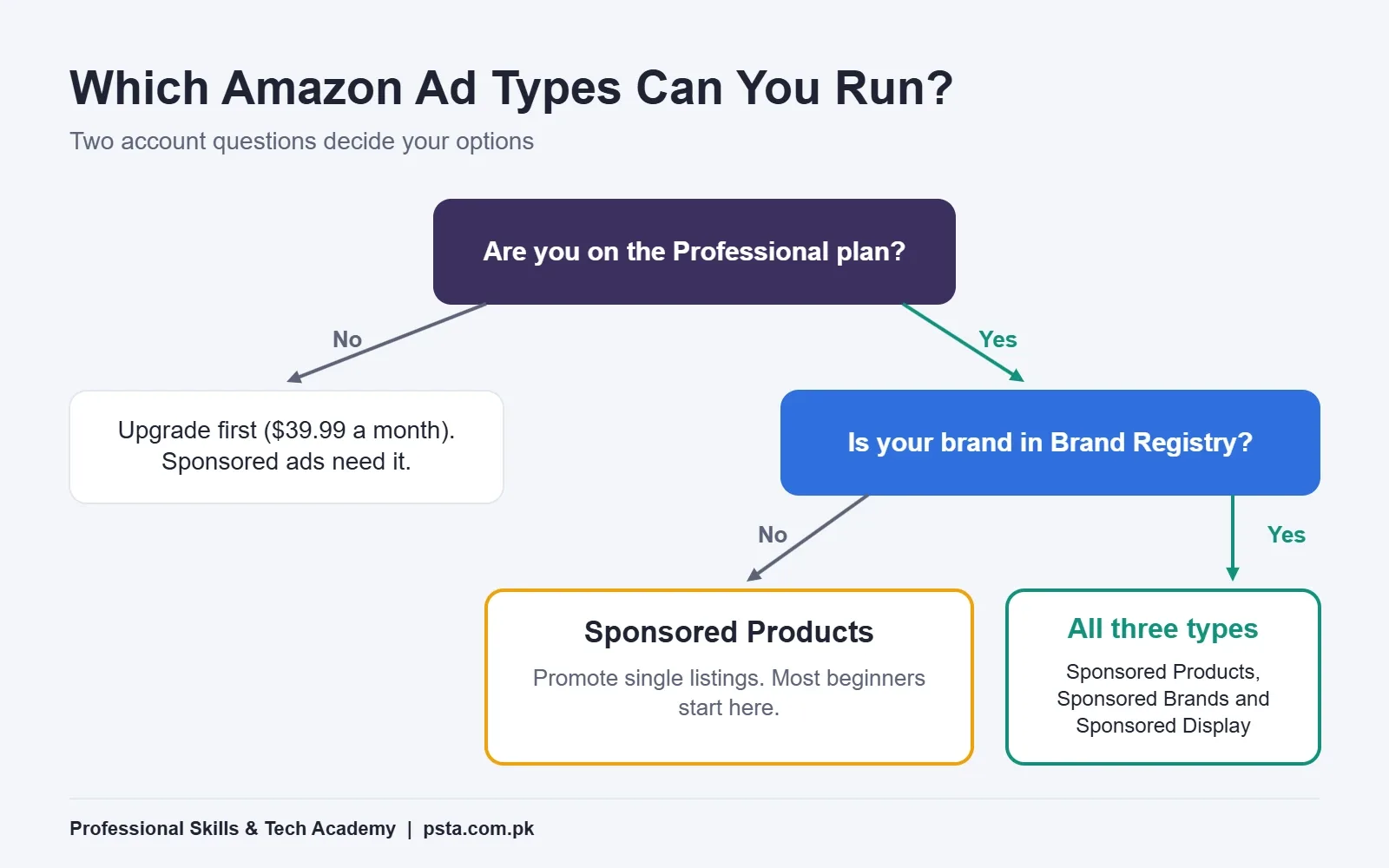
- • Sponsored Products need a Professional selling plan; Sponsored Brands and Display also need Brand Registry.
- • Automatic campaigns target four groups: close match, loose match, substitutes and complements.
- • Exact match gives the tightest control; broad match is for discovering new search terms.
- • Add negative keywords only after a search term has about 20 clicks with no orders.
- • ACOS = ad spend ÷ ad sales × 100, and ROAS is its inverse; compare ACOS with your break-even margin.
- • Pakistani employers hiring for Amazon PPC ask for Excel skills, including pivot tables.
Table of contents 17 sections
- What Is Amazon PPC, in Plain Terms?
- The Three Ad Types and Who Can Run Them
- Sponsored Products
- Sponsored Brands
- Sponsored Display
- Account and Campaign Terms You'll See First
- Targeting Terms: How Automatic Campaigns Pick Shoppers
- Keyword Match Types: Broad, Phrase and Exact
- Product Targeting
- Negative Keywords and the Search Term Report
- Bidding Terms: CPC, Dynamic Bids and Placements
- How Do You Read ACOS and ROAS?
- Worked Example: Finding Your Break-Even ACOS
- A 30-Day Starter Plan: Amazon PPC for Beginners
- Is Amazon PPC a Real Job Skill in Pakistan?
- Building These Skills at PSTA
- Try This With a Spreadsheet Tonight
What does Amazon PPC for beginners really involve, and what do all those labels in Ads Manager mean? In short, you pay only when a shopper clicks your ad, and you judge each click by the sales it brings back. Amazon's seller page reports that sellers who used Sponsored Products saw 34% more sales growth than sellers who didn't, four weeks after starting. It's Amazon's internal data, so read it as a strong hint rather than a promise for your product.
The hard part for most new students isn't the idea. It's the vocabulary. Ads Manager is full of short labels like ACOS, ASIN, close match and negative exact, and a wrong guess about any of them can waste a budget in a few days. This Amazon PPC for beginners glossary explains each term in the order you meet it while building a campaign.
Here is what you will be able to do after reading:
- Tell the three main Amazon ad types apart and know which one your account can use
- Read the targeting and match type settings without guessing
- Calculate ACOS, ROAS and your break-even point on a single product
- Follow a simple first-month plan for your first Sponsored Products campaign
- Judge whether Amazon PPC is a skill worth adding to your freelance or job profile in Pakistan
What Is Amazon PPC, in Plain Terms?
PPC stands for pay-per-click. On Amazon, it means paid ads that show your product in search results or on other product pages. Amazon describes Sponsored Products as cost-per-click ads with no monthly or upfront fee, so an ad that nobody clicks costs you nothing.
Think of it as renting a better shelf in a busy bazaar. Your listing still has to persuade the shopper. The ad only moves it to where more people walk past. That's why PPC rarely rescues a weak listing with poor photos, a vague title or a high price. Fix the listing first, then pay for traffic.
When sellers say "PPC", they usually mean Amazon Sponsored Products, the ad type this guide spends most of its time on.
One rule surprises new sellers: an ad only appears while the product is in stock and eligible to win the Featured Offer (the main "Add to Cart" offer on the page). If you run out of stock, your ads simply stop.
The Three Ad Types and Who Can Run Them
Amazon sells many advertising products, but sellers on Seller Central mostly use three self-service ad types. Your account setup decides which ones you can open.
Sponsored Products
These promote a single listing. They look almost like normal search results, with a small "Sponsored" label. According to Amazon's advertising page for sellers, they're open to sellers on the Professional plan, priced at $39.99 per month, with selling fees on top. Nearly every beginner starts here.
Sponsored Brands
These help shoppers discover your brand as a whole, using a headline with a collection of products, images or a video. They need a Professional account linked to a brand enrolled in Amazon Brand Registry. Amazon says they can be charged per click or per 1,000 viewable impressions, depending on your goal.
Sponsored Display
These are display ads that can appear across the Amazon store and on other apps and websites. For sellers, they carry the same Brand Registry requirement as Sponsored Brands.
Account and Campaign Terms You'll See First
Before you touch targeting, you need the basic building blocks of Amazon PPC. Learn these five and the Ads Manager screen starts to make sense.
- ASIN: Amazon's product ID. The Sponsored Products targeting guide notes that it is always 10 characters long. You advertise ASINs, not listings in the general sense.
- Campaign: the top container. It holds your daily budget, start date, targeting type and bidding strategy.
- Ad group: a set of products inside a campaign that share the same keywords or targets. Amazon allows up to 1,000 products in one ad group, but beginners do better with one closely related product family per group.
- Daily budget: the average amount you're willing to spend per day. Amazon spreads it over a calendar month, so its Sponsored Products best practices guide gives the example that a $100 daily budget can mean up to $3,000 of clicks in a 30-day month. The same guide suggests starting around $10 a day.
- Impression and click: an impression is one time your ad was shown. A click is when a shopper opens it. You pay for the click, not the impression, on Sponsored Products.
Targeting Terms: How Automatic Campaigns Pick Shoppers
Every Sponsored Products campaign in Amazon PPC is either automatic or manual. In an automatic campaign, Amazon reads your listing and decides where to show the ad. In a manual campaign, you choose the keywords or products yourself. The automatic vs manual campaign choice is the first real decision you'll make, and it's normal to run both, one after the other.
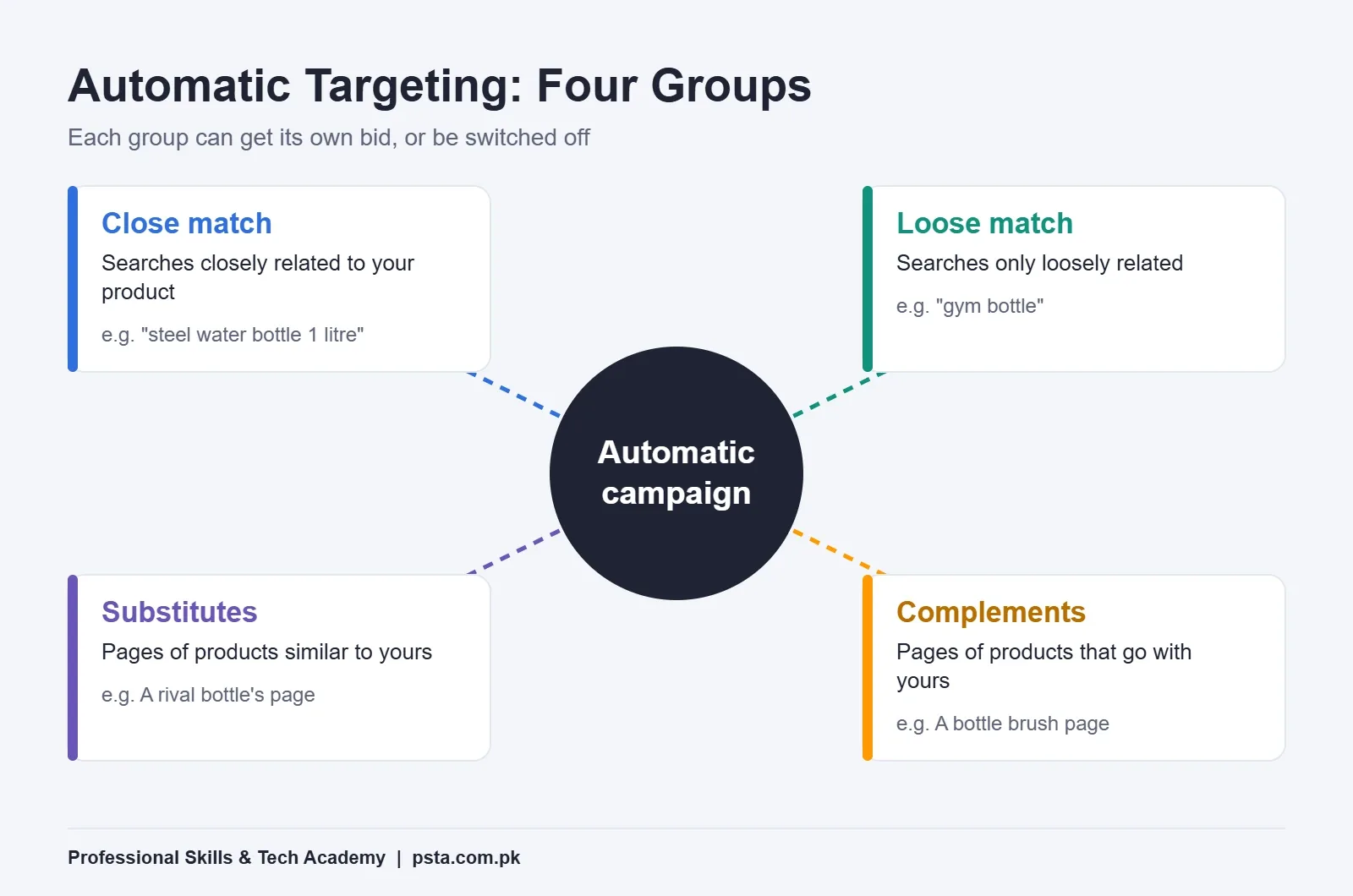
Automatic campaigns split their reach into four targeting groups. You can bid on each group separately or switch one off.
- Close match: shoppers whose search terms are closely related to your product.
- Loose match: shoppers whose searches are only loosely related.
- Substitutes: shoppers viewing detail pages of products similar to yours.
- Complements: shoppers viewing products that go well with yours.
Take a stainless steel water bottle as an example. Close match might catch "steel water bottle 1 litre". Loose match might catch "gym bottle". Substitutes would place you on a rival bottle's page, and complements might place you on a lunch box or a bottle brush page. Each group behaves differently, which is why separate bids help.
The automatic campaign is also your research tool. After it runs, its report shows the real search terms shoppers typed before they clicked. You'll copy the winning terms into a manual campaign later.
Keyword Match Types: Broad, Phrase and Exact
In a manual keyword campaign, every keyword gets a match type. It tells Amazon how strictly a shopper's search must match the keyword you entered. Amazon's targeting guide defines the three types this way, and it says exact match tends to give the highest conversion rates.
| Match type | What it matches | Example keyword: "steel water bottle" | Best use |
|---|---|---|---|
| Broad | Searches with your words in any order, and sometimes related words | "bottle for water steel kids" | Finding new search terms |
| Phrase | Searches containing your words in the same order, plus plurals | "steel water bottle for gym" | Middle ground once you know the core phrase |
| Exact | The same words in the same order, plus plurals | "steel water bottles" | Proven terms you want to control tightly |
Two limits from the guide are handy to remember. A keyword can be at most 10 words and 80 characters. Short-tail keywords usually have one to three words, while long-tail keywords have three or more and tend to be cheaper and more specific.
Product Targeting
Manual campaigns can also target products instead of keywords. You can pick specific ASINs, whole categories or brands, and narrow a category by price range, star rating or brand. This is how you place your ad on a competitor's page that sells at a higher price than you do.
Negative Keywords and the Search Term Report
A negative keyword tells Amazon where not to show your ad. If you sell steel bottles and your ad keeps getting clicks on "plastic bottle", adding "plastic" as a negative stops that waste.
- Negative phrase: blocks searches containing the full phrase or close variations.
- Negative exact: blocks only that exact search or a close variation.
Don't add negatives too early. Amazon's guide suggests judging a search term only after it has at least 20 clicks, and letting a negative run for two weeks or more before you change direction. A term with three clicks and no sale hasn't proved anything yet.
The search term report is where you find these terms. It lists what shoppers actually typed, with clicks, spend and orders for each. Most day-to-day Amazon PPC work is sorting this report in Excel and making one of three calls on each row: move it to manual, add it as a negative, or wait for more data. If pivot tables are new to you, our guide to pivot tables in Excel covers the summary step.
Bidding Terms: CPC, Dynamic Bids and Placements
Your bid is the most you're willing to pay for one click. CPC (cost per click) is what you actually paid on average, which is often lower than your bid because of the auction.
Amazon offers three bidding strategies for Sponsored Products:
- Dynamic bids, down only: Amazon lowers your bid in real time when a click looks less likely to turn into a sale. This is the safest choice for a first campaign.
- Dynamic bids, up and down: Amazon can raise or lower your bid based on how likely a sale looks.
- Fixed bids: Amazon uses your exact bid every time.
Placements are where the ad appears: top of search (first page), rest of search, and product pages. You can add a placement bid adjustment of up to 900% according to Amazon's best practices guide. Treat that ceiling as a technical limit, not a target. Small adjustments, tested one at a time, are easier to read.
How Do You Read ACOS and ROAS?
These two numbers tell you whether ads earn more than they cost. Amazon's ACOS guide gives the formulas:
- ACOS (advertising cost of sales) = ad spend ÷ ad sales × 100
- ROAS (return on ad spend) = ad sales ÷ ad spend
They're two views of the same data. Amazon's own example: spend $50, earn $100 in ad sales, and your ACOS is 50% while your ROAS is 2. Lower ACOS is better. Higher ROAS is better.
Worked Example: Finding Your Break-Even ACOS
This is an illustrative example, not real seller data. Say your bottle sells for $20, and after product cost, Amazon fees and shipping you keep $6 before any advertising. That $6 is 30% of the price, so 30% is your break-even ACOS.
| Week | Ad spend | Ad sales | ACOS | ROAS | Result vs 30% break-even |
|---|---|---|---|---|---|
| Week 1 | $42 | $100 | 42% | 2.4 | Losing money on ad sales |
| Week 2 | $36 | $120 | 30% | 3.3 | Breaking even |
| Week 3 | $30 | $140 | 21% | 4.7 | Profitable on ad sales |
So a "good" ACOS has no single answer. It depends on your margin and your goal. A launch week can run above break-even on purpose to gather reviews and data, as long as you decide that in advance and set a limit.
You'll also hear TACOS (total advertising cost of sales). It's an industry term, not an Ads Manager column: total ad spend divided by all sales, including organic ones. It shows whether ads are helping your whole listing grow or just buying the same sales you'd get anyway. To work out the margin side properly, use our walkthrough of Amazon FBA fees.
A 30-Day Starter Plan: Amazon PPC for Beginners
Amazon's guides suggest patience at almost every step. Put together, they give a calm first month for one product:
- Day 1: launch one automatic Sponsored Products campaign with dynamic bids down only and a modest daily budget. Amazon suggests around $10 as a starting point.
- Week 1: check the numbers at least twice, as Amazon's best practices guide advises. Look for budget running out early or zero impressions, and change nothing else.
- Weeks 2 to 3: after about two weeks, open the search term report. Move terms that produced orders into a new manual campaign on exact or phrase match.
- Week 3: add negatives only for terms with 20 or more clicks and no orders.
- Week 4: let the manual match types run at least one to two weeks before pausing any keyword. Then compare ACOS against your break-even number.
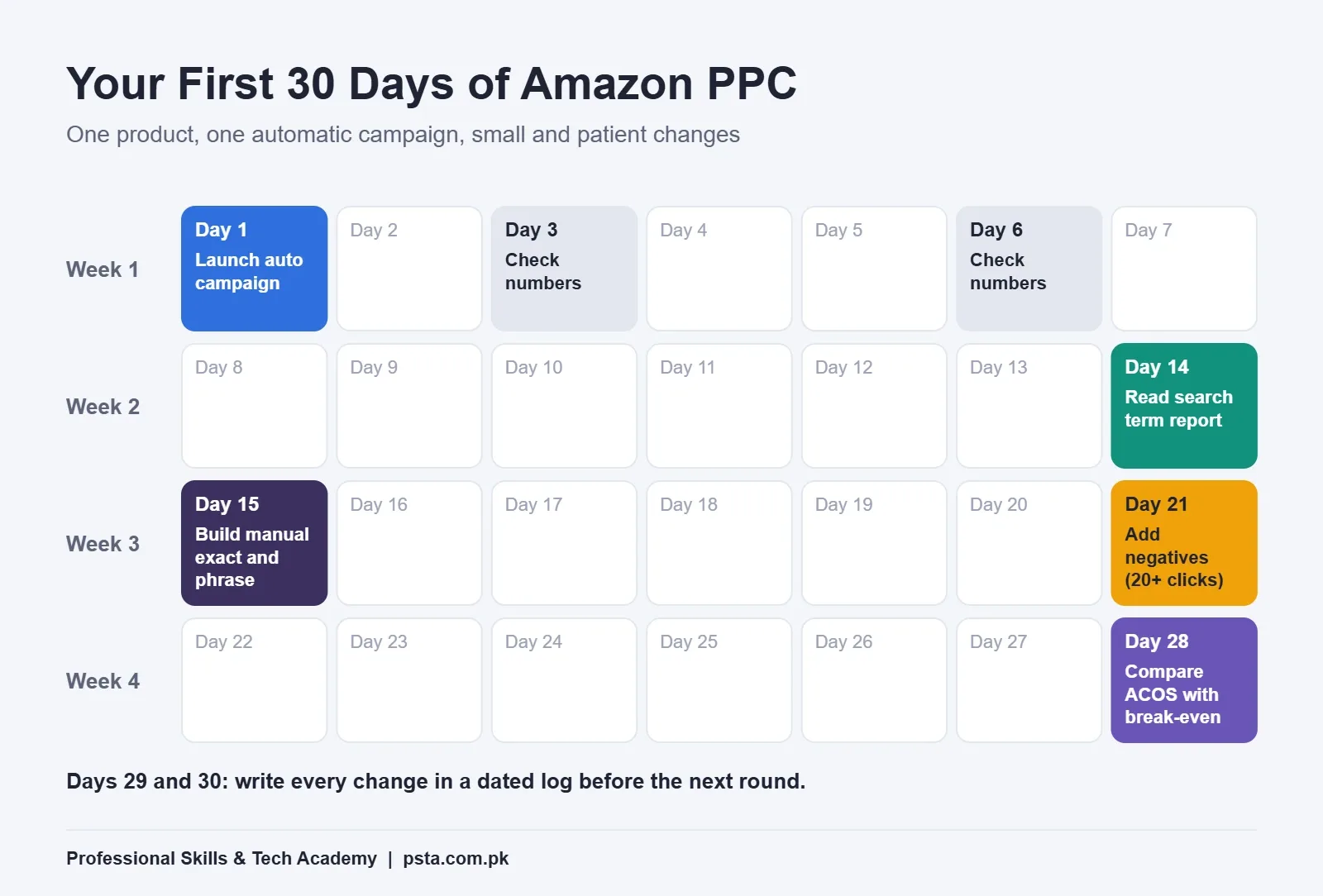
The habit that matters most here is writing every change in a simple log with the date. When ACOS moves, you'll know what caused it.
Is Amazon PPC a Real Job Skill in Pakistan?
Yes. Amazon PPC is one of the more practical e-commerce skills to learn, since the work happens inside an online dashboard and local companies hire for it. A recent Amazon PPC Specialist listing in Karachi, posted on the Sindh government's job portal, asked for one year of experience, strong Excel skills including pivot tables, and work on Sponsored Products and Sponsored Brands. It also said prior Amazon Ads experience was a plus, not a must, and invited fresh graduates. Most Amazon PPC jobs in Pakistan read much the same way: Excel first, platform experience second.
Public training exists too. The Honhaar Jawan training platform lists a three-month Amazon PPC Business Manager course covering keyword and bid management, budgeting and dashboards. When employers and public programs both name a skill this specifically, it is a fair sign of steady demand.
Be realistic, though. Clients hire Amazon PPC managers who can show results, so you'll need practice files, a clear report you built yourself, and ideally one real product you advertised. If you plan to sell rather than manage ads, read our guide to the Amazon seller account in Pakistan first, and pair PPC with solid Amazon product hunting, because ads can't fix a product nobody wants.
Building These Skills at PSTA
The Master E-Commerce course at PSTA is a 12-week program pitched at complete beginners. Across its nine modules you work through market research for product ideas, sourcing from local and overseas suppliers, private label and wholesale FBA, and paid traffic on Facebook and Google. The course page lists the fee at Rs. 25,000 at the time of writing. A new batch opens each month, and class slots run from 9:00 AM to 9:30 PM, Monday through Saturday. Keep this Amazon PPC for beginners glossary open as your vocabulary list while you study.
Seats are available on campus, opposite FIMS College on Old College Road in Mandian, Abbottabad. If you live elsewhere, the same class streams live, and you can switch between the two formats when needed. If you'd rather focus on ads across several platforms, the Advanced Digital Marketing course is a good companion. Questions about batch timings can go to the team on WhatsApp at +92 314 5424399, and the full list of programs sits on the courses page.
Try This With a Spreadsheet Tonight
Pick any product you like on Amazon and write down its price. Estimate what a seller keeps before ads, work out the break-even ACOS, and then list ten keywords under broad, phrase and exact. It takes 20 minutes, and you'll understand Ads Manager far better on your first login. When you're ready for guided practice, the admission page explains how to reserve a seat in the next batch.
Frequently asked questions
Can I run Amazon PPC campaigns from Pakistan?
Yes. Ads Manager is an online dashboard, so location isn't the barrier. A seller needs a Professional selling account on the marketplace where the product is listed, and the product must be in stock. If you manage ads for a client, the client gives you user access to their account, so you work inside it without needing your own store.
How much budget do I need to start Amazon PPC?
Amazon's own best practices guide suggests a daily budget of around $10, or the local equivalent, for a first Sponsored Products campaign. The budget is spread across the month, so some days spend more and others less. Start small, keep one product in one campaign, and raise spend only after the numbers show which search terms bring orders.
What is a good ACOS on Amazon?
There's no single good number. Work out your break-even ACOS first: the share of the selling price you keep after product cost, Amazon fees and shipping, before ads. If you keep 30% of the price, an ACOS under 30% is profitable on ad sales. During a planned launch you might accept a higher ACOS for a short, fixed period.
Should beginners start with automatic or manual campaigns?
Start with an automatic campaign. Amazon reads your listing and finds search terms and product pages for you, which gives you real data to learn from. Amazon's targeting guide suggests letting it run about two weeks, then moving the terms that produced orders into a manual campaign where you control match types and bids.
Do I need Brand Registry to run Amazon ads?
Not for Sponsored Products. Those only need a Professional selling plan and an eligible, in-stock product. Brand Registry becomes necessary when you want Sponsored Brands or Sponsored Display, because those formats promote a brand rather than one listing. Many beginners spend their first months on Sponsored Products alone and add the others later.
How long does it take to learn Amazon PPC?
Most students can understand the terms and build a first campaign within a few weeks of steady practice. Reading reports confidently and making good bid and negative keyword decisions takes longer, because it depends on seeing real data over time. Strong Excel skills shorten the learning curve, since most PPC analysis happens in spreadsheets.
Is Amazon PPC the same as Google Ads?
The ideas overlap, since both use keywords, bids and pay-per-click pricing. The difference is intent and setting. Amazon ads show only inside Amazon's shopping pages and some partner sites, to people already looking to buy, and they are tied to a specific product listing. Google Ads send searchers to any website you choose.
Sources & references
- Amazon Ads: Targeting with Sponsored Products advertising.amazon.com
- Amazon Ads: Sponsored Products best practices advertising.amazon.com
- Amazon Ads: ACOS (advertising cost of sales) guide advertising.amazon.com
- Sell on Amazon: Advertising for sellers sell.amazon.com
- iWork4Sindh: Amazon PPC Specialist job listing, Karachi iwork4sindh.com
- Honhaar Jawan: Amazon PPC Business Manager course honhaarjawan.net
Last reviewed & updated on by Umar Qureshi. Written by the PSTA team in Abbottabad, Pakistan.

Umar Qureshi

Master E-Commerce & Build Your Online Empire: Amazon FBA, Shopify & Dropshipping
Turn this guide into a career: hands-on training with real projects, online across Pakistan or on-campus in Abbottabad · 12 Weeks.
Comments
No comments yet — ask a question or share your experience.