Quick answer
There is no single best frame rate for video. Use 24 or 25 fps for films and talking videos, 50 or 60 fps for fast action and slow motion, and in Pakistan prefer 25 or 50 fps with a 1/50 or 1/100 shutter indoors, because lights run on 50 Hz mains and flicker at other settings.
Key takeaways
- • Choose frame rate before the shoot; mismatched clips drop or invent frames in the edit.
- • Use 25 fps with a 1/50 shutter indoors in Pakistan to avoid 50 Hz light flicker.
- • 60 fps gives slow motion only when played back at a lower rate, such as 25 or 30.
- • Keep the shutter near double the frame rate for natural motion blur.
- • Upload to YouTube at the frame rate you recorded; high frame rates need more bitrate.
Table of contents 15 sections
- Why the Best Frame Rate for Video Depends on the Job
- What Do 24, 25, 30, 50 and 60 fps Actually Mean?
- Myths 1 and 2: More Frames and the Cinematic Look
- Myth 1: A Higher Frame Rate Always Looks More Professional
- Myth 2: 24 fps Is the Only Cinematic Choice, and 25 Is Wrong
- Myth 3: You Can Fix the Frame Rate Later in the Edit
- Myth 4: Shooting at 60 fps Gives You Slow Motion Automatically
- Why Do My Indoor Videos Flicker in Pakistan? (Myth 5)
- Myth 6: Uploading at 60 fps Gets You Better Quality on YouTube
- Myths 7 and 8: Shutter Speed and Phone Auto Settings
- Myth 7: Shutter Speed and Frame Rate Are Separate Settings
- Myth 8: The Phone's Auto Frame Rate Is Always Fine
- A Frame Rate Plan for Common Shoots in Pakistan
- Where Frame Rate Fits in PSTA's Video Editing Course
- Run a Two-Minute Flicker Test Tonight
A lot of beginners think the best frame rate for video is simply the highest number their phone offers, so they leave everything on 60 fps and hope for a professional result. That belief costs them footage. The right choice depends on what you film, where the video will play and, in Pakistan, on the 50 Hz lights hanging above your subject.
This guide tests eight common beliefs against what Adobe, YouTube, Apple and Nikon actually publish. By the end, you will know:
- When 24, 25, 30, 50 or 60 fps is the sensible pick, and when it isn't
- Why indoor footage flickers in Pakistani homes, shops and classrooms, and the settings that stop it
- How to get real slow motion from 60 fps or 120 fps clips in Premiere Pro
- What YouTube asks for when you upload high frame rate video
- A simple frame rate plan for the shoots you are most likely to get as a beginner editor
Why the Best Frame Rate for Video Depends on the Job
Frame rate is the number of still images your camera records each second. Play those images back quickly and your brain reads them as motion. Fewer frames give a slightly softer, filmic movement. More frames give smoother, crisper movement that can feel almost too real for drama.
So there is no single best frame rate for video in every situation. A wedding highlight film, a cricket clip for slow motion and a teacher recording a lesson under tube lights all need different settings. Treat frame rate as a decision you make before you press record, the same way you pick a lens or a microphone.
The eight myths below are the ones I hear most often from students who bring their own phone or camera footage to class. Each one comes with a fact you can check and a setting you can change today.
What Do 24, 25, 30, 50 and 60 fps Actually Mean?
Before the myths, here is a quick reference. Two of these rates, 25 and 50, matter more in Pakistan than most English tutorials admit, because they line up with our 50 Hz electricity supply.
| Frame rate | How motion looks | Typical use | Fits 50 Hz lighting? |
|---|---|---|---|
| 24 fps | Soft, filmic motion blur | Films, short films, music videos | Usually, with a 1/50 shutter |
| 25 fps | Almost identical to 24 | PAL-region video, vlogs, interviews | Yes, with a 1/50 shutter |
| 30 fps | Slightly smoother than 24 | TV-style content, screen recordings | Only if you avoid 1/60 |
| 50 fps | Smooth, sharp action | Sports, events, gentle slow motion | Yes, with a 1/100 shutter |
| 60 fps | Very smooth, "live" feel | Gaming, fast action, slow motion | Only if you avoid 1/120 |
The shutter values in the last column come from Nikon's own flicker guidance, which we will look at in Myth 5.
Myths 1 and 2: More Frames and the Cinematic Look
Myth 1: A Higher Frame Rate Always Looks More Professional
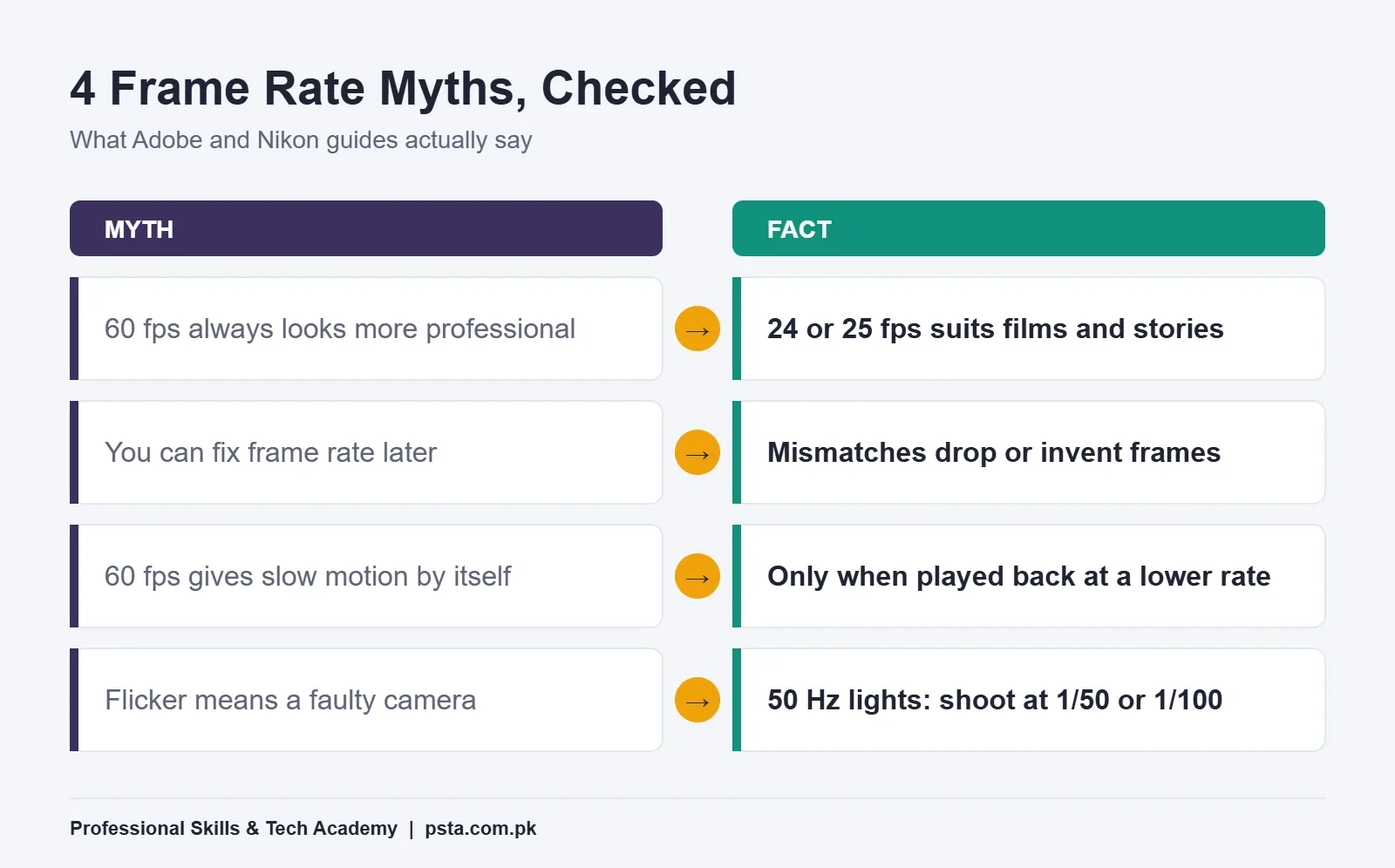
Fact: Smoothness isn't the same as quality. Adobe's guide to frame rate explains that movies and much streaming content use 24 fps for their classic cinematic look, while 30 fps is common for live TV and most TV shows. Adobe points to 60 fps for recording video games.
Shoot a short drama scene at 60 fps and play it at 60, and it often looks like a home video, even with good lighting. Viewers can't name the problem, but they feel it. For storytelling, ads with actors and wedding films, a lower rate usually serves the mood better.
Myth 2: 24 fps Is the Only Cinematic Choice, and 25 Is Wrong
Fact: The same Adobe page notes that 25 fps is the PAL standard used in regions such as Europe and Africa. Side by side, most viewers can't tell 24 from 25. The difference that does show up is practical: Pakistan's grid runs at 230 V and 50 Hz, according to World Standards, and 25 fps divides neatly into that frequency.
If your client footage will mostly be shot indoors in Pakistan, 25 fps is a perfectly cinematic and often safer default. Keep 24 fps for projects where a director or a festival specifically asks for it.
Myth 3: You Can Fix the Frame Rate Later in the Edit
Fact: You can change it, but you pay for it. Adobe's mixed frame rates tutorial for Premiere Pro states the trade-off plainly: when a clip doesn't match the sequence, either frames get dropped or new frames get generated to fill the gaps.
Dropped frames create a faint stutter on pans. Generated frames can smear edges, especially on hands, fans and moving traffic. Premiere also shows a Clip Mismatch Warning when you drop the first odd clip on a timeline, asking whether to change the sequence or keep its settings.
Here's the habit that saves hours: agree a project frame rate before the shoot, then set every phone and camera to it. If two cameras record a seminar and one is at 30 while the other is at 25, you'll fight that mismatch on every cut. I've seen beginners lose a full evening this way on a simple two-camera event.
Myth 4: Shooting at 60 fps Gives You Slow Motion Automatically
Fact: A 60 fps clip played on a 60 fps timeline runs at normal speed. You only get smooth slow motion when you play those extra frames back at a lower rate. Adobe's Interpret Footage tutorial shows how to do this in Premiere Pro:
- Shoot the action at 50 or 60 fps (or higher if your camera allows it).
- Import the clip and select it in the Project panel, not on the timeline.
- Go to Clip > Modify > Interpret Footage.
- In the Frame Rate section, switch to the option for a new frame rate and enter your sequence rate, for example 25.
- Click OK. The clip becomes longer and plays in slow motion with no invented frames.
- To undo it, return to the same dialog and choose the option that uses the frame rate from the file.
A 50 fps clip on a 25 fps timeline plays at half speed. For dramatic slow motion, record at 120 fps or more. Apple's iPhone video settings guide lists Slo-mo at 240 fps from the back camera, with 120 fps as an option.
If you must slow a clip that was shot at a normal rate, the Speed/Duration dialog offers Frame Sampling, Frame Blending and Optical Flow. Optical Flow builds new frames and needs rendering, so check the result carefully before you send it to a client.
Why Do My Indoor Videos Flicker in Pakistan? (Myth 5)
Myth: Flicker or dark bands rolling across indoor footage mean the camera is faulty.
Fact: The lights are pulsing with the mains supply, and your shutter is catching them at different points in each pulse. Nikon's video flicker reduction guide describes flicker and banding under fluorescent and mercury-vapor lighting. It recommends picking 50 Hz or 60 Hz to match the region, and if flicker remains, using a shutter speed of 1/100, 1/50 or 1/25 second in 50 Hz areas.
Many cheap LED bulbs and tube lights in Pakistani shops and offices behave the same way. The problem shows most when beginners use settings copied from American tutorials, where the grid is 60 Hz and 30 fps with a 1/60 shutter is normal.
To fix it on a camera or a phone app with manual control:
- Set the camera's flicker or anti-flicker option to 50 Hz if it has one.
- Choose 25 fps or 50 fps for the project.
- Set the shutter to 1/50 for 25 fps, or 1/100 for 50 fps.
- Control brightness with ISO, aperture or an ND filter, not by speeding up the shutter.
- Record a 10-second test under the room's lights and check it on a laptop before the real shoot.
On iPhone, a hidden 25 fps option appeared in iOS 14.3. ProVideo Coalition reports that turning on "Show PAL Formats" in the Camera settings adds 25 fps at resolutions such as 1080p and 4K. Many Android camera apps hide a similar choice under "Pro" or "Video" settings, so look before you assume your phone can't do it.
Myth 6: Uploading at 60 fps Gets You Better Quality on YouTube
Fact: YouTube doesn't reward a high number on its own. Its recommended upload encoding settings name six common frame rates, from 24 up to 60 fps, including 25 and 50. The page says content should be encoded and uploaded at the same frame rate it was recorded.
Converting a 25 fps vlog to 60 fps for upload adds file size and nothing else. High frame rate video also needs more data. For 1080p, YouTube's table suggests 8 Mbps at standard frame rates and 12 Mbps at high ones. At 1440p the figures are 16 and 24 Mbps. At 4K, the suggestion rises from 35 to 45 Mbps up to 53 to 68 Mbps.
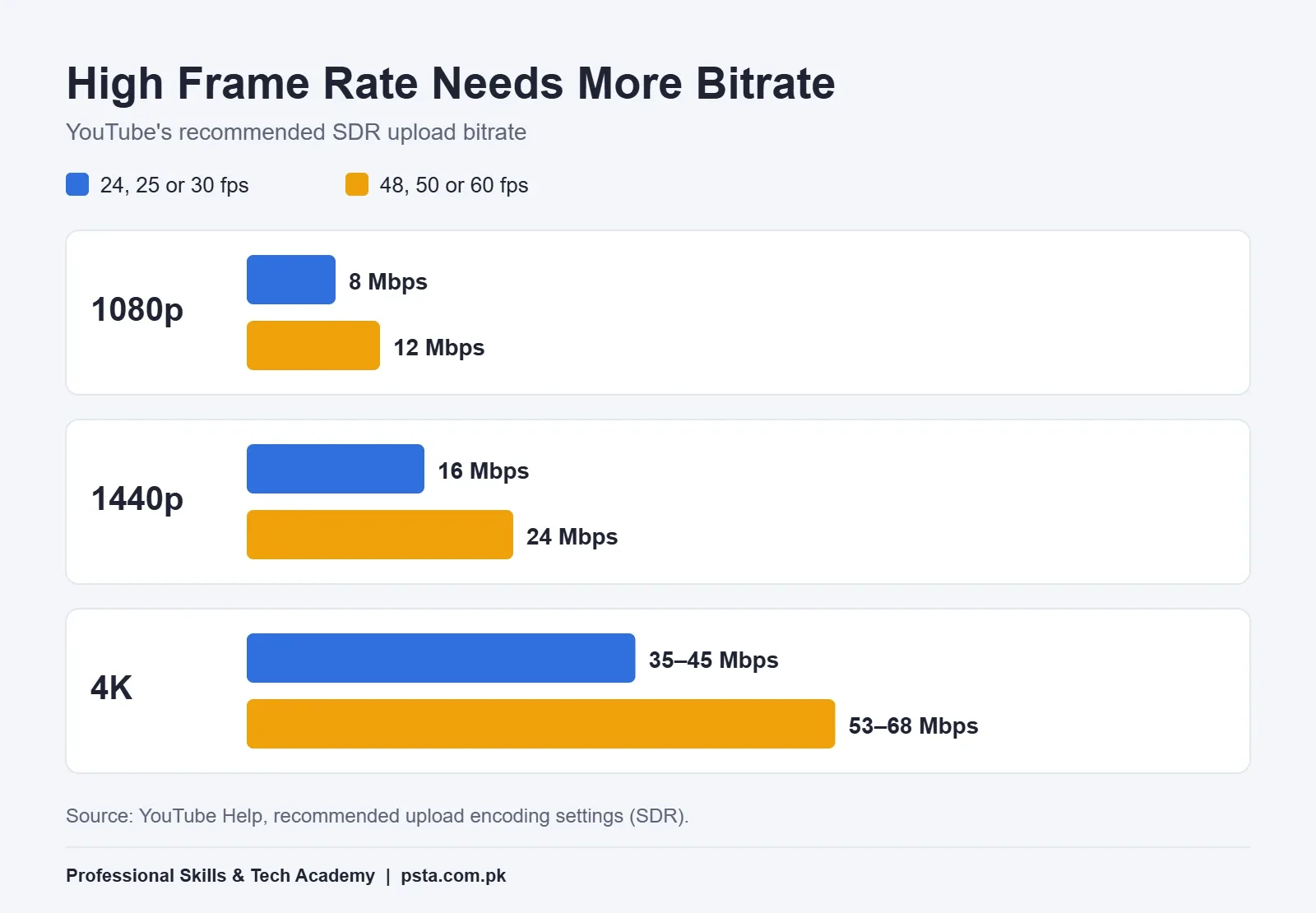
That matters on Pakistani internet. A higher bitrate means a bigger file and a longer upload on a typical home connection. Keep high frame rates for content that really benefits from them, such as gaming, sports and product spins. The same YouTube page asks for progressive scan, so deinterlace any old interlaced footage before upload. For full export presets, see our guide to export settings for YouTube.
Myths 7 and 8: Shutter Speed and Phone Auto Settings
Myth 7: Shutter Speed and Frame Rate Are Separate Settings
Fact: They work as a pair. Adobe explains the 180-degree shutter rule: set the shutter speed to roughly twice the frame rate for natural-looking motion blur. That means about 1/50 at 24 or 25 fps, and 1/100 to 1/120 at 50 or 60 fps.
A very fast shutter, like 1/1000 on a sunny day, makes each frame razor sharp. Motion then looks choppy, like a stop-motion effect. If bright Pakistani sun forces your phone into a fast shutter, an ND filter on the lens lets you keep the 180-degree rule outdoors.
Myth 8: The Phone's Auto Frame Rate Is Always Fine
Fact: Auto settings help casual users but can hurt client work. Apple's iPhone guide describes Auto FPS, which you can apply to 30 fps video only or to both 30 and 60 fps video, along with a separate low-light frame rate option. Settings like these can change the frame rate your phone records in dim rooms.
For a paid shoot, set the frame rate yourself and turn off automatic frame rate changes. Also watch the Lock Camera and Enhanced Stabilization options, because they change how the phone records. The goal is that every clip from the day arrives at the rate you planned.
A Frame Rate Plan for Common Shoots in Pakistan
Two questions decide the best frame rate for video in most cases: how much motion is in the shot, and is it lit by daylight or by indoor mains-powered lights? The grid below turns those two questions into a starting setting.
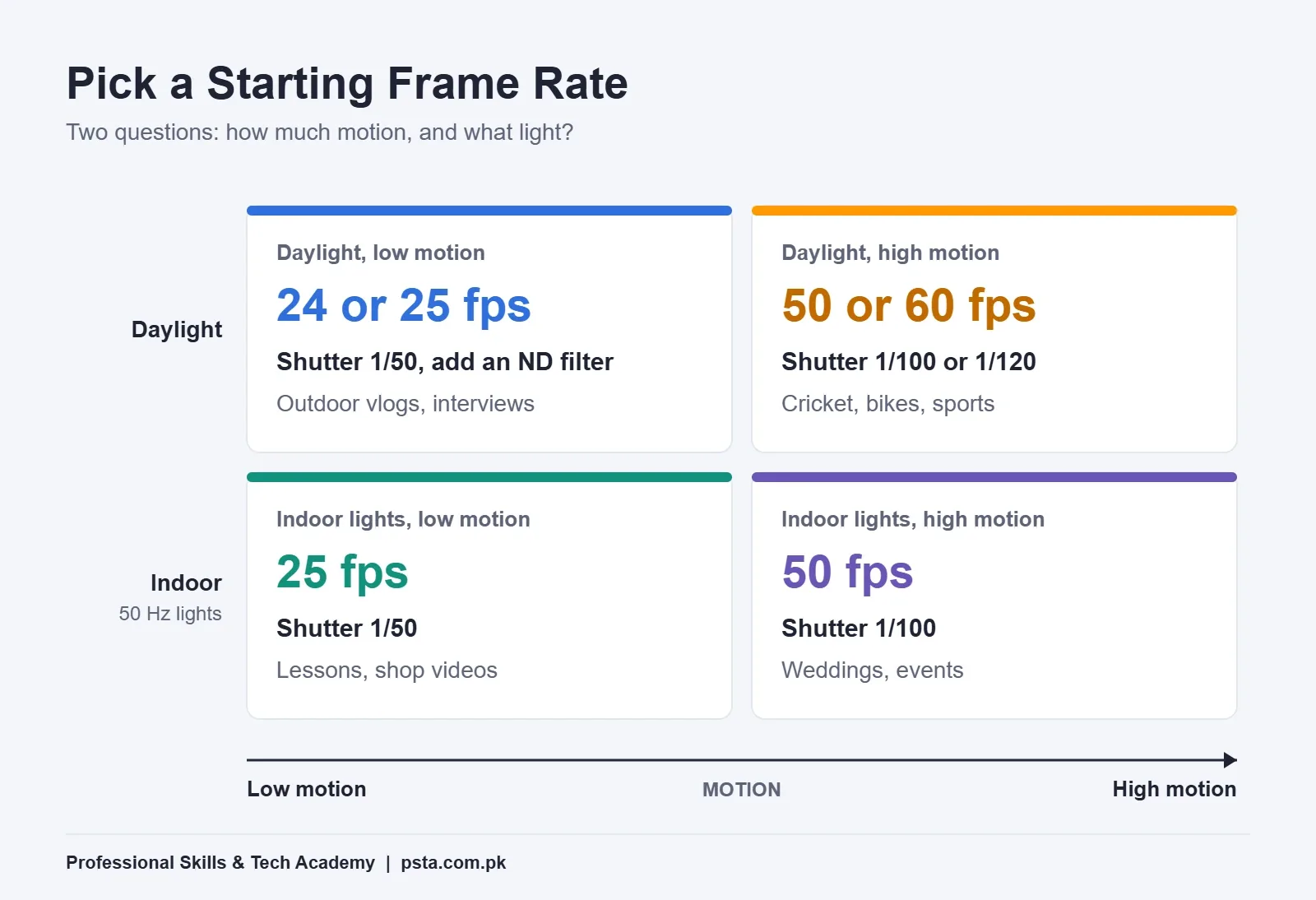
And here is how that plays out on jobs a beginner editor is likely to get:
| Shoot | Frame rate | Shutter | Why |
|---|---|---|---|
| Teacher's lesson in a classroom | 25 fps | 1/50 | Little motion, tube lights |
| Shop owner's product video | 25 fps | 1/50 | Indoor LEDs, calm movement |
| Product spin for slow motion | 50 fps | 1/100 | Smooth half-speed on a 25 fps timeline |
| Wedding hall highlights | 25 and 50 fps | 1/50 and 1/100 | Normal speech plus slow-motion moments |
| Outdoor cricket or bike clips | 50 or 60 fps | 1/100 or 1/120 | Fast action in daylight |
| Gaming or screen recording | 30 or 60 fps | Not applicable | Match the game or screen capture setting |
Notice that 25 and 50 work together. Footage shot at 50 drops onto a 25 fps timeline cleanly, either at normal speed or at exactly half speed. The 24 and 60 pairing doesn't divide evenly, which is one reason mixed footage causes trouble.
For Reels and TikTok, there is no magic platform number to chase. Pick the rate that suits the shot and the lights, then export at that same rate. If you're still choosing a laptop to edit on, our notes on a laptop for video editing explain why 50 and 60 fps 4K clips are heavier to play back.
Where Frame Rate Fits in PSTA's Video Editing Course
At PSTA, frame rate is taught on real footage, not as theory. In our Video Editing and VFX course, you set up Premiere Pro projects, fix mismatched clips, build slow-motion sequences and export for YouTube, Instagram, TikTok and Facebook. The course is beginner level and runs for 12 weeks. You can join on campus in Abbottabad, live online from anywhere in Pakistan, or in a mix of both.
The course page currently lists a fee of Rs. 22,000 (regular Rs. 25,000), payable in 2 installments, and a new batch starts every month. Projects include a YouTube vlog edit, a color-graded short scene, a green screen product promo and a one-minute showreel. If grading is your next step, read color correction vs color grading, and if you want to pair editing with design work, look at our Graphic Designing course, or the one on social media marketing and Meta ads.
Every PSTA program, with its duration and fee, appears on the full course list. To reserve a seat, fill in the online admission form. Morning, evening and weekend slots can be confirmed with us on WhatsApp (+92 314 5424399).
Run a Two-Minute Flicker Test Tonight
Pick the room where you film most often and switch on its usual lights. Record 10 seconds at 30 fps with a 1/60 shutter, then 10 seconds at 25 fps with a 1/50 shutter, pointing at a plain wall. Play both clips on a laptop at full screen.
If the first clip shows rolling bands and the second doesn't, you've found the best frame rate for video in that room, at least for indoor work. Write it down, set it on every camera you use, and make it the starting point of your next project.
Frequently asked questions
Is 30 fps or 60 fps better for YouTube?
Neither is better on its own. YouTube asks you to upload at the frame rate you recorded, and it supports both. Choose 60 fps for gaming, sports or fast product shots where smooth motion helps. Choose 24, 25 or 30 fps for vlogs, tutorials and talking videos, which also keeps file sizes and upload times lower.
What frame rate should I use for Instagram Reels and TikTok?
There is no special frame rate that boosts reach. Shoot at the rate that suits the scene, such as 25 or 30 fps for talking clips and 50 or 60 fps for action, then export at that same rate. Indoors in Pakistan, 25 fps with a 1/50 shutter usually avoids light flicker.
Why does my mobile video flicker under tube lights?
Many tube lights and cheap LED bulbs pulse with Pakistan's 50 Hz mains supply. If your phone records at 30 fps with a 1/60 shutter, it catches the lights at different brightness levels, which shows as flicker or rolling bands. Switching to 25 fps, or a 1/50 or 1/100 shutter, usually fixes it.
Is 24 fps or 25 fps better for a cinematic look?
Both give a similar filmic feel, and most viewers can't tell them apart. 24 fps is the traditional cinema rate, while 25 fps is the PAL-derived rate that matches 50 Hz lighting. For indoor shoots in Pakistan, 25 fps is often the safer choice. Use 24 fps when a client or festival asks for it.
Can I convert 30 fps footage to 60 fps for smoother video?
You can, but the software has to invent the missing frames, which can smear edges and won't add real detail. YouTube also recommends uploading at the original frame rate. If you want smooth motion or slow motion, record at 50 or 60 fps from the start instead of converting later.
What shutter speed should I use at 25 fps?
Use 1/50 second. This follows the 180-degree shutter rule, where the shutter is about double the frame rate, and it also suits 50 Hz lighting in Pakistan. In bright sunlight, use an ND filter or a lower ISO to control exposure instead of raising the shutter speed, which makes motion look choppy.
How do I make slow motion from 60 fps footage in Premiere Pro?
Select the clip in the Project panel and open Clip, Modify, Interpret Footage. Enter your sequence frame rate, for example 30 or 25, as the new frame rate and click OK. The clip becomes longer and plays in smooth slow motion because Premiere uses the real recorded frames instead of creating new ones.
Sources & references
- Adobe: What is frame rate and why does it matter adobe.com
- Adobe: Working with mixed frame rates in Premiere Pro adobe.com
- Adobe: Change footage properties with Interpret Footage adobe.com
- YouTube Help: Recommended upload encoding settings support.google.com
- Nikon: Video flicker reduction onlinemanual.nikonimglib.com
- Apple Support: Change video recording settings on iPhone support.apple.com
- World Standards: Power plug and mains voltage in Pakistan worldstandards.eu
- ProVideo Coalition: The hidden 25p mode in the iPhone camera app provideocoalition.com
Last reviewed & updated on by Umar Qureshi. Written by the PSTA team in Abbottabad, Pakistan.

Umar Qureshi

Mastering Video Editing & Visual Effects (VFX)
Turn this guide into a career: hands-on training with real projects, online across Pakistan or on-campus in Abbottabad · 12 Weeks.

Comments
No comments yet — ask a question or share your experience.