
Quick answer
Learn Gutenberg first if you build blogs, school sites or simple business pages, because it is free and built into WordPress. Add Elementor when clients want custom landing pages, forms and popups; Elementor Pro plans start from $60 a year. Most WordPress freelancers in Pakistan benefit from knowing both editors well.
Key takeaways
- • Gutenberg is the free block editor built into WordPress since version 5.0 in December 2018.
- • Elementor is a separate page builder with 10+ million active installs; Pro plans start from $60 a year.
- • Elementor 4 uses plain HTML elements, but pages mixing many v3 widgets can still be heavier.
- • Choose by project: license budget and how custom the design must be decide most cases.
- • Learn the block editor first, then Elementor, so you can accept edits on either kind of site.
Table of contents 14 sections
- What Are Elementor and Gutenberg, in Plain Terms?
- Elementor vs Gutenberg: The Core Differences in One Table
- How Each Editor Feels When You Build a Real Page
- Building It in Gutenberg
- Building It in Elementor
- Strengths and Weak Spots of Each Editor
- Free vs Paid: What Does Elementor Pro Add, and Is It Worth It?
- What Changed in 2026: Elementor 4 and Newer WordPress Releases
- Speed and Hosting: Which Builder Is Lighter on Cheap Hosting?
- Which One Do Clients and Freelance Buyers Ask For?
- Pick by Project: A Simple Decision Matrix
- A Learning Order That Covers Both Editors
- How PSTA's WordPress Course Teaches Both Editors
- This Weekend: Build One Page Twice
Elementor vs Gutenberg is a question you can settle in about a minute if you answer three questions honestly. Take this quick self-test before you read further, and keep your answers in mind.
- Will you build mostly blogs, school sites and simple business pages, or landing pages full of custom sections, popups and forms?
- Can you pay a yearly license in US dollars with an international card, or do you need a setup that costs nothing?
- After launch, will the client edit the site, or will you?
If you picked simple pages, no budget and client editing, start with Gutenberg. If you picked custom marketing pages and you can pay for Pro, Elementor will save you time. Most people land somewhere in between, which is why the rest of this guide exists.
In this comparison you'll find:
- What each editor is and how it stores your page
- A side-by-side table of cost, speed, flexibility and client handover
- What Elementor Pro adds, and which plan fits a beginner
- What changed in 2026 with Elementor 4 and recent WordPress releases
- A learning order that covers both, so you never turn down a project
What Are Elementor and Gutenberg, in Plain Terms?
Gutenberg is the code name for the block editor that ships inside WordPress itself. It arrived with WordPress 5.0 on December 6, 2018, and every page you write in it is a stack of blocks: a heading block, an image block, a columns block and so on. You don't install anything. Open a fresh WordPress site and you're already using it.
There is also a separate Gutenberg plugin. According to its WordPress.org listing, that plugin is a beta track for testing features before they reach core, and stable features are merged into each WordPress release anyway. Beginners don't need it.
Elementor is a separate plugin that replaces the editing screen with its own drag-and-drop canvas. You drag widgets onto the page, style them from a side panel and see the result live. The Elementor plugin page lists 10+ million active installations, a 4.5 out of 5 rating from 7,323 reviews and "over 40" free widgets. It currently requires WordPress 6.8 or higher and PHP 7.4 or higher.
So the real choice isn't between two products of the same type. It's between the editor WordPress already gives you and a page builder you add on top.
Elementor vs Gutenberg: The Core Differences in One Table
Here is how the two compare on the points that matter when you're learning or taking client work. The figures come from the official pages linked in this article.
| Factor | Gutenberg (Block Editor) | Elementor |
|---|---|---|
| Cost | Free, part of WordPress | Free core plugin; Pro plans start from $60 a year |
| How you edit | Blocks in the WordPress editor, with a live preview | Drag-and-drop canvas with a styling panel |
| Design control | Good, and better with a block theme | Very detailed spacing, motion and responsive controls |
| Page output | Native WordPress blocks | Depends on the plugin; Elementor 4 elements use plain HTML tags |
| Popups and form builder | Need extra plugins | Included in Pro (Advanced Solo plan and above) |
| If the plugin is removed | Content stays readable | Layouts lose their styling |
| Best for | Blogs, school and news sites, lean business sites | Landing pages, agency work, design-heavy client sites |
Read the "if the plugin is removed" row twice. With Elementor, the layout depends on the plugin staying active. That isn't a flaw if you plan for it, but it does mean a client site built in Elementor will stay on Elementor for years.
How Each Editor Feels When You Build a Real Page
Take an example brief: a dental clinic in Abbottabad wants a one-page site with a hero image, three service cards, doctor timings, a map and a WhatsApp button.
Building It in Gutenberg
You'd start with a block theme such as the current default theme, then insert a Cover block for the hero, a Columns block for the services and a simple table or list for timings. Patterns help a lot here. A pattern is a ready-made group of blocks you can drop in and edit. The map usually needs an embed or a small plugin. The page comes out clean, and the clinic's receptionist can later change timings without breaking anything.
Building It in Elementor
You'd open the Elementor canvas, drop in a container, add a heading, image and button, then duplicate a card three times for services. The free Google Maps widget handles the location. You'll spend more time adjusting spacing and mobile layout, because Elementor gives you a control for nearly everything. The result can look more polished, but the receptionist will need a short training session before touching it.
Neither result is wrong, and this example shows the Elementor vs Gutenberg choice better than any feature list. The difference is who you're designing for after launch.
Strengths and Weak Spots of Each Editor
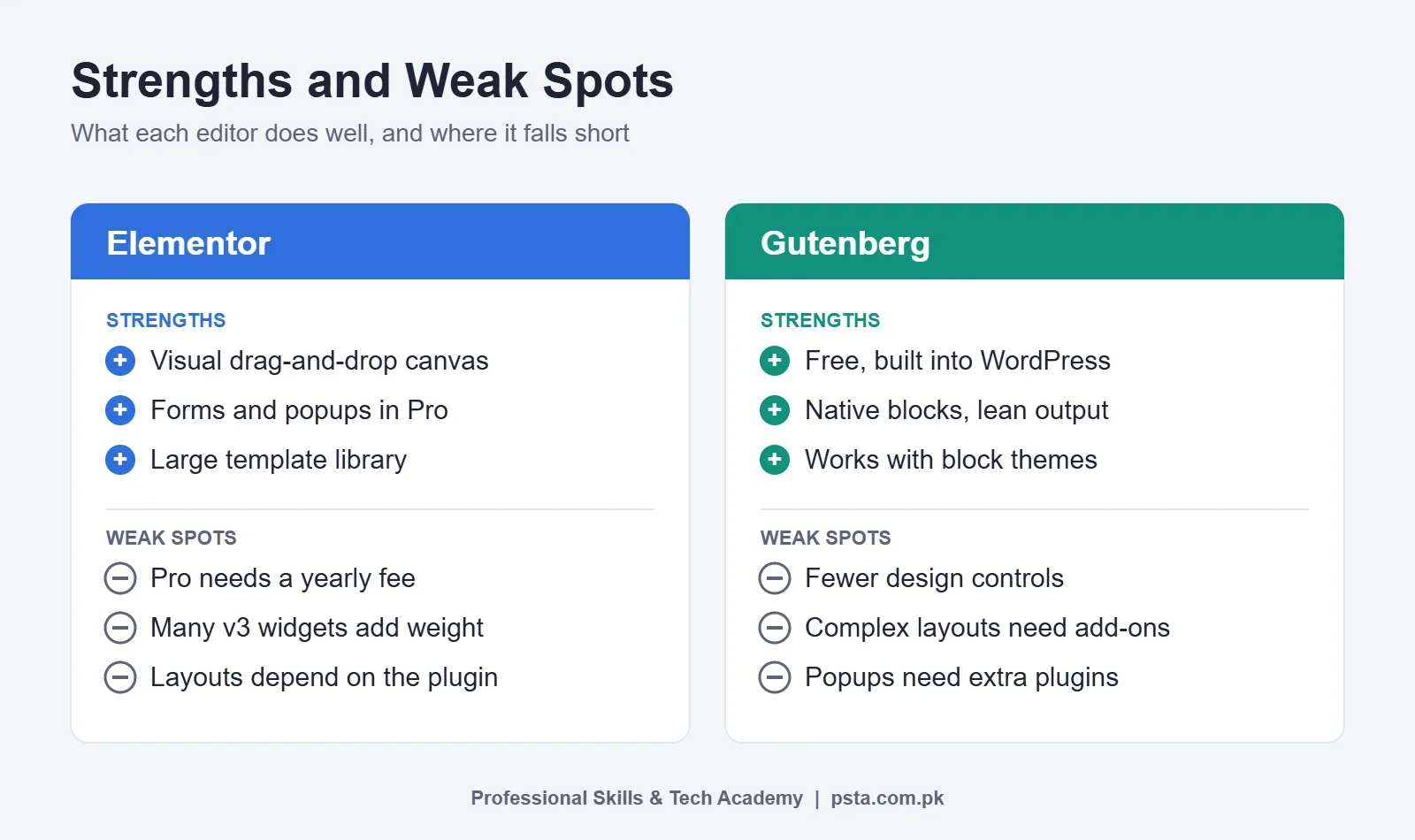
Every Elementor vs Gutenberg debate comes back to the same trade-off. Gutenberg's biggest strength is that it belongs to WordPress. It updates with WordPress, costs nothing, and produces markup the rest of the ecosystem understands. Its weak spot is design depth: complex layouts, animation and conditional popups need extra block plugins or custom CSS.
Elementor's strength is speed of design. A beginner can match a Figma mockup closely without writing CSS, and the template library gives you a head start. Its weak spots are the yearly Pro fee, heavier pages when you stack many older widgets, and the lock-in described above.
Free vs Paid: What Does Elementor Pro Add, and Is It Worth It?
The free Elementor plugin is enough to learn the editor and build simple pages. Pro adds the features clients usually ask for: the form builder, the popup builder, custom code, theme building and eCommerce widgets. According to Elementor's pricing page, Elementor Pro plans start from $60 a year and renew at list price on your billing cycle.
| Plan | Websites | Pro widgets | What's missing or added |
|---|---|---|---|
| Essential | 1 | 57 | No Popup Builder, custom code or eCommerce widgets; limited form and dynamic content |
| Advanced Solo | 1 | 85 | Adds Form Builder, Popup Builder, custom code and eCommerce |
| Advanced | 3 | 85 | Same features as Advanced Solo for three sites |
| Expert | 25 | 85 | Same features, for agencies managing many sites |
Exact dollar amounts change with sales and promotions, so check the pricing page on the day you buy. Two practical points for buyers in Pakistan:
- You'll need a card that works for international online payments, and your bank may add its own charges.
- For client work, let the client buy the license in their own name. When the project ends, the license stays with the site owner, not with you.
Is Pro worth it? This is where Elementor vs Gutenberg becomes a money question. For a freelancer who builds landing pages every week, the form and popup builders alone usually justify the fee. For a student practicing on a local install, the free version is plenty for the first few months.
What Changed in 2026: Elementor 4 and Newer WordPress Releases
Older comparisons often say Elementor pages are bloated and Gutenberg pages are lean. That was a fair summary for years, but Elementor's version 4 changes part of the picture.
According to Elementor's version 4 FAQ, new Elementor sites run the new Atomic Editor by default from April 2026. Its elements are built on plain HTML tags without extra wrapper layers, and it adds reusable Classes and Variables for colors and typography. Older v3 widgets still work on the same page, and existing sites have to switch the Atomic Editor on themselves. The FAQ also notes that Grid and Loop aren't available as atomic elements yet.
On the WordPress side, the WordPress download page lists version 7.1.4 as current and recommends PHP 8.3 or newer. The block editor keeps improving with each release, and the Gutenberg project lists four phases: Editing, Customization, Collaboration and Multilingual.
What this means for you: tutorials from 2023 or 2024 may show screens you won't see today. Learn from material that matches the version on your install.
Speed and Hosting: Which Builder Is Lighter on Cheap Hosting?
Speed is the part of Elementor vs Gutenberg that beginners argue about most. A plain Gutenberg page usually loads fewer scripts and styles than the same page built with many Elementor v3 widgets. That matters on low-cost shared hosting, which many small businesses in Pakistan use because annual plans are cheap. Elementor's own FAQ admits that performance gains vary when v3 widgets are mixed with new atomic elements.
In practice, the builder is only one part of speed. Image size, caching, the theme and the number of plugins often matter more. Our WordPress speed optimization checklist walks through those fixes step by step.
Before you install either editor on a client's hosting, run through these checks:
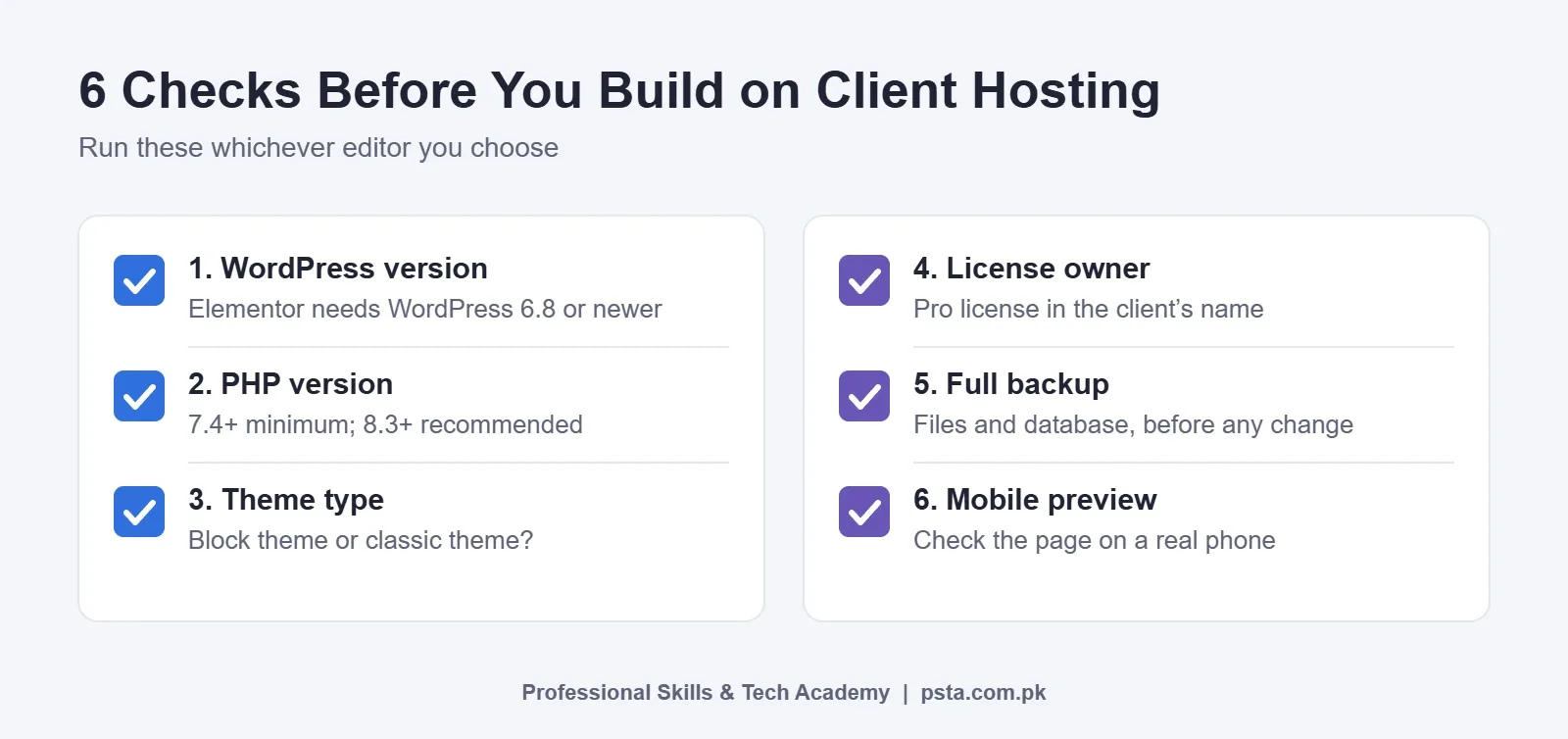
The theme check matters more than it looks. A block theme lets you edit headers and footers in the Site Editor, while many classic themes expect Elementor or the Customizer for that job. And take a full backup of files and database first, because switching editors on a live page is hard to undo.
Which One Do Clients and Freelance Buyers Ask For?
Elementor sits at the top of the most popular plugins list on WordPress.org, and that reach shows up in WordPress freelancing. On Fiverr and Upwork, a common kind of small order is an edit to an existing Elementor site: fix the mobile header, add a section, connect a form. If you can't open Elementor confidently, you'll skip those orders.
Gutenberg demand looks different. Bloggers, publishers, schools and developers who care about clean code often prefer the block editor, and agencies building block themes need people who understand patterns and the Site Editor. It's also worth knowing that the Classic Editor plugin still has 8+ million active installations, so you'll meet older sites that use neither builder.
If you plan to sell WordPress services, a gig that says you work in both editors reaches more buyers. Our guide on how to create a Fiverr gig covers how to package that.
Pick by Project: A Simple Decision Matrix
When a new project arrives, two questions do most of the work: does the client have a budget for a license, and does the design need custom marketing sections? Place the project in one of four boxes.
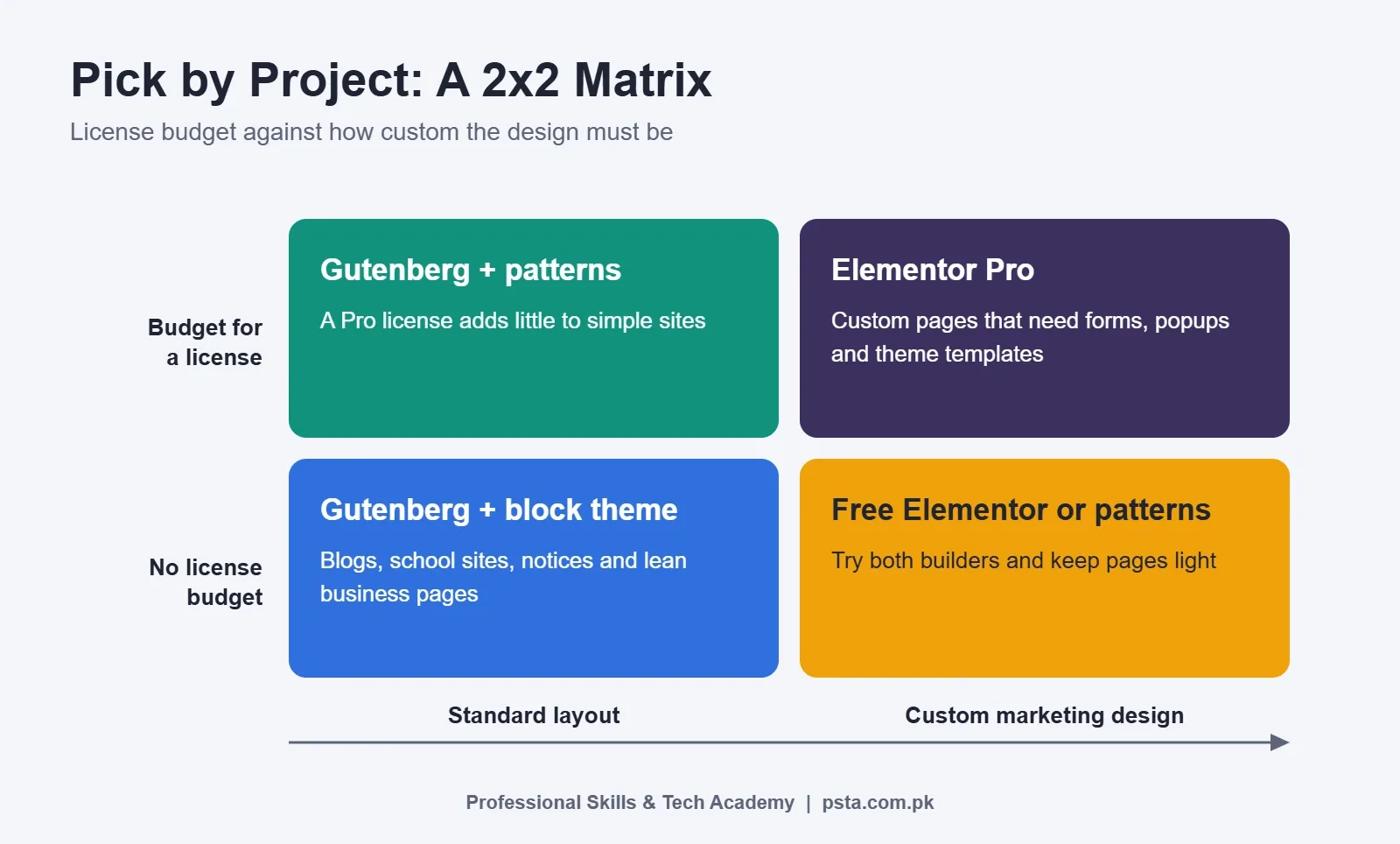
Notice that Gutenberg appears in three of the four boxes. That's not a verdict against Elementor. It reflects the fact that most small sites don't need popups or theme building, while the projects that do need them are often the better-paid ones.
A Learning Order That Covers Both Editors
You don't have to settle Elementor vs Gutenberg forever. This order keeps your first month simple and your skills marketable:
- Set up a practice site. Install WordPress locally so mistakes cost nothing. Our XAMPP localhost guide takes about an hour.
- Learn the block editor first. Build three pages with core blocks only: an About page, a services page and a blog post. Learn patterns, including synced patterns you can reuse across pages.
- Try a block theme and the Site Editor. Change the header, footer and global styles without a plugin.
- Install free Elementor. Rebuild one of your three pages in it and compare the experience.
- Learn responsive editing in Elementor. Fix the tablet and mobile views of that page until they look right.
- Study Pro features only when a project needs them. Forms, popups and theme templates are easier to learn with a real brief in front of you.
- Publish one finished sample of each. Put both in your portfolio with a short note on why you chose that editor.
This order works because the block editor teaches you how WordPress itself thinks about content. Elementor then feels like a design layer on top, not a separate world.
How PSTA's WordPress Course Teaches Both Editors
The Complete WordPress Website Development Course is a 12-week, beginner-level program, and it doesn't ask you to pick a side. One module is dedicated to theme customization with Elementor and Gutenberg, and other modules cover domain and hosting setup, must-have plugins, WooCommerce, SEO and speed, security, and freelancing with portfolio building. The course page currently lists the fee as Rs. 22,000, reduced from Rs. 25,000.
Classes run in person in Abbottabad (our building is on Old College Road in Mandian, across from FIMS College), fully online, or as a mix of both. If you're also curious about coding your own themes later, look at the Full-Stack Web Development course. For a sense of what clients pay for finished sites, read our WordPress website cost breakdown.
Questions about batches or timings are welcome on WhatsApp at +92 314 5424399. When you're ready, the admission page has the form, and all courses are listed in one place if you want to compare.
This Weekend: Build One Page Twice
Pick a simple page, such as a tuition center's contact page with timings, a map and a WhatsApp button. Build it once with core blocks and once with free Elementor, then open both on your phone. Note which one took less time, which one looks better on mobile, and which one you'd be happier handing to a client. That one small test will tell you more about Elementor vs Gutenberg than any article, including this one.
Frequently asked questions
Is Gutenberg free to use?
Yes. Gutenberg is the block editor built into WordPress, so it costs nothing and needs no installation. You only pay for hosting and a domain. Some extra block plugins and premium block themes are paid, but you can build complete blogs, school sites and small business pages with the free core blocks and patterns.
Can I switch a site from Elementor to Gutenberg later?
Yes, but plan it as a rebuild rather than a switch. Pages designed in Elementor depend on the plugin for their layout, so turning it off leaves mostly unstyled content. Take a full backup, rebuild one page at a time with blocks or patterns, check each on mobile, and only then deactivate Elementor.
Does Elementor slow down a WordPress site?
It can if a page stacks many older v3 widgets, because each adds scripts and styles. Elementor 4 elements use plain HTML tags, which helps. In practice, oversized images, missing caching and too many plugins usually hurt speed more than the builder itself, so fix those first and then measure again.
Do I need Elementor Pro to get freelance work?
Not at the start. Many small orders are edits to existing sites where the client already owns Pro, and you can learn the editor on the free plugin. Buy Pro, or ask the client to buy it, when a project needs forms, popups or theme templates, and keep the license in the client’s name.
Is Gutenberg the same as the WordPress block editor?
Yes, in everyday use. Gutenberg was the project code name, and the editor that ships with WordPress is its stable result. There is also a separate Gutenberg plugin, which is a beta track for testing new features early. Beginners and client sites should use the editor that comes with WordPress, not the beta plugin.
Which is better for a WooCommerce store?
Both can work. A block theme with WooCommerce blocks keeps a small store light and costs nothing extra. Elementor Pro adds eCommerce widgets that give you more control over product and shop page design, starting from the Advanced Solo plan. Choose based on how custom the store design must be and the client’s budget.
Can I use Elementor and Gutenberg on the same site?
Yes. Many sites write blog posts in the block editor and build the home page or landing pages in Elementor. Just keep each page in one editor, so nobody edits the same page in two places. Note in your handover document which pages use which editor, so the client knows where to make changes.
Sources & references
- WordPress 5.0 “Bebo” release announcement wordpress.org
- Elementor Website Builder on WordPress.org wordpress.org
- Elementor pricing and plans elementor.com
- Elementor version 4 FAQ elementor.com
- Gutenberg plugin on WordPress.org wordpress.org
- Download WordPress (current version and requirements) wordpress.org
- Classic Editor plugin on WordPress.org wordpress.org
- Popular plugins directory, WordPress.org wordpress.org
Last reviewed & updated on by Umar Qureshi. Written by the PSTA team in Abbottabad, Pakistan.

Umar Qureshi
Complete WordPress Website Development Course: Beginner to Pro
Turn this guide into a career: hands-on training with real projects, online across Pakistan or on-campus in Abbottabad · 12 Weeks.

Comments
No comments yet — ask a question or share your experience.