Quick answer
Usually not, but your accounts might be. Many "hacked phone" worries turn out to be account takeovers that start with a shared OTP or a linked WhatsApp session. Run Play Protect or iPhone Safety Check, review WhatsApp Linked devices and your Google or Apple device list, and secure accounts before any factory reset.
Key takeaways
- • Battery drain, warmth and call noise are weak signs; messages sent "from you" and unknown sign-in alerts are strong ones.
- • Check accounts as well as the handset: WhatsApp Linked devices and your Google or Apple device list come first.
- • On Android, run Play Protect and review device admin, accessibility and unknown-app permissions.
- • On iPhone (iOS 16 or later), use Safety Check under Privacy & Security.
- • Secure accounts from a clean device before you factory reset, and never share an OTP or PIN with a caller.
- • NCCIA received 77,023 complaints in the first five months of 2026, so report incidents with screenshots and transaction IDs.
Table of contents 20 sections
- Why "Is My Phone Hacked?" Is Usually an Account Question
- 9 Myths vs Facts About Phone Hacking
- Myth 1: Fast Battery Drain Means Someone Is Spying on You
- Myth 2: Clicks or Echo on Calls Mean Your Line Is Tapped
- Myth 3: A Secret Dial Code Will Tell You If You're Hacked
- Myth 4: iPhones Can't Be Hacked
- Myth 5: Installing an Antivirus App Solves Everything
- Myth 6: A Factory Reset Always Fixes a Hacked Phone
- Myth 7: Hackers Break In Through Clever Code, Not Conversation
- Myth 8: If WhatsApp Opens Normally, Nobody Else Is Reading It
- Myth 9: Only Rich or Famous People Get Targeted
- Is My Phone Hacked? Warning Signs That Deserve Attention
- How Do You Check an Android Phone?
- How Do You Check an iPhone?
- The Two Checks People Skip: WhatsApp and Your Main Account
- What Should You Do If Something Looks Wrong?
- When Is a Factory Reset the Right Move?
- How Big Is the Problem in Pakistan?
- Turning These Checks Into a Skill With PSTA
- Do One Check Tonight: Your Linked Devices
Before you settle on an answer to "is my phone hacked," take a quick self-test with four questions. Has an app you don't remember installing appeared on your phone? Did you get a WhatsApp or SMS login code you never asked for? Has someone told you they got a strange message "from you"? Did a bank or Google alert mention a sign-in from a new device? If you said no to all four, the answer is probably no, and a slow battery or a warm phone has an ordinary cause. If you said yes to even one, keep reading and do the checks below today.
In this guide you will find:
- Nine popular beliefs about phone hacking, and what is actually true about each one
- A table that separates warning signs worth acting on from everyday glitches
- Separate check routines for Android phones and iPhones, using tools already on your phone
- A recovery order that stops an attacker before you wipe anything
- What the latest NCCIA complaint figures say about cyber fraud in Pakistan
Why "Is My Phone Hacked?" Is Usually an Account Question
In many everyday cases that people describe as a hacked phone, the handset itself is fine. More often, somebody has taken over an account that lives on the phone: WhatsApp, Gmail, Facebook or a banking app. The phone keeps working normally, so the owner assumes it is safe, while the attacker reads messages from another device.
That difference changes what you check. Phone spyware that hides on the handset does exist, but it is expensive and aimed at a small group of people. Account takeover is cheap, and it usually starts with a phone call or a message that talks you into sharing a code. The Pakistan Telecommunication Authority's latest warning, issued during Cybersecurity Awareness Week 2026, focuses on exactly this: fake calls, messages and links that impersonate banks, companies and government offices.
So treat this guide as two jobs. First, check the phone for apps and settings that shouldn't be there. Second, check the accounts for devices and sessions that aren't yours.
9 Myths vs Facts About Phone Hacking
Most of the worry we hear comes from forwarded tips and half-remembered news stories. Here is what holds up and what doesn't.
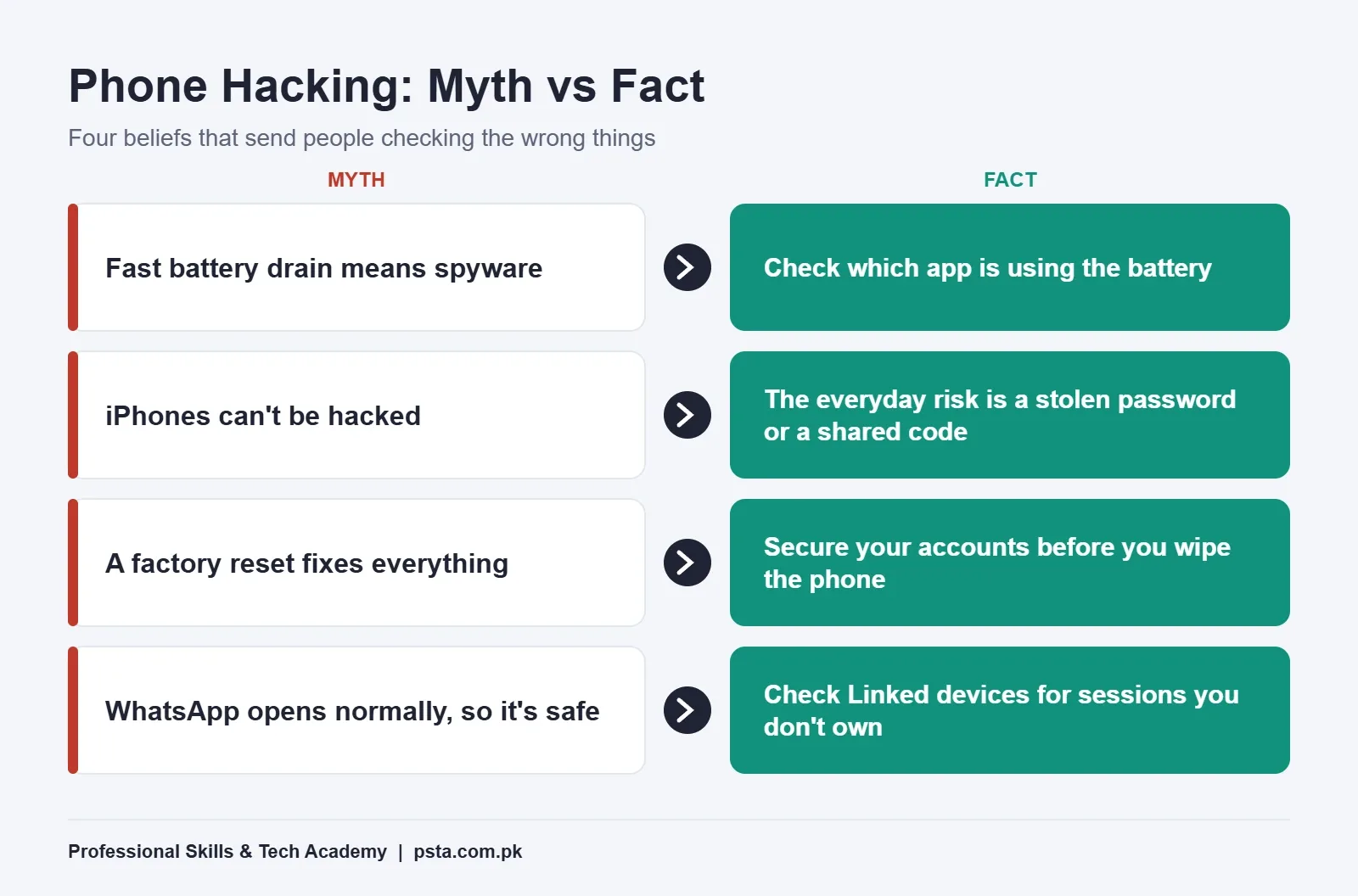
Myth 1: Fast Battery Drain Means Someone Is Spying on You
Fact: An ageing battery, a bright screen, weak signal and heavy apps explain most drain. Spyware can use power, but so can a game or a video app. The useful clue isn't the drain itself. Open the battery usage screen and look at which app is responsible. A familiar app at the top is normal. An app you don't recognize, or one with no icon, is worth investigating.
Myth 2: Clicks or Echo on Calls Mean Your Line Is Tapped
Fact: Noise on a call comes from the network, the other handset or a poor connection. Sound is not a reliable sign of anything. Don't spend your energy listening for clicks. Spend it on the checks later in this guide, which look at things you can actually verify.
Myth 3: A Secret Dial Code Will Tell You If You're Hacked
Fact: Codes shared in WhatsApp forwards mostly show call-forwarding status. That is worth knowing, because a scammer who forwards your calls can receive voice OTPs. But it says nothing about apps or accounts. Check forwarding in your phone's call settings, and if anything is forwarded that you didn't set up, switch it off and call your network's helpline.
Myth 4: iPhones Can't Be Hacked
Fact: iPhones are hard to attack directly, but not impossible. Apple says it has sent threat notifications since 2021 to users in more than 150 countries who were targeted by mercenary spyware. The same Apple support page says the vast majority of users will never face such attacks. For everyone else, the real iPhone risk is a stolen Apple Account password or a code shared with a caller.
Myth 5: Installing an Antivirus App Solves Everything
Fact: Android phones with Google Play already include Google Play Protect. According to Google's Play Protect help page, it checks apps when you install them, scans your device periodically, and can warn about, disable or remove harmful apps. A third-party security app can add features, but no app protects you from typing your password into a fake page. Be careful with "cleaner" or "booster" apps that ask for broad permissions.
Myth 6: A Factory Reset Always Fixes a Hacked Phone
Fact: A reset removes apps and settings from the handset. It does nothing to an attacker who already has your Gmail, Apple Account or WhatsApp on their own device. If you reset first and restore the same backup with the same passwords, you can end up exactly where you started. Secure the accounts before you think about wiping.
Myth 7: Hackers Break In Through Clever Code, Not Conversation
Fact: PTA's recent warnings center on scammers who use calls, messages and links rather than technical tricks. Its advice is plain: never share one-time passwords, PINs or account passwords with anyone, and verify callers who claim to represent banks, companies or officials on your own. A caller who asks for a code is the attack. No technical skill is needed on their side once you read the code out.
Myth 8: If WhatsApp Opens Normally, Nobody Else Is Reading It
Fact: WhatsApp lets one account run on linked devices, such as a laptop browser. Someone who scanned your QR code for a minute can keep reading your chats while your phone works as usual. The WhatsApp Help Center shows where to find Linked devices and how to log a device out. We cover the full recovery process in our WhatsApp hacked recovery checklist.
Myth 9: Only Rich or Famous People Get Targeted
Fact: Expensive spyware does go after journalists, activists and officials. Ordinary fraud goes after everyone. NCCIA sources quoted by ProPakistani say thousands of people lose between Rs. 2,000 and Rs. 20,000 every day, and many never report it because the amount feels too small.
Is My Phone Hacked? Warning Signs That Deserve Attention
Use this table to separate the signs of a hacked phone from everyday glitches. The left column is the symptom. The middle column is the boring explanation that is usually right. The right column is the check that settles it.
| What You Notice | Common Innocent Cause | Check That Settles It |
|---|---|---|
| Battery drains faster than before | Old battery, heavy apps, weak signal | Battery usage by app; look for unknown names |
| Phone feels warm | Charging, gaming, camera use | Same battery screen; warmth while idle is the odd case |
| Unknown app on the home screen | Pre-installed by the brand or carrier | Open its app info; check installer and permissions |
| Login codes you didn't request | Someone typed your number by mistake | Never share the code; turn on two-step verification |
| Friends get messages "from you" | Rarely innocent | WhatsApp Linked devices; Facebook and Gmail sessions |
| "New sign-in" email from Google or Apple | Your own new phone or laptop | Account device list; remove anything unfamiliar |
| Calls stop ringing, callers hear a busy tone | Network fault or Do Not Disturb | Call forwarding settings; network helpline |
| Pop-up ads on the home screen | An adware app, usually from outside the store | Recently installed apps; Play Protect |
Two rows matter most: messages sent "from you" and sign-in alerts you didn't trigger. Those point to an account, so jump to the account checks and the recovery steps.
How Do You Check an Android Phone?
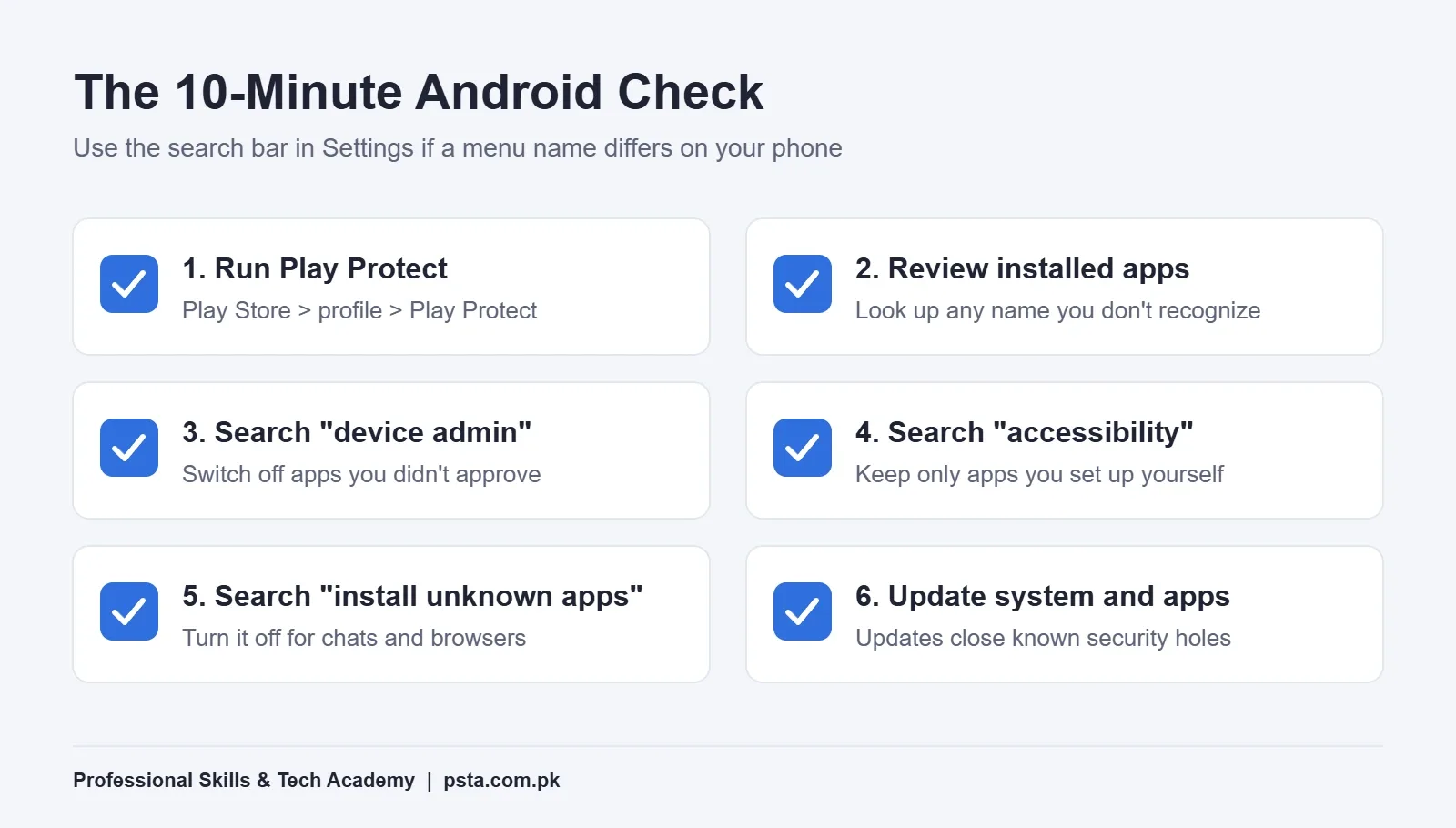
This routine takes about 10 minutes and answers "is my phone hacked" for most Android users. Menu names change between Samsung, Infinix, Tecno, Xiaomi and other brands, so use the search bar at the top of Settings when a path doesn't match.
- Run Play Protect. Open the Play Store, tap your profile picture, then Play Protect. Make sure "Scan apps with Play Protect" is on in its settings, and act on any warning it shows.
- Review installed apps. In Settings, open Apps and sort the list. Anything you don't recognize, look up by name before deciding. Remove apps you no longer use.
- Search Settings for "device admin". Apps with device admin rights can resist being uninstalled. Your bank, a work profile or Find My Device may appear here legitimately. Anything else should be switched off, then uninstalled.
- Search Settings for "accessibility". Accessibility access lets an app read the screen and tap for you. Only apps you deliberately set up, such as a screen reader, belong here.
- Search Settings for "install unknown apps". Turn this permission off for WhatsApp, browsers and file managers. Many fake "APK" files arrive through chats.
- Update the phone and apps. System and app updates close security holes, and PTA's guidance lists keeping devices updated among its basic precautions.
How Do You Check an iPhone?
iPhones give you fewer places to hide things, so the routine for checking whether your iPhone is hacked is shorter.
- Open Safety Check. Go to Settings, then Privacy & Security, then Safety Check (iOS 16 or later). Apple's guide explains that it shows who can see your location, which devices are signed in to your Apple Account, and which apps have privacy permissions. Choose Manage Sharing & Access to review item by item.
- Look for profiles you didn't add. Under Settings, General, check VPN & Device Management. On a personal phone, a profile you can't explain should be removed.
- Update iOS. Apple lists keeping devices updated as a core protection.
- Treat Apple alerts carefully. Apple says its threat notifications never ask you to click links, install apps or share codes. If a message claiming to be from Apple asks for any of these, it is the scam.
If you are a journalist, activist or public official and have a real reason to think you're being targeted, Apple recommends turning on Lockdown Mode and getting expert help.
The Two Checks People Skip: WhatsApp and Your Main Account
Your Google Account or Apple Account is the master key. It holds your contacts, backups, photos and password resets for almost everything else. Open its security page and review the list of signed-in devices. Remove any phone, laptop or browser you don't own, then change the password.
WhatsApp is the second key in Pakistan, because family, work and payment conversations all run through it. Open Linked devices (from the menu on Android, from Settings on iPhone) and log out any session you don't recognize. Then turn on two-step verification so a stolen SMS code alone can't move your account to another phone.
Facebook and Instagram have their own "Where you're logged in" lists under security settings. Check them while you're at it.
What Should You Do If Something Looks Wrong?
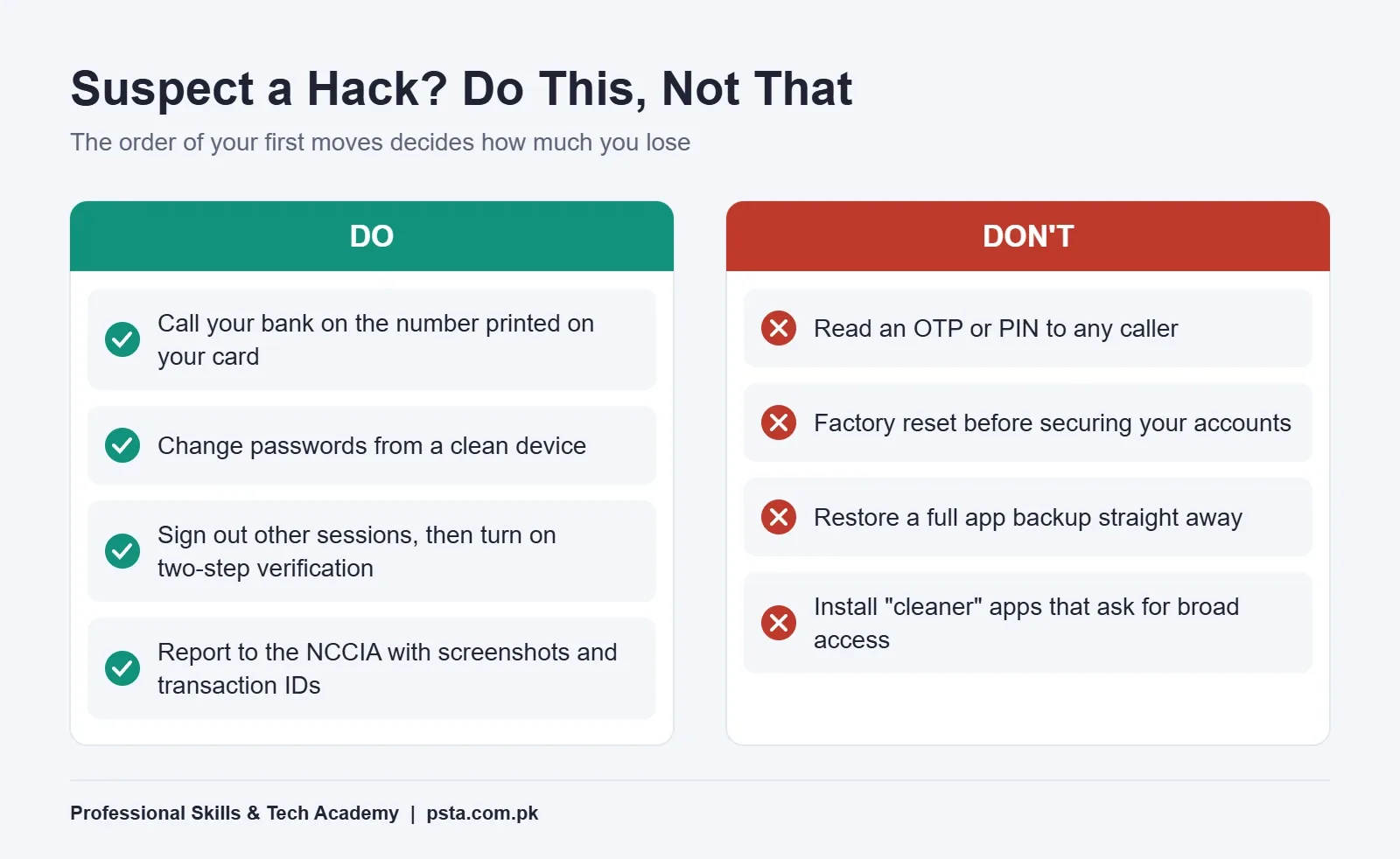
Order matters here. If you change passwords on a phone that still has a malicious app, the app may capture the new ones. Follow this sequence instead:
- Call your bank first if money apps are involved. Use the number printed on your card, not one from a message. Ask them to block cards and freeze online banking until you're sure.
- Move to a clean device. Use a family member's phone or a laptop you trust for the next steps.
- Change your main email or Apple Account password, then sign out of all other sessions from its security page.
- Turn on two-step verification for email, WhatsApp, Facebook and banking. PTA's June 2026 advisory, reported by Daily Pakistan, also asks users to keep a different password for every platform.
- Clean the phone. Remove unknown apps, revoke device admin and accessibility access, and run Play Protect again.
- Report it. File a complaint with the NCCIA through its official channels, and keep screenshots, numbers and transaction IDs. PTA's August alert lists its Digital Assistant on WhatsApp (0315-0055055) as one official contact.
For scam calls specifically, our guide to fraud calls in Pakistan walks through how to recognize and report them.
When Is a Factory Reset the Right Move?
Reset after the account steps, not before, and only when the phone still behaves strangely: an app keeps coming back, settings change on their own, or pop-ups continue after you've removed suspicious apps. Back up photos and documents first, but avoid restoring a full app backup that could bring the problem back. Reinstall apps one by one from the official store.
If the phone is old and no longer receives security updates, the honest advice is to replace it when you can. A phone without updates stays exposed to holes that newer models have closed.
How Big Is the Problem in Pakistan?
The numbers show why habits matter more than gadgets. According to figures shared in the National Assembly and reported by Journalism Pakistan, the NCCIA received 77,023 complaints in the first five months of 2026 and verified 58,286 of them. The same report lists 161,828 complaints in 2024 and 157,465 in 2025.
ProPakistani, citing NCCIA records, reported 227,757 cyber fraud complaints over three years, with combined losses of Rs. 8.32 billion. Even serving and former lawmakers appear among the victims. Nobody in that list was protected by owning an expensive phone. What protects people is refusing to share codes and spotting a takeover early.
Turning These Checks Into a Skill With PSTA
If going through these settings made you curious about how attacks actually work, that curiosity is the starting point for a career. PSTA's Cyber Security & Ethical Hacking Course is a beginner program spread over 12 weeks. When I checked the course page for this guide, it listed the fee as Rs. 45,000. You can study on our Abbottabad campus at Mandian, Old College Road, join live online from another city, or mix the two.
The labs cover recognizing phishing, malware and social engineering, configuring defenses such as firewalls and VPNs, and investigating an incident while preserving evidence. Those are the same instincts you used in this guide, done properly and with permission. If offensive testing interests you later, the next step up is our Advanced Ethical Hacking & Penetration Testing Course. If you're weighing certifications too, read our comparison of cyber security certifications for beginners.
You can see every program on the courses page, and the admission page explains how to reserve a seat in the next monthly batch.
Do One Check Tonight: Your Linked Devices
You don't need to do everything at once. Tonight, open WhatsApp's Linked devices and your Google or Apple Account device list. Two minutes, two lists. If every entry is yours, you can stop worrying about whether your phone is hacked. If one isn't, you now know the exact order to fix it. Good phone security is mostly small habits like this, repeated every few weeks.
Frequently asked questions
Can someone hack my phone just by calling me?
A normal call can't install anything on your phone. The danger is what the caller asks you to do. Scammers pose as banks, couriers or officials and ask you to read out an OTP, share a PIN or install an app. PTA advises never sharing OTPs, PINs or passwords with anyone and verifying callers yourself through an official number.
How do I know if someone is reading my WhatsApp messages?
Open WhatsApp and go to Linked devices: from the menu on Android or from Settings on iPhone. Every computer or browser listed there can read your chats. If you see one you don't recognize, tap it and log out. Then turn on two-step verification so your account can't be moved to another phone with just an SMS code.
Does a factory reset remove spyware?
A reset removes apps and settings stored on the handset, so it clears most malicious apps. It does not log an attacker out of your Gmail, Apple Account or WhatsApp if they already have access on their own device. Change passwords and remove unknown sessions from a clean device first, then reset only if problems continue.
Is Google Play Protect enough, or do I need an antivirus app?
For most Android users, Play Protect plus careful habits covers the basics. Google says it checks apps at install, scans the device periodically, and can warn about, disable or remove harmful apps. Extra security apps can add features, but avoid "cleaner" or "booster" apps that ask for broad permissions they don't need.
Can an iPhone get spyware?
Yes, but advanced spyware is rare and expensive. Apple says its threat notifications have gone to users in more than 150 countries since 2021, aimed at people such as journalists and activists, while the vast majority of users will never be targeted. Everyday iPhone risks are stolen Apple Account passwords and codes shared with scammers.
Where do I report a hacked phone or account in Pakistan?
Call your bank immediately on the number printed on your card if money is involved. Then file a complaint with the National Cyber Crime Investigation Agency (NCCIA) through its official channels, keeping screenshots, phone numbers and transaction IDs. PTA also lists its Digital Assistant on WhatsApp, 0315-0055055, as an official contact for reporting suspicious communication.
What are the strongest signs that my phone or account is hacked?
Two signs deserve immediate action: friends receiving messages "from you" that you didn't send, and sign-in alerts from Google, Apple or your bank for a device you don't own. Battery drain, a warm phone or noise on calls usually have ordinary causes. Check the battery usage list for unknown apps before assuming the worst.
Sources & references
- PTA Warns How Scammers Trick You Into Losing Money and Sensitive Data (ProPakistani) propakistani.pk
- Your Money and Data Are at Risk as Phishing Attacks Rise (ProPakistani) propakistani.pk
- Cyber Fraudsters Defraud Over 227,000 Pakistanis (ProPakistani) propakistani.pk
- Pakistan Cybercrime Complaints Top 77,000 in 2026 (Journalism Pakistan) journalismpakistan.com
- Use Google Play Protect to Help Keep Your Apps Safe (Google Help) support.google.com
- About Apple Threat Notifications and Protecting Against Mercenary Spyware (Apple Support) support.apple.com
- How Safety Check Works (Apple Personal Safety User Guide) support.apple.com
- How to Unlink a Device (WhatsApp Help Center) whatsapp.com
Last reviewed & updated on by Umar Qureshi. Written by the PSTA team in Abbottabad, Pakistan.

Umar Qureshi

Cyber Security & Ethical Hacking Course in Abbottabad - PSTA
Turn this guide into a career: hands-on training with real projects, online across Pakistan or on-campus in Abbottabad · 12 Weeks.

Comments
No comments yet — ask a question or share your experience.