Quick answer
Power BI Desktop is a free Windows download, and a free license lets you publish reports to your own My workspace. Sharing with other people usually needs Power BI Pro at $14 per user per month, paid yearly, for the sender and every viewer. Sign-up needs a work or school email, and the Fabric trial lasts 60 days.
Key takeaways
- • Power BI Desktop is free on Windows and covers Power Query, modeling, DAX and report design.
- • The free service license is for your own content only; it cannot share or collaborate.
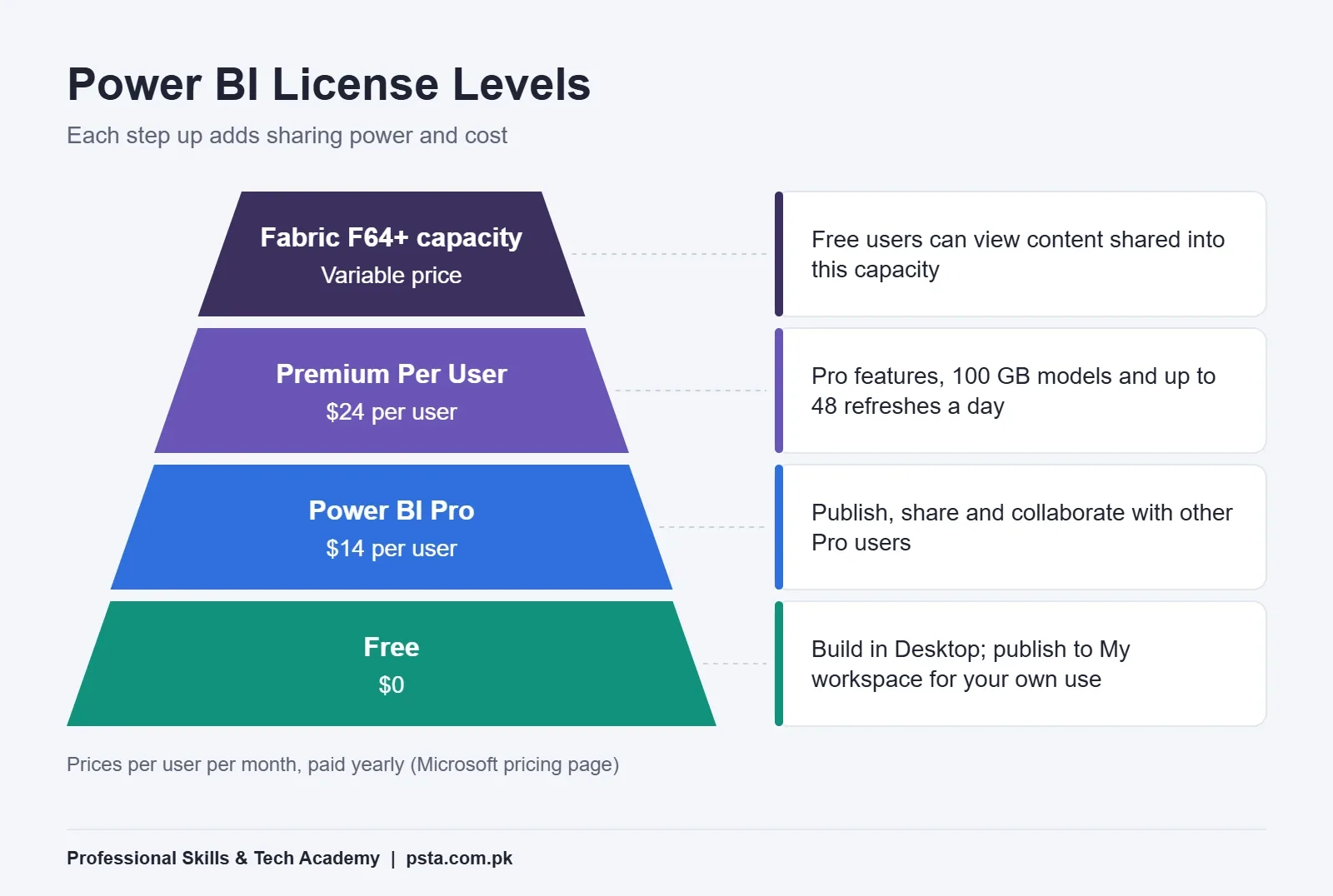
- • Pro costs $14 and Premium Per User $24 per user per month, paid yearly.
- • Gmail, Hotmail and Outlook.com addresses cannot sign up for the Power BI service.
- • Publish to web makes a report public to anyone, so never use it for client data.
Table of contents 11 sections
- Is Power BI Free? What the Free Parts Actually Cover
- Power BI License Types Side by Side
- Myth 1: "If Desktop Is Free, Sharing Must Be Free Too"
- Myth 2: "I Can Sign Up for the Service With My Gmail Account"
- Myth 3: "Publish to Web Is a Free Way to Share Client Reports"
- Myth 4: "The Free Trial Can Be Renewed Forever"
- Myth 5: "You Need a Paid License to Learn Power BI Properly"
- Myth 6: "Power BI Runs on Any Laptop, Including a MacBook"
- What Does a Small Pakistani Business Actually Pay?
- Where PSTA's Power BI Course Fits In
- Try This Before You Spend a Rupee
Many students assume that because they downloaded Power BI without paying, everything after that is free as well. So is Power BI free? Partly. Power BI Desktop costs nothing on Windows, but the moment you want to share a report with a manager or client through the Power BI service, you usually need a paid license that starts at $14 per user per month on Microsoft's pricing page.
That gap between "free to build" and "paid to share" causes most of the confusion I see in class. This guide clears it up myth by myth.
Here's what you'll be able to answer after reading:
- Which parts of Power BI are free, and where the bill starts
- Why your Gmail address gets rejected at sign-up, and what to do instead
- What Pro, Premium Per User and Fabric capacity each cost and add
- How much a small team in Pakistan would realistically pay
- How to learn Power BI and build a portfolio without buying any license
Is Power BI Free? What the Free Parts Actually Cover
Power BI isn't one product. It's a set of pieces, and each piece has its own price.
Power BI Desktop is the Windows app where you connect data, clean it in Power Query, build a model, write DAX measures and design report pages. Microsoft's download guide describes it as a free download, and it gets a new release every month. Because Power BI Desktop is free, the pricing page lists no paid edition of the app itself. Nearly everything you learn in a Power BI course happens here.
The Power BI service is the website (app.powerbi.com) where reports are published, refreshed on a schedule and shared. A Power BI free license exists here too, but it's limited to your own content.
Licenses decide what you can do in the service: Free, Pro, Premium Per User (PPU), or access through an organization's Fabric or Premium capacity.
So the honest answer is this: building is free, while publishing for other people is usually paid. If you only ever work alone on your own laptop, you may never pay a rupee.
Power BI License Types Side by Side
Before we get to the myths, here's the full picture in one place. Every Power BI Pro price and plan below comes from Microsoft's official pricing page, billed per user, per month, on a yearly commitment.
| Option | Price | What it lets you do | Main limit |
|---|---|---|---|
| Power BI Desktop | Free | Build models and reports on a Windows PC | No sharing by itself |
| Power BI free license (service) | Free | Publish to My workspace for your own use | Can't share or collaborate with others |
| Power BI Pro | $14.00 | Publish, share and collaborate with other Pro users | 1 GB model size, 8 refreshes a day |
| Premium Per User | $24.00 | Everything in Pro plus most Premium features | Only shares with other PPU users |
| Fabric capacity (F64 or larger) | Variable | Organization-wide capacity; free users can view shared content | Priced for companies, not individuals |
Two extra details from the same page are worth knowing. Pro already comes bundled with the E5 plans of Microsoft 365 and Office 365, so some corporate employees have it without realizing. And a Pro user can step up to PPU with a $14.00 add-on instead of paying the full $24.00.
Myth 1: "If Desktop Is Free, Sharing Must Be Free Too"
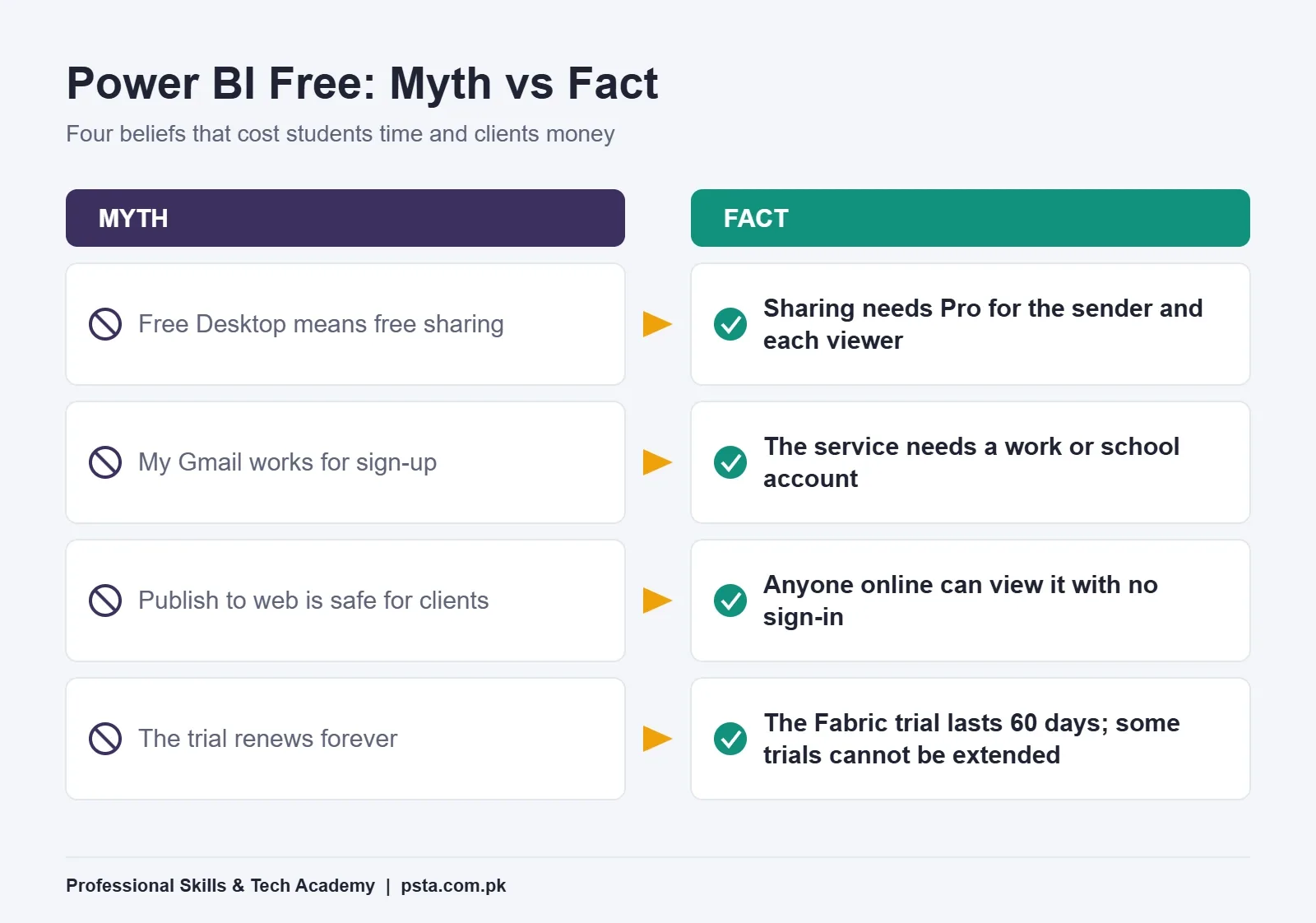
This is the big one, and it explains most Power BI free vs Pro questions. Microsoft's license feature guide says free users can create content for their own use, but can't use sharing or collaboration features with others, or publish into other people's workspaces.
In practice, that means:
- You can publish a report to your own My workspace and view it in the browser or on your phone.
- You can't share that report with your boss, add a colleague to a workspace, or set up an app for a team.
- To share in the normal way, both the sender and the viewer need Pro (or both need PPU).
There's one exception. If your company runs a Fabric F64 or larger capacity, or an older Power BI Premium P capacity, free users can view content placed there by Pro or PPU users. Most small businesses in Pakistan don't have that kind of capacity, so plan on per-user licenses.
Myth 2: "I Can Sign Up for the Service With My Gmail Account"
You'll hit an error if you try. Microsoft's sign-up guide states that you need a work or school email account, and its sign-up FAQ lists Gmail, Hotmail and Outlook.com among the consumer domains it doesn't accept.
This catches a lot of fresh graduates who expected the Power BI free account to work like any other app sign-up. Your options are:
- Use your university email if it's a Microsoft 365 account and your IT office hasn't blocked self-service sign-up.
- Use your employer's account if you already work somewhere that uses Microsoft 365.
- Start a Microsoft 365 trial, which Microsoft says creates a work email account for you. You can then sign in to Power BI with that address.
Keep in mind that you don't need any of this to learn Desktop. The sign-up wall only matters when you want to practice the online service.
Myth 3: "Publish to Web Is a Free Way to Share Client Reports"
Publish to web creates a public link or embed code for a report. Students like it because the link works for anyone. That's exactly the problem.
Microsoft's Publish to web documentation warns that anyone on the internet can view the report with no sign-in, and that people may be able to reach the underlying data in the model even when a visual doesn't display it. It also needs a license: a Power BI license from My workspace, and Pro or PPU from other workspaces.
My advice is simple:
- Fine to publish: a portfolio report built on public data, such as open cricket statistics or a sample sales file.
- Never publish: a client's sales ledger, staff salaries, customer phone numbers or anything from a bank, hospital or school.
If a Lahore clothing brand hires you to build a dashboard, the right route is proper sharing with licenses, or handing over the .pbix file. A public link is a data leak waiting to happen.
Myth 4: "The Free Trial Can Be Renewed Forever"
Microsoft offers a Power BI free trial so you can test paid features before buying. According to the Fabric trial documentation, the trial capacity lasts 60 days unless you cancel it earlier. The same page says a Power BI individual trial gives use rights equivalent to a Premium Per User license, and the trial capacity includes up to 1 TB of OneLake storage.
What the trial is not: a permanent Power BI free plan. Microsoft's FAQ notes that some trials can't be extended, and once a non-extendable trial ends, you need a paid license to keep using paid features. Changing the trial's capacity size doesn't reset the clock either.
Because of that, timing matters. Don't start the trial on day one of learning. Start it when you have a finished report and want to practice workspaces, scheduled refresh and sharing in a focused two-month window.
Myth 5: "You Need a Paid License to Learn Power BI Properly"
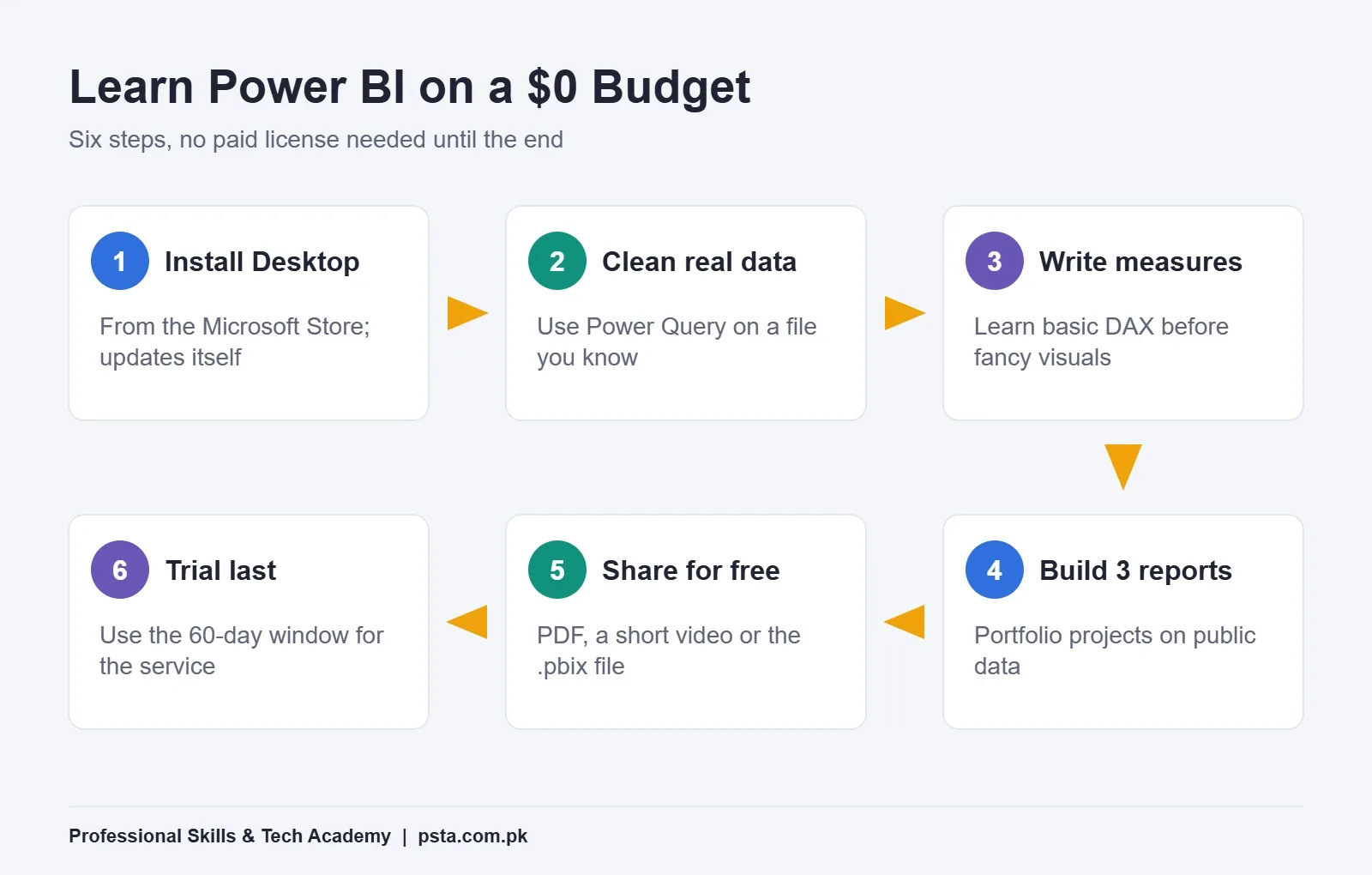
You don't. Power BI free tools cover almost everything a beginner needs, and the skills employers test in interviews (Power Query, data modeling, DAX and clear report design) all live in the free Desktop app. Here's the setup I'd recommend to a student with zero budget:
- Install Desktop from the Microsoft Store. Microsoft notes that the Store version updates automatically and doesn't need admin rights.
- Practice on files you already understand. An Excel sheet of your family shop's monthly sales teaches more than a random sample file. Our Power Query guide for beginners shows how to clean that kind of data.
- Learn measures early. Work through the basics in our DAX for beginners post before you design fancy visuals.
- Build three portfolio reports. Pick ideas from our list of Power BI projects for beginners, using public data only.
- Share without the service. Export pages to PDF, record a two-minute screen walkthrough, or share the .pbix file on GitHub so a recruiter can open it in their own Desktop.
- Use the trial last. When the portfolio is ready, use the 60-day window to learn workspaces, apps and refresh schedules.
If you're still deciding whether Power BI or advanced Excel suits you better, read our comparison of Power BI vs Excel first.
Myth 6: "Power BI Runs on Any Laptop, Including a MacBook"
Power BI Desktop is a Windows program. Microsoft's requirements page sets Windows 10 (or Windows Server 2016) as the minimum, along with .NET 4.7.2, and the Edge WebView2 runtime. It doesn't list macOS at all. On a Mac, the usual workaround is a Windows virtual machine, or a Windows PC at a lab or office.
The hardware floor is modest, but the details matter:
- Memory: at least 2 GB available, with 4 GB or more recommended. In my experience, 8 GB makes large files far less painful.
- Processor: a 64-bit (x64) chip. The 32-bit version is no longer supported.
- Screen: at least 1440x900 or 1600x900. A 1366x768 screen falls below that minimum, and that resolution is common on older budget laptops.
If your laptop has a 1366x768 screen, plug it into an external monitor while you work. It's a cheaper fix than a new machine.
What Does a Small Pakistani Business Actually Pay?
Let's turn the price list into real bills and see where Power BI free use ends for a business. The cases below are examples, built only from Microsoft's published prices. Costs are in US dollars because Microsoft bills in dollars, and the final rupee amount on your card depends on the exchange rate and bank charges that month.
| Example | What they need | Licenses | Monthly cost (paid yearly) |
|---|---|---|---|
| A student building a portfolio | Desktop, PDFs and .pbix files | None | $0 |
| A freelancer sharing one dashboard with one client contact | Shared report in the service | 2 x Pro | $28 |
| An Abbottabad distributor with 5 managers viewing daily sales | Workspace and app for the team | 5 x Pro | $70 |
| The same team needing larger models and 48 refreshes a day | Premium features | 5 x PPU | $120 |
Notice the freelancer row. Your client needs a license too, because Pro users share with other Pro users. Many freelancers forget this and quote a price that leaves the client unable to open the report. Put the license cost in your proposal as a separate line so nobody is surprised.
For most small teams, Pro is the right starting point. Move to PPU only when you actually hit the 1 GB model limit or need refreshes more often than eight times a day. Fabric capacity is a decision for larger organizations, and Microsoft lists its price as variable, with yearly reservations saving 40.5% compared with pay-as-you-go.
Where PSTA's Power BI Course Fits In
At PSTA, almost all of the hands-on work happens in the free Desktop app, so you don't need to buy a license before joining. The Power BI free setup on your own laptop is enough for the course projects. Lasting 8 weeks, the PSTA Power BI course starts from beginner level, and its page currently lists the fee as Rs. 32,000.
The modules move in the same order you'd use on a real job:
- Connecting SQL, Excel, web and cloud data
- Cleaning in Power Query, then modeling tables and how they relate
- Writing DAX columns and measures
- Designing interactive dashboards with standard and custom visuals
- Publishing to the Power BI service, with governance and security settings
- Projects based on situations real businesses face
Classes run in Abbottabad, live online across Pakistan, or as a mix of both. If you also want SQL depth for the data side, our Oracle Database 19c course pairs well with it, and the Advanced Python course suits anyone heading toward data science. Every program is listed side by side on our courses page, and the admission page lists the steps to join a batch. Questions about timings can go to our team on WhatsApp at +92 314 5424399.
Try This Before You Spend a Rupee
Install Power BI Desktop tonight, open one Excel file you already know, and build a single report page with three visuals and one DAX measure. Export it to PDF. If you enjoyed the process, you've confirmed what this whole guide comes down to: Power BI is free to start, and you only need to pay when other people need to see your work.
Frequently asked questions
Can I use Power BI Desktop without paying anything?
Yes. Microsoft offers Power BI Desktop as a free download for Windows, with no subscription needed to install it or build reports. You can connect data, clean it in Power Query, write DAX and design report pages. Payment usually comes in only when you want to share those reports with other people through the Power BI service.
Can a free user open a report that a Pro user shares?
Usually not. In normal shared capacity, both the person sharing and the person viewing need Pro, or both need Premium Per User. The exception is content stored in a Fabric F64 or larger capacity, or a Power BI Premium P capacity. In that case, free users can view what Pro or PPU users publish there.
Why does Power BI reject my Gmail address?
The Power BI service only accepts work or school accounts for self-service sign-up. Microsoft lists Gmail, Hotmail and Outlook.com as consumer domains that are not accepted. You can use a university or employer Microsoft 365 account, or start a Microsoft 365 trial, which creates a work email address you can then use for Power BI.
How much does Power BI Pro cost in Pakistan?
Microsoft lists Power BI Pro at $14.00 per user per month, paid yearly, and charges in US dollars. The amount in rupees depends on the exchange rate and your bank's foreign transaction charges when the payment goes through. Premium Per User is $24.00 per user per month, or a $14.00 add-on for existing Pro users.
Is Power BI free for students?
The Desktop app is free for everyone, which covers most of what students need to learn. Microsoft's pricing page does not show a separate student plan for the service. If your university provides a Microsoft 365 account, you may be able to sign in to the service with it, depending on how your IT office has set it up.
Does Power BI work on a Mac?
Microsoft's requirements for Power BI Desktop list Windows only, starting with Windows 10, and do not mention macOS. Mac users typically run Windows in a virtual machine or use a Windows PC. You can still view reports in a web browser on a Mac once they are published to the Power BI service.
What happens when the Power BI trial ends?
Microsoft says the Fabric trial capacity lasts 60 days, and some trials cannot be extended. When a non-extendable trial ends, you need to buy or be assigned a paid license to keep using paid features. Your Desktop files stay on your computer, so plan to keep copies of your .pbix reports.
Sources & references
- Power BI Pricing (Microsoft) microsoft.com
- Power BI service features by license type (Microsoft Learn) learn.microsoft.com
- Sign up for the Power BI service as an individual (Microsoft Learn) learn.microsoft.com
- Self-service sign-up and trial FAQ (Microsoft Learn) learn.microsoft.com
- Microsoft Fabric trial capacity (Microsoft Learn) learn.microsoft.com
- Get Power BI Desktop (Microsoft Learn) learn.microsoft.com
- Publish to web from Power BI (Microsoft Learn) learn.microsoft.com
Last reviewed & updated on by Umar Qureshi. Written by the PSTA team in Abbottabad, Pakistan.

Umar Qureshi

Power BI Course: Data Analytics & Dashboards
Turn this guide into a career: hands-on training with real projects, online across Pakistan or on-campus in Abbottabad · 8 Weeks.
Comments
No comments yet — ask a question or share your experience.