Quick answer
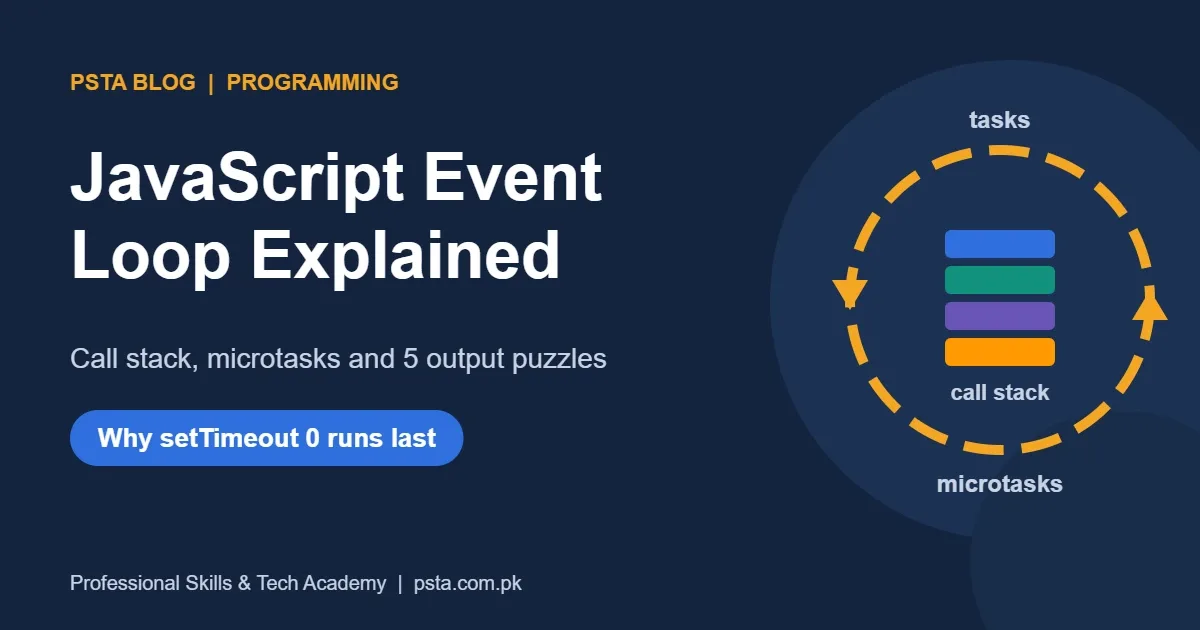
The JavaScript event loop runs one task at a time on a single call stack. After each task it empties the whole microtask queue, which holds promise handlers and await continuations, before it takes the next task such as a setTimeout callback. That is why promise callbacks run before setTimeout 0.
Key takeaways
- • JavaScript runs your code on one call stack, and each job finishes before the next starts.
- • After every task, the event loop drains the entire microtask queue before taking another task.
- • setTimeout with a delay of 0 still waits for the current script and all microtasks to finish.
- • await suspends only its own async function; the rest resumes later as a microtask.
- • Node.js splits each loop turn into six phases, and setImmediate vs setTimeout order depends on context.
Table of contents 17 sections
- What Is the JavaScript Event Loop, in Plain Words?
- The Four Parts You Need to Know
- Why Does setTimeout 0 Not Run Immediately?
- Microtask vs Macrotask: Which Queue Wins?
- Predict the Output: Five Practice Puzzles
- Puzzle 1: The Classic
- Puzzle 2: A Timer Created Inside a Promise
- Puzzle 3: What await Really Pauses
- Puzzle 4: Two Ways to Queue a Microtask
- Puzzle 5: A Node.js Trick Question
- How Does async/await Fit Into the Event Loop?
- Is the Node.js Event Loop Different From the Browser?
- Myths That Trip Up Beginners
- How to Avoid Blocking the Main Thread
- Event Loop Interview Questions You Should Be Ready For
- Practicing Asynchronous JavaScript at PSTA
- Run One Puzzle in Your Browser Console Tonight
The JavaScript event loop is the rule that decides which waiting piece of code runs next on JavaScript's single main thread. Plenty of people need that rule: 66% of respondents to the Stack Overflow 2025 Developer Survey said they used JavaScript. If you write any of it, the event loop explains why a setTimeout with a delay of 0 still fires after your promise callbacks.
This explainer builds the model piece by piece, then tests it on short output puzzles of the kind junior developers meet in technical interviews. Here is what you will be able to do by the end:
- Name the four parts of the event loop and what each one holds
- Explain the difference between a task and a microtask in one sentence
- Predict the output of mixed
setTimeout, promise andasynccode - Describe where Node.js behaves differently from the browser
- Spot code that freezes a page and fix it
What Is the JavaScript Event Loop, in Plain Words?
The JavaScript event loop is a scheduler that runs one job at a time, finishes it completely, then picks the next job from a queue. JavaScript itself has one call stack per agent, so it can't run two of your functions in parallel. The loop keeps that single thread busy without letting slow work like network requests block it.
Think of a single cashier at a busy utility store in Abbottabad. The cashier serves one customer from start to finish. Customers who must wait for something, like a manager's signature, step aside. When their paperwork is ready, they rejoin a line. The cashier never stops mid-customer to serve someone else. That last rule is what MDN calls run-to-completion: each job finishes before any other job starts.
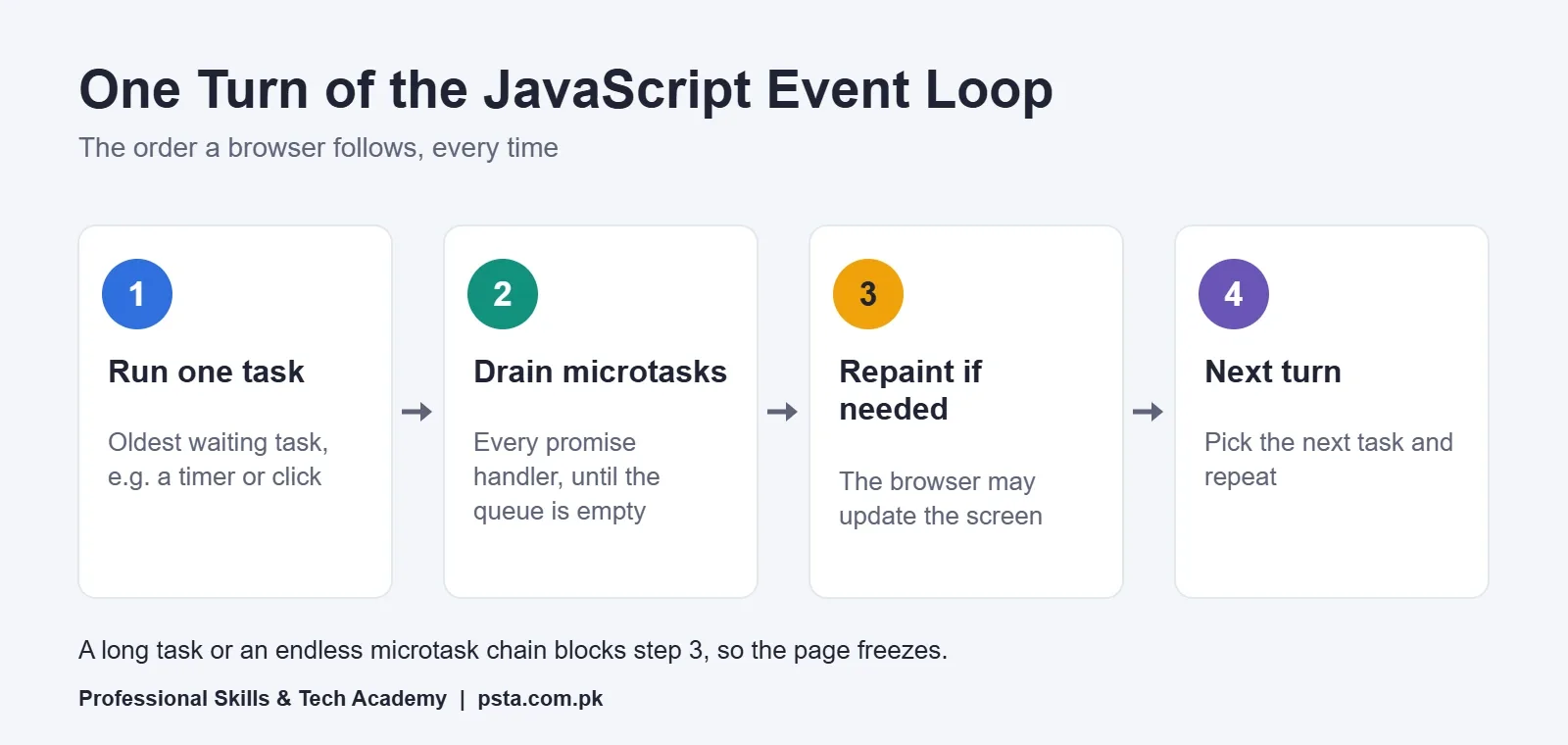
One turn of the loop looks like this. Run the oldest waiting task. Then run every microtask in the microtask queue until it is empty. Then let the browser repaint the screen if it needs to. Then start the next turn.
The Four Parts You Need to Know
Most confusion about the JavaScript event loop comes from mixing up these four pieces. Learn them as a set.
| Part | What It Holds | Examples |
|---|---|---|
| Call stack | The functions running right now, last in, first out | Your main() calling formatPrice() |
| Host APIs | Work the browser or Node.js does outside your code | Timers, fetch(), file reads, click listeners |
| Task queue | Callbacks waiting for their turn, one per loop turn | setTimeout, setInterval, a dispatched click event |
| Microtask queue | Short follow-up jobs, drained completely after each task | Promise then handlers, queueMicrotask, MutationObserver |
The call stack is the only place code actually executes. Everything else is a waiting room. When the stack is empty, the loop decides who walks in next, and the microtask queue always gets priority over the task queue.
You will also hear tasks called "macrotasks." The HTML standard just says tasks, but interviewers use both words, so recognize them as the same thing.
Why Does setTimeout 0 Not Run Immediately?
A setTimeout with a delay of 0 doesn't run immediately because the delay only says when the callback may join the task queue. It still has to wait until the current script finishes and every microtask has drained. MDN's setTimeout reference puts it simply: a delay of 0 means the next event cycle, not "now."
The delay is also a minimum, never a promise. MDN lists a few details worth remembering:
- Once nested
setTimeoutcalls reach 5 levels, browsers enforce a minimum delay of 4 milliseconds. - Background tabs are throttled. Firefox Desktop uses a 1-second minimum for inactive tabs, and Chrome may check timers once per second or, after longer inactivity, once per minute.
- The delay is stored as a signed 32-bit integer, so the largest safe value is 2,147,483,647 ms, about 24.8 days. Bigger numbers overflow.
So if a student's countdown timer drifts when the tab is in the background, the code isn't broken. The browser is saving battery.
Microtask vs Macrotask: Which Queue Wins?
In the microtask vs macrotask question, microtasks win: after each task, the loop empties the entire microtask queue before it touches the next task. MDN's microtask guide adds a detail that catches people out. Microtasks added while the queue is draining also run before the next task.
That has a real cost. A promise chain that keeps queuing new microtasks can starve the task queue, so clicks and timers wait. MDN advises using queueMicrotask only when there's no other option, for example inside a framework or library.
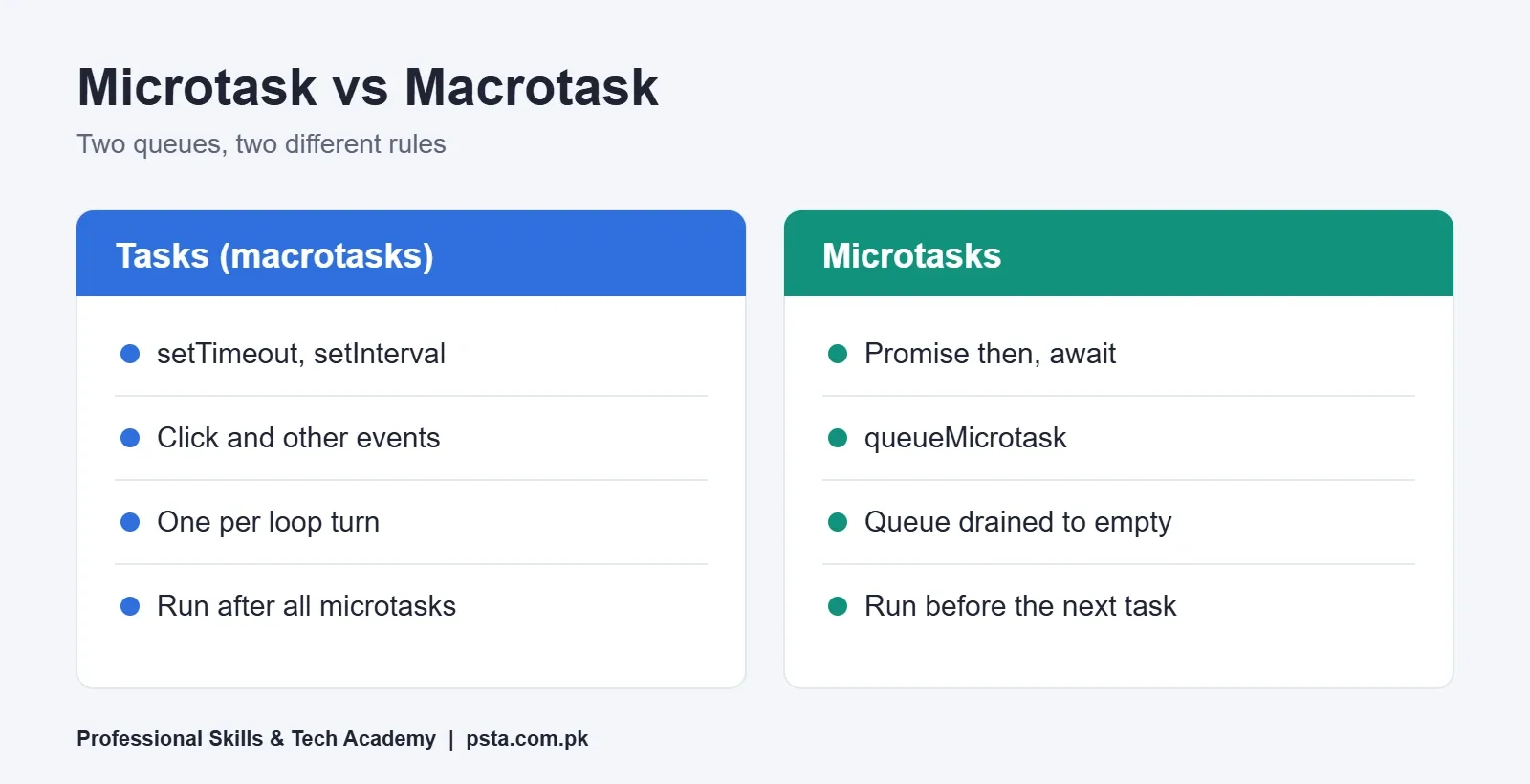
Here's the short version for your notes. Tasks are taken one per turn. Microtasks are taken until none are left. Rendering happens between turns, which is why a long microtask chain can freeze the screen just as badly as a long loop.
Predict the Output: Five Practice Puzzles
The fastest way to learn the JavaScript event loop is to predict output before you run it. Cover the answer under each snippet, write your guess on paper, then check. These are the patterns that come up again and again in junior developer interviews.
Puzzle 1: The Classic
console.log('A');
setTimeout(() => console.log('B'), 0);
Promise.resolve().then(() => console.log('C'));
console.log('D');
Answer: A, D, C, B. This is the promise vs setTimeout question in its simplest form. The two plain logs are synchronous. The promise handler is a microtask, so it runs as soon as the script ends. The timer callback is a task and waits for the next turn.
Puzzle 2: A Timer Created Inside a Promise
setTimeout(() => console.log('1'), 0);
Promise.resolve()
  .then(() => {
    console.log('2');
    setTimeout(() => console.log('3'), 0);
  })
  .then(() => console.log('4'));
console.log('5');
Answer: 5, 2, 4, 1, 3. The first handler logs 2 and queues timer 3 behind timer 1. When it returns, the second handler becomes a new microtask, and it still runs before any timer. Only then do the two tasks run in the order they were queued.
Puzzle 3: What await Really Pauses
async function load() {
  console.log('x');
  await null;
  console.log('y');
}
console.log('start');
load();
console.log('end');
Answer: start, x, end, y. An async function runs synchronously until its first await. Everything after the await continues later as a microtask, so end prints first.
Puzzle 4: Two Ways to Queue a Microtask
queueMicrotask(() => console.log('m1'));
Promise.resolve().then(() => console.log('p1'));
queueMicrotask(() => console.log('m2'));
Answer: m1, p1, m2. Both methods use the same microtask queue, and it is first in, first out.
Puzzle 5: A Node.js Trick Question
setTimeout(() => console.log('timeout'), 0);
setImmediate(() => console.log('immediate'));
Answer: it depends. The Node.js event loop guide says that when this runs in the main module, the order is not guaranteed. Inside an I/O callback, such as the callback of fs.readFile, setImmediate always runs first. Saying "it depends, and here is why" earns more marks than a confident wrong answer.
How Does async/await Fit Into the Event Loop?
When execution reaches an await, only the surrounding async function stops; the rest of your program carries on. The rest of that function is scheduled as a microtask once the awaited value settles, and the call stack is free for other work in the meantime. Puzzle 3 shows this in five lines.
This is why await inside a for loop makes requests one after another. Each round waits for the previous one. If the requests don't depend on each other, start them together and use Promise.all. If you want a refresher on the syntax itself, our async/await guide covers it with examples.
Is the Node.js Event Loop Different From the Browser?
Yes. The Node.js event loop uses the same idea as the JavaScript event loop in browsers but splits each turn into named phases. The Node.js documentation lists six of them in order:
- Timers: runs
setTimeoutandsetIntervalcallbacks whose time has passed. - Pending callbacks: runs some deferred system callbacks, such as certain TCP errors.
- Idle, prepare: used internally by Node.js.
- Poll: collects new I/O events and runs their callbacks.
- Check: runs
setImmediatecallbacks. - Close callbacks: runs close events, such as a socket closing.
Node.js also has process.nextTick, which sits outside these phases. Its queue is processed after the current operation finishes, whatever phase the loop is in. The same guide warns that calling nextTick recursively can starve I/O, because the loop never reaches the poll phase.
For most backend work in Express.js, you don't need to memorize the phases. You do need to know that one slow synchronous function blocks every request on that server, not just one user.
Myths That Trip Up Beginners
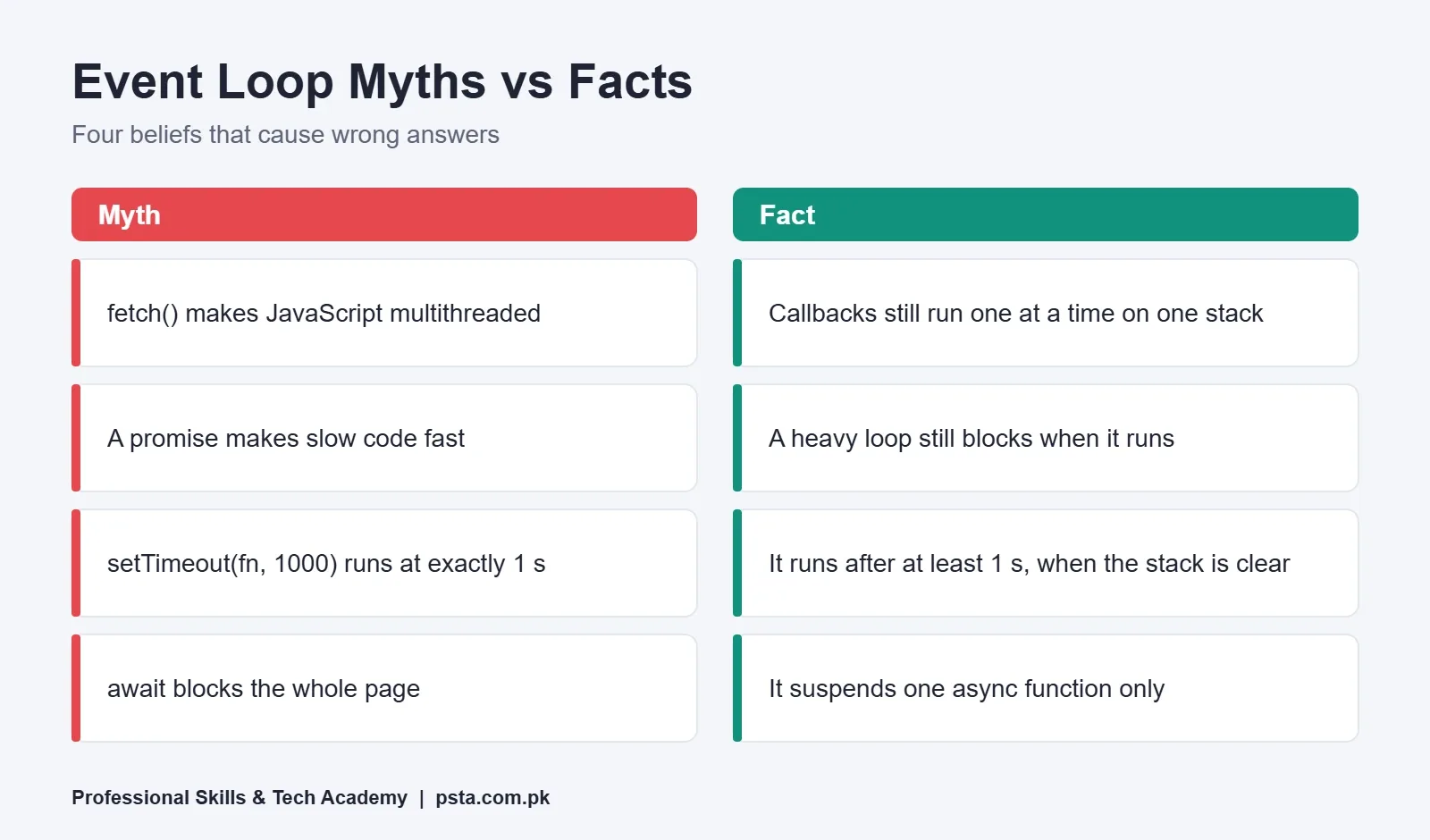
Each of these beliefs about the JavaScript event loop sounds reasonable, and each one leads to a wrong answer in an interview or a bug in production.
- "JavaScript is multithreaded because fetch runs in the background." The network work happens in the host. Your callbacks still run one at a time on one call stack.
- "A promise makes slow code fast." Wrapping a heavy loop in a promise doesn't move it off the main thread. It still blocks when it runs.
- "setTimeout(fn, 1000) runs after exactly one second." It runs after at least one second, once the stack and microtask queue are clear.
- "await blocks the whole page." It suspends one function. Clicks, timers and other code keep working.
How to Avoid Blocking the Main Thread
MDN notes that a long job blocks user interaction, which is when a browser shows its "script is taking too long" warning. These habits keep pages responsive:
- Keep each job short. Break a loop over 50,000 rows into chunks and schedule each chunk with
setTimeout, so the browser can paint between them. - Move heavy work to a Web Worker. Each worker gets its own agent, with its own stack and queue, so parsing a big CSV file doesn't freeze the form.
- Avoid alert() and synchronous XHR. MDN calls them legacy exceptions that block the agent until they finish.
- Don't chain microtasks forever. A recursive
thenorqueueMicrotaskloop starves timers and rendering. - Measure before guessing. The Performance panel in Chrome DevTools marks long tasks, so you can see which function is the problem.
A realistic example: a small Lahore e-commerce dashboard loads 20,000 orders and calculates totals in one loop on page load. The spinner stops spinning because rendering can't happen until the loop ends. Splitting the work into chunks, or moving it to a worker, fixes the freeze without changing the totals.
Event Loop Interview Questions You Should Be Ready For
Event loop interview questions come up often in frontend and Node.js interviews. Practice answering each in two or three sentences.
| Question | What a Strong Answer Covers |
|---|---|
| What is the event loop? | Single call stack, queues, run-to-completion, microtasks drained after each task |
| Microtask vs macrotask? | Promise handlers vs timers and events, and which runs first |
| Why is setTimeout 0 delayed? | Waits for the stack, all microtasks and the next turn; nesting clamp of 4 ms |
| What does await do? | Suspends one async function; the rest resumes as a microtask |
| setImmediate vs setTimeout in Node.js? | Order is not guaranteed in the main module; setImmediate first inside I/O callbacks |
| How do you stop a page freezing? | Chunk work, use Web Workers, avoid sync APIs, measure long tasks |
For more practice, our list of JavaScript interview questions covers scope, closures and hoisting, and the guide to var vs let vs const explains a closely related timer puzzle with loops.
Practicing Asynchronous JavaScript at PSTA
PSTA's JavaScript Programming Course is listed as a 12-week, beginner-level program that you can take on campus in Abbottabad, live online from anywhere in Pakistan, or hybrid. Its published modules include callbacks and promises, the Fetch API with await and error handling, DOM events, ES6+ features and an introduction to React. The current fee is shown on the course page.
The useful part for learning the JavaScript event loop is practice with a trainer watching. Puzzles like the five above make more sense when you step through them in DevTools with someone who can point out the exact line where your model went wrong. If you already know the basics and want to build larger apps, the React.js course is the next step. You can compare every program on the courses page.
Run One Puzzle in Your Browser Console Tonight
Open any page, press F12, paste Puzzle 2 into the Console and press Enter. Before you do, write your predicted order on paper. If the result surprises you, your mental model of the JavaScript event loop needs one more pass: read the microtask section again and trace the two queues by hand. Ten minutes of this teaches more than an hour of reading.
When you're ready for guided practice, you can apply for admission online or send your questions on WhatsApp at +92 314 5424399 before you decide.
Frequently asked questions
Is JavaScript single-threaded or multithreaded?
Your JavaScript code runs on one main thread with one call stack, so two of your functions never run at the same moment. The browser or Node.js can do network and file work in the background, and Web Workers give you extra threads, but each worker has its own separate stack and queue. Inside one page, callbacks still take turns.
What runs first, a promise or setTimeout?
A resolved promise handler runs first. Promise callbacks go to the microtask queue, and the event loop empties that queue as soon as the current script finishes. A setTimeout callback is a task, so it waits for the next turn of the loop, even when its delay is 0.
What is the difference between the call stack and the task queue?
The call stack holds the functions that are executing right now, last in, first out. The task queue holds callbacks that are ready but waiting their turn, such as timer callbacks and click handlers. The event loop moves the next callback onto the stack only when the stack is empty.
Can the event loop get stuck?
Yes. A long synchronous loop blocks everything until it ends, and a chain of microtasks that keeps queuing new microtasks can starve timers, clicks and rendering. The page looks frozen in both cases. Break heavy work into smaller chunks or move it into a Web Worker to keep the page responsive.
Does async/await make code run in parallel?
No. await pauses one async function until its value is ready, while other code keeps running. Requests awaited one by one in a loop run in sequence. To run independent requests at the same time, start them together and wait for all of them with Promise.all.
Do I need to learn the event loop before React?
You need the basics: callbacks, promises, async/await and the idea that state updates and effects run later, not instantly. That knowledge explains many React bugs, such as reading stale state right after setting it. You do not need to memorize Node.js phases to start building React apps.
Sources & references
- Stack Overflow 2025 Developer Survey survey.stackoverflow.co
- MDN: Using microtasks in JavaScript with queueMicrotask() developer.mozilla.org
- MDN: setTimeout() global function developer.mozilla.org
- MDN: JavaScript execution model developer.mozilla.org
- Node.js: The Node.js Event Loop nodejs.org
Last reviewed & updated on by Umar Qureshi. Written by the PSTA team in Abbottabad, Pakistan.

Umar Qureshi

JavaScript Programming Course in Abbottabad: Beginner to React
Turn this guide into a career: hands-on training with real projects, online across Pakistan or on-campus in Abbottabad · 12 Weeks.
Comments
No comments yet — ask a question or share your experience.