Quick answer
For a clean Meta Pixel setup, create a dataset in Events Manager and install it once, through Shopify's Facebook & Instagram channel, the Meta for WooCommerce plugin or base code. Send value and currency with Purchase, match eventID with the server's event_id to avoid double counting, and test every event before running ads.
Key takeaways
- • Create one dataset in Events Manager; its ID is the pixel ID your store platform asks for.
- • Install the pixel through one method only, or every event will be counted twice.
- • Purchase needs value and currency, and browser and server copies need the same eventID to be deduplicated within 48 hours.
- • Test each event in Test Events and Ads Data Advisor, the renamed Pixel Helper, before spending on ads.
- • With most Pakistani orders paid on delivery, judge campaigns on delivered orders, not on Purchase counts alone.
Table of contents 25 sections
- What Does the Meta Pixel Actually Do?
- Pixel, Dataset and Conversions API: Three Terms to Sort Out First
- What You Need Before Meta Pixel Setup
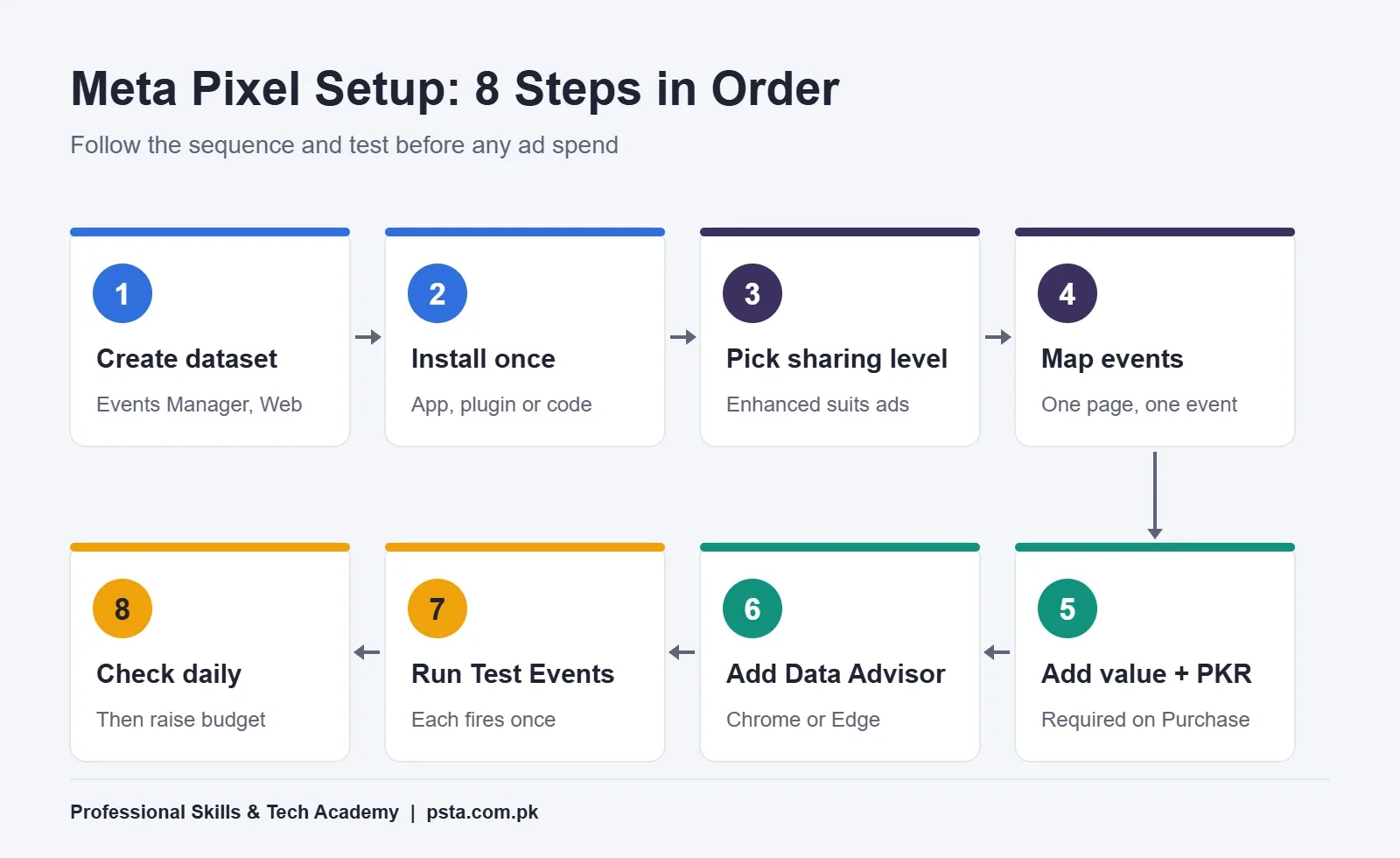
- Meta Pixel Setup in 8 Steps
- Step 1: Create the Dataset in Events Manager
- Step 2: Install the Pixel With One Method Only
- Step 3: Choose a Data-Sharing Level on Shopify
- Step 4: Map Each Event to a Page or Action
- Step 5: Send Value and Currency With Every Purchase
- Step 6: Install Meta Ads Data Advisor
- Step 7: Run Test Events
- Step 8: Check the Overview Daily Before Scaling Ads
- Which Meta Pixel Events Should a Store Track?
- Adding the Conversions API Without Double Counting
- How Do You Test the Meta Pixel Before Running Ads?
- Cash on Delivery and the Purchase Event
- Why Is My Meta Pixel Not Working?
- No Events at All
- Every Event Appears Twice
- Purchase Fires on Every Refresh
- Purchase Shows Zero Value
- Server and Browser Purchases Both Count
- Customer Data and Privacy: What to Tell Shoppers
- Hands-On Pixel Practice in PSTA's Meta Ads Course
- Fire One Test Event Before You Spend a Rupee
Example: a small clothing shop in Abbottabad runs Instagram ads to its Shopify store. Ads Manager reports more purchases than the owner can find in the order list, and the retargeting audience looks oddly small. In cases like this, the ads are rarely the real problem. A rushed Meta Pixel setup is: the code was added twice, the Purchase event fires again when the thank-you page reloads, and nobody tested anything before the budget went live.
This guide takes you through a clean setup for a Pakistani store, from creating the dataset to proving that each event fires once. By the end, you will be able to:
- pick the right install method for Shopify, WordPress or a hand-coded site
- choose the events that matter for a store that sells on cash on delivery
- add the Conversions API without counting every order twice
- test each event before you spend money on ads
- trace the faults that break tracking most often
What Does the Meta Pixel Actually Do?
The Meta Pixel is a short piece of JavaScript that loads on every page of your website. When a visitor does something you care about, such as opening a product or placing an order, the pixel reports that action to Meta as an event.
Meta puts those events to work in three places. Reporting shows which ads led to sales. Audiences let you reach people who added to cart but didn't buy. And campaign delivery uses the events to find more people who behave like your buyers. When events are missing or doubled, all three go wrong together, and you end up paying for decisions made on bad numbers.
A Facebook pixel only sees what happens on a website you control. If you sell only through chats or a marketplace storefront, your tracking options are different, and a common Meta ads mistake is spending on website campaigns before the site can measure anything.
Pixel, Dataset and Conversions API: Three Terms to Sort Out First
Events Manager uses several names for related things, and tutorials written a few years ago use older ones. This table keeps them straight.
| Term | What it is | Where it runs |
|---|---|---|
| Meta Pixel | Browser code that sends events such as ViewContent and Purchase | The visitor's browser |
| Dataset | The container in Events Manager that holds your events; its ID is the same number as your pixel ID | Meta's side |
| Conversions API | Events sent from your store's server straight to Meta | Your server or store platform |
| Meta Ads Data Advisor | A free extension, formerly Meta Pixel Helper, that shows which events fire on a page | Your Chrome or Edge browser |
Why bother with both browser and server events? Shopify's help page on Meta data sharing points out that a browser ad blocker can stop the pixel, while server-to-server data can't be blocked that way. The pixel catches browsing behavior well. The server is more reliable for the order itself.
What You Need Before Meta Pixel Setup
Ten minutes of preparation saves hours of guessing later. Have these ready:
- Admin access to the Meta business account that owns your ad account, so the dataset sits with the business and not a personal profile.
- Admin access to the website: the Shopify owner or staff account, or a WordPress administrator login.
- One install method, decided in advance. Mixing a plugin with hand-pasted code is the most common cause of doubled events.
- A privacy policy page that says you use advertising cookies and share some data with Meta.
- A test product you can order with cash on delivery and then cancel.
- Chrome or Edge with Meta Ads Data Advisor installed.
If your store is still being built, finish the basics first. Our Shopify pre-launch checklist covers payment, delivery and policy pages that should exist before any tracking goes in.
Meta Pixel Setup in 8 Steps
The order matters here. Creating events before the base code is in place, or running ads before testing, leads to data you can't trust. Work through the steps in sequence.
Step 1: Create the Dataset in Events Manager
- Open Meta Events Manager and choose the option to connect a new data source.
- Select Web and continue.
- Choose to create a new dataset, give it a clear name such as "StoreName Website", and confirm.
- Open the dataset's settings and copy the ID. Shopline's walkthrough of this screen confirms the dataset ID is the pixel ID that store platforms ask for.
Step 2: Install the Pixel With One Method Only
| Your site | Install method | Watch out for |
|---|---|---|
| Shopify | Facebook & Instagram sales channel, then Settings, then Share data settings | Remove any pixel code pasted into the theme earlier |
| WordPress with WooCommerce | The free Meta for WooCommerce plugin by Facebook | Uninstall other pixel plugins before connecting it |
| Hand-coded site | Paste the base code inside the <head> of every page, then add event calls | Pages built from separate templates may miss the code |
For WooCommerce, the Meta for WooCommerce listing on WordPress.org shows more than 400,000 active installations and version 3.7.8 at the time of writing. It installs the pixel and can sync your product catalog. If you build WordPress shops for clients, this plugin is worth learning properly, and it is part of the workflow in our WordPress website development course.
Step 3: Choose a Data-Sharing Level on Shopify
Shopify asks you to pick a level when you turn on data sharing:
- Standard uses only the pixel to collect browsing behavior.
- Enhanced adds the Conversions API and shares customer details such as name, location, email address and phone number.
- Maximum also uses the Conversions API, along with Meta's latest advertising features.
For most stores that run paid campaigns, Enhanced is the sensible starting point, provided your privacy policy covers it.
Step 4: Map Each Event to a Page or Action
Write a one-line plan before touching code: product page fires ViewContent, cart button fires AddToCart, checkout page fires InitiateCheckout, thank-you page fires Purchase. Shopify and the WooCommerce plugin do this mapping for you. On a hand-coded site, this plan is your developer's brief.
Step 5: Send Value and Currency With Every Purchase
The Meta Pixel reference lists currency and value as required parameters for Purchase. Without them, Ads Manager can count orders but can't calculate return on ad spend. A hand-coded call looks like this:
fbq('track', 'Purchase', {value: 4500, currency: 'PKR'});Use the real order total from your cart, not a fixed number.
Step 6: Install Meta Ads Data Advisor
Add the extension from the Chrome Web Store or Edge Add-ons. According to Meta's Ads Data Advisor page, it is the renamed Pixel Helper. A badge on its icon shows how many events fired, and each event gets a status such as Active, Warning or Error.
Step 7: Run Test Events
Open the Test Events tab in Events Manager, enter your store URL and browse it like a customer. Each action should appear in the list within moments. The full test routine is in the testing section below.
Step 8: Check the Overview Daily Before Scaling Ads
For the first week, open the dataset's overview each morning. Compare yesterday's Purchase count with the orders in your store dashboard. Small gaps are normal. A count that's double your orders, or zero, needs fixing before you raise any budget.
Which Meta Pixel Events Should a Store Track?
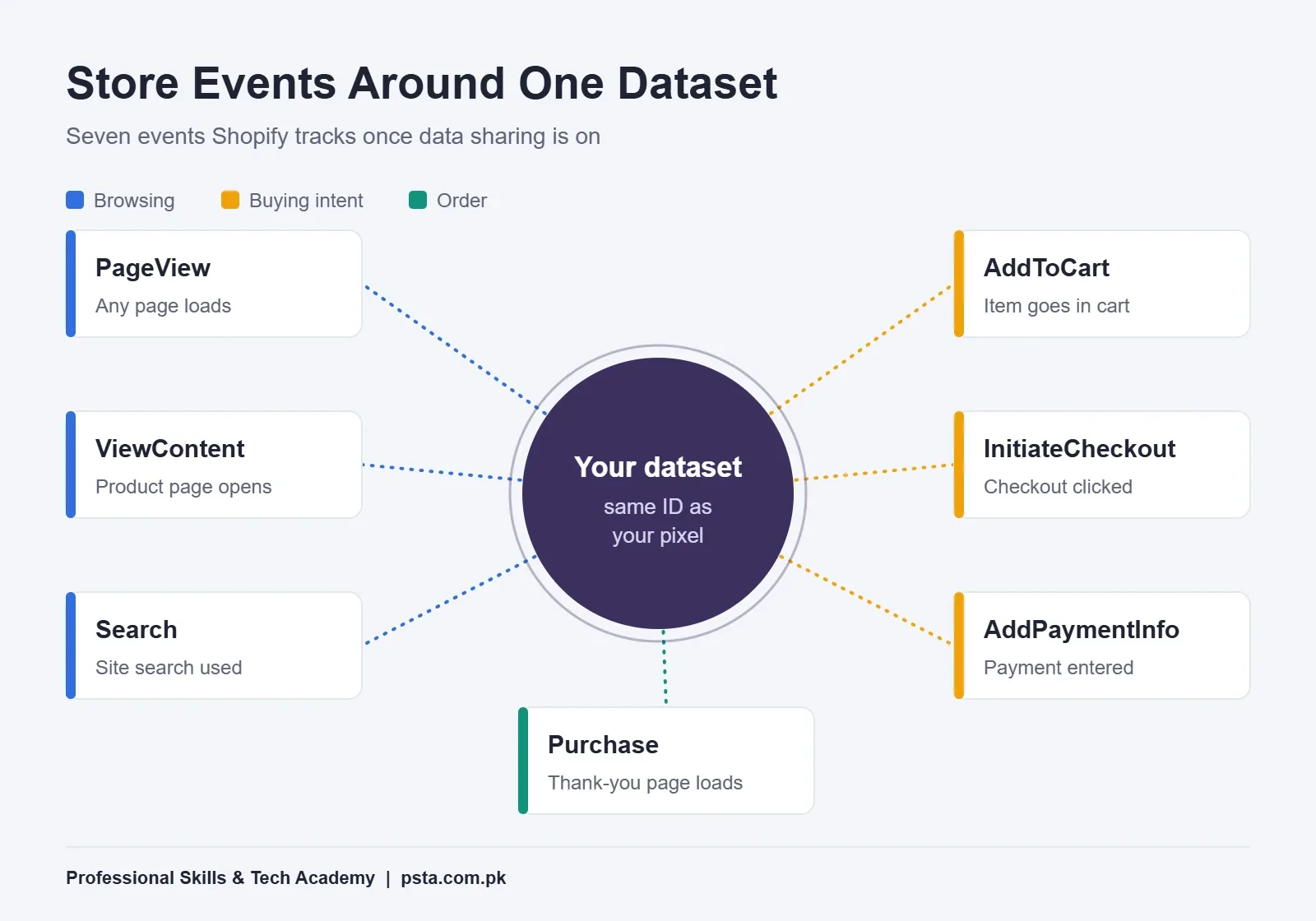
Meta defines 17 standard events. A typical online shop needs only a handful of them, plus the basic PageView. Shopify tracks these seven automatically once data sharing is on:
| Event | Fires when | What you learn |
|---|---|---|
| PageView | Any page loads | Total site traffic from ads |
| ViewContent | A product page opens | Which products draw interest |
| Search | A visitor uses site search | What people look for and can't find |
| AddToCart | A product goes into the cart | Your strongest retargeting audience |
| InitiateCheckout | The checkout button is clicked | Where buyers drop off |
| AddPaymentInfo | Payment details are entered | Card checkout friction |
| Purchase | The thank-you page is viewed | Orders and order value |
Service businesses use a different set. A clinic, academy or consultant usually cares more about Lead, Contact, Schedule and SubmitApplication. Pick the few events that match real business steps and ignore the rest.
One recent change is worth knowing. Meta says that from August 3, 2026, new pixel setups done through Ads Data Advisor pre-select automatic detection of standard events. That is convenient, but if you also code events yourself, check in Events Manager that the two sources aren't reporting the same action.
Adding the Conversions API Without Double Counting
Once a store sends the same Purchase from the browser and from the server, Meta needs a way to know they are one order. Meta's guide to handling duplicate pixel and Conversions API events sets out the rules:
- The browser event's eventID must match the server event's event_id.
- The event names must match, for example Purchase and Purchase.
- Both must go to the same pixel ID.
- Matching works within 48 hours of the first event with that ID.
The eventID goes in the fourth argument of the browser call. Using the order number is the simplest choice, because both sides already know it:
fbq('track', 'Purchase', {value: 4500, currency: 'PKR'}, {eventID: 'order-10234'});The server then sends the same Purchase with event_id set to order-10234. Meta keeps one and discards the later copy. Two details catch people out. Deduplication does not remove repeats from a single source, so two browser Purchases with the same data both count. And the fallback method, matching on fbp or external_id, generally only works when the browser event arrives first.
On Shopify's Enhanced level or the WooCommerce plugin, this matching is handled for you. It becomes your job when a developer builds a custom server integration.
How Do You Test the Meta Pixel Before Running Ads?
Testing is the step most people skip, and it's the one that decides whether your Meta Pixel setup can be trusted. Run this routine in a normal browser window, with ad blockers switched off:
- Open the Test Events tab in Events Manager and load your homepage. PageView should appear.
- Open a product. Check for one ViewContent, with the product ID.
- Add the product to the cart. Look for exactly one AddToCart.
- Go to checkout and confirm InitiateCheckout fires once.
- Place a cash-on-delivery test order. Purchase should show the right value and PKR.
- Refresh the thank-you page. No second Purchase should appear.
- Cancel the test order in your store so it doesn't reach your courier.
Ads Data Advisor shows the same events from the browser side, including warnings about missing parameters or duplicates. For server events, the Conversions API documentation explains the test_event_code that makes them appear in Test Events. Remove that code once testing is done. Test-coded events are still stored and count towards measurement, so keep test orders few.
Cash on Delivery and the Purchase Event
This is where most guides written for other countries stop being useful. The US International Trade Administration's Pakistan eCommerce guide cites industry reports that 95 percent of online businesses here receive payment by cash on delivery.
That matters for any Meta Pixel setup in Pakistan, because Purchase fires when the thank-you page loads, before any money has changed hands. A parcel the customer refuses at the door still counts as a sale in Ads Manager. If your refusal rate is high, the ad platform will look more profitable than your bank account.
You have three practical options:
- Keep Purchase as it is and judge campaigns on delivered orders in your own sheet. This is the simplest route for a new store.
- Send a later server event when a parcel is marked delivered. Website events sent through the Conversions API can be up to 7 days old, which suits most domestic deliveries.
- Upload delivered orders as offline events. Meta's documentation advises uploading these within 62 days of the conversion.
Whichever you choose, cutting refusals helps tracking as much as it helps cash flow. Our walkthrough on reducing COD returns covers order confirmation calls and courier choices.
Why Is My Meta Pixel Not Working?
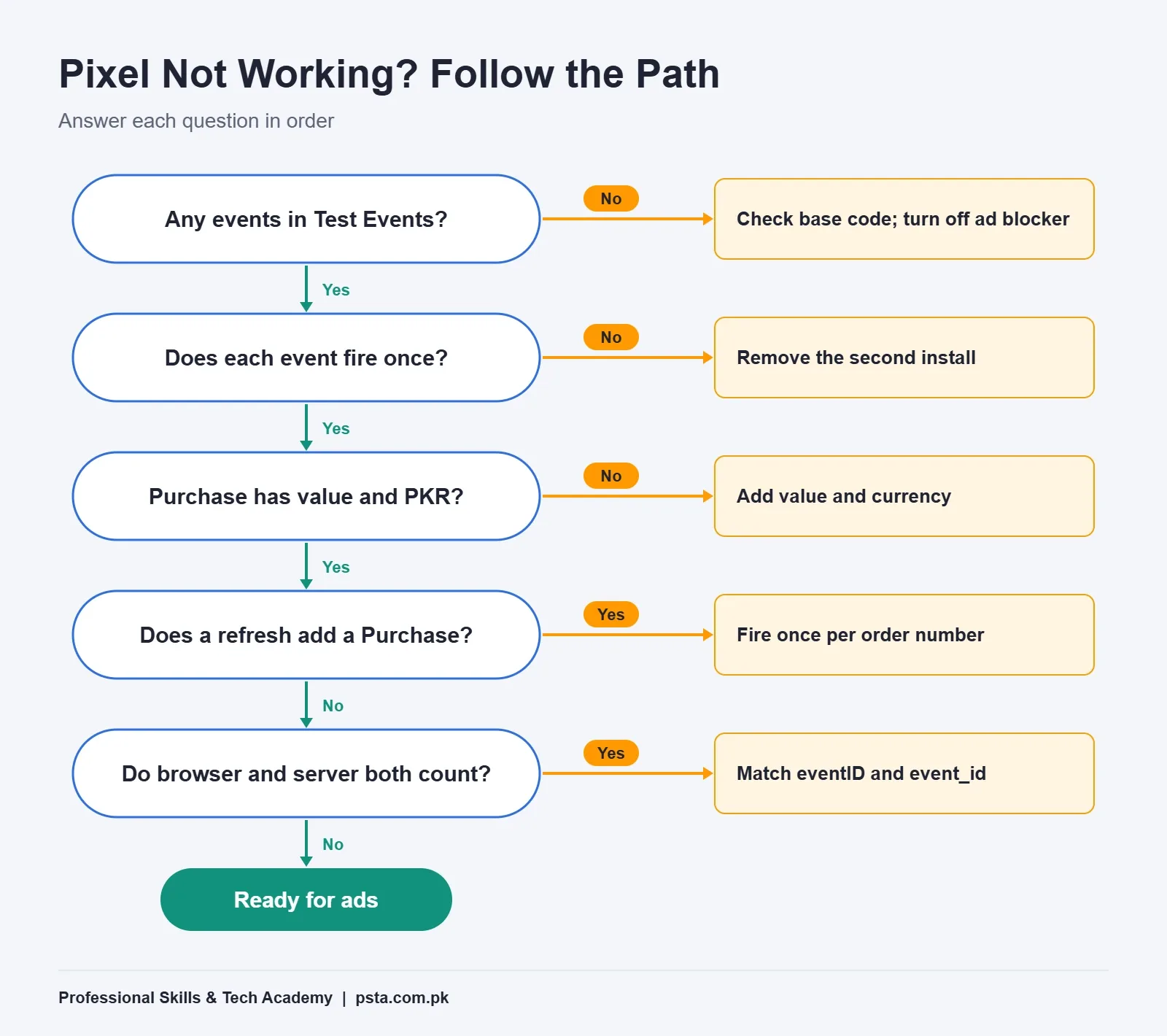
Most faults trace back to a shortcut taken during Meta Pixel setup. Start with the symptom, then check the likely cause. These five faults cover the usual suspects.
No Events at All
The base code is missing, sits outside the <head>, or an ad blocker in your own browser is hiding it. Test in a clean window first.
Every Event Appears Twice
Two installs are running, often an old theme snippet plus the Shopify or WooCommerce connection. Keep one and delete the other.
Purchase Fires on Every Refresh
A hand-coded thank-you page sends Purchase on each load. Fire it once per order number, or send the eventID so repeats can be matched to the server copy.
Purchase Shows Zero Value
The value or currency parameter is missing or passed as text. Read the event details in Ads Data Advisor.
Server and Browser Purchases Both Count
The eventID and event_id don't match, or the names differ in spelling. Compare them side by side in Test Events.
Customer Data and Privacy: What to Tell Shoppers
The Enhanced and Maximum levels send personal details such as email address and phone number to Meta. Meta's documentation requires some customer fields to be hashed before sending, and the official business SDKs and store integrations handle that step. Your job is the plain-language part: say in your privacy policy that you use advertising cookies and share order data with Meta to measure ads, and keep that page linked from your footer and checkout.
Don't send things Meta doesn't need, such as full addresses in custom parameters or national ID numbers collected for delivery. Tracking works fine without them.
Hands-On Pixel Practice in PSTA's Meta Ads Course
Reading about events is one thing. Watching them fire, break and get fixed on a real store is how the skill sticks. Our Social Media Marketing and Meta Ads course is a 12-week, beginner-level program. Module 5 covers Meta Pixel setup and the Conversions API, standard versus custom events, and troubleshooting. Module 6 then uses that data to build custom and lookalike audiences, and Module 11 links everything to GA4 reporting.
Its listed fee is currently Rs. 24,000, with a regular price of Rs. 30,000. Classes run on campus in Mandian, Abbottabad (Old College Road, across from FIMS College), live online for students in other cities, or as a hybrid of both, and a fresh batch opens each month. Shop owners often add our e-commerce course alongside it. The full course list lets you compare durations and fees.
Fire One Test Event Before You Spend a Rupee
A finished Meta Pixel setup is one you've tested yourself. Before your next campaign goes live, open Test Events, place one cash-on-delivery order on your own store and refresh the thank-you page. If you see exactly one Purchase with the right value in PKR, your tracking is ready for ads. If not, the fault list above will usually point you to the cause in a few minutes.
When you're ready to learn this with a trainer beside you, the admission page has the form, or reach our team on WhatsApp (+92 314 5424399) if you have questions about batch dates or timings.
Frequently asked questions
Is the Meta Pixel free to use?
Yes. Meta does not charge you to create a dataset or add the pixel to your website. Your costs come from the ads themselves and from anything you pay for around the setup, such as a premium plugin, a theme change or a developer's time. On Shopify and WooCommerce, the official connections cost nothing extra.
Do I need a website to use the Meta Pixel?
Yes. The pixel only reports actions on pages where its code runs, so it needs a website or store you control. If you sell mainly through WhatsApp or Instagram DMs, click-to-message campaigns measure conversations instead, and you can add a pixel later when you launch a site.
What is the difference between the Meta Pixel and the Conversions API?
The pixel sends events from the visitor's browser, so it sees browsing well but can be blocked by ad blockers. The Conversions API sends events from your store's server straight to Meta, which makes order data more reliable. Most stores use both and match them with a shared event ID so each order counts once.
Why does Ads Manager show more purchases than my store received?
The usual causes are a second pixel install, a thank-you page that sends Purchase on every refresh, or browser and server events that were not deduplicated. In Pakistan there is a further reason: cash-on-delivery orders count as purchases when placed, even if the parcel is later refused.
What happened to the Meta Pixel Helper extension?
Meta renamed it Meta Ads Data Advisor. Existing users get the update automatically, and the old diagnostic features still work. It shows whether a pixel loaded, which events fired, their parameters such as value and currency, and warnings about duplicates or missing data. It runs in Chrome and Microsoft Edge.
Should I fire Purchase for cash-on-delivery orders?
Yes, fire it when the order is placed, because that is the signal Meta can optimize on. Then judge results on delivered orders in your own records. Stores that want cleaner data can also send a later server event when a parcel is marked delivered, within Meta's seven-day limit for website events.
Do I need a developer to set up the Meta Pixel?
Not on Shopify or WooCommerce. The Facebook & Instagram sales channel and the Meta for WooCommerce plugin handle installation, standard events and much of the Conversions API work for you. A hand-coded or custom-built site is different: someone needs to add the base code, write event calls and pass the right values.
Sources & references
- Meta Pixel Reference: Standard Events developers.facebook.com
- Meta: Handling Duplicate Pixel and Conversions API Events developers.facebook.com
- Meta: Conversions API, Using the API developers.facebook.com
- Meta Ads Data Advisor developers.facebook.com
- Shopify Help Center: Facebook Data Sharing help.shopify.com
- WordPress.org: Meta for WooCommerce Plugin wordpress.org
- US International Trade Administration: Pakistan eCommerce trade.gov
- Shopline Help Center: Creating a Meta Dataset and Getting the Pixel ID help.shopline.com
Last reviewed & updated on by Umar Qureshi. Written by the PSTA team in Abbottabad, Pakistan.

Umar Qureshi

Social Media Marketing (SMM) & Meta Ads Course
Turn this guide into a career: hands-on training with real projects, online across Pakistan or on-campus in Abbottabad · 12 Weeks.

Comments
No comments yet — ask a question or share your experience.