Quick answer
The Nmap commands beginners need most are -sn to find live hosts, -p and -p- to choose ports, -sV to identify services, -O for the operating system, -T4 for speed, -sC for default scripts and -oA to save results. Practice only on your own lab or scanme.nmap.org, and get written permission before scanning anything else.
Key takeaways
- • Only scan your own lab, scanme.nmap.org or networks you have written permission to test.
- • PECA 2016 Section 3 punishes unauthorized access with up to three months in prison, a Rs. 50,000 fine, or both.
- • A plain nmap scan checks the 1,000 most common TCP ports; add -p- to scan all 65,535.
- • Use -sV to name services, -O for the operating system and -T4 for speed on a reliable lab network.
- • Start NSE with -sC or the safe category, and avoid brute, dos, exploit and intrusive scripts.
- • Save every scan with -oA so you can compare results week to week.
Table of contents 13 sections
- What Is Nmap, and What Can It Tell You?
- Before You Scan: Permission and the Law in Pakistan
- Installing Nmap on Windows, Kali and Ubuntu
- How to Read Nmap Output: The Six Port States
- Nmap Commands for Finding Live Hosts
- Nmap Commands for Port Scanning
- Service, Version and OS Detection
- What Do the Timing Templates -T0 to -T5 Do?
- Nmap Scripts (NSE): Which Ones Are Safe to Start With?
- A Five-Step Practice Workflow
- Mistakes That Waste Scan Time
- Where Nmap Fits in PSTA's Ethical Hacking Course
- Map Your Own Lab Tonight
A realistic example: a second-semester student sets up Kali Linux and two practice machines in VirtualBox. She types nmap followed by her lab's address range, gets a wall of output, and has no idea which lines matter. Ten minutes later, she's tempted to try the same command on her hostel Wi-Fi. That second step is where many beginners get into trouble.
This cheat sheet fixes both problems. It groups the Nmap commands you'll actually use by job, explains what each one shows, and keeps every example on targets you're allowed to scan.
In this guide, you'll learn:
- What Nmap does and how to read its six port states
- The rules on permission, including what Pakistan's PECA 2016 says
- Commands for finding hosts, scanning ports and detecting services
- How timing templates and NSE scripts change a scan
- A five-step practice routine for your own lab
What Is Nmap, and What Can It Tell You?
Nmap, short for Network Mapper, is a free, open-source tool for discovering devices on a network and the services they run. Security teams use it to check what they've exposed. System administrators use it to keep an inventory. Penetration testers use it in the scanning phase of an authorized test.
A basic scan answers three questions: which hosts are up, which ports are open on them, and what software is listening on those ports. With extra options, Nmap can also estimate the operating system and run scripts that check for common misconfigurations.
The current release on the official download page is Nmap 7.992. On Windows, the installer bundles Zenmap, a graphical front end that shows the exact command behind each scan. That makes it a handy way to learn the flags.
Before You Scan: Permission and the Law in Pakistan
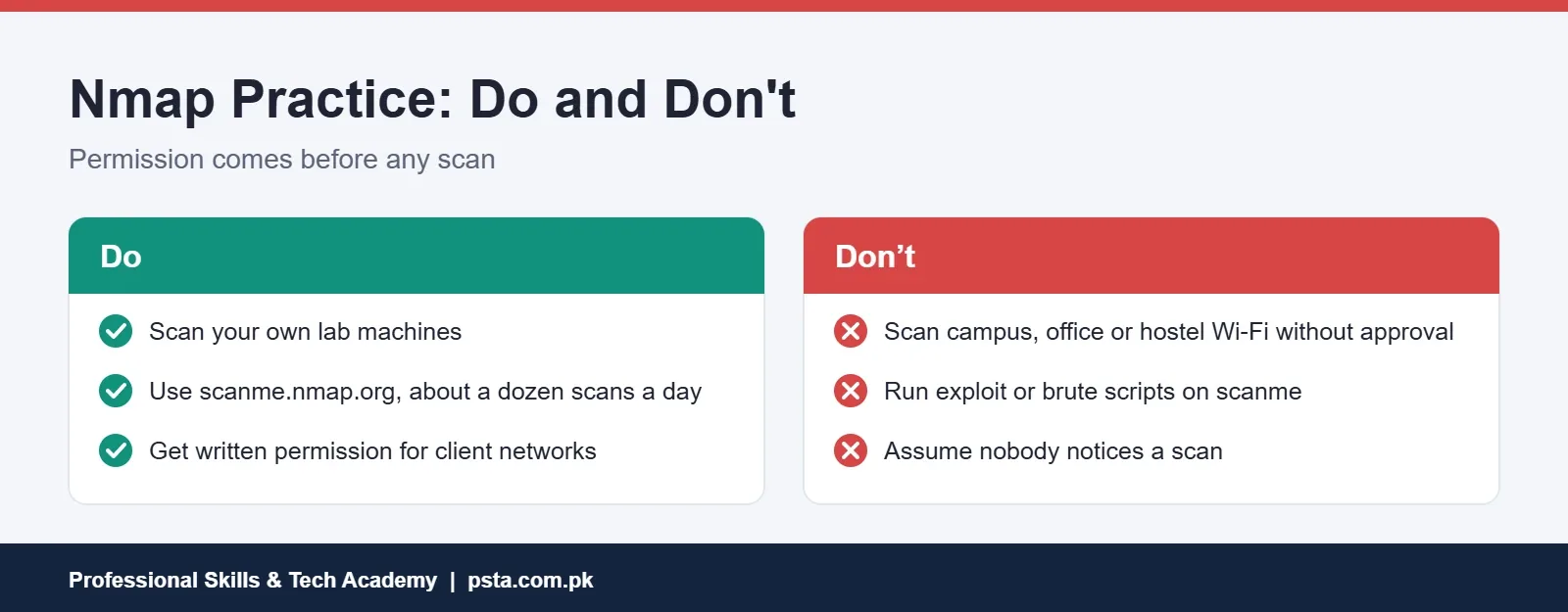
Scanning is quiet compared with an attack, but it's still noticed. Network owners see scans in their logs, and many treat them as the first sign of trouble. The Nmap project's own guide to legal issues gives clear advice: get written permission from the network owner first, and don't scan from work or university networks without approval.
In Pakistan, the Prevention of Electronic Crimes Act 2016 makes dishonest, unauthorized access to an information system or data an offence. According to the Commonwealth's summary of the Act, Section 3 carries up to three months' imprisonment, a fine of up to Rs. 50,000, or both. Section 6 covers critical infrastructure and carries up to three years or a fine of up to Rs. 1 million.
We're not lawyers, and a scan isn't automatically "access." Still, there's no reason to test that line with someone else's network.
So where can you practice? Use your own virtual machines, your own home router, or scanme.nmap.org, a host the Nmap project provides for testing. Its rules allow scans only, not exploits, and the project asks users to keep it to about a dozen scans a day.
Installing Nmap on Windows, Kali and Ubuntu
Installation takes a few minutes on any common system:
- Windows: download the setup file from nmap.org and run it. It installs Nmap, Zenmap and Npcap, the packet capture driver Nmap needs on Windows.
- Kali Linux: Nmap comes preinstalled. Check the version with
nmap --version. - Ubuntu or Debian: run
sudo apt install nmap. Distribution packages can lag behind the latest release, which is fine for learning.
Run your scans from a terminal opened as administrator on Windows, or with sudo on Linux. Nmap's port scanning reference explains why. With raw-packet privileges, Nmap uses a SYN scan by default. Without them, it falls back to a full connect scan. Results can differ between the two, so it helps to know which one ran.
To confirm everything works, run your first Nmap scan against the practice host: nmap scanme.nmap.org. You should see a short list of open ports within a minute or so.
How to Read Nmap Output: The Six Port States
Nmap's output looks dense at first, but the key column is STATE. The port scanning basics page defines six states:
| State | What it means | What to do next |
|---|---|---|
| open | An application is accepting connections | Run -sV to identify the service |
| closed | The port answers, but nothing is listening | Note it; the host is up |
| filtered | A firewall blocks the probes | Try other ports or scan types |
| unfiltered | Reachable, but open or closed is unclear (ACK scan only) | Confirm with a SYN or connect scan |
| open|filtered | Can't tell open from filtered; common with UDP | Add -sV to probe further |
| closed|filtered | Can't tell closed from filtered (idle scan only) | Rare for beginners; move on |
Also note that a plain nmap target scans the 1,000 most common TCP ports, not all 65,535. A service on an unusual port won't show up unless you widen the range.
Nmap Commands for Finding Live Hosts
Start every lab session by finding out what's on the network. These commands come from the host discovery section of the official Nmap reference guide:
nmap -sn 192.168.56.0/24runs a ping scan of your lab range and lists responding hosts without scanning ports.nmap -sL 192.168.56.0/24lists the targets without sending them any packets. Use it to double-check a range before a real scan.nmap -Pn 192.168.56.10skips discovery and treats the host as up. Use it when a firewall blocks ping and the host looks "down" when it isn't.
Replace the example range with your own lab network. On a local network, a privileged -sn uses ARP requests, which are fast and reliable.
Nmap Commands for Port Scanning
Once you know which hosts are up, check their ports. These are the Nmap commands for beginners to memorize first:
nmap 192.168.56.10scans the 1,000 most common TCP ports.nmap -p 22,80,443 192.168.56.10scans only the ports you list.nmap -p 1-1000 192.168.56.10scans a range.nmap -p- 192.168.56.10scans all 65,535 TCP ports. It's slower but catches services on odd ports.nmap -F 192.168.56.10runs fast mode, which scans fewer ports than the default.nmap --top-ports 20 192.168.56.10scans the 20 most common ports.sudo nmap -sS 192.168.56.10runs a SYN scan;nmap -sTruns a full connect scan.sudo nmap -sU --top-ports 20 192.168.56.10checks common UDP ports.
Be patient with UDP. Nmap's documentation explains that open and filtered UDP ports rarely reply, so it waits and retries, and a full UDP scan can take hours. Limiting it to the top ports keeps it practical.
Service, Version and OS Detection
An open port number is only a hint. Port 8080 could be a web server, a proxy or something else entirely. These options identify what's really there:
nmap -sV 192.168.56.10probes open ports to identify the service and version.sudo nmap -O 192.168.56.10estimates the operating system.sudo nmap -A 192.168.56.10turns on OS detection, version detection, default scripts and traceroute together.
The -A flag is convenient in a lab, but it's noisy. In a real engagement, run the pieces you need rather than everything at once.
What Do the Timing Templates -T0 to -T5 Do?
Timing templates control how fast Nmap sends probes. Nmap's timing guide names them:
- -T0 paranoid and -T1 sneaky: extremely slow, meant for avoiding intrusion detection.
- -T2 polite: reduces load on the target, but can be around ten times slower than a default scan.
- -T3 normal: the default, so adding it changes nothing.
- -T4 aggressive: recommended for fast, reliable networks such as a home lab.
- -T5 insane: very fast, at some cost to accuracy.
For practice, nmap -T4 -F 192.168.56.0/24 is a good quick sweep. The same guide makes a useful point: if you're worried about crashing a fragile device, leaving out version detection helps more than slowing the timing.
Nmap Scripts (NSE): Which Ones Are Safe to Start With?
The Nmap Scripting Engine runs small Lua scripts during a scan. The NSE documentation index lists 611 scripts, sorted into categories such as safe, default, discovery, vuln, intrusive and brute.
nmap -sC 192.168.56.10runs the default category. These scripts are chosen to be fast, useful and low in intrusiveness.nmap --script safe 192.168.56.10runs scripts not designed to crash services or exploit holes.nmap --script http-title -p 80,443 192.168.56.10runs a single script, here one that reads web page titles.nmap --script vuln 192.168.56.10checks for specific known vulnerabilities. Use it only in your lab.
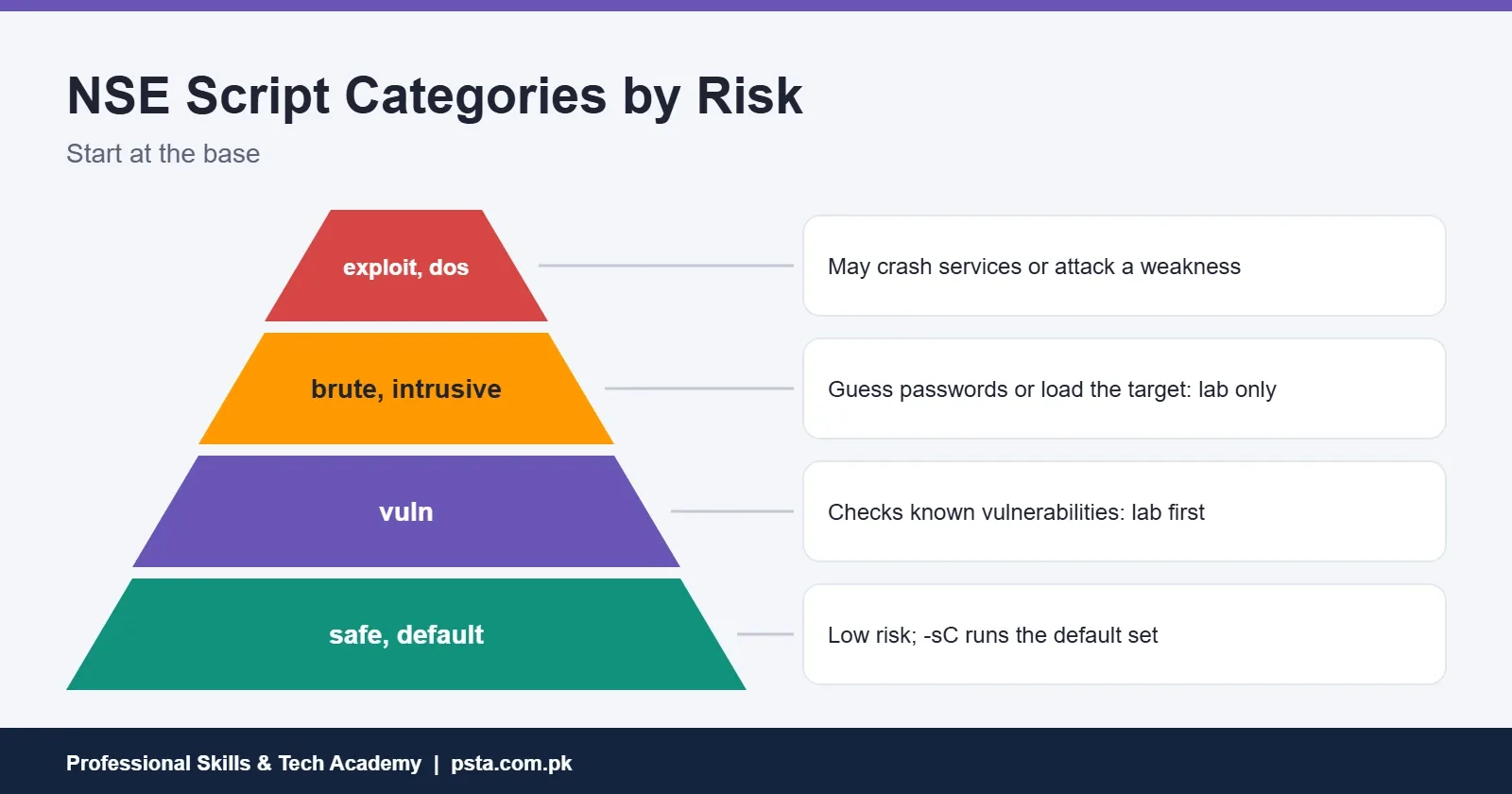
Leave the brute, dos, exploit and intrusive categories alone until you understand them. Brute scripts guess passwords, dos scripts may crash a service, and exploit scripts actively attack a weakness. The NSE usage guide warns that scripts aren't sandboxed and some can damage systems, so never run third-party scripts you haven't read.
A Five-Step Practice Workflow
Here's a routine that turns these Nmap commands into a habit. Run it on your lab every week:
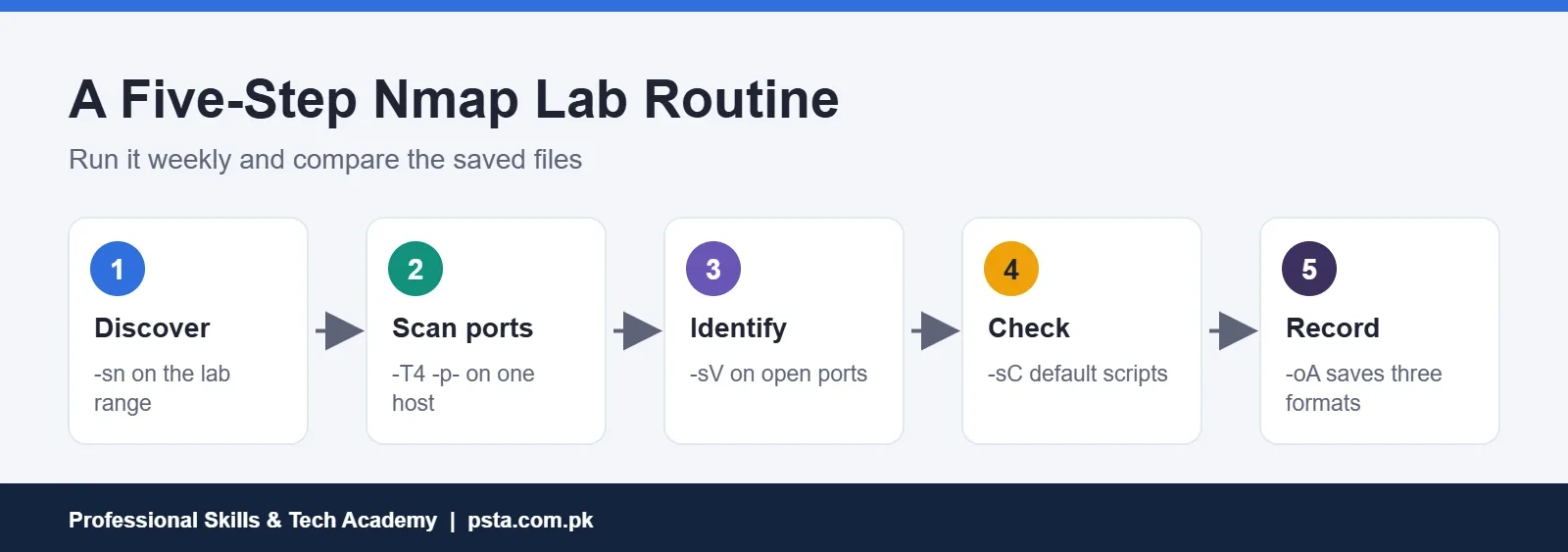
- Discover:
nmap -snon your lab range to list live hosts. - Scan ports:
nmap -T4 -p-on one host to find every open TCP port. - Identify:
nmap -sV -pwith the open ports to name each service. - Check:
nmap -sCon the same ports for default script results. - Record: repeat the final scan with
-oA lab-week1, which saves normal, XML and grepable files at once.
Mistakes That Waste Scan Time
- Scanning the wrong range. One typo in a subnet can point Nmap at someone else's network. Check targets with
-sLfirst. - Trusting the default 1,000 ports. Services on unusual ports are missed until you add
-p-. - Reading "filtered" as "closed." Filtered means a firewall is in the way, not that nothing is there.
- Using
-Afor everything. It's slow and noisy, and it hides which option produced which result. - Not saving output. Without files, you can't compare scans or write a report later.
Saved output matters more than it seems. Comparing this week's file with last week's shows you what changed, and XML output can be imported into other tools and reports. If you haven't built a lab yet, our ethical hacking lab setup checklist walks through it. Our list of cyber security projects for beginners shows how to turn scan results into a portfolio piece.
Where Nmap Fits in PSTA's Ethical Hacking Course
Nmap is taught in Module 3, Scanning & Enumeration, of PSTA's Advanced Ethical Hacking & Penetration Testing course. The same module covers Zenmap, service enumeration and vulnerability scanning with Nessus and OpenVAS. Module 1 covers lab setup and cyber crime law under PECA 2016 before any scanning starts. It's a 12-week, intermediate-level course, and its page lists the current fee as Rs. 30,000.
If you're new to security, the Cyber Security & Ethical Hacking course is the gentler starting point. Batches run at the Abbottabad campus, online for other cities, or in a hybrid mix. Browse the course catalog, apply through the admission page, or ask about the next start date on WhatsApp: +92 314 5424399.
Map Your Own Lab Tonight
Boot your practice machines and run just two Nmap commands: nmap -sn on the lab range, then nmap -sV on one host. Write down every open port and the service behind it, and check whether you expected each one. That small habit of asking "why is this open?" is the real skill Nmap teaches.
Frequently asked questions
Is it illegal to use Nmap in Pakistan?
Owning and running Nmap isn't illegal, and security teams use it every day. The risk comes from scanning systems you don't own or have no permission to test. PECA 2016 makes dishonest, unauthorized access to an information system an offence. Practice on your own lab or scanme.nmap.org, and get written permission before scanning any other network. For legal questions, consult a lawyer.
What is the most basic Nmap command?
Type nmap followed by a target, such as nmap scanme.nmap.org. Nmap checks whether the host is up and then scans its 1,000 most common TCP ports, listing each open port and the usual service name. Add -sV to confirm which software is actually running, and -v for more detail while the scan runs.
What is the difference between -sS and -sT in Nmap?
Both find open TCP ports. -sS, the SYN scan, needs administrator or root privileges and is Nmap's default when it has them. -sT, the connect scan, completes a full TCP connection and works without special privileges, so Nmap falls back to it when you run as a normal user. Results usually match, but the method differs.
Why does Nmap say a host is down when it is running?
Many hosts, including Windows machines with the firewall on, ignore the probes Nmap uses for host discovery. Nmap then assumes the host is down and skips it. Add -Pn to treat the target as up and scan its ports anyway. Expect the scan to take longer, because Nmap can't skip anything.
Which Nmap timing template should a beginner use?
Use the default -T3 when you're unsure, and -T4 on a fast, reliable network such as your own lab. Nmap's documentation describes -T0 and -T1 as very slow options for avoiding detection and -T5 as fast but less accurate. For fragile devices, dropping version detection does more to reduce risk than slowing the timing.
Can I practice Nmap without my own lab?
Yes. The Nmap project runs scanme.nmap.org for practice scans. It asks users to stick to scanning, not exploits, and to keep it to about a dozen scans a day. For anything beyond that, build a small lab with free virtual machines in VirtualBox, which also lets you practice scripts safely.
How do I save Nmap results to a file?
Use -oN for normal text, -oX for XML or -oG for grepable output, followed by a file name. The easiest option is -oA with a base name, such as -oA lab-week1, which saves all three formats at once. Saved files let you compare scans over time and add results to a report.
Sources & references
- Nmap download page nmap.org
- Legal Issues (Nmap Network Scanning) nmap.org
- Port Scanning Basics (Nmap Reference Guide) nmap.org
- Timing Templates (Nmap Network Scanning) nmap.org
- NSE Documentation nmap.org
- NSE Usage and Examples nmap.org
- Prevention of Electronic Crimes Act (Commonwealth policy repository) tradecca.thecommonwealth.org
Last reviewed & updated on by Umar Qureshi. Written by the PSTA team in Abbottabad, Pakistan.

Umar Qureshi

Advanced Ethical Hacking & Penetration Testing Course in Abbottabad
Turn this guide into a career: hands-on training with real projects, online across Pakistan or on-campus in Abbottabad · 12 Weeks.
Comments
No comments yet — ask a question or share your experience.