Quick answer
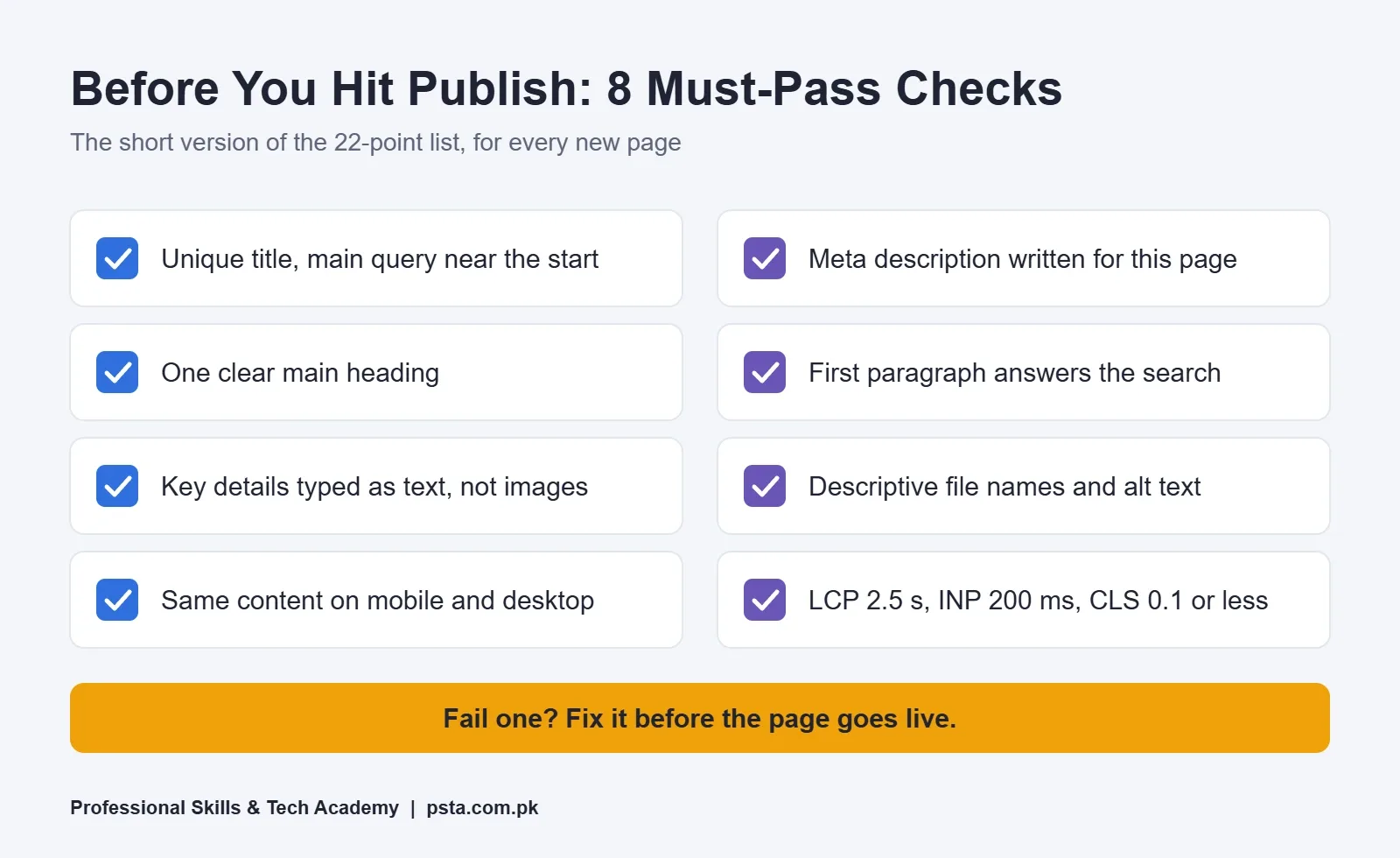
An on-page SEO checklist covers everything on the page itself: a unique title with the main query near the start, a readable URL, a page-specific meta description, clear headings, an opening that answers the search, real text instead of image-only menus, descriptive alt text, useful internal links, the same content on mobile, and good Core Web Vitals.
Key takeaways
- • Pick one main search query per page before changing anything.
- • Write a unique title and meta description for every page; Google ignores the meta keywords tag.
- • Type prices, menus and service details as text, not only as images.
- • Use descriptive file names, alt text and link text that make sense on their own.
- • Google ranks the mobile version, so keep the same content on phones.
- • Good Core Web Vitals: LCP 2.5 s or less, INP 200 ms or less, CLS 0.1 or less.
Table of contents 34 sections
- What Does On-Page SEO Actually Cover?
- Before You Start: How to Use This On-Page SEO Checklist
- Checks 1–5: Title, URL and Meta Description
- 1. The Page Has Its Own Title
- 2. The Main Query Appears Near the Start
- 3. The Title Isn't Stuffed
- 4. The URL Uses Readable Words
- 5. The Meta Description Is Written for This Page
- Checks 6–9: Headings and the Opening Paragraph
- 6. One Clear Main Heading
- 7. Subheadings Describe What's Below Them
- 8. The First Paragraph Answers the Search
- 9. Important Text Is Real Text
- Checks 10–13: Content That Matches the Search
- 10. The Page Type Fits What People Want
- 11. Length Comes From the Topic, Not a Target
- 12. It Includes Local and Specific Details
- 13. It's Easy to Read on a Small Screen
- Checks 14–16: Images and Alt Text
- 14. File Names Describe the Image
- 15. Alt Text Says What the Image Shows
- 16. Images Sit Next to Related Text and Load Quickly
- Checks 17–19: Internal and External Links
- 17. Link Text Makes Sense on Its Own
- 18. Every Important Page Gets at Least One Internal Link
- 19. External Links Point to Sources You Trust
- Checks 20–22: Mobile View and Page Speed
- 20. The Mobile Version Has the Same Content
- 21. Main Content Doesn't Wait for a Tap
- 22. Core Web Vitals Are in the Good Range
- Which Old SEO Habits Can You Stop?
- How Long Do On-Page Changes Take to Show in Google?
- Practicing On-Page SEO in PSTA's Digital Marketing Batches
- Run These Checks on One Page This Week
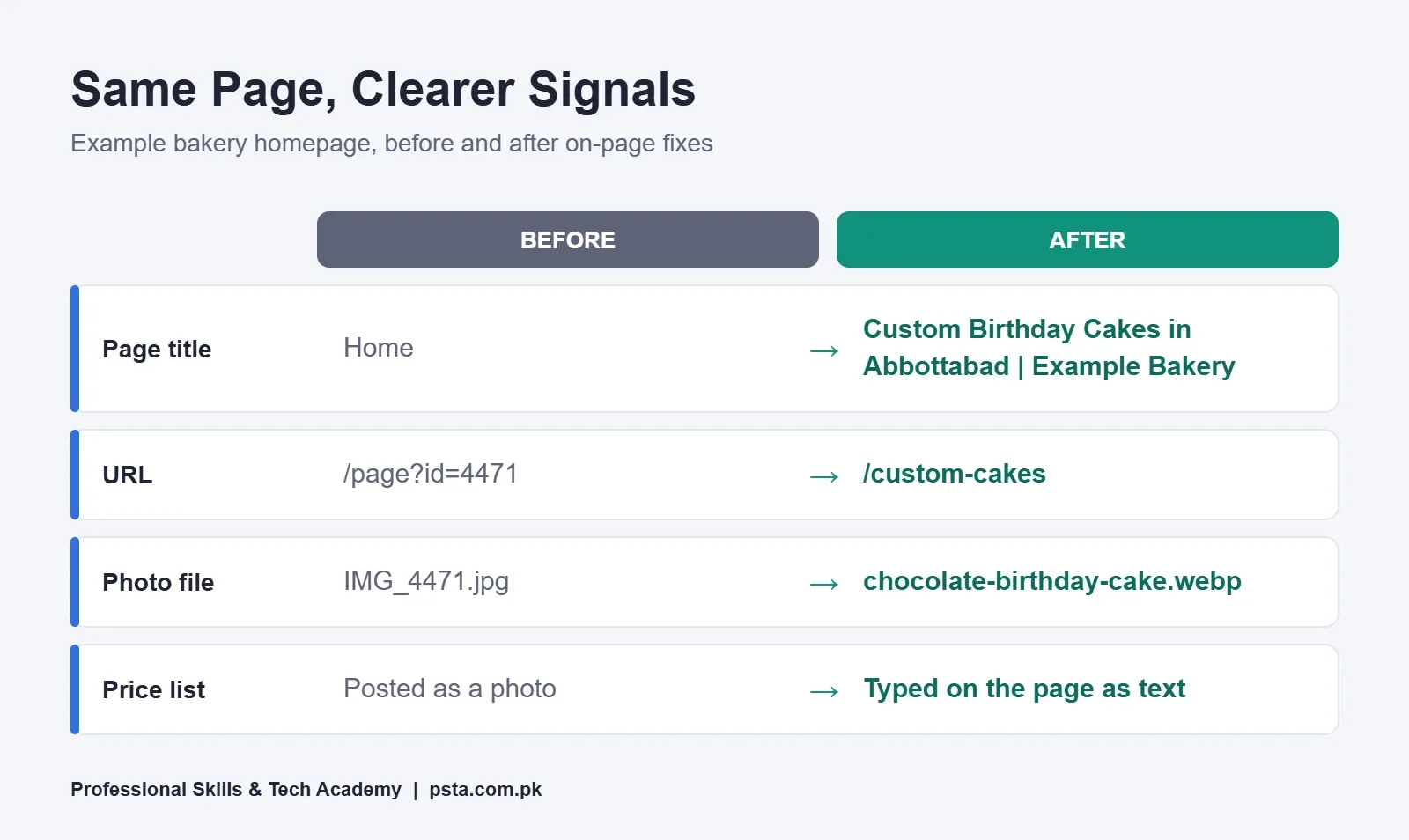
Example: here's a scenario that shows why an on-page SEO checklist matters. A bakery in Abbottabad pays for a neat website with photos of every cake. Three months later, someone in Supply searches "birthday cake order Abbottabad" and the bakery is nowhere. The homepage title says "Home", the cake photos are named IMG_4471.jpg, and the menu is a single picture with no text. Nothing on the page tells Google what the bakery sells or where.
That's the gap an on-page SEO checklist closes. On-page SEO is the work you do on the page itself: its title, address, headings, words, images and links. You control all of it, it costs nothing but time, and you can finish a first pass on a small site in an afternoon.
Here's what this checklist covers:
- The 22 checks to run on any page before you publish or hand it to a client
- How to write a title and meta description that match what people type
- Image, link and mobile checks that most small Pakistani sites skip
- Old SEO habits Google has said it ignores, so you can stop spending time on them
- A realistic idea of how long changes take to show up in search
What Does On-Page SEO Actually Cover?
Search engine optimization splits into three broad areas. Technical SEO is about whether Google can crawl and index the site at all. Off-page SEO is mostly about other sites linking to and talking about yours. On-page SEO sits in the middle: it's everything a visitor (and Google) sees once they land on a single page.
Google's own SEO Starter Guide spends most of its pages on exactly these on-page items: titles, snippets, headings, URLs, images and link text. That's a useful hint about where a beginner's effort pays off first.
For a student, this is also the most hireable SEO skill. A shop owner can't judge your backlink strategy, but they can see the difference when you fix their title, rewrite their service page and their listing finally reads like a real business.
Before You Start: How to Use This On-Page SEO Checklist
Work on one page at a time, and decide on one main search query for that page before you touch anything. A page that tries to rank for "cakes", "catering" and "wedding decor" usually ranks for none of them.
- Write down the page's main query, for example "custom cakes in Abbottabad".
- Search it on your phone and note what kind of pages show up: shop pages, blog posts, maps or videos.
- Open the page you're fixing on your phone too, since that's how most visitors will see it.
- Go through the checks below in order and mark each one pass, fix or not relevant.
- Make the changes, then re-read the page as a customer would.
If you haven't chosen queries yet, start with our keyword research guide for beginners and come back with a short list.
Checks 1–5: Title, URL and Meta Description
These three items are what a searcher sees before they decide to click. Get them right and every other check has a chance to matter.
1. The Page Has Its Own Title
Every page needs a unique title tag, the <title> element in its HTML. Google's title link documentation warns against vague labels like "Home" and against titles that repeat across many pages with one word changed.
2. The Main Query Appears Near the Start
Put the words people search for early in the title, then add your brand at the end after a pipe or hyphen. "Custom Birthday Cakes in Abbottabad | Example Bakery" beats "Welcome to Example Bakery – Quality Since 2010". There's no fixed character limit, but Google truncates long titles to fit the screen width, so keep the useful part up front.
3. The Title Isn't Stuffed
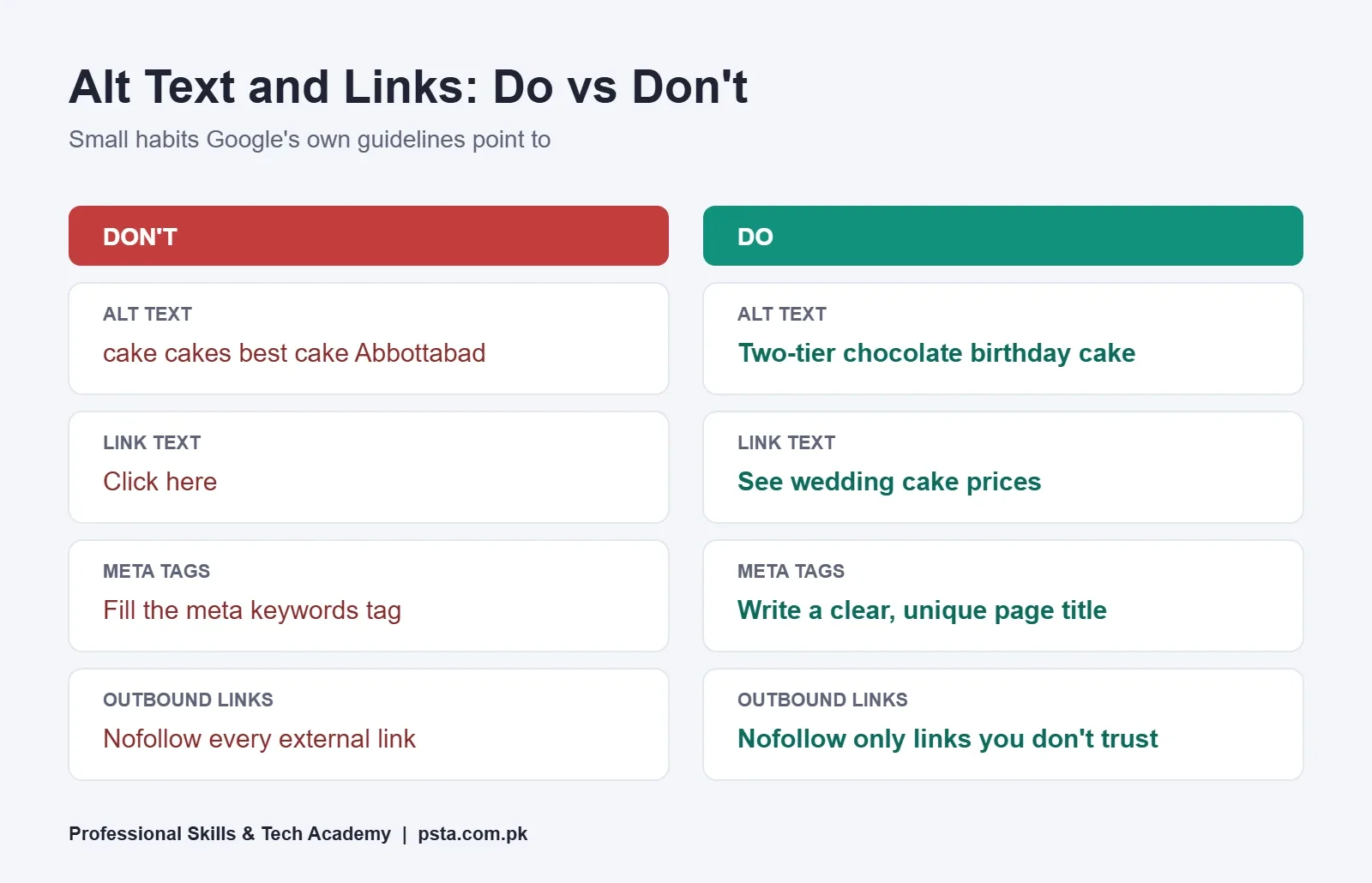
Repeating "cakes Abbottabad, best cakes Abbottabad, cheap cakes" doesn't help. Google says this makes results look spammy, and it may rewrite the title link anyway.
4. The URL Uses Readable Words
Use short, hyphenated words such as /custom-cakes instead of /page?id=4471. Be realistic about why: Google's starter guide says keywords in a URL have hardly any ranking effect. The benefit is that people (and the breadcrumb in search results) can tell what the page is before clicking.
5. The Meta Description Is Written for This Page
Write one or two sentences that summarize the page and give a reason to click: what you offer, where, and one specific detail. Google's snippet guidelines say most snippets come from page content, and the meta description is used when it describes the page better. They also say identical descriptions across a site aren't helpful.
Checks 6–9: Headings and the Opening Paragraph
6. One Clear Main Heading
The page should have one visible main heading, usually the H1, that matches the title's promise. If the title says "Custom Birthday Cakes" and the heading says "Our Story", the visitor feels lost.
7. Subheadings Describe What's Below Them
Use H2s and H3s like signposts: "Prices and Sizes", "How to Order", "Delivery Areas". Google's starter guide says there's no ideal number of headings and that heading order doesn't affect Search, though a logical order helps screen reader users. So write headings for scanning, not for a formula.
8. The First Paragraph Answers the Search
Someone who searched "custom cakes Abbottabad" wants to know three things fast: do you make them, what do they cost, and how do I order. Answer those in the first two or three sentences. Save the founding story for lower down.
9. Important Text Is Real Text
Menus, price lists and service details posted only as an image are a common problem on Pakistani business sites. Google can't read a JPEG menu the way it reads HTML text, and neither can a customer on a slow connection. Type the key details as text, then add the image as a bonus.
Checks 10–13: Content That Matches the Search
10. The Page Type Fits What People Want
Look back at the results you noted earlier. If the top results for your query are service pages with prices, a 2,000-word blog post probably isn't the right format. If they're how-to guides, a thin sales page will struggle.
11. Length Comes From the Topic, Not a Target
Google's guide is direct about this: there's no magical word count, minimum or maximum. A plumber's service page might need 300 good words. A buying guide might need 2,000. Cover what the reader needs, then stop.
12. It Includes Local and Specific Details
Generic pages blend into each other. Add the details only you can give: areas you serve, delivery times, payment options such as cash on delivery or JazzCash, real working hours and a phone or WhatsApp number written as text. These details help visitors and give Google clear signals about location.
13. It's Easy to Read on a Small Screen
Short paragraphs, plain words and lists where they fit. Many readers in Pakistan will be on phone data. By the end of 2025, Pakistan had 117 million internet users and 194 million cellular mobile connections, per the Digital 2026 Pakistan data from DataReportal. Write for the person reading on a phone in a busy market.
Checks 14–16: Images and Alt Text
14. File Names Describe the Image
Rename files before uploading: chocolate-birthday-cake.webp, not IMG_4471.jpg. Google's image SEO guidance uses the same kind of example and advises against names like image1.jpg.
15. Alt Text Says What the Image Shows
Google calls alt text the most important metadata for an image. Its own examples move from missing alt, to a keyword-stuffed list, to a short, specific description. Apply the same idea: "two-tier chocolate birthday cake with fresh strawberries" is useful. "cake cakes best cake Abbottabad" is not.
16. Images Sit Next to Related Text and Load Quickly
Google uses the surrounding text and captions to understand an image, so place each photo near the words it supports. Use standard <img> tags, because Google doesn't index CSS background images. Compress large photos and use a modern format such as WebP, which Google Search supports.
Checks 17–19: Internal and External Links
17. Link Text Makes Sense on Its Own
Read each link without the sentence around it. "Click here" and "read more" tell nobody anything. "see our wedding cake prices" does. Google's link best practices recommend exactly this test, and they also ask you to keep link text concise and natural.
18. Every Important Page Gets at Least One Internal Link
Google says every page you care about should be linked from at least one other page on your site. Link your service pages from the homepage, link blog posts to the service they relate to, and avoid orphan pages that only exist in a sitemap. Good internal links also guide visitors from an article to the service it supports. Use real <a href> links; buttons that only run JavaScript may not be followed.
19. External Links Point to Sources You Trust
Citing an official source builds trust with readers. Use nofollow only for links you don't vouch for, and sponsored for paid placements. You don't need to nofollow every outbound link.
Checks 20–22: Mobile View and Page Speed
20. The Mobile Version Has the Same Content
Google indexes and ranks the mobile version of a page, a policy it calls mobile-first indexing. If your theme hides the price table or the FAQ on phones, Google may never count it. Tabs and accordions are fine, as long as the content is still there.
21. Main Content Doesn't Wait for a Tap
Google won't load content that needs a click, swipe or typing to appear. A "Load more" button that hides your service list is a real risk.
22. Core Web Vitals Are in the Good Range
Google's Core Web Vitals measure loading, responsiveness and visual stability. According to web.dev, a page counts as good when Largest Contentful Paint is 2.5 seconds or less, Interaction to Next Paint is 200 milliseconds or less, and Cumulative Layout Shift is 0.1 or less, measured at the 75th percentile of page views. On WordPress sites, the usual fixes are smaller images, fewer plugins and a lighter theme. Our WordPress website cost guide explains where hosting quality fits into that budget.
Which Old SEO Habits Can You Stop?
A lot of SEO advice in WhatsApp groups and old YouTube videos is out of date. These habits use up time and give you nothing back, so leave them off your on-page SEO checklist.
| Old Habit | What Google Says | Do This Instead |
|---|---|---|
| Filling the meta keywords tag | Google Search doesn't use it | Spend that time on the title and first paragraph |
| Writing to a fixed word count | No magical word count, minimum or maximum | Cover the question fully, then stop |
| Packing keywords into the URL | Hardly any effect beyond breadcrumbs | Keep URLs short and readable |
| Keeping H2s and H3s in perfect order for rankings | Heading order doesn't matter for Search | Order headings for readers and screen readers |
| Repeating the keyword in every alt tag | Keyword stuffing can get a site flagged as spam | Describe what each image shows |
| Copying one meta description to every page | Identical descriptions aren't helpful | Write one per page, starting with key pages |
One more myth worth clearing up: E-E-A-T (experience, expertise, authoritativeness and trust) isn't a ranking factor you can switch on, according to the starter guide. Showing real experience still helps readers trust you, which is reason enough to do it.
How Long Do On-Page Changes Take to Show in Google?
Not overnight. Google's title link documentation says it can take a few days to a few weeks to reprocess changes to a page's title sources. Rankings can move more slowly than that, because Google also has to compare your page with everything else on the topic.
Two habits help while you wait. First, keep a simple log: page, date changed, what you changed. Second, if the site is verified in Google Search Console, use the URL Inspection Tool to check how Google sees the updated page. Avoid changing the same title every few days, because you won't be able to tell which version worked.
Practicing On-Page SEO in PSTA's Digital Marketing Batches
In PSTA's Advanced Digital Marketing course, SEO is one full module, covering keyword research, on-page, technical and off-page work, followed by a separate module on local SEO and Google Business Profile. One of the course projects is a business website on WordPress or Wix where you apply these fixes to the main pages yourself, so this on-page SEO checklist becomes something you've done rather than something you've read.
The course runs for 12 weeks and starts from the basics, so no marketing experience is needed. Its listed fee is Rs. 30,000, down from a regular Rs. 35,000, and you can split it into 2 installments. Classes run on campus in Mandian, on Old College Road across from FIMS College in Abbottabad, live online for students in other cities, or as a hybrid of the two. New batches start every month.
If you want to build sites as well as optimize them, the WordPress development course pairs well with it. For a local shop client, our Google Business Profile walkthrough covers the Maps side of the same work. You can compare every program on the courses page.
Run These Checks on One Page This Week
Pick a single page: your own portfolio, a relative's shop site or a small business you'd like as a client. Write its main query at the top of a notebook page, run this on-page SEO checklist, and fix the three that fail most clearly. Usually that's the title, the first paragraph and the image names.
Save a screenshot of the search result before and after. That pair is the start of a case study, and our portfolio roadmap shows how to build more of them. When you're ready to learn this with feedback from an instructor, you can apply through the admission page or message +92 314 5424399 on WhatsApp to ask which batch timing suits you.
Frequently asked questions
What should an on-page SEO checklist include?
At minimum: a unique title with the main query near the start, a readable URL, a meta description written for that page, one clear main heading, an opening that answers the search, key details as real text, descriptive file names and alt text, sensible internal links, the same content on mobile and desktop, and Core Web Vitals in the good range.
What is the difference between on-page and off-page SEO?
On-page SEO covers what you control on the page itself, such as the title, headings, text, images and internal links. Off-page SEO is mostly about signals from elsewhere, especially other websites linking to and mentioning yours. Technical SEO sits underneath both and deals with whether search engines can crawl and index the site properly.
How long should a title tag be?
Google sets no fixed character limit for titles, but it shortens long ones in search results to fit the screen width. A practical approach is to keep the most useful words, usually the main query, at the start and add your brand name at the end after a pipe or hyphen. Avoid stuffing several keyword variations into one title.
Does Google still use the meta description?
Sometimes. Google says most snippets are generated from the page content, and it uses the meta description when that gives a more accurate summary of the page. It is still worth writing one for each important page, because a specific, unique description can become the text people read before deciding to click.
Do keywords in the URL help a page rank?
Very little. Google's starter guide says keywords in a domain name or URL path have hardly any effect beyond appearing in breadcrumbs. Readable URLs are still worth using, because people can understand the page before clicking. Don't change the URLs of pages that already rank just to add keywords, since that creates redirects for little gain.
How many words does a page need to rank on Google?
There is no required number. Google states there is no magical word count, minimum or maximum. A local service page might need only a few hundred clear words with prices and contact details, while a buying guide may need far more. Look at what already ranks for your query and cover the reader's question fully.
How do I know if Google has picked up my on-page changes?
If your site is verified in Google Search Console, use the URL Inspection Tool to see how Google currently sees the page. Google says changes to title sources can take a few days to a few weeks to be reprocessed. Keep a simple change log so you can match any ranking movement to the edit that caused it.
Is on-page SEO enough for a local business in Pakistan?
It is the right place to start, but local businesses usually also need a complete Google Business Profile, consistent contact details across the web and genuine customer reviews. On-page work makes sure that when people do land on your site, the page clearly explains what you offer, where you work and how to contact you.
Sources & references
- Google Search Central: SEO Starter Guide developers.google.com
- Google Search Central: Influencing Title Links developers.google.com
- Google Search Central: Meta Description and Snippets developers.google.com
- Google Search Central: Image SEO Best Practices developers.google.com
- Google Search Central: Link Best Practices developers.google.com
- Google Search Central: Mobile-First Indexing Best Practices developers.google.com
- web.dev: How the Core Web Vitals Thresholds Were Defined web.dev
- DataReportal: Digital 2026 Pakistan datareportal.com
Last reviewed & updated on by Umar Qureshi. Written by the PSTA team in Abbottabad, Pakistan.

Umar Qureshi

Advanced Digital Marketing Course in Pakistan and Abbottabad
Turn this guide into a career: hands-on training with real projects, online across Pakistan or on-campus in Abbottabad · 12 Weeks.
Comments
No comments yet — ask a question or share your experience.