Quick answer
Use the Context API to share values that change rarely, such as theme, language or the signed-in user. Choose Redux Toolkit when lots of state is shared across the app, changes often, follows complex rules or is maintained by a team. Zustand is a lighter middle option with no provider and selective re-renders.
Key takeaways
- • Context shares a value down the component tree; it does not manage how that value changes.
- • Redux Toolkit is the official way to write Redux and adds DevTools, Immer and RTK Query.
- • Every component reading a context re-renders when its value changes, while useSelector re-renders only when the selected value changes.
- • Recent React job ads on Rozee.pk name Redux, and some also accept Context API.
- • Learn useState, then Context with useReducer, then Redux Toolkit, rebuilding one small app each time.
Table of contents 13 sections
- What Is the Difference Between Redux and Context API?
- What Problem Does Context Actually Solve?
- What Does Redux Toolkit Add on Top?
- Redux vs Context API: Side-by-Side Comparison
- How Do Re-Renders Differ in Redux vs Context API?
- When Is Context API Enough?
- When Should You Reach for Redux Toolkit?
- Where Does Zustand Fit In?
- What Do Surveys and Pakistani Job Ads Show?
- A Learning Order That Avoids Confusion
- How to Answer This in an Interview
- Practising State Management in PSTA's React Course
- Build the Same Cart Twice This Weekend
Should you learn Redux or just use the Context API? Almost every student who finishes the basics of React asks it. It usually comes up the week their first app starts passing the same props through five components. Here's the short version of Redux vs Context API. Context shares a value with part of your component tree. Redux Toolkit is a full state management library with a store, rules for updates and debugging tools.
They overlap, so the choice confuses people. This guide compares them the way we do in class, with small code samples and real situations from Pakistani projects.
By the end of this guide, you will know:
- What each tool was built to do, and where they overlap
- How re-renders differ between Context and Redux, in plain terms
- A simple test for deciding which one a project needs
- Where Zustand fits if neither feels right
- What Pakistani job ads ask for, and a sensible order to learn it all
What Is the Difference Between Redux and Context API?
The React Context API ships with React itself. You create a context, wrap part of your app in a provider, and any component below it can read the value with useContext. The middle components never touch the data. That is all it does. It doesn't decide how the value changes. You still hold the actual state with useState or useReducer in some parent component.
Redux is a separate library. Your app state lives in one store outside the component tree. Components dispatch actions that describe what happened, reducers calculate the next state, and components read only the pieces they need. Today you write Redux with Redux Toolkit (RTK). The Redux team's own docs call it the official recommended approach and describe the old hand-written style as obsolete for new code.
So the honest comparison is not "Context or Redux" as equals. It's "Context plus React's own state hooks" against "Redux Toolkit plus React-Redux." One is a delivery method. The other is a complete system for storing, updating and tracing state.
What Problem Does Context Actually Solve?
Context removes prop drilling. Picture a school result portal for an Abbottabad college (an example, not a real client). The logged-in teacher's name and role are needed in the header, the sidebar and a settings page buried four levels deep. Without Context, every layer in between accepts a user prop just to pass it along.
With Context, it looks like this:
const UserContext = createContext(null);

function App() {
  const [user, setUser] = useState(null);
  return (
    <UserContext value={user}>
      <Dashboard />
    </UserContext>
  );
}

function ProfileBadge() {
  const user = useContext(UserContext);
  return <span>{user?.name}</span>;
}
The official React docs on context list the classic uses: theming such as dark mode, the current account, routing, and managing state when you pair it with a reducer. They also suggest two things to try first: pass props normally, or restructure so you pass JSX as children. Context comes after those, not before.
What Does Redux Toolkit Add on Top?
Redux Toolkit gives you a structure that stays the same as the app grows. A typical slice for a shopping cart looks like this:
const cartSlice = createSlice({
  name: 'cart',
  initialState: { items: [] },
  reducers: {
    addItem(state, action) {
      state.items.push(action.payload);
    },
    removeItem(state, action) {
      state.items = state.items.filter(i => i.id !== action.payload);
    }
  }
});

export const { addItem, removeItem } = cartSlice.actions;
export const store = configureStore({ reducer: { cart: cartSlice.reducer } });
That short file gives you a few things Context alone does not:
- Generated actions:
createSlicebuilds action creators and type names from your reducer names. - Safe "mutating" code: RTK uses the Immer library, so
state.items.push()produces a new immutable state behind the scenes. - DevTools by default:
configureStoresets up Redux DevTools and adds development checks that catch accidental mutations. - Async helpers:
createAsyncThunkhandles loading and error states for API calls. - Data fetching: RTK Query, an optional part of the package, fetches and caches server data.
The trade-off is more files, more concepts and more ceremony. For a contact form or a landing page, that cost buys you nothing.
Redux vs Context API: Side-by-Side Comparison
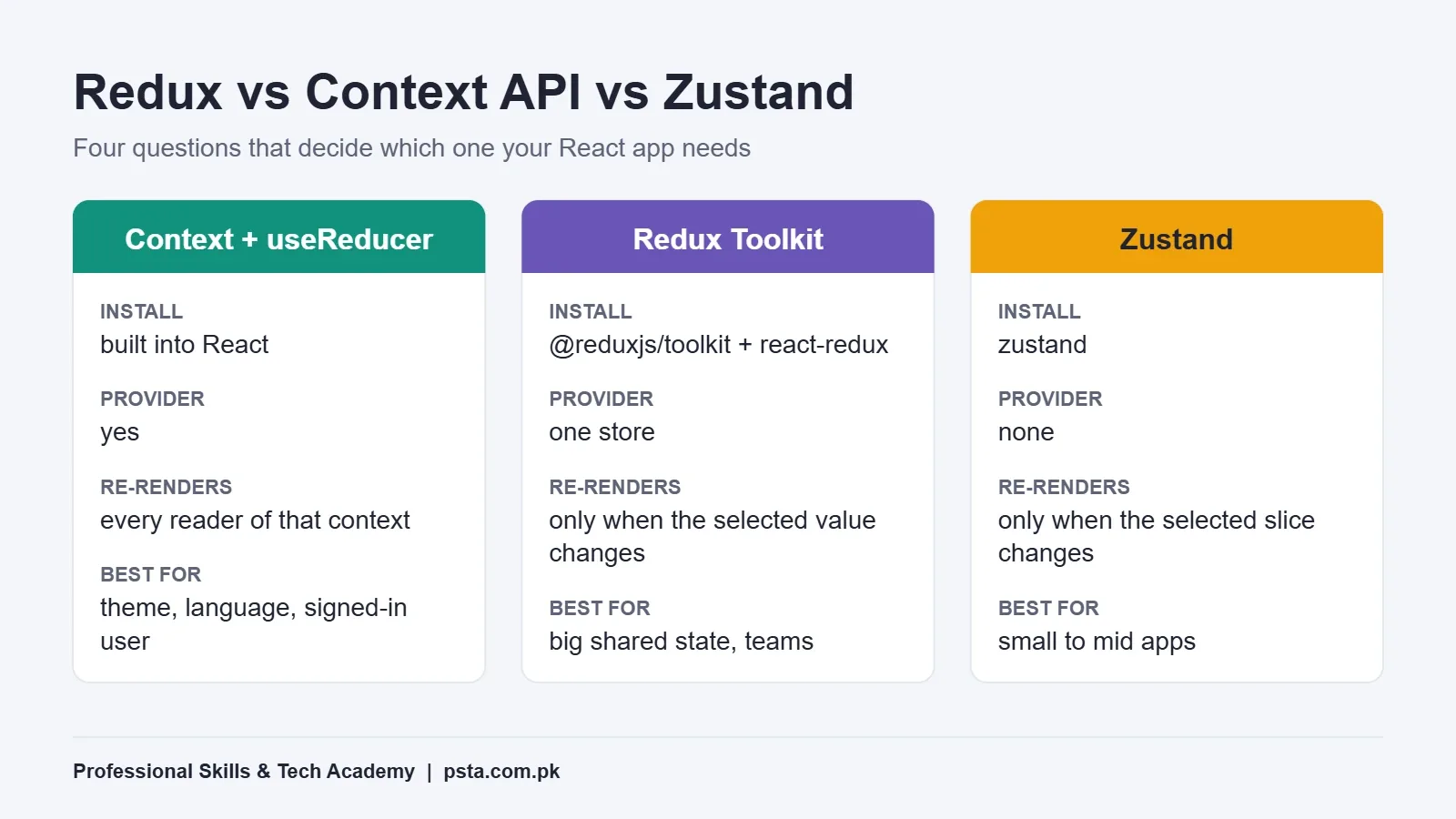
Here's how the two compare on the points that matter in a real project. We've added Zustand because it keeps coming up in interviews and code reviews.
| Point | Context + useReducer | Redux Toolkit | Zustand |
|---|---|---|---|
| Extra install | None, built into React | @reduxjs/toolkit and react-redux | zustand |
| Provider needed | Yes, wrap the tree | Yes, one store provider | No |
| Who re-renders | Every component reading that context | Components whose selected value changed | Components whose selected slice changed |
| Debugging | React DevTools only | Redux DevTools with action history | Redux DevTools via its devtools middleware |
| Server data caching | Write it yourself | RTK Query included | Pair with another tool |
| Setup effort | Low | Medium | Low |
| Best fit | Theme, language, logged-in user | Large shared state, big teams | Small to mid apps with shared state |
How Do Re-Renders Differ in Redux vs Context API?
This is the technical point most beginners miss. The React docs explain that when a provider receives a new value, React updates every component below it that reads that context. Say you put the cart, the user, the filters and the notifications into one big context object. A change to the notification count now re-renders the cart too.
On a small app you won't notice. On an admin dashboard with long tables and charts, you will. Students usually first see it as typing lag in a search box.
Redux handles this differently. According to the React-Redux hooks reference, useSelector compares the old and new selected value after each action, using strict === equality. If they match, the component skips the render. One catch: a selector that builds a new object every time defeats this check. Call useSelector once per field, or pass shallowEqual.
You can reduce Context re-renders too. Split one large context into several small ones, keep the state and the update functions in separate contexts, and memoize values. It works, but you are now building by hand what a state library already gives you.
When Is Context API Enough?
For most student projects and many client sites, Context is the right call. Use it when:
- The value changes rarely: theme, language (English or Urdu), currency, or the signed-in user
- Only a handful of components need the shared state
- You're building a portfolio site, a clinic booking page or a small business catalog
- Most of your data comes from an API and you can fetch it in the page that needs it
- You're working alone and want the fewest moving parts
The Redux FAQ says openly that not all apps need Redux. Treat that as permission to start simple.
When Should You Reach for Redux Toolkit?
The same FAQ lists the conditions where Redux pays off. In our words, reach for it when:
- Lots of state is needed in many unrelated parts of the app.
- That state changes often, such as a cart, live orders or form wizards.
- The update logic is complex, with many rules about what changes when.
- The codebase is medium or large and several developers work on it.
- You need to see exactly how and when state changed while debugging.
Think of an e-commerce admin panel for a Lahore clothing brand selling through its own site and Daraz (again, an example). Orders, stock levels, returns, courier status and user permissions all affect each other. Being able to step through each action in Redux DevTools saves hours when a stock count goes wrong. That's where the extra structure earns its keep.
Where Does Zustand Fit In?
Zustand sits between the two. You create a store with one function and use it as a hook anywhere, with no provider. The Zustand documentation notes that components select the slice they need and re-render only when that slice changes.
const useCart = create((set) => ({
  items: [],
  addItem: (item) => set((s) => ({ items: [...s.items, item] }))
}));

const count = useCart((s) => s.items.length);
It also changes the Redux vs Context API debate a little. It's a good choice for mid-sized apps that have outgrown Context but don't need Redux's full toolkit. Just don't learn it instead of Redux if you're applying to software houses. Learn it after.
What Do Surveys and Pakistani Job Ads Show?
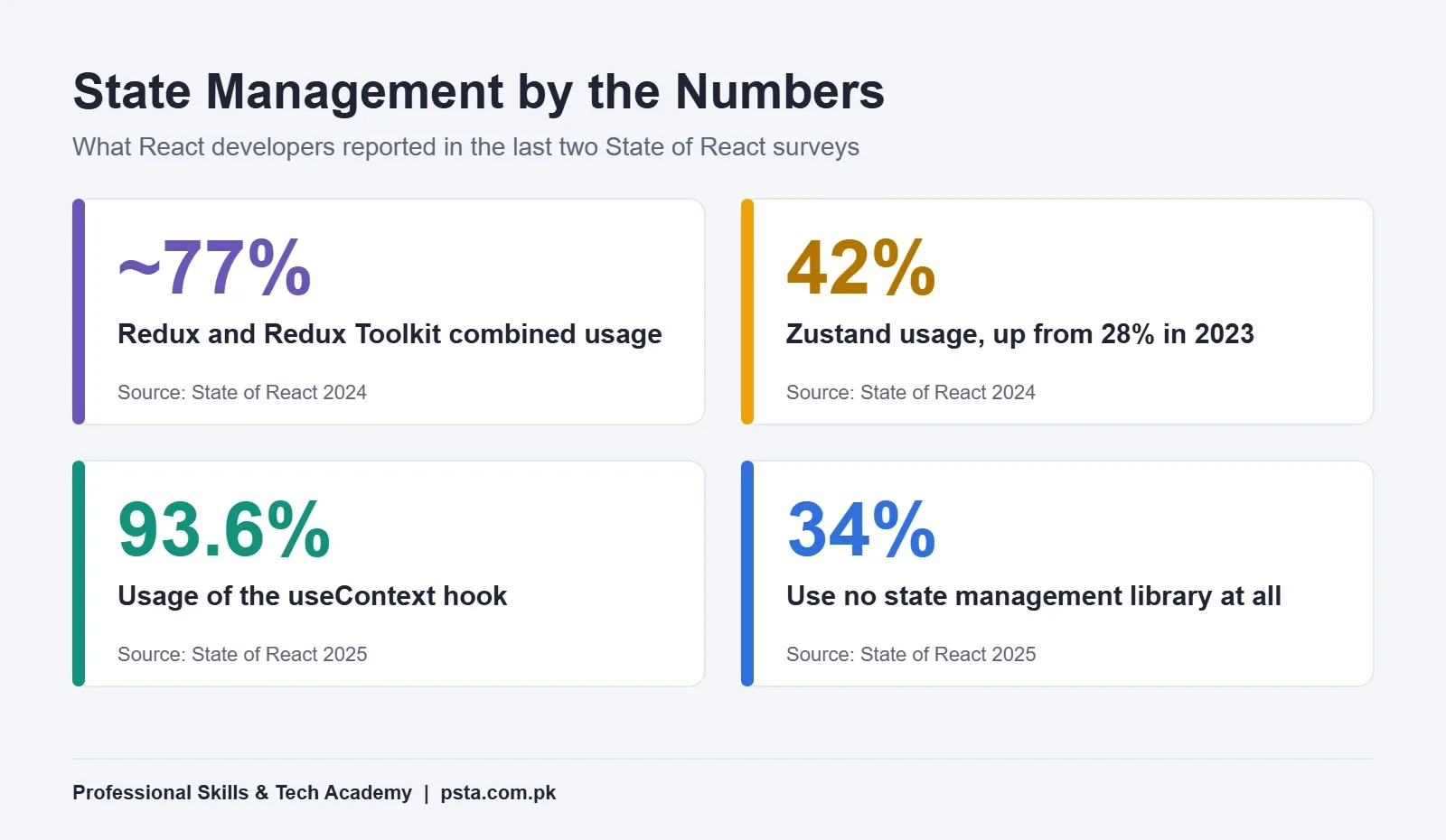
Global survey data gives a useful picture. The State of React 2024 results, summarized by Telerik's review of React tools, put combined Redux and Redux Toolkit usage at around 77%. Zustand climbed from 28% in 2023 to 42% in 2024.
In the 2025 edition, broken down by certificates.dev, 34% of respondents used no state management library at all. The useContext hook showed 93.6% usage. Complexity (20%) and boilerplate (15%) were the top complaints about state libraries.
Local hiring tells a similar story. A remote React developer listing on Rozee.pk posted in September 2026 asked for experience with state libraries such as Redux, along with TypeScript. A React JS role at a Multan hospital, posted in October 2026, asked for state management with "Redux or Context API." Employers expect you to know both and to explain why you'd pick one.
The practical takeaway on Redux vs Context API: Context is something every React developer uses, Redux is still what many job ads name, and Zustand is a growing third option.
A Learning Order That Avoids Confusion
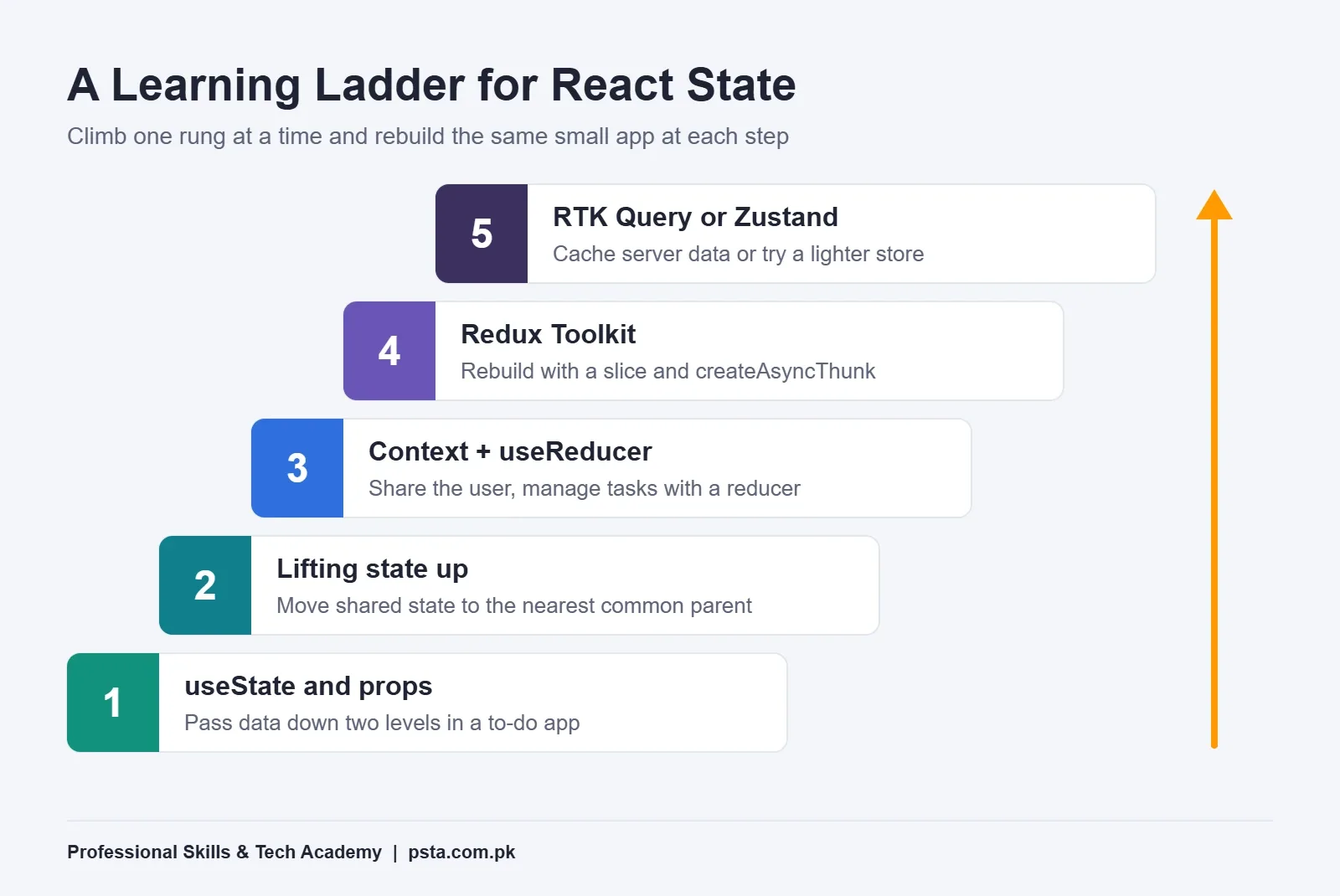
Students who jump straight into Redux often memorize the steps without knowing what problem they're solving. This order for learning React state management builds understanding first:
- useState and props. Build a to-do app and pass data down at least two levels. Our guide on props vs state in React covers this stage.
- Lifting state up. Move shared state to the nearest common parent and feel where it starts to get messy.
- Context with useReducer. Rebuild the same app with a context for the user and a reducer for the tasks.
- Redux Toolkit. Rebuild it once more with a slice, then add
createAsyncThunkfor an API call. - RTK Query or Zustand. Add server caching with RTK Query, or try Zustand on a side project.
Building one app three ways takes about two weekends. It turns Redux vs Context API from a debate into something you've felt yourself. It also teaches more than any comparison article. While you're at it, read our list of common React hooks mistakes, since several of them show up as state bugs.
How to Answer This in an Interview
Redux vs Context API is a common topic in React interviews, and there's no single correct answer. Interviewers want reasoning. A strong answer has three parts:
- Say what each one is: Context shares a value, Redux manages state with a predictable update flow.
- Give one case for each: theme and auth in Context, a cart or order dashboard in Redux Toolkit.
- Mention the re-render difference and how you'd reduce it in Context.
Practice saying it out loud in under a minute. Our set of React interview questions has more to rehearse with.
Practising State Management in PSTA's React Course
The Redux vs Context API choice comes up early in the syllabus. Module 2 of PSTA's Advanced React.js course covers state management with Context API and Redux Toolkit. Later modules cover React Router, API integration, performance and code splitting, and a final e-commerce project where these choices really matter. The course runs 12 weeks at an intermediate level, and the course page shows a fee of Rs. 30,000. Classes are available on campus in Abbottabad or online.
If modern JavaScript still feels shaky, start with our JavaScript course, which leads into React. If you want the backend side as well, look at Full-Stack Web Development with AI. You can compare everything on the courses page and apply through admissions when you're ready.
Build the Same Cart Twice This Weekend
Pick one small feature, like a cart with add, remove and a total. Build it with Context and useReducer on Saturday, then with Redux Toolkit on Sunday. Note how many files each version needed and which one was easier to debug. That one exercise will settle the Redux vs Context API question for your own projects better than any opinion online.
Frequently asked questions
Is the Context API a replacement for Redux?
Not exactly. Context only passes a value down the component tree. It needs useState or useReducer to hold and update that value. Redux Toolkit adds a central store, structured updates, selective re-renders and DevTools. For theme, language or the signed-in user, Context can replace Redux. For large, frequently changing shared state, it usually cannot without extra work.
Is Redux still worth learning in 2026?
Yes, if you want React jobs. Survey data from State of React 2024 put combined Redux and Redux Toolkit usage at around 77%, and recent Pakistani React job ads on Rozee.pk still name Redux. Learn it with Redux Toolkit, which the Redux team calls the official recommended approach, rather than the old hand-written style.
Can I use Redux and Context API in the same app?
Yes, and many apps do. A common split is Context for values that rarely change, such as the theme or language, and Redux Toolkit for shared app data like a cart, orders or user permissions. React-Redux itself uses a provider at the top of the tree, so the two approaches sit together without conflict.
Does the Context API cause performance problems?
It can in larger apps. When a provider gets a new value, every component that reads that context re-renders. On small apps you won't notice. On dashboards with long tables, it can cause lag. Splitting one big context into smaller ones and memoizing values helps a lot before you need a library.
Should a beginner learn Zustand or Redux first?
Learn Context with useReducer first, then Redux Toolkit, then Zustand. Redux teaches the action and reducer pattern that interviewers often ask about, and many local job ads name it. Zustand is quicker to set up, so it's easy to pick up later once you understand why shared state needs structure.
What is the difference between Redux and Redux Toolkit?
Redux is the core pattern and library. Redux Toolkit is the official package for writing Redux today. It wraps the core and adds configureStore, createSlice, Immer for simpler update code, createAsyncThunk and the optional RTK Query. The Redux docs describe hand-written Redux without the toolkit as obsolete for new code.
Is useReducer the same as Redux?
They share the same idea: you dispatch an action and a reducer returns the next state. The difference is scope. useReducer lives inside one component, so you pair it with Context to share it. Redux keeps state in a store outside the component tree and adds selectors, middleware and DevTools on top.
Sources & references
- Why Redux Toolkit Is How To Use Redux Today redux.js.org
- Redux FAQ: General redux.js.org
- React Redux Hooks API redux.js.org
- Passing Data Deeply with Context (React Docs) react.dev
- Zustand Introduction zustand.docs.pmnd.rs
- Top Libraries and Tools for Modern React Frontend Development (Telerik) telerik.com
- Breaking Down State of React 2025 Results certificates.dev
- React Developer Job, Islamabad (Rozee.pk) rozee.pk
Last reviewed & updated on by Umar Qureshi. Written by the PSTA team in Abbottabad, Pakistan.

Umar Qureshi

Advanced React.js Mastery: Build Scalable Real-World Applications
Turn this guide into a career: hands-on training with real projects, online across Pakistan or on-campus in Abbottabad · 12 Weeks.


Comments
No comments yet — ask a question or share your experience.