Quick answer
SQL window functions calculate across related rows without collapsing them, so each row keeps its detail and gains a total, rank or comparison. Use PARTITION BY to group, ORDER BY to sequence, and ROWS or RANGE to set the frame. Filter the results in an outer query, because window functions run after WHERE.
Key takeaways
- • A window function adds a total, rank or comparison to every row instead of collapsing rows like GROUP BY.
- • With ORDER BY and no frame, Oracle defaults to RANGE BETWEEN UNBOUNDED PRECEDING AND CURRENT ROW, which creates a running total.
- • On a tie, ROW_NUMBER gives 1-2-3-4, RANK gives 1-2-2-4 and DENSE_RANK gives 1-2-2-3.
- • LAG and LEAD compare rows without a self join, and the LAG offset defaults to 1.
- • Window functions cannot go in WHERE, so filter them in a subquery or WITH clause.
- • You can practise free in Oracle FreeSQL or Oracle AI Database 26ai Free.
Table of contents 15 sections
- What Are SQL Window Functions?
- The Example Business: One Table, Five Questions
- How the OVER Clause Is Built
- Question 1: What Share of Branch Sales Does Each Product Bring?
- Question 2: Which Product Ranks First in Each Branch?
- Question 3: Did This Month Beat Last Month?
- Question 4: How Do You Build a Running Total and a Moving Average?
- ROWS vs RANGE: The Tie Problem
- Question 5: Who Are the Top 25% of Customers?
- Why Can't You Filter a Window Function in WHERE?
- SQL Window Functions Cheat Sheet
- Where Can You Practise SQL Window Functions for Free?
- Common Mistakes and Quick Fixes
- How PSTA's Oracle Course Prepares You for This
- Try the Top-Product Query Tonight
Try this quick test before you read on. Your manager wants the best-selling product in every branch, plus each product's share of its branch's sales, and she wants both in one result. If your first plan is two GROUP BY queries and a join, SQL window functions will save you that work. They calculate across a group of related rows while every original row stays in the output.
This guide runs on one small sales table from an example shop chain. Each section answers a question a real manager would ask, using Oracle syntax that also works, with small changes, in PostgreSQL, SQL Server and MySQL 8.
Work through it and you will be able to:
- Read any OVER clause and say what PARTITION BY, ORDER BY and the window frame are doing
- Pick correctly between ROW_NUMBER, RANK and DENSE_RANK when two rows tie
- Compare each month with the month before it using LAG, with no self join
- Build running totals and 3-month moving averages, and know why ROWS and RANGE can disagree
- Filter on a window result without hitting the error every beginner meets
What Are SQL Window Functions?
A window function performs a calculation over a set of rows that are related to the current row. That set is the "window." You define it with the OVER clause.
The easiest way to see the difference is to compare it with GROUP BY. GROUP BY folds many rows into one row per group. Ask for total sales per branch and you get one line per branch; the product rows are gone. A window function keeps every product row and writes the branch total next to each one. You get detail and summary side by side.
Oracle's documentation calls these analytic functions. PostgreSQL, SQL Server and MySQL call them window functions. It is the same idea under two names, so learn to recognise both.
Why spend time on SQL window functions? In the Stack Overflow Developer Survey 2025, 58.6% of all respondents said they used SQL, and 10.6% used Oracle as a database. SQL is not a niche skill, and window functions are one of the clearest signs that someone has gone past SELECT, WHERE and GROUP BY.
The Example Business: One Table, Five Questions
Picture a small mobile-accessories chain with shops in Abbottabad and Mansehra. The owner, the data and the figures below are an example made for this guide, kept small so you can check every answer by hand.
The table is called monthly_sales. Each row holds one branch, one month, one product and its sales in rupees. Here is the Abbottabad branch for October 2026:
| Branch | Month | Product | Sales (Rs.) |
|---|---|---|---|
| Abbottabad | 2026-10 | Chargers | 180,000 |
| Abbottabad | 2026-10 | Earbuds | 150,000 |
| Abbottabad | 2026-10 | Power banks | 150,000 |
| Abbottabad | 2026-10 | Phone covers | 90,000 |
The branch total for the month is Rs. 570,000. Notice the tie: earbuds and power banks both sold Rs. 150,000. That tie is on purpose, because it is where most ranking mistakes happen.
The owner has five questions:
- What share of the branch's sales does each product bring in?
- Which product is the top seller in each branch?
- Did each month beat the month before it, and by how much?
- What are the running total and the 3-month moving average?
- Which customers sit in the top quarter by spending?
Every answer below is one query built with SQL window functions. None of them needs a self join.
How the OVER Clause Is Built
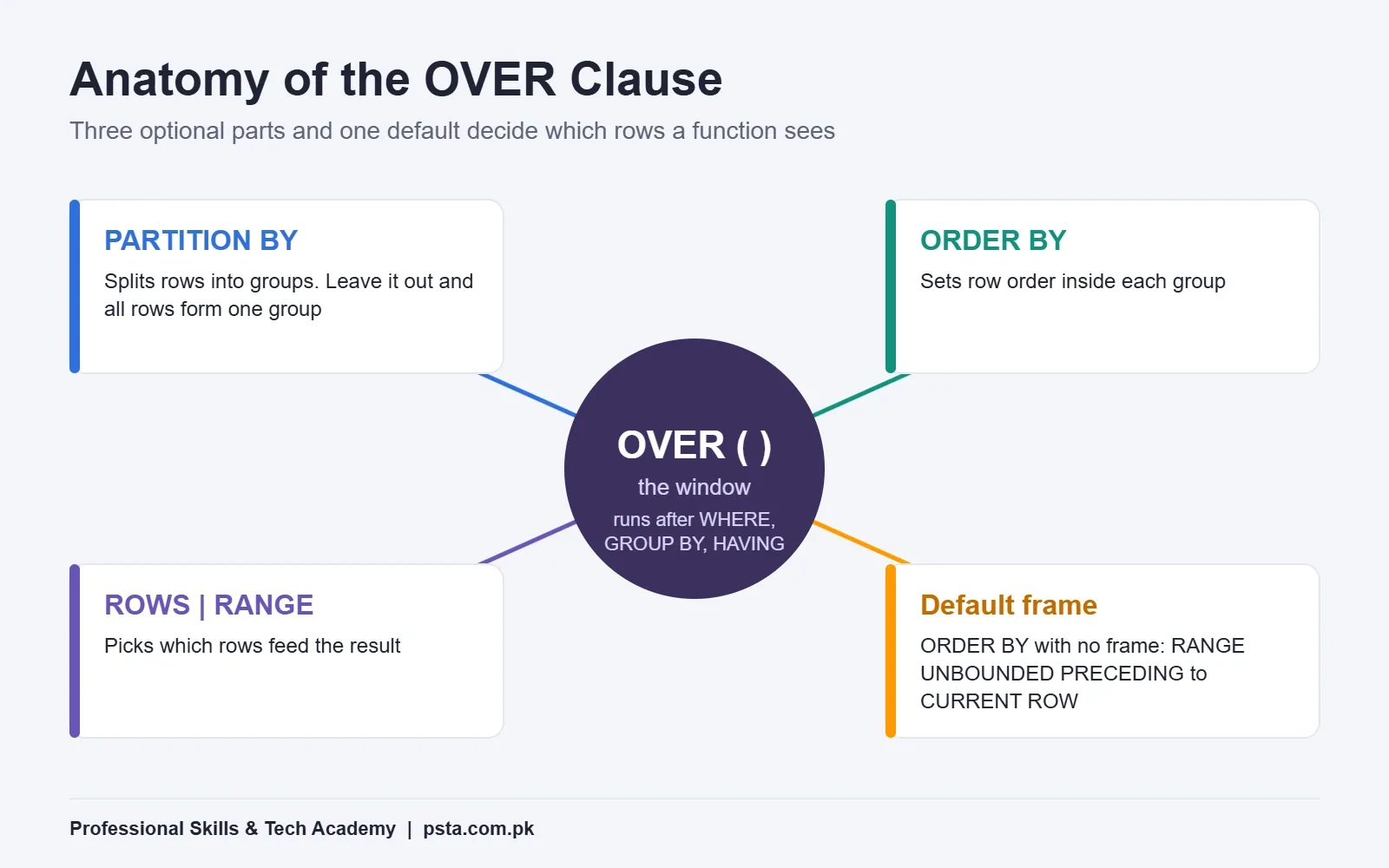
All SQL window functions share the same shape: a function, then OVER, then up to three parts in brackets.
function_name(arguments) OVER (
    PARTITION BY ...   -- split rows into groups
    ORDER BY ...       -- order rows inside each group
    ROWS | RANGE ...   -- choose which rows feed the calculation
)
Here is what each part does, based on Oracle's Analytic Functions reference for 19c:
- PARTITION BY splits the result into groups. Leave it out and the whole result set is treated as a single group.
- ORDER BY sets the order of rows inside each partition. Ranking functions and LAG need it.
- The windowing clause (ROWS or RANGE) picks the rows that feed each calculation. You can only write it after an ORDER BY.
One default catches almost everyone. If you write ORDER BY and skip the windowing clause, Oracle uses RANGE BETWEEN UNBOUNDED PRECEDING AND CURRENT ROW. That turns SUM into a running total, whether you wanted one or not.
Question 1: What Share of Branch Sales Does Each Product Bring?
To get a share, each row needs its branch total beside it. A window SUM with PARTITION BY and no ORDER BY gives exactly that:
SELECT branch, product, sales,
       SUM(sales) OVER (PARTITION BY branch, sale_month) AS branch_total,
       ROUND(100 * sales /
             SUM(sales) OVER (PARTITION BY branch, sale_month), 1) AS share_pct
FROM   monthly_sales
WHERE  sale_month = DATE '2026-10-01';
Because there is no ORDER BY inside OVER, the window is the full partition. Every Abbottabad row shows Rs. 570,000 as its total. Chargers come out at 31.6%, earbuds and power banks at 26.3% each, and phone covers at 15.8%.
Oracle also has a shortcut for this exact job: RATIO_TO_REPORT(sales) OVER (PARTITION BY branch, sale_month) returns the share as a fraction, so 0.316 instead of 31.6. Many developers never learn it exists, and it makes the intent clearer to whoever reads your query next.
Question 2: Which Product Ranks First in Each Branch?
This is the classic "top-N per group" problem, and the tie decides which function you should use. Oracle has three ranking functions, and on our October data they give three different answers:
| Product | Sales (Rs.) | ROW_NUMBER | RANK | DENSE_RANK |
|---|---|---|---|---|
| Chargers | 180,000 | 1 | 1 | 1 |
| Earbuds | 150,000 | 2 | 2 | 2 |
| Power banks | 150,000 | 3 | 2 | 2 |
| Phone covers | 90,000 | 4 | 4 | 3 |
The rules, from Oracle's pages on RANK and DENSE_RANK:
- ROW_NUMBER gives every row its own number starting at 1, even when values tie. Which tied row gets 2 and which gets 3 is not guaranteed unless your ORDER BY makes the order unique.
- RANK gives tied rows the same rank, then skips ahead by the number of tied rows. That's why phone covers jump to 4.
- DENSE_RANK also shares the rank on ties but never skips, so phone covers get 3.
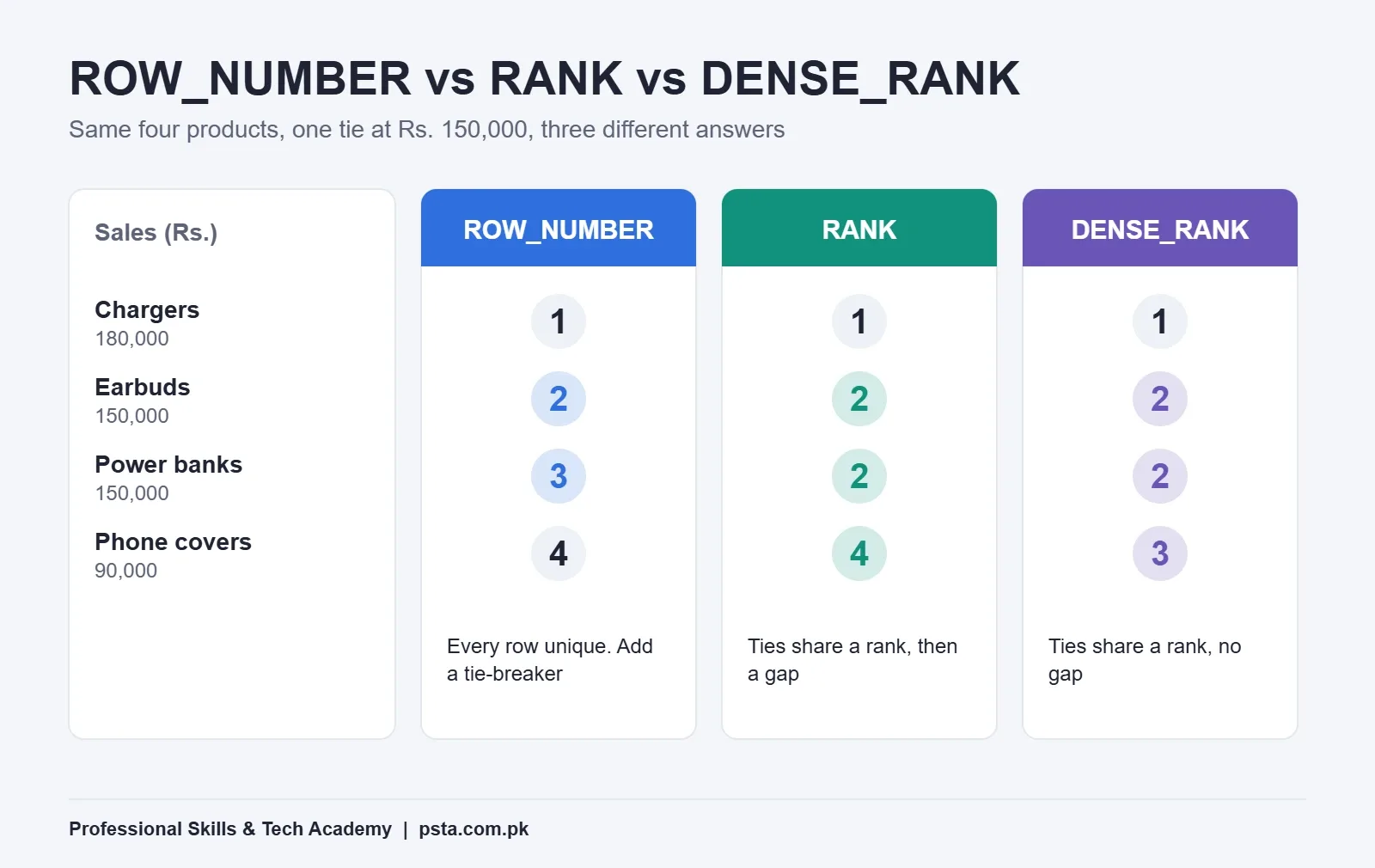
So how do you settle ROW_NUMBER vs RANK vs DENSE_RANK? If the owner wants exactly one product per branch, use ROW_NUMBER and add a tie-breaker, such as product name. If he wants every product that shares the top spot, use RANK. If he says "show me the top three price levels," DENSE_RANK fits.
Here is the top seller per branch:
SELECT branch, product, sales
FROM (
    SELECT branch, product, sales,
           ROW_NUMBER() OVER (PARTITION BY branch
                              ORDER BY sales DESC, product) AS rn
    FROM   monthly_sales
    WHERE  sale_month = DATE '2026-10-01'
)
WHERE rn = 1;
Oracle's ROW_NUMBER page uses this same nesting pattern for top-N reports and warns that you need a deterministic sort order for consistent results. Our product tie-breaker does that job.
Question 3: Did This Month Beat Last Month?
Before window functions, month-on-month comparison meant joining the table to itself on "month minus one." The LAG function removes that join. It reads a value from an earlier row in the same partition.
First, roll the Abbottabad products up to monthly totals. Then compare:
WITH branch_month AS (
    SELECT branch, sale_month, SUM(sales) AS total_sales
    FROM   monthly_sales
    GROUP  BY branch, sale_month
)
SELECT branch, sale_month, total_sales,
       LAG(total_sales) OVER (PARTITION BY branch
                              ORDER BY sale_month) AS prev_month,
       total_sales - LAG(total_sales) OVER (PARTITION BY branch
                              ORDER BY sale_month) AS change_rs
FROM   branch_month;
Notice the pattern: GROUP BY runs first, then the window function works on the grouped rows. You can mix the two freely this way.
For Abbottabad, July to October totals of Rs. 410,000, Rs. 455,000, Rs. 498,000 and Rs. 570,000 give changes of blank, +45,000, +43,000 and +72,000. The July row is blank because no earlier row exists.
Three details from Oracle's LAG reference are worth remembering:
- The offset defaults to 1, so
LAG(total_sales)means "one row back." WriteLAG(total_sales, 12)to compare with the same month last year, if every month is present. - The third argument sets a default for rows with nothing behind them.
LAG(total_sales, 1, 0)shows 0 instead of null. - Add
IGNORE NULLSto skip months where the value is missing. The default is RESPECT NULLS.
LEAD is the mirror image. It looks forward, which is handy for questions like "how many days until this customer's next order?"
Question 4: How Do You Build a Running Total and a Moving Average?
A running total in SQL is SUM with an ORDER BY inside OVER. A moving average adds a frame that limits how far back the window reaches:
SELECT branch, sale_month, total_sales,
       SUM(total_sales) OVER (PARTITION BY branch
                              ORDER BY sale_month
                              ROWS UNBOUNDED PRECEDING) AS running_total,
       ROUND(AVG(total_sales) OVER (PARTITION BY branch
                              ORDER BY sale_month
                              ROWS BETWEEN 2 PRECEDING AND CURRENT ROW)) AS avg_3m
FROM branch_month;| Month | Sales (Rs.) | Running Total (Rs.) | 3-Month Average (Rs.) |
|---|---|---|---|
| Jul 2026 | 410,000 | 410,000 | 410,000 |
| Aug 2026 | 455,000 | 865,000 | 432,500 |
| Sep 2026 | 498,000 | 1,363,000 | 454,333 |
| Oct 2026 | 570,000 | 1,933,000 | 507,667 |
Look at the first two average rows. July averages one month and August averages two, because the frame can't reach back past the first row. Some reports hide averages until three months exist. Decide that with the owner before you share the numbers.
ROWS vs RANGE: The Tie Problem
ROWS counts physical rows. RANGE works on values, so every row with the same ORDER BY value is treated as one step. With unique months, both give the same running total. With ties, they split.
Say you run a cumulative SUM over the October products ordered by sales. Under RANGE, earbuds and power banks both show the same running figure, because they tie at Rs. 150,000. Under ROWS, one gets the higher figure first, and which one is not guaranteed. Oracle's reference says plainly that a ROWS window with ties can give a nondeterministic result. The fix is the same as before: add a column to ORDER BY so the order is unique.
Question 5: Who Are the Top 25% of Customers?
NTILE splits ordered rows into a set number of buckets of near-equal size. For spending quartiles:
SELECT customer_id, total_spent,
       NTILE(4) OVER (ORDER BY total_spent DESC) AS quartile
FROM   customer_totals;
Quartile 1 holds the biggest spenders. Oracle's NTILE reference says bucket sizes differ by at most one row, with leftover rows going to the first buckets. With 102 customers, buckets 1 and 2 get 26 each and buckets 3 and 4 get 25, so treat the edges as rough lines, not exact cutoffs.
This one query helps a shop owner decide who gets a loyalty discount on WhatsApp and who gets a general reminder. That is the practical value of SQL window functions: an ordinary business question answered in one pass over the data.
Why Can't You Filter a Window Function in WHERE?
Sooner or later you will write this and get ORA-30483:
-- Fails: window functions are not allowed here
SELECT branch, product
FROM   monthly_sales
WHERE  RANK() OVER (PARTITION BY branch ORDER BY sales DESC) = 1;
The reason is processing order. Oracle's documentation explains that joins, WHERE, GROUP BY and HAVING all finish before analytic functions are calculated. Only the final ORDER BY comes after them. So when WHERE runs, the rank doesn't exist yet, and window functions can only appear in the SELECT list or ORDER BY.
The fix, as you saw in Question 2, is to calculate the window value in a subquery or WITH clause and filter it in the outer query. Some other databases offer a QUALIFY clause for this, but the subquery pattern works everywhere and is what most interviewers expect to see.
SQL Window Functions Cheat Sheet
SQL window functions are much easier to remember when you group them by the job they do:
| Job | Functions | Needs ORDER BY? | Accepts a Frame? |
|---|---|---|---|
| Number or rank rows | ROW_NUMBER, RANK, DENSE_RANK, NTILE | Yes | No |
| Compare with another row | LAG, LEAD | Yes | No |
| Totals and averages | SUM, AVG, COUNT, MIN, MAX | Only for running values | Yes |
| Share of a total | RATIO_TO_REPORT | No | No |
| Pick a value from the window | FIRST_VALUE, LAST_VALUE, NTH_VALUE | Yes | Yes |
| Position in a spread | PERCENT_RANK, CUME_DIST | Yes | No |
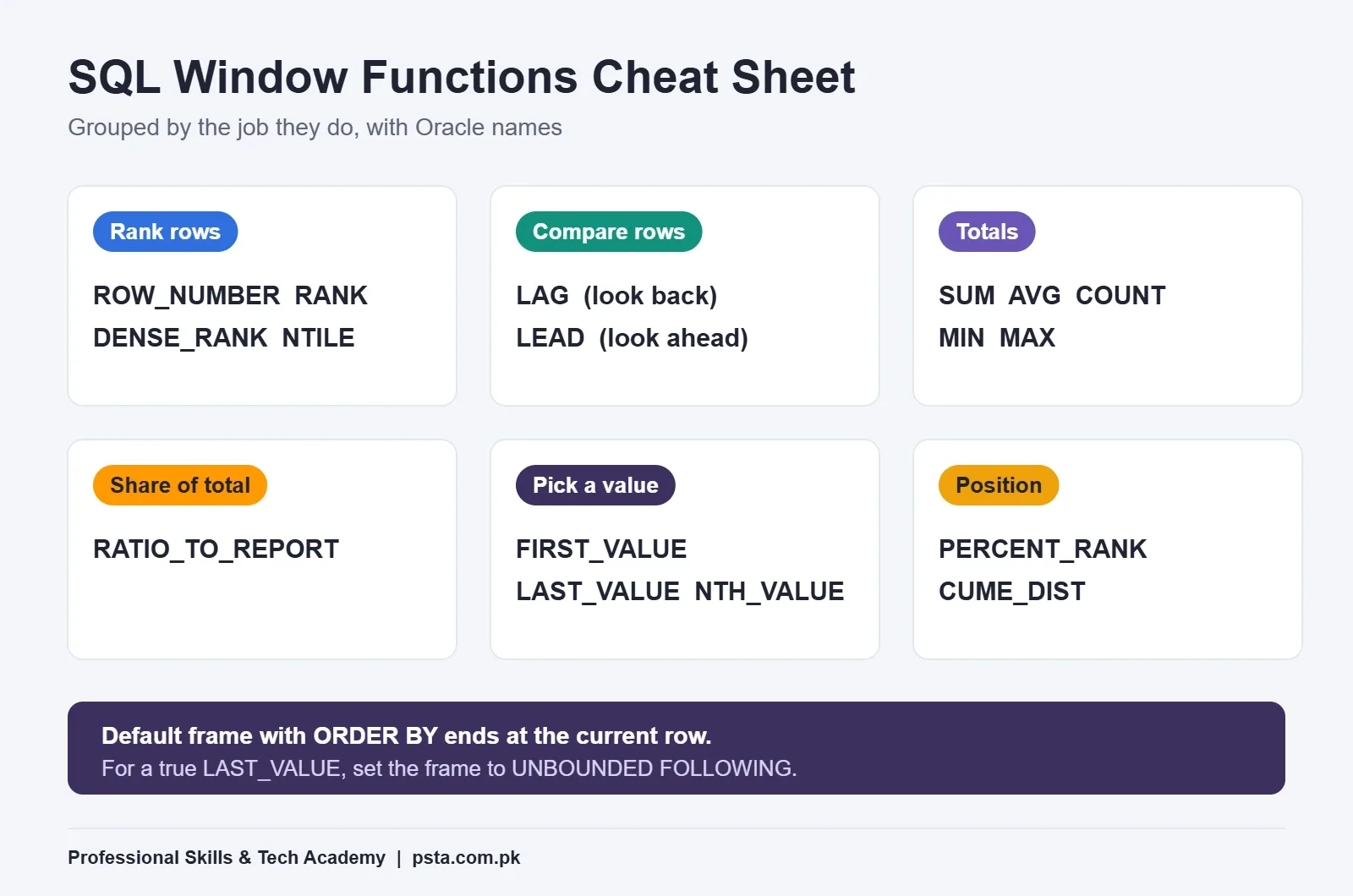
One trap hides in the last group. LAST_VALUE with only an ORDER BY uses the default frame, which ends at the current row, so it returns the current row's value. Add ROWS BETWEEN UNBOUNDED PRECEDING AND UNBOUNDED FOLLOWING when you want the true last value of the partition.
Where Can You Practise SQL Window Functions for Free?
You don't need a powerful laptop to learn this. Two free options cover most students:
- Oracle FreeSQL in the browser. The old Live SQL address, livesql.oracle.com, now redirects to FreeSQL, a browser-based worksheet for Oracle SQL and PL/SQL. Paste the queries from this guide and run them.
- Oracle AI Database 26ai Free on your own machine. Oracle's Free edition page lists Windows x64, Linux and container versions, with limits of 2 CPU threads, 2 GB of database RAM and 12 GB of user data. That is far more than you need for practice tables.
A simple practice plan: build the monthly_sales table from this guide, add a third branch and two more months, then rewrite each of the five answers without looking. If you get stuck, rebuild the query one part at a time: function first, then PARTITION BY, then ORDER BY, then the frame.
If your JOIN skills feel shaky, fix those first with our guide on SQL joins with Oracle examples, because window queries often sit on top of a join. When you are ready for interviews, the SQL interview questions for freshers post is the next step.
Common Mistakes and Quick Fixes
| Mistake | What You See | Fix |
|---|---|---|
| ORDER BY added to a SUM meant as a group total | Totals that grow row by row | Remove ORDER BY from OVER, or set a full frame |
| ROW_NUMBER with tied values | Top product changes between runs | Add a unique tie-breaker column |
| Window function inside WHERE | ORA-30483: window functions are not allowed here | Wrap it in a subquery and filter outside |
| Missing PARTITION BY | Ranks run across all branches together | Partition by the group you report on |
| LAG over months with gaps | "Previous month" is really two months back | Fill missing months with a calendar table first |
How PSTA's Oracle Course Prepares You for This
SQL window functions sit on top of skills you need first: clean SELECT statements, grouping, joins and subqueries. PSTA's Oracle Database 19c Masterclass starts there. Its first module covers the SELECT statement, sorting and filtering, single-row functions, aggregation and grouping, joins and set operators, and subqueries. Later modules move into PL/SQL, database architecture, security, RMAN backup and recovery, and performance tuning, ending in a capstone project.
At the time of writing, the course page lists a duration of 12 weeks, a beginner level and a fee of Rs. 33,000, with a new batch each month. You can join on campus in Abbottabad, in live online classes or in a hybrid mix. Check the page before you enroll, since fees and batch dates can change.
If your goal is reporting rather than database administration, SQL pairs well with the Power BI course; our DAX for beginners guide is a sensible next read. Developers building data apps may prefer to add Advanced Python. You can compare options on the courses page, and when you have decided, the admission form takes a few minutes. Questions about timings can go to WhatsApp at +92 314 5424399.
Try the Top-Product Query Tonight
Open FreeSQL, create the four October rows from this guide and run the ROW_NUMBER query from Question 2. Then swap ROW_NUMBER for RANK and watch the tie change the result. That 10-minute test will teach you more about SQL window functions than another hour of reading.
Frequently asked questions
What is the difference between a window function and GROUP BY?
GROUP BY collapses rows, so you get one output row per group and lose the detail. A window function keeps every row and adds a calculated value beside it, such as the group total, a rank or the previous row's value. Use GROUP BY for summary reports and window functions when you need detail and summary in the same result.
Should I use RANK or DENSE_RANK for a top-N query?
It depends on how you want ties handled. RANK gives tied rows the same number and then leaves a gap, so after two rows at 2 the next row is 4. DENSE_RANK never leaves gaps, so the next row is 3. Use RANK for "top three rows, ties included" and DENSE_RANK for "top three distinct values."
Why does my SUM OVER show a running total instead of a group total?
You probably added ORDER BY inside OVER. In Oracle, ORDER BY without a frame uses RANGE BETWEEN UNBOUNDED PRECEDING AND CURRENT ROW, which adds up rows only to the current one. Remove ORDER BY to get the full partition total, or set the frame to UNBOUNDED PRECEDING AND UNBOUNDED FOLLOWING.
Can I use a window function in a WHERE clause?
No. Oracle calculates analytic functions after joins, WHERE, GROUP BY and HAVING, so the value does not exist when WHERE runs, and you get ORA-30483. Put the window function in a subquery or WITH clause, give it an alias, and filter on that alias in the outer query.
What is the difference between ROWS and RANGE in a window frame?
ROWS counts physical rows, so ROWS BETWEEN 2 PRECEDING AND CURRENT ROW always covers three rows. RANGE works on the ORDER BY value, so rows with equal values are treated together. The two give the same result when the ORDER BY values are unique and different results when there are ties.
Do SQL window functions work outside Oracle?
Yes. MySQL 8, PostgreSQL and SQL Server all support window functions with the same OVER, PARTITION BY and ORDER BY structure. Some function names and frame options differ slightly, and Oracle has extras such as RATIO_TO_REPORT, but the queries in this guide need only small changes to run elsewhere.
Where can I practise Oracle window functions for free?
Oracle FreeSQL runs in your browser, so you can create a small table and test queries without installing anything. If you want a local database, Oracle AI Database 26ai Free runs on Windows x64 and Linux, with limits of 2 CPU threads, 2 GB of database RAM and 12 GB of user data.
Sources & references
- Oracle Database 19c SQL Reference: Analytic Functions docs.oracle.com
- Oracle Database 19c SQL Reference: RANK docs.oracle.com
- Oracle Database 19c SQL Reference: DENSE_RANK docs.oracle.com
- Oracle Database 19c SQL Reference: ROW_NUMBER docs.oracle.com
- Oracle Database 19c SQL Reference: LAG docs.oracle.com
- Oracle Database 19c SQL Reference: NTILE docs.oracle.com
- Oracle AI Database Free oracle.com
- Stack Overflow Developer Survey 2025: Technology survey.stackoverflow.co
Last reviewed & updated on by Umar Qureshi. Written by the PSTA team in Abbottabad, Pakistan.

Umar Qureshi

Oracle Database 19c Masterclass: SQL, PL/SQL & Administration
Turn this guide into a career: hands-on training with real projects, online across Pakistan or on-campus in Abbottabad · 12 Weeks.
Comments
No comments yet — ask a question or share your experience.