Quick answer
A technical SEO checklist confirms Google can crawl, index and load your pages. Check robots.txt, real links, internal links and your sitemap; use noindex, canonicals and 301 redirects correctly; return true 404s; match mobile content; meet Core Web Vitals; serve HTTPS; validate structured data; and keep server errors rare.
Key takeaways
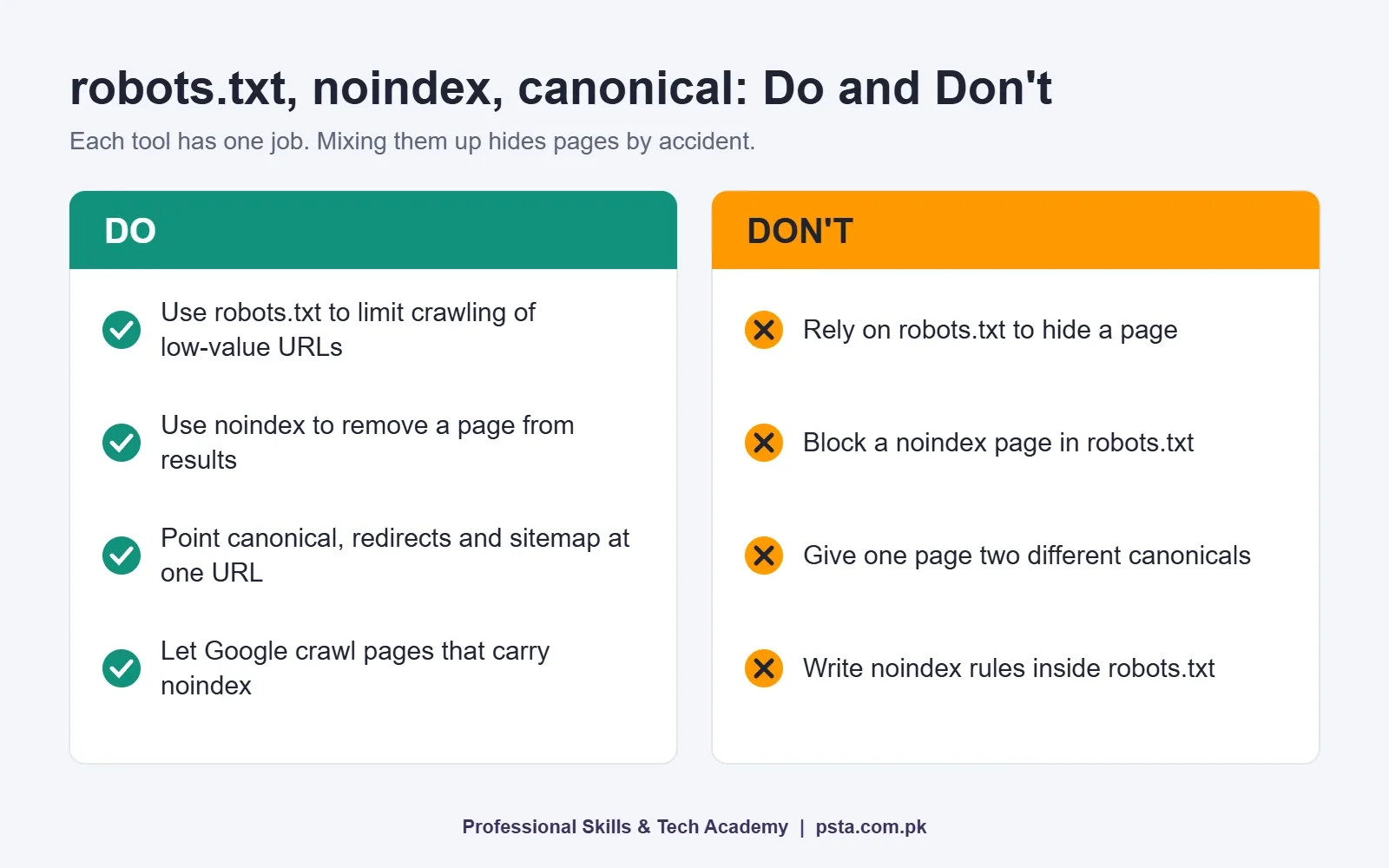
- • robots.txt controls crawling; it does not keep a page out of Google, so use noindex for that.
- • A noindex page must stay crawlable, or Google never sees the rule.
- • Use 301 or 308 redirects for permanent moves and point canonicals, redirects and sitemaps at one URL.
- • Good Core Web Vitals: LCP 2.5 seconds or less, INP 200 ms or less, CLS 0.1 or less.
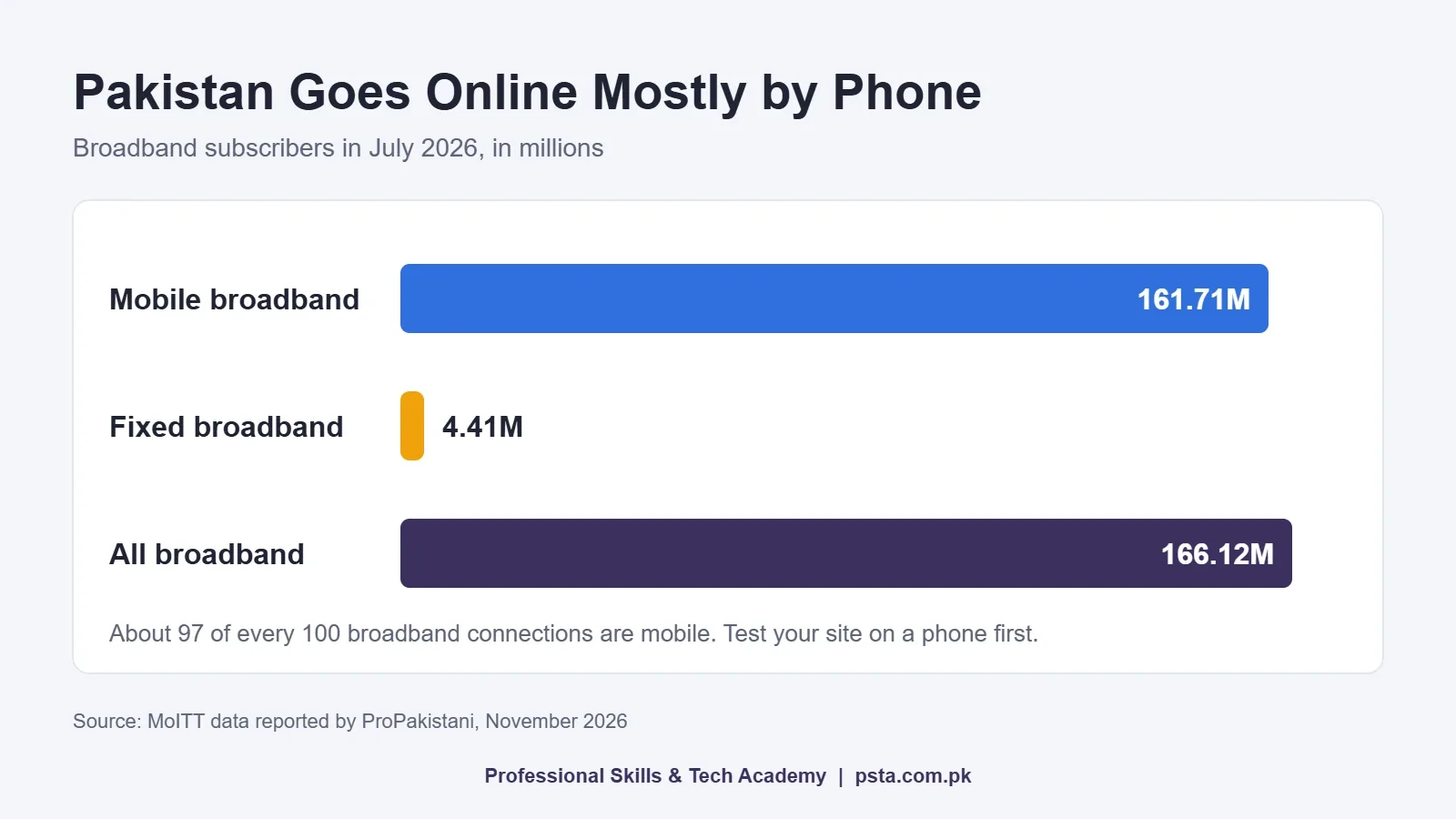
- • About 97 of every 100 broadband connections in Pakistan are mobile, so audit on a phone first.
Table of contents 26 sections
- What Does Technical SEO Cover?
- Free Tools You'll Use for This Audit
- Crawling Checks: Can Google Reach Your Pages?
- 1. Robots.txt Doesn't Block Pages You Want Found
- 2. Navigation Uses Real Links
- 3. Every Important Page Has at Least One Internal Link
- 4. Your XML Sitemap Is Clean and Submitted
- Indexing Checks: Will Google Keep the Right Version?
- 5. Noindex Appears Only Where You Mean It
- 6. Each Page Has One Clear Canonical
- 7. Moved Pages Use Permanent Redirects
- 8. Missing Pages Return a Real 404
- Status Codes Google Treats Differently
- Why Do Mobile and Speed Checks Matter So Much in Pakistan?
- 9. The Mobile Version Has the Same Content
- 10. Core Web Vitals Sit in the Good Range
- 11. Every Page Loads Over HTTPS
- Rendering and Server Checks
- 12. Important Content Doesn't Depend on a Click
- 13. Structured Data Passes the Rich Results Test
- 14. The Server Stays Up
- Your Technical SEO Checklist at a Glance
- How Often Should You Run a Technical SEO Audit?
- Which Technical SEO Problems Should You Fix First?
- Where Technical SEO Fits in PSTA's Digital Marketing Course
- Your First Ten Minutes: Open Your Own robots.txt
Myth: a technical SEO checklist is something only developers can work through. In practice, most of the checks need a browser, a free Google Search Console account and about an hour of careful reading. You don't need to write code to find out whether Google can reach, read and trust your pages. You only need to know where to look.
This technical SEO checklist gives you 14 checks in the order an auditor would run them, with the free tool for each one. Here's what you'll be able to do once you finish:
- Spot the settings that quietly stop Google from crawling or indexing your pages
- Tell the difference between robots.txt, noindex and canonical tags, and use each one correctly
- Read HTTP status codes and choose the right redirect when a URL changes
- Judge your mobile speed against Google's official Core Web Vitals thresholds
- Run a four-week audit routine on a small business website without hiring anyone
What Does Technical SEO Cover?
Technical SEO is the part of search optimization that deals with access and structure rather than words. On-page SEO asks, "Does this page answer the search well?" Technical SEO asks an earlier question: "Can Google find this page, load it, understand which version is the real one, and show it to mobile users without delay?"
Think of it in four layers. Crawling is Google discovering your URLs. Indexing is Google deciding to store a page. Rendering is Google loading the page the way a browser would, scripts included. Experience covers speed, mobile layout and security. If a page fails at the first layer, nothing you write on it matters, because Google never sees it.
That's why technical problems hurt so much on small Pakistani business sites. A school website in Abbottabad or a clothing store in Peshawar might have excellent content, but a single wrong setting left behind by a theme or a developer can hide the whole site. If you have already worked through our on-page SEO checklist, this guide covers the layer underneath it.
Free Tools You'll Use for This Audit
Every item on this technical SEO checklist uses a free tool. Set these up before you start so you aren't switching tasks halfway through.
| Tool | What You'll Use It For | Cost |
|---|---|---|
| Google Search Console | Indexing status, sitemaps, URL Inspection, Core Web Vitals report | Free |
| PageSpeed Insights | Real-user speed data and lab tests for a single URL | Free |
| Rich Results Test | Checking structured data on a page | Free |
| Your browser | Viewing robots.txt, page source and redirects | Free |
| A spreadsheet | Logging each issue, the URL and the fix | Free |
If Search Console isn't connected to your site yet, do that first. Our Google Search Console setup guide walks through verification and sitemap submission step by step.
Crawling Checks: Can Google Reach Your Pages?
The first four items on any technical SEO checklist deal with discovery. If Google can't reach a URL, every later check is irrelevant for that page.
1. Robots.txt Doesn't Block Pages You Want Found
Type your domain followed by /robots.txt into the browser. Look for any "Disallow" line that covers important folders such as /products/ or /blog/. A single line reading "Disallow: /" blocks the whole site, and it sometimes survives from a staging copy.
Keep one point clear. According to Google's robots.txt guide, the file mainly exists to stop crawlers from overloading your server. It is not a way to keep a page out of search results, and a blocked URL can still show up if other sites link to it.
2. Navigation Uses Real Links
Menus and category buttons should be ordinary HTML links with an href address. Some page builders create buttons that only work through JavaScript clicks. People can use them, but a crawler may not follow them. Right-click a menu item and choose "Copy link address." If nothing useful copies, ask your developer to change it.
3. Every Important Page Has at Least One Internal Link
A page that nothing links to is called an orphan page. Google may find it through your sitemap, but it gets little attention. List your money pages, such as course pages, product categories and the contact page, and confirm each one is linked from the menu, a category page or a related post.
4. Your XML Sitemap Is Clean and Submitted
Open your sitemap (often /sitemap.xml or /sitemap_index.xml) and scan it. It should list only pages you want indexed. Old test pages, tag archives with two posts and thank-you pages don't belong there. Google's sitemap documentation sets a limit of 50,000 URLs or 50MB uncompressed per sitemap file, and it calls submission a hint, not a guarantee. Most small sites never come close to that size, so a bloated sitemap usually means junk URLs are being included.
Indexing Checks: Will Google Keep the Right Version?
Indexing problems are the ones that surprise site owners most, because the pages look perfectly normal in a browser. The robots.txt vs noindex mix-up is the one we untangle most often in class.
5. Noindex Appears Only Where You Mean It
A noindex rule tells Google to drop a page from results. You add it with a meta robots tag or an X-Robots-Tag HTTP header. Google's noindex documentation adds a condition that catches many beginners: the page must not be blocked in robots.txt, or Google never sees the noindex instruction at all. The same page notes that Google doesn't support noindex rules written inside robots.txt.
On WordPress, check Settings, then Reading, for the box labeled "Discourage search engines from indexing this site." Developers often tick it during the build and forget it at launch. In Search Console, the URL Inspection tool shows whether a specific page carries a noindex.
6. Each Page Has One Clear Canonical
The same product can often load at several addresses: with and without "www," with tracking parameters, or under two categories. A canonical tag tells Google which address is the main one. The guide on consolidating duplicate URLs ranks redirects and rel="canonical" as strong signals, and a sitemap listing as a weak one. The safest setup is to make all three point to the same URL.
Example scenario: a Lahore shoe store shares a product link with "?utm_source=whatsapp" attached. Without a canonical, Google could treat that tagged address as a separate page. A self-referencing canonical on the clean URL solves it.
7. Moved Pages Use Permanent Redirects
When you rename a URL or merge two posts, send visitors and Google to the new address with a redirect. The type matters, as the table below shows.
8. Missing Pages Return a Real 404
If a deleted product shows an empty template with a 200 status, Search Console may flag it as a soft 404. Deleted pages should return a true 404 or 410, or redirect to a close replacement if one exists. Don't redirect every dead page to the homepage, because that confuses visitors as well as crawlers.
Status Codes Google Treats Differently
Every time a browser or crawler requests a page, the server answers with a three-digit code. You can see it in the Network tab of your browser's developer tools or in URL Inspection. Here is how Google describes its crawler's response to the codes you'll meet most.
| Code | Meaning | What Google Does |
|---|---|---|
| 200 | Page loaded | Passes content on for indexing, but indexing isn't guaranteed |
| 301 / 308 | Moved permanently | Strong signal that the new URL should be canonical |
| 302 / 307 | Moved temporarily | Weak canonical signal; old URL may stay in results |
| 404 / 410 | Not found / gone | Indexed URLs are removed; crawl rate isn't affected |
| 429 / 5xx | Server overloaded or failing | Crawling slows down; long-running errors lead to removal |
Google's crawlers follow up to 10 redirect hops, according to the same page, but each hop wastes time. If page A redirects to B and B redirects to C, point A straight at C.
Why Do Mobile and Speed Checks Matter So Much in Pakistan?
Because almost every visitor arrives on a phone connection. ProPakistani, citing Ministry of IT and Telecom data, reported 166.12 million broadband subscribers in July 2026. Of those, 161.71 million were mobile broadband and only 4.41 million were fixed broadband. That works out to roughly 97 of every 100 broadband connections being mobile, so test on a phone before you test on a laptop.
9. The Mobile Version Has the Same Content
Google's mobile-first indexing guide states that it uses the mobile version of a site's content, crawled with a smartphone agent, for indexing and ranking. So if your theme hides a pricing table, FAQ or reviews on small screens, Google may treat that content as missing. Open your key pages on an ordinary Android phone and compare them with the desktop view.
10. Core Web Vitals Sit in the Good Range
These three Google metrics track how quickly the main content shows, how fast the page reacts to a tap, and whether the layout jumps around. The thresholds below come from web.dev's explanation of how they were defined, and each is judged at the 75th percentile of real page views.
| Metric | What It Measures | Good | Poor |
|---|---|---|---|
| LCP (Largest Contentful Paint) | How fast the main content appears | 2.5 seconds or less | Over 4 seconds |
| INP (Interaction to Next Paint) | How quickly the page reacts to taps | 200 ms or less | Over 500 ms |
| CLS (Cumulative Layout Shift) | How much the layout jumps while loading | 0.1 or less | Over 0.25 |
Check the Core Web Vitals report in Search Console for groups of slow URLs, then test one example in PageSpeed Insights. Heavy sliders, uncompressed hero images and too many plugins are the usual causes on small sites. If you run WordPress, our WordPress speed optimization guide covers the fixes in detail.
11. Every Page Loads Over HTTPS
Your site should load on https:// with a valid certificate, and the http:// version should redirect permanently to it. Also look for "mixed content," where a secure page still pulls an image or script over plain http. Browsers flag it, and visitors notice the warning before Google does.
Rendering and Server Checks
12. Important Content Doesn't Depend on a Click
Text that appears only after someone taps a tab, scrolls an endless feed or presses "Load more" may be read late or not at all. Use URL Inspection, then "View crawled page," to see the HTML Google actually received. If your service descriptions or prices are missing from it, they need to load with the page.
13. Structured Data Passes the Rich Results Test
Structured data is code, usually JSON-LD, that labels what a page is: an article, a course, a local business or a set of FAQs. Run your main pages through the Rich Results Test. Fix errors first, then warnings. Never mark up content that visitors can't see on the page.
14. The Server Stays Up
Cheap shared hosting that throws 5xx errors at busy times does more damage than slow pages, because repeated server errors make Google crawl less. Search Console's Crawl Stats report, under Settings, shows response codes over time. If server errors appear every week, talk to your host or move to a better plan.
Your Technical SEO Checklist at a Glance
Print this table or copy it into a spreadsheet, then add a column for the date you checked each item and another for the fix.
| # | Check | Where to Look |
|---|---|---|
| 1 | Robots.txt allows key folders | yourdomain/robots.txt |
| 2 | Menus use real href links | Right-click, copy link |
| 3 | No orphan money pages | Menu, categories, related posts |
| 4 | Sitemap lists only indexable pages | Search Console, Sitemaps |
| 5 | Noindex only on purpose | URL Inspection, WordPress Reading settings |
| 6 | One canonical per page | Page source, URL Inspection |
| 7 | Moved URLs use 301 or 308 | Browser Network tab |
| 8 | Deleted pages return 404 or 410 | Page Indexing report |
| 9 | Mobile shows the same content | Your own phone |
| 10 | Core Web Vitals in the good range | Search Console, PageSpeed Insights |
| 11 | HTTPS everywhere, no mixed content | Browser address bar and console |
| 12 | Key content in the crawled HTML | URL Inspection, View crawled page |
| 13 | Structured data valid | Rich Results Test |
| 14 | Few or no server errors | Crawl Stats report |
How Often Should You Run a Technical SEO Audit?
For a small business site with under a few hundred pages, a full pass every quarter is enough, plus a quick look after any redesign, theme change or hosting move. Those three events are behind many of the sudden traffic drops we see when students bring their own sites to class.
You don't have to finish the whole technical SEO checklist in one sitting. Splitting the work across four weeks keeps each session short and makes it easier to confirm that a fix actually worked before you move on. Pick one fixed day, such as Monday, so the audit becomes a habit rather than a task you keep postponing.
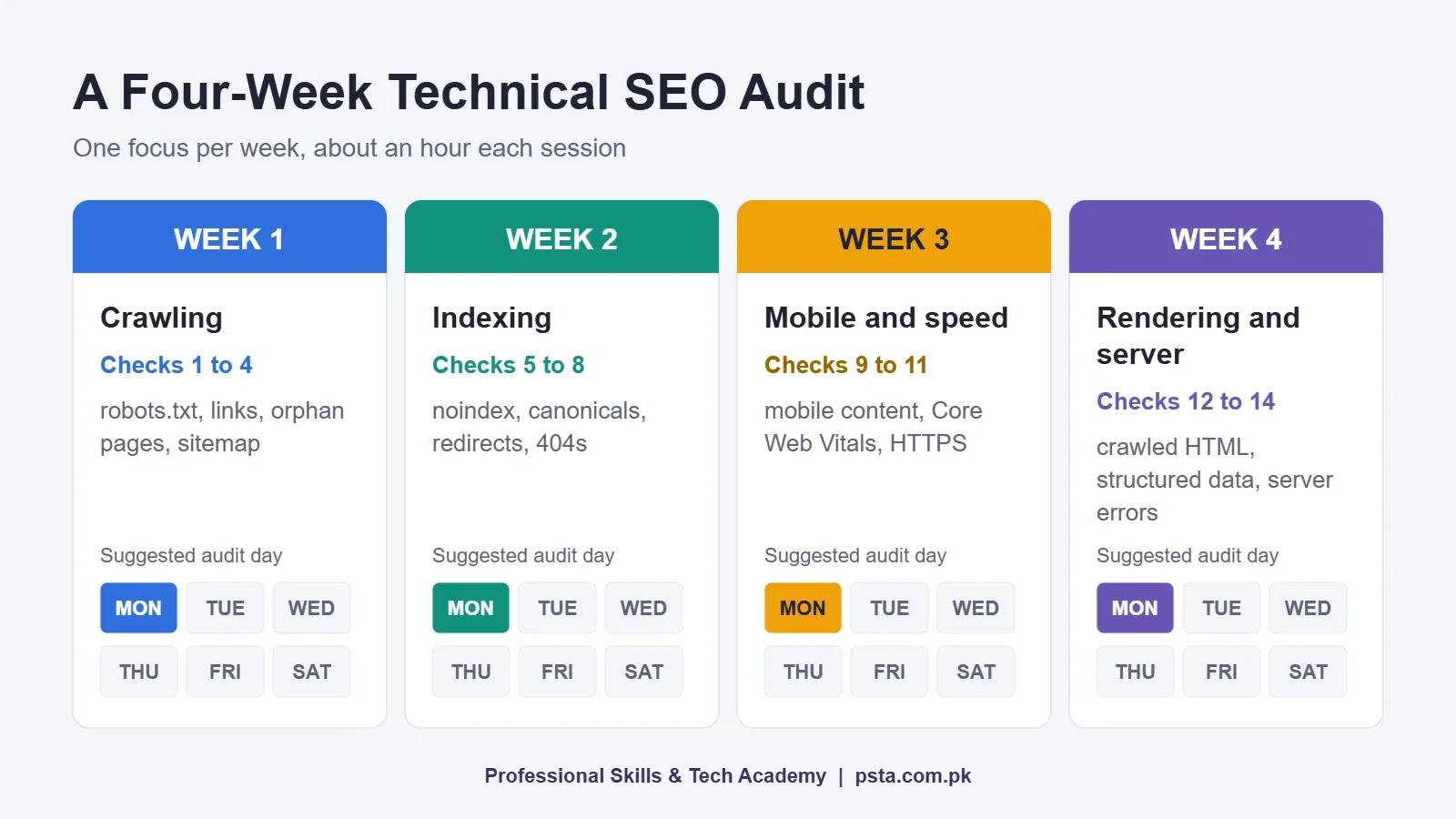
- Week 1: run checks 1 to 4 and note every blocked folder, orphan page and junk sitemap entry.
- Week 2: run checks 5 to 8 and fix noindex, canonical and redirect problems.
- Week 3: run checks 9 to 11 on your five most visited pages.
- Week 4: run checks 12 to 14, then re-inspect the URLs you fixed in weeks 1 and 2.
Which Technical SEO Problems Should You Fix First?
When the technical SEO checklist turns up several issues, fix them in order of how much traffic is at stake. A site-wide noindex or a "Disallow: /" line beats everything else, because it can hide every page at once. Next come server errors and broken redirects on pages that earn leads or sales. Duplicate URLs and missing canonicals follow. Speed and structured data improvements come last, not because they don't matter, but because they only help pages Google can already reach and index.
One more piece of advice from teaching this: change one thing at a time and write down the date. When rankings move a few weeks later, your log tells you which change caused it. Without a log, you're guessing.
Where Technical SEO Fits in PSTA's Digital Marketing Course
Our Advanced Digital Marketing Course runs for 12 weeks across 26 modules, and each module ends with a practical task. The SEO work covers on-page and technical SEO with Google Search Console and PageSpeed Insights, and module 8 also covers getting a business cited in AI answers. No marketing background is needed, because the course starts from the basics.
You can study on campus in Abbottabad (Mandian, Old College Road, opposite FIMS College), join live online classes from anywhere in Pakistan, or mix both. For the January 2027 batch, the early-bird fee is Rs. 25,000 until 15 December 2026, then Rs. 30,000 until registration closes on 31 December 2026. The regular fee is Rs. 35,000, payable in two installments.
If you'd like to run this technical SEO checklist on your own website during the course, bring its address to class. If your work leans toward building sites, the WordPress course pairs well with this audit, since most of these fixes happen inside WordPress settings and plugins. You can compare all programs on the courses page, start an application through admission, or ask about timings on WhatsApp at +92 314 5424399.
Your First Ten Minutes: Open Your Own robots.txt
Before you close this tab, type your website address followed by /robots.txt and read every line. Then open Search Console's Page Indexing report and note the top reason pages aren't indexed. Those two screens will tell you which section of this technical SEO checklist to start with, and they take less time than a cup of chai.
Frequently asked questions
Can I do technical SEO without knowing how to code?
Yes, for most checks. Reading robots.txt, inspecting URLs in Search Console, testing speed in PageSpeed Insights and checking structured data with the Rich Results Test all happen in a browser. You will need a developer or a plugin for some fixes, such as changing server redirects or rebuilding JavaScript menus, but finding the problem rarely needs code.
Should I use robots.txt or noindex to hide a page from Google?
Use noindex. Google says robots.txt manages crawling and does not reliably keep a page out of results, because a blocked URL can still appear if other sites link to it. Add a noindex meta tag or X-Robots-Tag header instead, and leave the page crawlable so Google can actually read the rule.
How long does a technical SEO audit take for a small website?
For a site with a few dozen to a few hundred pages, a first pass through all 14 checks usually fits into four sessions of about an hour each. Fixing what you find can take longer, especially if hosting or theme changes are involved. Later quarterly audits go faster because you already know where to look.
Does WordPress handle technical SEO automatically?
Partly. WordPress creates a basic sitemap and clean URLs, and SEO plugins add canonicals and meta robots controls. It cannot stop you from ticking the setting that discourages search engines, choosing a slow theme, or leaving old redirects broken. You still need to check settings and test pages after every major change.
What is a soft 404 error in Search Console?
A soft 404 happens when a page returns a 200 success code but looks like an error or empty page to Google. Deleted product pages that still load a blank template are a common cause. Fix it by returning a real 404 or 410 code, or by redirecting the URL to a closely matching page.
Which redirect should I use when I change a page URL?
Use a permanent server-side redirect, either 301 or 308, when the move is final. Google treats these as a strong signal that the new URL should be canonical. Keep 302 or 307 for genuinely temporary moves, such as a short sale page, and avoid chains by pointing old URLs directly at the final address.
How often should I check Core Web Vitals?
Look at the Core Web Vitals report in Search Console once a month, and after any redesign, new plugin or new hosting plan. The report groups slow URLs together, so you can fix a template once instead of page by page. Test a sample URL in PageSpeed Insights to see what is causing the delay.
Sources & references
- Robots.txt Introduction and Guide (Google Search Central) developers.google.com
- Block Search Indexing with noindex (Google Search Central) developers.google.com
- Build and Submit a Sitemap (Google Search Central) developers.google.com
- How to Specify a Canonical (Google Search Central) developers.google.com
- How HTTP Status Codes Affect Google's Crawlers developers.google.com
- Mobile-first Indexing Best Practices (Google Search Central) developers.google.com
- How the Core Web Vitals Metrics Thresholds Were Defined (web.dev) web.dev
- Pakistan Has Over 16 Crore Broadband Internet Users (ProPakistani) propakistani.pk
Last reviewed & updated on by Umar Qureshi. Written by the PSTA team in Abbottabad, Pakistan.

Umar Qureshi

Advanced Digital Marketing Course in Pakistan and Abbottabad
Turn this guide into a career: hands-on training with real projects, online across Pakistan or on-campus in Abbottabad · 12 Weeks.
Comments
No comments yet — ask a question or share your experience.