Quick answer
Choose WiFi cameras for one to four cameras in a flat, rented home or small shop: they are easy to fit but need 2 to 4 Mbps upload each and store video on a memory card. Choose a wired DVR or NVR system for five or more cameras, full outdoor coverage and simple UPS backup.
Key takeaways
- • For four indoor cameras, installed WiFi and analog HD packages cost about the same in 2026 retailer guides.
- • EZVIZ recommends 2 Mbps upload per camera, and up to 4 Mbps for 4MP models.
- • WiFi cameras store video on a card inside each camera; a DVR or NVR keeps all cameras on one hard drive.
- • A wired system is easier to keep running through load shedding, since one UPS covers everything.
- • Count your camera spots first: four or fewer favors WiFi, five or more favors a wired system.
Table of contents 14 sections
- What Counts as a WiFi Camera, and What Counts as CCTV?
- WiFi Camera vs CCTV: Side-by-Side Comparison
- What Does Each Option Cost in Pakistan?
- How Much Internet Does a WiFi Camera Need?
- Wi-Fi Band and Range
- Where Does Your Footage Go?
- WiFi Cameras: Memory Card or Cloud
- Wired CCTV: One Hard Drive for All Cameras
- Power Cuts and Load Shedding: Which Keeps Recording?
- Privacy and Account Security
- Which One Fits Your Building?
- Can You Mix WiFi Cameras and CCTV in One Property?
- Where CCTV Skills Pay Off: The CPCST Course at PSTA
- A Ten-Minute Task: Count Your Cameras on Paper
Should you buy a few WiFi cameras or get a proper CCTV system installed? It is one of the first questions a homeowner or shopkeeper asks once they decide they want cameras. In the WiFi camera vs CCTV choice, WiFi cameras win for one to four cameras in a home or rented space, while a wired DVR or NVR system wins once you need more cameras, outdoor coverage on every side, or recording that doesn't depend on your router.
The rest of this guide explains why, using real 2026 prices and manufacturer specs. Here is what you will be able to decide after reading it:
- What each option costs for a four-camera setup in Pakistan, with installation
- How much upload speed and Wi-Fi signal a WiFi camera really needs
- Where your footage is stored in each case, and for how long
- Which system keeps recording through load shedding
- Which one suits your house, flat, shop or office
What Counts as a WiFi Camera, and What Counts as CCTV?
Shop counters use both words loosely, so let's fix the meaning before comparing them.
A WiFi camera, the wireless security camera most homes buy first, is a self-contained unit. It joins your home router over Wi-Fi and saves video to a microSD card inside the camera, or to a paid cloud plan. You watch it in a phone app such as EZVIZ or Imou. Each camera works on its own. You plug it into a power socket, scan a QR code and you are done.
A CCTV system, in the sense installers mean, is a set of wired cameras that all feed one recorder. Analog HD cameras run on coaxial cable to a DVR. IP cameras run on Ethernet cable to an NVR. The recorder holds a hard drive, shows all cameras on one screen and sends a view to your phone through an app like Hik-Connect.
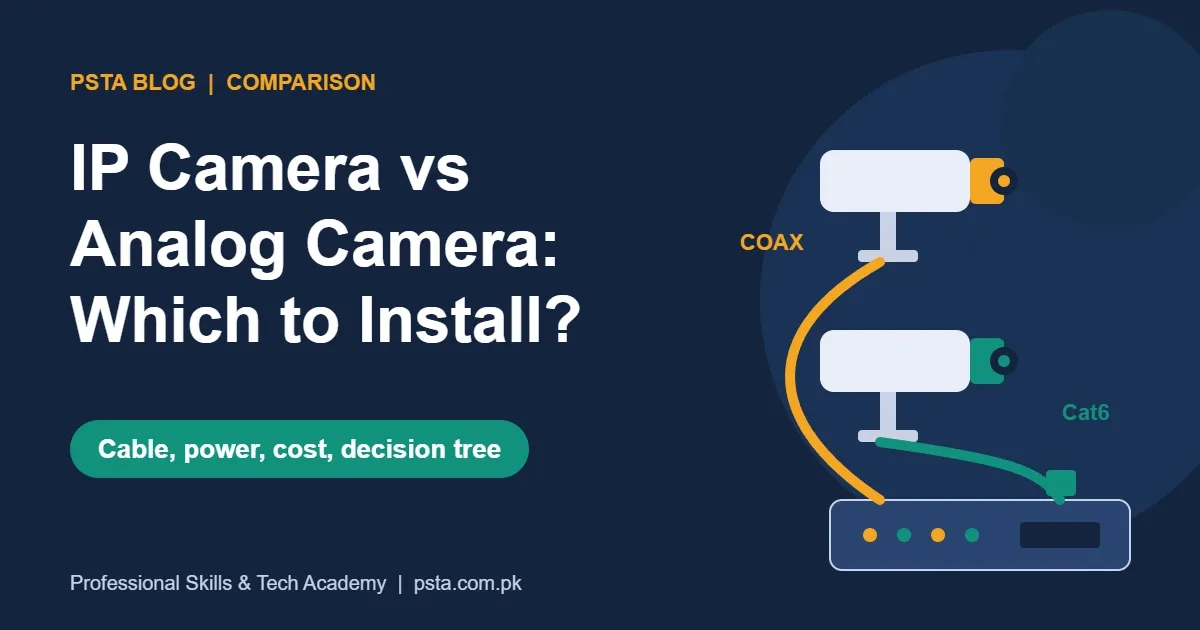
So the real comparison is this: many separate cameras, each with its own small memory card, against one central recorder with a large hard drive and cables to every camera. If you are deciding between analog and IP inside a wired system, our IP camera vs analog camera guide covers that separate choice.
WiFi Camera vs CCTV: Side-by-Side Comparison
The table below puts the two options next to each other. The specs come from the EZVIZ H8c outdoor camera page and a Hikvision four-channel DVR listing.
| Factor | WiFi camera | Wired CCTV (DVR or NVR) |
|---|---|---|
| Connection | Wi-Fi to your router; the H8c uses 2.4 GHz only | Coax or Ethernet cable to the recorder |
| Storage | microSD in each camera (H8c takes up to 512 GB) or a cloud subscription | One hard drive in the recorder (a 4-channel Hikvision DVR takes up to 4 TB) |
| Viewing | Phone app, one camera at a time or a small grid | Monitor or TV through HDMI or VGA, plus a phone app |
| Power | A socket near each camera (the H8c needs 12 V, 1 A) | Central power supply, or PoE for IP cameras |
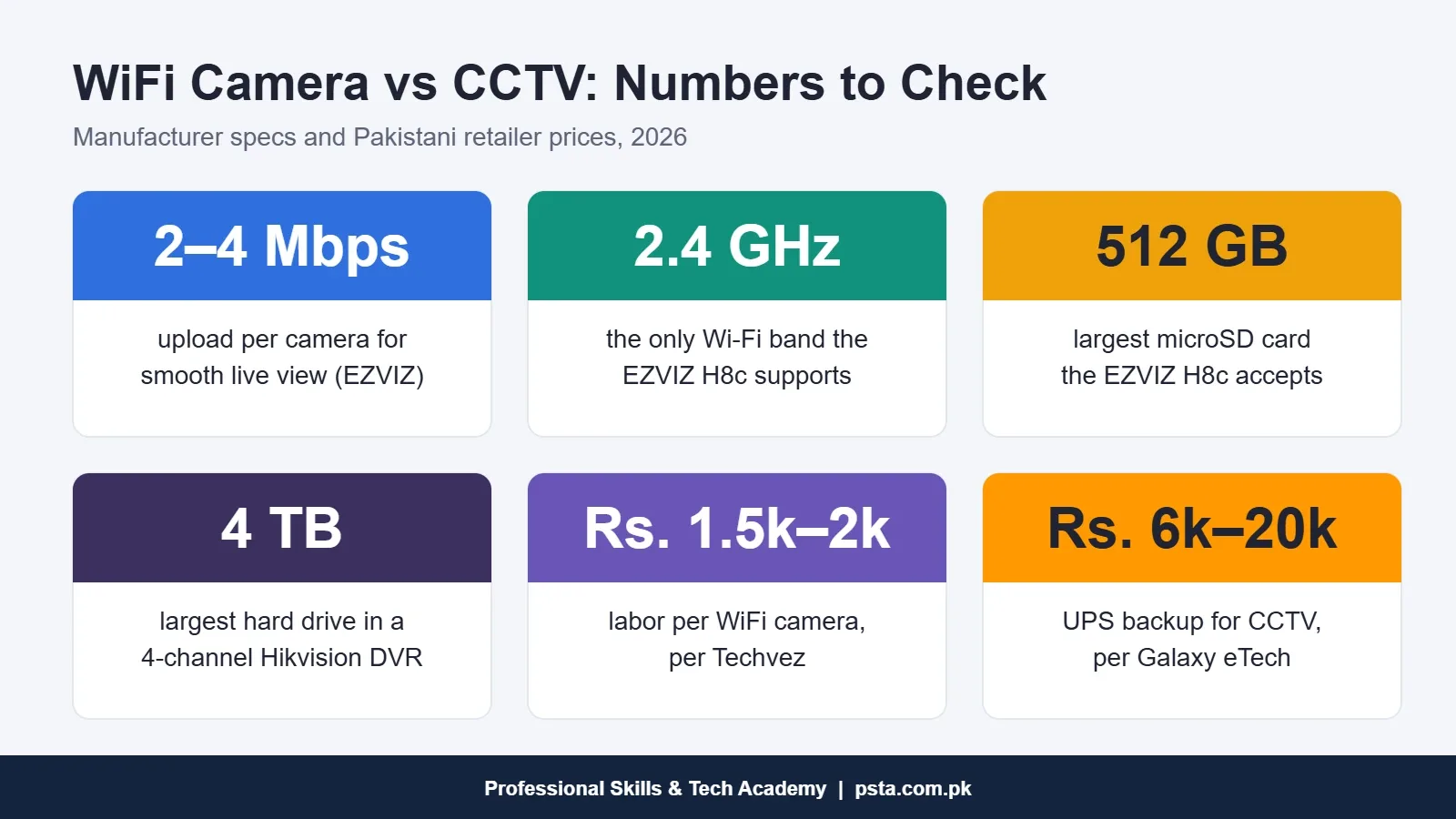
| Installation | Often DIY; Techvez quotes Rs. 1,500 to 2,000 labor per camera | Cable runs, drilling and recorder setup by a technician |
| Typical camera count | 1 to 4 | 4, 8, 16 or more |
| Best for | Flats, rented homes, small shops, baby or pet monitoring | Houses with a boundary wall, shops with several aisles, offices, factories |
Neither column is "better" on every row. The right choice depends on how many cameras you need and how much you trust your Wi-Fi and power supply.
What Does Each Option Cost in Pakistan?
Any CCTV camera price in Pakistan tracks the exchange rate, so treat these figures as 2026 reference points rather than final quotes. They come from two Pakistani retailers' published price guides.
Techvez's September 2026 installation guide lists an indoor package of four EZVIZ H6C Pro 3MP cameras with 64 GB cards at Rs. 39,200 for the equipment. Its outdoor package, with two H8C 2K and two H8C Pro 5MP cameras, comes to Rs. 62,800. On CCTV installation cost, the same guide adds Rs. 6,000 to 8,000 to install four WiFi cameras, or Rs. 1,500 to 2,000 per camera. It also says a wired four-camera system with an NVR, hard drive and cabling typically starts above Rs. 1 lakh.
Galaxy eTech's June 2026 buyer's guide gives a lower floor for analog HD. It prices a four-camera HD package, installed, at Rs. 45,000 to 90,000 and an eight-camera HD package at Rs. 90,000 to 160,000. It lists single WiFi or indoor cameras at Rs. 3,000 to 8,000, a 4 to 8 channel DVR or NVR at Rs. 8,000 to 25,000 and installation and cabling at Rs. 1,500 to 4,000 per camera.
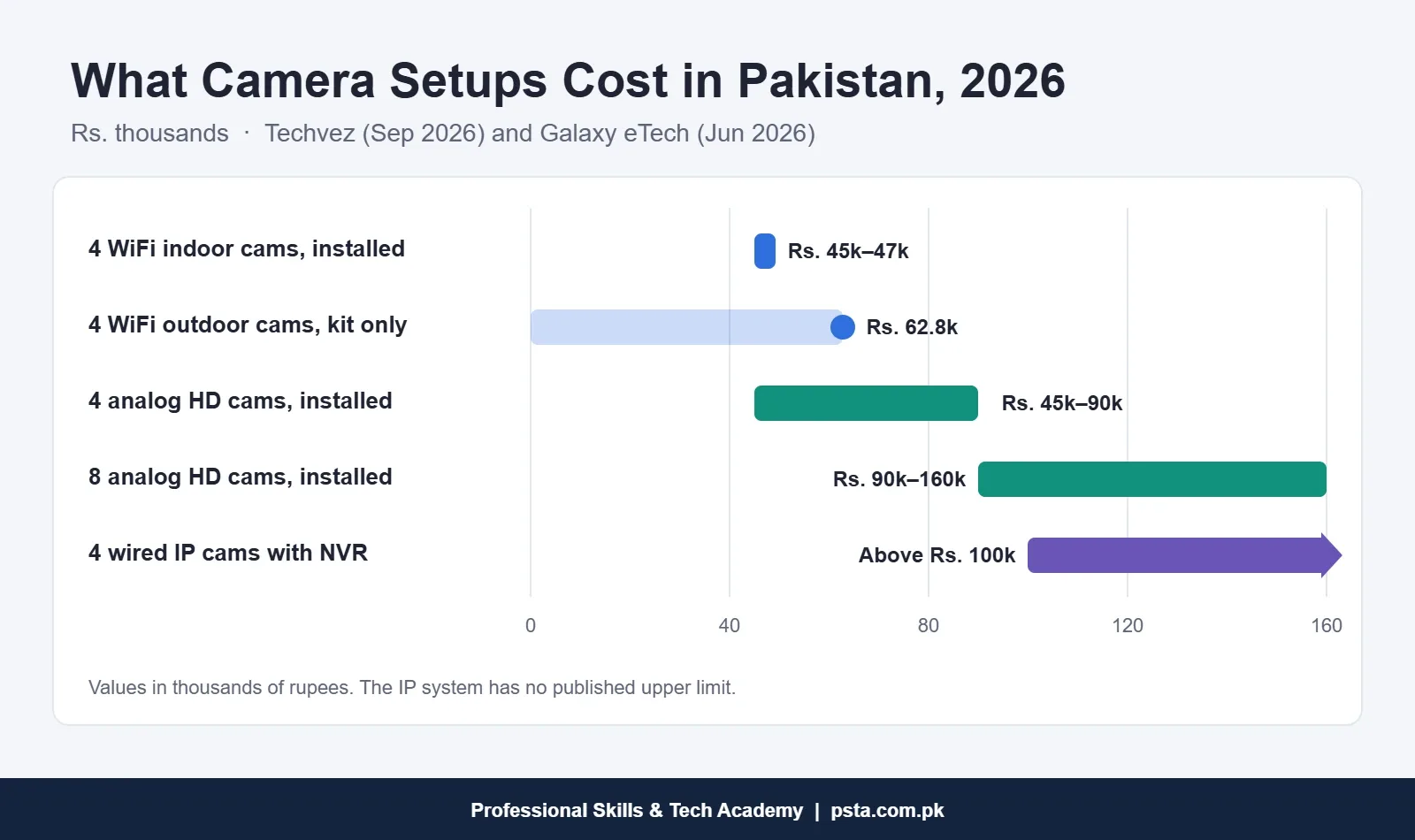
Read those two sources together and a pattern appears. For four indoor cameras, WiFi and analog HD cost about the same once installed. The gap opens on two fronts: outdoor WiFi cameras are pricier per unit, and a wired IP system costs more than either. Past four cameras, a wired system gets cheaper per camera, because one recorder and one hard drive serve all of them.
Don't forget the hidden extras. A cloud plan is a monthly cost per camera. A wired system needs a surveillance hard drive, which Galaxy eTech lists at Rs. 9,000 to 35,000 for 1 to 4 TB. If you are sizing that drive, our CCTV storage calculation guide shows the math.
How Much Internet Does a WiFi Camera Need?
This is where many home setups go wrong. A WiFi camera doesn't only need Wi-Fi bars on your phone. It needs steady upload speed at the router whenever someone watches live or the camera sends clips to the cloud.
EZVIZ's own support page recommends an average upload speed of 2 Mbps or better, rising to 3 Mbps for 3MP models and 4 Mbps for 4MP models. Google's Nest help page tells a similar story: its wired 2K indoor camera can use up to 3.3 Mbps of upload, and event recording pushes even 1080p models to about 2 to 3 Mbps.
Multiply that by four cameras and you can see the problem. Internet packages are usually advertised by download speed, so check the upload figure yourself. Run a speed test at the spot where the router sits, look at the upload figure, and divide it by the number of cameras you plan to watch at once.
Wi-Fi Band and Range
The EZVIZ H8c, like many outdoor WiFi cameras, works on 2.4 GHz only. That band travels through walls better than 5 GHz, but it is also crowded in dense neighborhoods. A camera on the gate of a 10 marla house may sit two walls and 15 meters away from the router. Test the signal at the exact mounting point with your phone before you drill. If it is weak, an extender or a short Ethernet run to the camera's RJ45 port (the H8c has one) will fix more than any app setting.
A wired CCTV system skips this whole section. The cameras talk to the recorder over cable, so recording never depends on your internet. You only need internet for remote viewing.
Where Does Your Footage Go?
Storage decides how far back you can look after something happens.
WiFi Cameras: Memory Card or Cloud
Each WiFi camera records to its own microSD card. The EZVIZ H8c product page lists support for cards up to 512 GB, though the four-camera packages Techvez lists come with 64 GB cards. When the card fills, the camera overwrites the oldest video.
The weak spot is physical. If a thief pulls the camera off the wall, the card goes with it. Cloud storage solves that, but EZVIZ notes its cloud plan needs a subscription and is only offered in certain markets, so check in the app before you count on it.
Wired CCTV: One Hard Drive for All Cameras
A recorder keeps every camera on one drive. A four-channel Hikvision DVR such as the DS-7104HGHI-M1 has one SATA slot that takes up to 4 TB. You can lock the recorder in a cupboard or a separate room, away from the cameras. A burglar who smashes a camera still leaves the footage behind.
Searching is also easier. You sit in front of one screen, pick a time and see all cameras together. With WiFi cameras, you check each camera's timeline one by one on your phone.
Power Cuts and Load Shedding: Which Keeps Recording?
In most Pakistani cities, power reliability matters as much as image quality. Both systems stop the moment they lose power. What differs is how easy they are to back up.
- WiFi cameras are spread around the building, each on its own socket. To keep them alive during a power cut, every socket they use must be on your UPS or solar circuit. Your router must stay on too, or you lose live view and cloud uploads even if the cards keep recording.
- Wired CCTV runs from one point. One small UPS can back up the recorder, the camera power supply and the router together. Galaxy eTech lists UPS backup for CCTV at Rs. 6,000 to 20,000.
If your area has long daily outages, this point alone often settles the decision in favor of a wired system, or a WiFi setup where every camera sits on a backed-up circuit.
Privacy and Account Security
Both systems connect to the internet when you want to watch remotely, so both need basic care. Change the default password during setup, turn on the app's two-step verification, and update the firmware when the app asks. Don't share the main account with every family member or employee. Most apps let you share a single camera with limited rights instead.
Point indoor cameras away from bedrooms and washrooms, and tell staff that cameras are in use. Your neighbors' doors and windows should not be in frame either. Settling these points on day one avoids awkward conversations later.
If you want to understand how home devices get hacked and how to lock them down, the Cyber Security & Ethical Hacking course teaches those skills step by step.
Which One Fits Your Building?
Use the flowchart below as a quick filter, then read the example cases under it.
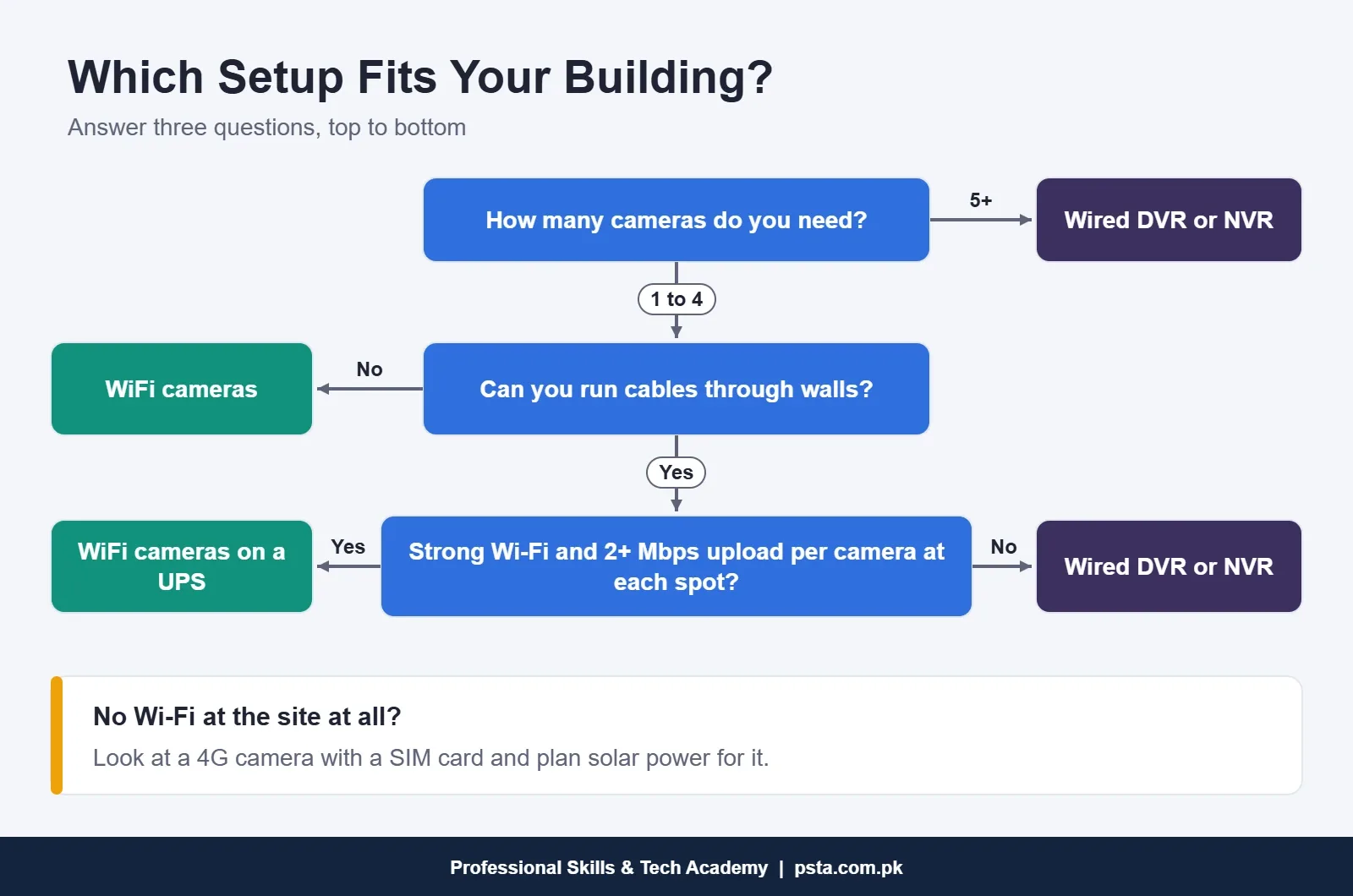
These are typical cases I see when students bring in questions from relatives and clients:
- A rented flat in Islamabad or Lahore. Two indoor WiFi cameras near the entrance and lounge. This is where a WiFi camera for home use makes the most sense: no drilling through walls, and the cameras move with you when you shift.
- A small mobile or garments shop. One or two WiFi cameras over the counter often work, as long as the router and cameras are on a UPS.
- A 10 marla house with a gate, a garage and a back lane. Four to six outdoor cameras. A wired DVR or NVR system is easier to back up and harder to defeat.
- An office or a school. Eight or more cameras, a recorder in a locked room and a monitor at reception. Go wired.
- A plot or farmhouse with no Wi-Fi. Neither standard option fits well. Look at 4G cameras that take a SIM, and plan solar power for them.
Can You Mix WiFi Cameras and CCTV in One Property?
Yes, and many installers do. A common pattern is a wired system for the gate, boundary and parking, plus one WiFi camera indoors near the children's play area or the shop's cash counter. The wired part handles security. The WiFi camera handles quick checks from your phone.
Some NVRs can also add certain IP-based WiFi cameras as an extra channel, but compatibility depends on the brand and model, so confirm it with the recorder's documentation before buying. To keep things simple, many owners just use two apps.
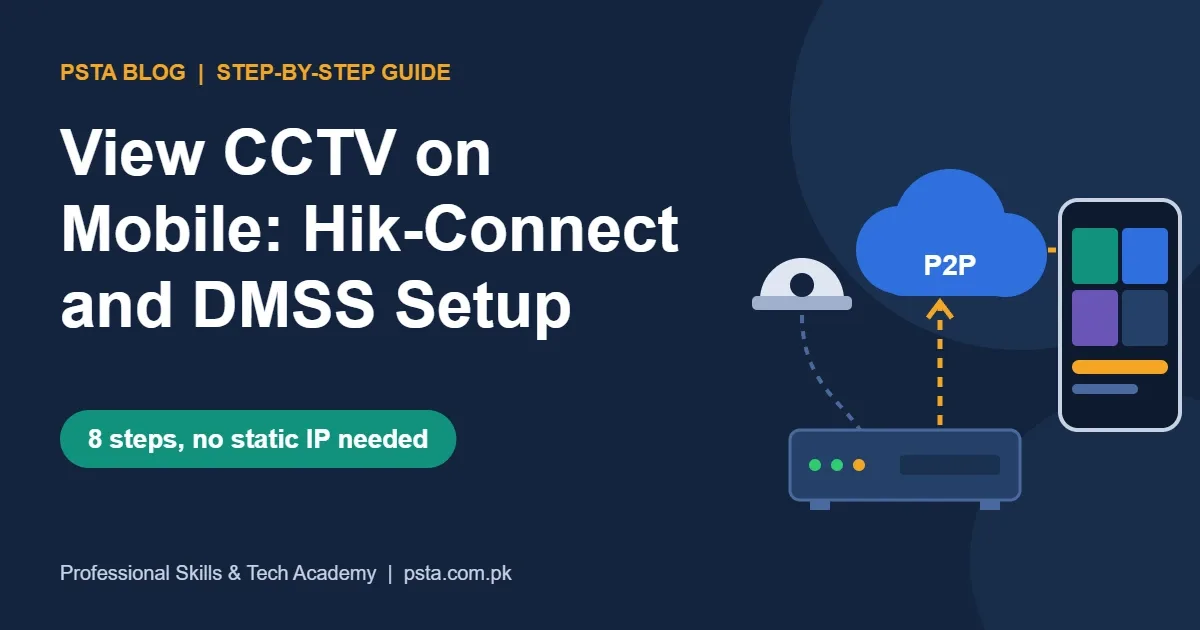
When you set up phone viewing for the wired part, our step-by-step guide to viewing CCTV on mobile with Hik-Connect and DMSS walks through it.
Where CCTV Skills Pay Off: The CPCST Course at PSTA
Every client who asks the WiFi camera vs CCTV question needs someone who can survey the site, explain the trade-offs and quote both options honestly. That is a real local service business, and it starts with hands-on practice on the equipment.
At PSTA, the CPCST course in CCTV surveillance and AI security is a 12-week program that starts at beginner level. Its 12 modules move from cabling and DVR configuration to IP networking, NVR and RAID storage, PoE switching and wireless bridges, remote access through P2P cloud apps, smart analytics, troubleshooting, site surveys and writing quotations. Its fee, as shown on the course page today, is Rs. 22,000.
You can attend at our Abbottabad campus on Old College Road in Mandian, opposite FIMS College, join live online classes from anywhere in Pakistan, or combine the two. A new batch starts every month. Compare options on the courses page or reserve a seat through admission. If you'd rather ask a question first, send a WhatsApp message to +92 314 5424399.
A Ten-Minute Task: Count Your Cameras on Paper
Take a sheet of paper and sketch your home or shop from above. Mark every door, the gate, the counter and any blind corner, then put a dot where each camera should go. Count the dots, because that number settles most of the WiFi camera vs CCTV question. If you have four or fewer and good Wi-Fi at each one, price out WiFi cameras. If you have more, or the dots sit far from the router, ask an installer to quote a wired system. Bring that sketch to the shop and you'll get a far more accurate quote. Before signing off on any installation, run through our list of common CCTV installation mistakes.
Frequently asked questions
Can a WiFi camera record without internet?
Most WiFi cameras with a microSD card keep recording to the card while they have power, even if the internet drops. What you lose is live viewing, phone alerts and cloud uploads until the connection returns. Check your model's manual, because first-time setup usually needs the internet and the app.
Which is cheaper for four cameras in Pakistan, WiFi or CCTV?
In 2026 retailer guides, four installed indoor WiFi cameras and a four-camera analog HD package land in a similar range, roughly Rs. 45,000 and up. Outdoor WiFi cameras cost more per unit, and a wired IP system with an NVR usually starts above Rs. 1 lakh. Past four cameras, wired systems become cheaper per camera.
Do WiFi cameras work during load shedding?
Only if the camera and your router both stay powered. Each WiFi camera uses its own socket, so every one of those sockets must sit on a UPS or solar circuit. A wired DVR or NVR system is easier to back up, because one UPS can power the recorder, the camera supply and the router together.
Will a WiFi camera connect to 5 GHz Wi-Fi?
Many will not. The EZVIZ H8c, for example, supports only the 2.4 GHz band. If your router broadcasts both bands under one name, setup can fail, so make sure 2.4 GHz is switched on. The 2.4 GHz band also passes through walls better, which helps cameras placed far from the router.
Can I install a WiFi camera myself?
Yes, an indoor WiFi camera is a simple DIY job: plug it in, scan the QR code in the app and mount it. Outdoor cameras need a weatherproof power point and a strong signal at the wall, so many owners hire help. Techvez lists labor at Rs. 1,500 to 2,000 per WiFi camera.
Can I watch a DVR or NVR system on my phone?
Yes. Hikvision recorders connect to the Hik-Connect app and Dahua recorders to DMSS. You link the recorder to the app once, usually by scanning its QR code, and then see every camera from anywhere. The recording itself stays on the recorder's hard drive, so it continues even when the internet is down.
How do I keep my camera footage private?
Change the default password, turn on two-step verification in the app and install firmware updates. Share individual cameras with family or staff instead of the main login. Keep indoor cameras away from bedrooms and washrooms, keep neighbors' homes out of frame, and tell employees where cameras are installed.
Sources & references
- CCTV Installation Cost in Pakistan 2026 (Techvez) techvez.com
- CCTV Camera Price in Pakistan 2026: A Complete Buyer's Guide (Galaxy eTech) galaxyetech.com
- EZVIZ H8c product specifications ezviz.com
- EZVIZ Support: What should I do if the live stream fails to play support.ezviz.com
- Google Nest Help: Internet bandwidth and speed requirements for Nest cameras support.google.com
- Hikvision DS-7104HGHI-M1 DVR specifications (Panacompu) panacompu.com
Last reviewed & updated on by Umar Qureshi. Written by the PSTA team in Abbottabad, Pakistan.

Umar Qureshi

Certified Professional CCTV Surveillance & AI Security Technician (CPCST)
Turn this guide into a career: hands-on training with real projects, online across Pakistan or on-campus in Abbottabad · 12 Weeks.
Comments
No comments yet — ask a question or share your experience.