Quick answer
Amazon listing optimization means fixing the title, bullets, backend search terms, images and A+ Content so shoppers find and buy your product. Start with compliance: titles under 200 characters with no word used more than twice, and a pure white main image. Then improve keywords, bullets and secondary images.
Key takeaways
- • Since January 21, 2025, most Amazon titles are capped at 200 characters, with no word repeated more than twice.
- • Banned title characters include ! $ ? _ { } ^ ¬ and ¦ unless they are part of the brand name.
- • Backend search terms are limited to about 250 bytes in the US store; separate terms with spaces, not commas.
- • The main image needs a pure white background, the product filling 85% of the frame, and 1,000 pixels for zoom.
- • A+ Content is free for Brand Registry sellers on a Professional plan; Amazon cites sales lifts of up to 8% (Basic) and 20% (Premium).
Table of contents 20 sections
- What Does Amazon Listing Optimization Actually Cover?
- Amazon's Listing Rules in Numbers
- Title Mistakes: The Field Amazon Polices Hardest
- Mistake 1: Writing the Title for the Algorithm Instead of the Shopper
- Mistake 2: Keeping Old Titles Without Checking Them
- Why Aren't Your Bullet Points Selling?
- Mistake 3: Listing Features Without Saying Why They Matter
- Mistake 4: Repeating the Title in Every Bullet
- Backend Search Terms: Hidden Field, Visible Mistakes
- Mistake 5: Going Over the Byte Limit
- Mistake 6: Commas, Competitor Brands and Repeats
- Image Mistakes That Cost You the Click
- Mistake 7: An Off-White or Undersized Main Image
- Mistake 8: Leaving Secondary Image Slots Empty
- Mistake 9: Skipping A+ Content When You Qualify
- Does Alexa for Shopping Change Amazon Listing Optimization?
- Amazon Listing Optimization: Which Fixes Come First?
- Can You Offer Listing Optimization as a Freelance Service?
- Practicing Listings in PSTA's E-Commerce Classes
- Audit One Live Listing Before Friday
Here is an example we work through in class. A first-time seller lists an insulated steel bottle on Amazon.com. The photos are decent and the price is fair, yet after three weeks the listing has a handful of sessions and no orders. Nothing is wrong with the product. The problems are in the listing itself, and almost every one of them is a mistake that Amazon listing optimization exists to fix.
This guide walks through the nine listing mistakes we see most often when students from Pakistan open their first Amazon account, with the current rule behind each one and the fix.
What you'll be able to do after reading:
- Write a product title that passes Amazon's 2025 title rules and still reads well on a phone
- Turn feature lists into bullet points that answer a buyer's real questions
- Fill backend search terms without wasting bytes or breaking policy
- Check your main image against Amazon's background, fill and zoom requirements
- Decide which fixes to make first when you have limited time
What Does Amazon Listing Optimization Actually Cover?
Amazon listing optimization is the work of improving every part of a product detail page so that two things happen. Shoppers find the product when they search, and shoppers who land on the page decide to buy. Some sellers call this Amazon SEO, but it covers more than search. Ranking and conversion are linked. A page that converts well tends to earn more visibility, and more visibility gives it more chances to convert.
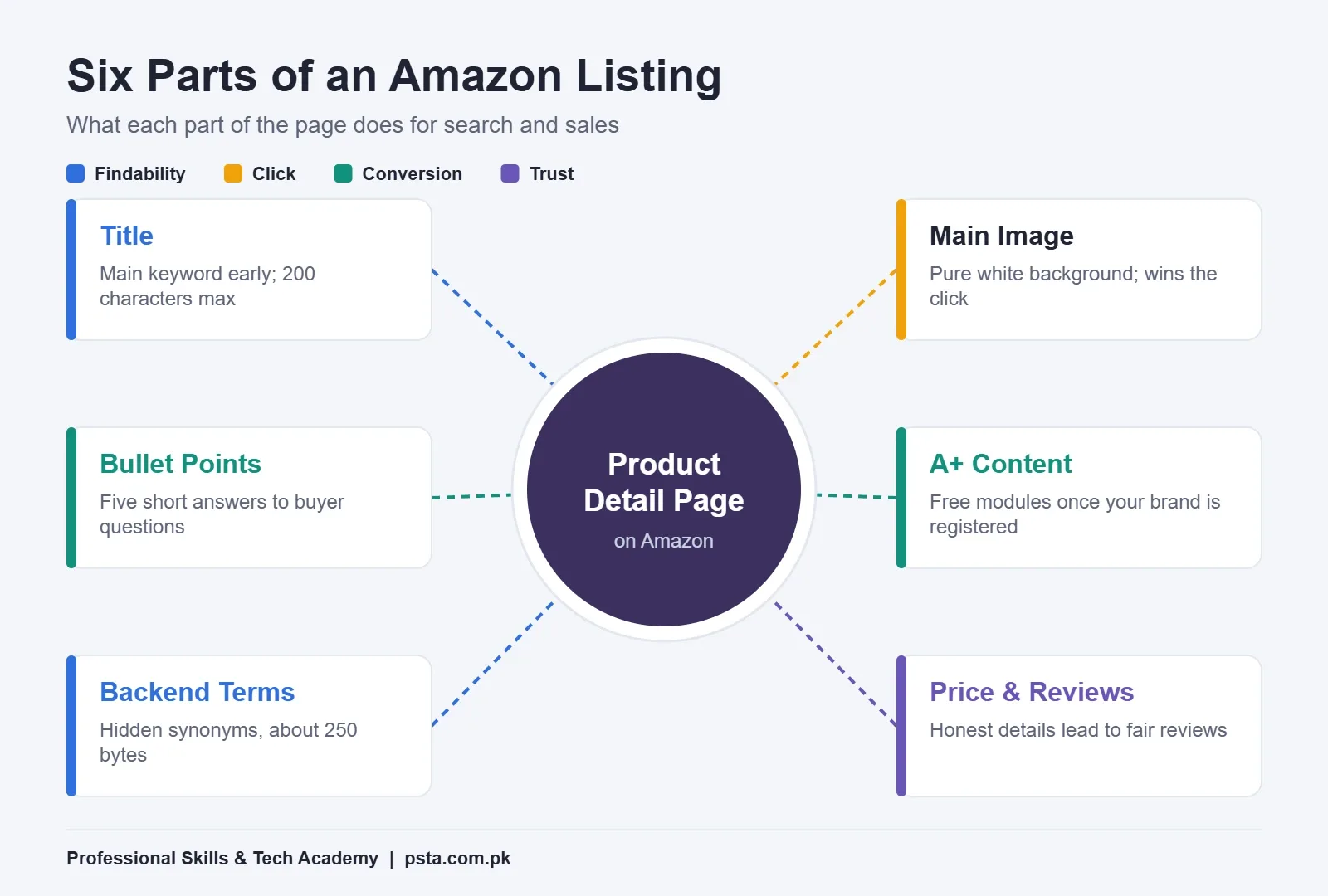
Six parts of the page do most of that work. The title, bullet points and backend search terms decide which searches you can appear in. The main image decides whether anyone clicks. The secondary images, bullets and A+ Content decide whether the visitor buys. Price and reviews sit around all of it, and while they aren't text you write, the listing has to set honest expectations so the reviews that follow are good ones.
Amazon put Pakistan on its seller-country list in May 2021, according to Dawn. Since then, many sellers here have learned product research and FBA logistics but treat the listing as a form to fill once. It deserves more care than that, because it's the only salesperson you have on the page.
Amazon's Listing Rules in Numbers
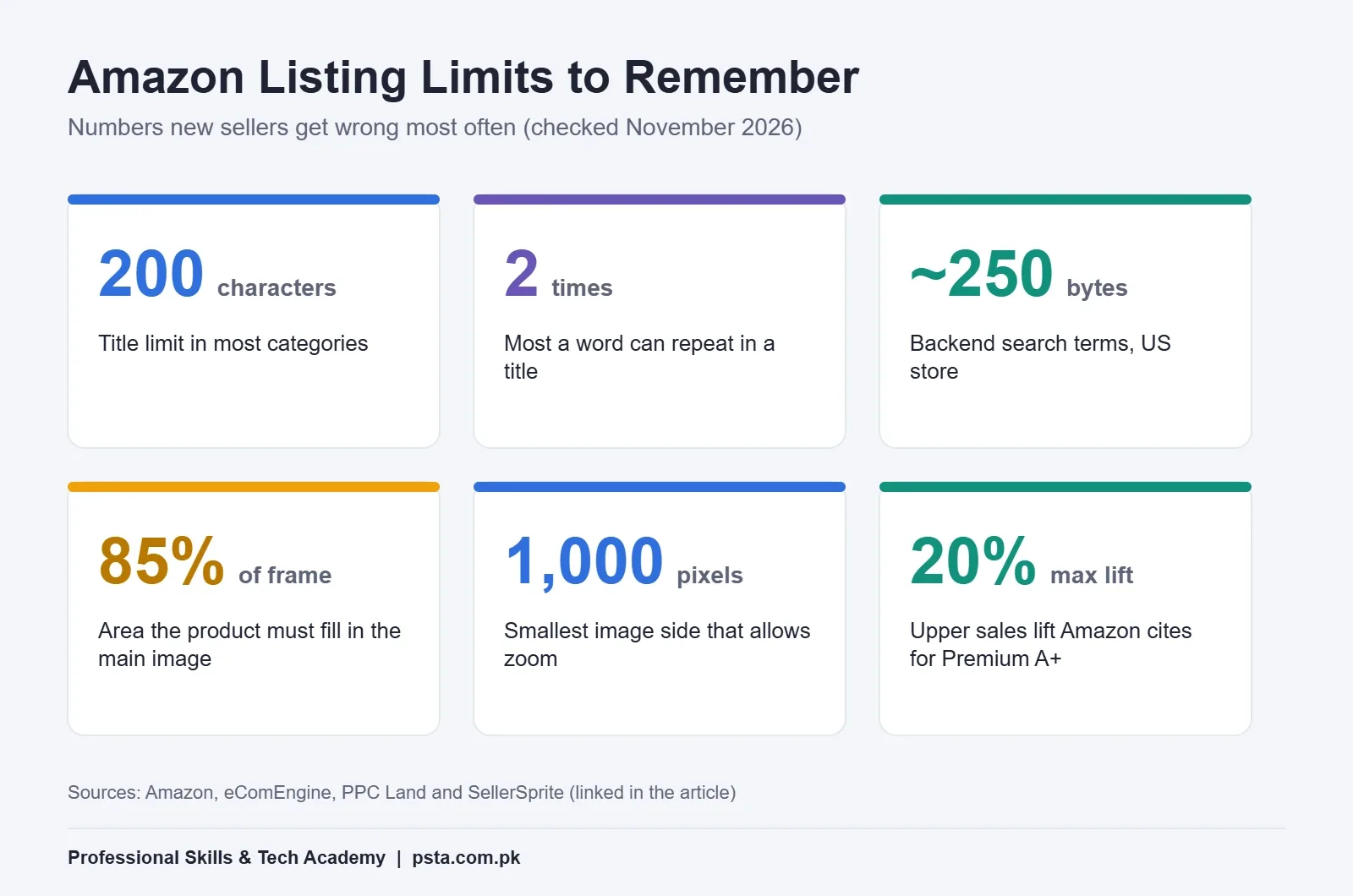
Before the mistakes, it helps to know the hard limits. These figures sit behind most Amazon listing optimization work, and they trip up new sellers often. Each one comes from the sources linked in this guide.
| Listing Part | Rule or Limit | What It Means for You |
|---|---|---|
| Title length | 200 characters including spaces (most categories) | Longer titles can be flagged or rewritten |
| Word repetition in title | No word more than twice (articles, prepositions and conjunctions excepted) | Repeating "bottle" three times is a violation |
| Banned title characters | ! $ ? _ { } ^ ¬ ¦ unless part of the brand name | No exclamation marks or dollar signs |
| Bullet points | Five bullets, under about 1,000 characters combined | Each bullet should earn its space |
| Backend search terms | About 250 bytes in the US store | Bytes, not words, are the budget |
| Main image | Pure white background, product fills at least 85% of the frame | A grey or colored backdrop fails |
| Image zoom | 1,000 x 1,000 pixels or larger | Smaller images load but can't be zoomed |
Title Mistakes: The Field Amazon Polices Hardest
In Amazon listing optimization, the title carries more ranking weight than any other text you write, and since January 21, 2025, it has also had the strictest rules. PPC Land's report on the change explains that brand owners receive suggested title rewrites for non-compliant listings and have 14 days to review them before Amazon applies its own version.
Mistake 1: Writing the Title for the Algorithm Instead of the Shopper
The old habit was to pack an Amazon product title with every keyword variation. You've probably seen titles like this one. It's an invented example, but it's typical of what new sellers submit:
BEST Water Bottle!! Steel Water Bottle Gym Water Bottle for School Office Kids Free Shipping
That title now breaks four rules at once. It uses exclamation marks, repeats "water" and "bottle" more than twice, shouts in capitals and adds a promotional phrase. eComEngine's summary of Amazon's title guidelines lists "free shipping" style claims as not allowed, asks for numerals instead of spelled-out numbers, and gives a recommended order: brand, style, product type, key attribute, color, size or pack count, then model number.
Here's the same product rewritten in that order:
| Version | Title | Problems |
|---|---|---|
| Before | BEST Water Bottle!! Steel Water Bottle Gym Water Bottle for School Office Kids Free Shipping | Banned "!", repeated words, all caps, promo phrase |
| After | Kohsar Insulated Stainless Steel Water Bottle, 750 ml, Leak-Proof Lid, Matte Black | None; brand first, attributes clear, 82 characters |
"Kohsar" is a made-up brand for this example. Notice that the fixed title is far shorter than 200 characters. The same eComEngine summary notes that Amazon suggests 80 characters or fewer where possible, because mobile search results cut long titles off. Put what a buyer needs to recognize the product in the first 80 characters.
Mistake 2: Keeping Old Titles Without Checking Them
If you created listings before 2025, or you manage a client's catalog, review every title against the current rules. A seller who ignores the suggested rewrites lets Amazon decide the wording. Check the Review Listing Updates area in Seller Central regularly so you choose the final version yourself.
Why Aren't Your Bullet Points Selling?
Bullets are the part of Amazon listing optimization that most sellers rush, yet they're where a browsing shopper decides whether to scroll further or press back. SellerSprite's 2026 listing guide calls the five Amazon bullet points the second most important ranking field and says Amazon recommends keeping all five under 1,000 characters combined.
Mistake 3: Listing Features Without Saying Why They Matter
"304 stainless steel" is a feature. "Won't hold the smell of yesterday's tea" is the reason a buyer cares about it. Good bullets lead with the result and then back it with the feature. A simple pattern works well:
- Start each bullet with a short benefit phrase of three to six words.
- Follow it with the specific feature, material or measurement that proves it.
- Add one detail that removes a doubt, such as what's in the box or how to clean it.
Order the five bullets by the questions buyers ask most. For a bottle, that's usually temperature, leaks, size, cleaning and what's included. You can find those questions in competitors' reviews and in the customer questions on similar listings.
Mistake 4: Repeating the Title in Every Bullet
Some sellers copy the full product name into each bullet to "add keywords." It wastes space and reads badly. Use the bullets for related terms the title couldn't hold, like "gym," "office" or "hiking," placed naturally inside useful sentences.
Backend Search Terms: Hidden Field, Visible Mistakes
Amazon backend search terms are keywords you enter in Seller Central that shoppers never see. Amazon reads them for indexing. Because they're hidden, sellers often treat this field as a dumping ground, which causes the next two mistakes.
Mistake 5: Going Over the Byte Limit
The limit is measured in bytes, not characters. SellerSprite's backend search terms guide puts the US limit at 250 bytes, and its listing guide gives 249 and warns that going over can cause Amazon to ignore the whole field, not only the extra words. Since sources differ by a byte, aim for about 240 and you'll stay safe. Plain English letters, numbers and spaces each take one byte.
Mistake 6: Commas, Competitor Brands and Repeats
The same guide recommends separating terms with spaces instead of commas, skipping filler words such as "and" or "the," and leaving out anything already in your title or bullets. It also warns against competitor brand names, which can create policy problems. Use the field for synonyms, alternate spellings and use cases you couldn't fit elsewhere. For a bottle, that might be "flask tumbler thermos hydration hiking commute."
Image Mistakes That Cost You the Click
In search results, the main image is often the only thing a shopper looks at before deciding whether to click. Images are often the quickest Amazon listing optimization win, and two image mistakes are especially common among new sellers who shoot products on a table at home.
Mistake 7: An Off-White or Undersized Main Image
SellerSprite's image requirements guide lists Amazon product image requirements for the main image: a pure white background (RGB 255, 255, 255), the product filling at least 85% of the frame, and at least 1,000 x 1,000 pixels if you want zoom to work. Amazon accepts images down to 500 x 500 pixels, but those won't zoom. The same guide recommends 2,000 x 2,000 pixels where possible, with files under 10MB.
A light grey sheet photographed under room lighting isn't pure white. Shoot on a plain background, then clean it up in Photoshop or a similar editor and check the corner pixels with the eyedropper tool.
Mistake 8: Leaving Secondary Image Slots Empty
The extra slots are where you answer questions visually. A size comparison next to a hand, a close-up of the lid seal, an infographic of the capacity and a lifestyle shot in use will often do more than another paragraph. Plan these images before the photoshoot so you capture every angle in one session.
Mistake 9: Skipping A+ Content When You Qualify
A+ Content adds image-and-text modules below the bullets. Amazon's A+ Content page says you need a Professional selling account ($39.99 a month plus selling fees) and a Brand Representative or Reseller role for a brand enrolled in Brand Registry. The tool itself is free for eligible sellers. Amazon says, citing its internal data, that Basic A+ Content can increase sales by up to 8% and well-implemented Premium A+ Content by up to 20%.
"Up to" matters in those figures. A+ Content won't rescue a weak product, but if you have registered your brand and left this section blank, you've skipped one of the few free upgrades available.
Does Alexa for Shopping Change Amazon Listing Optimization?
Partly. eComCrew reports that on May 13, 2026, Amazon retired the Rufus brand and merged it with Alexa+ into Alexa for Shopping for US customers. Natural-language questions typed into the main search bar now go to the assistant, and it can build comparisons and shopping guides on its own.
The same report says the assistant weighs review volume, listing quality and pricing consistency most heavily when it narrows recommendations. In practice, that rewards the basics of Amazon listing optimization covered in this guide. A listing that clearly states material, capacity, dimensions and use cases in plain sentences gives an AI assistant something accurate to repeat. A title full of repeated keywords gives it very little.
Amazon Listing Optimization: Which Fixes Come First?
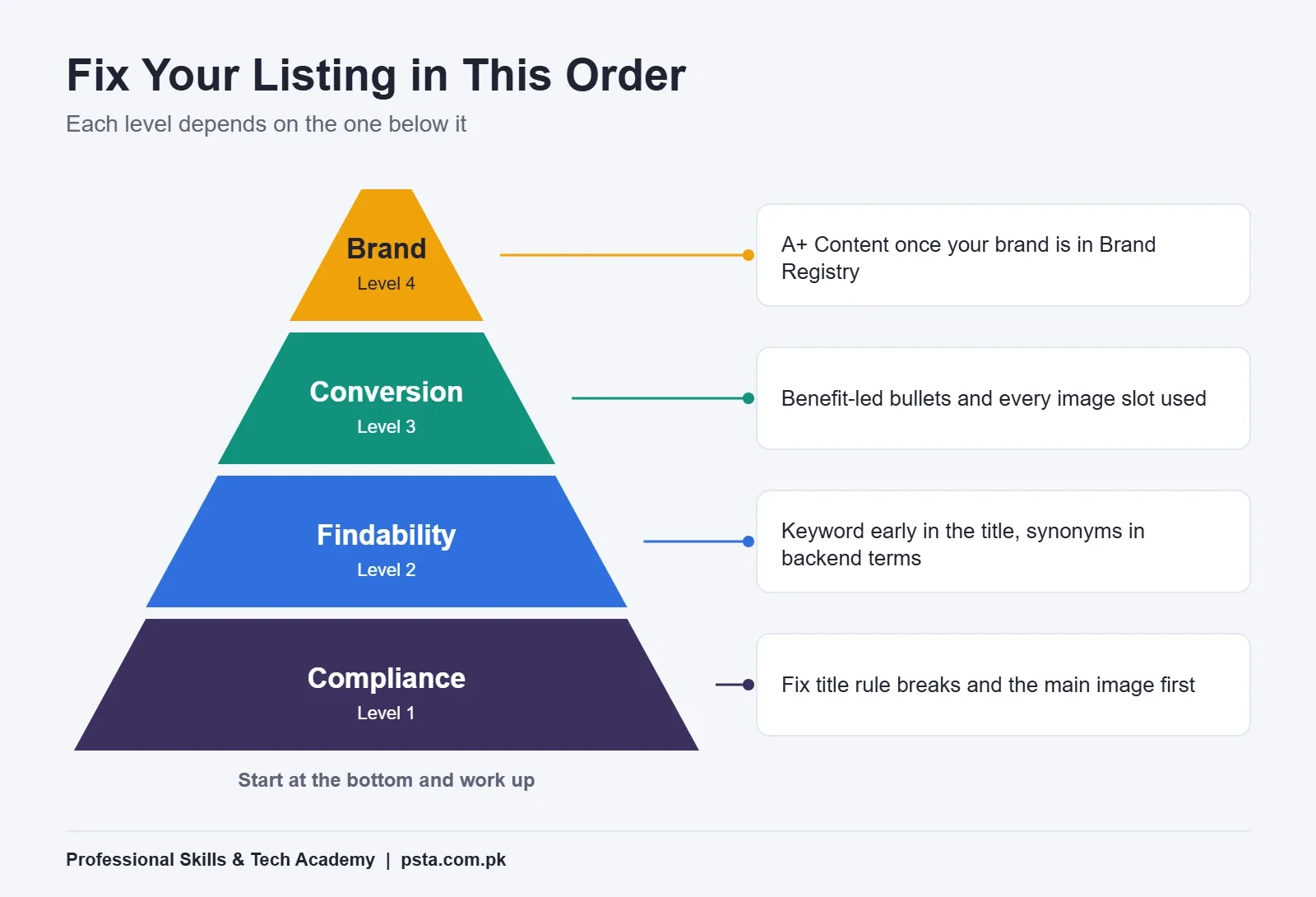
If you have an existing listing and only an evening to work on it, follow this order. Each level depends on the one below it.
- Compliance first. Fix title rule breaks and main image problems. A non-compliant listing can be rewritten by Amazon or lose visibility.
- Findability next. Make sure your main keyword sits early in the title, related terms appear in the bullets, and the backend field holds synonyms within the byte limit.
- Conversion after that. Rewrite bullets around benefits and fill every image slot with a purpose.
- Brand content last. Add A+ Content once your brand is registered and the basics are solid.
Change one element at a time and give it a couple of weeks before judging. If you edit the title, images and price on the same day, you won't know which change helped. Your Business Reports in Seller Central show sessions and unit session percentage, which together tell you whether more people are finding the page and whether more of them are buying.
Listing work also connects to advertising. If you're running ads, the search term report from our Amazon PPC for beginners guide is one of the best sources of real phrases buyers type, and those phrases belong in your title, bullets or backend field.
Can You Offer Listing Optimization as a Freelance Service?
Yes. Many Amazon sellers abroad hire outside help to write and audit listings, and Amazon listing optimization is a service you can offer from Pakistan on Fiverr or Upwork. It suits people who write clear English, understand basic keyword research and can explain their changes to a client.
Clients will judge you on whether you know the current rules, so a sample audit is a strong portfolio piece. Pick a public listing in a category you understand, then write a one-page review covering the title, bullets, images and A+ Content, with suggested rewrites. Don't claim results you can't show. Explain your reasoning instead.
Listing work sits alongside product research and costing. Our guides on Amazon product hunting and Amazon FBA fees cover those steps, and the Amazon seller account guide for Pakistan covers registration.
Practicing Listings in PSTA's E-Commerce Classes
PSTA's E-Commerce Course: Amazon FBA, Shopify & Dropshipping is a 12-week program for beginners, priced at Rs. 25,000 on its course page at the time of writing. Its syllabus moves from choosing a business model to finding and sourcing products, then into FBA with private label or wholesale stock, Shopify and WooCommerce stores, and paid ads on Facebook and Google.
Classes run in person in Mandian, Abbottabad (Old College Road, opposite FIMS College), live over the internet if you live in another city, or as a blend of the two. New batches start each month. If your listings need better images, the Graphic Designing course teaches Photoshop and Illustrator, the tools most sellers use to clean up product photos. For traffic beyond Amazon, see the Advanced Digital Marketing course.
To see fees side by side, open our full course list; when you're ready, the online admission page takes a few minutes to complete. Questions about batch timings are easiest to settle on WhatsApp at +92 314 5424399.
Audit One Live Listing Before Friday
Open any listing you own or one from a seller you admire. Count the title's characters, check whether any word appears more than twice, and look for banned symbols. Then read the five bullets aloud and ask whether each one answers a buyer's question. Write down three changes you'd make. That short audit will teach you more about Amazon listing optimization than another hour of videos.
Frequently asked questions
How long does Amazon listing optimization take to show results?
There's no fixed timeline. Change one element at a time, such as the title or main image, then compare sessions and unit session percentage in Business Reports over the next two to four weeks. If you change several things at once, you can't tell which edit helped, so keep a simple log of what you changed and when.
What is the character limit for an Amazon product title?
Most categories allow up to 200 characters, including spaces, under rules that took effect on January 21, 2025. The same word can't appear more than twice, apart from short words like "and" or "for." Amazon also suggests keeping titles to around 80 characters where possible, because mobile search results cut longer titles off.
Do backend search terms still help a listing rank?
Yes. Amazon reads them for indexing even though shoppers never see them. Use them for synonyms, alternate spellings and use cases that don't fit naturally in your title or bullets. Keep the total under the byte limit, separate words with spaces and leave out competitor brand names, since these can cause policy problems.
Do I need Brand Registry to add A+ Content?
Yes, in most cases. Amazon's A+ Content page says you need a Professional selling account and a Brand Representative or Reseller role for a brand enrolled in Brand Registry. The tool itself is free for eligible sellers. Until your brand is registered, put your effort into the title, bullets and images.
What size should Amazon product images be?
Make each image at least 1,000 x 1,000 pixels so shoppers can zoom; smaller images down to 500 pixels are accepted but won't zoom. Many sellers work at 2,000 x 2,000 pixels for sharper detail, keeping files under 10MB. The main image must sit on a pure white background, with the product filling at least 85% of the frame.
Can I use AI tools to write my Amazon listing?
You can use them to draft ideas, but treat the output as a first draft. Check every claim against the real product, remove banned characters and repeated words, and make sure the tone matches your brand. AI tools often add exaggerated promises, and those can mislead buyers and lead to returns or bad reviews.
Is Amazon listing optimization a good freelance skill in Pakistan?
It can be, because many overseas sellers outsource listing writing and audits. You'll need clear written English, basic keyword research and up-to-date knowledge of Amazon's rules. Build a portfolio of sample audits on public listings, and describe your process honestly rather than promising specific sales results to clients.
Sources & references
- PPC Land: Amazon limits product titles to 200 characters ppc.land
- eComEngine: Amazon product title guidelines ecomengine.com
- SellerSprite: Amazon listing optimization for 2026 sellersprite.com
- SellerSprite: Amazon backend search terms best practices sellersprite.com
- SellerSprite: Amazon image requirements and tips sellersprite.com
- Amazon: A+ Content sell.amazon.com
- eComCrew: Amazon retires Rufus and launches Alexa for Shopping ecomcrew.com
- Dawn: Pakistan officially added to Amazon sellers list dawn.com
Last reviewed & updated on by Umar Qureshi. Written by the PSTA team in Abbottabad, Pakistan.

Umar Qureshi

Master E-Commerce & Build Your Online Empire: Amazon FBA, Shopify & Dropshipping
Turn this guide into a career: hands-on training with real projects, online across Pakistan or on-campus in Abbottabad · 12 Weeks.


Comments
No comments yet — ask a question or share your experience.