Quick answer
Yes. A reputable password manager with zero-knowledge encryption is safer than reusing passwords, which is how most accounts get taken over. It can't stop malware already on your device, so keep the device clean, use a long master passphrase and turn on two-step login for the vault. Free options like Google Password Manager and Bitwarden are enough for most people.
Key takeaways
- • Zero-knowledge vaults are encrypted on your device, so the provider can't read your passwords.
- • Infostealer malware on your phone or laptop can still capture logins, so clean the device before installing a vault.
- • NIST's 2025 rules favor 15+ character passwords and ban forced symbol rules and scheduled changes.
- • Verizon found only 49% of passwords were distinct in the median infected device, which is why reuse is the real risk.
- • Bitwarden's free tier stores unlimited logins; Google Password Manager is free in Chrome and Android.
- • Move your main email account into the vault first, then banking, wallets and social accounts.
Table of contents 20 sections
- Why the "All Eggs in One Basket" Worry Feels Right
- Are Password Managers Safe? The Honest Short Answer
- Myths About How the Vault Works
- Myth 1: If the Company Gets Hacked, All My Passwords Are Gone
- Myth 2: The Company Can Read My Passwords
- Myth 3: Once I Have a Password Manager, Hackers Can't Get My Logins
- Myths About the Passwords Themselves
- Myth 4: A Short Password Full of Symbols Is the Strongest Kind
- Myth 5: You Should Change Every Password Every Few Months
- Myth 6: Reusing One Strong Password Is Good Enough
- Myths About Cost and Convenience
- Myth 7: A Safe Password Manager Costs Money Every Month
- Myth 8: Websites Don't Want You Using Autofill or Pasting Passwords
- Which Password Manager Should a Beginner in Pakistan Use?
- How to Move Your Accounts Into a Vault Safely
- What Makes a Master Password Hold Up?
- Before and After: What Actually Changes
- When a Password Manager Isn't the Right Fix
- Where Password Security Fits in PSTA's Cyber Security Course
- Your Ten-Minute Starting Point
The most common myth behind the question "are password managers safe" is that one app holding every password hands a hacker your whole life in a single theft. That fear gets the risk backwards. In practice, the bigger danger is the habit most people already have: the same few passwords, reused across Gmail, Facebook, Daraz and a bank app, sometimes saved in a WhatsApp chat to yourself.
This guide from PSTA (Professional Skills & Tech Academy) takes eight popular beliefs about password managers and checks each one against official guidance and published research. Here is what you will be able to judge by the end:
- Why encrypted vaults are built so the company itself can't read them
- The one threat a password manager can't stop, and how to cover it
- What current password rules from NIST and CISA actually say about length and changes
- Which free option suits a student, a freelancer or a small shop owner in Pakistan
- A safe order for moving your accounts into a vault without locking yourself out
Why the "All Eggs in One Basket" Worry Feels Right
The worry makes sense on the surface. If a thief opens the vault, they get everything. But compare it with what you are doing now. When you reuse one password across ten sites, any one of those ten sites can leak it. You don't control their security, and you often won't hear about the leak.
That isn't a guess. Pakistan's national cyber emergency team, PKCERT, warned in May 2025 about an exposed file holding more than 184 million account credentials, as Dawn reported. The logins covered Google, Microsoft, Facebook, Instagram, banks and government portals. Among its advice, PKCERT told people to use a unique password for every service and to consider a password manager.
So the real choice isn't "one basket or many baskets." It's one strong, locked basket that you watch closely, or dozens of thin bags left with strangers.
Are Password Managers Safe? The Honest Short Answer
Yes, a reputable password manager is safer than the way most people handle passwords today, as long as you protect the master password, turn on two-step login for the vault and keep your device free of malware. It is a strong lock, not a force field. The myths below show where it helps and where it doesn't.
Government bodies on two continents say the same thing. America's cyber defense agency, CISA, calls using strong passwords with a manager "one of the easiest ways to protect our accounts" in its Secure Our World passwords tip sheet. In the UK, the data regulator still encourages password managers even after fining one provider, which we cover in Myth 1.
Myths About How the Vault Works
The first three myths come from not knowing what actually happens inside the app. Once you see how a vault is built, most of the fear goes away. One concern stays, and it's an important one.
Myth 1: If the Company Gets Hacked, All My Passwords Are Gone
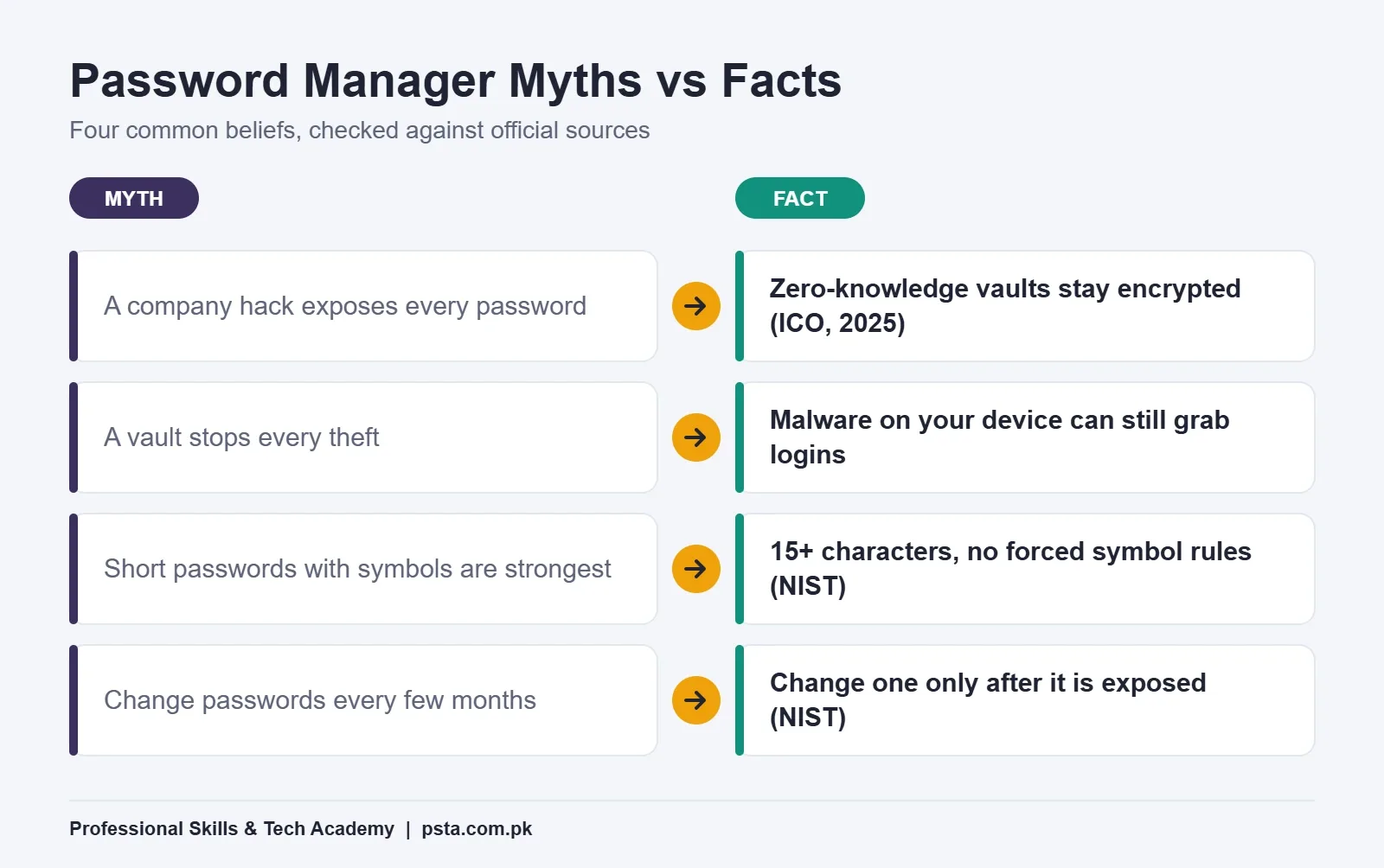
Fact: Good password managers use what is called zero-knowledge encryption. Your vault is scrambled on your own device with a key made from your master password. The company stores only the scrambled copy.
A real case shows how this plays out. In December 2025, the UK Information Commissioner's Office fined LastPass UK £1.2 million over a 2022 breach that affected up to 1.6 million UK users. The ICO said it found no evidence that attackers could decrypt customer passwords, because of that zero-knowledge design. It still called password managers a safe and effective tool for the public.
The fine was about the company's weak internal controls, which is a fair reminder to pick a provider with a clean security record. For anyone asking "are password managers safe" after a breach headline, the key detail is that the ICO found no sign customer passwords were revealed without their owners' master passwords.
Myth 2: The Company Can Read My Passwords
Fact: Not with a zero-knowledge design. Google's help page on how Chrome protects your passwords says Chrome encrypts your username and password with a key known only to your device, so nobody, including Google, learns them during breach checks. Zero-knowledge managers apply the same idea to the whole vault, which is the design the ICO credited in Myth 1.
The flip side matters too. Because the company can't read your vault, it usually can't reset your master password for you either. Forget it, and your saved logins may be gone. We'll deal with that in the master password section.
Myth 3: Once I Have a Password Manager, Hackers Can't Get My Logins
Fact: A password manager can't protect you from malware already running on your phone or laptop. Infostealer malware grabs what you type, what your browser stores and what sits on screen. The 184 million credentials in the PKCERT warning were believed to have been collected this way, from infected devices.
The ICO case has a lesson here as well. Its notice says a keylogger captured one senior employee's master password, which opened that person's vaults. Strong encryption meant nothing once the device itself was compromised. So the order is simple: clean device first, vault second. As a habit, avoid pirated software, cracked games and APK files from unknown sites, since they are easy ways for malware to reach a device.
Myths About the Passwords Themselves
Many people resist password managers because they believe the old rules: short, full of symbols, changed every month. Those rules are now officially out of date. The newest US standard, NIST SP 800-63B-4, finalized in July 2025, rewrote them.
Myth 4: A Short Password Full of Symbols Is the Strongest Kind
Fact: Length beats tricks. NIST now says a password used on its own should be at least 15 characters, and systems should allow at least 64. It also says services shall not force mixtures of character types, because rules like "one capital, one number, one symbol" push people toward predictable patterns such as Pakistan@123. CISA's tip sheet goes a step further and suggests at least 16 characters.
A 16-character random string is hard to remember. That is exactly the job a password manager does for you. It generates and stores it, so you never need to.
Myth 5: You Should Change Every Password Every Few Months
Fact: NIST says services shall not require people to change passwords on a schedule. The change should happen when there is evidence a password was exposed. Forced changes tend to produce weaker passwords, such as adding 1, then 2, then 3 to the end.
To be fair, advice varies here. PKCERT's 2025 advisory suggested changing passwords once a year. Both positions agree on the main point: change a password immediately when it appears in a breach. A password manager with a breach checker makes that easy to spot.
Myth 6: Reusing One Strong Password Is Good Enough
Fact: Reuse is how one leak becomes ten account takeovers. Attackers take leaked email and password pairs and try them on other sites, a method called credential stuffing. Verizon's 2025 research on credential stuffing found that compromised credentials were the initial way in for 22% of the breaches it reviewed. In single sign-on logs it studied, credential stuffing made up a median of 19% of all login attempts each day.
The same research looked at devices infected with infostealers. In the median case, only 49% of a person's passwords across different services were distinct from each other. Password reuse is the norm, not the exception, and a vault is the simplest way to break the habit.
Myths About Cost and Convenience
The last two myths stop people before they even try. They aren't about whether the vault is secure; they're about whether it's worth the effort. Both are easy to check.
Myth 7: A Safe Password Manager Costs Money Every Month
Fact: Solid free options exist. Bitwarden's plan page says its core password manager is free, with unlimited storage of logins, notes, cards and identities across devices, plus a password generator. Its pricing page lists Premium at $10 billed yearly and a Families plan at $40 yearly for up to six users. Google Password Manager is built into Chrome and Android at no charge.
For most students and freelancers, the free tier is enough. Paid extras such as file attachments and vault health reports are nice, not necessary.
Myth 8: Websites Don't Want You Using Autofill or Pasting Passwords
Fact: The opposite is now the official standard. NIST SP 800-63B-4 says verifiers shall allow the use of password managers and autofill, and should let people paste passwords. Some older Pakistani portals still block pasting. When that happens, the site is behind current guidance, not you.
| Myth | What the evidence says | Source |
|---|---|---|
| A company hack exposes all passwords | Zero-knowledge vaults stay encrypted; no evidence of decryption in the LastPass case | ICO, Dec 2025 |
| The provider can read my vault | Credentials are encrypted with a key only your device knows | Google Chrome Help |
| A vault stops every theft | Infostealer malware on your device can still capture logins | PKCERT via Dawn |
| Short and complex is strongest | 15+ characters for single-factor passwords; no forced symbol rules | NIST SP 800-63B-4 |
| Change passwords every few months | No scheduled changes; change after a compromise | NIST SP 800-63B-4 |
| One strong reused password is fine | Only 49% of passwords were distinct in the median infected device | Verizon 2025 |
| Good managers cost money | Free tier with unlimited logins; Premium $10 a year | Bitwarden |
| Sites block autofill on purpose | Verifiers shall allow password managers and autofill | NIST SP 800-63B-4 |
Which Password Manager Should a Beginner in Pakistan Use?
If you live in Chrome and use an Android phone, Google Password Manager is the easiest start because it's already there. If you switch between browsers, share a laptop, or want a vault that isn't tied to one company's ecosystem, a dedicated app like Bitwarden is the more flexible password manager for beginners. Either choice beats a notes app.
| Option | Cost | Good for | Watch out for |
|---|---|---|---|
| Google Password Manager | Free, built into Chrome and Android | Students and phone-first users | Your Google account becomes the key, so protect it with 2-Step Verification |
| Bitwarden Free | Free, unlimited logins | Freelancers using several browsers or devices | No vault health reports or file attachments on the free tier |
| Bitwarden Premium | $10 a year | People who want built-in authenticator codes and health reports | Billed in US dollars once a year |
| Bitwarden Families | $40 a year, up to 6 users | A family or a small shop sharing a few logins | Someone must manage who sees which items |
| Notes app, email or WhatsApp chat | Free | Nobody | PKCERT specifically advises against storing passwords in email or unprotected files |
People often search for the best free password manager as if one app wins for everyone. It doesn't. The best one is the one you will actually open every day, on every device you use.
How to Move Your Accounts Into a Vault Safely
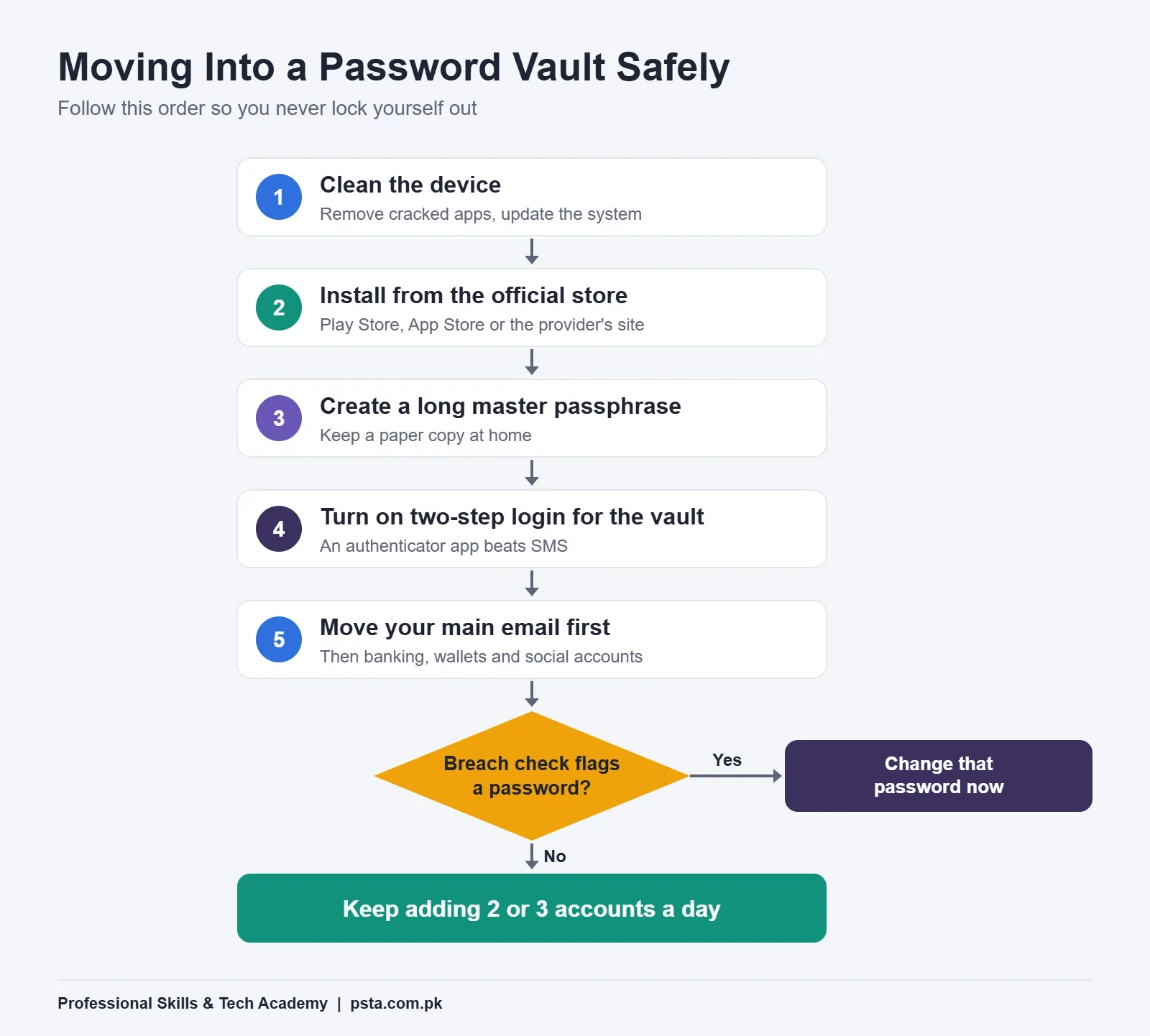
Switching all at once is how people lock themselves out. Move in a careful order, starting with the accounts that can reset all the others.
- Check the device first. Uninstall cracked software and unknown APKs, update the operating system and run the built-in security scan.
- Install from the official source only. Use the Play Store, the App Store or the provider's own website, never a download link sent in a chat or an ad.
- Create a long master passphrase. Write it on paper and keep it at home until you have it memorized.
- Turn on two-step login for the vault itself. An authenticator app is better than SMS. Our guide to two-factor authentication methods ranks the options.
- Move your main email account first. Email resets everything else, so give it a fresh, generated password.
- Then banking, mobile wallets and social accounts. Replace each reused password with a new generated one as you save it.
- Run the breach check. Google Password Manager has a Checkup feature, and paid vaults have health reports. Change anything flagged as exposed.
Do two or three accounts a day rather than all fifty at once. Within two weeks, the accounts you actually use will all be inside.
What Makes a Master Password Hold Up?
A good master password is long, unique and something only you could remember. A passphrase of four or five unrelated words, with a space or a word in Urdu written in Roman script, easily passes 20 characters and is far harder to guess than a short mix of symbols.
Keep these rules:
- Never use it anywhere else, not even on your email.
- Don't base it on your name, CNIC, phone number, date of birth or cricket team.
- Don't type it on a shared or café computer.
- Save the vault's recovery code or emergency kit offline, on paper, in a safe place at home.
Remember Myth 2: the provider can't recover it for you. That recovery code is your only backup if you forget.
Before and After: What Actually Changes
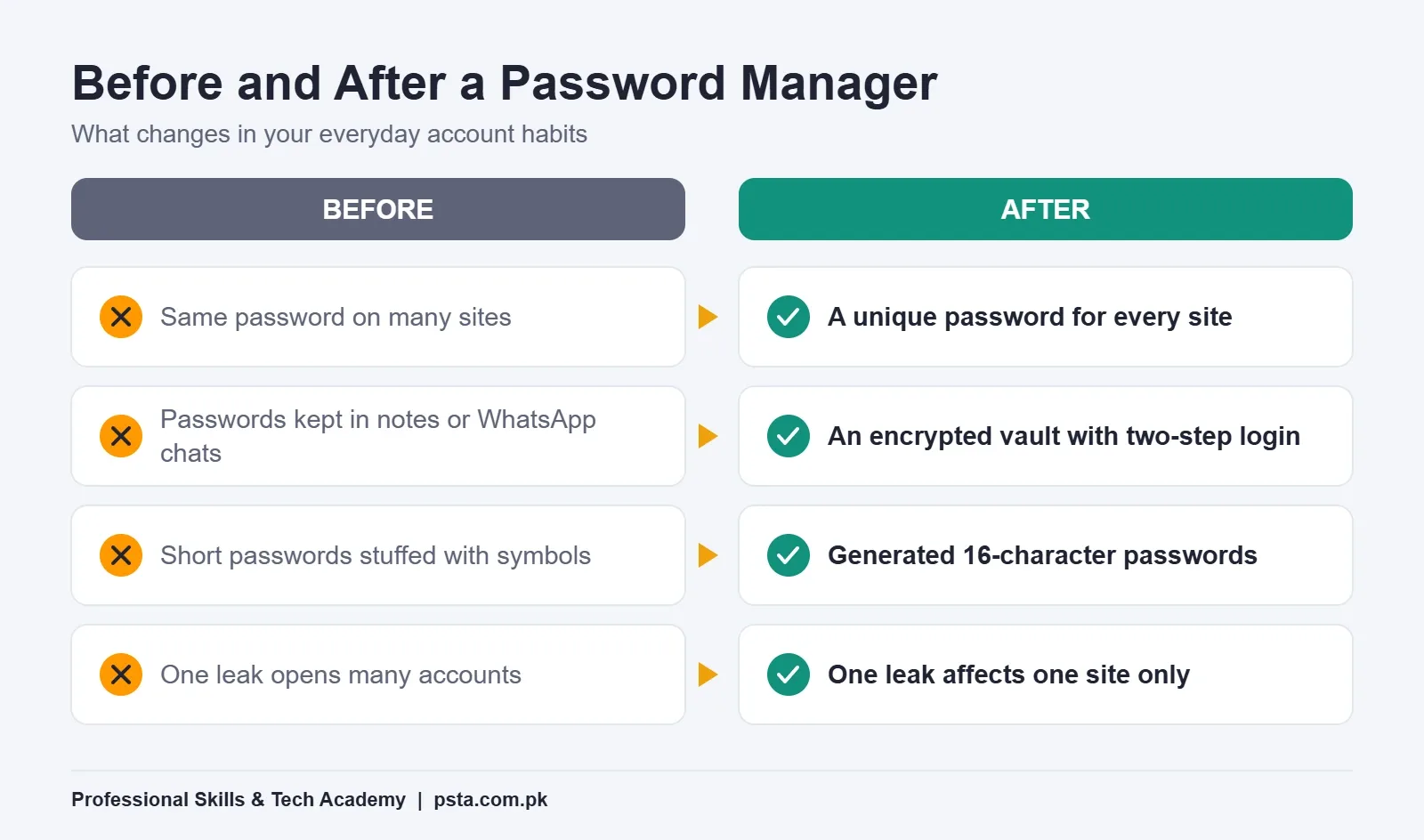
Once you stop asking whether password managers are risky and start using one, the difference shows up in your habits more than in the app. Before, a leak at one shopping site meant your email and Facebook were at risk too. After, a leak at that site exposes one random password that works nowhere else, and you change it in a minute.
You also stop the slow, risky routines: screenshotting passwords, emailing them to yourself, or keeping a "passwords" note on the phone. If you ever lose access to WhatsApp, our WhatsApp account recovery checklist is easier to follow when your email and phone carrier logins are already safe in a vault.
When a Password Manager Isn't the Right Fix
So, are password managers safe for everyone in every situation? Not quite. A vault solves password reuse and weak passwords. It doesn't solve everything, and pretending otherwise would be the same mistake as the myths above.
- A shared family phone: if several people use the same phone, anyone holding it can open a vault that is still open. Set the vault to lock itself within a minute or two.
- A device you suspect is infected: fix or reset the device before you put a vault on it.
- Phishing links: autofill usually helps because it matches saved logins to the real web address, but you can still type a password into a fake page by hand. Learn to check whether a link is safe before you log in.
- Someone who will never remember a master password: for an elderly parent, a written password book kept at home may honestly be safer than a vault they can't open.
Where Password Security Fits in PSTA's Cyber Security Course
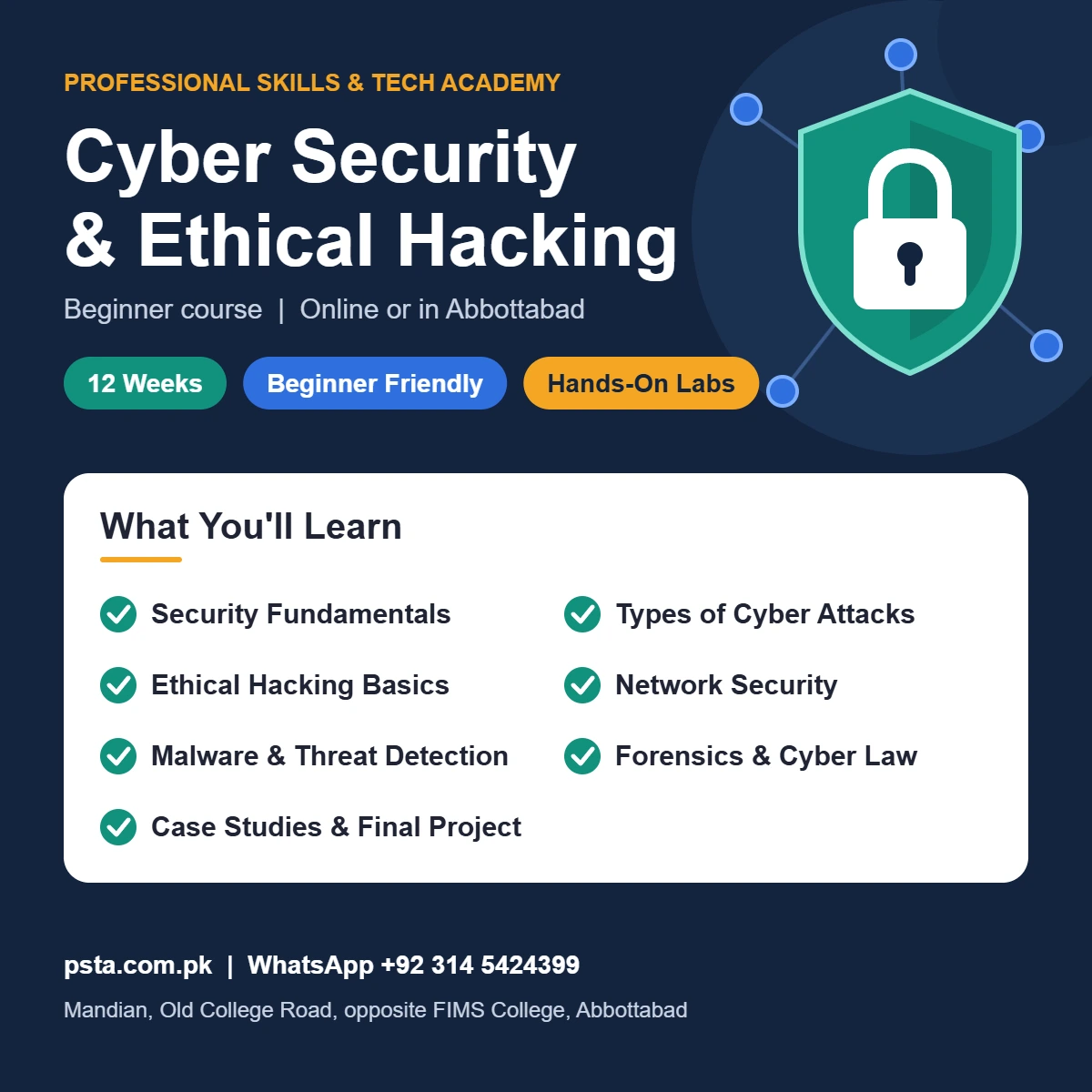
Asking "are password managers safe" is a good first lesson in security thinking. Each myth teaches the same habit: you weigh threats, check evidence and pick controls that fit real people. That thinking runs through the Cyber Security Course for Beginners at PSTA.
The course page lists it as a 12-week, beginner-level program with a current fee of Rs. 45,000, discounted from Rs. 60,000. Its modules move from the CIA triad and common attacks such as phishing and social engineering to network security, malware analysis, incident response, and digital forensics with Pakistan's PECA cyber laws, ending in a final security project.
If you already know the basics, the Penetration Testing and Advanced Ethical Hacking Course (12 weeks, advanced, Rs. 30,000) shows the attacker's side, including how password cracking methods such as dictionary attacks work, so you understand why length and uniqueness matter.
Both courses are offered on campus in Abbottabad, as live online classes anywhere in Pakistan, or as a hybrid. A new batch starts every month, with classes scheduled between 9:00 AM and 9:30 PM, Monday to Saturday. You can compare every program on the courses page.
Your Ten-Minute Starting Point
Pick one account today: your main email. Open the password manager you already have (Google's is likely on your phone), generate a new 16-character password for that email, save it, and turn on two-step verification. That single change protects the account that can reset all the others.
If you'd like to learn account security properly, with live classes and a real trainer, you can apply through the admission page or send a question on WhatsApp at +92 314 5424399. There's no pressure to enroll; ask whatever you need first.
Frequently asked questions
Is it safe to save passwords in Google Chrome?
For most people, yes, if your Google account is protected. Google says Chrome encrypts your username and password with a key only your device knows during breach checks, and it can warn you when a saved password appears in a breach. The weak point is your Google account itself, so turn on 2-Step Verification and keep your phone and laptop free of malware.
What happens if I forget my password manager's master password?
With a zero-knowledge password manager, the company can't see or reset your master password, so a forgotten one can mean losing the vault. That is why you should save the recovery code or emergency kit on paper when you set it up and keep it somewhere safe at home. Some providers also offer trusted emergency contacts on paid plans.
Can a password manager be hacked?
The company's servers can be breached, as the UK ICO's December 2025 fine against LastPass UK showed, but the ICO found no evidence that customer passwords were decrypted because of zero-knowledge design. The bigger risk is your own device. If malware or a keylogger captures your master password, the attacker can open your vault, so device hygiene matters most.
Is Bitwarden free to use in Pakistan?
Yes. Bitwarden's core password manager is free, with unlimited storage of logins, notes and cards, a password generator and access across devices. Its pricing page lists Premium at $10 a year and Families at $40 a year for up to six users. The paid plans are billed in US dollars, so you'd need a payment method that supports that.
Should I still change my passwords regularly?
Current NIST guidance says services shall not force scheduled password changes, because people respond with weak patterns like adding a number each time. Change a password right away when it shows up in a breach or you suspect someone saw it. Pakistan's PKCERT has suggested yearly changes, so a calm yearly review of your most important accounts does no harm.
Is a password manager better than writing passwords in a notebook?
For most people, yes, because a vault lets you use a different long password on every site without memorizing them. A paper notebook kept at home is not hacked over the internet, though, and it can suit an elderly parent who would struggle with an app. What you should avoid is storing passwords in email, WhatsApp chats or an unprotected notes file.
Do I still need two-factor authentication if I use a password manager?
Yes. A password manager protects you from weak and reused passwords, while two-factor authentication protects you when a password leaks anyway, for example through phishing or malware. Turn it on for the vault itself and for your email, bank and social accounts. An authenticator app is generally a stronger choice than SMS codes.
Sources & references
- NIST SP 800-63B-4: Authenticators and Verifiers pages.nist.gov
- Verizon: Credential Stuffing Research From the 2025 DBIR verizon.com
- CISA Secure Our World: Passwords Tip Sheet mass.gov
- ICO: Password Manager Provider Fined (December 2025) ico.org.uk
- Dawn: Over 184m Credentials Exposed, PKCERT Advisory dawn.com
- Google Chrome Help: How Chrome Protects Your Passwords support.google.com
- Bitwarden: Password Manager Plans bitwarden.com
- Bitwarden: Pricing go.bitwarden.com
Last reviewed & updated on by Umar Qureshi. Written by the PSTA team in Abbottabad, Pakistan.

Umar Qureshi
Cyber Security & Ethical Hacking Course in Abbottabad - PSTA
Turn this guide into a career: hands-on training with real projects, online across Pakistan or on-campus in Abbottabad · 12 Weeks.
Comments
No comments yet — ask a question or share your experience.