Quick answer
To check if a link is safe, long-press it to preview the address, find the real domain just before the first single slash, and compare it letter by letter with the official one. Scan doubtful links on VirusTotal or Google Safe Browsing, but when in doubt, open the official app instead.
Key takeaways
- • Only the real domain, just before the first single slash, tells you who owns a site.
- • A padlock means the connection is encrypted, not that the site is honest.
- • Link checkers only catch known threats, and VirusTotal shares scan reports publicly.
- • Never type an OTP, PIN or password into a page opened from a message.
- • If you clicked, close the page, call your bank and report the number to PTA on 0800-55055.
Table of contents 18 sections
- Check If a Link Is Safe: The Short Version
- Why Do Scam Links Keep Working in Pakistan?
- The Seven-Step Link Check
- Step 1: Pause When the Message Pushes You to Hurry
- Step 2: Ask Whether You Expected This Message
- Step 3: Preview the Real Address Without Opening It
- Step 4: Find the Real Domain
- Step 5: Compare Letter by Letter With the Official Domain
- Step 6: Scan It With a Link Checker
- Step 7: Go to the Source Yourself
- Common Link Tricks and How to Spot Them
- Are Link Checker Websites Reliable?
- Got a Link? A Quick Decision Path
- What If You Already Clicked a Phishing Link?
- Where to Report Scam Links in Pakistan
- Teaching Your Family the Two-Rule Version
- Going Further: PSTA's Cyber Security Course
- Practice on Three Messages in Your Inbox Today
Here is an example we walk through in class to show how to check if a link is safe. A student in Abbottabad gets an SMS at 11 p.m.: her parcel is "on hold," and she must pay a small redelivery charge through a link within two hours. She has ordered something online that week, so the message feels real. Her thumb is already over the link.
What she does in the next 30 seconds decides whether this is a non-event or a drained wallet. The good news is that learning to check if a link is safe doesn't need software or technical training. It needs a short routine you repeat until it becomes automatic.
In this guide, you'll learn:
- A seven-step routine for judging any link from SMS, WhatsApp, email or social media
- How to find the real domain inside a long, confusing web address
- Which free URL checkers help, and what they can't tell you
- The first moves to make if you've already tapped a scam link
- Where to report phishing links in Pakistan
Check If a Link Is Safe: The Short Version
If you only remember one thing, remember this: a link is safe to open when you expected it, the sender is confirmed through a separate channel, and the real domain matches the official one letter for letter. If any of those three fails, don't tap. Open the official app or type the official address yourself instead.
Everything below expands on those three tests. The longer routine matters because scammers are good at passing one test while failing another. A message can come from a friend's real WhatsApp number, for example, because the friend's account was taken over first.
Why Do Scam Links Keep Working in Pakistan?
Phishing links work because they arrive where we already trust the messages. WhatsApp alone had about 52 million Pakistani users in 2024, according to World Population Review figures cited by Dawn's report on a Digital Rights Foundation alert. In that same report, the DRF said it had received 233 reports of scam calls since January 2025, and it described phishing links being used to take over accounts and then ask the victim's contacts for "urgent financial help." The same alert mentioned callers posing as delivery riders or HEC staff who ask for a "verification code."
The Pakistan Telecommunication Authority describes the pattern clearly. Its phishing guide, reported by ARY News in April 2026, says these scams use fake emails, texts and websites to steal OTPs, logins and banking details, and that they create urgency so you act before you think. The PTA also states that it will never call or email you asking for personal details.
National CERT Pakistan has warned about the same tricks in its advisory on WhatsApp hacking, covered by ProPakistani: malicious links disguised as promotional offers, fake bank updates and messages from people pretending to be officials or acquaintances. Notice that none of these require advanced hacking. They rely on a tired person tapping quickly.
The Seven-Step Link Check
Run these steps in order whenever you need to check if a link is safe. Most scam links fail by step 3, so the full routine rarely takes more than a minute.
Step 1: Pause When the Message Pushes You to Hurry
Deadlines are the scammer's main tool. "Your account will be blocked today," "Claim before midnight," "Your SIM is linked to suspicious activity." When a message sets a timer, treat the timer itself as a warning sign. Real banks and telecom companies don't fix serious problems through fake SMS links with two-hour deadlines.
Step 2: Ask Whether You Expected This Message
The US Federal Trade Commission suggests a simple question in its guidance on spotting phishing: do you actually have an account with this company, or know this person? If not, it's very likely phishing. If you do, the FTC's advice is to contact them through a number or website you already know is genuine, not through the details inside the message.
Apply this locally. Did you order from a courier that week? Did you ask your bank for anything? Was your cousin really planning to send you a "voting link" for a competition? An unexpected message deserves more suspicion, even when the sender looks familiar.
Step 3: Preview the Real Address Without Opening It
On a laptop, hover your mouse over the link and read the address in the bottom corner of the browser. On Android or iPhone, press and hold the link until a preview or menu shows the full address. Don't tap it once to "just see." Malwarebytes' guide to checking links also points out that the text you see can differ from where the link really goes, so read the actual address, not the label.
Step 4: Find the Real Domain
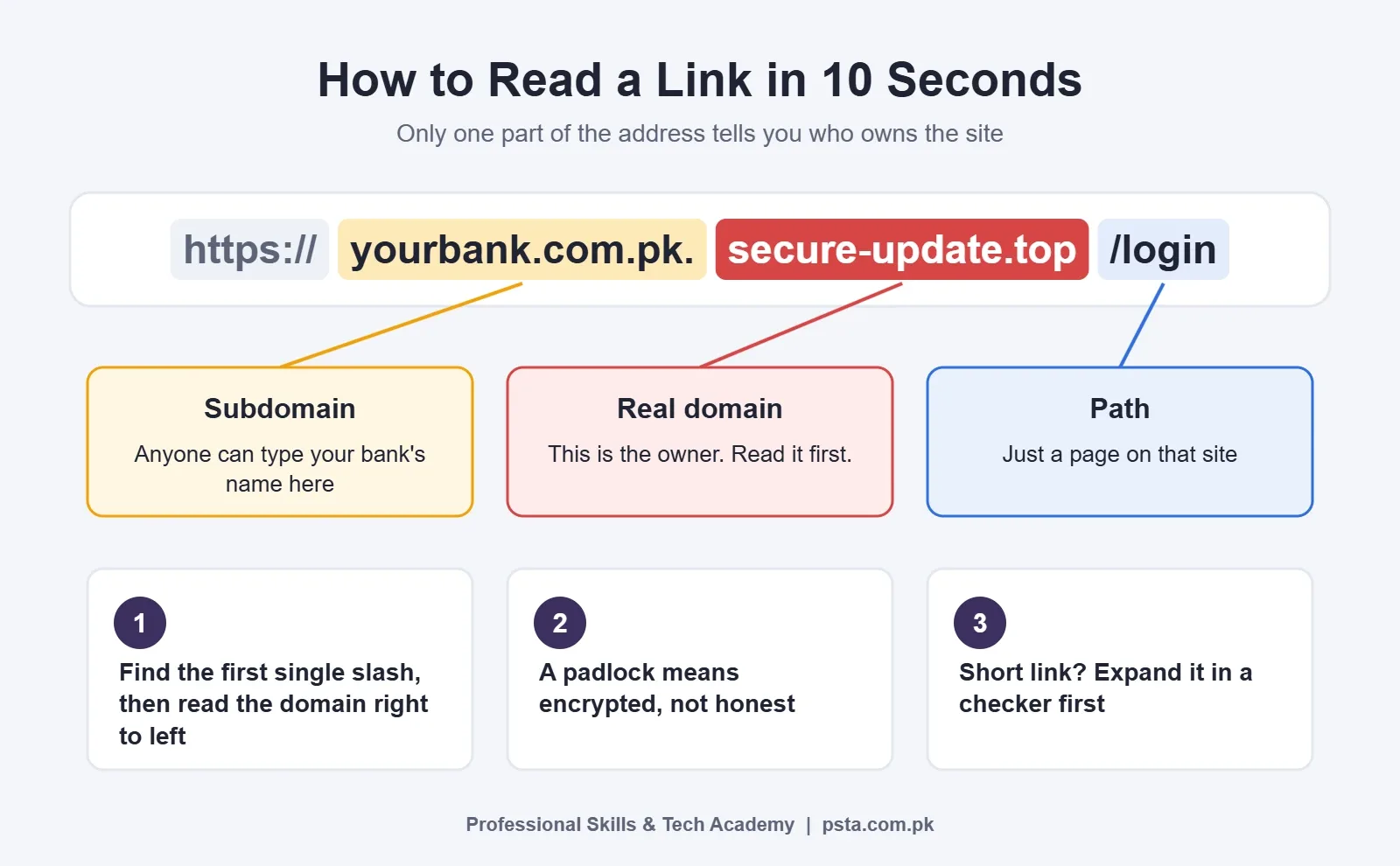
This is the step most people skip when they check if a link is safe, and it's where scammers hide. A web address has parts, and only one part tells you who owns the site: the domain sitting just before the first single slash after "https://". Read that section from right to left. Everything to its left is a subdomain, which the site owner can set to anything they like, including the name of your bank.
So in yourbank.com.pk.secure-update.top/login, the site belongs to secure-update.top, not to your bank. The bank's name is decoration. Once you see this pattern, you'll spot it in half the scam messages you receive.
Step 5: Compare Letter by Letter With the Official Domain
Lookalike domains are built to pass a quick glance. Security firm Barracuda explains in its overview of URL manipulation that attackers register near-copies such as "aple.com" for "apple.com," add or remove dashes, swap the ending, or replace a Latin letter with an identical-looking letter from another alphabet. Find the official address from the company's app, a bank card, or a statement, then compare the two slowly.
Step 6: Scan It With a Link Checker
If the domain still looks plausible but you're not sure, paste the link into a URL checker instead of opening it. Two widely used free options are Google's Safe Browsing site status page and VirusTotal. Treat a clean result as "no known problems," not as proof of safety. The next section explains why.
Step 7: Go to the Source Yourself
The safest move doesn't involve the link at all. If the message says your bank account needs attention, close it and open your bank's official app. If it's about your phone's PTA status, the PTA says to check only through dirbs.pta.gov.pk, by sending your IMEI to 8484, or through its official Device Verification App, according to its warning on deceptive DIRBS links. A real problem will still be there when you check through the front door.
Common Link Tricks and How to Spot Them
These are the patterns that come up most often when students bring suspicious messages to class. The examples are made up for illustration; don't type them into a browser.
| Trick | Made-up example | How to spot it |
|---|---|---|
| Brand name as a subdomain | yourbank.com.pk.secure-update.top | The real domain is the last part before the first single slash: secure-update.top |
| Typo or extra word | yourbnak-pk.com, yourbank-verify.com | Compare with the address printed in the official app or on your card |
| Swapped ending | yourbank.top instead of yourbank.com.pk | Pakistani banks and government bodies usually use .com.pk, .pk or .gov.pk; check the official one |
| Lookalike letters | A Cyrillic "а" in place of a Latin "a" | Type the official address yourself rather than trusting a pasted one |
| Shortened link | bit.ly/3xYz9 in a "prize" message | Expand it with a checker before opening; shorteners hide the destination |
| Padlock used as proof | "Secure site, look for the lock" | HTTPS only means the connection is encrypted, not that the owner is honest |
Barracuda notes that attackers often wrap a malicious address in a shortener, sometimes several times, to slip past filters. Malwarebytes makes the padlock point plainly: HTTPS shows encryption, not trustworthiness. Plenty of phishing pages have a padlock.
Are Link Checker Websites Reliable?
They're useful when you check if a link is safe, but they can only report what is already known. VirusTotal's documentation says it checks items against more than 70 antivirus scanners and URL or domain blocklisting services. That's a strong second opinion for a link that has been around for a few hours. A brand-new scam domain, created this morning, may show no detections at all.
There's also a privacy catch. VirusTotal says its scan reports are shared with the public VirusTotal community and that the contents of submitted pages may be shared with its premium customers. So never submit a link that contains your own details, such as a password-reset link, a private Google Drive link, or anything with your phone number or CNIC in the address.
Use checkers like this:
- Copy the link with a long press. Don't open it.
- Paste it into Google's site status page or VirusTotal.
- If either flags it, delete the message and report it.
- If both show nothing, still apply steps 4, 5 and 7. A clean scan doesn't override a wrong domain.
Got a Link? A Quick Decision Path
When you're busy, a full routine to check if a link is safe can feel like too much. The decision path below fits the same logic into four yes-or-no questions. One "no" is enough to stop and use the official app or number instead.
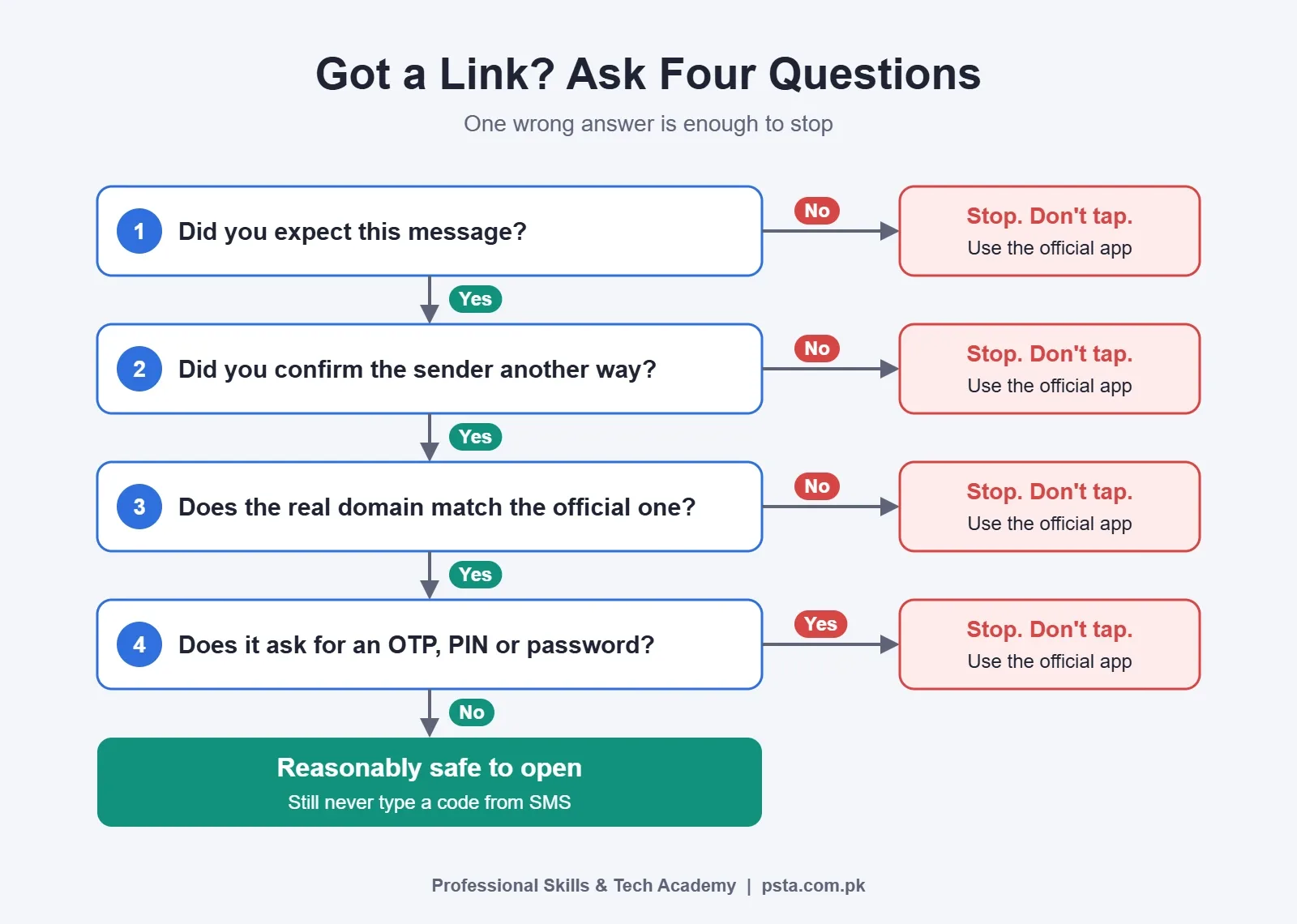
Pay special attention to the last question. Any page that asks for an OTP, ATM PIN, card number or password straight after you open a link from a message should be treated as hostile. The PTA's scam awareness page tells people never to share ATM or PIN details or online account details with anyone they don't know or trust.
What If You Already Clicked a Phishing Link?
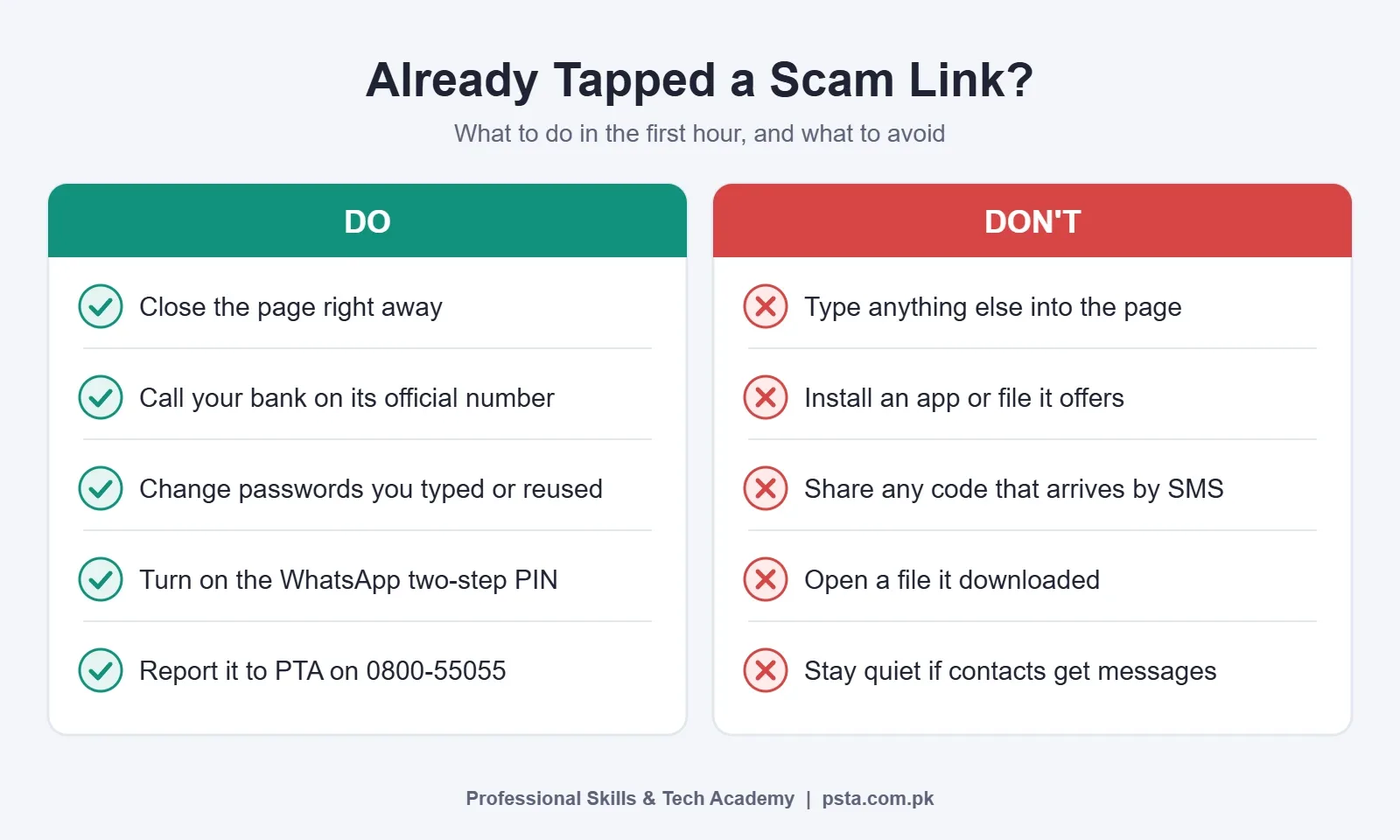
Don't panic, and don't hide it out of embarrassment. Opening a link is not the same as losing money. The damage usually happens when you type details into the fake page or install something it offers. Act quickly, in this order:
- Close the page. Don't type anything else into it, and don't install any app or file it suggests.
- Call your bank's official helpline if you entered any card, account or wallet details. The PTA advises contacting your bank and the police immediately if you've sent money or shared banking details, because the bank may be able to stop a transaction or block the account.
- Change the password for any account whose login you typed, then change it anywhere else you reused that password.
- Turn on two-step verification in WhatsApp. National CERT's advisory notes that a six-digit PIN can block access even if an OTP is stolen.
- Delete any downloaded file without opening it, run a security scan, and keep your phone's software updated.
- Warn your contacts if your WhatsApp or Facebook was used to send messages, so nobody sends money "to you."
If your WhatsApp has already been taken over, our guide on recovering a hacked WhatsApp account walks through the recovery steps. If your phone is acting strangely afterwards, read how to tell if your phone is hacked.
Where to Report Scam Links in Pakistan
Reporting takes a few minutes and helps block the number or site for others. Based on the PTA's own published guidance, use these channels:
- Your mobile network: the PTA says to ask your operator (Jazz, Zong, Telenor, Ufone or PTCL) to block a suspected number first.
- PTA: call the toll-free number 0800-55055 or file a complaint at complaint.pta.gov.pk. The PTA CMS mobile app also accepts complaints.
- State Bank of Pakistan: for banking or financial fraud, the PTA page lists [email protected].
- Digital Rights Foundation: its Digital Security Helpline, 0800-39393, runs daily from 9 a.m. to 5 p.m., as reported by Dawn.
Before reporting, take a screenshot of the message showing the sender's number and the full link. Then delete the message so nobody else in the family taps it later. For phone-based tricks that don't involve links, see our guide to fraud calls in Pakistan.
Teaching Your Family the Two-Rule Version
Older parents and younger siblings won't remember seven steps to check if a link is safe, and they don't need to. Give them two rules and repeat them often:
- Never tap a link that asks you to pay, verify or "release" something. Call the company on the number you already have.
- Never share a code that arrives by SMS, no matter who asks for it. Not the bank, not the courier, not "HEC," not a relative.
Those two rules cover the scams described in the Dawn and National CERT reports above. Put them on a note near the family's main phone charger. It sounds simple, and that's the point.
Going Further: PSTA's Cyber Security Course
Knowing how to check if a link is safe is a personal habit. If you'd like to understand how these attacks are built and how organizations defend against them, that's the work of a security professional. PSTA's Cyber Security and Ethical Hacking Course runs for 12 weeks and assumes no security background. Its modules cover cyber security fundamentals, types of attacks including phishing and social engineering, ethical hacking basics, network security, malware and incident response, digital forensics with Pakistan's PECA law, and a final case-study project.
Classes run in person at the PSTA campus in Mandian, Abbottabad (Old College Road, across from FIMS College), and students in other cities attend live online. The course page lists the fee as Rs. 45,000. Once you have the basics, the Advanced Ethical Hacking and Penetration Testing Course is the natural next step. You can compare options on our courses page, see batch details on the admission page, or send your questions first to +92 314 5424399 on WhatsApp.
Practice on Three Messages in Your Inbox Today
Open your SMS inbox and find three messages that contain links, even harmless ones from your network operator. For each, long-press the link, read the address and point to the real domain out loud. It feels slow the first time. By the third message you'll do it in seconds, and the next time a "parcel on hold" text arrives at 11 p.m., you'll already know where to look.
Frequently asked questions
Is a link with a padlock or https always safe?
No. The padlock only shows that the connection between your device and the site is encrypted. Scammers can get certificates for their own domains too, so many phishing pages show a padlock. Judge a link by its real domain and by whether you expected the message, not by the lock icon in the address bar.
Can just opening a link hack my phone?
In most scams, the damage happens after you open the link: when you type a password, OTP or card number, or install an app the page offers. Opening an unknown link is still a risk, so keep your phone's software updated, close any page you didn't expect, and never install files from a link in a message.
Is it safe to paste a link into VirusTotal?
For a suspicious link from a stranger, yes. VirusTotal says its scan reports are shared with its public community, and submitted page contents may reach its premium customers. So don't submit links that carry your own details, such as password-reset links, private document links, or addresses containing your phone number or CNIC.
How do I check a shortened link like bit.ly?
Don't open it to find out. Copy it with a long press and paste it into a link checker or URL expander, which shows the final address without loading the page on your phone. Then apply the usual test: find the real domain and compare it with the official one. If you can't confirm it, skip it.
What should I do if I entered my bank details on a fake site?
Call your bank's official helpline at once, using the number on your card or in the bank's app. The PTA advises contacting your bank and the police immediately, because the bank may be able to stop a transaction or block the account. Then change any passwords you typed and report the message to PTA on 0800-55055.
Are links sent by friends on WhatsApp safe?
Not automatically. Scammers often take over one account and then message that person's contacts, so the sender's name can be real while the message is not. If a friend sends an unexpected link, especially one about money, prizes or voting, call them or message them on another app to confirm before you tap.
Does my browser warn me about dangerous sites?
Often, yes. Google Safe Browsing powers warnings in Chrome and is also used by other major browsers when you try to open a known phishing or malware site. It can only flag sites already on its lists, though, so a brand-new scam page may load with no warning. Treat a missing warning as neutral, not as approval.
Sources & references
- Dawn: Digital Rights Foundation issues alert for rising scam compromising WhatsApp accounts dawn.com
- ARY News: PTA guide to phishing arynews.tv
- ProPakistani: Govt warns public over rising WhatsApp hacking cases propakistani.pk
- PTA: Cautions public on deceptive links pta.gov.pk
- PTA: Protect yourself from scams pta.gov.pk
- FTC: Phishing scams can be hard to spot consumer.ftc.gov
- VirusTotal: How it works docs.virustotal.com
- Barracuda: URL manipulation techniques blog.barracuda.com
Last reviewed & updated on by Umar Qureshi. Written by the PSTA team in Abbottabad, Pakistan.

Umar Qureshi
Cyber Security & Ethical Hacking Course in Abbottabad - PSTA
Turn this guide into a career: hands-on training with real projects, online across Pakistan or on-campus in Abbottabad · 12 Weeks.
Comments
No comments yet — ask a question or share your experience.