Quick answer
For most beginners, Astra or Kadence is the safest free WordPress theme to start with. Use Hello Elementor if you build everything in Elementor, Twenty Twenty-Five for a pure block-editor site, Blocksy or OceanWP for WooCommerce shops, and GeneratePress if you want a lean base and know some CSS.
Key takeaways
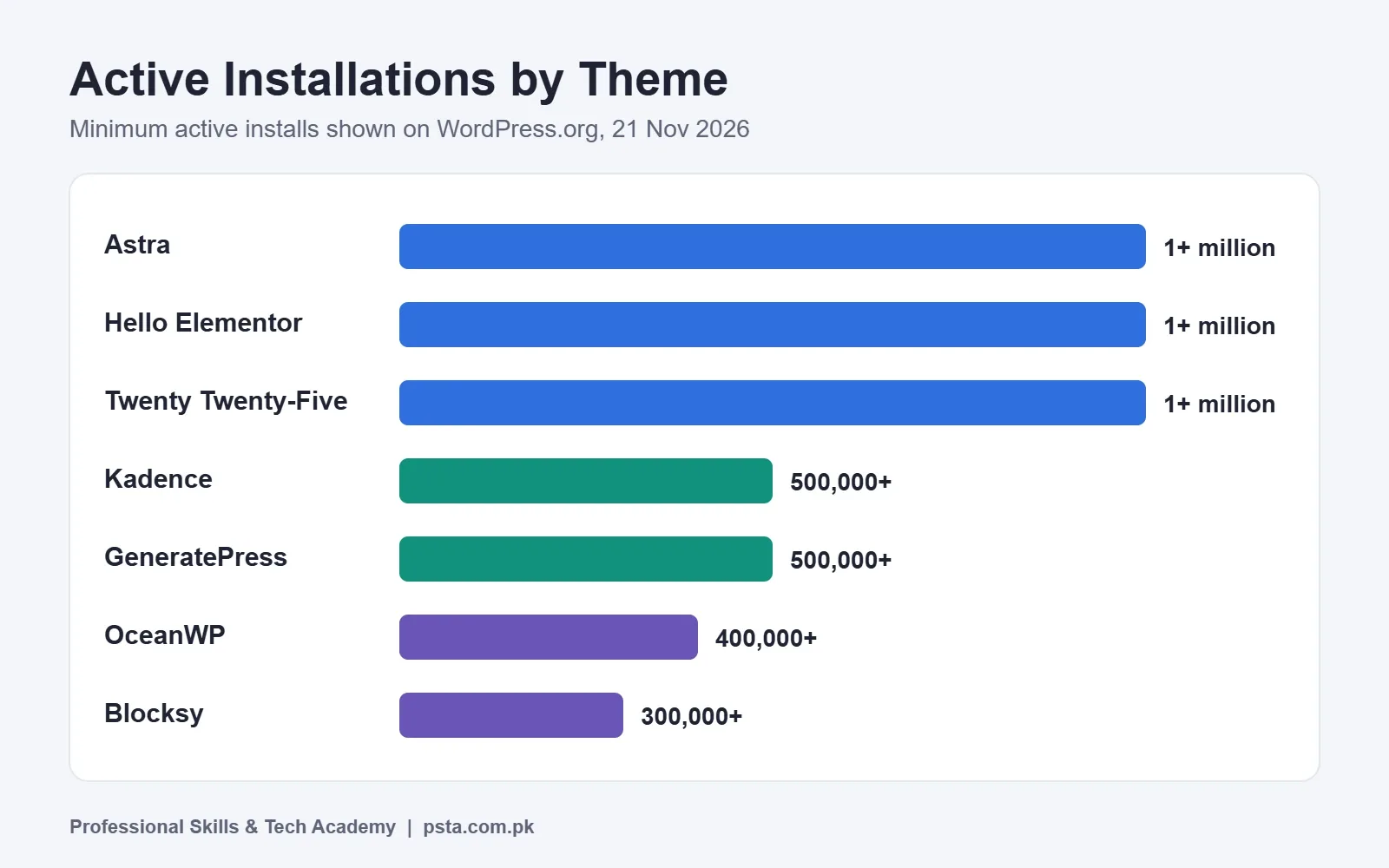
- • Astra, Hello Elementor and Twenty Twenty-Five each show 1+ million active installs on WordPress.org.
- • Astra and OceanWP pair 4.9 ratings with thousands of reviews.
- • Twenty Twenty-Five is the only block theme in this comparison.
- • Choose by how you build pages: Elementor, block editor or WooCommerce.
- • Use a child theme before adding custom code.
- • Back up and test on staging before switching themes on a live site.
Table of contents 14 sections
- What Does a WordPress Theme Actually Control?
- How We Compared These Free WordPress Themes
- Best Free WordPress Themes at a Glance
- Astra: The Safe All-Rounder
- Kadence: Strong Free Header and Footer Builder
- GeneratePress: Minimal and Developer-Friendly
- Blocksy, OceanWP and Hello Elementor
- Is the Default Twenty Twenty-Five Theme Good Enough?
- Which of These Free WordPress Themes Should You Choose?
- What Do You Give Up by Staying on the Free Version?
- Why Use a Child Theme Before You Customize?
- How to Switch Themes Safely on a Live Site
- Learn Theme Customization in PSTA's WordPress Course
- Try Two Themes This Week
The best free WordPress themes for most beginners in 2026 are Astra, Kadence, GeneratePress, Blocksy, OceanWP, Hello Elementor and the default Twenty Twenty-Five, and the right pick depends on how you plan to build your pages. That choice matters more than it looks. According to W3Techs, WordPress runs 38.5% of all websites, so the theme you learn now is a skill you will use on client sites for years. This review from PSTA (Professional Skills & Tech Academy) compares the seven themes using their official WordPress.org listings, then tells you which one to start with.
In this review, you will find:
- A side-by-side table of active installations, ratings and update dates
- What each theme does well, and who should skip it
- A simple way to choose based on your page builder and project
- Why a child theme protects your changes
- A safe process for switching themes on a live site
What Does a WordPress Theme Actually Control?
A WordPress theme controls how your site looks and how its pages are laid out: the header, footer, fonts, colors, blog layout and shop pages. It does not hold your content. Your posts, pages and products stay in the database, so you can change themes without losing them.
What can change is the design around that content. Menus may move, widgets may disappear and some page layouts may need rebuilding. That is why choosing a solid free theme at the start saves real time later.
All the free WordPress themes in this review come from the official directory, where a volunteer Themes Team reviews and approves submissions before they are listed. There are two broad kinds today. Classic themes use the Customizer and often pair with a page builder such as Elementor. Block themes use the Site Editor, where you design every part of the site with blocks. Of the seven themes here, only Twenty Twenty-Five is tagged as a block theme on WordPress.org.
How We Compared These Free WordPress Themes
Every number below comes from each theme's official page on the WordPress.org theme directory, checked on 21 November 2026. We looked at four things you can verify yourself:
- Active installations. A rough sign of how widely a theme is used and how many tutorials exist for it.
- Average rating and review count. A high rating from thousands of reviews means more than a perfect score from a few dozen.
- Last updated date. Regular updates matter for security and compatibility with new WordPress versions.
- Type. Whether it is a classic theme or a block theme.
We did not run speed tests for this article, so you will not see invented load times here. Speed depends heavily on your hosting, images and plugins, and you should test your own site with a tool such as PageSpeed Insights.
Best Free WordPress Themes at a Glance
This table shows the directory figures for each of the free WordPress themes we compared. "Reviews" is the total of all star ratings listed on the theme page.
| Theme | Active Installs | Rating | Reviews | Last Updated | Type |
|---|---|---|---|---|---|
| Astra | 1+ million | 4.9 / 5 | 6,559 | 12 Nov 2026 | Classic |
| Hello Elementor | 1+ million | 4.2 / 5 | 131 | 3 Nov 2026 | Classic |
| Twenty Twenty-Five | 1+ million | 4 / 5 | 14 | 20 May 2026 | Block |
| Kadence | 500,000+ | 4.9 / 5 | 458 | 20 Nov 2026 | Classic |
| GeneratePress | 500,000+ | 4.9 / 5 | 1,428 | 1 Dec 2025 | Classic |
| OceanWP | 400,000+ | 4.9 / 5 | 5,721 | 20 Nov 2026 | Classic |
| Blocksy | 300,000+ | 5 / 5 | 874 | 13 Nov 2026 | Classic |
Two things stand out. Astra and OceanWP combine high ratings with thousands of reviews, which makes their scores more reliable. GeneratePress has the oldest last-update date of the group, about a year before this review, so check its page for newer releases before you commit.
Astra: The Safe All-Rounder
Astra has more than one million active installations and a 4.9 rating from over 6,500 reviews, the largest review base in this list. Its theme page says it is built to work with page builders such as Elementor, Beaver Builder and Spectra, which makes it a flexible base for client sites.
Choose it if you want the theme with the biggest community, which means more answers when you search for a fix. Skip it if you want a theme with no paid tier at all. Like most themes here, Astra is listed as a commercial theme with paid upgrades, although the free version covers most first client projects.
Kadence: Strong Free Header and Footer Builder
Kadence lists more than 500,000 active installations and a 4.9 rating. It was updated on 20 November 2026, the most recent update in this group. Its theme page highlights a drag-and-drop header and footer builder, so you can design different header layouts without extra plugins.
Choose it if you plan to build with the block editor and want control over headers without a page builder. Skip it if you already work fully inside Elementor, where a minimal base theme makes more sense.
GeneratePress: Minimal and Developer-Friendly
GeneratePress has over 500,000 active installations, a 4.9 rating and more than 1,400 reviews. Its theme page describes it as a lightweight theme focused on speed and usability, and says a fresh install adds less than 10 KB (gzipped) to your page size.
Choose it if you are comfortable with a little CSS and want a lean starting point. Skip it if you would rather start from a ready-made design than from a plain base.
Blocksy, OceanWP and Hello Elementor
Blocksy has more than 300,000 active installations and a perfect 5 out of 5 rating from about 870 reviews. Its page describes it as a fast, modern theme with advanced WooCommerce support and full compatibility with the block editor. It is a good second theme to learn after Astra or Kadence.
OceanWP has over 400,000 active installations and a 4.9 rating from more than 5,700 reviews. Its page puts WooCommerce features and Elementor compatibility at the center of its pitch, which makes it a common shortlist pick for online shops.
Hello Elementor has more than one million installations but a lower 4.2 rating. Its page describes it as a lightweight, minimalist theme made to work with the Elementor site builder plugin, which then designs everything. On its own it looks plain. If Elementor is your main tool, it is a sensible base; if not, choose another theme.
Is the Default Twenty Twenty-Five Theme Good Enough?
For a personal blog or a simple portfolio, yes. Twenty Twenty-Five is the official WordPress default, has over one million installations, and is the only block theme in this comparison. You design headers, footers and templates directly in the Site Editor without any extra plugin.
Its rating is lower, 4 out of 5, but from only 14 reviews, so the score says little. The bigger limit is fewer business-style layouts to start from. If a client wants a polished company site quickly, a commercial theme's design options can save you hours.
Which of These Free WordPress Themes Should You Choose?
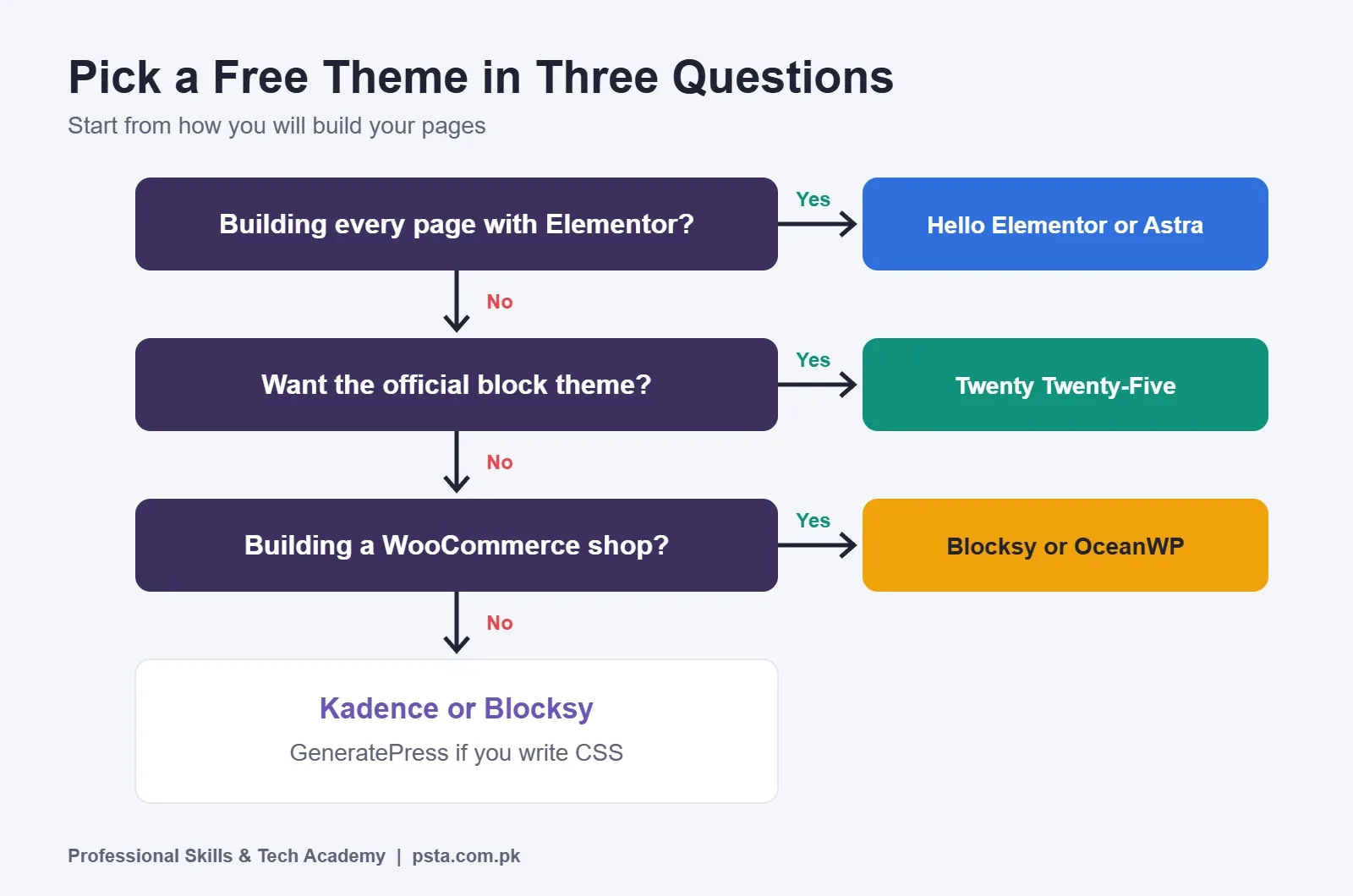
Start from how you plan to build pages, not from a list of features. These quick rules cover most beginners:
- You will use Elementor for everything: Hello Elementor or Astra.
- You want to use the block editor with good header control: Kadence or Blocksy.
- You want the official, plugin-free block approach: Twenty Twenty-Five.
- You are building a WooCommerce shop: Blocksy or OceanWP, both of which list WooCommerce support on their theme pages. Test the shop and checkout pages before launch.
- You are comfortable with CSS and want a lean base: GeneratePress.
What Do You Give Up by Staying on the Free Version?
Six of the seven free WordPress themes in this list are marked on WordPress.org as commercial themes. That means the theme itself is free, and the company also sells upgrades or support. Twenty Twenty-Five is the exception, because it is a community theme with no paid tier.
For learning and for most small-business sites, the free versions are enough. Pay for an upgrade only when a real project needs a specific feature, and when the client is covering the cost. Before you buy, check the theme's own pricing page, because offers and plans change often.
If you are still unsure, pick Astra or Kadence. Both have large user bases, recent updates and plenty of free learning material, which matters when you get stuck at 2 AM before a client deadline.
Why Use a Child Theme Before You Customize?
A child theme keeps your custom code safe when the main theme updates, and it works with all the free WordPress themes above. The WordPress Theme Handbook lists this as a key reason: parent themes can be updated without losing your modifications. If you edit the parent theme's files directly, the next update replaces them and your changes vanish.
You only need a child theme when you add custom PHP or template changes. If you only change colors and fonts through the Customizer or Site Editor, those settings are saved in the database rather than in theme files. The handbook walks you through creating a child theme yourself, and some theme makers also offer a ready-made one on their own sites.
How to Switch Themes Safely on a Live Site
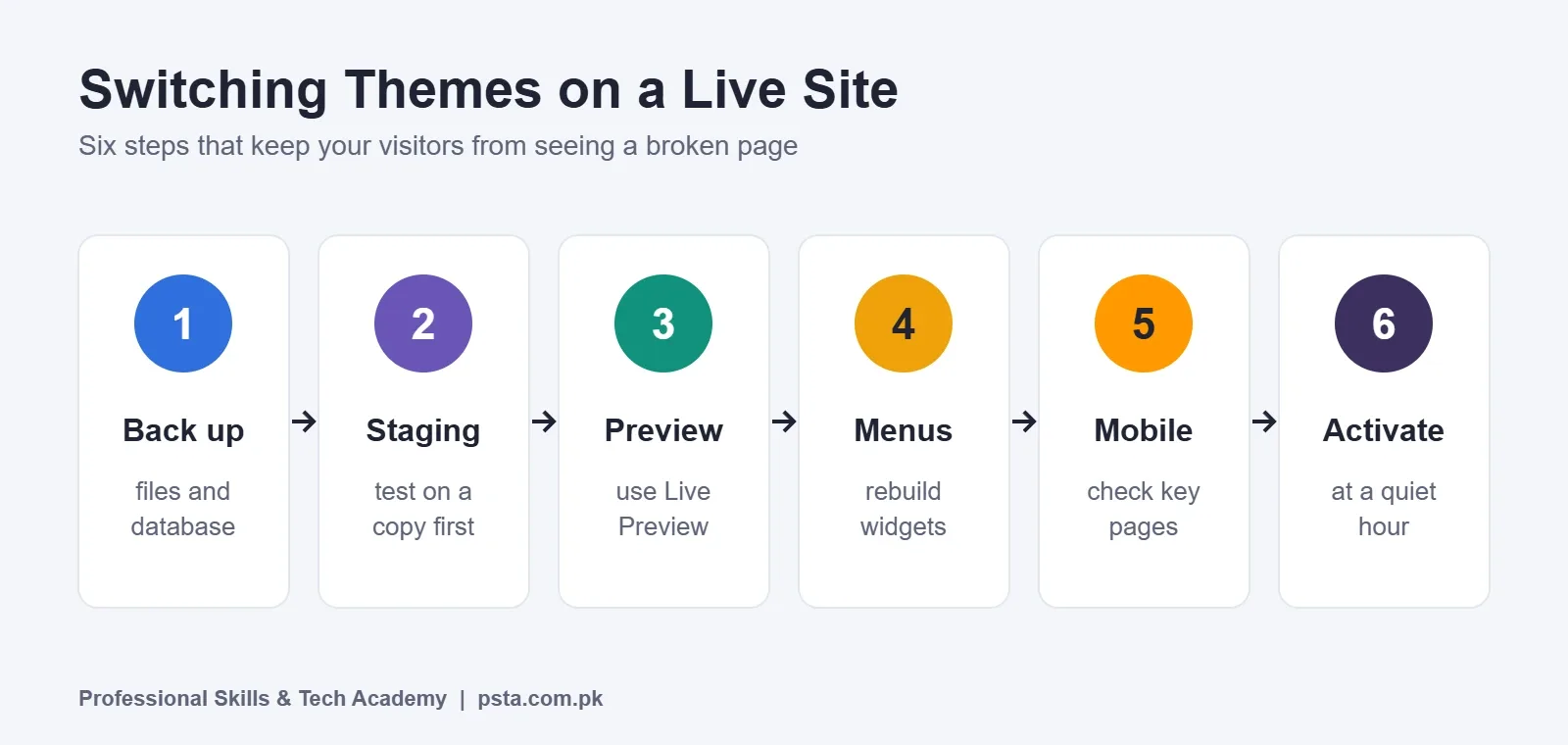
Changing a theme on a site that already has visitors needs care. Follow these steps:
- Take a full backup. Back up files and the database with your host's tool or a backup plugin.
- Test on a staging copy. Many hosts offer one-click staging. If yours does not, practice on a local install first.
- Install and preview the new theme. Use Live Preview in Appearance, Themes before activating it.
- Rebuild menus and widgets. Check the header menu, footer and sidebar, which often reset.
- Check key pages on mobile. Home, contact, product and checkout pages come first.
- Activate and monitor. Switch on the live site at a quiet hour and watch for broken layouts or forms.
New to installing WordPress locally? Our walkthrough on how to install WordPress on localhost gives you a safe test site, and the WordPress plugins for beginners guide covers backup and security plugins.
Learn Theme Customization in PSTA's WordPress Course
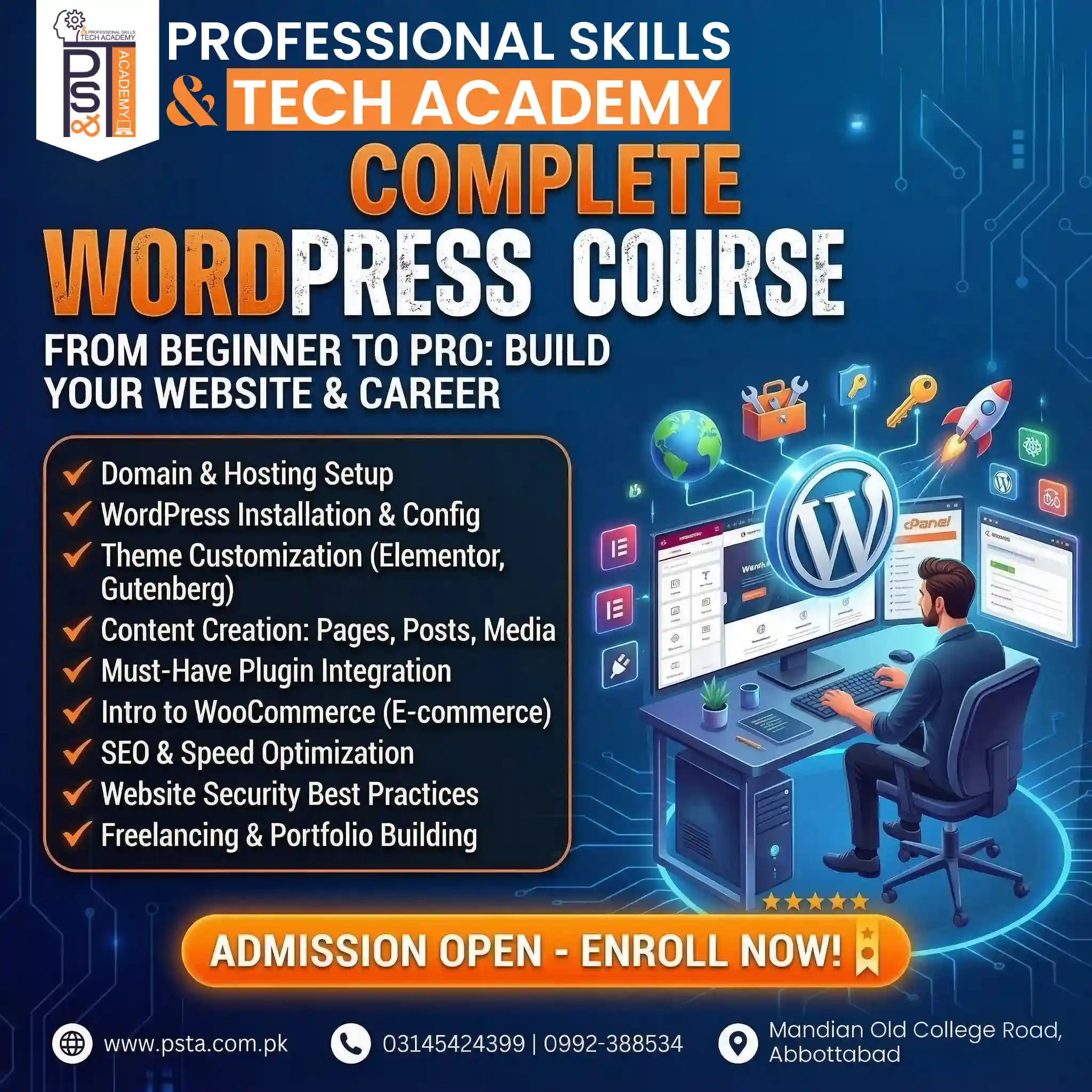
Choosing between free WordPress themes is the first step. Customizing one cleanly for a client is the skill that gets paid. PSTA's Complete WordPress Website Development Course is a 12-week program for beginners. According to its course page, you set up a domain and hosting, customize themes in both Elementor and Gutenberg, build a WooCommerce store, and work on SEO, site speed and security before preparing a freelance portfolio. The listed fee is Rs. 22,000.
You can join from the Abbottabad campus, attend the same classes live from any city, or mix both. If you later want to write your own themes and web apps, PSTA's six-month full-stack program adds HTML, CSS, JavaScript, React and PHP. The full catalogue is on the PSTA courses page at psta.com.pk.
Try Two Themes This Week
Install a local WordPress site, then build the same simple home page twice: once with Astra or Kadence, and once with Twenty Twenty-Five. Compare how long each took and which editor felt natural. That one exercise teaches you more about free WordPress themes than any review. If you want a trainer to check your build, you can apply for the next batch or ask the PSTA team on WhatsApp at +92 314 5424399.
Frequently asked questions
Which free WordPress theme is best for beginners?
For most beginners, Astra or Kadence is the easiest start. Both have large user bases, high ratings on WordPress.org and recent updates, so help is easy to find. If you build everything with Elementor, Hello Elementor is a sensible base, and Twenty Twenty-Five suits people who want to stay inside the block editor.
Is a free WordPress theme good enough for a business website?
Yes, for most small-business sites. The free versions of themes like Astra, Kadence and Blocksy are fully usable for company pages, blogs and simple shops. Consider a paid upgrade only when a real project needs a specific feature and the budget covers it. Hosting, images and plugins usually matter more for speed and reliability.
Will changing my theme delete my posts and pages?
No. Your posts, pages, products and media are stored in the WordPress database, not in the theme. Changing the theme changes how they look. Menus, widgets and some page layouts may need to be set up again, so take a backup and preview the new theme before activating it on a live site.
What is the difference between a block theme and a classic theme?
A classic theme uses the Customizer and widget areas, and often works with a page builder such as Elementor. A block theme uses the Site Editor, where headers, footers and page templates are all built from blocks. Twenty Twenty-Five is a block theme; the other six themes in this review are classic themes.
Do I need a child theme?
Only if you plan to change theme files or add custom PHP code. A child theme keeps those changes safe when the parent theme updates. If you only adjust colors, fonts and layouts through the Customizer or Site Editor, you usually do not need one, because those settings are saved separately from theme files.
Which free theme should I use for a WooCommerce store?
Blocksy and OceanWP both mention WooCommerce support on their WordPress.org pages, so they are good places to start. Astra and Kadence are also widely used for shops. Whatever you choose, test the product, cart and checkout pages on a phone before launch, since many customers will shop from their phones.
Can I use these themes for client work on Fiverr or Upwork?
Yes. Themes in the WordPress.org directory are released under GPL-compatible licenses, which allows use on client sites. If a client needs premium features, the client should usually buy the upgrade license in their own name, so renewals and support stay with the site owner after the project ends.
Sources & references
- W3Techs: Usage statistics of WordPress w3techs.com
- WordPress.org: Astra theme wordpress.org
- WordPress.org: Kadence theme wordpress.org
- WordPress.org: GeneratePress theme wordpress.org
- WordPress.org: Blocksy theme wordpress.org
- WordPress.org: OceanWP theme wordpress.org
- WordPress.org: Twenty Twenty-Five theme wordpress.org
- WordPress Theme Handbook: Child themes developer.wordpress.org
Last reviewed & updated on by Umar Qureshi. Written by the PSTA team in Abbottabad, Pakistan.

Umar Qureshi
Complete WordPress Website Development Course: Beginner to Pro
Turn this guide into a career: hands-on training with real projects, online across Pakistan or on-campus in Abbottabad · 12 Weeks.

Comments
No comments yet — ask a question or share your experience.