Quick answer
Kali Linux is a Debian-based system built for penetration testing, not an everyday operating system for Linux newcomers. Learn basic Linux first, run Kali in a virtual machine, change the default kali/kali password, update with sudo apt, and test only machines you own or have written permission to test, because PECA 2016 penalizes unauthorized access.
Key takeaways
- • Kali's own docs say it is not recommended if you're unfamiliar with Linux, so learn Linux basics first.
- • Run Kali in a virtual machine, a live USB or WSL 2 instead of wiping Windows.
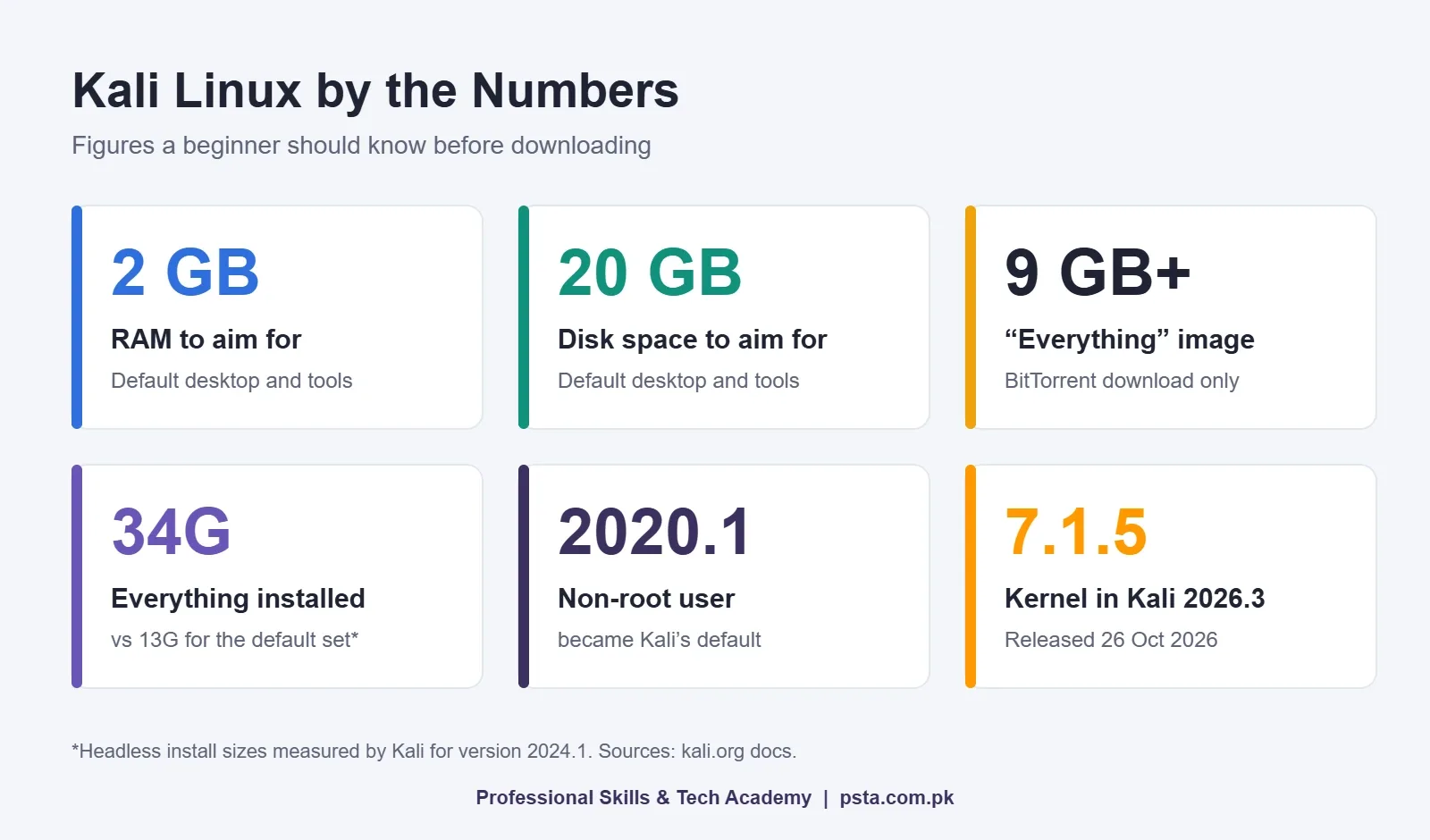
- • Aim for at least 2 GB of RAM and 20 GB of disk for the default desktop and tools.
- • Kali has used a non-root user with sudo since 2020.1; change the default kali/kali password first.
- • Under PECA 2016, unauthorized access can bring up to three months in prison, a Rs. 50,000 fine, or both.
Table of contents 19 sections
- Kali Linux for Beginners: What You're Actually Downloading
- Myths About What Kali Is
- Myth: Installing Kali Makes You a Hacker
- Myth: Kali Is a Good Everyday Operating System
- Myths About Installing Kali
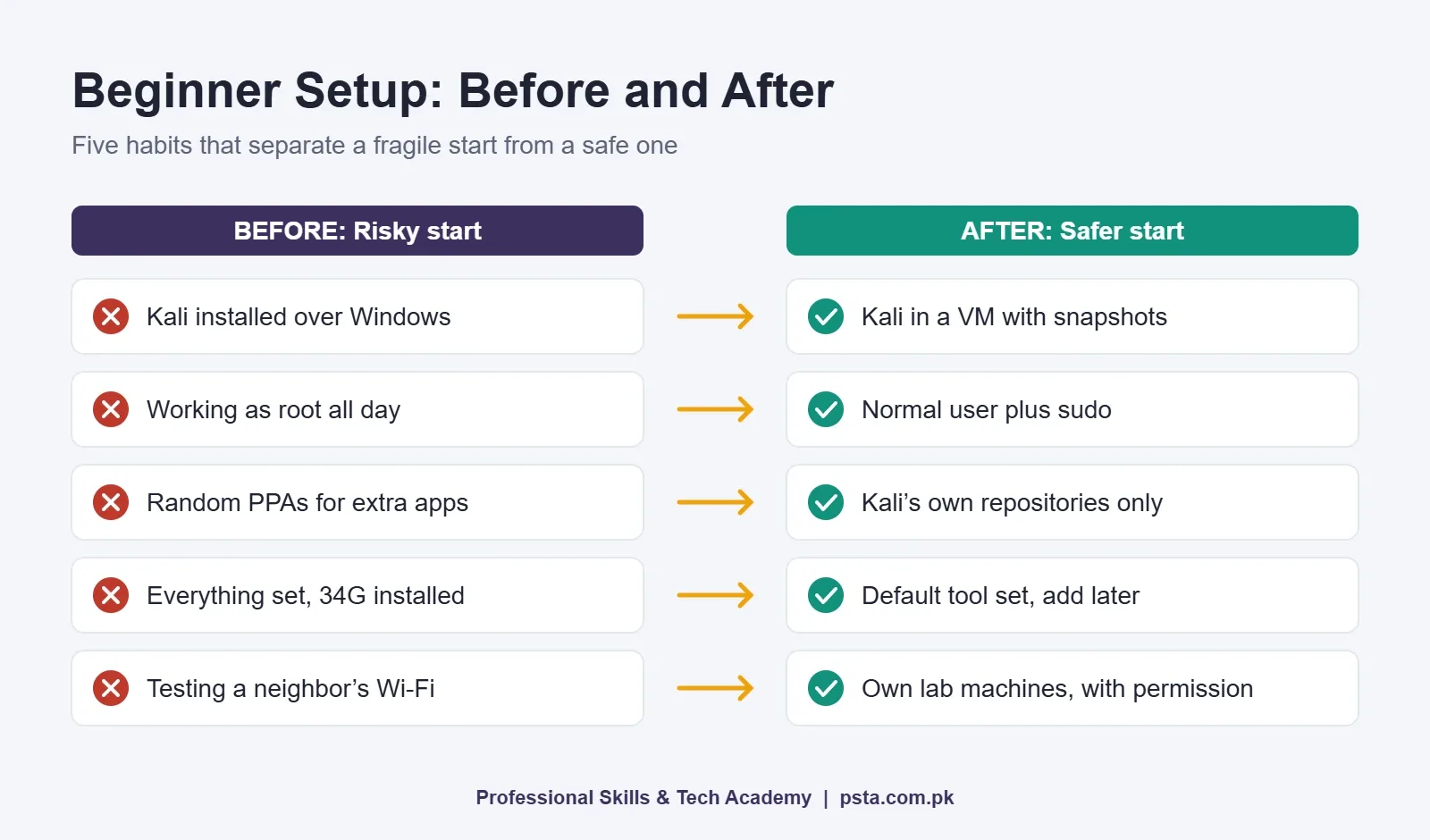
- Myth: You Must Delete Windows First
- Myth: Any Old Laptop Will Do
- Myth: Download the "Everything" Image to Be Safe
- Myths About Using Kali Day to Day
- Myth: You Should Log In as Root
- Myth: Add Any Repository or PPA for Missing Software
- Your First Hour in Kali: A Safe Setup Order
- Which Kali Linux Commands Should a Beginner Learn First?
- Is Using Kali Legal in Pakistan?
- Myth: If the Tool Is Legal, Anything You Do With It Is Legal
- Does Knowing Kali Get You a Job?
- Myth: Employers Hire People Who List "Kali Linux" on a CV
- Learning Kali the Structured Way at PSTA
- Tonight's Task: Boot Kali in a VM and Change One Password
Think of Kali Linux for beginners the way you would think of a fully stocked mechanic's garage handed to someone who has never changed a tire. Every tool is there, sorted and labeled. None of it teaches you how an engine works, and some of it can do real damage in the wrong hands.
That gap between owning the tools and knowing the craft is where most beginner myths about Kali come from. This guide to Kali Linux for beginners checks nine of them against Kali's own documentation and Pakistan's cyber crime law.
In this guide, you'll find:
- What Kali actually is, and who its developers say it is not for
- Three safe ways to run it without wiping Windows
- The hardware Kali's documentation asks for, in plain numbers
- A safe setup order for your first hour, plus the first commands worth learning
- Where the legal line sits under PECA 2016
Kali Linux for Beginners: What You're Actually Downloading
Kali is a Linux distribution built on Debian. Its own documentation describes it as built for professional penetration testing and security auditing. In practice, it's a normal Linux system with a large set of security tools pre-packaged, tested and grouped by task.
It changes often. Kali 2026.3, released on 26 October 2026, moved to Linux kernel 7.1.5, shipped KDE Plasma 6.7 and added six new tools, including rustscan, katana and dalfox. For Kali Linux for beginners, that pace matters: tutorials from three years ago often show menus, commands and defaults that no longer match what you'll see on screen.
Myths About What Kali Is
Myth: Installing Kali Makes You a Hacker
Fact: Kali gives you tools, not understanding. A port scanner only helps if you know what a port is, why a service listens on it and what a version number tells you. The skills that matter sit underneath the tools: networking, the Linux command line, how websites handle requests, and writing a clear report.
The most useful advice we can give about Kali Linux for beginners is to learn the layer under the tools first. In our classes, the students who progress fastest are rarely the ones who installed Kali first. They're the ones who can explain what a single command did and why.
Myth: Kali Is a Good Everyday Operating System
Fact: Kali's developers say the opposite. Their page "Should I Use Kali Linux?" states plainly that Kali is not recommended if you're unfamiliar with Linux, and that it's a poor fit for general use such as development, web design or gaming. Network services are disabled by default through systemd hooks, and the kernel is patched for wireless injection.
If you've never used Linux, spend a couple of weeks on Ubuntu or Linux Mint first. Learn files, folders, permissions and the package manager there, then move to Kali with far less confusion.
Myths About Installing Kali
Myth: You Must Delete Windows First
Fact: You have at least three ways to run Kali while keeping Windows exactly as it is. Kali's own advice to first-time users is to start inside a virtual machine before they install Kali Linux on real hardware.
| How You Run Kali | Best For | Watch Out For |
|---|---|---|
| Virtual machine (VirtualBox or VMware) | Learning and lab practice; snapshots let you undo mistakes | Needs enough RAM for Windows and Kali at the same time |
| Live USB | Trying Kali on any PC without installing anything | Installing from it skips the choice of desktop and extra tool sets |
| WSL 2 with Win-KeX | Using Kali tools from inside Windows, with a desktop if needed | Check that each lesson's tools work inside WSL before relying on it |
| Full install on a laptop | Experienced users who need direct hardware access | Secure Boot must be disabled; easiest to break by accident |
If you specifically want Kali Linux on Windows, the WSL route uses Win-KeX, which gives Kali a graphical desktop inside WSL 2. Once Kali is installed in WSL, the package comes in with sudo apt install -y kali-win-kex.
Myth: Any Old Laptop Will Do
Fact: The official Kali Linux system requirements are modest but real. Kali's installation guide lists amd64 (64-bit) hardware. For the default Xfce desktop with the standard tool set, it says to aim for at least 2 GB of RAM and 20 GB of disk space. A stripped-down SSH server can run on far less, but that's not what a beginner wants.
Inside a virtual machine, remember that Windows needs its own memory too. A laptop with 8 GB of RAM and an SSD will feel much smoother than a 4 GB machine trying to run two operating systems at once. The guide also notes that the Kali kernel isn't signed, so a full install requires Secure Boot to be turned off in UEFI.
Myth: Download the "Everything" Image to Be Safe
Fact: Kali's image guide says that if you're in doubt, use the Installer image. The Everything flavor is over 9 GB and only available through BitTorrent. On a slow PTCL or mobile data connection, that's a long wait for tools you won't touch for months.
Installed sizes tell the same story. Kali's own measurements for version 2024.1 put a headless kali-linux-default install at 13G, kali-linux-large at 19G and kali-linux-everything at 34G. Start with the default set and add a tool category later if a lesson needs it. When you're new, a smaller install is simply easier to manage.
Myths About Using Kali Day to Day
Myth: You Should Log In as Root
Fact: Kali has used a non-root default user since version 2020.1. Its user policy explains that you run privileged commands through sudo on the command line or pkexec in the desktop. Older YouTube videos showing a root prompt by default are simply out of date.
Some tools do behave differently without root, and the policy gives a useful example. Nmap runs a SYN scan by default as root but falls back to a TCP connect scan for a normal user, because raw packets need super-user rights. That's not a reason to live as root. It's a reason to understand what sudo changes before you use it.
Myth: Add Any Repository or PPA for Missing Software
Fact: This is the quickest way to break a fresh install. Kali keeps its software sources deliberately small, and its documentation lists third-party repositories, PPAs and apt-add-repository as unsupported. If you want Steam or a design app, keep it on Windows or another Linux system, not in your testing machine.
Your First Hour in Kali: A Safe Setup Order
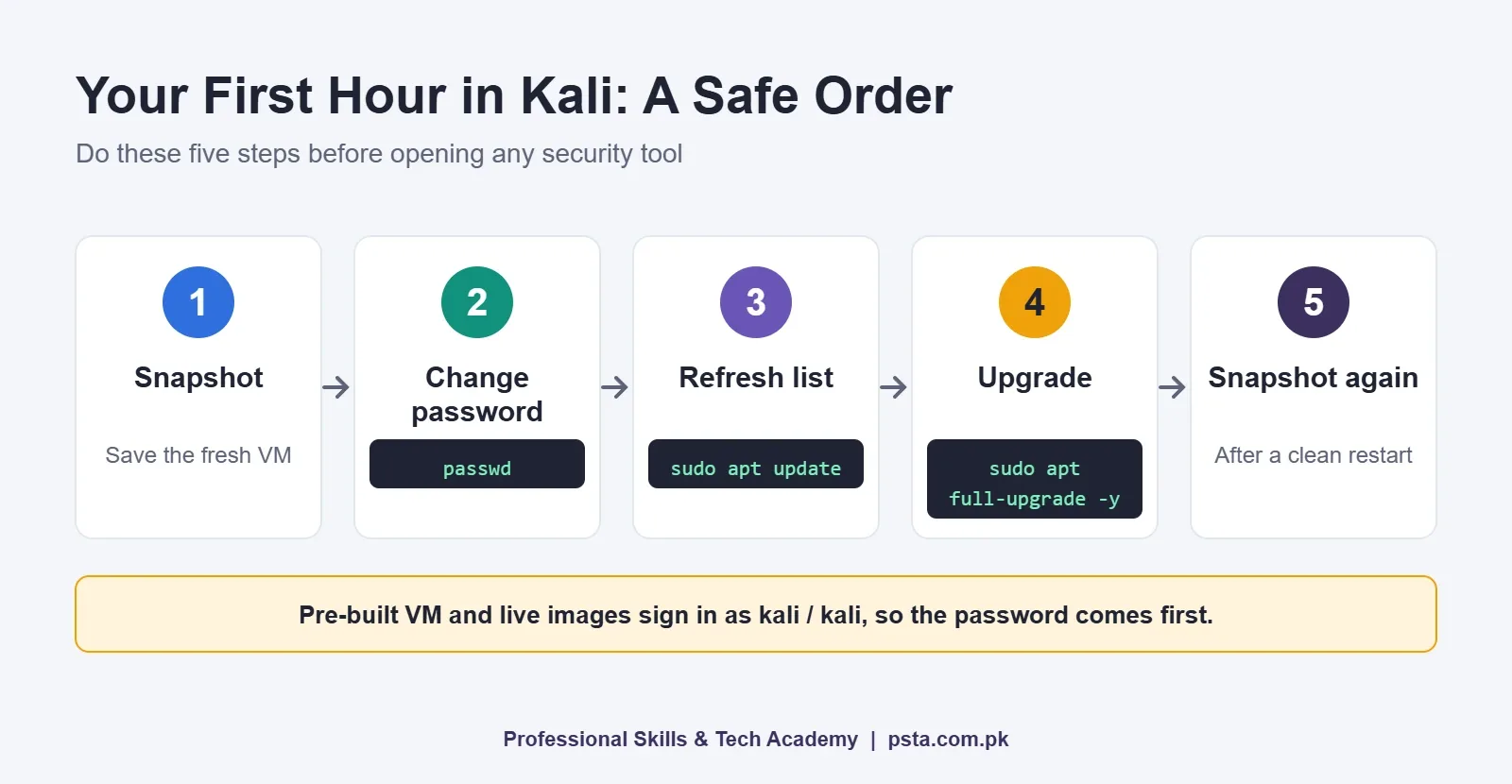
Pre-built virtual machine and live images sign in with the username kali and password kali, according to Kali's default credentials page. That Kali Linux default password is public knowledge, so changing it comes before anything else. Here is the order we follow with new students:
- Take a snapshot of the fresh virtual machine, so you can roll back if something goes wrong.
- Change the password by typing
passwdand following the prompts. - Refresh the package list with
sudo apt update. - Upgrade the system with
sudo apt full-upgrade -y. Kali is a rolling release, so this is also how you move to newer versions without reinstalling. - Take a second snapshot once the upgrade finishes and the machine restarts cleanly.
If you later need a bigger tool set, the metapackages documentation shows two routes: install one with sudo apt install -y followed by its name, or tick it in the Metapackages tab of kali-tweaks. There's even a kali-linux-labs package with practice environments for learning.
Which Kali Linux Commands Should a Beginner Learn First?
Not the hacking tools. The best first step in Kali Linux for beginners is the plain Linux commands that every tool depends on. If you can use these Kali Linux commands without looking them up, Nmap and Burp Suite become far easier to follow.
| Command | What It Does | Why It Matters |
|---|---|---|
pwd |
Shows the folder you're in | Stops you saving scan results in the wrong place |
ls -la |
Lists files, including hidden ones, with permissions | Permissions are central to privilege escalation lessons |
cd |
Moves between folders | Every tool's output lives somewhere |
ip a |
Shows your network interfaces and IP addresses | You must know your own address before scanning a lab |
sudo apt update |
Refreshes the package list | Always comes before installing anything |
apt search |
Finds a package by keyword | Confirms a tool is in Kali's own repositories |
man |
Opens a tool's manual page | Faster and more accurate than an old blog post |
uname -r |
Prints the running kernel version | Quick check that an upgrade actually applied |
Once these feel natural, our Nmap commands guide and Burp Suite walkthrough are sensible next steps.
Is Using Kali Legal in Pakistan?
Myth: If the Tool Is Legal, Anything You Do With It Is Legal
Fact: Downloading and learning Kali is fine. What you point it at is what counts. The Prevention of Electronic Crimes Act 2016 sets out penalties that apply to exactly the things Kali's tools can do:
- Section 3, unauthorized access: up to three months in prison, a fine of up to Rs. 50,000, or both.
- Section 4, unauthorized copying or transmission of data: up to six months, a fine of up to Rs. 100,000, or both.
- Section 5, interference with a system or data: up to two years, a fine of up to Rs. 500,000, or both.
Your neighbor's Wi-Fi, your university portal and a friend's Facebook account are all off limits without written permission, however harmless the test feels. Kali's own documentation warns that misusing these tools can bring serious legal consequences. This is general information, not legal advice. Practice only on machines you own, intentionally vulnerable labs, or programs that publish clear rules. Our ethical hacking lab setup checklist shows how to build an isolated lab on one laptop.
Does Knowing Kali Get You a Job?
Myth: Employers Hire People Who List "Kali Linux" on a CV
Fact: A line saying "Kali Linux" tells an interviewer very little, because the distribution is free and anyone can install it. What they want to see is what you did with it. A short written report on a lab machine, with the scan, the weakness you found, the evidence and a fix, says far more than a list of tool names.
A realistic beginner path looks like this: Linux basics, then networking, then one scanner and one web proxy, then reporting. Certifications can help once you have that base, and our guide to cyber security certifications for beginners compares the common first options.
Learning Kali the Structured Way at PSTA
At PSTA, we don't teach Kali Linux for beginners as a separate subject. Kali is the workbench for our Advanced Ethical Hacking and Penetration Testing course. Module 1 covers cyber crime law under PECA 2016 and the VirtualBox and Kali lab setup, before any attack technique. That order is deliberate: a responsible ethical hacking course teaches the rules before the tools. Later modules move through reconnaissance, scanning with Nmap and Zenmap, vulnerability scanning with Nessus and OpenVAS, and exploitation with the Metasploit Framework.
The course page lists it at 12 weeks, advanced level, with a fee of Rs. 30,000. If you're new to security altogether, the beginner Cyber Security and Ethical Hacking course is also 12 weeks and starts with fundamentals such as the CIA triad, attack types and network security; its page lists the fee at Rs. 45,000. Study either one on campus at our Abbottabad lab near FIMS College on Old College Road, attend the live online classes from wherever you are in Pakistan, or combine both in a hybrid batch.
Compare both on the courses page, and when you know which batch suits you, the admission form takes a few minutes. Not sure which level fits you? Message the PSTA team on WhatsApp (+92 314 5424399) and ask.
Tonight's Task: Boot Kali in a VM and Change One Password
Keep your first evening short. Skip the tool lists for now. Install VirtualBox, import Kali's pre-built virtual machine, sign in, and run passwd. Then run sudo apt update, read what it prints, and take your first snapshot. That small, careful routine is the habit everything else in ethical hacking is built on.
Frequently asked questions
Is Kali Linux good for beginners?
Kali's own documentation says it is not recommended if you're unfamiliar with Linux. It's built for penetration testing and security auditing, not general use. A better order is to learn basic Linux on Ubuntu or Linux Mint for a few weeks, then move to Kali inside a virtual machine once files, permissions and the package manager feel familiar.
What is the default username and password for Kali Linux?
Kali's live boot and pre-built images, including the virtual machine images, use the username kali and the password kali. Because that pair is public, change it straight away with the passwd command. If you install Kali with the regular installer, you choose your own username and password during setup instead.
Can I run Kali Linux on a laptop with 4 GB RAM?
Kali's installation guide says to aim for at least 2 GB of RAM and 20 GB of disk for the default desktop and tools. Running it inside a virtual machine on a 4 GB laptop is possible but tight, because Windows needs memory too. If you can, use 8 GB of RAM and an SSD for smoother lab work.
Is it illegal to have Kali Linux in Pakistan?
Downloading and learning Kali is not the issue. Using it against systems without permission is. PECA 2016 sets penalties for unauthorized access, unauthorized copying of data and interference with systems, ranging up to two years in prison under Section 5. Practice only on your own machines or authorized labs. This is general information, not legal advice.
Do I need to reinstall Kali when a new version comes out?
No. Kali is a rolling release, so you move to newer versions by updating. Run sudo apt update followed by sudo apt full-upgrade -y, then restart if the system asks for it. Taking a virtual machine snapshot before a large upgrade gives you a simple way back if something breaks.
Can I use Kali Linux on Windows without a virtual machine?
Yes. You can install Kali in Windows Subsystem for Linux (WSL 2) and add Win-KeX with sudo apt install -y kali-win-kex to get a graphical Kali desktop inside Windows. A live USB is another option that changes nothing on your hard drive. For full lab practice, many students still prefer a virtual machine.
Which Kali tools should a beginner learn first?
Start with plain Linux commands, then learn one network scanner and one web testing tool. Nmap is the usual first scanner, Wireshark helps you see traffic, and Burp Suite is the standard web proxy. Learn each on your own lab machines and write short notes on what every command showed you.
Sources & references
- Kali Linux 2026.3 Release kali.org
- Should I Use Kali Linux? kali.org
- Installing Kali Linux (system requirements) kali.org
- Which Image Should I Download? kali.org
- Kali Linux User Policy kali.org
- Kali Linux Metapackages kali.org
- Kali's Default Credentials kali.org
- Prevention of Electronic Crimes Act 2016 cert.punjab.gov.pk
Last reviewed & updated on by Umar Qureshi. Written by the PSTA team in Abbottabad, Pakistan.

Umar Qureshi

Advanced Ethical Hacking & Penetration Testing Course in Abbottabad
Turn this guide into a career: hands-on training with real projects, online across Pakistan or on-campus in Abbottabad · 12 Weeks.
Comments
No comments yet — ask a question or share your experience.