Quick answer
Facebook retargeting ads reach people who already visited your website, messaged your Page, watched your video or opened your lead form. Build a custom audience in Ads Manager, exclude recent buyers, pick a retention window that fits your buying cycle, and make the audience a firm limit if you want a pure warm test.
Key takeaways
- • Website custom audiences can hold visitors for up to 180 days; Page and Instagram engagers for up to 730 days.
- • Always build an exclusion audience so recent buyers and leads stop seeing sales ads.
- • With Advantage+ Audience on, a custom audience is only a suggestion; make it a firm limit for pure retargeting.
- • Give each warm level its own ad: explain to video viewers, reassure cart abandoners.
- • Small lists produce few results per day, so judge retargeting over about two weeks.
Table of contents 19 sections
- What Are Facebook Retargeting Ads?
- Which Audiences Can You Retarget, and for How Long?
- Before You Start: Three Things to Check
- Facebook Retargeting Ads: The 8-Step Setup
- Step 1: Confirm Your Events in Events Manager
- Step 2: Decide Which Warm Group to Target
- Step 3: Create the Custom Audience
- Step 4: Build the Exclusion Audience
- Step 5: Create the Campaign With the Right Objective
- Step 6: Set the Audience Controls
- Step 7: Write Ads for That Exact Group
- Step 8: Set a Budget and Wait Before Judging
- Match the Message to How Warm the Person Is
- A 14-Day Retargeting Plan for a Small Online Shop
- How Does Advantage+ Audience Change Retargeting?
- Why Is My Retargeting Audience Too Small?
- Retargeting Mistakes That Waste Budget
- Where Retargeting Fits in PSTA's Meta Ads Course
- Build Your First 30-Day Visitor List Today
Facebook retargeting ads show your next ad only to people who have already interacted with your business: they visited your website, messaged your Page, watched your Reel or opened your lead form. Meta can keep a website visitor in such a list for up to 180 days, and someone who engaged with your Page or Instagram profile for up to 730 days, according to Meta's own developer documentation.
That often makes retargeting a sensible first place for a small Pakistani business to spend, because these people already know your name. Here is what this guide covers:
- Which warm audiences Meta lets you build, and how long each one can last
- An 8-step setup in Ads Manager, from checking your pixel to reading results
- How to match the ad to how close a person is to buying
- A sample 14-day plan for a small online shop
- Why some retargeting audiences stay too small to run, and what to do about it
What Are Facebook Retargeting Ads?
A retargeting ad is a normal Meta ad with one difference: the audience. Instead of asking Meta to find new people by age, city or interest, you point the ad at a custom audience, a list Meta builds from actions people took with your website, Page, Instagram account, videos or forms.
Think of a clothing store in Saddar. Hundreds of people walk past the window every day. A few step inside, touch a kurta and leave. Retargeting is the shopkeeper's way of saying, "You looked at this last week. It is back in your size." Online, the "step inside" is a page visit, a video view or a message.
You don't get anyone's name or number from this. Meta states that no personal information about any individual website visitor is reported to the advertiser. You only see the audience size and the ad results.
The scale is real in Pakistan. DataReportal's Digital 2026: Pakistan report says Meta's ad tools showed 52.9 million Facebook users and 22.4 million Instagram users in the country in late 2025. Most of the people who visit a local store's website are on at least one of those apps.
Which Audiences Can You Retarget, and for How Long?
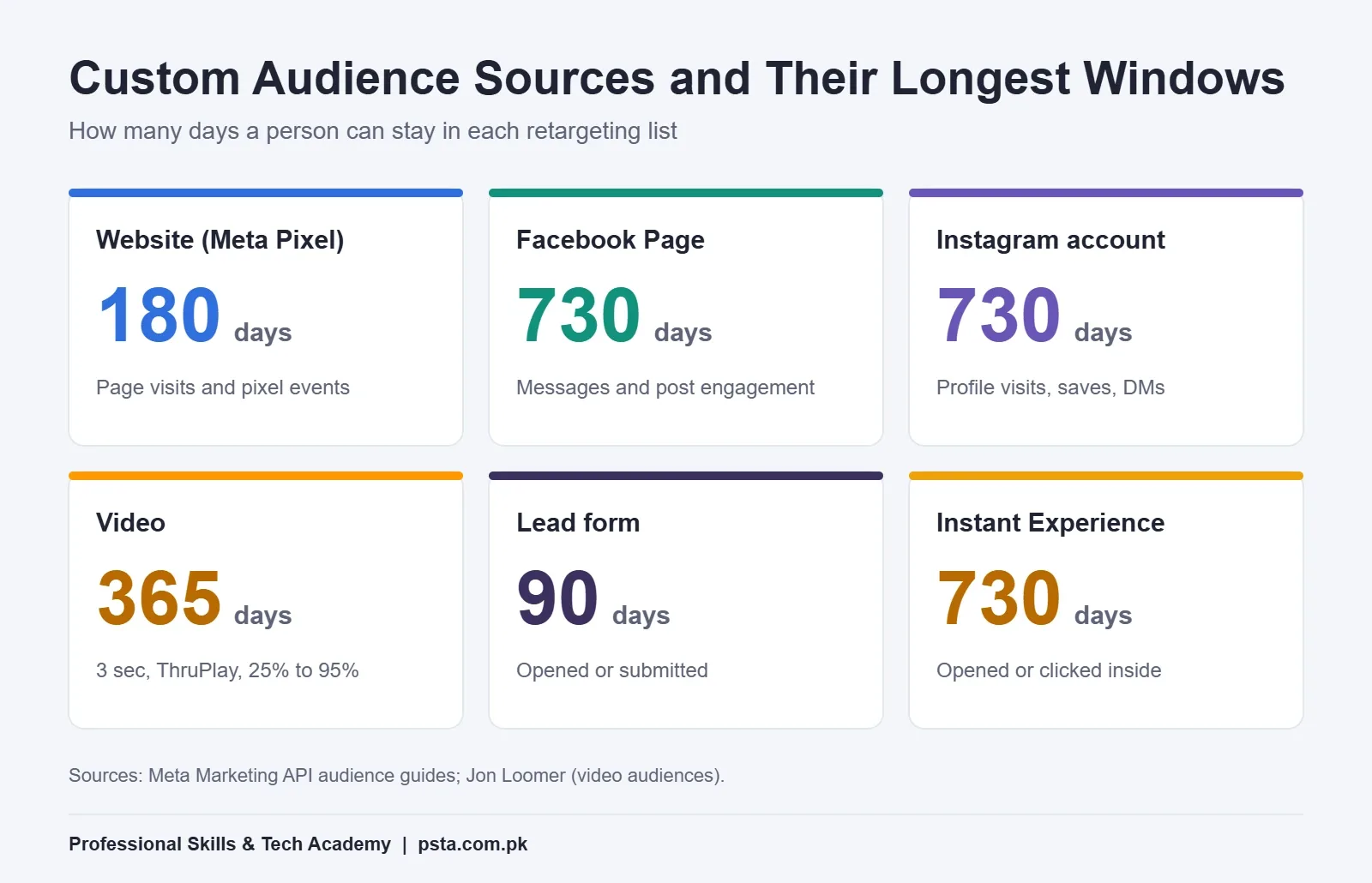
Every custom audience has a retention window: the number of days a person stays in the list after their last matching action. When the window ends, Meta removes them automatically. The maximum window depends on the source.
| Audience source | Example action | Maximum window |
|---|---|---|
| Website (Meta Pixel) | Viewed a product page or added to cart | 180 days |
| Facebook Page | Messaged the Page or engaged with a post | 730 days |
| Instagram professional account | Visited the profile or saved a post | 730 days |
| Video | Watched 3 seconds, ThruPlay or 25% to 95% | 365 days |
| Lead form (Instant Form) | Opened or submitted the form | 90 days |
| Instant Experience | Opened or clicked inside it | 730 days |
The website, Page, Instagram, lead form and Instant Experience limits come from Meta's Website Custom Audiences guide and Engagement Custom Audiences guide. The video options and their 365-day limit are explained in Jon Loomer's guide to video engagement audiences.
Longer is not automatically better. A person who watched your Reel 11 months ago has probably forgotten you. The window you choose should match how long people take to decide in your market: a few days for a Rs. 1,500 phone cover, a few weeks for a course admission, months for a plot or a car.
Before You Start: Three Things to Check
Retargeting fails quietly when the basics are missing. Check these first.
- Your pixel actually fires. For website audiences, the Meta Pixel must be installed and sending events such as PageView, ViewContent and AddToCart. If you haven't done this yet, follow our Meta Pixel setup guide before going further.
- Your Page and Instagram account sit in the same Business portfolio as the ad account. Engagement audiences can only be built from assets the ad account can reach.
- You have enough activity to fill a list. Meta only lets you deliver ads to an audience once it reaches a certain size. A brand-new store with 40 visitors a month will struggle, so start with Page and video audiences, which fill faster.
Facebook Retargeting Ads: The 8-Step Setup
These steps follow the current Ads Manager layout. Menu names occasionally shift, but the order of decisions stays the same.
Step 1: Confirm Your Events in Events Manager
Open Events Manager, choose your pixel and use Test events. Visit your own product page, add an item to the cart and watch the events arrive. If AddToCart never appears, an "add to cart" audience will stay empty forever.
Step 2: Decide Which Warm Group to Target
Write one sentence before you click anything: "I want to reach people who did X in the last N days, but not people who did Y." For example: people who added to cart in the last 14 days, but not people who purchased in the last 14 days. That sentence becomes your audience and your exclusion.
Step 3: Create the Custom Audience
- In Ads Manager, open Audiences from the main menu.
- Click Create audience, then Custom audience.
- Pick the source: Website, Facebook Page, Instagram account, Video or Lead form.
- Set the event or URL rule. For a website you can match an event, a URL that contains a word such as "checkout", or a mix of both.
- Enter the retention in days and give the audience a clear name, such as "WEB – AddToCart – 14d".
Meta's documentation says people can be added within minutes of a matching visit, while additions and removals can take a few hours to settle.
Step 4: Build the Exclusion Audience
Repeat Step 3 for the people you don't want to reach. For a shop, that is usually purchasers in the last 14 or 30 days. For an academy or clinic, it is people who already submitted your lead form. Showing "Still thinking?" to someone who paid yesterday wastes money and looks careless.
Step 5: Create the Campaign With the Right Objective
Choose the objective that matches the action you want next. Sales suits a store with purchase tracking. Leads suits admissions, real estate and services. Engagement with a messaging destination suits shops that close orders on WhatsApp. Our explainer on Meta ads campaign objectives goes through all six.
Step 6: Set the Audience Controls
In the ad set, add your custom audience and your exclusion. Here is the part many beginners miss: with Advantage+ Audience switched on, Meta treats a custom audience as a suggestion and may show the ad to new people as well. Jon Loomer's write-up on recent audience changes explains that you can tick the option to make custom audiences a firm limit. Do that for a pure retargeting ad set.
Step 7: Write Ads for That Exact Group
A cart abandoner already knows the product. Don't introduce it again. Answer the doubt that stopped them: delivery time, cash on delivery, size exchange, or a real customer photo. The next section shows how the message changes with each level.
Step 8: Set a Budget and Wait Before Judging
Retargeting audiences are small, so budgets are usually small too. Meta's learning phase still refers to roughly 50 optimization events within seven days, as Jon Loomer notes in his learning phase analysis. A small list rarely hits that, so judge results over two weeks, not two days, and avoid editing the ad set every morning.
Match the Message to How Warm the Person Is
Not every warm person is equally close to buying. Someone who watched three seconds of a Reel is curious. Someone who reached checkout is nearly a customer. Group them in levels and give each level its own set of Facebook retargeting ads.
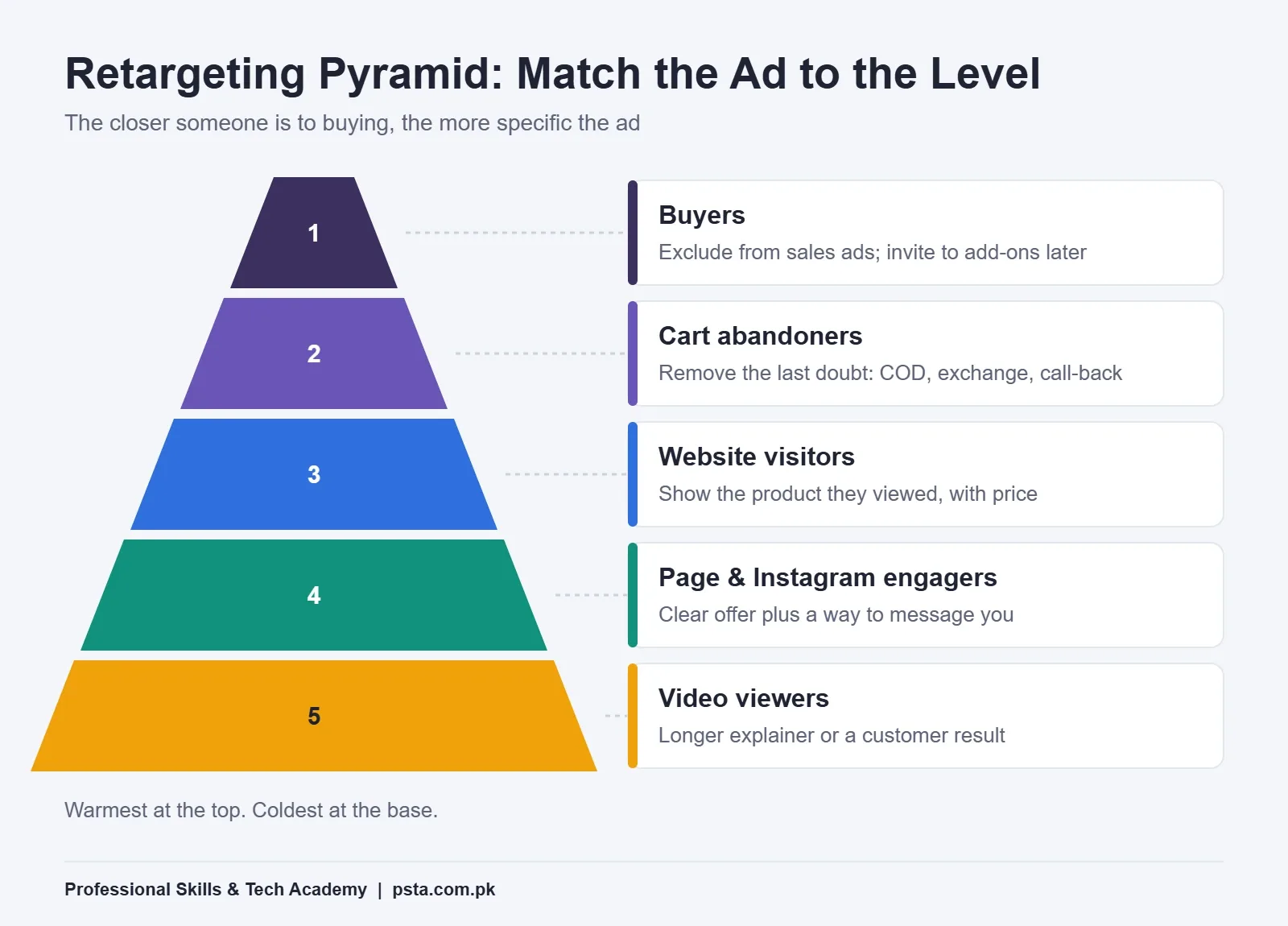
- Video viewers (3 seconds or more): show a longer explainer or a customer result. They need more information, not a discount.
- Page and Instagram engagers: show a clear offer and a way to message you. They already trust the brand a little.
- Website visitors: show the product or service they looked at, with price and delivery details.
- Cart abandoners and form openers: remove the last doubt. Mention cash on delivery, exchange policy or a call-back.
- Buyers: exclude them from sales ads, then later invite them to a refill, an add-on or a review.
Store owners dealing with many unpaid parcels can pair the bottom level with the tactics in our walkthrough on reducing COD returns in Pakistan.
A 14-Day Retargeting Plan for a Small Online Shop
The plan below shows how Facebook retargeting ads can run in sequence. It is an example, not a rule. Picture a home-based shop in Abbottabad selling winter shawls through a simple website and WhatsApp. Traffic is modest, so the plan uses four small ad sets, one for each phase.
| Days | Who sees it | Ad message |
|---|---|---|
| 1 to 3 | Product viewers (7-day window) | Carousel of the exact shawls they viewed, with prices |
| 4 to 7 | Cart abandoners (7-day window) | Cash on delivery and free exchange within a set period |
| 8 to 10 | Video viewers (30-day window) | Short clip showing fabric close-ups and colors in daylight |
| 11 to 14 | Page and Instagram engagers (30-day window) | Click-to-WhatsApp ad: "Send a photo of your outfit, we'll suggest a shawl" |
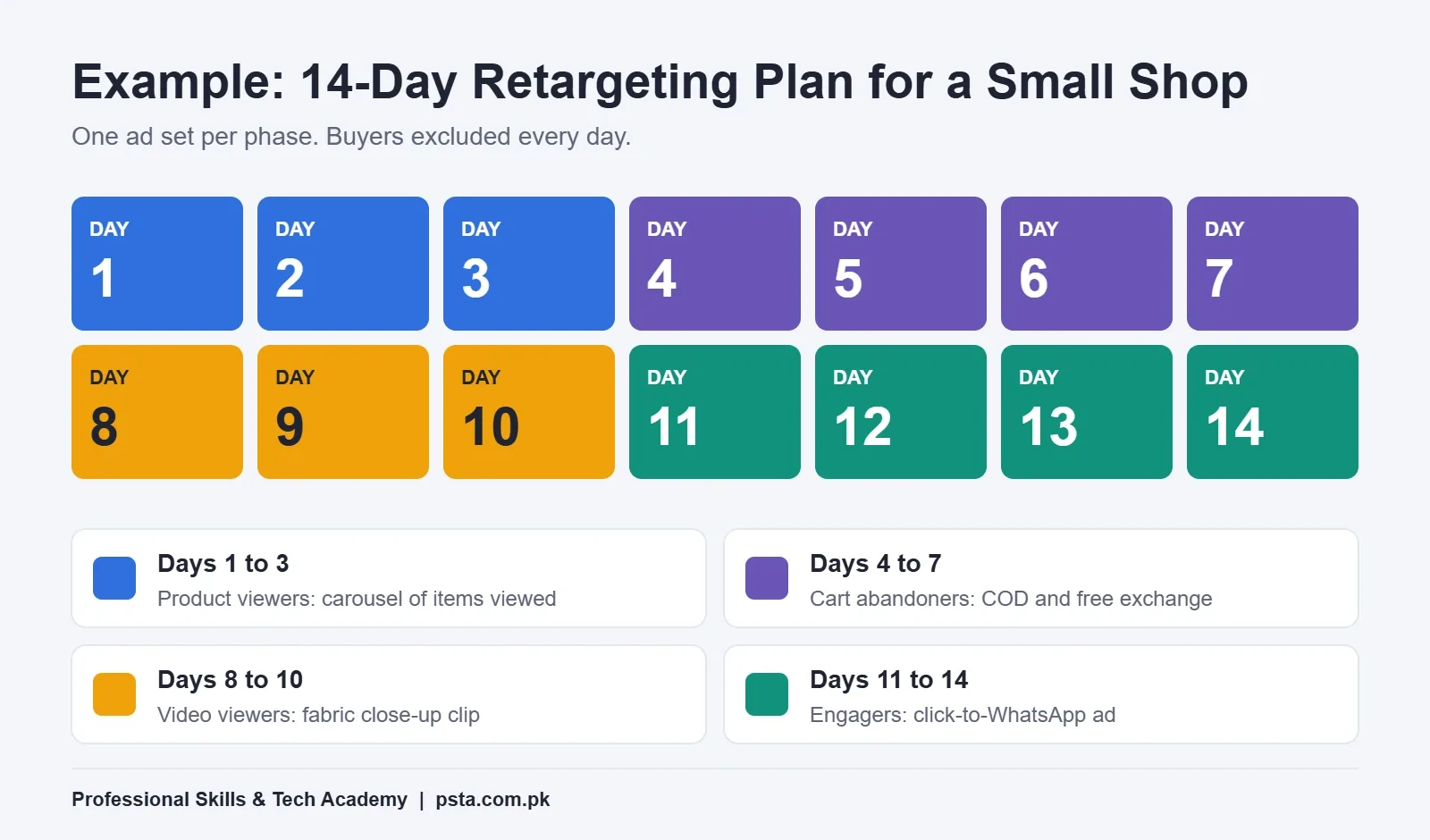
Buyers from the last 14 days are excluded from every row. If WhatsApp is where your sales close, our guide to click-to-WhatsApp ads covers that setup.
How Does Advantage+ Audience Change Retargeting?
Meta now switches on Advantage+ Audience, Advantage+ placements and Advantage campaign budget by default when you create Sales, App and Leads campaigns, according to Jon Loomer's coverage of the streamlined setup. Inside Advantage+ Audience, your custom audience becomes a starting point. Meta may go beyond it when it predicts better results.
That is useful for prospecting, but it blurs a test of Facebook retargeting ads. If you want to know whether warm people buy more than cold people, keep them separate:
- One ad set with the custom audience set as a hard limit (Advantage+ off for audience)
- One ad set with Advantage+ Audience on, using the same custom audience as a suggestion
Compare cost per result after both have run long enough to gather a fair number of results. Neither option is wrong; you just need to know which one you are paying for.
Why Is My Retargeting Audience Too Small?
This is the most common question from students running their first client account. Work through the causes in this order:
- The window is too short. A 3-day cart audience on a low-traffic site may hold only a handful of people. Try 14 or 30 days.
- The rule is too narrow. A URL rule like "contains /checkout/step-2" may miss visitors. Use the AddToCart or InitiateCheckout event instead.
- The pixel stopped firing. A theme update or a new plugin can remove the code. Re-check Test events.
- The audience was created recently. Some audiences can include past activity, but newer ones may need time to fill. Give it a few days.
- Your traffic is simply low. Combine sources: website visitors or Page engagers or 50% video viewers in one audience.
Retargeting Mistakes That Waste Budget
- No exclusions. Paying to reach people who already bought or already applied.
- One ad for every level. A cold "Meet our brand" video shown to cart abandoners.
- The same creative for weeks. A small audience sees one ad many times. Watch frequency and rotate creatives.
- Judging after 48 hours. Small lists produce few results per day. Read results over a longer period.
- Window longer than the buying cycle. Reaching someone 150 days after they looked at a Rs. 900 phone case rarely pays.
- Forgetting Advantage+ Audience. Thinking you are retargeting while Meta is quietly expanding to new people.
Where Retargeting Fits in PSTA's Meta Ads Course
At PSTA, retargeting is taught as a full module rather than a side topic. In the Social Media Marketing (SMM) & Meta Ads Course, Module 6 (Advanced Audience Engineering) builds custom audiences from website traffic, video views and lead forms, then moves on to lookalikes and to retargeting through the middle and bottom of the funnel. Before that, Module 5 sets up tracking: pixel installation, Conversions API, and the difference between standard events and custom ones.
The course is 12 weeks long, starts from beginner level and is offered on campus in Abbottabad, as live online classes or as a mix of both. When this guide was written, the listed fee was Rs. 24,000, so check the course page for the latest figure. Your final project is a live campaign that you plan, launch and run yourself.
For SEO, Google Ads and analytics alongside Meta, look at our Advanced Digital Marketing Course too. Store owners can look at the E-Commerce course for the Shopify and dropshipping side. To weigh all programs side by side, open all courses; when you are ready, the steps to enroll are on our admission form. If you would like to ask about the next batch first, message PSTA on WhatsApp (+92 314 5424399).
Build Your First 30-Day Visitor List Today
You don't need a campaign ready to begin. Open Ads Manager, go to Audiences and create one website custom audience: all visitors, 30-day window, named "WEB – All – 30d". It costs nothing to create, and it becomes the base for all your Facebook retargeting ads later. In a week you will see how many warm people you actually have, and that number tells you whether to start with website retargeting or with Page and video audiences.
Frequently asked questions
How much should I spend on Facebook retargeting ads in Pakistan?
There is no fixed amount. Retargeting audiences are small, so a modest daily budget usually covers them. Start low, run the ad set for about two weeks without constant edits, then compare cost per message, lead or sale with your profit per order. Increase the budget only when results stay steady and the audience is not seeing the same ad too often.
Do I need a website to run retargeting ads?
No. Without a website you can still retarget people who engaged with your Facebook Page or Instagram account, watched your videos, or opened your lead form. These engagement audiences are often the best starting point for shops that sell through WhatsApp or Instagram DMs, because they fill from activity you already have.
Can I retarget people who messaged my Facebook Page?
Yes. When you create a Facebook Page engagement audience, you can choose people who sent your Page a message. Meta allows Page engagement audiences to cover up to 730 days, but for most shops a window of 30 to 90 days keeps the list relevant to people who still remember the conversation.
How quickly does a new custom audience fill up?
Meta says people who match a website rule can be added within minutes of their visit, although additions and removals can take a few hours to settle. Some audience types can also include earlier activity. If the list still looks tiny after a few days, check your pixel events and widen the retention window.
Will people know I am tracking them?
You never receive names, numbers or browsing details. Meta states that no personal information about individual website visitors is reported to advertisers, and you only see audience sizes and ad results. People can also limit ad personalization in their own Facebook and Instagram settings, so treat retargeting as a reminder, not surveillance.
What is the difference between retargeting and a lookalike audience?
Retargeting reaches people who already interacted with you, such as visitors, engagers or video viewers. A lookalike audience uses one of those lists as a seed and asks Meta to find new people with similar traits. Use retargeting to close sales from warm interest, and lookalikes to grow the warm pool in the first place.
Should I keep Advantage+ Audience on for retargeting?
If your goal is pure retargeting, make your custom audience a firm limit so Meta stays inside that list. With Advantage+ Audience fully on, the custom audience acts only as a suggestion and Meta may also reach new people. You can run both versions side by side to see which gives the lower cost per result.
Sources & references
- Website Custom Audiences (Meta for Developers) developers.facebook.com
- Engagement Custom Audiences (Meta for Developers) developers.facebook.com
- Digital 2026: Pakistan (DataReportal) datareportal.com
- How to Create Facebook Video Engagement Custom Audiences (Jon Loomer) jonloomer.com
- Is It the End of Original Audiences? (Jon Loomer) jonloomer.com
- Is the Learning Phase 10 or 50 Events? (Jon Loomer) jonloomer.com
Last reviewed & updated on by Umar Qureshi. Written by the PSTA team in Abbottabad, Pakistan.

Umar Qureshi

Social Media Marketing (SMM) & Meta Ads Course
Turn this guide into a career: hands-on training with real projects, online across Pakistan or on-campus in Abbottabad · 12 Weeks.
Comments
No comments yet — ask a question or share your experience.