Quick answer
The Model Context Protocol (MCP) is an open standard, introduced by Anthropic in November 2024, that lets AI apps connect to outside tools and data in one shared way. A host app creates one client per server, and servers offer tools, resources and prompts. n8n supports MCP in both directions without code.
Key takeaways
- • MCP is a protocol for exchanging context, not an AI model.
- • Every setup has a host, one client per server, and servers that offer tools, resources and prompts.
- • A request moves through discovery, tools/list, the model's choice, tools/call and the answer.
- • n8n's MCP Client Tool and MCP Server Trigger nodes let you use MCP without writing code.
- • Treat every server as untrusted: limit tools and tokens, and require approval for risky actions.
Table of contents 15 sections
- What Is the Model Context Protocol?
- Why Did AI Tools Need a Shared Standard?
- The Three Roles: Host, Client and Server
- What Can an MCP Server Offer?
- How Does a Single MCP Request Work?
- Local or Remote: Stdio vs Streamable HTTP
- MCP Myths Beginners Believe
- Using MCP in n8n Without Writing Code
- Let an n8n Agent Use Outside Tools
- Turn Your Workflows Into Tools for Other Apps
- A Realistic Example: An Abbottabad Clinic
- Is It Safe to Connect an MCP Server?
- MCP Terms You'll Meet Often
- Building MCP Workflows in PSTA's AI Automation Course
- Before Your Next Study Session: Map One Tool
Before I explain the Model Context Protocol, try a quick self-test. Answer yes or no: Can an AI chatbot read your Google Sheet without you pasting the data in? Is MCP a new AI model, like GPT or Gemini? Can an n8n workflow become a tool that another AI app calls? If you weren't sure about all three, this guide is for you. In short, MCP is an open standard that lets an AI application connect to outside tools and data in one shared way, so the same connector works across many apps. (The answers are: yes, with the right connection; no; and yes.)
I teach automation to students and shop owners who often hear "MCP" in YouTube videos and Upwork job titles but can't find a plain explanation. Here's what you'll take away from this explainer:
- What MCP is, who created it and who looks after it now
- The three roles in every MCP setup and how a single request moves between them
- The difference between tools, resources and prompts, in everyday terms
- How n8n lets you use MCP without writing code
- The security checks to make before you connect any MCP server
What Is the Model Context Protocol?
The Model Context Protocol is a set of rules for how an AI app asks an outside program for data or actions, and how that program replies. Anthropic, the company behind Claude, introduced MCP on November 25, 2024 as an open standard. Its stated goal was to replace the one-off integrations that every AI assistant needed for every data source.
Think of a phone charger. Before USB-C, every brand had its own cable. A shared port meant one charger could serve many phones. MCP does something similar for AI software. A developer builds one MCP server for, say, a stock database, and any AI app that speaks MCP can use it.
One point confuses beginners: MCP is not a model and it doesn't make an AI smarter. The official architecture overview says MCP only covers the exchange of context. It doesn't decide how the AI app uses its language model or what it does with the data it receives.
Why Did AI Tools Need a Shared Standard?
A chatbot on its own only knows what it learned during training and what you type into the chat box. To answer "How many blue kurtas are left in size M?" it needs your live stock sheet. Before MCP, each AI product had to write its own code for each app: one connector for Google Drive, another for Slack, another for a database. Ten AI apps and ten data sources could mean up to 100 separate integrations.
With the Model Context Protocol as the shared standard, the work splits cleanly. Data owners build one server. AI app makers build one client. Anything that follows the rules can talk to anything else that follows them. Anthropic's launch post listed ready-made servers for Google Drive, Slack, GitHub, Git, Postgres and Puppeteer, which gave developers working examples from day one.
Adoption grew fast. After Anthropic donated MCP to the new Agentic AI Foundation on December 9, 2025, it reported more than 10,000 active public MCP servers and over 97 million monthly SDK downloads across Python and TypeScript. The same announcement named ChatGPT, Cursor, Gemini, Microsoft Copilot and Visual Studio Code among the products that support it.
The Agentic AI Foundation is a directed fund under the Linux Foundation, co-founded by Anthropic, Block and OpenAI, with support from Google, Microsoft, AWS, Cloudflare and Bloomberg. For you as a learner, that matters for one reason. MCP is no longer tied to a single company. The skill should stay useful whichever AI tools your future clients prefer.
The Three Roles: Host, Client and Server
Every MCP setup has three parts. Learn these names first, because every tutorial and job post uses them.
- Host: the AI application you actually use, such as Claude Desktop, Visual Studio Code or an n8n AI agent. It manages the connections.
- Client: a small connector the host creates inside itself. The host makes one client for each server, and each client keeps its own dedicated connection.
- Server: the program that provides data or actions. It can run on your own laptop or on a company's cloud platform.
So if your host connects to a file server, a database server and a CRM server, it runs three clients side by side. The diagram below shows that layout using a small business example.

The word "server" trips people up. It doesn't have to be a big machine in a data center. The official docs use the term for any program that serves context, wherever it runs. A server that reads files on your own computer counts, and so does one hosted by a software company.
What Can an MCP Server Offer?
An MCP server can expose three kinds of building blocks, which the specification calls primitives. Each has its own job.
| Primitive | What it is | Example for a Pakistani shop | Who usually triggers it |
|---|---|---|---|
| Tools | Actions the AI can run | Add a new order row, send a WhatsApp reminder | The model decides to call it |
| Resources | Read-only data the AI can use as context | Price list, stock sheet, return policy file | The app attaches it |
| Prompts | Saved templates for common requests | "Write a polite payment reminder in Urdu and English" | The user picks it |
A database server is a good way to picture all three together. The docs describe exactly this case: tools to run queries, a resource holding the database schema, and a prompt with sample questions that show the model how to use those tools well.
The client side has its own feature too. Elicitation lets a server pause and ask the user for missing details or for confirmation before an action. That's useful when a tool is about to change real data, such as cancelling an order.
If you read older tutorials, you may see "sampling" and "roots" listed as client features. The current specification, version 2026-07-28, marks both as deprecated, along with protocol logging. New projects should pass folders through tool parameters or settings, and call model APIs directly instead of asking the client for completions.
How Does a Single MCP Request Work?
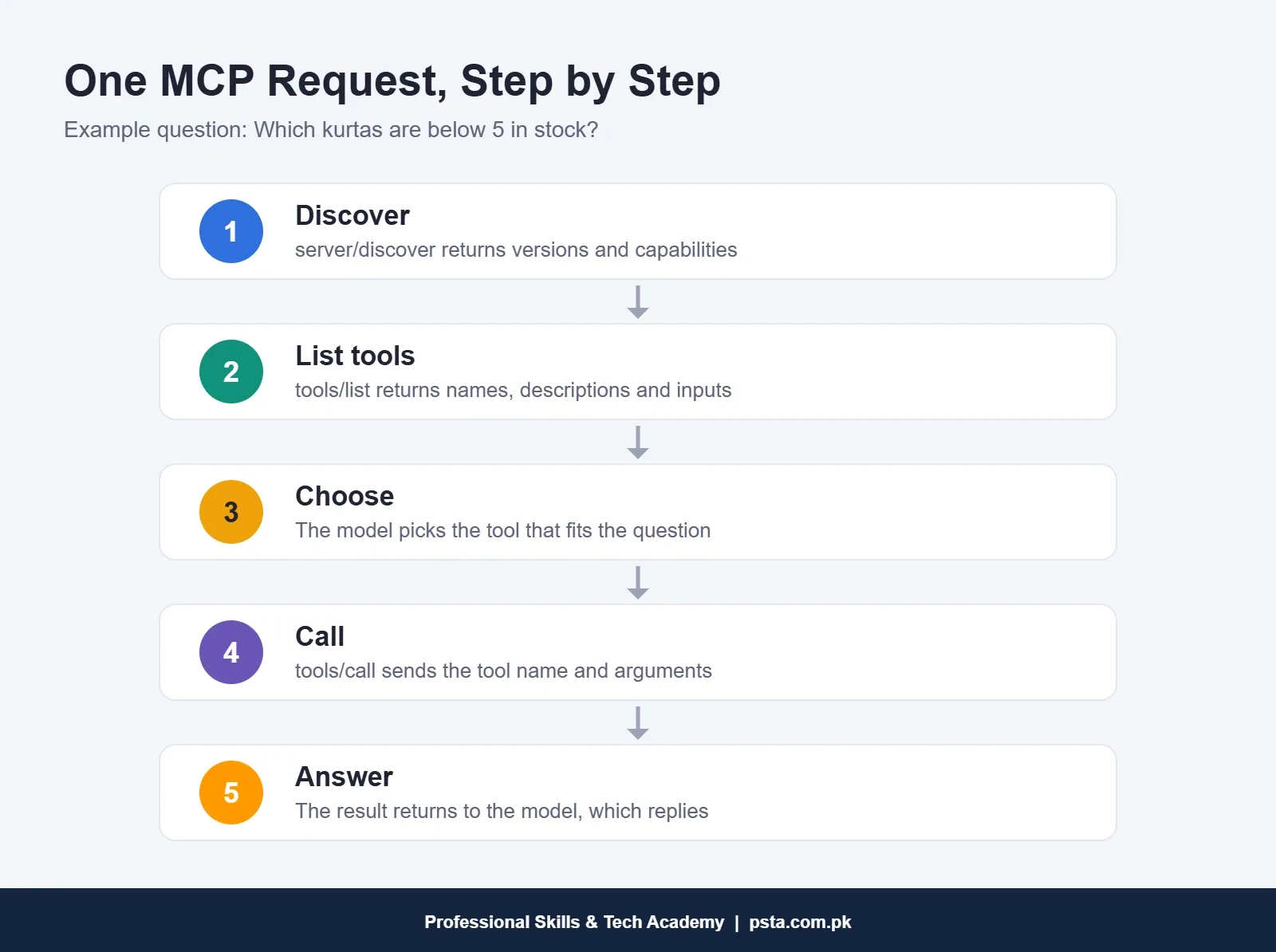
Here's the path of one question, using a small clothing store in Lahore as a realistic example. The owner asks her AI assistant, "Which kurtas are below 5 pieces in stock?"
- Discovery. The client can ask the server what it supports with a
server/discoverrequest. The answer lists protocol versions and capabilities such as tools and resources. - Listing tools. The client sends
tools/list. The server returns each tool's name, a description and an input schema that says which fields it expects. - Choosing. The host gives that list to the language model. The model reads the descriptions and decides that a tool called something like
stock_low_itemsfits the question. - Calling. The client sends
tools/callwith the tool name and arguments, for example a limit of 5. - Answering. The server returns content, usually text and sometimes images or structured data. The host passes it back to the model, which writes a normal reply for the owner.
All these messages use JSON-RPC 2.0, a simple format for requests and replies written in JSON. If you've studied REST APIs, the idea will feel familiar: a named method, some parameters, a response. The current version is also stateless. Each request carries the protocol version and capabilities in a _meta field, so a server can handle it without remembering earlier messages.
Servers can also tell clients when their tool list changes. The client opens a subscription, and the server sends a notification when tools are added or removed. The spec calls these notifications best effort, so a client should still refresh its list now and then.
Local or Remote: Stdio vs Streamable HTTP
MCP defines two ways for messages to travel, called transports. Which one you meet depends on where the server runs.
| Point | Stdio | Streamable HTTP |
|---|---|---|
| Where the server runs | On the same computer as the host | On another machine or a cloud service |
| How it connects | Standard input and output between two local programs | HTTP POST, with optional Server-Sent Events for streaming |
| Typical users | Usually one client | Often many clients at once |
| Login | Handled by your local setup | Bearer tokens, API keys or headers; OAuth is recommended |
| Common example | A file server reading folders on your laptop | A vendor's hosted server for its own product |
As a beginner, you'll mostly use remote servers from inside tools like n8n, and local ones when you test on your own machine. Don't worry about the low-level details yet. Just know which kind you're connecting to, because it changes how you secure it.
MCP Myths Beginners Believe
In class, the same wrong ideas come up again and again. Clearing them early saves you weeks of confusion.
"MCP only works with Claude." Anthropic started it, but ChatGPT, Gemini, Microsoft Copilot, Cursor and Visual Studio Code were all listed as supporters by December 2025, and the protocol now sits under a neutral foundation.
"MCP replaces APIs." The Model Context Protocol doesn't replace them. Many MCP servers simply wrap an existing API. MCP gives AI apps one consistent way to find and use those capabilities.
"You must be a programmer to use it." Building a custom server from scratch needs code, usually Python or TypeScript. Using MCP inside n8n needs no code, as the next section shows.
"A server from a public list is safe." Not automatically. Tool descriptions and results can carry hidden instructions, which we cover in the security section.

Using MCP in n8n Without Writing Code
n8n, the workflow tool we use heavily in automation training, supports MCP in both directions. If you're still choosing a platform, our n8n vs Zapier vs Make comparison explains why many learners start with n8n.
Let an n8n Agent Use Outside Tools
The MCP Client Tool node connects an n8n AI agent to an external MCP server. You enter the server's endpoint, pick an authentication method (bearer, header, multiple headers, OAuth2 or none), then choose which tools the agent may see: all of them, only selected ones, or all except some. Services listed in n8n's MCP server registry can be connected from the node panel without adding a credential yourself.
That "Tools to Include" setting is your first safety control. If a server offers 20 tools and your agent only needs to read data, select the read tools and leave the rest out.
Turn Your Workflows Into Tools for Other Apps
The MCP Server Trigger node works the other way round. It makes n8n act as an MCP server, so an outside AI app can list and call tools you've built. You attach workflows to it through the Custom n8n Workflow Tool node.
A few details from the n8n docs are worth knowing before you try it:
- It supports Server-Sent Events and streamable HTTP, but not stdio.
- It has a test URL for building and a production URL that becomes active when you publish the workflow.
- Authentication options are none, bearer, header, or n8n user auth (OAuth2) in newer node versions.
- Behind a reverse proxy such as nginx, you must turn off proxy buffering for the MCP endpoint, or connections can break.
If you run n8n on your own server, our guide on self-hosting n8n on a VPS covers the nginx setup you'll need to adjust.
A Realistic Example: An Abbottabad Clinic
Here's an example to make this concrete. A small clinic keeps appointments in Google Sheets. You build three n8n workflows: check free slots, book a slot, and cancel a booking. You attach them to an MCP Server Trigger with bearer authentication. Now the receptionist can ask an MCP-ready assistant, "Is Dr. Ayesha free on Thursday after 4?" and the assistant calls your tool instead of guessing. You'd keep "cancel" behind a confirmation step, because it changes real records.
Building small, well-described tools like these is closer to everyday freelance work than most beginners expect. If you want to understand where agents end and fixed workflows begin, read AI agents vs automation next.
Is It Safe to Connect an MCP Server?
It can be, if you treat every Model Context Protocol server as untrusted until you've checked it. The OWASP MCP Security Cheat Sheet lists the main risks. These are the ones I'd make every student understand first:
- Tool poisoning: hidden instructions inside a tool's description or output that steer the model.
- Rug pulls: a server quietly changes its tools after you approved them.
- Over-privileged tokens: a key with far more access than the task needs, so one leak exposes everything.
- Supply chain attacks: a fake package with a name close to a popular server.
Before you connect a server for a client, run through these checks:
- Install only from a source you can verify, such as the vendor's own docs.
- Read the full tool list and schemas, not just the short descriptions.
- Give each server its own limited credential, and prefer short-lived tokens.
- Expose only the tools the job needs, using settings like n8n's "Selected" option.
- Require human approval for anything that deletes, pays or sends messages.
- Keep a log of tool calls so you can see what the agent actually did.
If these risks interest you more than building the workflows, that's a sign you might enjoy security work. PSTA's Cyber Security and Ethical Hacking course covers how attackers think, which helps here too.
MCP Terms You'll Meet Often
Keep this short glossary nearby when you read docs or job posts.
| Term | Plain meaning |
|---|---|
| Host | The AI app that manages MCP connections |
| Client | One connector inside the host, linked to one server |
| Server | Any program that offers tools, resources or prompts |
| Tool | An action the model can call, with defined inputs |
| Resource | Data supplied as context, such as a file or schema |
| Elicitation | A server asking the user for input or confirmation |
| Transport | How messages travel: stdio or streamable HTTP |
| JSON-RPC 2.0 | The request and reply format MCP messages use |
Building MCP Workflows in PSTA's AI Automation Course
The Model Context Protocol makes the most sense once you've built a few ordinary workflows, because an MCP tool is usually just a well-made workflow with a clear name and description. That's how we approach it in the AI Automation Course: Beginner to Pro.
Classes last 8 weeks and assume no prior coding. Study at the Abbottabad campus, join the live online batch from your own city, or mix both through the hybrid option. The course page currently lists the fee at Rs. 22,000, down from a regular Rs. 28,000, split across 2 installments, with fresh batches opening monthly. Practical work covers n8n, Make and Zapier, OpenAI and other AI API connections, and chatbots. It ends with a multi-step agent project built around a problem you face yourself.
If you'd like to write your own MCP servers later, Python is the natural next step, and our Advanced Python course covers the programming side. The full catalogue sits on our courses page. Batch dates and the enrollment form are on the admission page. If you'd rather talk first, send a WhatsApp to +92 314 5424399 and mention MCP so we can suggest a suitable batch.
Before Your Next Study Session: Map One Tool
Pick one repetitive task you already do, such as checking a sheet or replying to a common question. On paper, write it as a Model Context Protocol tool: a short name, one sentence describing when to use it, the inputs it needs, and what it returns. Then decide whether it only reads data or changes something. That single page is the design of your first MCP server, and it's exactly what you'll build when you open n8n.
Frequently asked questions
Is the Model Context Protocol free to use?
Yes. MCP is an open standard, so there is no license fee for the protocol itself. Your costs come from the things around it, such as an AI app subscription, paid API usage for the language model, or hosting for a remote server. For practice, a local server running on your own laptop adds no hosting cost at all.
What is the difference between MCP and an API?
An API is how one program exposes its features to other programs, and each API has its own format. MCP is a shared standard designed for AI apps. A typical MCP server wraps an existing API and describes its actions as tools with names, descriptions and input schemas, so any MCP-ready AI app can discover and call them the same way.
Do I need to learn Python to use MCP?
Not to use it. In n8n, the MCP Client Tool and MCP Server Trigger nodes let you connect and publish tools without writing code. You do need programming if you want to build a custom MCP server from scratch. The official SDKs most people start with are for Python and TypeScript, so Python is a sensible first language.
Which AI apps support MCP?
When Anthropic moved MCP to the Agentic AI Foundation in December 2025, it named ChatGPT, Cursor, Gemini, Microsoft Copilot and Visual Studio Code among the supporting products, alongside Claude. Support details differ between apps, so check each product's own documentation for which transports and features it handles before you plan a client project around it.
What is the difference between an MCP server and an MCP client?
The server is the program that offers something useful, such as tools to query a database or files to read. The client lives inside the AI app, called the host, and keeps one dedicated connection to one server. If a host connects to four servers, it runs four clients, one for each connection.
Is MCP the same as an AI agent?
No. An AI agent is software that uses a language model to plan and take steps toward a goal. MCP is one way that agent reaches tools and data. An agent can work without MCP through custom integrations, and an MCP server can just as easily serve a simple chatbot that never plans multi-step tasks.
Can I connect n8n to Claude Desktop through MCP?
Yes. The n8n documentation explains that Claude Desktop can reach an n8n MCP Server Trigger through an mcp-remote gateway, configured with the workflow's MCP URL and a bearer token. Build and test with the test URL first, then publish the workflow so the production URL becomes active for everyday use.
Sources & references
- Introducing the Model Context Protocol (Anthropic) anthropic.com
- Donating the Model Context Protocol and Establishing the Agentic AI Foundation (Anthropic) anthropic.com
- Architecture Overview (Model Context Protocol docs) modelcontextprotocol.io
- MCP Server Trigger Node (n8n Docs) docs.n8n.io
- MCP Client Tool Node (n8n Docs) docs.n8n.io
- MCP Security Cheat Sheet (OWASP) cheatsheetseries.owasp.org
Last reviewed & updated on by Umar Qureshi. Written by the PSTA team in Abbottabad, Pakistan.

Umar Qureshi
AI Automation Course: Beginner to Pro (Dominate Workflows)
Turn this guide into a career: hands-on training with real projects, online across Pakistan or on-campus in Abbottabad · 8 Weeks.
Comments
No comments yet — ask a question or share your experience.