Quick answer
An n8n webhook is a trigger URL that starts a workflow when another system sends it a request. Build with the test URL, which listens for 120 seconds. Paste the production URL into live forms and publish the workflow. Add authentication, validate every field and pick the Respond option that suits the caller.
Key takeaways
- • The test URL listens for 120 seconds and shows incoming data in the editor.
- • The production URL works only after you publish, and its runs appear in the Executions tab.
- • Use the Respond to Webhook node when the caller needs custom JSON, a redirect or a status code.
- • Turn on header, basic or JWT auth before a webhook URL goes on a live form.
- • On n8n Cloud, reply within 100 seconds or the caller receives a 524 error.
Table of contents 18 sections
- What Is an n8n Webhook, in Plain Words?
- Webhook Trigger vs Schedule Trigger: Which Do You Need?
- Test URL vs Production URL: Which One Should You Use?
- The Test URL
- The Production URL
- The Webhook Node's Settings, Term by Term
- HTTP Method
- Path
- Authentication
- Respond
- Options Worth Knowing
- How Should Your Webhook Reply? Respond Options Compared
- Worked Example: A Course Inquiry Form That Fills a Google Sheet
- Securing an n8n Webhook Before You Share the Link
- Why Isn't My Webhook Firing? Common Problems and Fixes
- n8n Cloud or Self-Hosted for Webhooks?
- Where Webhooks Fit in PSTA's AI Automation Course
- Try It in 15 Minutes: Catch One Test Request
"Why does my n8n webhook work when I click Execute, then go silent the next morning?" Students ask me this in almost every automation batch. The answer is that an n8n webhook has two different addresses, a test URL and a production URL, and each one only listens under specific conditions. Learn those conditions and a handful of node settings, and webhooks stop feeling random.
Think of this page as a plain-language glossary with one complete, working example. Once you've read it, you'll be able to:
- Say what a webhook trigger does and when it beats a schedule
- Choose the right URL for testing and for live traffic
- Read every important setting on the Webhook node
- Build a course inquiry form that drops each lead into Google Sheets
- Lock the endpoint down and fix the errors beginners hit most
What Is an n8n Webhook, in Plain Words?
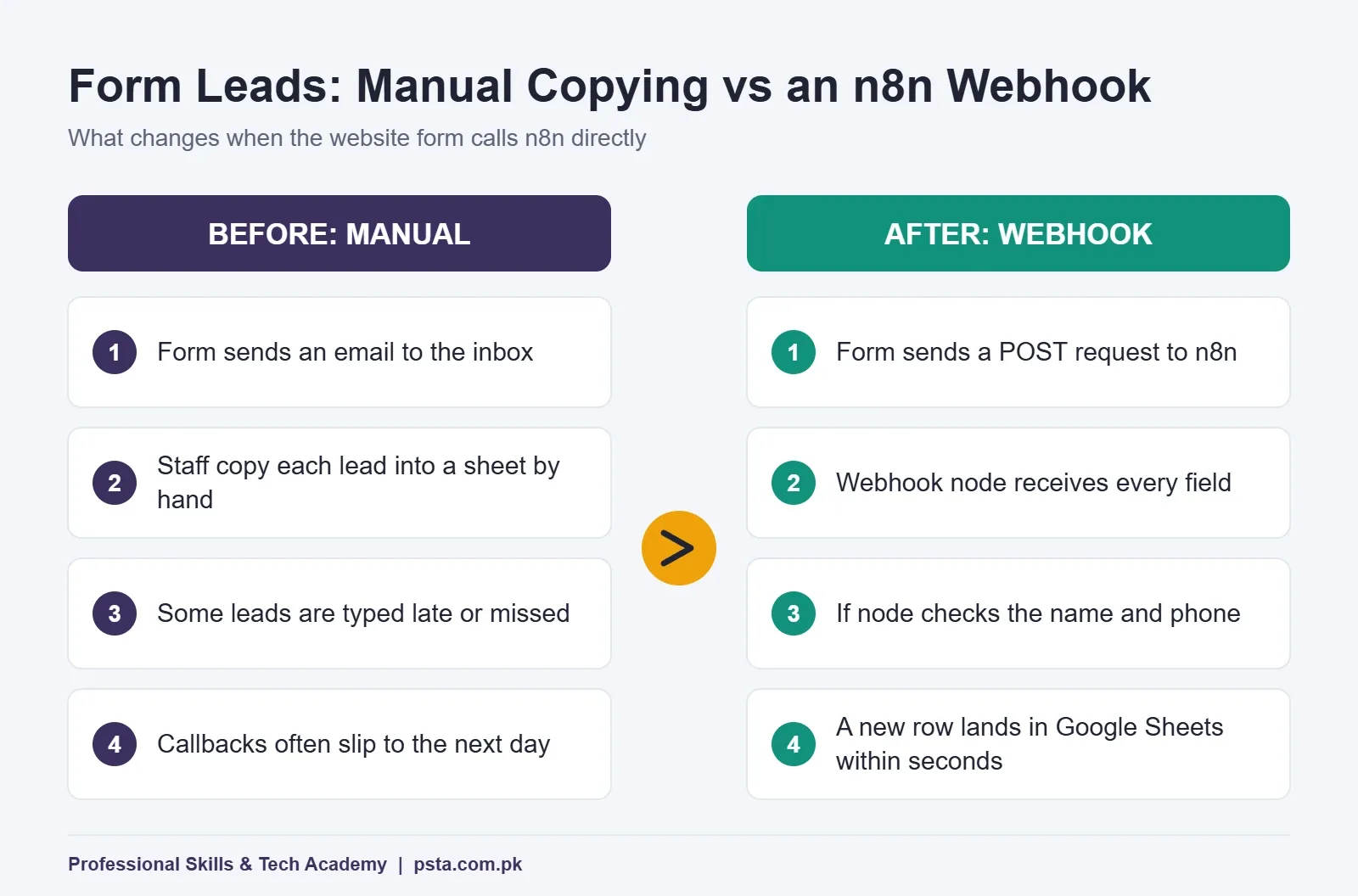
A webhook is a web address that waits for another system to send it data. Instead of n8n asking a website every few minutes whether anything is new, the website calls n8n the moment something happens. That call is an ordinary HTTP request, the same kind your browser sends when you submit a form.
Inside n8n, the Webhook node is a trigger. It sits at the start of a workflow, receives the request and hands everything that arrived to the next node: form fields, JSON, headers, query values, even uploaded files. From there you can save the data, check it, pass it to an AI model or reply to the sender.
Here are a few places you'll meet webhooks in Pakistani businesses:
- A WordPress or custom website form that should create a lead the second someone submits it
- A Shopify or WooCommerce store announcing a new order
- A payment gateway or courier service reporting a status change
- Your own app or script asking n8n to do a job and send back an answer
If HTTP methods and JSON still feel unfamiliar, read our REST API guide for beginners first. It covers the request basics this page builds on.
Webhook Trigger vs Schedule Trigger: Which Do You Need?
Many beginners build everything on a timer: "check the sheet every five minutes." That works, but it burns executions when nothing has changed and adds a delay when something has. A webhook runs only when data actually arrives.
| Question | Webhook trigger | Schedule trigger |
|---|---|---|
| When does it run? | When another system sends a request | At times you set |
| Delay before it reacts | Close to instant | Up to your interval |
| Needs a public URL? | Yes | No |
| Best for | Forms, orders, payments and app events | Daily reports, backups and regular syncs |
| Runs wasted when nothing happens | None | Possible on every check |
The catch sits in the third row. The sender has to reach your n8n address over the internet. On n8n Cloud that's handled for you. If you run n8n on your own laptop, an outside website can't see localhost, so you'll need a public server or a tunneling tool while you test.
Test URL vs Production URL: Which One Should You Use?
Open any n8n webhook node and you'll find two URLs. They look nearly identical, which is exactly why people mix them up.
The Test URL
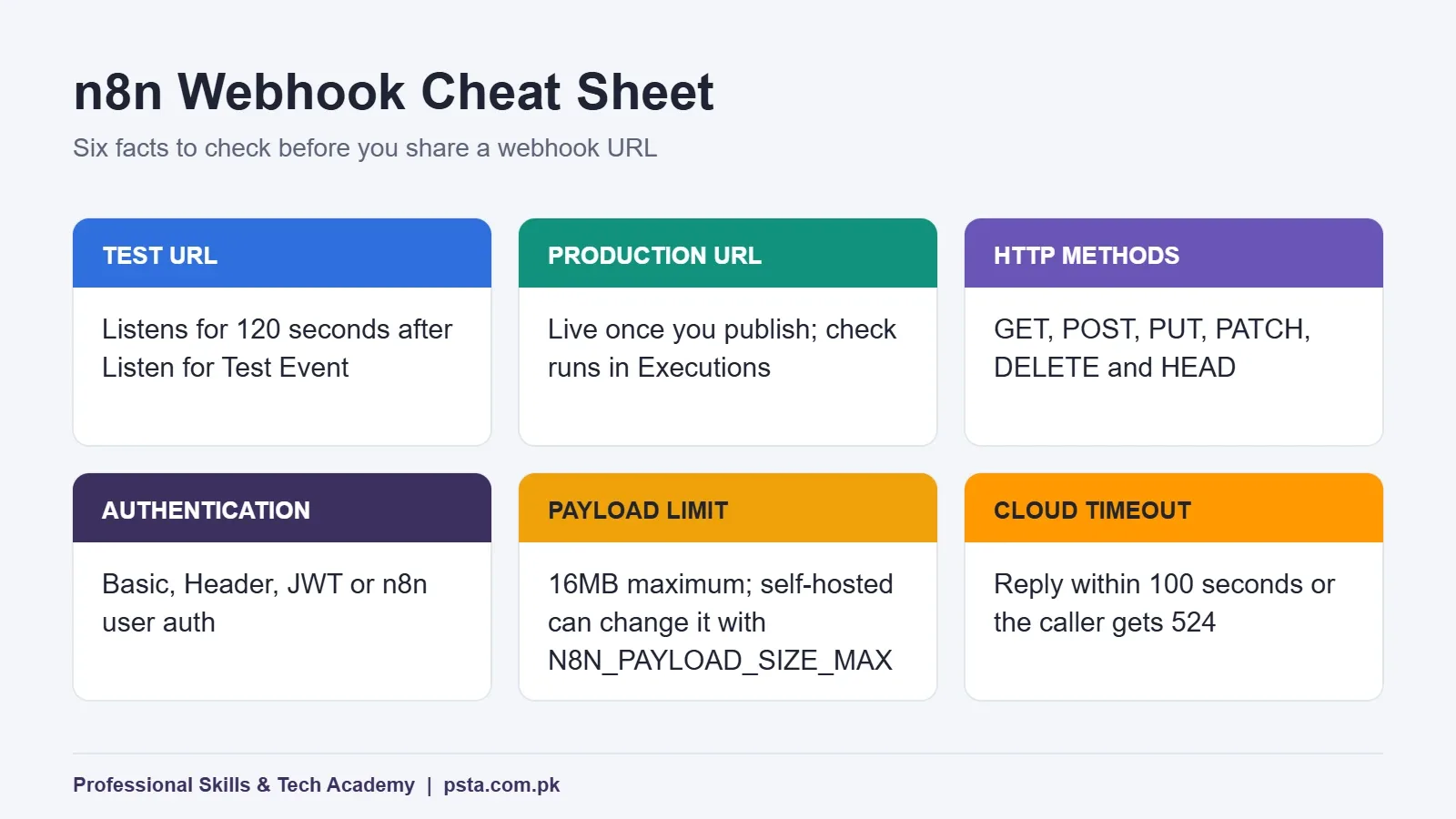
n8n registers the test URL when you click Listen for Test Event or Execute workflow, as long as the workflow isn't already active. According to n8n's webhook troubleshooting page, it then listens for 120 seconds. Incoming data appears right inside the editor, so you can see every field and drag it into later nodes.
The Production URL
The production URL starts working when you publish the workflow and keeps working until you unpublish it. Calls to it don't show up on the canvas. To see what arrived, open the workflow's Executions tab. The official Webhook node documentation describes both behaviors in detail.
The rule I give every class: build with the test URL, paste the production URL into the real form, then publish. If the live form still points at the test URL, it only works during the two-minute windows when you happen to be listening. That's the "it worked yesterday" problem from the top of this page.
The Webhook Node's Settings, Term by Term
You don't need every option on day one. These are the ones you'll touch on almost every project.
HTTP Method
The node accepts DELETE, GET, HEAD, PATCH, POST and PUT. Website forms and most online services send POST. If one path has to accept two methods, switch on Allow Multiple HTTP Methods in the node's settings.
Path
This is the last part of the URL. n8n fills in a random path by default; change it to something readable, such as course-lead. You can also capture values from the address itself with route parameters like /:city or /order/:id, and they arrive as fields in your data. One limit to remember: two published workflows can't use the same path with the same method.
Authentication
Your choices are None, Basic auth, Header auth, JWT auth and n8n user auth. Leaving it on None is fine for a two-minute test, never for a live form. The security section below explains which to pick.
Respond
This decides when n8n answers the caller and what it sends back. It matters enough to get its own section next.
Options Worth Knowing
- Allowed Origins (CORS): the default is *, which lets browser code on any website call your webhook.
- Ignore Bots: skips requests from link previewers and crawlers.
- IP(s) Allowlist: only listed addresses get through; everyone else receives a 403.
- Raw Body and Binary Property: for payloads that aren't plain JSON, such as files or signed data.
- Response Headers and Response Code: control exactly what the caller receives.
There's also a size limit. The docs put the maximum payload at 16MB, and self-hosted users can change it with the N8N_PAYLOAD_SIZE_MAX environment variable.
How Should Your Webhook Reply? Respond Options Compared
Whoever calls your webhook waits for an answer. The Respond setting decides what that answer is.
| Respond setting | What the caller gets | Use it when |
|---|---|---|
| Immediately | A short message saying the workflow started | The sender doesn't need a result, as with most form submissions |
| When Last Node Finishes | Output of the last node: all entries, the first entry as JSON or binary, or no body | Short workflows where the caller waits for an answer |
| Using 'Respond to Webhook' Node | Exactly what you design in that node | You want custom JSON, a redirect or a specific status code |
| Streaming response | Data sent in pieces while nodes run | Chat-style replies from AI agent nodes that support streaming |
The Respond to Webhook node can answer with JSON, text, a binary file, a redirect, a JWT token, all incoming items, the first item or no data at all. Two behaviors catch people out. If the workflow errors before reaching that node, the caller receives a 500 error. If the workflow ends without ever reaching it, the caller still gets a 200, which can hide a broken branch.
n8n Cloud also has a time limit. If your workflow doesn't answer within 100 seconds, the request fails with a 524 error. For slow jobs, such as a long AI summary, reply Immediately and deliver the result another way: an email, a WhatsApp message or a second webhook the caller checks later.
Worked Example: A Course Inquiry Form That Fills a Google Sheet
Here's a realistic scenario; the business is invented for illustration. A small training centre in Mansehra runs Facebook ads to a one-page website. Inquiries arrive by email, and the receptionist copies names and numbers into a spreadsheet at the end of the day. Some get missed, and callbacks happen a day late.
The goal: every submission becomes a row in Google Sheets within seconds, and the visitor sees a proper thank-you message.
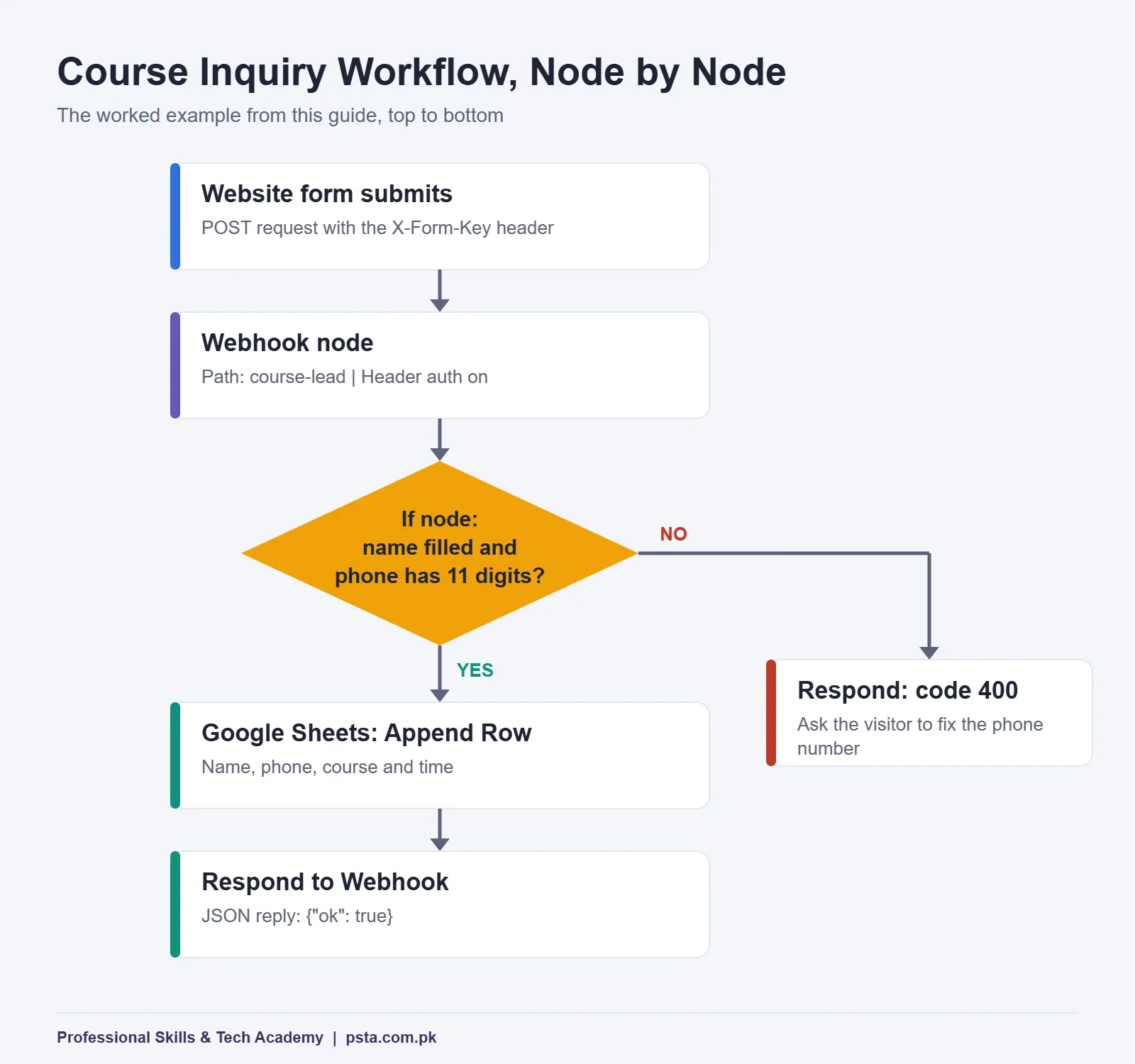
- Add a Webhook node. Set HTTP Method to POST, Path to course-lead and Respond to Using 'Respond to Webhook' Node.
- Switch on Header auth. Create a credential with a header name such as X-Form-Key and a long random value. Your website's form handler sends this header; strangers won't know it.
- Send a test request. Click Listen for Test Event, then within two minutes send a sample like the one below from a terminal. Paste your own test URL and key in place of the placeholders.
- Add an If node. Check that the name isn't empty and that the phone number has 11 digits, the length of a local mobile number written as 03XXXXXXXXX.
- Add a Google Sheets node on the true branch. Choose Append Row and map name, phone, course and the time the lead arrived.
- Add two Respond to Webhook nodes. After the sheet, reply with JSON such as {"ok": true}. On the false branch, reply with response code 400 and a short message so the site can ask the visitor to fix the number.
- Go live. Copy the production URL into the form handler, publish the workflow, submit the real form once yourself and confirm the new row. Then open the Executions tab and look at the run.
curl -X POST "PASTE-YOUR-TEST-URL-HERE" \
  -H "Content-Type: application/json" \
  -H "X-Form-Key: PASTE-YOUR-KEY-HERE" \
  -d '{"name": "Ayesha", "phone": "03001234567", "course": "AI Automation"}'
One practical warning. Send the request from your website's server code or a form plugin that supports custom headers, not from JavaScript running in the visitor's browser. Anything in browser code can be read from the page source, key included.
Once this works, a WhatsApp or email alert for the sales team is one more node on the true branch. For more builds in the same spirit, browse these n8n projects for beginners.
Securing an n8n Webhook Before You Share the Link
A published webhook is a public door. Anyone who finds the URL can send it data, and on a paid plan every call that starts the workflow counts toward your executions. These habits keep it under control:
- Turn on authentication. Header auth is simplest for forms. Basic auth suits tools that only offer a username and password. JWT auth fits apps that already issue tokens.
- Narrow Allowed Origins. When the browser makes the call, replace * with your own domain.
- Use the IP allowlist for fixed senders. If a service publishes its server addresses, list them. Behind a reverse proxy such as Nginx, set N8N_PROXY_HOPS so n8n sees the real caller instead of the proxy.
- Switch on Ignore Bots so chat apps generating link previews don't trigger runs.
- Validate before you act. Treat every incoming field as untrusted, especially before it reaches a sheet, a database or an AI prompt.
- Keep secrets out of the query string. Full URLs often end up in server logs and browser history.
Why Isn't My Webhook Firing? Common Problems and Fixes
When an n8n webhook stays silent, the cause is nearly always one of the rows below. Work through them in order.
| What you see | Likely cause | Fix |
|---|---|---|
| Works in the editor, fails from the live form | Form points at the test URL, or the workflow isn't published | Use the production URL and publish |
| Nothing arrives while testing | The 120-second listening window ran out | Click Listen for Test Event again and resend |
| URL shows localhost or the wrong domain | Self-hosted n8n behind a proxy builds the address from its own host settings | Set N8N_WEBHOOK_URL (WEBHOOK_URL on versions before 2.35.0) |
| Conflict when publishing | Another published workflow uses the same path and method | Change the path or method, or unpublish the other workflow |
| Caller sees a 524 on n8n Cloud | No response within 100 seconds | Respond Immediately and deliver results separately |
| IP allowlist blocks everyone | n8n sees the proxy's address, not the caller's | Set N8N_PROXY_HOPS to the number of proxies |
| Large upload rejected | Payload over the 16MB limit | Compress the file, or raise N8N_PAYLOAD_SIZE_MAX if self-hosted |
The webhook URL configuration page explains the reverse proxy setup, including which forwarded headers your proxy should pass along.
n8n Cloud or Self-Hosted for Webhooks?
For webhooks, the deciding question is simple: who keeps the public URL online, secure and up to date?
- n8n Cloud gives you a working HTTPS address on day one. Plans are priced by monthly workflow executions. When we checked the n8n pricing page, Starter was listed at €20 a month billed annually, with 2,500 executions. A busy form, or bots hitting an unprotected URL, eats into that quota.
- Self-hosted means paying for a server and handling the domain, HTTPS, updates and backups yourself. The pricing page notes that a standard self-hosted version is available on GitHub. Our guide to self-hosting n8n walks through the setup.
My advice for students is to learn on whichever you already have. For client work, choose based on who will maintain it. A shop owner with no technical staff is usually better off on Cloud. If you're still choosing a platform altogether, our n8n vs Zapier vs Make comparison sets out the trade-offs.
Where Webhooks Fit in PSTA's AI Automation Course
Webhooks appear early in PSTA's AI automation course because almost every real project starts with data arriving from somewhere. It's an 8-week, beginner-level program. Classes happen at the Abbottabad campus, in live online sessions open to students across Pakistan, or as a hybrid of the two. The fee is listed as Rs. 22,000 against a usual Rs. 28,000, with the option to pay in 2 installments. A fresh batch begins each month.
You'll build in n8n, Make and Zapier. One of the course projects is the lead capture workflow described above, extended with an AI-drafted reply and a WhatsApp message to the sales team. Other projects include an OCR invoice reader, a WhatsApp support bot and a multi-step AI agent. The certificate is verifiable online.
If you'd rather write the form handler yourself, the JavaScript course or the Advanced Python course pairs well with this one. You can compare every option on the courses page, and the admission page lists the steps to enroll.
Try It in 15 Minutes: Catch One Test Request
Open n8n, add a Webhook node, leave the method on POST and click Listen for Test Event. Send the sample request from the example, look at the fields that appear, then change one value and send it again. That single loop with your first n8n webhook teaches you more than an hour of reading.
Want help with timings or the next batch? Message the academy on WhatsApp at +92 314 5424399, or drop by the Mandian campus on Old College Road in Abbottabad; it faces FIMS College.
Frequently asked questions
What is the difference between the n8n webhook test URL and production URL?
The test URL works only while you are listening in the editor, for 120 seconds, and shows the incoming data on the canvas so you can map fields. The production URL starts working when you publish the workflow and stays live until you unpublish it. Its runs appear in the Executions tab rather than in the editor.
Why is my n8n webhook not triggering from a live form?
Usually the caller is using the test URL when nobody is listening, or the workflow is not published yet. Check which URL the form or service is calling, publish the workflow, and confirm the HTTP method matches the node. Another published workflow on the same path and method can also cause a conflict.
Can I use an n8n webhook without a public server?
The sender must reach your n8n address over the internet. n8n Cloud gives you a public HTTPS URL straight away. If n8n runs on your own laptop, outside services cannot reach localhost, so you need a public server or a tunneling tool while you test.
How do I send a custom reply from an n8n webhook?
Set the Webhook node to respond using the Respond to Webhook node, then place that node where the reply should happen. It can return JSON, text, a file, a redirect or no data, with your own status code and headers. Remember that it only responds once, using the first item it receives.
How do I protect an n8n webhook from strangers?
Turn on authentication in the Webhook node. Header auth is the easiest for website forms, while Basic and JWT auth suit other senders. Narrow Allowed Origins to your domain, use the IP allowlist for services with fixed addresses, enable Ignore Bots and validate every field before you save it.
Do webhook calls count as executions on n8n Cloud?
n8n Cloud plans are priced by monthly workflow executions, and each request that starts your workflow creates a run. A busy form, or bots hitting an unprotected URL, can therefore use up your quota. Authentication and the Ignore Bots option help keep unwanted runs down.
Sources & references
- n8n Docs: Webhook node docs.n8n.io
- n8n Docs: Webhook node common issues docs.n8n.io
- n8n Docs: Respond to Webhook node docs.n8n.io
- n8n Docs: Configure webhook URLs with a reverse proxy docs.n8n.io
- n8n Pricing n8n.io
Last reviewed & updated on by Umar Qureshi. Written by the PSTA team in Abbottabad, Pakistan.

Umar Qureshi

AI Automation Course: Beginner to Pro (Dominate Workflows)
Turn this guide into a career: hands-on training with real projects, online across Pakistan or on-campus in Abbottabad · 8 Weeks.
Comments
No comments yet — ask a question or share your experience.