
Quick answer
Photoshop edits pixels, so use it for photos, retouching, thumbnails and social posts. Illustrator draws vector paths, so use it for logos, icons, visiting cards and large prints. Both cost $22.99 a month on Adobe annual plans. Learn first the app that matches the first design service you want to sell.
Key takeaways
- • Photoshop is a raster (pixel) editor; Illustrator is a vector editor, so its artwork stays sharp at any size.
- • Use Illustrator for logos, icons, visiting cards, shop boards and stickers.
- • Use Photoshop for product photos, background removal, thumbnails and photo-based social posts.
- • Adobe lists both apps at $22.99 a month each on an annual plan billed monthly.
- • Both need at least 8 GB of RAM; 16 GB is recommended for Illustrator 31.0.
- • Learn the app that matches the first service you plan to sell, then add the other.
Table of contents 13 sections
- What Is the Real Difference Between Photoshop and Illustrator?
- A Two-Minute Test You Can Try Today
- Photoshop vs Illustrator: A Job-by-Job Comparison
- Where Photoshop Does the Better Job
- Where Illustrator Does the Better Job
- Which Is Better for Logo Design?
- How Much Do Photoshop and Illustrator Cost in 2026?
- Will Your Laptop Run Both Apps?
- Should You Learn Photoshop or Illustrator First?
- How Both Apps Share One Branding Job
- Mistakes That Waste Your First Months
- Where PSTA's Design Course Fits In
- Try This 20-Minute Test Before You Decide
Here's an example to start with. A bakery in Abbottabad hires a new designer for three things: a logo, a menu with photos of its cakes, and a week of Facebook posts for the opening. The designer does all of it in Photoshop. Ten days later, the print shop calls back. The logo looks soft and jagged on the 6-foot shop board, and nobody can fix it without starting again.
That phone call explains most of the Photoshop vs Illustrator question. Photoshop edits pixels, so it's the better tool for photos, retouching and social media images. Illustrator draws with paths, so it's the better tool for logos, icons and anything that must print sharp at any size. Most paying design work in Pakistan needs both apps, but the one you learn first should match the work you want to sell first.
In this comparison, you'll find:
- The one technical difference that settles most choices
- A job-by-job table for the work clients actually bring you
- What each app costs in 2026 and what your laptop needs to run it
- A simple rule for which app to open first, based on your goal
- How both apps share a single branding project from start to finish
What Is the Real Difference Between Photoshop and Illustrator?
Everything comes back to two kinds of image. Adobe's own raster vs vector guide puts it simply. A raster image is made of pixels, and when you stretch it past its size, the pixels show and it turns blurry. A vector image stores lines and curves as math, with no pixels at all, so you can resize it as much as you like without losing quality.
Photoshop is a raster editor. It can bring in vector files as smart objects, but its home ground is the pixel. Illustrator is a vector editor. It can place photos inside a layout, but its real strength is clean shapes and type.
The file types follow the same split. Photoshop work usually ends up as PSD, JPEG or PNG. Illustrator work usually ends up as AI, SVG, EPS or a print-ready PDF.
A Two-Minute Test You Can Try Today
Open any photo from your phone and zoom to 800%. You'll see small colored squares. Now open an SVG icon in a browser and zoom the page as far as it goes. The edges stay crisp. That is the whole reason a shop logo belongs in Illustrator and a cake photo belongs in Photoshop.
Photoshop vs Illustrator: A Job-by-Job Comparison
Clients don't ask for "raster" or "vector." They ask for a logo, a banner or a post. This table maps the requests we see most often from shops, schools and small brands to the app that handles each one best.
| Client Request | Better App | Why |
|---|---|---|
| Logo for a shop or startup | Illustrator | Must stay sharp from a visiting card to a shop board |
| Retouching product photos | Photoshop | Photos are pixels; healing and masking tools work on pixels |
| Facebook or Instagram post built around a photo | Photoshop | Layers, masks and blending suit photo-heavy layouts |
| Visiting card or letterhead | Illustrator | Exact sizes, crisp text and print-ready PDF export |
| Panaflex or shop board | Illustrator | Large print sizes expose any pixel-based artwork |
| Icon set for an app or website | Illustrator | Many artboards in one file, clean SVG export |
| Removing a background | Photoshop | Selection and mask tools are built for this |
| YouTube thumbnail | Photoshop | Cut-out faces, glow and color edits are pixel work |
| T-shirt print or sticker | Illustrator | Printers and cutters need clean vector outlines |
| Book cover with a photo | Both | Edit the photo in Photoshop, set the type in Illustrator |

Notice the pattern in this Photoshop vs Illustrator table. If the job starts with a camera, Photoshop leads. If it starts with a blank page and has to be printed or resized often, Illustrator leads.
Where Photoshop Does the Better Job
Photoshop shines when the raw material is a photo. Product shots for a Daraz or Instagram store, a family portrait that needs color correction, or a thumbnail with a cut-out face all live here.
The skills you build in Photoshop are mostly about control over pixels:
- Layers and layer masks let you hide parts of an image without deleting them, so you can change your mind later.
- Adjustment layers change brightness, contrast and color without damaging the original photo.
- Selection tools pull a product or person away from a busy background. Our guide on how to remove a background in Photoshop walks through five ways to do it.
- Retouching tools clean dust, marks and small flaws from product photos.
Where Photoshop struggles is anything that has to grow. A logo drawn at 500 pixels wide will never look clean on a 10-foot banner, however careful you were.
Where Illustrator Does the Better Job
Illustrator is built for artwork you draw rather than photograph. Logos, icons, patterns, labels, infographics and lettering all start here, because each shape stays editable and sharp forever.
- The Pen tool draws precise curves. It feels awkward for the first week, which is normal. Our Pen tool guide breaks it into eight practice steps.
- Artboards let you keep a logo, a visiting card and a social icon in one file, each at its own size.
- Type tools let you shape letters into custom wordmarks, which matters for brand work.
- Image Trace is Adobe's feature for turning a raster image into editable vector artwork. It's handy for a hand sketch, but traced shapes usually need cleanup before a client sees them.
Illustrator is weaker with photos. You can place and crop them, but serious edits to light, skin or color still belong in Photoshop.
Which Is Better for Logo Design?
Illustrator, in almost every case. A logo gets used on visiting cards, WhatsApp profile pictures, shop boards, stamps and sometimes embroidery. Only vector artwork can travel across all of those sizes without being redrawn.
A professional handover usually includes an AI or EPS master file, an SVG for the web, a PDF for the printer, and PNG copies for social media. Illustrator can export all of these from one source. Photoshop can only give you the PNG part properly. Using Illustrator for logo design also makes revisions painless, since changing a color or a curve never degrades the artwork.
If a client sends you an old logo as a small JPEG, don't simply trace it and send it back. Rebuild it with the Pen tool, compare it with the original at large size, then deliver. For the full workflow from brief to final files, see our guide to the logo design process.
How Much Do Photoshop and Illustrator Cost in 2026?
Adobe sells both apps through Creative Cloud subscriptions, priced in US dollars, so the Adobe Photoshop price you pay in rupees moves with the exchange rate. Here is what Adobe's individual plans page showed when we checked this month, all on an annual plan billed monthly:
| Plan | Price Per Month | What You Get |
|---|---|---|
| Photoshop | $22.99 | Photoshop only |
| Illustrator | $22.99 | Illustrator only |
| Photography | $19.99 | Photoshop and Lightroom |
| Creative Cloud Standard | $54.99 | A bundle of Adobe apps |
| Creative Cloud Pro | $69.99 regular | All apps; a $29.99 offer was running until November 27 |
Adobe's education plans page lists Photoshop and Illustrator at $14.99 a month each, but those licenses require an institutional affiliation, so they're bought through a school or university rather than by an individual student.
Students in Pakistan have raised the cost issue directly. In a November 2025 thread on the Adobe Community forum, a student asked for region-adjusted pricing. Community experts replied that prices are fixed on adobe.com and depend on currency values and taxes. No Pakistan discount was announced in that thread.

The practical takeaway: if money is tight, don't pay for both at once. Learn on one app, start earning with it, then add the second. The Photography plan is the cheapest legal way to get Photoshop if photo work is your focus. Before paying, ask your bank whether your debit card is enabled for international online payments. Cracked copies are a poor base for client work, since you can't update them safely or show licensed files to a client who asks.
Will Your Laptop Run Both Apps?
Many students ask this before anything else, and it's a fair question. Here are the Photoshop system requirements and Illustrator's, as Adobe publishes them for Windows:
| Requirement | Photoshop | Illustrator 31.0 |
|---|---|---|
| Minimum RAM | 8 GB | 8 GB (16 GB recommended) |
| GPU memory | 1.5 GB minimum, 2 GB recommended | 1 GB minimum, 4 GB recommended |
| Free disk space | 10 GB | 8 GB, SSD recommended |
| Windows | Windows 10 (21H2) or later | Windows 11, or Windows 10 21H2 LTSC |
Sources: Adobe's Photoshop technical requirements and Illustrator technical requirements.
In our classroom experience, 8 GB works for learning one app at a time. Once you keep both open with a few large files, 16 GB and an SSD make the day far less frustrating. If you're choosing a used laptop, put RAM and an SSD ahead of a faster processor.
Should You Learn Photoshop or Illustrator First?
Pick the app that matches the first service you want to sell. When students ask us about Photoshop vs Illustrator in the first class, this is the rule we give them:
- Want social media, thumbnail or product photo work? Start with Photoshop. Most of these jobs begin with a photo.
- Want logo, branding or print work? Start with Illustrator. Print shops and brand clients need vector files.
- Not sure yet? Spend three to four weeks on Photoshop basics, because you'll see results faster, then move to Illustrator and the Pen tool.
- Already know CorelDRAW? Go to Illustrator first. The vector ideas carry over, and many export clients expect AI or SVG files.
Whichever you choose, don't run two tutorial playlists side by side. Finish one small project in the first app before you open the second. Mixing both in week one is the most common reason beginners feel stuck.
If you're still deciding whether Adobe is the right choice at all, our graphic design software guide compares the wider set of options, including free ones.
How Both Apps Share One Branding Job
Back to the bakery example. Here is how a working designer would split that same job between the two apps:
- Sketch the logo on paper, then build it in Illustrator with the Pen and shape tools.
- Export the logo as SVG for the website, PDF for the printer and PNG for social media.
- Retouch the cake photos in Photoshop: fix the light, clean the plate edges and remove a cluttered background.
- Build the Facebook posts in Photoshop, placing the logo as a smart object so it stays sharp.
- Lay out the menu in Illustrator, placing the retouched photos and setting the prices in clean type.
- Prepare print files in the right color mode. Our RGB vs CMYK guide explains which mode each output needs.
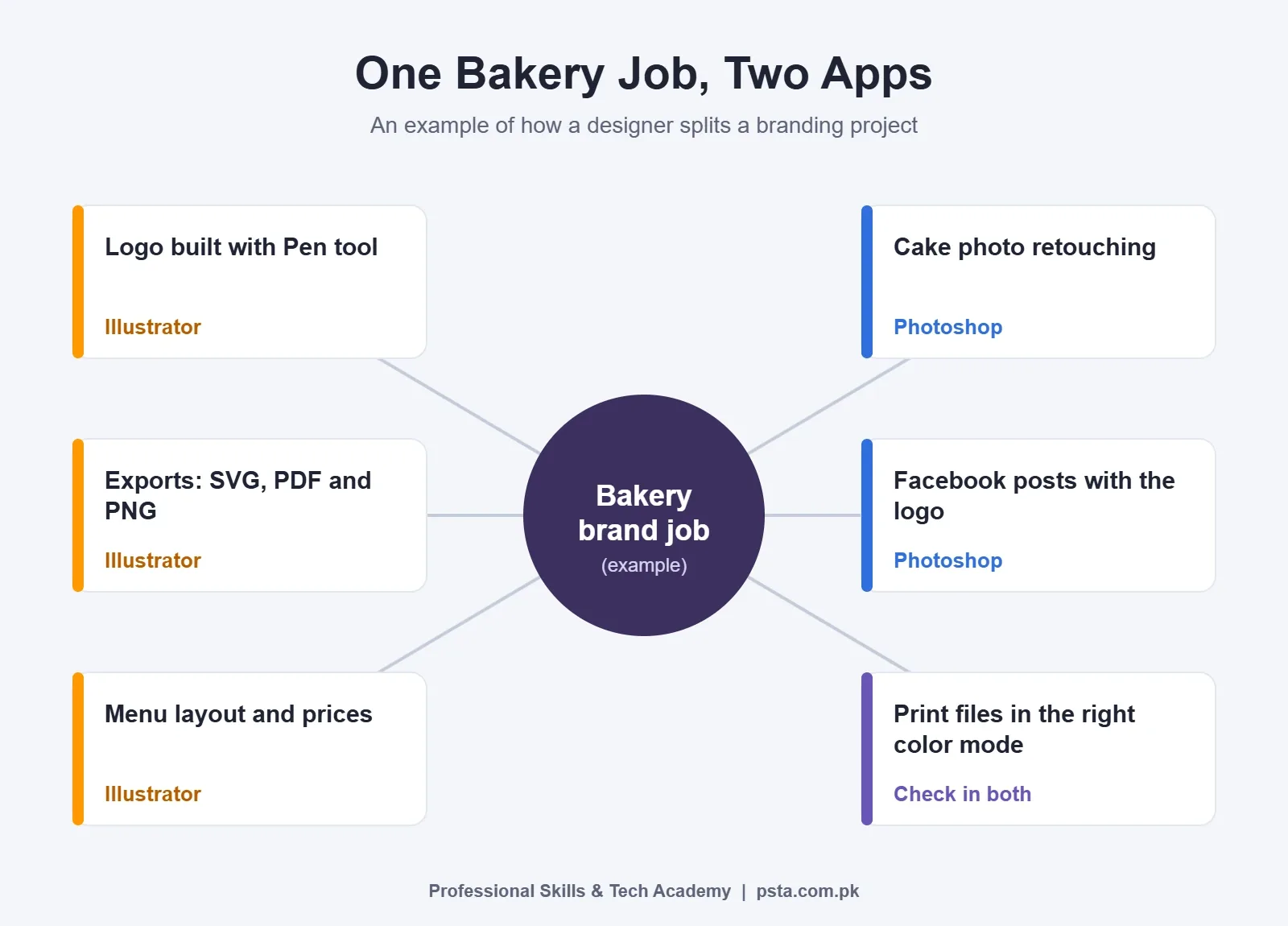
None of these steps is advanced. The skill is knowing which app to open at each step, and that comes from doing a full project at least once.
Mistakes That Waste Your First Months
- Designing a logo in Photoshop. It looks fine on screen, then fails the first time it's printed large.
- Trusting Image Trace blindly. Traced logos often have uneven curves and extra points. Check them at large zoom.
- Sending only a JPEG to the printer. Printers want a PDF or vector file with text converted or fonts included.
- Buying every plan at once. You'll pay for months of an app you aren't using yet.
- Skipping the basics of layout and type. Software skill without design sense still produces weak work.
Where PSTA's Design Course Fits In
Our Graphic Designing course teaches the two apps in the order most beginners find easiest. Week 2 covers Photoshop for image editing, banners and retouching. Week 3 moves to Illustrator for logos, icons and typography. After that, you also practice CorelDRAW for print, Canva for quick posts, InPage for Urdu posters, and a week of AI-assisted design.
It is a beginner-level program spread over 12 weeks. One of its projects is a brand identity kit: a logo built in Illustrator with a color palette, visiting card and letterhead, shown in mockups. That's close to the bakery job above. The fee is Rs. 18,000 (regular Rs. 20,000), payable in two installments, and a new batch starts every month.
Classes happen on campus (opposite FIMS College on Old College Road, Mandian, Abbottabad), as live online sessions you can join from any city, or as a hybrid of both. If you'd like to ask about timings first, message us on WhatsApp at +92 314 5424399. To reserve a seat, fill in the short online admission form, and you can compare other options on the all courses page.
Try This 20-Minute Test Before You Decide
Borrow a classroom or friend's computer that has both apps and draw the same simple shape, such as a circle with your initials, in both apps. Save each one, then enlarge both to 2,000%. Look at the edges. Then think about which result your first paying client would need. That small test usually settles the Photoshop vs Illustrator choice more clearly than any video.
Frequently asked questions
Is Illustrator harder to learn than Photoshop?
Most beginners find Illustrator slower at first because the Pen tool and path editing feel unfamiliar. Photoshop gives quicker visible results, since you start with a photo and adjust it. After two or three weeks of steady practice, the Pen tool usually clicks, and Illustrator becomes just as comfortable for simple logos and icons.
Can I make a logo in Photoshop?
You can draw one, but it will be made of pixels, so it blurs when printed large on a banner or shop board. Clients and printers also expect vector files such as AI, SVG, EPS or PDF. Build logos in Illustrator, then bring a copy into Photoshop as a smart object when you need it inside a social post.
Can Illustrator edit photos?
Illustrator can place, crop and mask photos inside a layout, which is enough for a menu or brochure. It is not built for retouching, color correction or removing backgrounds. Do that photo work in Photoshop first, save the edited image, then place it in your Illustrator layout.
Do I need both Photoshop and Illustrator for freelancing?
Not on day one. Pick the app that matches the first service you plan to sell, such as thumbnails in Photoshop or logos in Illustrator, and build a few portfolio pieces. Most clients eventually ask for mixed work, so plan to add the second app within a few months of starting.
Is Adobe Creative Cloud available in Pakistan?
Yes. Adobe sells plans on adobe.com in US dollars, and community experts on Adobe's forum have said prices there depend on currency values and taxes. You need a card enabled for international online payments, so check with your bank before you subscribe. No Pakistan-specific student discount has been announced in that forum thread.
What file should I send to a printer?
Send a print-ready PDF or a vector file from Illustrator, with fonts included or text converted to outlines, and the colors set up for print. A JPEG exported from Photoshop often looks soft on large prints. Ask the print shop which size, bleed and color mode it wants before you export anything.
What laptop specs do I need for Photoshop and Illustrator?
Adobe lists 8 GB of RAM as the minimum for both apps, and recommends 16 GB for Illustrator 31.0. Photoshop needs about 10 GB of free disk space and Illustrator about 8 GB, with an SSD recommended. If you will keep both apps open at once, aim for 16 GB of RAM and an SSD.
Sources & references
- Raster vs vector: what is the difference? (Adobe) adobe.com
- Creative Cloud plans and pricing (Adobe) adobe.com
- Creative Cloud education plans (Adobe) adobe.com
- Photoshop desktop technical requirements (Adobe Help) helpx.adobe.com
- Illustrator desktop technical requirements (Adobe Help) helpx.adobe.com
- Vectorize images using Image Trace (Adobe Help) helpx.adobe.com
- Request for region-adjusted student pricing in Pakistan (Adobe Community) community.adobe.com
Last reviewed & updated on by Umar Qureshi. Written by the PSTA team in Abbottabad, Pakistan.

Umar Qureshi
Ultimate Graphic Designing Course in Pakistan: Master Photoshop, Illustrator, CorelDRAW & AI Tools (Practical & Beginner Friendly)
Turn this guide into a career: hands-on training with real projects, online across Pakistan or on-campus in Abbottabad · 12 Weeks.
Comments
No comments yet — ask a question or share your experience.