Quick answer
Size a PoE switch for CCTV by total watts, not port count. Add every camera's maximum PoE draw from its datasheet, add cable loss, then keep about 20% headroom. Check that the uplink can carry all video streams, and remember copper Ethernet is limited to 100 meters unless you use extend mode.
Key takeaways
- • A switch's total PoE budget, not its port count, decides how many cameras it can run.
- • In our example, seven 6.5 W turrets and one 18 W PTZ need 70.2 W including cable loss.
- • A 62 W switch fails that job, while 120 W and 150 W options pass with headroom.
- • Eight cameras at 8 Mbps can overload a 100 Mbps uplink; use gigabit or lower bitrates.
- • Extend mode reaches 250 meters but can drop the port to 10 Mbps, so lower that camera's bitrate.
Table of contents 14 sections
- The Example Job: An 8-Camera Cloth Shop
- What a PoE Switch for CCTV Actually Does
- Step 1: List Every Camera's Real Power Draw
- Step 2: Add Cable Loss and Headroom
- Why Did the 62 W Switch Fail This Job?
- A Note on Class-Based Allocation
- Step 3: Check Bandwidth on the Uplink Port
- What Happens to Cameras More Than 100 Meters Away?
- Separate Switch or PoE NVR: Three Ways to Wire the Shop
- PoE Switch Prices in Pakistan: What Your Money Buys
- Your Pre-Purchase Spec Check
- Common Mistakes When Choosing a PoE Switch for CCTV
- How PSTA's CCTV Technician Course Teaches Network Design
- Run the Numbers on One Real Site This Week
How many cameras can one PoE switch for CCTV really run? Fewer than its port count, sometimes. The answer comes down to three numbers: total watts, uplink bandwidth and cable distance. Get any one of them wrong and cameras reboot at night, freeze during busy hours or never power up at all.
This guide works through one example job from start to finish, the way we plan a site in class. You'll see each calculation, where the figures come from and which switch passes.
By the time you finish, you'll be able to:
- Read a camera datasheet and find its real power draw over PoE
- Add cable loss and safety headroom to get a usable power budget
- Check whether a 100 Mbps uplink can carry all your video
- Decide between a separate PoE switch and an NVR with built-in PoE ports
- Compare switch prices in Pakistan without paying for features you won't use
The Example Job: An 8-Camera Cloth Shop
Here's the scenario we'll use. It's an example built for teaching, not a real client. A cloth shop on a busy bazaar road wants eight IP cameras: seven fixed turret cameras covering the counter, aisles, stockroom and back door, plus one PTZ camera on the front wall that can zoom onto the street.
For the turrets we'll use the Hikvision DS-2CD1343G2-LIUF, a common 4 MP value model. For the PTZ we'll use the Hikvision DS-2DE4425IWG1-E. Both datasheets list exact power and network figures, which is why we picked them. Your own job may use other brands, but the method stays the same.
The recorder sits in a small office at the back. The longest cable run, out to the front PTZ, is close to 100 meters. Keep that number in mind, because it shows up twice later.
What a PoE Switch for CCTV Actually Does
A PoE switch sends data and DC power down the same network cable. The camera needs no adapter at the pole and no extra power wire. That saves labor, and it means one UPS in the office can keep every camera alive during load shedding.
The switch is called the PSE (power sourcing equipment). The camera is the PD (powered device). Some power is always lost in the cable between them, which is why every standard quotes two numbers. TP-Link's surveillance switch guide lists them like this:
| Standard | Common name | Power at the switch port | Power at the camera |
|---|---|---|---|
| IEEE 802.3af | PoE | 15.4 W | 12.95 W |
| IEEE 802.3at | PoE+ | 30 W | 25.5 W |
| IEEE 802.3bt Type 3 | PoE++ | 60 W | 51 W |
| IEEE 802.3bt Type 4 | PoE++ | 90 W | 71 W |
The same guide notes that most fixed cameras work on 802.3af, while PTZ cameras usually need 802.3at. Our example follows that pattern exactly.
Step 1: List Every Camera's Real Power Draw
Don't guess from the camera's size or price. Open the datasheet and find the line called "power consumption" or "max power."
- Turret camera. The DS-2CD1343G2-LIUF datasheet gives a maximum of 6.5 W on PoE (5 W on a 12 V adapter), IEEE 802.3af, Class 3.
- PTZ camera. The DS-2DE4425IWG1-E datasheet gives a maximum of 18 W on IEEE 802.3at. That figure includes 9 W for the infrared lights and 1.6 W for the heater.
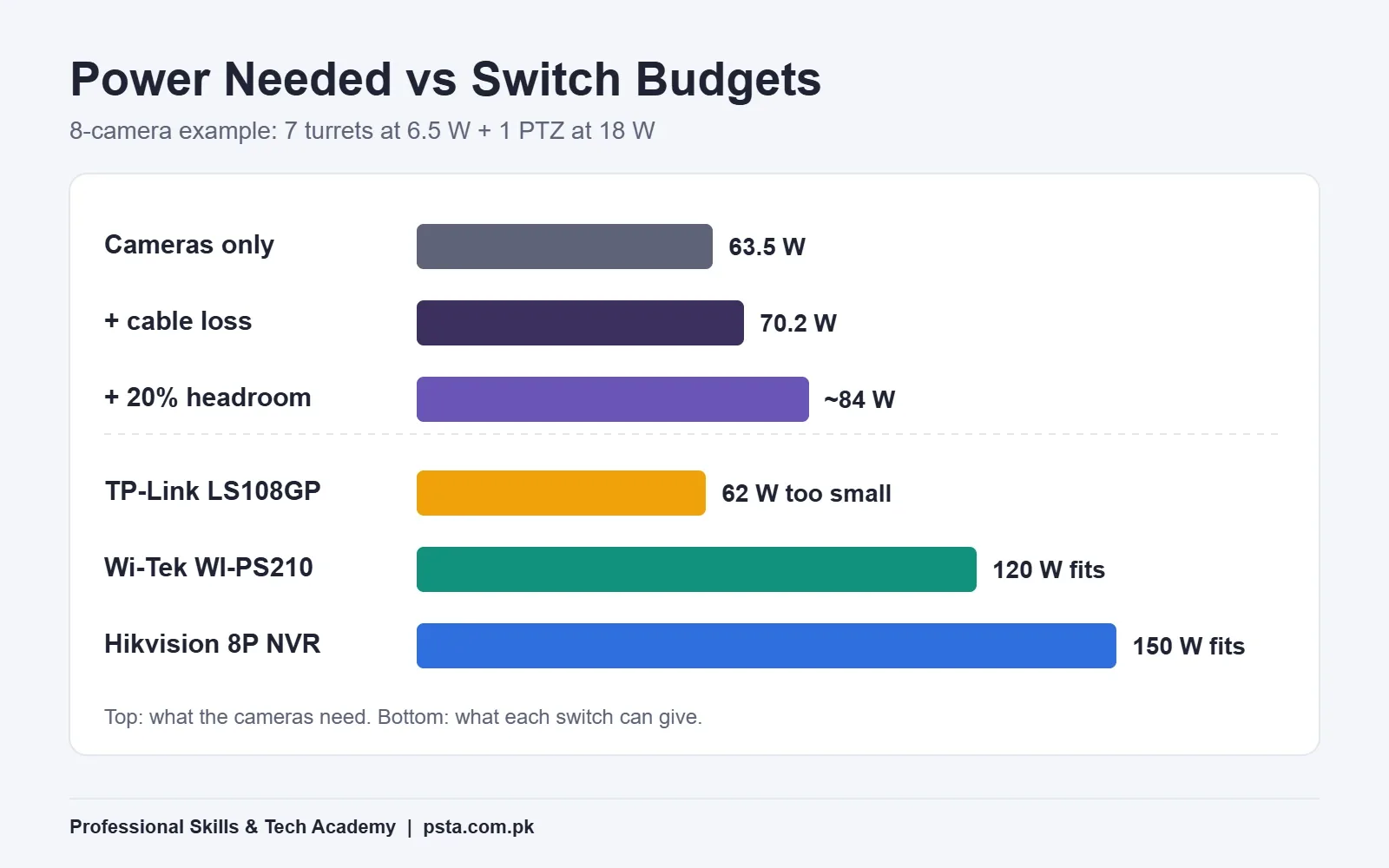
- Multiply and add. Seven turrets at 6.5 W make 45.5 W. Add the PTZ's 18 W and the cameras alone need 63.5 W.
Notice where the PTZ's power goes. Infrared lights only switch on after dark, so a PTZ that runs fine at noon can still overload a weak switch at 8 PM. That's one reason "it worked during installation" means little.
Step 2: Add Cable Loss and Headroom
The camera's figure is what reaches the camera. The switch has to supply a little more, because copper wastes some as heat. TP-Link measured this on Cat5e at 100 meters: roughly 1.1 W lost on a 30 W port, 0.8 W on a 15 W port and 0.3 W on a 10 W port.
To stay on the safe side, we'll charge 0.8 W of loss to each turret and 1.1 W to the PTZ, as if every run were the full 100 meters. Shorter runs lose less, so real loss will be lower.
| Line item | Calculation | Watts |
|---|---|---|
| Seven turret cameras | 7 × 6.5 W | 45.5 W |
| One PTZ camera | 1 × 18 W | 18.0 W |
| Cable loss, turrets | 7 × 0.8 W | 5.6 W |
| Cable loss, PTZ | 1 × 1.1 W | 1.1 W |
| Load the switch must supply | 70.2 W | |
| With 20% headroom (our rule of thumb) | 70.2 W × 1.2 | about 84 W |
The 20% margin is not a standard. It's a habit we teach, because cameras age, summers in Pakistan are hot and clients nearly always add a camera next year. Some installers use 25%. Either is better than running a switch at its limit.
Why Did the 62 W Switch Fail This Job?
Take the TP-Link LS108GP, a popular 8-port gigabit model. Every port is PoE+ and can give up to 30 W. On paper, it looks perfect.
Its total PoE budget, though, is 62 W. Our cameras need 63.5 W before a single meter of cable. TP-Link's own page explains what happens when demand passes 62 W: the switch cuts power to lower-priority ports.
In real life that looks like a random camera going dark around sunset, when the infrared lights come on. The shop owner calls it a faulty camera. It's actually a sizing error.
The lesson is simple. A per-port rating tells you the biggest single camera a port can run. Only the total budget tells you how many cameras the whole switch can run together.
A Note on Class-Based Allocation
Some managed switches reserve power by a camera's PoE class instead of its measured draw. A Class 3 camera can then lock up a full 15.4 W even though it uses 6.5 W. If you buy a managed switch, check in its manual whether it allocates by class or by actual use, and redo the sum if needed.
Step 3: Check Bandwidth on the Uplink Port
Power gets most of the attention, but video traffic causes plenty of trouble too. Every camera's stream flows into the switch and then out of one uplink cable to the NVR. That uplink is the bottleneck.
TP-Link's guide gives a working formula: per-camera bandwidth = 1.2 × (main stream + sub stream), with the sub stream at about 0.5 Mbps. It then divides the total by 0.7, because a switch delivers roughly 50 to 70% of its rated speed in practice.
Our turret's datasheet lists a main stream of up to 8 Mbps. Suppose you set all eight cameras, PTZ included, to 8 Mbps:
- Per camera: 1.2 × (8 + 0.5) = 10.2 Mbps
- Eight cameras: 8 × 10.2 = 81.6 Mbps
- Rated speed needed: 81.6 ÷ 0.7 ≈ 117 Mbps
That's more than a 100 Mbps uplink can carry comfortably. You have two clean fixes. Use a switch with a gigabit uplink, or drop each main stream to 6 Mbps. At 6 Mbps the sum becomes 8 × 7.8 = 62.4 Mbps, which needs about 89 Mbps of rated speed and fits a 100 Mbps link.
For a shop interior, a 4 MP image at 6 Mbps is usually still sharp enough to read faces at the counter. Test it on site before you lock the setting.
What Happens to Cameras More Than 100 Meters Away?
Under the TIA/EIA-568 cabling standard, a copper Ethernet channel is limited to 100 meters in total. Monoprice's Cat6 explainer breaks that into a 90-meter fixed run plus up to 10 meters of patch cords. Our front PTZ sits right at the edge.
Many CCTV switches offer an "extend mode" that pushes power and data to 250 meters. The trade-off is speed. On the LS108GP, extend mode works on ports 1 and 2 only and drops those ports to 10 Mbps.
Run our formula again. A camera at 8 Mbps needs 10.2 Mbps, which is more than an extend-mode port can give. Set that one camera to 4 Mbps and it needs 1.2 × 4.5 = 5.4 Mbps, which fits. So extend mode is a good tool for one far gate camera, but you should plan a lower bitrate for it from day one.
Beyond about 250 meters, stop stretching copper. A second switch near the cameras, or a fiber link, is the cleaner design.
Separate Switch or PoE NVR: Three Ways to Wire the Shop
With the numbers done, here are three layouts that pass for our example. Each has a different weak point.
| Option | Power budget | Uplink or recording limit | Main trade-off |
|---|---|---|---|
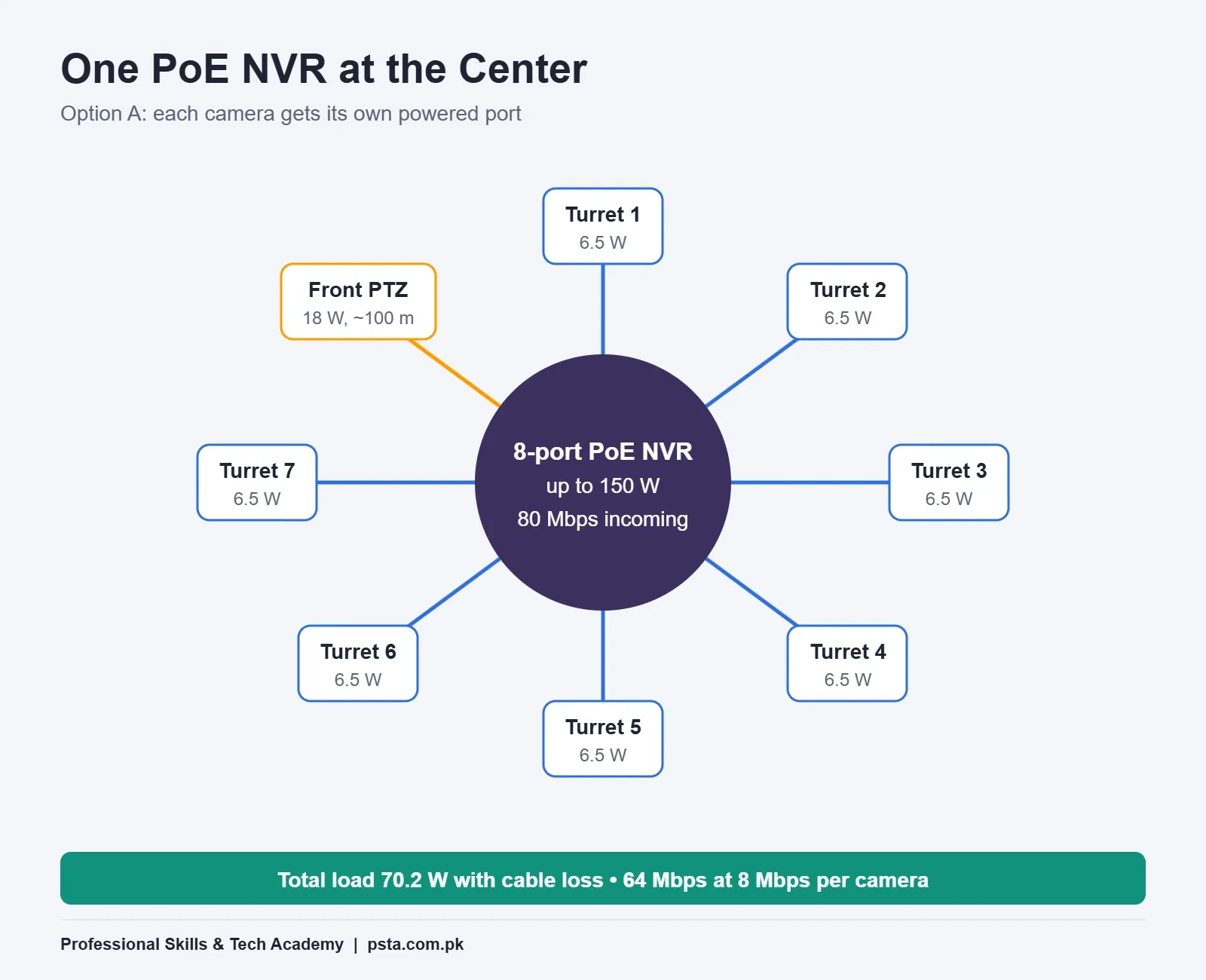
| A. NVR with 8 built-in PoE ports (DS-7608NXI-I2/8P/SE) | Up to 150 W | 80 Mbps incoming | No spare camera port for a ninth camera |
| B. 120 W CCTV switch (Wi-Tek WI-PS210) plus a non-PoE NVR | 120 W | 10/100 Mbps uplink ports | Main streams should stay near 6 Mbps |
| C. Two smaller switches, front and back | Split across two | Depends on models | More boxes, two power points to back up |
Option A is the tidiest for a small shop. The Hikvision DS-7608NXI-I2/8P/SE datasheet lists eight 10/100 Mbps PoE ports under IEEE 802.3af/at, a PoE total of up to 150 W and 80 Mbps of incoming bandwidth. Each camera gets its own port, so there's no shared uplink to worry about. Eight cameras at 8 Mbps main stream come to 64 Mbps, inside that 80 Mbps limit.
Option B suits a site where the recorder is far from the cameras, because the switch can sit near them. Option C makes sense when cameras cluster in two separate areas, such as a front showroom and a rear godown.
PoE Switch Prices in Pakistan: What Your Money Buys
Prices move with the dollar and with stock, so treat these as a snapshot from listings we checked, not a quote.
- Wi-Tek WI-PS210 (8 PoE ports, 120 W). W11stop lists it at Rs. 11,500, with a note that the price was set in July 2025 and may change. Ports 2 to 8 give up to 30 W each, port 1 gives up to 60 W, and a DIP switch turns on 250-meter extend mode.
- TP-Link LS108GP (8 PoE+ ports, 62 W). Mustafa Computers lists it at Rs. 12,990, though it showed as sold out when we checked. It's all-gigabit, which is great for bandwidth, but its 62 W budget fits jobs with fewer or lower-power cameras.
The comparison shows why price alone misleads. The slightly cheaper switch has nearly double the power budget, while the slightly dearer one has much faster ports. Which one is "better" depends entirely on the site.
Your Pre-Purchase Spec Check
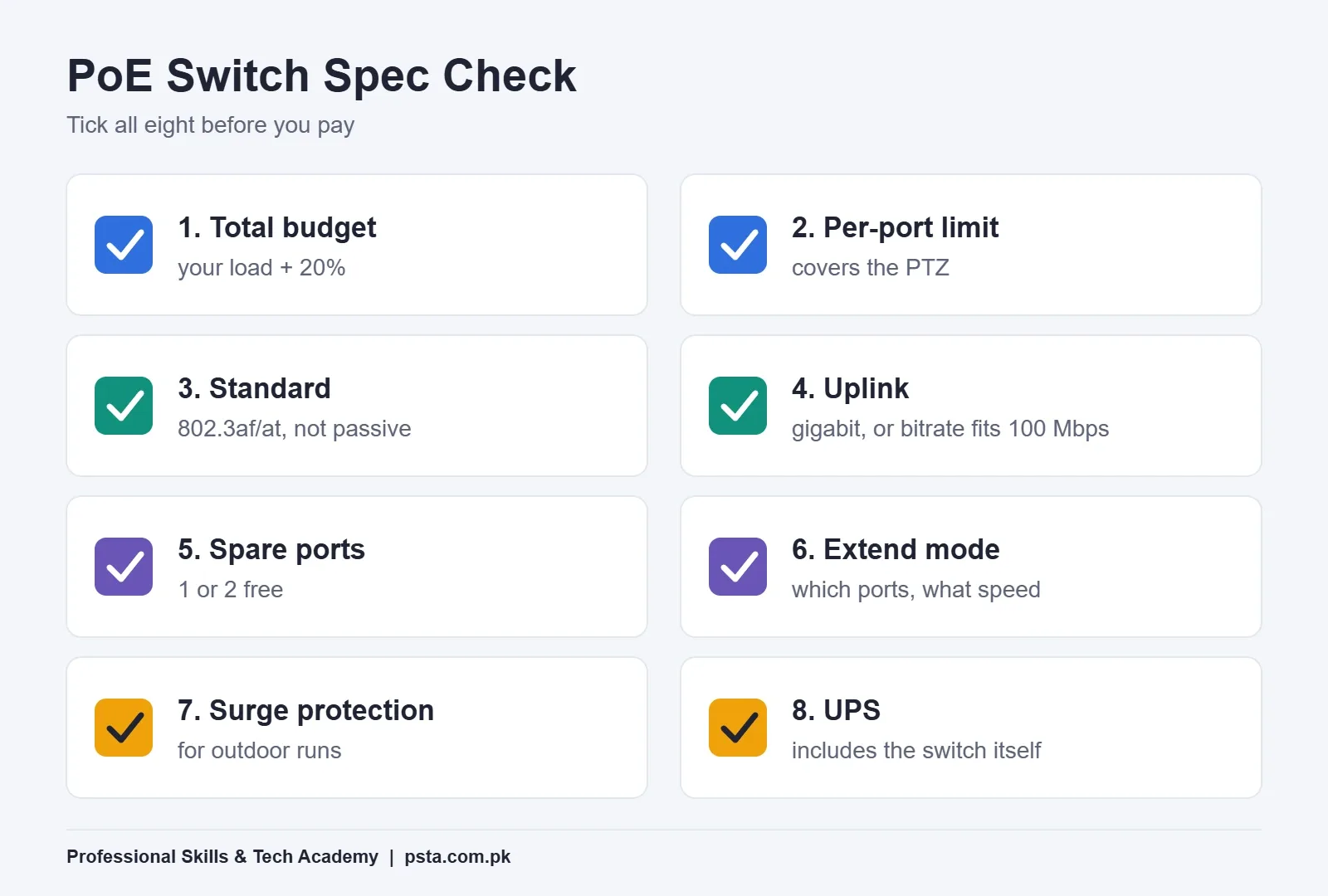
Before you order any PoE switch for CCTV, run through these checks with the datasheet open. If a seller can't show you the datasheet, that tells you something too.
- Total PoE budget is at least your load plus 20%.
- Per-port limit covers your hungriest camera, usually the PTZ.
- Standard is IEEE 802.3af/at, not "passive 24 V" or an unnamed PoE.
- Uplink speed is gigabit, or your bitrate math fits 100 Mbps.
- Spare ports: at least one or two free for the camera the client adds next year.
- Extend mode, if needed, and which ports and speed it supports.
- Surge protection rating, especially for outdoor runs.
- UPS sizing includes the switch's own power use, not only the cameras.
For the last point, our guide on sizing a UPS for CCTV during load shedding walks through the battery math. If you're still choosing between IP and analog for a site, read IP camera vs analog camera first, because analog systems don't use PoE switches at all. And once the network is sorted, use our CCTV storage calculation guide to size the hard drive from the same bitrates.
Common Mistakes When Choosing a PoE Switch for CCTV
- Counting ports instead of watts. Eight ports never guarantee eight cameras.
- Testing in daylight only, before infrared and heaters add their load.
- Leaving every camera at maximum bitrate on a 100 Mbps uplink.
- Running copper past 100 meters without extend mode or a second switch.
- Powering the switch from a wall socket with no UPS, so every camera dies in a power cut.
Our list of common CCTV installation errors covers cabling and mounting problems that sit beside these.
How PSTA's CCTV Technician Course Teaches Network Design
Power budgets and uplink sums are part of the syllabus in our CCTV Surveillance & AI Security Technician course. One module is dedicated to PoE switching, VLANs and wireless bridges, and another covers NVR deployment, RAID storage and bandwidth. Students also practice site surveys and written quotations, which is where these numbers end up.
Classes last 12 weeks and suit complete beginners. The fee shown on the course page is Rs. 22,000, reduced from Rs. 25,000. You can study at the Abbottabad campus, join live online from anywhere in Pakistan or combine the two, and fresh batches open monthly.
If you'd also like to secure the camera network itself, the Cyber Security & Ethical Hacking course pairs well with it. You can compare everything on our full course list, or go straight to the admission form. Questions about batch timing can go to WhatsApp at +92 314 5424399.
Run the Numbers on One Real Site This Week
Pick any building you can walk around, even your own house or a relative's shop. Mark where four to eight cameras would go, look up one real datasheet for each model and fill in the three-line sum: camera watts, cable loss, plus 20%. Then do the bitrate sum for the uplink. Fifteen minutes of arithmetic on paper will teach you more about PoE than any spec sheet read alone.
Frequently asked questions
How many cameras can an 8-port PoE switch run?
It depends on the switch's total PoE budget, not just the ports. Add each camera's maximum PoE draw from its datasheet, plus cable loss, then keep about 20% spare. A 62 W switch cannot run seven 6.5 W turrets and an 18 W PTZ together, while a 120 W switch can. Always compare the total load with the total budget.
What is the difference between PoE and PoE+ for CCTV cameras?
PoE (IEEE 802.3af) supplies up to 15.4 W at the switch port, with about 12.95 W reaching the camera. PoE+ (IEEE 802.3at) supplies 30 W, with 25.5 W at the camera. Most fixed bullet, dome and turret cameras run on PoE, while PTZ cameras with heaters and strong infrared usually need PoE+.
Do I need a gigabit PoE switch for IP cameras?
Not always. Camera ports at 10/100 Mbps are enough for one camera each. The uplink to the NVR is the real concern, because it carries every stream together. For eight cameras at 8 Mbps main stream, a gigabit uplink is safer. Lowering main streams to about 6 Mbps lets a 100 Mbps uplink cope.
Can I use a PoE NVR instead of a separate PoE switch?
Yes. An NVR with built-in PoE ports powers and records cameras directly, so there is no shared uplink to size. Hikvision's DS-7608NXI-I2/8P/SE, for example, lists eight PoE ports and up to 150 W. The catch is a fixed port count, so a ninth camera needs an extra switch.
How far can a PoE camera be from the switch?
A standard copper Ethernet channel is limited to 100 meters, usually split into a 90-meter fixed run and 10 meters of patch cords. Many CCTV switches offer an extend mode reaching 250 meters, but some drop that port to 10 Mbps. Plan a lower bitrate for that camera, or use fiber or a second switch.
What is extend mode on a PoE switch?
Extend mode lets a switch send power and data farther than the usual 100 meters, often up to 250 meters, by slowing the port down. On TP-Link's LS108GP it works on ports 1 and 2 at 10 Mbps. It suits one distant gate or parking camera set to a modest bitrate, not a whole site.
How much does a PoE switch cost in Pakistan?
Prices change with stock and the exchange rate. When we checked, W11stop listed the 120 W Wi-Tek WI-PS210 at Rs. 11,500, and Mustafa Computers listed the 62 W TP-Link LS108GP at Rs. 12,990 but sold out. Compare power budget and uplink speed before price, then confirm the current rate with the seller.
Sources & references
- TP-Link: What You Should Consider When Choosing Switches for Your Surveillance System tp-link.com
- TP-Link LS108GP 8-Port Gigabit PoE+ Switch (Pakistan) tp-link.com
- Hikvision DS-2CD1343G2-LIUF Datasheet us-legacy.hikvision.com
- Hikvision DS-2DE4425IWG1-E PTZ Datasheet assets.hikvision.com
- Hikvision DS-7608NXI-I2/8P/SE NVR Datasheet assets.hikvision.com
- Monoprice: Cat6 Cable Distance Limits monoprice.com
- W11stop: Wi-Tek WI-PS210 8-Port PoE Switch w11stop.com
- Mustafa Computers: TP-Link LS108GP mustafacomputers.pk
Last reviewed & updated on by Umar Qureshi. Written by the PSTA team in Abbottabad, Pakistan.

Umar Qureshi

Certified Professional CCTV Surveillance & AI Security Technician (CPCST)
Turn this guide into a career: hands-on training with real projects, online across Pakistan or on-campus in Abbottabad · 12 Weeks.
Comments
No comments yet — ask a question or share your experience.