Quick answer
For a new WordPress site on a zero budget, Rank Math's free version offers more: redirects, a 404 monitor and five focus keywords per post. Yoast suits sites already running it, writing teams that need readability checks, and owners who want AI tools included in one paid plan. Neither plugin ranks pages by itself.
Key takeaways
- • Rank Math's free version includes redirects, a 404 monitor and 16+ schema types.
- • Yoast SEO Premium listed $9.90 a month, billed annually, and covers one site per subscription.
- • Rank Math PRO listed €7.99 a month, billed annually, for unlimited personal sites.
- • Google no longer shows FAQ rich results, and llms.txt files don't affect Google rankings.
- • Both plugins import each other's data, but never run the two together.
Table of contents 22 sections
- Rank Math vs Yoast: The Short Verdict for Pakistani Site Owners
- What Each Plugin Gives You Free in 2026
- Yoast SEO (Free)
- Rank Math SEO (Free)
- Rank Math vs Yoast Side-by-Side Table
- How Much Do the Paid Versions Cost?
- Strengths and Weak Spots of Each Plugin
- Where Yoast Does Well
- Where Yoast Falls Short
- Where Rank Math Does Well
- Where Rank Math Falls Short
- Which Plugin Fits Your Kind of Website?
- A Freelancer Building Client Sites
- A Student Blog or Portfolio
- A Local Business Site
- A WooCommerce Store
- Do Schema and llms.txt Still Matter After Google's 2026 Changes?
- Can You Switch From Yoast to Rank Math Without Losing Rankings?
- Setup Checklist for Whichever Plugin You Choose
- Habits That Matter More Than the Plugin
- Practising SEO Plugin Setup in PSTA's WordPress Course
- Test Both on a Staging Copy This Weekend
Try a quick self-test before you read on. Do you want a redirect manager without paying for it? Do you plan to build sites for clients, some of whom already run Yoast? Is your next project a WooCommerce store? Your three answers settle most of the Rank Math vs Yoast question. Both plugins are free, both are well rated, and both will look after the technical basics of a WordPress site. The real differences sit in what each one keeps behind a paywall and how each one charges you.
The best SEO plugin for WordPress is the one that fits your site, so this guide compares the two as they stand in late 2026, using their official plugin pages and pricing pages, and then helps you choose for the kind of site you actually run.
What you'll be able to answer after reading:
- Which features each plugin gives away free, and which ones cost money
- What the paid plans cost, and why "per site" and "unlimited sites" change the math
- Which plugin suits a client-site freelancer, a blogger, a local business and an online store
- What Google's 2026 changes to FAQ results and llms.txt mean for your plugin choice
- How to switch from one plugin to the other without losing titles and descriptions
Rank Math vs Yoast: The Short Verdict for Pakistani Site Owners
If you're starting a fresh site and you don't plan to pay for anything, Rank Math gives you more tools in its free version. Redirects, a 404 monitor and several focus keywords per post are all free there. Yoast keeps its redirect manager and extra keyphrases for paying customers.
Yoast still makes sense in three situations. The site already runs it and ranks well. A team of writers needs its readability and inclusive language checks. Or the owner wants a single paid plan where the AI tools are included with no credit system on top.
Neither plugin will rank a page by itself. They write meta tags, sitemaps and schema. The content, the speed of the site and the links pointing to it still decide where you land.
What Each Plugin Gives You Free in 2026
Any WordPress SEO plugin worth installing handles the basics you should never do by hand: title and meta description fields, XML sitemaps, canonical URLs, breadcrumbs and a setup wizard. The difference is in the extras.
Yoast SEO (Free)
The Yoast SEO listing on WordPress.org showed version 28.9, more than 10 million active installs and a 4.8 out of 5 rating when we checked. Its free version is strongest on writing guidance. You get the traffic-light SEO analysis for one focus keyphrase, a readability check, an inclusive language check, desktop and mobile search previews, FAQ and HowTo blocks, and a free bulk editor for titles and descriptions. It also manages an llms.txt file for you.
One detail matters for older hosting: the listing now asks for WordPress 7.0 or higher. If a client's site runs an old WordPress version that the host hasn't updated, check this before you install.
Rank Math SEO (Free)
The Rank Math listing on WordPress.org showed version 1.0.283, more than 4 million active installs and the same 4.8 rating. Its free feature list is longer. It includes more than 16 schema types, a redirection manager, a 404 monitor, a role manager, Google Search Console and Analytics connections, and automatic image alt text and title tags. Each post can carry five focus keywords by default, and a filter raises that limit.
Rank Math also works in modules. You switch on only the parts you need, which keeps the settings screens shorter for a beginner.
Rank Math vs Yoast Side-by-Side Table
This Rank Math vs Yoast table compares only what the two official listings and pricing pages stated when we checked them. Features change often, so recheck any line you depend on before you buy.
| Feature | Yoast SEO | Rank Math SEO |
|---|---|---|
| Active installs (WordPress.org) | 10+ million | 4+ million |
| Rating (WordPress.org) | 4.8 out of 5 | 4.8 out of 5 |
| Minimum WordPress version | 7.0 | 6.7 |
| Focus keywords per post | 1 free, up to 5 in Premium | 5 by default in the free version |
| Redirect manager | Premium only | Free |
| 404 monitor | Not listed in free | Free |
| Readability and inclusive language checks | Free | Not its focus |
| Schema types | Core types free, more in Premium | 16+ free, 20+ in PRO |
| AI writing tools | Included in Premium, no credits | Content AI, free to start, with its own AI pricing |
| Import from the other plugin | Yes, built in | Yes, one click in the setup wizard |
| Paid plan licensing | One site per subscription | PRO covers unlimited personal sites |
How Much Do the Paid Versions Cost?
Pricing is where the Rank Math vs Yoast choice gets most practical, and the way they count sites matters more than the headline number. Here is the Yoast SEO Premium price next to Rank Math PRO.
The Yoast SEO Premium page listed an original price of $9.90 a month, billed annually, which comes to $118.80 for a year. One subscription covers one site or domain, so three client sites mean three subscriptions. Since Yoast simplified its plans in July 2025, Premium also includes Local SEO, Video SEO and News SEO, which used to be sold separately. Online stores have a separate Yoast WooCommerce SEO plan on top of that.
The Rank Math pricing page showed prices in euros when we opened it from Pakistan. The regular PRO price was €7.99 a month, billed annually, for unlimited personal websites. Business was €23.99 a month and Agency €56.99 a month, both for client sites.
Both companies were running Black Friday discounts when we checked. Yoast showed $6.93 a month for the first year, billed at $83.16. Rank Math showed PRO at €3.99 a month. Discounts like these apply to the first year only, and both pages said renewals return to the regular price. Budget for the renewal, not the sale.
One practical point for buyers in Pakistan: both charge in foreign currency, so you need a debit or credit card that allows international online payments. Your bank's exchange rate and any foreign transaction charges decide the final rupee amount, so check them before you pay.
Strengths and Weak Spots of Each Plugin
Where Yoast Does Well
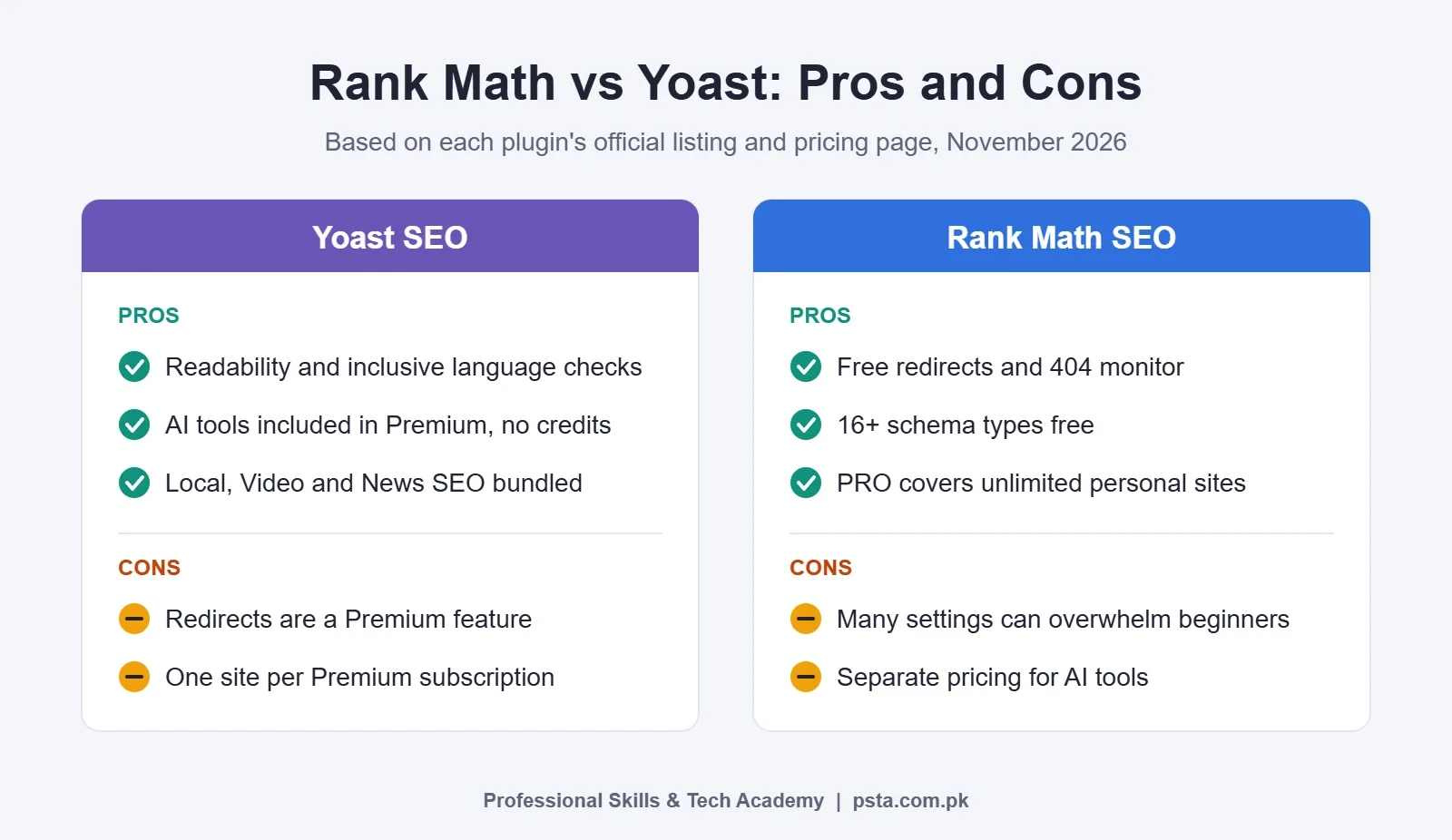
- Writing guidance. The readability and inclusive language checks help teams where several people write, such as a school or a news site.
- Predictable AI costs. Yoast says its AI tools come with Premium, with no separate credits to buy.
- Bundled extras. Local, Video and News SEO now sit inside one Premium plan.
Where Yoast Falls Short
- Redirects and extra keyphrases are paid features.
- Per-site licensing gets expensive once you manage several client sites.
Where Rank Math Does Well
- Generous free version. Redirects, a 404 monitor and more schema types cost nothing.
- Unlimited personal sites on PRO. One license can cover your own blog, portfolio and side projects.
- Modules. You can turn off what you don't use.
Where Rank Math Falls Short
- The free version shows many settings, which can overwhelm a first-time user who switches on everything.
- Rank Math lists separate pricing for its AI tools, so heavy AI use can cost more than the PRO plan alone.
Which Plugin Fits Your Kind of Website?
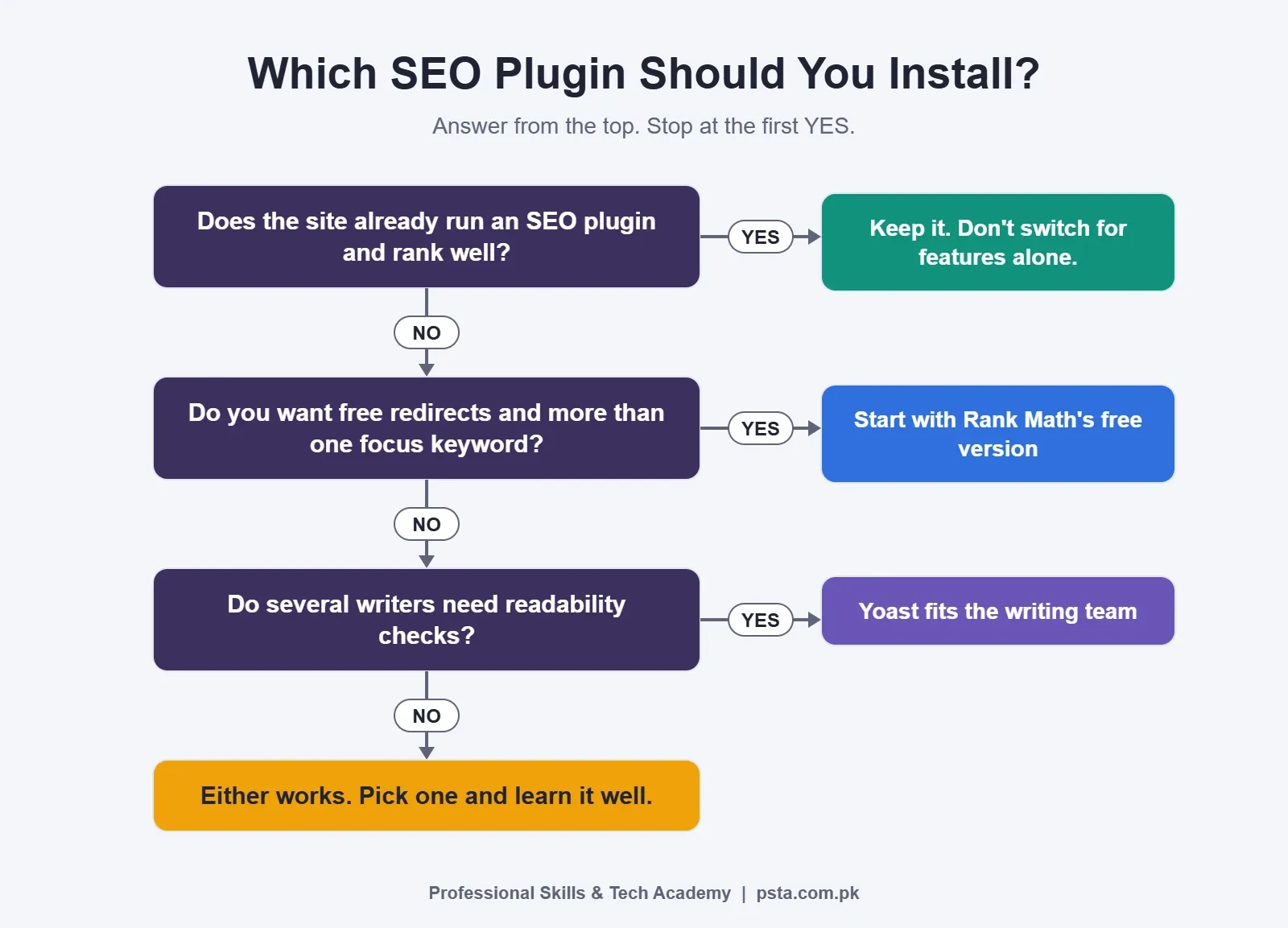
The best answer to Rank Math vs Yoast depends on the site in front of you. Here are four common situations we see with WordPress students in Abbottabad and online. Treat them as examples, not rules.
A Freelancer Building Client Sites
Say you're building a site for a dental clinic in Mansehra and another for a tile shop in Haripur. On a new site, Rank Math's free version covers redirects and local business schema without adding a cost to your quote. If a client's existing site already runs Yoast and ranks well, leave it in place.
A Student Blog or Portfolio
Either free SEO plugin works. Pick one and learn it properly. Rank Math's free 404 monitor helps when you rename posts while you learn.
A Local Business Site
Both handle local business details. Yoast includes its Local SEO add-on with Premium, while Rank Math lists local SEO tools on its free listing. For a five-page business site, the free version of either is usually enough.
A WooCommerce Store
Rank Math lists automatic product schema in its free version and adds GTIN and brand fields in PRO. Yoast sells a separate WooCommerce SEO plan. If you're still choosing a store platform, our Shopify vs WooCommerce guide covers costs and cash on delivery first.
Do Schema and llms.txt Still Matter After Google's 2026 Changes?
Many Rank Math vs Yoast comparisons count schema types and AI features as if more is always better. Two updates from Google this year should change how much weight you give them.
First, Google's Search Central changelog says the FAQ rich result is no longer shown in Google Search, and its documentation was removed. Adding FAQ schema through either plugin won't bring back the expandable questions under your result. FAQ sections can still help readers, so keep them for people, not for a special snippet.
Second, the same changelog says llms.txt files aren't needed for Google Search and won't help or hurt rankings, though other services may use them. Both plugins can create one. Don't pick a plugin, or pay for one, because of llms.txt.
Schema in general still matters. Product, organization and article markup help search engines read a page, and Google still supports many rich result types. Just choose the schema you need rather than the plugin with the longest list.
Can You Switch From Yoast to Rank Math Without Losing Rankings?
Yes, if you migrate from Yoast to Rank Math carefully. Both companies publish import tools for each other's settings. Based on the Rank Math migration guide, the move from Yoast looks like this:
- Take a full backup of files and the database.
- Install Rank Math and open its setup wizard.
- Let the wizard detect Yoast, then deactivate Yoast from that screen.
- Start the import and wait until the progress bar reaches 100%.
- If you used Yoast FAQ or HowTo blocks, convert them with the Yoast Block Converter in Database Tools. Rank Math warns that this step can't be undone.
- Open five or six important posts and confirm the titles, descriptions and focus keywords came across.
- Check that only one sitemap exists and submit it again in Search Console.
Going the other way works too. Yoast's help page explains importing from Rank Math under Tools, then running its first-time configuration and a clean-up step.
Never keep both plugins active after the move. Two SEO plugins print duplicate meta tags and sitemaps. Our WordPress plugins for beginners guide explains why one plugin per job keeps a site cleaner.
Setup Checklist for Whichever Plugin You Choose
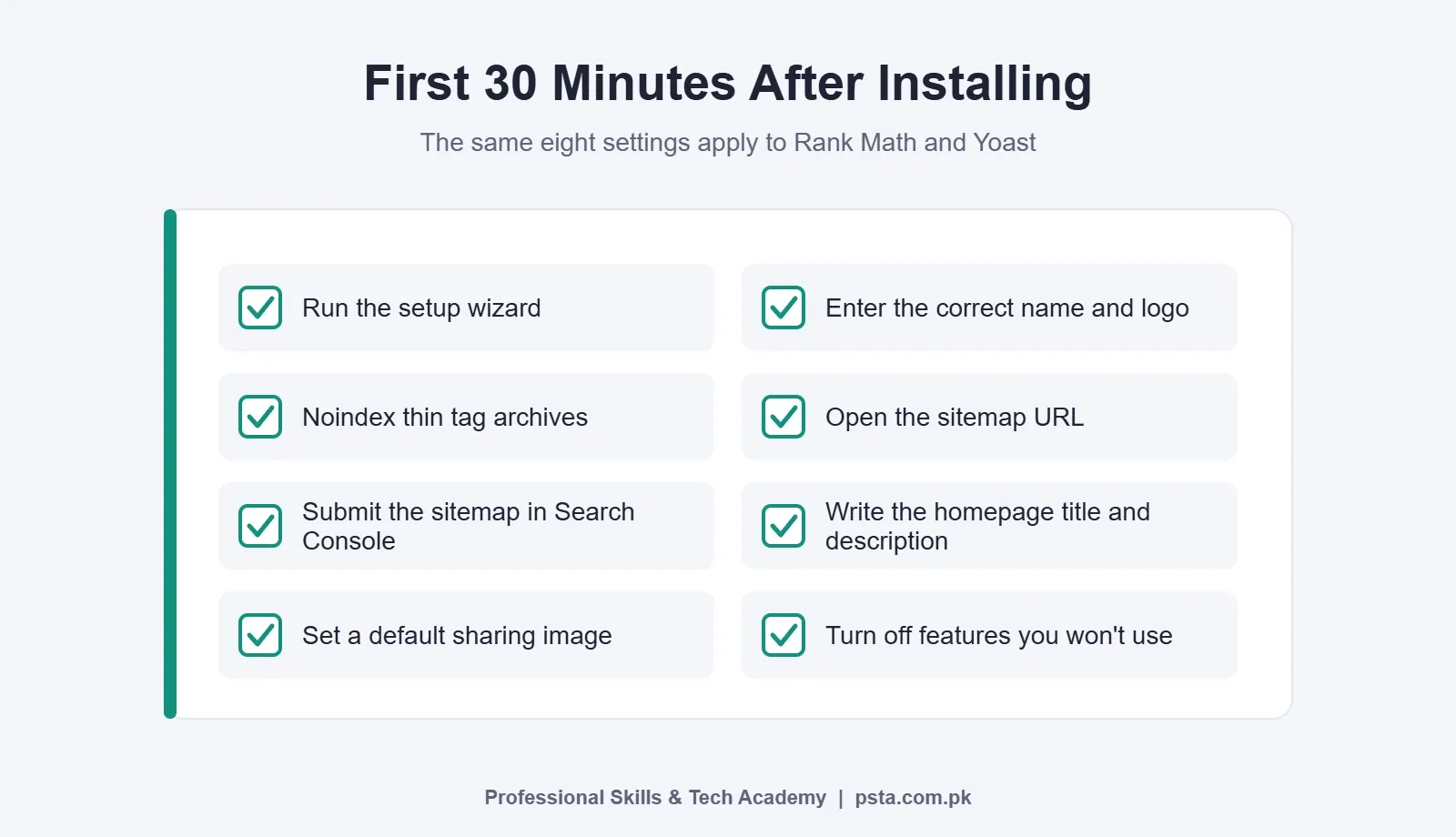
The first half hour after installing decides most of what an SEO plugin does for you. Work through these settings once, whichever plugin you picked:
- Run the setup wizard and enter the correct business or person name and logo.
- Set the site to "noindex" for tag archives and other thin pages you don't want in search.
- Open the XML sitemap URL and confirm it loads.
- Submit that sitemap in Google Search Console.
- Write a custom title and meta description for the homepage.
- Set a default social sharing image.
- Turn off modules or features you won't use.
- Write down which plugin and version you installed, for the next developer.
For the server side of things, such as Core Web Vitals and crawl errors, our technical SEO checklist picks up where this list ends.
Habits That Matter More Than the Plugin
We've watched students spend a week on Rank Math vs Yoast and then publish pages with no clear topic. The green light in either plugin is a checklist, not a ranking. A few habits do more work:
- Write each page for one search question and answer it early.
- Keep pages fast. A heavy theme undoes good meta tags, as our WordPress speed guide shows.
- Link related pages to each other with clear anchor text.
- Update the plugin regularly. Yoast's listing mentions a two-week update cycle, and outdated plugins are a common security gap.
- Check Search Console every week for pages that stopped getting indexed.
Practising SEO Plugin Setup in PSTA's WordPress Course
Twelve weeks is the length of our WordPress website development course, and nobody expects you to know code on day one. You start with domain and hosting, build pages in Elementor and Gutenberg, then move through plugins, a WooCommerce store, SEO, site speed and security, and finish with portfolio and freelancing work. Fees change from time to time; when we checked today, it was Rs. 22,000, with Rs. 25,000 shown as the regular price.
In class, you work with both sides of the Rank Math vs Yoast question on a live practice site. You configure an SEO plugin, set up redirects and check the sitemap in Search Console. You can join at the Abbottabad campus, attend live online from anywhere in Pakistan, or mix the two.
If you want to go deeper into keyword research and content planning, the Advanced Digital Marketing course covers SEO beyond WordPress. Developers who want to write their own themes and plugins may prefer the Full-Stack Web Development course. Fees and durations for every program sit on the courses page, and the admission form takes a few minutes. Questions about batches can go to WhatsApp at +92 314 5424399.
Test Both on a Staging Copy This Weekend
Install WordPress locally or on a staging subdomain, add Rank Math to one copy and Yoast to another, and set up the same three pages on each. Our guide to installing WordPress on localhost gets you there in an evening. After an hour with each settings screen, you'll know which one you'd rather open every day, and that matters more than any feature count.
Frequently asked questions
Is Rank Math better than Yoast for beginners?
For a new site with no budget, Rank Math gives a beginner more in its free version, including redirects, a 404 monitor and five focus keywords per post. Its many settings can feel heavy, so switch on only the modules you need. Yoast's traffic-light checks are simpler to follow if you mainly want writing guidance.
Is Yoast SEO free to use?
Yes. The core Yoast SEO plugin is free on WordPress.org and includes SEO and readability analysis, XML sitemaps, canonical URLs, breadcrumbs and an llms.txt option. Features such as the redirect manager, up to five keyphrases per post and the AI tools need a Yoast SEO Premium subscription, which covers one site each.
How much does Yoast SEO Premium cost in Pakistan?
Yoast lists Premium at $9.90 a month, billed annually, which is $118.80 a year per site, before any sale. You pay in US dollars with a card that allows international online payments, so the rupee amount depends on your bank's exchange rate and charges on the day you pay.
Can I use Rank Math and Yoast together?
No. Running both prints two sets of meta tags and can create two sitemaps, which sends search engines mixed signals. Pick one plugin, import the data from the other, check a few posts, and then deactivate and remove the plugin you no longer use.
Will switching from Yoast to Rank Math hurt my rankings?
A careful switch shouldn't, because Rank Math imports Yoast titles, descriptions and focus keywords through its setup wizard. Back up the site first, convert any Yoast FAQ or HowTo blocks, check important posts after the import, and resubmit your sitemap in Google Search Console so nothing gets missed.
Does an SEO plugin guarantee a first-page ranking?
No plugin can. Rank Math and Yoast handle technical tasks such as meta tags, sitemaps and schema, and their green scores are checklists. Rankings depend on how well a page answers the search, how fast the site loads and which other sites link to it.
Which SEO plugin is better for a WooCommerce store?
Rank Math's free version lists automatic product schema, and its PRO plan adds GTIN and brand fields. Yoast offers a separate WooCommerce SEO plan built on Premium. For a small Pakistani store starting out, Rank Math's free version usually covers the basics without an extra subscription.
Sources & references
- Yoast SEO plugin listing wordpress.org
- Rank Math SEO plugin listing wordpress.org
- Yoast SEO Premium pricing yoast.com
- Yoast product portfolio update, July 2025 yoast.com
- Rank Math pricing rankmath.com
- Migrating from Yoast SEO to Rank Math rankmath.com
- How to migrate from Rank Math to Yoast SEO yoast.com
- Google Search Central documentation updates developers.google.com
Last reviewed & updated on by Umar Qureshi. Written by the PSTA team in Abbottabad, Pakistan.

Umar Qureshi

Complete WordPress Website Development Course: Beginner to Pro
Turn this guide into a career: hands-on training with real projects, online across Pakistan or on-campus in Abbottabad · 12 Weeks.

Comments
No comments yet — ask a question or share your experience.