
Quick answer
A social media content calendar is a shared sheet listing each post's date, platform, pillar, format, caption, asset and status. Pick three or four content pillars, choose a posting pace you can sustain, mark seasonal dates, plan two to four weeks ahead, schedule weekly, and review results every month.
Key takeaways
- • Keep sales posts to about one in three; rotate the rest through tips, behind the scenes and customer questions.
- • A steady pace you can keep beats an ambitious one you abandon after a week.
- • Eight columns are enough: date, platform, pillar, format, caption, asset link, status and result.
- • Plan seasonal campaigns such as Ramadan and Eid four to six weeks ahead.
- • Review each post after seven days and judge it by the chats it starts, not just likes.
Table of contents 15 sections
- What Is a Social Media Content Calendar, and What Does It Replace?
- Meet the Example Business: A Home Clothing Brand in Abbottabad
- Step 1: Choose Three or Four Content Pillars
- Step 2: Pick Platforms and a Posting Pace You Can Sustain
- Which Columns Should Your Calendar Template Have?
- Step 3: Mark the Dates That Matter to Your Buyers
- Seasonal and Cultural Dates
- Lead Time for Big Campaigns
- Your Own Business Dates
- The Finished December Social Media Content Calendar
- How Far Ahead Should You Schedule Posts?
- Reviewing the Month: What to Measure Before You Plan Again
- Mistakes That Quietly Break a Social Media Content Calendar
- Where Content Planning Fits in PSTA's SMM and Meta Ads Course
- Block Two Hours on Sunday
A social media content calendar is a simple plan that says what you will post, where, on which day and why, usually a month at a time. It matters in Pakistan because the audience is large and still growing: DataReportal's Digital 2026 Pakistan report puts Pakistan's social media user identities at 79.9 million in October 2025, roughly 31.2 percent of everyone in the country. A calendar is how a small shop turns that reach into steady, planned posting instead of last-minute guesswork.
In this guide we will build one month of posts for a realistic example business, step by step. You will see:
- How to pick three or four content pillars that fit your shop
- A posting pace you can actually keep, by platform
- The columns your calendar sheet needs, and the ones you can skip
- How to work Pakistani dates, including Ramadan 2027, into the plan
- A finished four-week calendar you can copy and adapt
What Is a Social Media Content Calendar, and What Does It Replace?
Most small businesses in Pakistan post the same way. Someone remembers at 9 PM that the page has been quiet, grabs a product photo, writes a caption on the phone and hits publish. Some weeks get six posts. Then a busy week arrives and the page goes silent for ten days.
A calendar replaces that pattern with a shared sheet. Each row is one post. It holds the date, the platform, the format, the caption, a link to the image or video, and a status such as "idea", "ready" or "scheduled". Hootsuite's 2026 calendar guide puts the minimum fields as the date, time, platform, copy, asset and link for each post. Everything else is optional.
The point isn't paperwork. It's that you make posting decisions once a month, calmly, instead of thirty times a month in a rush.
Meet the Example Business: A Home Clothing Brand in Abbottabad
To keep this practical, we'll plan for an example business. It's a made-up brand we'll call Noor Threads, run by two sisters from home in Abbottabad. They sell winter shawls and unstitched suits through Facebook, Instagram and WhatsApp, and deliver by courier across the country.
Their situation is common. They have one phone, a ring light, and about two hours a week for social media. Orders arrive through Instagram DMs and WhatsApp. Their posts are almost all product photos with prices, and engagement has gone flat.
Their goal for December is modest: post on a fixed rhythm, mix in content that isn't a sales pitch, and keep track of which posts lead to chats. Everything below follows their planning session in order. Swap in your own products as you read.
Step 1: Choose Three or Four Content Pillars
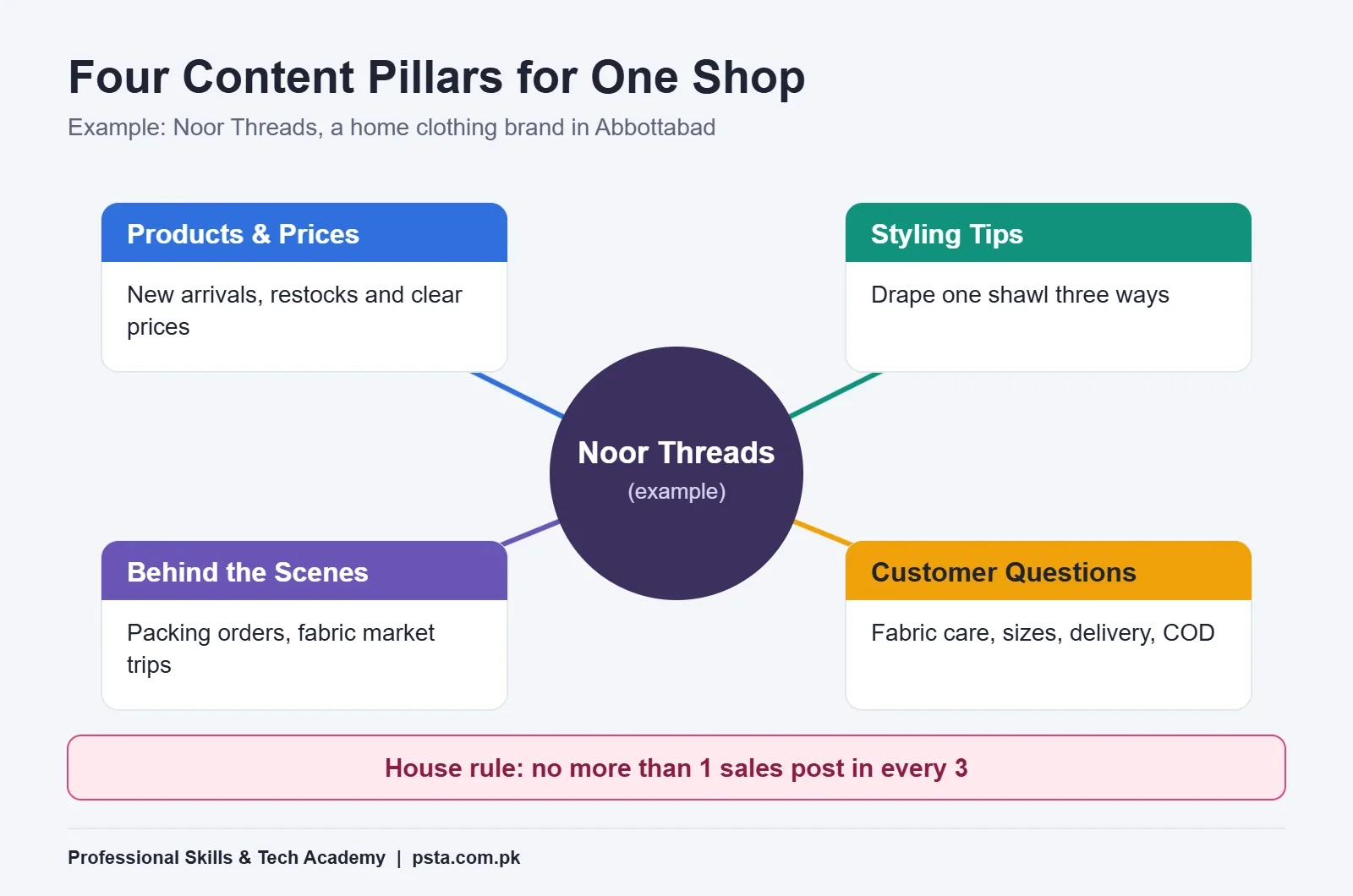
A content pillar is a recurring theme your posts rotate through. Pillars stop the page from becoming a price list, and they make a social media content calendar faster to fill because every empty slot already has a category waiting.
Hootsuite's posting-schedule guide describes the 5-3-2 rule for mixing content: out of every 10 posts, 5 are curated from trusted sources, 3 are your own and 2 are personal or human. A small product brand rarely curates other people's content, so treat these rules as a reminder to balance, not a formula.
Noor Threads settled on four pillars:
- Products and prices. New arrivals, restocks and clear prices. This is the selling pillar.
- Styling tips. How to drape a shawl three ways, which colors suit a mehndi versus an office day.
- Behind the scenes. Packing orders, choosing fabric at the wholesale market, a courier pickup.
- Customer questions. Answers to the things buyers ask in DMs: fabric care, sizes, delivery time, cash on delivery.
They also set one house rule: no more than one in every three posts may be a straight sales post. The other pillars still sell, just more quietly.
Step 2: Pick Platforms and a Posting Pace You Can Sustain
Next, decide where to post and how often. The audience numbers help here. In DataReportal's late-2025 figures, ad tools in Pakistan reached 54.3 million people on YouTube, 52.9 million on Facebook and 22.4 million on Instagram. The report quotes Meta's own warning that audience size is not the same as active users, so use these numbers to compare platforms, not to predict sales.
If you've ever wondered how often to post on Instagram, the useful answer is as often as you can keep doing it well. For a clothing brand that sells through chat, Facebook and Instagram were the obvious pair. YouTube needs longer videos, which the sisters didn't have time to make yet.
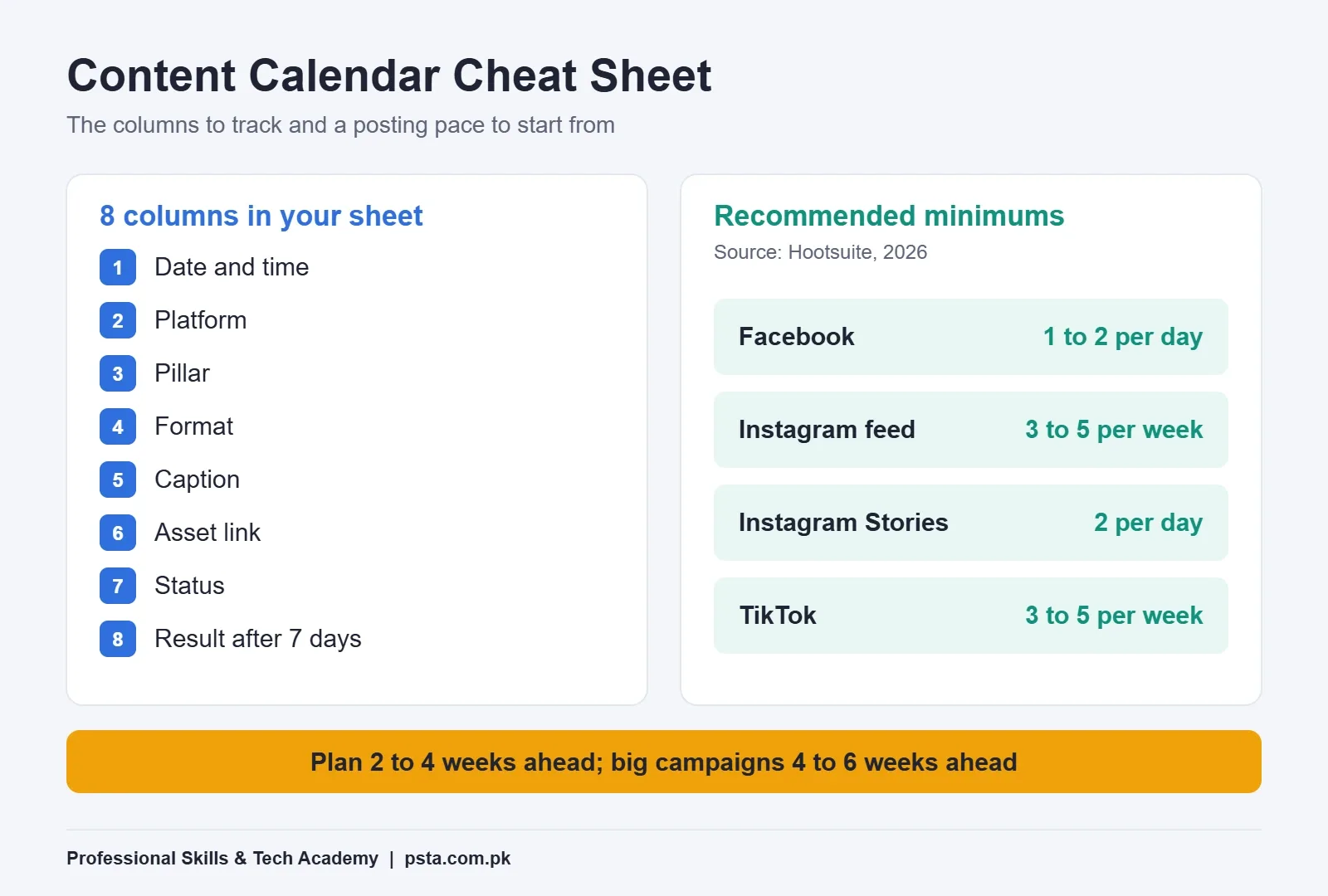
Then comes frequency. Hootsuite's 2026 posting schedule gives these recommended minimums:
| Platform | Hootsuite's Recommended Minimum | Noor Threads' Realistic Plan |
|---|---|---|
| 1 to 2 posts per day | 3 posts per week, plus shared Reels | |
| Instagram feed | 3 to 5 posts per week | 3 posts per week |
| Instagram Stories | 2 per day | 1 to 2 on posting days |
| TikTok | 3 to 5 posts per week | Not yet |
| 1 to 2 per day | Not relevant for this shop |
Notice that the plan sits below the recommendations. That's deliberate. The same Hootsuite guide says consistency matters more than volume, and Buffer's calendar guide makes the same case: a pace like three posts a week that you keep up beats bursts of activity you can't repeat. A social media posting schedule should fit your own hours, not someone else's chart. Add more once the routine holds for a month.
Which Columns Should Your Calendar Template Have?
You don't need paid software to run a social media content calendar. A Google Sheet works well because both sisters can edit it from their phones. The question is which columns to add. Too few, and the sheet can't answer "what's ready for tomorrow?" Too many, and nobody fills it in.
Here is the content calendar template Noor Threads used, with the reason for each column:
| Column | What Goes In It | Why It Earns Its Place |
|---|---|---|
| Date and time | Mon 7 Dec, 8 PM | Forces a decision about when, not just what |
| Platform | FB + IG | One row can cover cross-posts |
| Pillar | Styling tips | Shows gaps or too many sales posts in a row |
| Format | Reel, carousel, photo, Story | Tells you what to shoot on filming day |
| Caption | Draft text and hashtags | Written in batches, not at 9 PM |
| Asset link | Google Drive link | No hunting through the phone gallery |
| Status | Idea, ready, scheduled, posted | Answers "are we on track?" in one glance |
| Result after 7 days | Reach, saves, DMs | Feeds next month's plan |
Hootsuite's calendar guide lists extra fields that bigger teams use, such as owner, reviewer notes, alt text and a paid boost flag. Add "owner" if more than one person posts. Add a boost column only if you run ads; our guide to boosting posts versus using Ads Manager explains when that money is worth spending.
Step 3: Mark the Dates That Matter to Your Buyers
Before filling any slots, the sisters marked the dates that change what people buy. For a clothing shop in Pakistan, these fall into three groups.
Seasonal and Cultural Dates
December means winter wear, weddings and year-end gifts. National days like Quaid-e-Azam Day on 25 December and Independence Day on 14 August suit themed posts, while big religious occasions drive the heaviest buying. According to ARY News, Ramadan 2027 is expected to begin on 8 or 9 February 2027, subject to moon sighting, and likely to end around 8 March. Treat that as provisional, but it's close enough to start planning Eid stock and posts.
Lead Time for Big Campaigns
Hootsuite notes that most teams schedule regular posts one to two weeks ahead but plan major and seasonal campaigns four to six weeks ahead. For Noor Threads, that meant writing "start Ramadan and Eid planning" into the calendar for the first week of January, not February.
Your Own Business Dates
Restock days, a new fabric arriving, the day your courier rates change. These are small for the world but big for your page, and they belong on the calendar too.
The Finished December Social Media Content Calendar
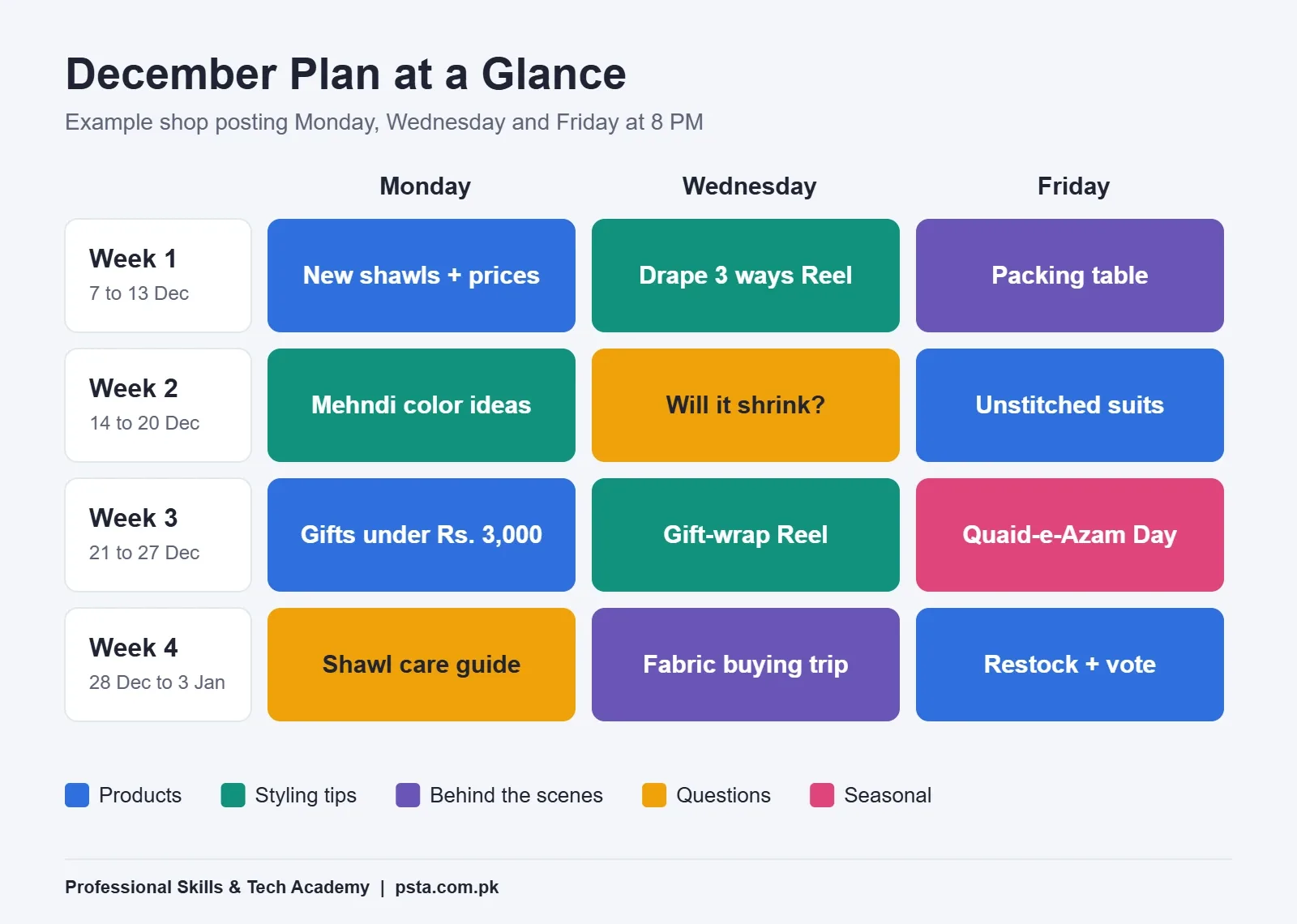
With pillars, pace and dates ready, filling the month took about an hour. The sisters posted on Monday, Wednesday and Friday at 8 PM, with a "customer questions" Story every Sunday.
- Week 1, 7 to 13 December (winter launch): Monday shows the new shawl range with prices. Wednesday is a Reel draping one shawl three ways. Friday shows the packing table on a busy morning.
- Week 2, 14 to 20 December (wedding season): Monday is a carousel of mehndi and baraat color ideas. Wednesday answers "will this fabric shrink?" Friday features the unstitched suits with prices.
- Week 3, 21 to 27 December (gifting): Monday is a "gifts under Rs. 3,000" post built from their own price list. Wednesday is a gift-wrapping Reel. Friday, 25 December, is a respectful themed post for Quaid-e-Azam Day.
- Week 4, 28 December to 3 January (year-end): Monday is a care guide for wool shawls. Wednesday follows the sisters on a fabric-buying trip. Friday is a restock post that also asks followers to vote on January colors.
Count the pillars and you'll see four sales posts out of 12, which meets their one-in-three rule. If a viral trend appears mid-month, one of the softer slots can swap for it. Shopify's calendar guide suggests leaving room like this for timely content, and also recommends setting aside a few hours at the start of each month to plan.
Size each asset for its slot as you go. Our social media post sizes guide lists the current dimensions, and the Instagram Reels for business guide covers the mistakes shops make with short video.
How Far Ahead Should You Schedule Posts?
Planning and scheduling are two different jobs. Planning means the sheet is filled. Scheduling means the post is loaded into a tool so it publishes on its own.
Buffer recommends planning at least two to four weeks ahead. Scheduling can be shorter: one week at a time works for most small shops, because it leaves room to react to stock changes or news.
For Facebook and Instagram, the free Meta Business Suite Planner handles scheduling. How far ahead it allows is unclear. A SocialBee article says Meta's help pages mention 75 days, while users report a 30-day limit in some places. Check the date picker in your own account before planning around either number.
A workable weekly routine for a two-person shop:
- On Sunday, film and photograph everything for the coming week in one session.
- On Monday morning, write captions in the sheet and move each row to "ready".
- Load the week's posts into the Planner and mark them "scheduled".
- Each evening, spend 15 minutes replying to comments and DMs. Scheduling saves posting time, not conversation time.
Reviewing the Month: What to Measure Before You Plan Again
A social media content calendar earns its keep at the end of the month, when you can compare posts side by side. Buffer suggests a weekly review of impressions, clicks, likes and comments. For a shop that sells through chat, add the measure that matters most: how many DMs or WhatsApp chats each post started.
Fill the "result after 7 days" column for every post, then ask three questions:
- Which pillar started the most conversations, not just the most likes?
- Which format (Reel, carousel, photo) reached the most people for the effort it took?
- Which posting day and time had the weakest results, and should it move?
If you send people to a website, add tracking to your links so each post shows up separately in Google Analytics. Our guide to UTM parameters walks through it. Next month's calendar should keep what worked, drop what didn't and test one new idea, never five at once.
Mistakes That Quietly Break a Social Media Content Calendar
- Planning a pace you can't keep. Ten posts a week in the sheet, three in reality. Plan for your worst week, not your best.
- Filling every slot with sales. The pillar column exists to catch this. If three sales posts sit in a row, swap one.
- Treating the calendar as fixed. It's a plan, not a contract. Moving a post for a trend or a stock problem is fine.
- Skipping the review. Without the results column, next month is just a guess with nicer formatting.
- Scheduling and disappearing. A scheduled post that gets unanswered questions does more harm than no post.
Where Content Planning Fits in PSTA's SMM and Meta Ads Course
At PSTA, students build a social media content calendar for a real brand inside the SMM and Meta Ads course. It's a 12-week, beginner-level course, and the current fee listed on the course page is Rs. 24,000. The modules cover brand voice and audience research, Canva design for carousels and Stories, short-form video for Reels and TikTok, Meta Ads Manager, the Pixel and Conversions API, WhatsApp marketing, and GA4 reporting with UTM tracking.
You can join on campus in Abbottabad, live online from anywhere in Pakistan, or mix the two. A new batch starts every month. If you'd like to make your own Reels rather than outsource them, the Video Editing and VFX course pairs well with it. You can compare all options on the courses page or apply through admission.
Block Two Hours on Sunday
You don't need a perfect system to start your first social media content calendar. Open a blank Google Sheet, add the eight columns above, write your three or four pillars at the top, and fill just the next two weeks. Pick a posting pace you're sure you can keep, even if it feels small. After four weeks, read the results column and adjust. For a small brand doing social media marketing in Pakistan, that single habit does more than any trick or hashtag.
Frequently asked questions
What should a social media content calendar include?
At minimum, each row needs the date and time, platform, format, caption, a link to the image or video, and a status. Adding a content pillar column helps you spot too many sales posts in a row, and a results column filled seven days later tells you what to repeat next month.
How often should a small business post on social media?
Hootsuite's 2026 guide suggests minimums of 1 to 2 Facebook posts a day and 3 to 5 Instagram feed posts a week. Small teams often start lower, such as three posts a week, because a pace you can keep beats bursts followed by silence. Increase frequency once the routine holds.
Can I make a content calendar in Google Sheets for free?
Yes. A free Google Sheet with one row per post and columns for date, platform, pillar, format, caption, asset link, status and result is enough for most small shops. It also lets two or more people edit the plan from their phones at the same time.
What are content pillars in social media marketing?
Content pillars are three to five recurring themes your posts rotate through, such as products, how-to tips, behind-the-scenes moments and answers to customer questions. They keep your page from turning into a price list and make filling the calendar faster, since every empty slot already has a category.
How far in advance should I plan social media posts?
Buffer recommends planning at least two to four weeks ahead. Hootsuite notes many teams schedule regular posts one to two weeks ahead and plan seasonal campaigns four to six weeks ahead. For Ramadan and Eid, start planning stock, offers and posts in early January.
Is Meta Business Suite good for scheduling posts?
Meta Business Suite's Planner is free and schedules posts to Facebook and Instagram, which is enough for most small businesses in Pakistan. Reports differ on how far ahead it lets you schedule, so check the date picker in your own account rather than relying on a fixed number.
How do I know if my content calendar is working?
Review each post about seven days after it goes live. Note reach, saves and comments, but for a shop that sells through chat, the key measure is how many DMs or WhatsApp conversations each post started. Keep the pillars and formats that start conversations and drop the ones that don't.
Sources & references
- Digital 2026: Pakistan (DataReportal) datareportal.com
- How to create a social media posting schedule in 2026 (Hootsuite) blog.hootsuite.com
- How to create a social media calendar in 2026 (Hootsuite) blog.hootsuite.com
- Social Media Calendar: 11 Free Templates (Buffer) buffer.com
- Social Media Calendar: How to Plan Content (Shopify) shopify.com
- Ramadan 2027: Start and end dates revealed in Pakistan (ARY News) arynews.tv
- Meta Planner 30-day post scheduling restriction (SocialBee) socialbee.com
Last reviewed & updated on by Umar Qureshi. Written by the PSTA team in Abbottabad, Pakistan.

Umar Qureshi

Social Media Marketing (SMM) & Meta Ads Course
Turn this guide into a career: hands-on training with real projects, online across Pakistan or on-campus in Abbottabad · 12 Weeks.



Comments
No comments yet — ask a question or share your experience.