Quick answer
To fix a Facebook ad account restricted from advertising, open Meta Business Support Home on a computer and follow the steps under "What you can do." Pay any failed balance, turn on two-factor authentication and secure the account. If the decision still looks wrong, an admin can request a review, which Meta says typically takes 48 hours.
Key takeaways
- • Meta restrictions range from lower spending limits to a full ban on advertising.
- • A failed payment disables an ad account until the amount due is paid.
- • Missing two-factor authentication can stop some business portfolios from publishing ads.
- • Only an admin can request a review, and the number of attempts is limited.
- • Meta says account reviews are typically completed in 48 hours.
- • Never open a new ad account to keep running ads that Meta has stopped.
Table of contents 16 sections
- What Does "Restricted" Actually Mean on Meta?
- Why Was My Facebook Ad Account Restricted?
- 1. Policy Problems
- 2. Payment Problems
- 3. Security Problems
- 4. Missing Two-Factor Authentication
- Points 1 to 3: Find the Exact Reason First
- Points 4 to 6: Fix What You Can Fix Yourself
- Points 7 and 8: Request a Review the Right Way
- How Long Does a Meta Ad Account Review Take?
- Points 9 and 10: Restart Safely After Reinstatement
- Facebook Ad Account Restricted in Pakistan: Card and Payment Checks
- What Should You Avoid While You Wait?
- Habits That Keep Your Ad Account Out of Trouble
- How the PSTA Meta Ads Course Covers Account Safety
- Before Your Next Campaign Goes Live
A Facebook ad account restricted from advertising usually traces back to one of four causes. These are a policy violation, a failed payment, missing two-factor authentication or activity that looks like a hack. You fix it from Meta Business Support Home. If you believe the decision is wrong, an account admin can request a review that Meta says is typically completed in 48 hours.
When a Facebook ad account restricted notice appears, the panic usually comes first and the guessing comes second. Business owners in Pakistan lose days opening new accounts, paying for "recovery" services or deleting ads. Several of those moves make the problem worse. This checklist keeps you on the steps Meta itself describes.
Here's what this checklist covers:
- How a rejected ad, a restricted account and a payment-disabled account differ
- The four reasons Meta gives for advertising restrictions
- A 10-point order of work: find the reason, fix it, then appeal
- Card and payment checks that matter for advertisers paying from Pakistan
- The mistakes that can turn a short restriction into a permanent one
What Does "Restricted" Actually Mean on Meta?
Meta uses one word for several different situations, and each one has a different fix. A Facebook ad account restricted for a failed card needs different action from one restricted for policy. According to Meta's page About advertising restrictions, a restriction can mean any of these:
- A lower daily spending limit or a lower payment threshold
- Losing access to some payment features
- Losing access to some advertising features
- Losing the ability to advertise on Meta platforms at all
The restriction can also land on different assets. Meta names four: the business portfolio, the ad account, the Facebook Page and the personal profile of the person running ads. If your own profile is restricted, you can't create ads, and any ad account where you're the only user may also be disabled. Other people in the same portfolio may still be able to advertise.
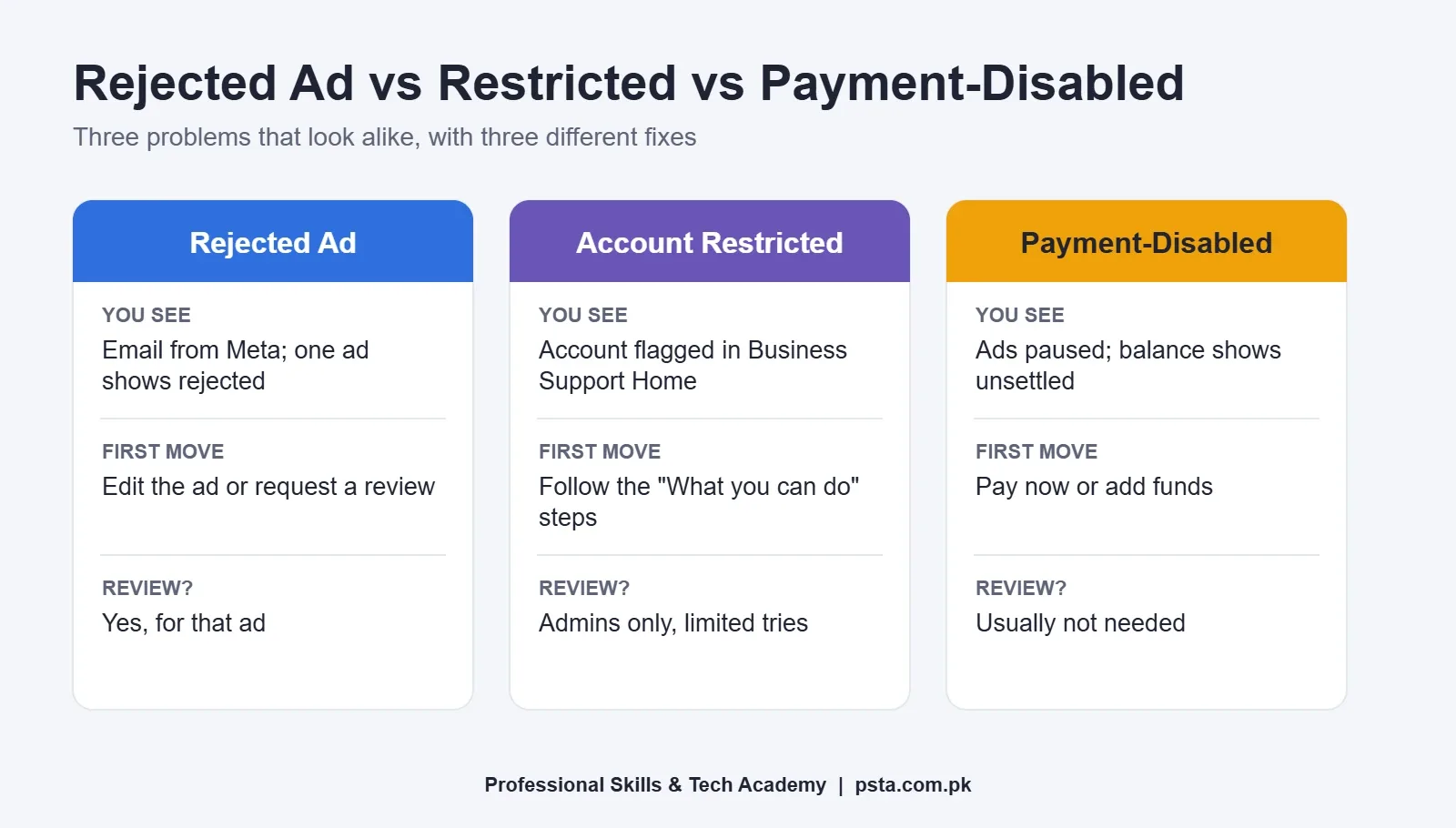
Before you do anything, work out which of the three common situations you're in. The table below sets them side by side.
| Situation | What you'll notice | First thing to do | Review available? |
|---|---|---|---|
| One ad rejected | Email from Meta; that ad shows as rejected while others keep running | Read the reason, then edit the ad or request a review | Yes, for that ad |
| Account restricted for policy or security | Ads stop; Business Support Home lists the account as restricted | Open the account and follow "What you can do" | Yes, admins only, limited number of times |
| Account disabled for failed payment | Ads paused; Billing and payments shows the account as unsettled | Pay the amount due or add funds | Usually not needed once the balance is paid |
Why Was My Facebook Ad Account Restricted?
Meta lists the situations in which it applies advertising restrictions. In plain terms, they fall into four groups.
1. Policy Problems
Your ads, Page or account broke the Community Standards, the Meta Advertising Standards, the Commerce Policies or other terms. Meta says it restricts accounts for content that "severely or repeatedly" violates its policies, so a single rejected ad usually isn't enough. A pattern of rejected ads is.
2. Payment Problems
Meta's failed payment guide is direct about this: when your payment method fails, your ads pause and the ad account is disabled until you pay the amount due. Meta also watches for high rates of failed or disputed payments, which can bring spending limits even after you pay.
3. Security Problems
If Meta suspects your business portfolio or one of its assets has been hacked, it may restrict features while it investigates. During that time you might not be able to add admins, add partners or create new ad accounts.
4. Missing Two-Factor Authentication
This one surprises many small advertisers. Meta's page on two-factor authentication for business portfolios says advertisers may need 2FA turned on to publish ads, including some portfolios older than 90 days. Without it, Meta may restrict advertising access, remove shop permissions or remove a payment method.
Points 1 to 3: Find the Exact Reason First
With a Facebook ad account restricted, most wasted time comes from fixing the wrong thing. Spend 15 minutes here before you change anything.
- Open Business Support Home on a computer. Meta's troubleshooting page asks you to start on a computer, not the phone app. Go to Account overview and click the restricted account.
- Note which asset is restricted. Is it the ad account, the Page, the portfolio or your own profile? Write it down. If only your profile is affected, another admin may be able to keep the business running while you sort it out.
- Read the "What you can do" section and screenshot it. Meta may ask you to confirm your identity, complete verification, secure your account or request a review. The order shown there is the order to follow.
Keep those screenshots in one folder with dates. If you later need to explain the case to a client or to Meta support, you'll have a clean record instead of memory.
Points 4 to 6: Fix What You Can Fix Yourself
Some restrictions don't need an appeal at all. They lift once you correct the underlying issue.
- Settle any unpaid balance. In Billing and payments, select the ad account, click Payment methods, then Pay now. If the card fails again, Meta suggests trying later with a different card. You can also use Add funds, though Meta notes the account may take a little while to return to a good state.
- Turn on two-factor authentication for every admin. Meta says people set up 2FA through their personal Facebook profile. Do it for yourself, then ask each person with access to do the same. Our guide to two-factor authentication methods explains which option is safest.
- Secure the account if anything looks unfamiliar. Check for admins you don't recognize, unknown ad accounts or charges you didn't make. Remove strangers, change passwords and follow Meta's hacked-account steps before you ask for any review.
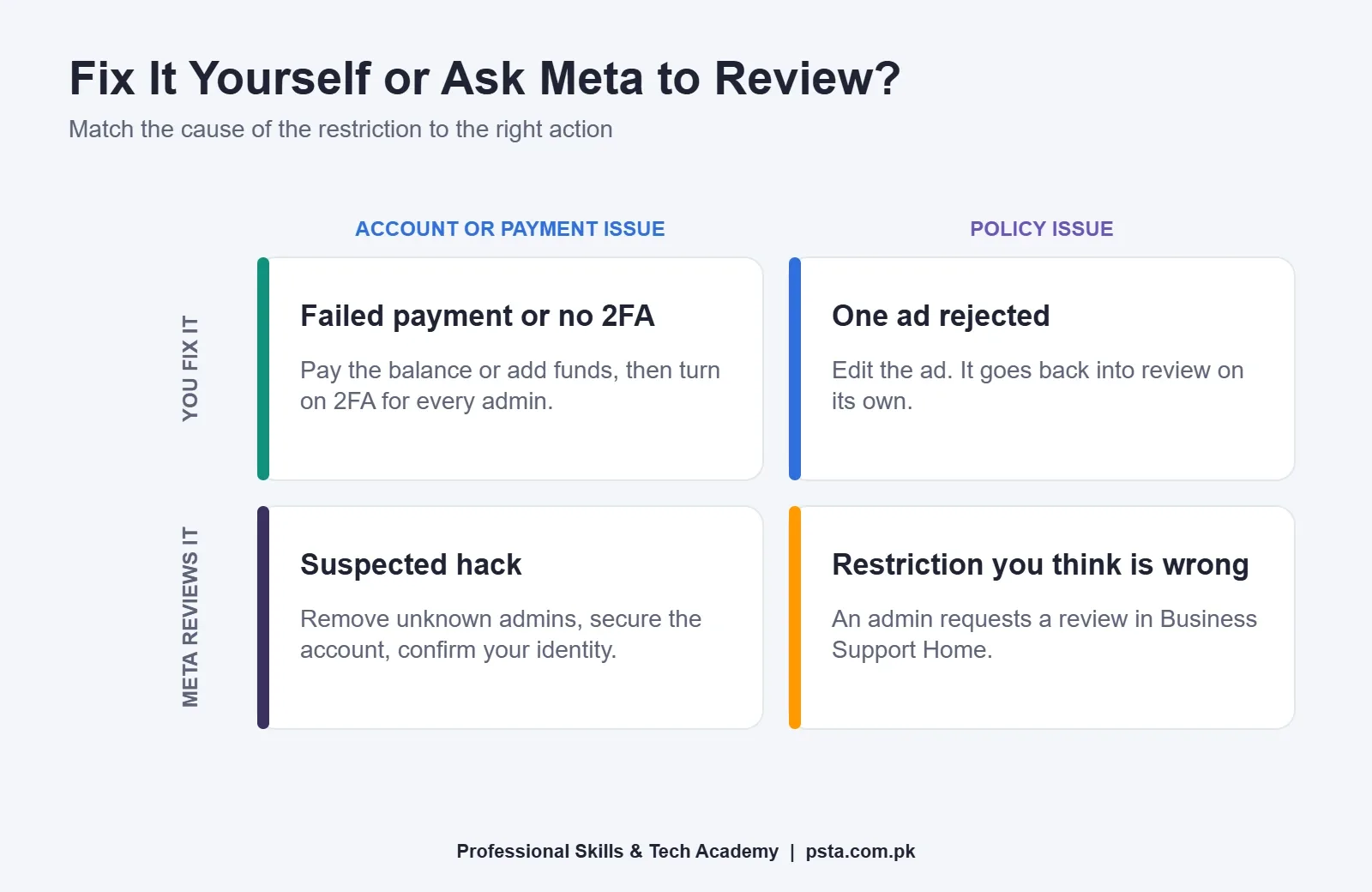
Once these three points are done, refresh Business Support Home. If the account status has cleared, skip straight to point 9. If it still shows a policy restriction, move on to the review.
Points 7 and 8: Request a Review the Right Way
A review is worth doing when you honestly believe the restriction is a mistake. Meta's review instructions are short, but two details catch people out: only an admin can submit it, and you get a limited number of attempts.
- Prepare before you click. Re-read the ads that ran in the last few weeks against the Advertising Standards. Look at the image, the text, the targeting and the landing page. If something was borderline, such as a "before and after" health claim or a get-rich-quick promise, fix or remove it first. Don't delete rejected ads, though: Meta says you may lose the ability to request another review of a deleted ad.
- Submit the request from Account status overview. In Business Support Home, choose Account status overview, select the restricted account, then click Request review under "What you can do" and complete the steps. Meta says asking for a review won't hurt your standing with the company.
Keep the request factual. A short, honest description of your business and what you sell helps more than a long complaint. Meta says the result is final once the review is complete, so this is not the moment to rush.
How Long Does a Meta Ad Account Review Take?
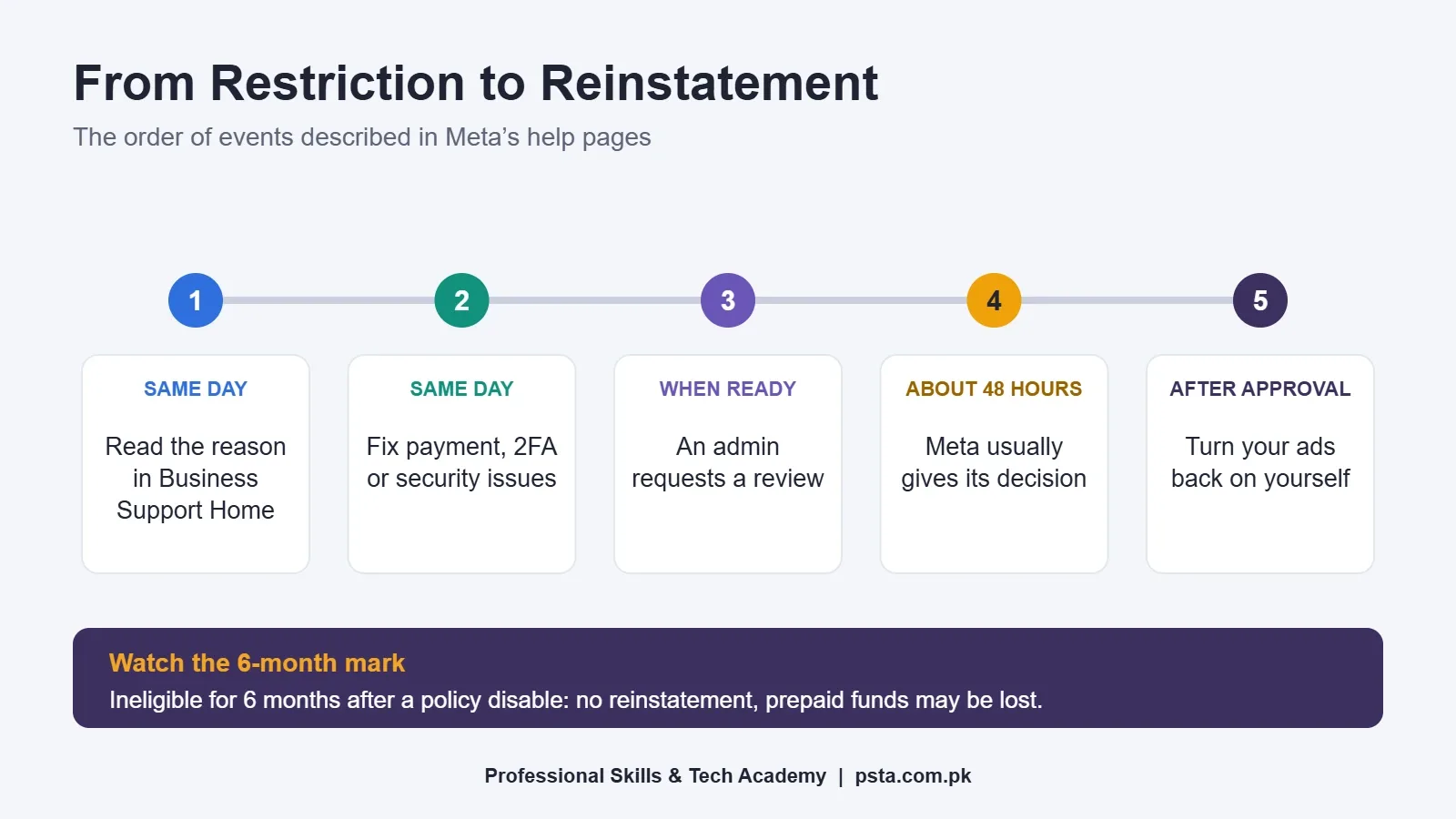
Meta says its review is typically completed in 48 hours, though some cases take longer. For a single rejected ad, Meta's rejected ad guide also gives a 48-hour target and says re-reviews rely more heavily on human reviewers than the first automated check.
Then the outcome splits two ways. If Meta agrees the restriction was wrong, the account is reinstated. If not, the restriction stays and the account is blocked.
There's also a longer clock to know about. Meta states that an ad account disabled for a policy violation may stay ineligible for reinstatement for six months. In that case, unused prepaid funds may be forfeited where the law allows, and the account can't be reinstated after that. Meta also reserves the right to disable an account permanently before six months in some circumstances. So if you have prepaid funds sitting in a disabled account, deal with it promptly.
Points 9 and 10: Restart Safely After Reinstatement
- Turn your ads back on yourself. Meta says ads that were running before the restriction won't restart automatically. Open Ads Manager and switch on only the campaigns you've checked against policy.
- Restart small and watch for a week. Begin with a modest daily budget and one or two ad sets. A sudden jump in spend right after reinstatement can look like the unusual activity that triggered limits in the first place. That's advice from practice, not a Meta rule, but it costs you little.
If you manage ads for a client, send them a short written note. Say what happened, what you changed and the date the account came back. It protects you both.
Facebook Ad Account Restricted in Pakistan: Card and Payment Checks
For many advertisers here, the trigger is a card problem, not a policy one. Meta's payment page lists checks that apply directly to Pakistani debit and credit cards:
- The card must be enabled for online transactions. If your bank controls online use separately, switch it on in the bank's app or through its helpline.
- The card needs a CVV code, and the phone number linked to the card must receive the one-time password.
- One payment method can typically be added to up to 10 ad accounts. Sharing one card across many client accounts can hit that limit.
- Add a backup payment method so one declined charge doesn't pause everything.
- If your card has a per-transaction limit, lower your payment threshold to match it.
Your bank also adds its own costs and limits. HBL's page on foreign currency card transactions says a foreign transaction fee and government taxes are charged on such payments, and it notes an industry-wide annual limit of $30,000 on card-based foreign currency transactions, effective 8 November 2022. The same page says these card transactions are for personal use. A business with regular ad spend should ask its bank which card or account fits that use. Leave room on the card for the fee and tax, or the charge can fail even when the ad cost itself fits.
For a full walk-through of payment options, read our guide to paying for Facebook ads from Pakistan.
What Should You Avoid While You Wait?
The days after a Facebook ad account restricted notice are when well-meaning advertisers make things worse. Avoid these moves:
- Opening a fresh ad account to keep running the same ads. Meta lists creating new ad accounts to repeat violations after a disable as evading enforcement. That can extend restrictions to your whole portfolio, Page and profile.
- Running ads from a friend's account. Meta also restricts assets that it links to a network of accounts violating or evading its policies.
- Deleting rejected ads to "clean" the record. Meta says editing or deleting a rejected ad doesn't remove the violation, and deletion can cost you the right to request a review.
- Paying a stranger to "fix" the account. Anyone who asks for your login or a code is a security risk. The official review in Business Support Home is free.
- Submitting repeated reviews in a hurry. Attempts are limited and the final decision stands, so one prepared request is better than three rushed ones.
Many of the policy problems behind restrictions start as small setup errors. Our list of common Meta ads mistakes covers the ones we see most in beginner campaigns.
Habits That Keep Your Ad Account Out of Trouble
Most cases of a Facebook ad account restricted for payment or security reasons can be prevented with routine. These habits take a few minutes a week:
- Keep at least two trusted admins on the business portfolio, both with 2FA on.
- Check card expiry dates and balance before your monthly billing date.
- Read every ad rejection email the day it arrives, and fix the cause rather than only the ad.
- Avoid claims you can't prove, such as guaranteed results, miracle health effects or "earn Rs. 1 lakh a week."
- Make sure your landing page or WhatsApp number matches what the ad promises.
- Review who has access every month and remove people who've left the team.
How the PSTA Meta Ads Course Covers Account Safety
In our Social Media Marketing and Meta Ads course, account setup comes early. Module 4 covers Business Manager and ad account setup for high-security environments before you build a single campaign. Later modules move into the Meta Pixel and Conversions API, custom and lookalike audiences, and reporting with GA4.
The course page lists it as a 12-week, beginner-level program with a fee of Rs. 24,000 (reduced from Rs. 30,000). You can study on campus in Abbottabad, live online from anywhere in Pakistan, or in a hybrid mix. A new batch starts every month, and classes run Monday to Saturday between 9:00 AM and 9:30 PM.
For a wider program that goes beyond social media, look at our Advanced Digital Marketing course as well. You can see every program on the courses page, and when you're ready, the admission form takes a few minutes. Questions about batches can go to our WhatsApp line, +92 314 5424399.
Before Your Next Campaign Goes Live
Open Business Support Home today, even if nothing is wrong. Look at the account status for every ad account you manage. You don't want to find a Facebook ad account restricted notice on the morning a sale starts. Then confirm that every admin has 2FA turned on and that each account has a backup payment method. Those two checks address two of the four causes Meta lists, and they take less than 20 minutes.
Frequently asked questions
Can I open a new ad account if my Facebook ad account is restricted?
Not to keep running the same ads. Meta lists creating new ad accounts to repeat violations after an account is disabled as evading enforcement. That can spread restrictions to your business portfolio, Page and personal profile. Fix the cause first, then use the review option in Business Support Home if you think the decision was a mistake.
How many times can I request a review of a restricted ad account?
Meta says there is a limited number of review requests, but it does not publish an exact figure. Once a review is complete, the decision is final. Prepare properly before you submit: check recent ads against the Advertising Standards, fix anything borderline and make sure the request comes from an admin on the account.
Why was my ad account disabled right after I added a Pakistani card?
The most common cause is a failed charge. Meta disables the ad account until the amount due is paid. Check that the card allows online transactions, has a CVV, has enough balance for the charge plus bank fees and taxes, and is linked to a phone that receives the one-time password.
Will my ads start running again automatically after the account is reinstated?
It depends on the reason. After a policy review, Meta says ads that were running before the restriction will not restart on their own, so you need to switch them on in Ads Manager. After a failed payment is cleared, Meta says it resumes active or scheduled ads and tries to make up the lost time.
Does requesting a review make my account standing worse?
No. Meta states that asking for another review of an advertising restriction will not hurt your standing with the company. The same applies to reviews of individual rejected ads, and an ad rejection that is successfully overturned does not count as a violation. The real risk is a rushed request, because attempts are limited.
What happens to my prepaid balance if the ad account stays disabled?
Meta says that if an ad account disabled for a policy violation stays ineligible for reinstatement for six months, unused prepaid funds may be forfeited where the law allows. After that period the account cannot be reinstated. If you have money sitting in a disabled account, follow the troubleshooting steps without delay.
Can my team keep advertising if only my personal profile is restricted?
Often, yes. Meta says a restricted profile cannot create ads, and ad accounts where that person is the only user may be disabled too. Other members of the business portfolio, ad account or Page may still be able to advertise. This is one reason to keep at least two trusted admins on every portfolio.
Sources & references
- About advertising restrictions (Meta Business Help Centre) facebook.com
- Request a review for a restricted advertising account (Meta) facebook.com
- Troubleshoot a disabled or restricted account (Meta) facebook.com
- Fix a failed payment issue on Meta facebook.com
- Common examples of Meta advertising policy violations facebook.com
- How to troubleshoot a rejected ad (Meta) facebook.com
- About two-factor authentication for your business portfolio (Meta) facebook.com
- Foreign currency card transactions (HBL) hbl.com
Last reviewed & updated on by Umar Qureshi. Written by the PSTA team in Abbottabad, Pakistan.

Umar Qureshi

Social Media Marketing (SMM) & Meta Ads Course
Turn this guide into a career: hands-on training with real projects, online across Pakistan or on-campus in Abbottabad · 12 Weeks.

Comments
No comments yet — ask a question or share your experience.