Quick answer
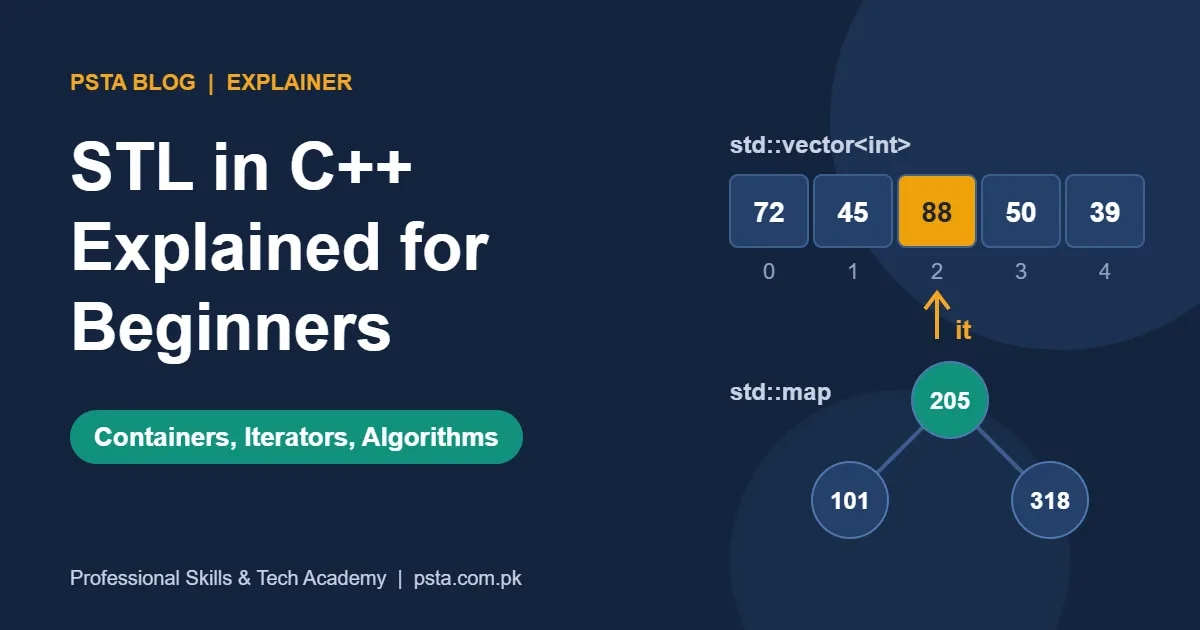
STL in C++ is the part of the standard library that gives you containers such as vector and map, iterators that point into them, and algorithms like sort and find. Start with vector as your default, use map or unordered_map for key lookups, and replace hand-written loops with library algorithms.
Key takeaways
- • The STL has four parts: containers, iterators, algorithms and function objects such as lambdas.
- • Use vector by default; Microsoft's documentation recommends it when you are unsure.
- • map keeps keys sorted with logarithmic operations, while unordered_map is average constant time with no order.
- • Changing a vector's capacity invalidates all its iterators, so never push_back while iterating.
- • Favour library algorithms like sort, find and count_if over hand-written loops.
Table of contents 13 sections
- What Is STL in C++?
- The Four Building Blocks of the STL
- Which Containers Does the STL Give You?
- Why Should vector Be Your Default?
- Three vector Habits Worth Building Early
- How Do You Choose the Right Container?
- Map vs unordered_map and Other Speed Questions
- Iterators in C++ and the Invalidation Trap
- Algorithms and Lambdas That Replace Your Loops
- STL Glossary: 10 Terms in Plain English
- A Four-Week STL Practice Order
- Where PSTA's C++ Course Fits
- This Week: Rewrite One Old Assignment
STL in C++ is the ready-made toolkit of containers, iterators and algorithms that ships with every standard C++ compiler, so you can store, search and sort data without writing those routines yourself. It matters because C++ is still widely used: in the 2025 Stack Overflow Developer Survey, 23.5% of all respondents said they had used C++ in the past year.
If you are a BSCS or BSSE student who has just finished arrays and loops, the STL is the next big step. It is also where many first-semester habits get replaced by cleaner, shorter code.
This explainer covers:
- What the Standard Template Library is and the four parts it is built from
- Every main container family, with the one you should use by default
- A simple way to choose a container for any assignment
- How fast common operations are, in plain words
- A glossary of STL terms and a four-week practice order
What Is STL in C++?
STL stands for Standard Template Library. Today it is part of the C++ standard library, and most teachers and job posts still use the short name for the containers, iterators and algorithms inside it. "Template" means the code works with almost any data type. A std::vector<int> holds whole numbers, while a std::vector<std::string> holds names, and both come from one piece of library code.
Before the STL, a student who needed a growing list had to manage memory with new and delete, track the size by hand and hope nothing leaked. With the C++ standard template library, that work is done for you, tested by compiler vendors and used across the industry.
You don't download anything extra. If you can compile a "Hello World" program with g++, MSVC or Clang, the STL is already there. You simply add the right header, such as #include <vector> or #include <algorithm>.
The Four Building Blocks of the STL
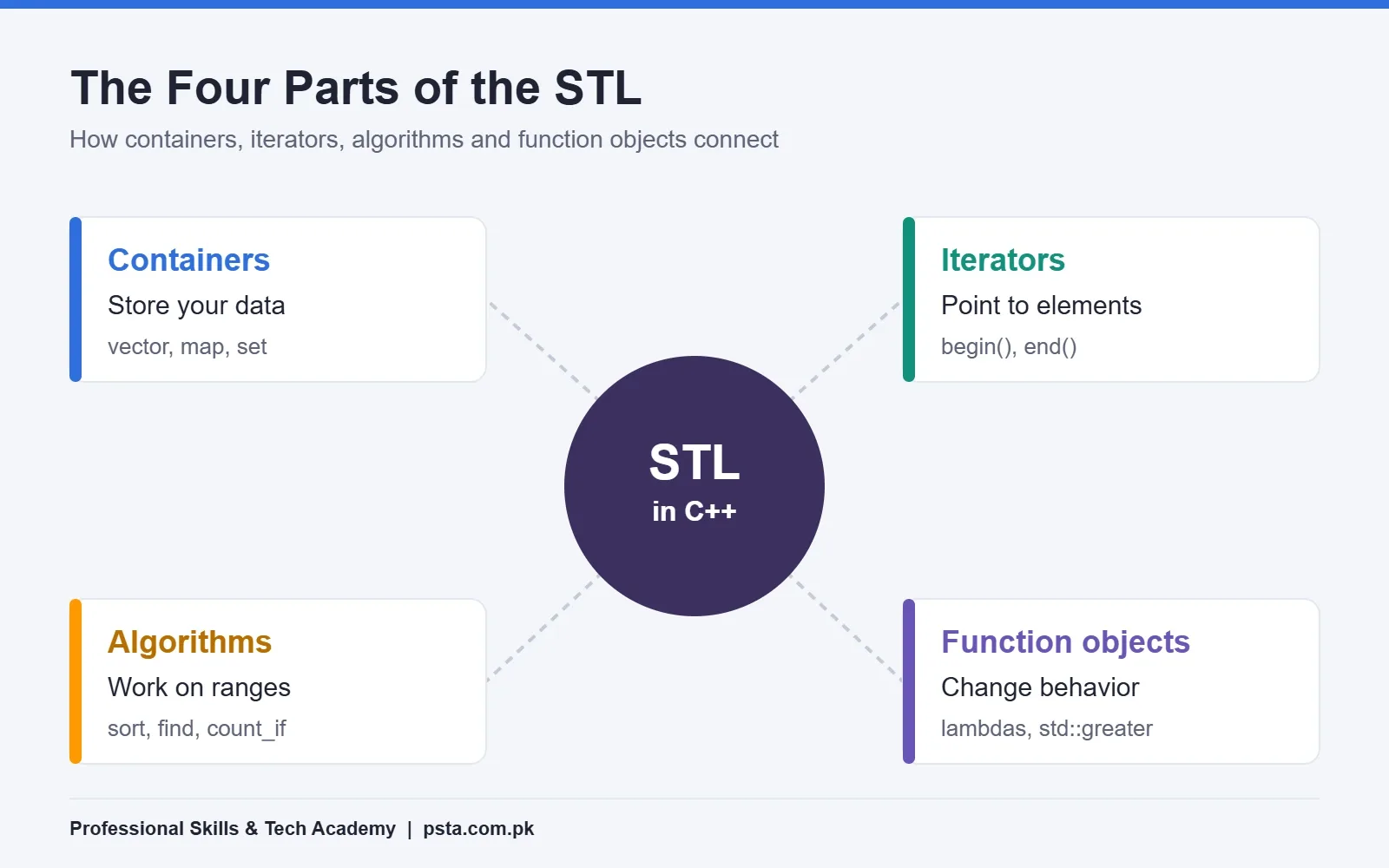
Think of the STL as four pieces that plug into each other:
- Containers hold your data, for example
vector,mapandset. - Iterators point at elements inside a container, a bit like a bookmark.
begin()marks the first element andend()marks the spot just after the last one. - Algorithms are ready-made functions such as
sort,findandcount_if. They work on any range an iterator pair describes. - Function objects, including lambdas and helpers like
std::greater, let you change how an algorithm behaves, for example sorting from high to low.
The clever part is the separation. An algorithm doesn't need to know whether your data sits in a vector or a deque. It only needs iterators. That is why one std::sort serves thousands of different programs.
Which Containers Does the STL Give You?
The cppreference container library page groups STL containers into a few families. Here is the short version you need for university work and coding tests:
| Family | Containers | How elements are kept | Typical student use |
|---|---|---|---|
| Sequence | vector, array, deque, list, forward_list | In the order you insert them | Marks list, queue of orders, playlist |
| Associative (ordered) | set, map, multiset, multimap | Sorted by key | Roll number to name, sorted word list |
| Unordered associative | unordered_set, unordered_map and their multi versions | Hashed, no fixed order | Fast lookups, counting word frequency |
| Adaptors | stack, queue, priority_queue | Restricted interface on top of another container | Undo feature, bank token line, task priority |
Newer standards keep adding to this list. cppreference lists flat_map and flat_set as C++23 additions, and marks inplace_vector and hive as C++26 containers. You won't need these in a first data structures course, but it helps to know they exist when you read modern code.
One detail catches many students. Microsoft's container documentation notes that the adaptors (stack, queue and priority_queue) don't support iterators, so you can't pass them straight to the standard algorithms.
Why Should vector Be Your Default?
Microsoft's guide is direct about this: when you aren't sure which sequence container to use, start with a vector. The hackingcpp beginner guide also calls std::vector the default dynamic array of C++.
A vector in C++ stores elements next to each other in memory, just like a normal array, but it can grow and shrink while the program runs. Here is a small example. A shopkeeper on Mansehra Road wants to record a week of daily sales and print the total:
#include <iostream>
#include <vector>
#include <numeric>

int main() {
    std::vector<int> sales;          // starts empty
    sales.reserve(7);                // room for one week
    int amount;
    for (int day = 1; day <= 7; ++day) {
        std::cin >> amount;
        sales.push_back(amount);     // add at the end
    }
    int total = std::accumulate(sales.begin(), sales.end(), 0);
    std::cout << "Days: " << sales.size() << ", Total: Rs. " << total;
}
Notice what you didn't write: no fixed array size, no memory management and no loop to add the numbers. The reserve(7) call is optional. According to cppreference's vector reference, reallocations are usually costly, and reserve() avoids them when you know the size in advance.
Three vector Habits Worth Building Early
- Use
at(i)while learning. It checks the index and throws an exception instead of silently reading the wrong memory, whichv[i]may do. - Pass large vectors to functions by
constreference. hackingcpp warns that copying a vector with many elements can be expensive. - Prefer a range-based
for (int x : sales)loop when you only need to read each value.
How Do You Choose the Right Container?
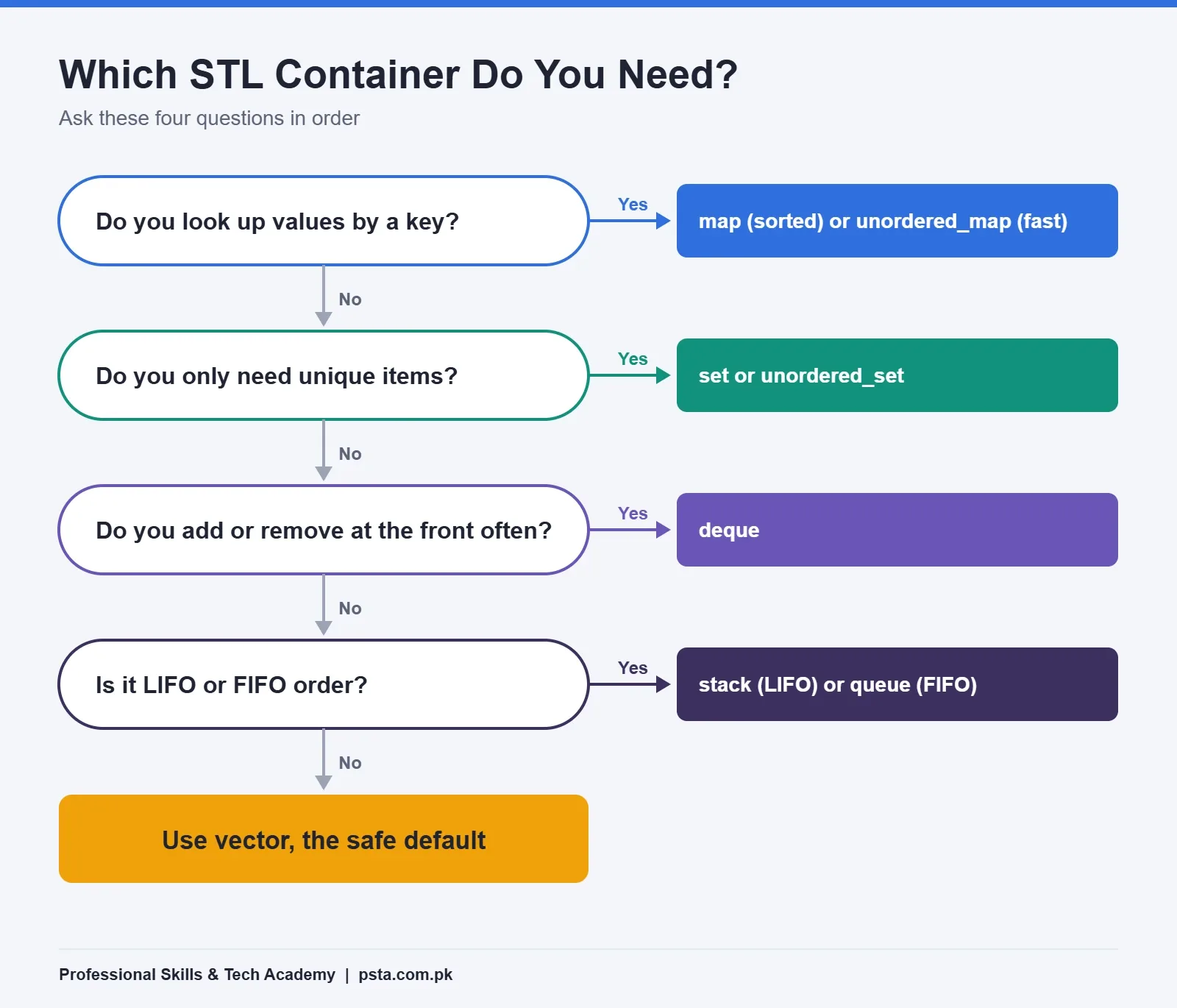
Most assignment questions give you a hint in the wording. "Look up a student by roll number" points to a map. "Remove duplicate entries" points to a set. "Process customers in arrival order" points to a queue. When nothing special is asked, a vector is the safe answer.
Ask yourself these questions in order:
- Do you need to look up a value by a key, such as a CNIC-style ID or a product code? Use
mapif you also need sorted output, otherwiseunordered_map. - Do you only care whether an item exists, with no duplicates? Use
setorunordered_set. - Do you add and remove at the front as often as at the back? Use
deque. - Does the problem say "last in, first out" or "first in, first out"? Use
stackorqueue. - None of the above? Use
vector.
Map vs unordered_map and Other Speed Questions
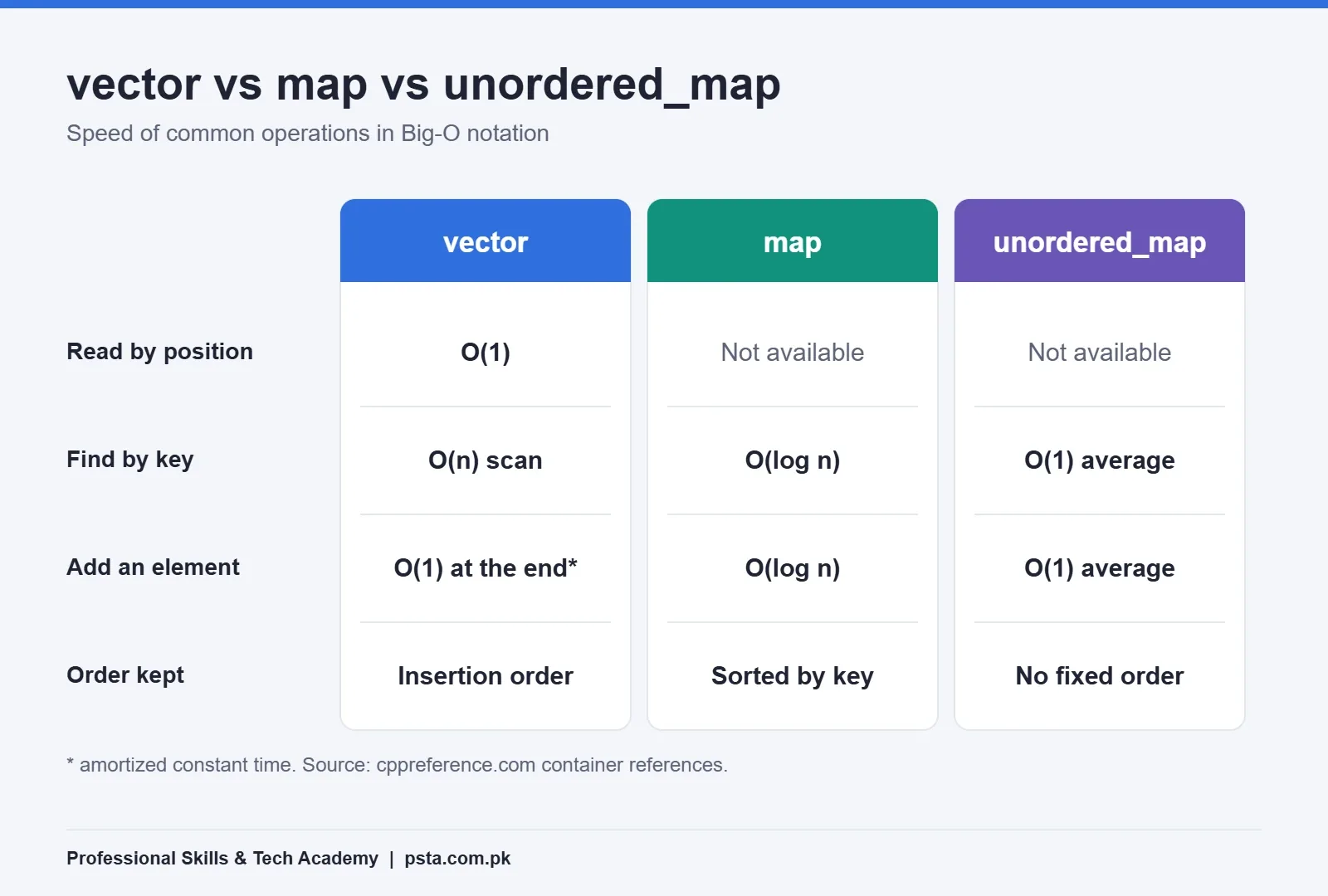
Teachers and interviewers love to ask about speed, written in Big-O notation. You don't need to memorise every case. These figures from cppreference cover most of what a beginner meets:
| Operation | vector | map | unordered_map |
|---|---|---|---|
| Read by position | O(1), constant | Not available | Not available |
| Find by key | O(n), scan every element | O(log n) | O(1) on average |
| Add an element | O(1) amortized at the end | O(log n) | O(1) on average |
| Insert or erase in the middle | O(n) | O(log n) | O(1) on average |
| Order of elements | Insertion order | Sorted by key | No fixed order |
The std::map reference says search, removal and insertion take logarithmic time, and that maps are usually built as red-black trees. The unordered_map reference describes the same operations as average constant time. Pay attention to the word "average". A hash table is usually faster, but it gives up sorted order, so printing a result sheet by roll number is easier with map.
Iterators in C++ and the Invalidation Trap
An iterator is an object that points to one element and can move to the next. For a vector, v.begin() points to the first element and v.end() points one step past the last. Algorithms take that pair and work on everything between them.
The trap is called iterator invalidation. If you change a container, some of your saved iterators may stop pointing anywhere safe. cppreference lists the rules container by container. Two are worth remembering now:
- For a vector, if an insertion changes its capacity, all iterators and references become invalid.
- For a list, an insertion invalidates nothing, and an erase affects only the erased element.
In practice, this means you shouldn't call push_back on a vector while looping over it with iterators. If a program crashes at random while it loops over a container, check for this mistake first.
Algorithms and Lambdas That Replace Your Loops
The C++ algorithms library lives mostly in <algorithm>, with a few numeric ones like accumulate in <numeric>. LearnCpp's introduction to algorithms sorts them into three groups: inspectors that read data, mutators that change it and facilitators that produce a result. Its advice is to favour these library functions over writing your own versions.
Here is a short example. Suppose a teacher has the final marks of a section and wants them ranked, plus a count of students who scored 50 or more:
#include <algorithm>
#include <functional>
#include <vector>

std::vector<int> marks = {72, 45, 88, 50, 39, 91, 66};

std::sort(marks.begin(), marks.end(), std::greater<int>());   // high to low

auto passed = std::count_if(marks.begin(), marks.end(),
                            [](int m) { return m >= 50; });     // 5

auto it = std::find(marks.begin(), marks.end(), 39);
bool found = (it != marks.end());
The part inside square brackets, [](int m) { return m >= 50; }, is a lambda: a small unnamed function you write on the spot. Lambdas are the most common kind of function object you will see in modern code.
If your compiler supports C++20, the ranges versions are even shorter. LearnCpp shows that you can pass the container directly, for example std::ranges::sort(marks), instead of writing begin() and end() every time.
STL Glossary: 10 Terms in Plain English
| Term | What it means |
|---|---|
| Template | Code written once that works with many data types, filled in by the compiler. |
| Container | An object that stores a collection of elements, such as vector or map. |
| Adaptor | A container with a limited interface built on another container, such as stack. |
| Iterator | An object that points to an element and can move through a container. |
| Range | A sequence of elements, described by a begin and end iterator or by a whole container. |
| Algorithm | A ready-made function like sort or find that works on a range. |
| Lambda | A short unnamed function written inside another expression. |
| Capacity | How many elements a vector can hold before it must reallocate memory. |
| Amortized O(1) | Usually constant time, with an occasional slower step that averages out. |
| Invalidation | When a change to a container makes a saved iterator or reference unsafe. |
A Four-Week STL Practice Order
You can learn the useful core of STL in C++ in about a month with an hour a day. This order builds each topic on the one before it:
- Week 1, vector: rewrite three old array assignments using
std::vector,push_back,sizeand range-based loops. - Week 2, algorithms: practise
sort,find,count_if,min_elementandaccumulateon the same programs. Write your first lambdas. - Week 3, map and set: build a phone book with
map, then a word counter withunordered_map. Remove duplicates from a list usingset. - Week 4, adaptors and iterators: solve bracket matching with
stack, simulate a bank token line withqueueand read the invalidation rules for vector and list.
For more practice ideas, our list of C++ projects for beginners includes several that use the STL. When you're ready for job tests, the STL section in our C++ interview questions for freshers shows how these topics are asked out loud.
Where PSTA's C++ Course Fits
The STL rests on basics that many students rush past: variables, loops, functions, arrays and a first look at classes. PSTA's C++ programming course for beginners covers exactly that ground in 12 weeks, at beginner level. Its modules run from setting up your tools and writing your first program through decisions, loops, functions, arrays and strings, then the basics of OOP and a final project.
The listed fee on the course page is Rs. 12,000, shown against an original Rs. 16,000. Classes run at the Mandian campus in Abbottabad, live online for students in other cities, or as a hybrid of the two. Fresh batches open monthly. Once those foundations are firm, STL in C++ feels like a natural extension rather than a wall of new syntax.
If you want to read ahead, our guides to pointers in C++ and OOP concepts in C++ explain the ideas iterators and containers are built on. If Python suits your goals better, compare with the Advanced Python course, or browse all PSTA courses. Questions about batches can go to our team on WhatsApp at +92 314 5424399, and the admission page has the form.
This Week: Rewrite One Old Assignment
Pick a program you already wrote with a fixed-size array, maybe a marks calculator or a simple inventory. Replace the array with a std::vector, swap your hand-written sum and search loops for accumulate and find, and compare the line count. That single exercise will teach you more about STL in C++ than a week of reading definitions.
Frequently asked questions
Is the STL a separate library I need to install?
No. The containers, iterators and algorithms people call the STL are part of the C++ standard library, so they come with every standard compiler such as g++, Clang and Microsoft Visual C++. You only add the right header at the top of your file, for example #include or #include , and the code is ready to use.
What is the difference between an array and a vector in C++?
A built-in array has a fixed size that you set when you write the program. A vector can grow and shrink while the program runs, tracks its own size and handles memory for you. Both store elements next to each other in memory, so reading by position is equally fast. For most new code, a vector is the safer choice.
Should I learn data structures before the STL?
Learn them side by side. Your data structures course teaches how a linked list, stack or hash table works inside, which helps you understand performance. The STL gives you tested versions of those structures for real programs. Build a simple linked list yourself once, then use std::list or std::vector in projects and compare how much code you saved.
Can I use the STL in university assignments?
It depends on the assignment. If the task is to implement a stack or linked list yourself, your teacher usually expects your own code, not std::stack. For other tasks, such as a result sheet or inventory program, using vector, map and sort is normally welcome. When unsure, ask your instructor before you submit.
Which STL containers should a beginner learn first?
Start with vector, then map and unordered_map, then set. These four cover most beginner programs and coding test questions. After that, learn stack, queue and priority_queue for problems about order and priority. Leave list, forward_list, deque and the newer flat containers for later, once you understand why vector is usually faster.
Is the STL used in competitive programming?
Yes, heavily. Contest solutions in C++ commonly rely on vector, sort, map, set, priority_queue and binary search functions because they are fast and already tested. Knowing the STL well saves you from writing these structures under time pressure, which leaves more of your contest time for thinking about the actual problem.
Sources & references
- C++ Containers Library en.cppreference.com
- std::vector reference en.cppreference.com
- std::map reference en.cppreference.com
- std::unordered_map reference en.cppreference.com
- C++ Standard Library Containers (Microsoft Learn) learn.microsoft.com
- Introduction to Standard Library Algorithms (LearnCpp) learncpp.com
- std::vector Beginner's Guide (hackingcpp) hackingcpp.com
- 2025 Stack Overflow Developer Survey: Technology survey.stackoverflow.co
Last reviewed & updated on by Umar Qureshi. Written by the PSTA team in Abbottabad, Pakistan.

Umar Qureshi

Best C++ Programming Course for Beginners in Pakistan
Turn this guide into a career: hands-on training with real projects, online across Pakistan or on-campus in Abbottabad · 12 Weeks.



Comments
No comments yet — ask a question or share your experience.