
Quick answer
To start email marketing, pick a free tool such as Brevo, Kit, MailerLite or Mailchimp, send from your own domain with SPF and DKIM set up, collect addresses only with permission, automate a short welcome sequence, and judge results by clicks more than opens. Mailchimp's average click rate across users is 2.62%.
Key takeaways
- • Free plans differ widely: Mailchimp allows 250 contacts and 500 emails a month, while Brevo allows 300 emails a day.
- • Send from your own domain and set up SPF, DKIM and DMARC before your first campaign.
- • Gmail's bulk sender rules require one-click unsubscribe and a spam rate below 0.3%.
- • A three-email welcome sequence earns trust while new subscribers are most interested.
- • Judge campaigns by clicks and replies, because Apple's privacy feature can inflate open rates.
Table of contents 24 sections
- Email Marketing for Beginners: What You're Actually Building
- Why Bother With Email When Your Customers Live on WhatsApp?
- Which Free Email Marketing Tool Should You Start With?
- Nine Steps to Your First Email Campaign
- Step 1: Decide What Readers Get From You
- Step 2: Use an Address on Your Own Domain
- Step 3: Create Your Account and Fill In the Sender Details
- Step 4: Authenticate Your Domain
- Step 5: Build a Signup Form
- Step 6: Turn On Double Opt-In
- Step 7: Write and Schedule a Welcome Email
- Step 8: Design Your First Campaign
- Step 9: Test, Send and Wait 48 Hours Before Judging
- The Gmail Rules That Decide Inbox or Spam
- Writing an Email People Actually Open
- Subject Lines
- Preview Text
- The Body
- Build a Three-Email Welcome Sequence
- What Are Good Open and Click Rates for Beginners?
- Mistakes That Push Beginners Into the Spam Folder
- Can Email Marketing Become a Freelance Skill From Pakistan?
- Practising Email Campaigns in PSTA's Digital Marketing Course
- Collect Your First 20 Subscribers Before Sunday
Email marketing for beginners comes down to three jobs: collect addresses with permission, send something useful on a steady schedule, and watch who clicks. Expect modest numbers at first. Mailchimp's published benchmarks put the average click rate across all its users at 2.62%, so a list of 500 people might bring roughly a dozen clicks per email.
That sounds small until you remember those clicks come from people who asked to hear from you, at no cost per message. Here's what this guide covers:
- Which free email marketing tools suit a Pakistani shop, academy or freelancer, and where each free plan stops
- Nine practical steps from an empty account to your first sent campaign
- The Gmail sender rules that decide whether you reach the inbox or the spam folder
- A three-email welcome sequence you can copy and adapt
- Which numbers to track, and what a reasonable open and click rate looks like
Email Marketing for Beginners: What You're Actually Building
Strip away the jargon and you are building one asset: a list of people who agreed to receive email from you. Everything else is a way to grow that list, keep it healthy and turn some of its readers into customers.
Three pieces work together:
- A signup point. A form on your website, a link in your Instagram bio, a QR code at the shop counter, or a checkbox at checkout.
- An email service provider. Tools such as Mailchimp, Brevo, MailerLite or Kit store your contacts, send in bulk, add the unsubscribe link and report results.
- A content rhythm. A welcome email for new subscribers, then regular campaigns, maybe every week or every two weeks.
The difference between a list and a pile of addresses is consent. Buying a "50,000 Pakistani emails" file from a Facebook group gets you none of it, and it will damage your sending reputation fast.
Why Bother With Email When Your Customers Live on WhatsApp?
It's a fair question. A lot of local selling in Pakistan happens in WhatsApp chats, and we teach click-to-WhatsApp ads for that reason. Email marketing in Pakistan still earns a place for three groups of people.
Online stores. A Shopify or WooCommerce store collects an email at checkout anyway. Abandoned-cart reminders, order updates and "new stock" notices all run on email, and they don't depend on a phone number being saved.
Academies, clinics and service businesses. Admission notices, schedules, receipts and longer explanations read better in an inbox than in a crowded chat.
Freelancers with foreign clients. Small businesses abroad often run newsletters and store emails, and a Pakistani freelancer who can set up a signup form, write a welcome sequence and keep emails out of spam has a skill those clients pay for.
You also own the list. If a Facebook page gets restricted or a WhatsApp number gets banned, your subscribers' email addresses stay in your account. If you're still deciding how far to take WhatsApp itself, our guide to WhatsApp Business App vs API covers that side.
Which Free Email Marketing Tool Should You Start With?
All four popular email marketing tools below have a free plan, but the limits differ a lot. The figures come from each vendor's pricing page or from recent reviews, and plans change, so check the vendor's own page before you commit.
| Tool | Free plan contacts | Free plan sending | Worth knowing |
|---|---|---|---|
| Mailchimp | 250 contacts | 500 emails a month, 250 a day | Mailchimp branding stays; Standard plan starts at $20 a month |
| Brevo | Up to 100,000 contacts | 300 emails a day | Starter plan is $9 a month on monthly billing |
| MailerLite | 250 subscribers | 2,500 emails a month | 3 active automations; logo can't be removed on free |
| Kit | Up to 10,000 subscribers | Unlimited broadcasts | 1 visual automation and 1 sequence; no integrations on free |
Sources: Mailchimp pricing, TechRadar's Brevo review (updated February 2026), EmailToolTester on MailerLite (updated August 2026) and EmailVendorSelection on Kit (updated August 2026).
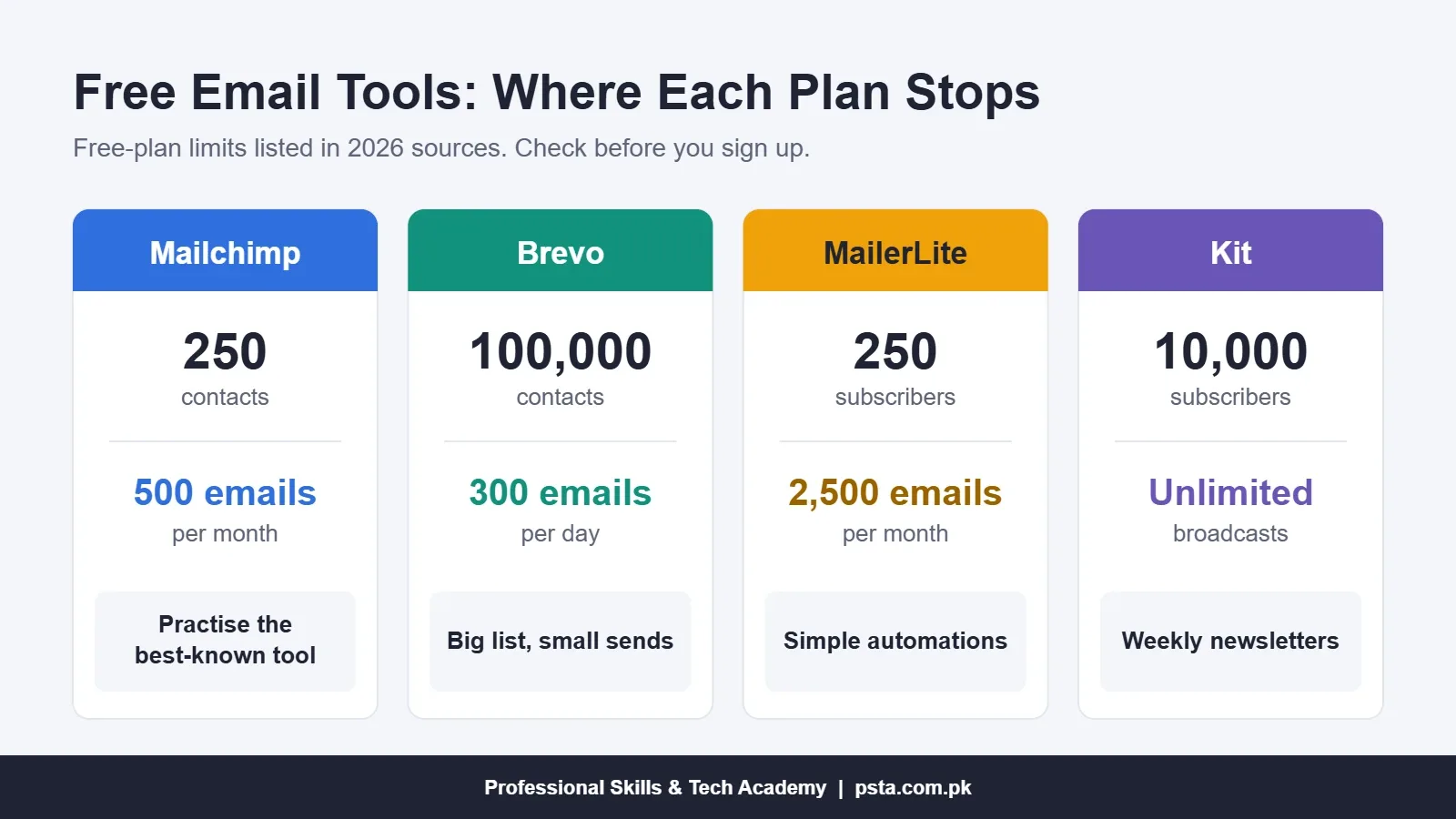
How to choose in practice:
- A shop with a big customer list but small sends fits Brevo, because the contact cap is generous and the limit is per day.
- A blogger, teacher or creator writing a weekly newsletter fits Kit, since broadcasts are unlimited until 10,000 subscribers.
- A freelancer learning the industry standard should practise in Mailchimp, because it's one of the best-known names in the field, even though the Mailchimp free plan is tight.
Nine Steps to Your First Email Campaign
This is the core of email marketing for beginners, so follow these in order. Skipping the early steps is a common reason first campaigns land in spam.
Step 1: Decide What Readers Get From You
Write one sentence: "Subscribers get ___ every ___." For an Abbottabad bakery, as an example, it could be "this week's fresh items and one order-ahead discount every Thursday." If you can't fill the blanks, nobody will sign up.
Step 2: Use an Address on Your Own Domain
Send from something like [email protected] rather than a free Gmail or Yahoo address. Gmail's sender guidelines treat a @gmail.com From address sent through another platform as spoofing. A domain plus a basic business mailbox is a one-time setup you won't regret.
Step 3: Create Your Account and Fill In the Sender Details
Sign up for the tool you picked, add your business name and a real postal address. The address appears in every email footer, and US law requires it for commercial email.
Step 4: Authenticate Your Domain
Your tool will show DNS records to add at your domain registrar or hosting panel: SPF, DKIM and, ideally, a DMARC record. This proves the tool is allowed to send for your domain. Ask whoever manages your hosting if the panel confuses you. It usually takes a few minutes and matters more than any subject line.
Step 5: Build a Signup Form
Email list building starts here. Keep the form to two fields, email and first name. Say exactly what people will receive and how often. Place it where interested people already are: your website footer, a checkout page, an Instagram link or a printed QR code at the counter.
Step 6: Turn On Double Opt-In
With double opt-in, a new subscriber clicks a confirmation link before joining the list. You lose a few signups, but you lose the typos and fake addresses too, and those are what push bounce rates up.
Step 7: Write and Schedule a Welcome Email
Set an automatic email that goes out right after someone confirms. Thank them, repeat what they signed up for, and give them one useful thing straight away. More on the full sequence below.
Step 8: Design Your First Campaign
Pick a simple single-column template. Use one main message, one image at most, and one clear button. Write alt text for the image, because many inboxes block images by default.
Step 9: Test, Send and Wait 48 Hours Before Judging
Send a test to your own Gmail and Outlook addresses and open it on a phone. Check every link. Then send, and give it two days before you read the report, since plenty of people don't open email the moment it arrives.
The Gmail Rules That Decide Inbox or Spam
Google tightened its rules for anyone emailing personal Gmail accounts in February 2024, and its sender FAQ says enforcement on non-compliant mail ramped up from November 2025. Messages that break the rules can now be rejected outright. This is what people mean by email deliverability: whether your mail reaches the inbox at all.
The strictest rules apply to bulk senders, meaning anyone sending close to 5,000 messages within 24 hours to personal Gmail addresses. You may be far from that today, but building good habits now costs nothing. Bulk senders must:
- Set up both SPF and DKIM for the sending domain.
- Publish a DMARC record, with a policy of at least p=none.
- Keep the domain in the From address aligned with the SPF or DKIM domain.
- Add one-click unsubscribe to marketing and promotional messages.
- Process unsubscribe requests within 48 hours.
- Keep the spam complaint rate below 0.1% and never let it reach 0.3%.
Put the last rule in plain numbers. A 0.3% complaint rate is just three spam reports for every 1,000 emails. That's why a cold, purchased list is so dangerous: strangers hit "Report spam" quickly.
Your email service provider handles the unsubscribe header and the sending servers for you. Your part is the domain records, the permission and the content.
Writing an Email People Actually Open
Good email copy reads like a note from a person, not a flyer.
Subject Lines
Say what's inside. "New winter stock: 12 jackets under Rs. 5,000" beats "Huge news you can't miss." Honest subject lines are also a legal point: the US CAN-SPAM guide from the FTC forbids subject lines that mislead about the content.
Preview Text
This is the grey line shown after the subject in most inboxes. Use it to add a second reason to open, such as "Free delivery in Abbottabad until Sunday."
The Body
- Open with the point in the first two lines. Some readers never scroll.
- Write short paragraphs of two or three sentences. Many of your readers will be on a phone.
- Use one call to action. Two buttons asking for two different things split attention.
- Sign off with a real name. "Umar from the PSTA team" feels far more personal than "The Management."
You can write in English, Urdu or Roman Urdu. Pick whatever your customers already use with you in person, and keep it consistent.
Build a Three-Email Welcome Sequence
If you automate only one thing while you learn email marketing as a beginner, make it this. A welcome email sequence is a short series of automated emails that every new subscriber receives in order. It's where you earn trust while interest is highest, right after signup.
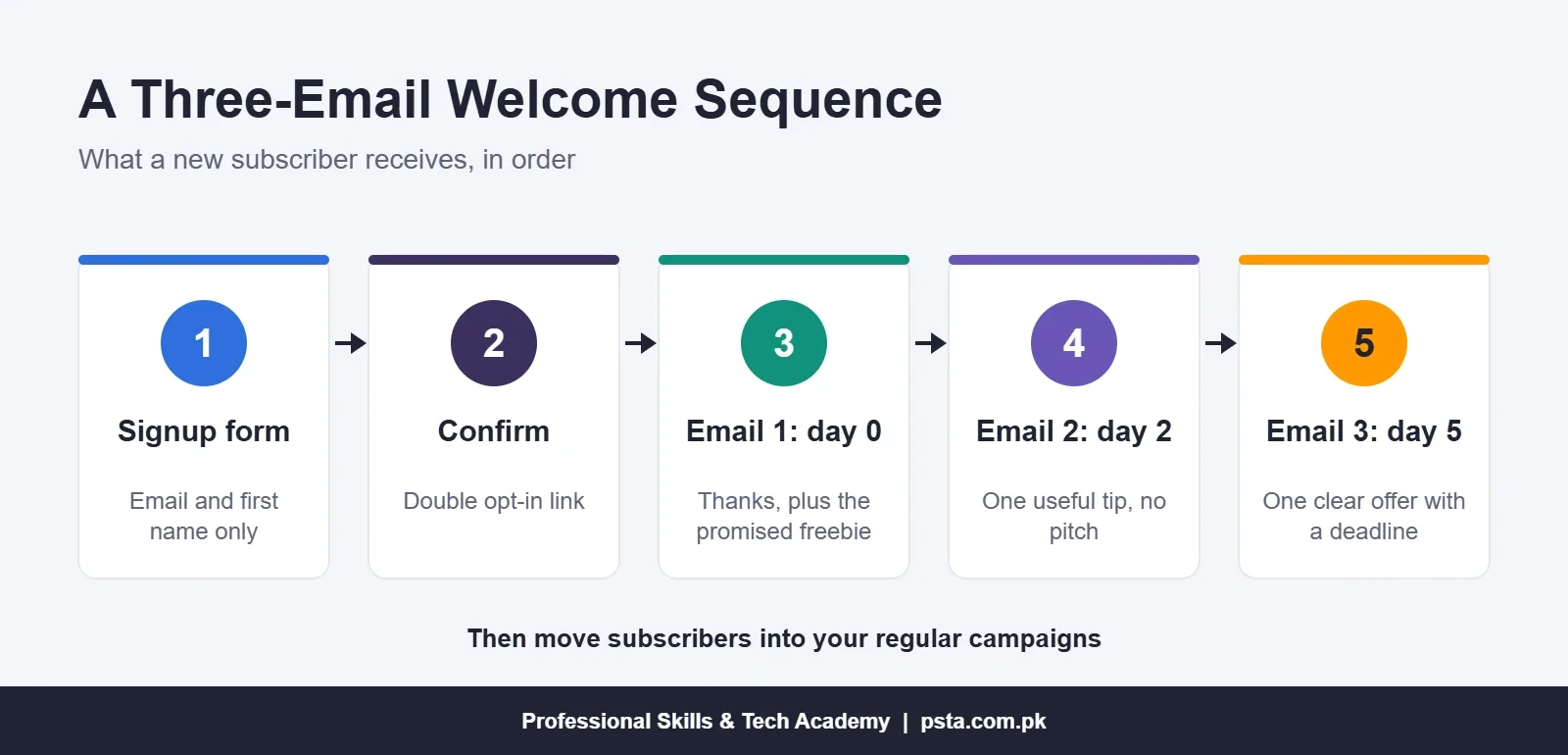
A simple version for a small business:
- Email 1, immediately: thank them, confirm what they'll receive and when, and give the promised freebie or code.
- Email 2, two days later: send something useful with no sales pitch. A tuition academy could share a study timetable; a clothing store could share a size guide.
- Email 3, five days after signup: make one clear offer, such as a first-order discount or a free trial class, with a deadline.
After email 3, subscribers move into your regular campaigns. Review the sequence every few months, because offers and prices go out of date.
What Are Good Open and Click Rates for Beginners?
Mailchimp's benchmark page gives these averages across its users. The data was last updated in December 2023, so treat it as a rough yardstick rather than a target.
| Group | Open rate | Click rate | Unsubscribe rate |
|---|---|---|---|
| All users | 35.63% | 2.62% | 0.22% |
| Ecommerce | 29.81% | 1.74% | 0.19% |
| Education and training | 35.64% | 3.02% | 0.18% |
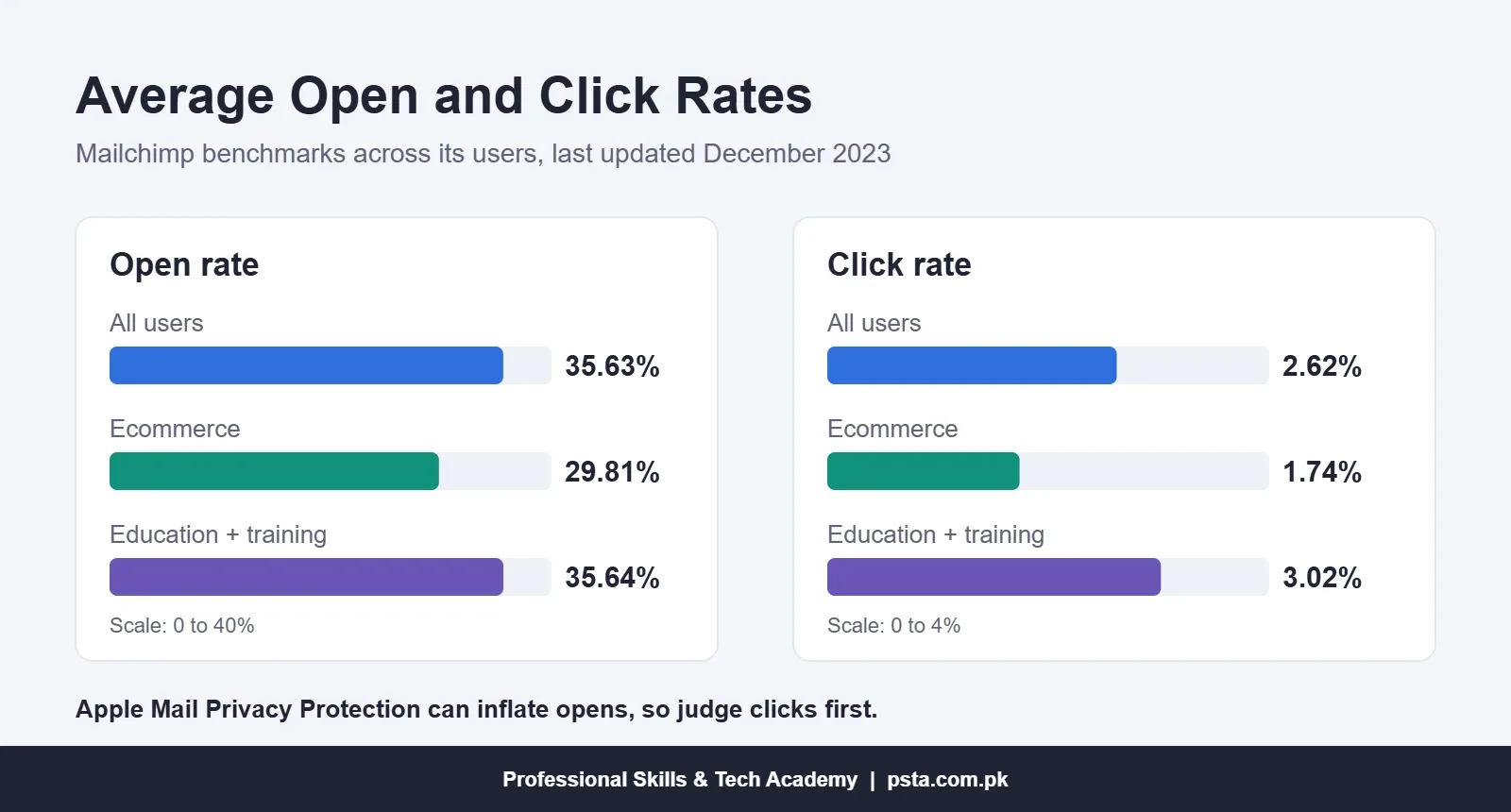
Two warnings before you compare your own report. First, Mailchimp itself notes that Apple's Mail Privacy Protection can inflate open rates, because some opens are recorded automatically. Second, a list of 200 people swings wildly from one send to the next.
So watch clicks and replies more than opens. If you send people to a website, add UTM tags to your links and track them in GA4, which our guide to setting up Google Analytics 4 walks through.
Mistakes That Push Beginners Into the Spam Folder
Most problems in email marketing for beginners come from a handful of habits, not from the tool.
- Importing old contacts without permission. A phone-book export or a purchased list brings complaints and bounces.
- Skipping domain authentication. Without SPF and DKIM, Gmail has no proof the mail is really yours.
- Sending one giant image. An email that's a single poster gives filters no text to read and blind readers nothing at all.
- Going silent for months, then blasting. People forget they subscribed and report you as spam.
- Hiding the unsubscribe link. Someone who can't leave easily clicks "Report spam" instead, and that hurts far more.
- Never cleaning the list. Remove addresses that bounce, and re-confirm people who haven't opened in six months.
Can Email Marketing Become a Freelance Skill From Pakistan?
Yes, if you can show results rather than just tool names. Clients usually want someone who can set up the account and domain records, build signup forms, write sequences and report what worked.
If your clients are in the US, learn the basics of CAN-SPAM. The FTC's compliance guide requires a valid physical postal address in each commercial email, a clear opt-out that's honored within 10 business days, and honest header and subject information. It also says a business can't hand off legal responsibility to whoever sends for it, and penalties reach up to $53,088 per violating email. Your client will expect you to know this.
A practical portfolio for this work can be small:
- A signup form and landing page you built for a real or practice business
- A three-email welcome sequence with your reasoning for each email
- A screenshot of authenticated domain records (with private details blurred)
- One campaign report explaining what you'd change next time
Many store owners pair email with an e-commerce platform. If that's your client base, our comparison of Shopify vs WooCommerce in Pakistan is useful background.
Practising Email Campaigns in PSTA's Digital Marketing Course
Email has its own module in our Advanced Digital Marketing Course. You work in Mailchimp, Kit and Brevo, covering list building, email flows, deliverability and metrics, and you build a welcome automation with a signup form yourself. It sits in week 11 next to WhatsApp and GA4, so you learn how the three channels hand leads to each other.
The course runs for 12 weeks across 26 modules, each ending with a practical task. The current fee is Rs. 30,000 (regular Rs. 35,000), payable in two installments. You can attend at the Mandian campus on Old College Road in Abbottabad, join live classes online from any city, or mix both.
For paid social, our Meta Ads and social media course is the natural next step, and store owners often add the E-Commerce course. You can compare everything on our courses page.
Collect Your First 20 Subscribers Before Sunday
If you take one thing from this guide to email marketing for beginners, let it be this: send something real. Don't wait for a perfect template. Open a free Brevo or Kit account today, make a two-field form, and share it with 20 customers or contacts who already know you, saying exactly what they'll get. Write the welcome email while you wait for them to confirm.
When you're ready to learn the full system with feedback on your own campaigns, the admission page has the next batch dates, or send a quick question about batches and timings to +92 314 5424399 on WhatsApp.
Frequently asked questions
Is email marketing still worth learning in Pakistan?
Yes, especially for online stores, academies and freelancers with foreign clients. Stores use email for order updates and cart reminders, while overseas clients often hire freelancers to run newsletters and automations. WhatsApp handles a lot of local sales, so treat email as a second channel you own rather than a replacement.
Which email marketing tool is best for beginners?
Start with whichever free plan fits your list. Brevo allows up to 100,000 contacts with 300 emails a day, Kit allows up to 10,000 subscribers with unlimited broadcasts, and Mailchimp's free plan is small but widely known. Check each vendor's pricing page first, since limits change.
Can I send marketing emails from a Gmail address?
It's a bad idea. Google's sender guidelines treat a @gmail.com From address sent through another platform as spoofing. Use an address on your own domain, such as [email protected], and add the SPF and DKIM records your email tool gives you.
Is it legal to buy an email list?
Buying a list is a fast way to collect spam complaints and bounces, which damage your sender reputation. If you email people in the US, the CAN-SPAM Act also requires honest headers, an opt-out and a postal address. Build your own list with consent instead.
How often should a small business send emails?
Pick a rhythm you can keep, such as once a week or every two weeks, and tell subscribers about it on the signup form. Long silences followed by sudden blasts lead to spam reports, because people forget they subscribed.
What is a good open rate for email marketing?
Mailchimp's benchmarks put the average open rate across its users at 35.63% and the click rate at 2.62%, based on data last updated in December 2023. Apple's Mail Privacy Protection can inflate opens, so compare your click rate and replies over several sends.
Do I need coding skills for email marketing?
No. Tools such as Mailchimp, Brevo, MailerLite and Kit offer drag-and-drop editors and ready-made forms. The technical part is adding a few DNS records for your domain, which your hosting panel or provider can help with in a few minutes.
Sources & references
- Mailchimp Pricing Plans mailchimp.com
- Mailchimp Email Marketing Benchmarks mailchimp.com
- Gmail Email Sender Guidelines FAQ support.google.com
- FTC CAN-SPAM Act: A Compliance Guide for Business ftc.gov
- TechRadar Brevo Review techradar.com
- EmailToolTester MailerLite Pricing emailtooltester.com
- EmailVendorSelection Kit Pricing emailvendorselection.com
Last reviewed & updated on by Umar Qureshi. Written by the PSTA team in Abbottabad, Pakistan.

Umar Qureshi
Advanced Digital Marketing Course in Pakistan and Abbottabad
Turn this guide into a career: hands-on training with real projects, online across Pakistan or on-campus in Abbottabad · 12 Weeks.
Comments
No comments yet — ask a question or share your experience.