
Quick answer
A laptop for AutoCAD 2027 needs 64-bit Windows 11, at least 16 GB of RAM, a Full HD screen, an SSD and ideally a graphics card with dedicated memory. For 3D modeling and rendering, Autodesk recommends 32 GB of RAM and an 8 GB graphics card. Confirm Windows 11 support before buying any used laptop.
Key takeaways
- • Autodesk's basic figure for AutoCAD 2027 is 16 GB of RAM; 32 GB is recommended.
- • AutoCAD 2027 needs 64-bit Windows 11, so confirm TPM 2.0 and Secure Boot first.
- • Dedicated graphics memory keeps zooming, panning and 3D views smooth.
- • An SSD and a 1920 x 1080 screen are the practical minimums for daily drafting.
- • Open a real drawing in the shop for 15 minutes before you pay.
Table of contents 14 sections
- Laptop for AutoCAD: What Autodesk Actually Asks For
- Why Some Shop Advice Is Already Out of Date
- Which Kind of AutoCAD Work Will You Do?
- The 12-Check Buying List, in Order
- Software and Operating System
- Core Hardware
- Body and Condition
- How Do You Check Windows 11 Support on a Used Laptop?
- Is Integrated Graphics Enough for AutoCAD?
- Can You Use a MacBook for AutoCAD?
- How Much Should You Budget in Pakistan?
- Shop-Floor Mistakes to Avoid
- What You Need for PSTA's AutoCAD Classes
- Test Before You Pay: A 15-Minute Routine
Before you shortlist a laptop for AutoCAD, try a quick self-test. Answer these three questions honestly: Will you mostly draw 2D plans, or will you model and render in 3D? Can the laptop run Windows 11 officially? Does it have at least 16 GB of RAM, or a free slot to add more?
If any answer was "I'm not sure," don't pay for a laptop for AutoCAD yet. The checks below sort that out in about half an hour, and most of them can be done in the shop.
Here's what this checklist covers:
- The exact AutoCAD 2027 hardware figures Autodesk publishes, in plain language
- Which tier of laptop matches 2D drafting, 3D modeling or point-cloud work
- Twelve checks to run on a new or used laptop, in the order that saves money
- How to confirm Windows 11 support before you hand over cash
- A realistic budget picture for students in Pakistan, with sources
Laptop for AutoCAD: What Autodesk Actually Asks For
Autodesk updated its AutoCAD 2027 system requirements page on October 27, 2026. These AutoCAD system requirements list two levels for Windows: "Basic," which is the floor for the software to work properly, and "Recommended," which is where daily work feels smooth.
| Component | Basic (AutoCAD 2027) | Recommended (AutoCAD 2027) |
|---|---|---|
| Operating system | 64-bit Windows 11 | 64-bit Windows 11 |
| Processor | 2.5 to 2.9 GHz base, 8 logical cores | 3 GHz or more base, 4 GHz or more turbo |
| Memory (RAM) | 16 GB | 32 GB |
| Graphics card | 2 GB GPU, 29 GB/s bandwidth, DirectX 11 | 8 GB GPU, 106 GB/s bandwidth, DirectX 12 |
| Screen | 1920 x 1080, True Color | Up to 3840 x 2160 with the recommended card |
| Disk space | 10 GB, SSD suggested | 10 GB, SSD suggested |
Two notes on that page matter more than they look. First, the "Fast" visual styles only switch on with DirectX 12 at Feature Level 12_0. Second, Autodesk says AutoCAD leans on the display card for zooming, panning, line smoothing and text. It recommends a card with dedicated video memory.
The AutoCAD 2027 installation notes add one more rule: the software must sit on a 64-bit Windows version that Microsoft still supports, and it installs .NET 10 if your machine doesn't have it.
Why Some Shop Advice Is Already Out of Date
Plenty of laptop listings in Pakistan still say "8 GB RAM, perfect for AutoCAD." One Lahore retailer's April 2026 buying guide calls 8 GB the minimum for basic 2D drafting. That was a fair rule for older releases. It no longer matches the current release, where Autodesk's own basic figure is 16 GB.
So how much RAM for AutoCAD is enough? Will it open on 8 GB? Often, yes. But a basic house plan with Xrefs, a few hatches and a browser full of reference images will push that machine into slow disk swapping. You'll feel it as lag every time you pan. If a seller quotes old advice, politely trust Autodesk's page instead.
Which Kind of AutoCAD Work Will You Do?
When you choose a laptop for AutoCAD, your workload decides the spec, not the brand sticker. Think of it as three levels.
Level 1: 2D drafting and plotting. Floor plans, electrical layouts, shop drawings and sheet sets. Autodesk's basic tier covers this: 16 GB of RAM, a modest graphics chip and a Full HD screen. Most civil, electrical and DAE students spend their first year here.
Level 2: 3D modeling and rendering. Solids, house models, materials and lighting. This is where the recommended tier pays off: 32 GB of RAM, a card with 8 GB of video memory and a fast processor.
Level 3: Point clouds and very large 3D files. Autodesk lists a separate set of needs for this work: 32 GB of RAM or more, 12 GB of video memory or more on a workstation-class card, and a 4K-capable display adapter. Very few students need this on day one.

Specialized toolsets add weight too. Autodesk lists 20 GB of disk space for AutoCAD Architecture and AutoCAD Electrical, and 21 GB for AutoCAD MEP. Each has 16 GB of RAM as its basic figure. If your degree uses one of these, plan storage around it.
The 12-Check Buying List, in Order
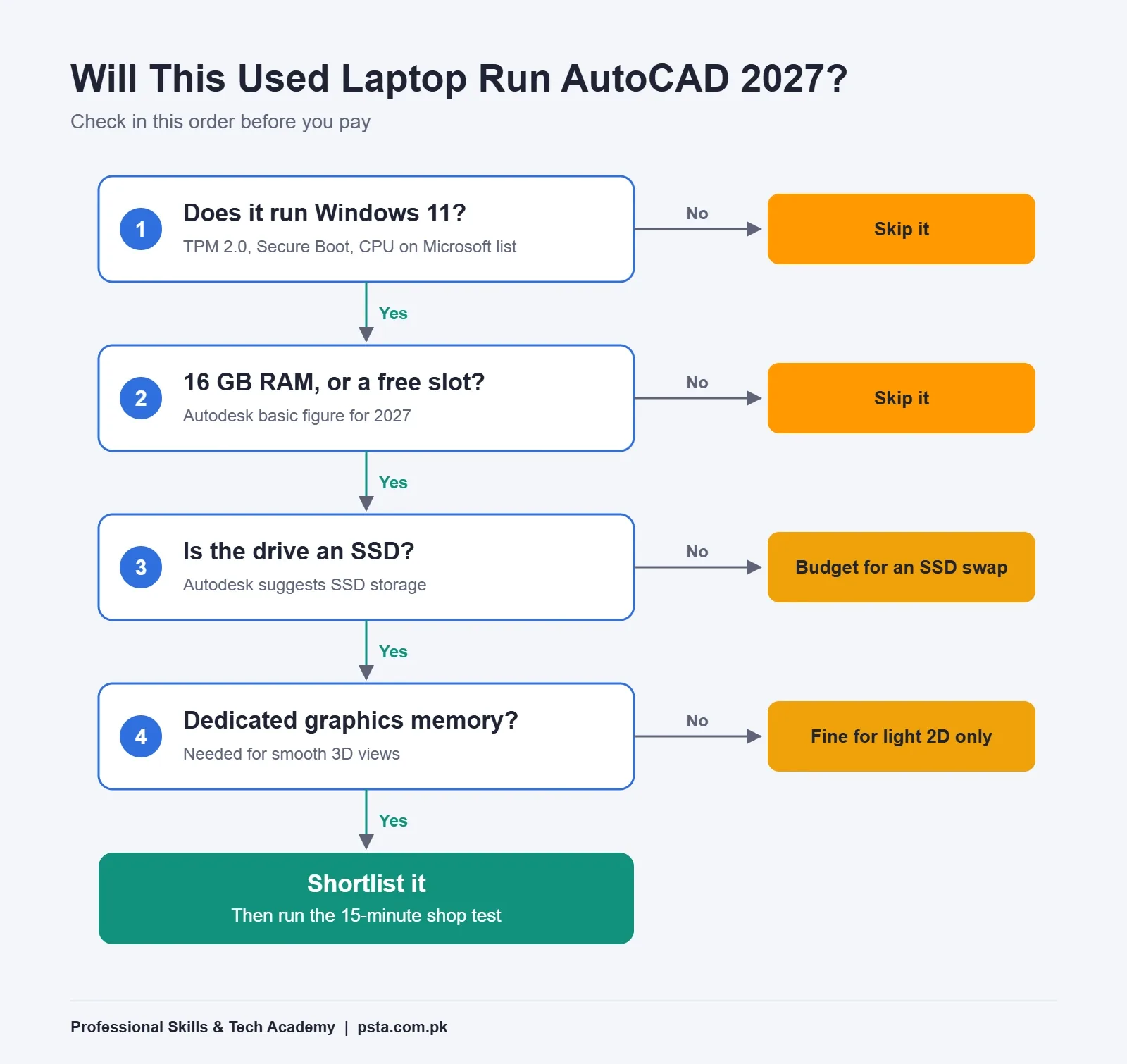
Run these checks from top to bottom on any new or used laptop for AutoCAD. The early ones are deal-breakers, so a laptop that fails check 1 doesn't deserve your time on check 9.
Software and Operating System
- Windows 11 runs officially. Windows 11 for AutoCAD isn't optional anymore. Microsoft's Windows 11 requirements ask for TPM 2.0, Secure Boot-capable UEFI firmware, at least 4 GB of RAM, 64 GB of storage and a processor on Microsoft's approved list. A laptop that can't meet these can't run AutoCAD 2027 properly.
- It isn't stuck on Windows 10. Windows 10 support ran out on October 14, 2025, according to Microsoft. Consumer Extended Security Updates can cover a device until October 12, 2027, but that's a stopgap, not a plan for a four-year degree.
- Windows is genuine and 64-bit. Cracked systems break updates, and Autodesk tells you to install the latest Windows updates before AutoCAD.
Core Hardware
- RAM is 16 GB, or upgradable to it. Open Task Manager, go to Performance, then Memory, and check "Slots used." A free slot lets you add memory later.
- The processor has good clock speed. Autodesk's recommended tier asks for 3 GHz or more base and 4 GHz or more turbo. That focus on clock speed tells you a quick chip beats a chip with many slow cores for most drafting.
- Graphics memory is dedicated. Check Task Manager under GPU. A separate NVIDIA or AMD chip with its own memory helps zoom and 3D views stay smooth.
- Storage is an SSD. AutoCAD needs 10 GB and Autodesk suggests an SSD. In practice, 512 GB leaves room for Windows, Office, project files and a toolset or two.
- The screen is at least 1920 x 1080. That's Autodesk's floor. Older 1366 x 768 panels crop the ribbon and palettes, and you'll waste time scrolling.
Body and Condition
- The keyboard and touchpad work fully. Test every number key, since you'll type coordinates and distances all day.
- You can use a real mouse. Autodesk lists an MS-Mouse compliant pointing device. A wheel mouse makes zoom and pan far quicker than a touchpad.
- The battery still holds a charge. With load shedding, a weak battery means lost work. Ask the seller to run a battery report while you watch.
- It stays cool under load. Open a heavy drawing and work for 10 minutes. Loud fans are normal; sudden slowdowns and a hot keyboard are warning signs.
How Do You Check Windows 11 Support on a Used Laptop?
This is the check most buyers skip when they hunt for a used laptop for AutoCAD, and it hurts most later. Older laptops, especially models from 2017 or earlier, can look perfect and still fail Windows 11's processor or TPM rules.
- Press Windows + R, type
winverand press Enter. The window shows whether the laptop already runs Windows 11. - Press Windows + R again and type
tpm.msc. Look for "Specification Version: 2.0." - Type
msinfo32in the same box. Check that "BIOS Mode" says UEFI and "Secure Boot State" says On. - Note the exact processor model and compare it with Microsoft's supported processor list.
A small clarification helps here. In early 2025, headlines claimed Microsoft had dropped Intel 8th, 9th and 10th Gen chips. Windows Central explained that the change applied to manufacturers building new PCs. Existing machines with those chips could still upgrade if they met the other requirements, TPM 2.0 included.
Is Integrated Graphics Enough for AutoCAD?
For light 2D work, a laptop for AutoCAD with a recent integrated chip can cope. You'll be able to draw, dimension, hatch and plot a small plan without much trouble.
Problems show up as files grow. Heavy hatching, large Xrefs and 3D views lean hard on the display system, and integrated graphics borrow memory from your RAM. That's one reason Autodesk recommends a card with dedicated video memory. If your course includes rendering, as PSTA's does in its later modules, a dedicated card is worth stretching for.
You don't need a flashy gaming model to get a good graphics card for AutoCAD, though. What matters is dedicated memory, current drivers and DirectX 12 support. A plain business laptop with a modest NVIDIA chip often does the job well. Some gaming machines pair a strong chip with weak cooling and a dim screen.
Can You Use a MacBook for AutoCAD?
Yes, a MacBook can work as a laptop for AutoCAD, with limits. Autodesk's 2027 page lists AutoCAD for Mac on macOS Sonoma 14 and newer, with Apple M-series or 64-bit Intel chips. The basic memory figure is 8 GB, and 16 GB or more is recommended.
The catch is the toolsets. Autodesk marks AutoCAD Architecture, Electrical, MEP, Mechanical, Map 3D and Plant 3D as Windows only. If your degree or future employer expects any of these, a Windows laptop is the safer buy. If you aren't sure what software your future office will use, Windows keeps every option open.
How Much Should You Budget in Pakistan?
Prices change week to week, so treat any laptop for AutoCAD price as a snapshot. In April 2026, NN Laptops in Lahore listed a general range of Rs. 60,000 to Rs. 100,000 for a reliable used AutoCAD laptop, with 2018 to 2020 Lenovo ThinkPad T series models at Rs. 60,000 to Rs. 80,000.
Use those numbers as a starting point, then apply the checklist against the AutoCAD 2027 requirements. A cheaper laptop that needs an 8 GB RAM upgrade and an SSD can still beat a pricier one that fails Windows 11 checks. Spend in this order:
- Windows 11 compatibility (non-negotiable)
- 16 GB of RAM, or a free slot to reach it
- An SSD
- Dedicated graphics memory, if you'll model or render in 3D
- Screen quality and battery health
Students on a tight budget have another option. If your institute has a lab, use it for heavy 3D sessions and keep your own laptop for 2D drafting at home.
Shop-Floor Mistakes to Avoid
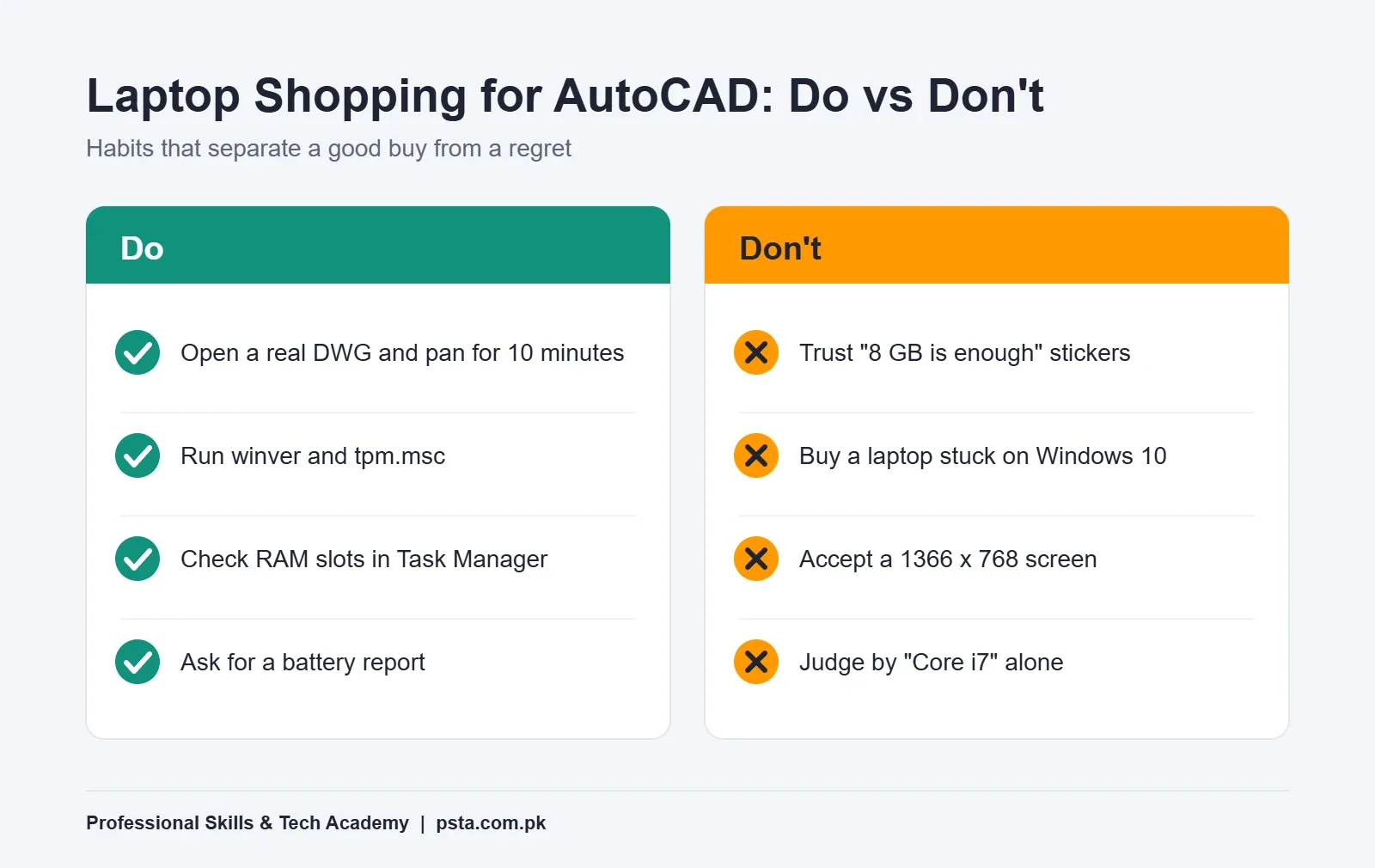
Most bad buys of a laptop for AutoCAD come from a short list of habits:
- Trusting the sticker. "Core i7" says little on its own. A 6th Gen i7 can fail Windows 11 rules while a newer i5 passes.
- Testing with an empty drawing. Any laptop looks fast on a blank screen. Bring a real DWG on a USB drive.
- Ignoring soldered RAM. Some thin laptops have memory fixed to the board. If it ships with 8 GB, it stays at 8 GB.
- Forgetting the charger. A weak or non-original charger can throttle performance and damage the battery.
What You Need for PSTA's AutoCAD Classes
PSTA's AutoCAD Mastery: 2D, 3D Design & BIM course is a beginner-level program that runs for 45 to 90 days. The course page lists the fee at Rs. 28,000. You can join at the Abbottabad campus, attend live online from any city, or mix the two.
The ten modules start with interface setup, 2D drafting, layers, dimensions, blocks, Xrefs and isometric drawing. They then cover 3D solids, parametric design, BIM basics and photorealistic rendering, and finish with a final project and portfolio. That order matches the three levels above. A Level 1 laptop carries you through the first half comfortably. The 3D and rendering modules are where extra RAM and a dedicated card start to pay off.
If you're still deciding between drafting tools, our guides on AutoCAD vs Revit and learning AutoCAD in Pakistan are useful next reads. Students can also check how to get AutoCAD free with an education license before paying for software. For electrical students, our industrial automation course uses panel drawings too. When you're ready, the admission page explains how to enroll, and all PSTA courses are listed in one place.
Test Before You Pay: A 15-Minute Routine
Save one real drawing on a USB drive tonight, ideally a floor plan with hatches and dimensions. Take it to every shop you visit. Run winver and tpm.msc, check RAM slots in Task Manager, then open your drawing and zoom, pan and plot to PDF for ten minutes. A laptop for AutoCAD that stays smooth through that test will serve you well through your first year of drafting.
Frequently asked questions
How much RAM do I need for AutoCAD 2027?
Autodesk lists 16 GB as the basic figure and 32 GB as recommended for Windows. Sixteen gigabytes handles 2D plans, sheet sets and plotting well. If you plan to model in 3D, render, or use toolsets like Architecture or MEP, aim for 32 GB, or buy a laptop with a free slot so you can upgrade later.
Can AutoCAD run on a Core i3 laptop with 8 GB RAM?
It may install and open simple drawings if the laptop meets Windows 11 rules, but 8 GB sits below Autodesk's basic figure for AutoCAD 2027. Expect lag once you add Xrefs, hatches and several open files. If the memory can be upgraded to 16 GB, the same laptop becomes far more usable for 2D work.
Do I need a graphics card for AutoCAD?
For simple 2D drafting, a recent integrated chip can manage. Autodesk still recommends a card with dedicated video memory, because AutoCAD uses the display card for zooming, panning, line smoothing and text. For 3D modeling and rendering, the recommended figure is an 8 GB card with DirectX 12 support.
Will AutoCAD 2027 install on Windows 10?
Autodesk lists 64-bit Windows 11 for AutoCAD 2027 and says the software must run on a Windows version Microsoft still supports. Microsoft stopped supporting Windows 10 on October 14, 2025. Any laptop you buy for drafting now should run Windows 11 officially, with TPM 2.0 and Secure Boot turned on.
Is a gaming laptop good for AutoCAD?
It can be, since gaming laptops usually carry dedicated graphics and quick processors. You don't need one for 2D drafting, though. Check the cooling, screen resolution, RAM upgrade options and battery health before paying extra for gaming looks. A business laptop with 16 GB of RAM and a modest dedicated card is often enough.
Can I run AutoCAD on a MacBook Air?
AutoCAD for Mac 2027 supports Apple M-series chips on macOS Sonoma 14 and newer. Autodesk lists 8 GB of RAM as basic and 16 GB or more as recommended. Specialized toolsets such as AutoCAD Architecture, Electrical and MEP are Windows only, so check what your course or employer uses before choosing a Mac.
How much storage does AutoCAD need?
AutoCAD 2027 needs 10 GB of disk space, and Autodesk suggests an SSD. Toolsets add more: 20 GB each for Architecture and Electrical, and 21 GB for MEP. A 512 GB SSD leaves comfortable room for Windows, Office, AutoCAD and your project folders without constant clean-ups.
Sources & references
- Autodesk: System requirements for AutoCAD 2027 including Specialized Toolsets autodesk.com
- Autodesk: AutoCAD 2027 installation requirements help.autodesk.com
- Microsoft: Windows 11 system requirements support.microsoft.com
- Microsoft: Windows 10 support has ended on October 14, 2025 support.microsoft.com
- Windows Central: Windows 11 update did not end support for older Intel chips windowscentral.com
- NN Laptops: Best used laptop for AutoCAD under Rs. 100,000 (April 2026) nnlaptops.com
Last reviewed & updated on by Umar Qureshi. Written by the PSTA team in Abbottabad, Pakistan.

Umar Qureshi

AutoCAD Mastery: 2D, 3D Design & BIM (Complete Professional Course)
Turn this guide into a career: hands-on training with real projects, online across Pakistan or on-campus in Abbottabad · 45 - 90 Days.

Comments
No comments yet — ask a question or share your experience.