Quick answer
Good online interviews are won the evening before. Confirm the format and platform, test the app on the device you will use, aim for about 1.5 Mbps upload and download, sit facing the light at eye level, keep a phone hotspot ready, rehearse answers on camera, join 10 minutes early and send a short thank-you within 24 hours.
Key takeaways
- • Find out first whether the interview is a live call, a one-way recording or a phone screen, because each needs different preparation.
- • Google lists up to 1.7 Mbps each way for a 720p Meet call, and Microsoft recommends 1,500 Kbps for a one-to-one Teams video call.
- • A test call with a friend, a UPS-powered router and a saved phone hotspot remove most technical surprises.
- • Rehearse answers out loud on camera and keep a few calm English lines ready for when the call lags or drops.
- • A three to five line thank-you email within 24 hours is a simple step most candidates skip.
Table of contents 19 sections
- Which Kind of Online Interview Is Waiting for You?
- How Much Internet Speed Do You Need for a Video Interview?
- Steps 1 to 3: Confirm, Install and Test Two Days Before
- Step 1: Read the Invitation Like a Checklist
- Step 2: Install the Platform on the Device You Will Actually Use
- Step 3: Do a Full Test Call With a Friend
- Steps 4 and 5: A Camera Corner That Survives Load-Shedding
- Step 4: Fix Light, Camera Height and Sound
- Step 5: Plan for the Power and Internet Going Out
- Step 6: Rehearse Your Answers Out Loud, on Camera
- Steps 7 and 8: Join Early and Speak for the Microphone
- Step 7: Dress Fully and Join 5 to 10 Minutes Early
- Step 8: Adjust How You Talk for a Video Call
- What Should You Say When the Call Drops or Lags?
- Online Interview Tips for One-Way Recorded Interviews
- Step 9: Send a Short Follow-Up Within 24 Hours
- Camera Habits: What Helps and What Hurts
- Practising Interview English With a Live Trainer at PSTA
- Before Your Next Invitation Arrives: Run a 10-Minute Mock Call
An example to start (not a real student): a commerce graduate in Mardan gets an email at 9 PM, and the online interview tips in this guide are what she needed that night. Her first-round interview is tomorrow at 11 AM on Google Meet. She joins from her phone with a bright window behind her, so her face is a shadow. The power goes out four minutes in.
She spends the rest of the call apologizing instead of answering. None of that had anything to do with her degree or her ability.
The good news is that almost every problem in that example can be fixed the evening before. If you have been searching for how to prepare for an online interview, this guide walks you through nine steps, from the moment the invitation arrives to the follow-up email you send afterwards. Here is what you will be able to do by the end:
- Tell a live video interview from a one-way recorded one, and prepare for each
- Check whether your internet is fast enough, using the numbers Google and Microsoft publish
- Set up a camera corner that still works when the power goes off
- Answer clearly in English, even when the line lags or a question is repeated
- Follow up in a way that keeps your name in the interviewer's mind
Which Kind of Online Interview Is Waiting for You?
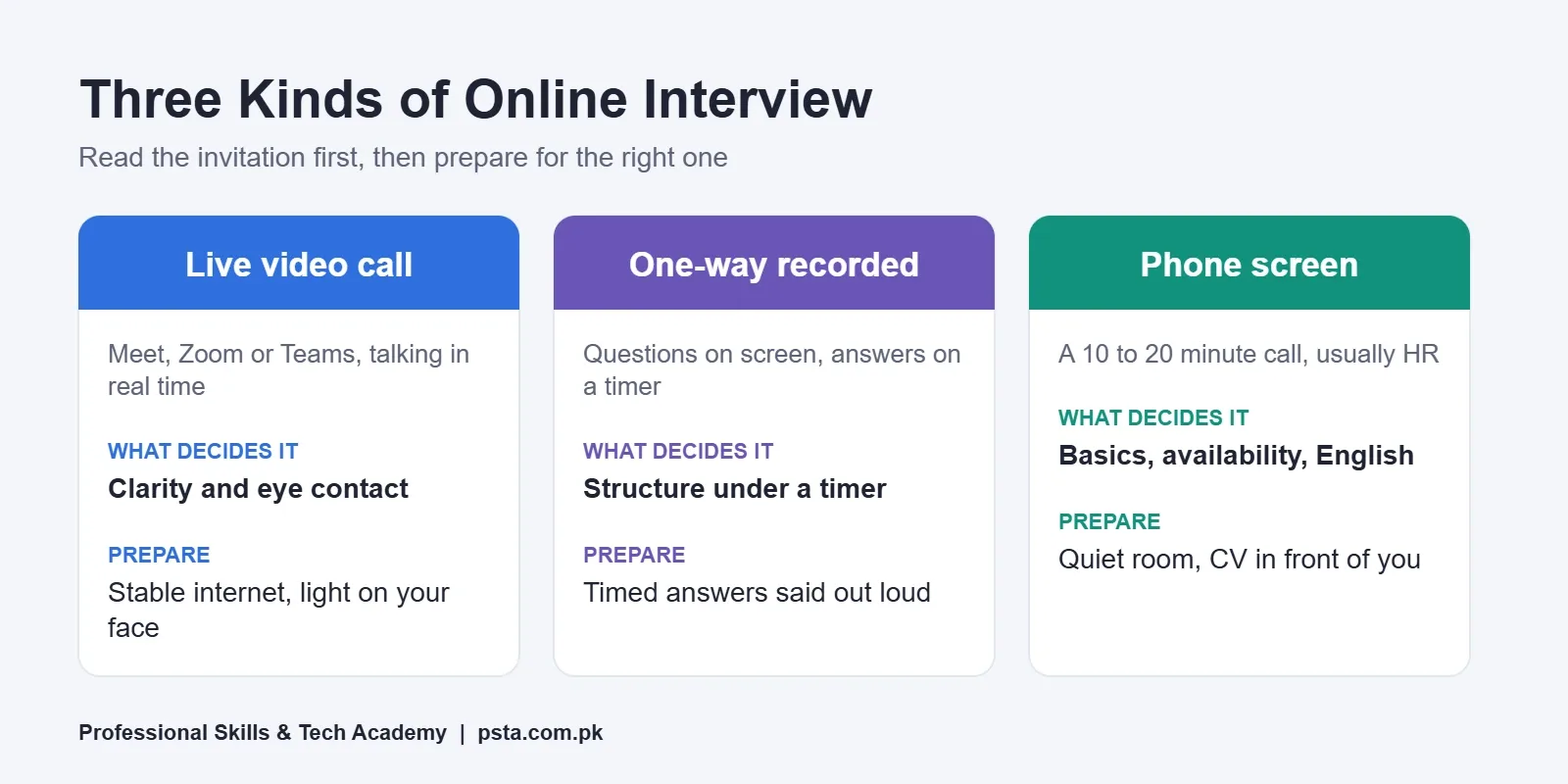
Most invitations in Pakistan fall into one of three formats: a live video call, a one-way recorded interview, or a short phone screen. Read the invitation twice before you prepare, because each format rewards different habits. A live call is a conversation. A recorded one is a performance with a timer. A phone screen is mostly about your voice and your basics.
Some larger employers and foreign remote companies use a recorded first round to screen many applicants quickly. Smaller teams more often set up a live Google Meet interview or a Zoom interview with one or two people. The table below compares the three formats, so you can see where your effort should go.
| Format | How it works | What decides it | Where to put your effort |
|---|---|---|---|
| Live video call (Meet, Zoom, Teams) | Real-time talk with one or more interviewers | Clarity, eye contact, handling follow-up questions | Stable internet, light on your face, short structured answers |
| One-way video interview | You record answers to on-screen questions with no one watching live | Structure under a timer, calm delivery | Practising timed answers out loud, checking the platform's practice round |
| Phone screen | A 10 to 20 minute call, usually from HR | Basic fit, availability, salary range, English level | A quiet room, your CV in front of you, clear short sentences |
If the email does not say which format it is, ask. A one-line reply such as "Could you please confirm whether this will be a live call or a recorded interview, and which platform you will use?" is polite and shows you plan ahead.
How Much Internet Speed Do You Need for a Video Interview?
For a one-to-one video interview, about 1.5 to 2 Mbps in both directions is a comfortable target. Upload speed matters as much as download, because the interviewer is watching your video, not the other way round. Speeds vary a lot by area and time of day, so test your own connection instead of assuming.
You do not have to guess. Google's network guide for Meet says a 720p video call uses up to 1.7 Mbps outbound and up to 1.7 Mbps inbound per participant, while audio-only needs about 100 Kbps each way. Microsoft's Teams planning page lists 150 Kbps as the minimum for a one-to-one video call, 1,500 Kbps as recommended and 4,000 Kbps for best performance, measured per endpoint in each direction.
| Platform and quality | Upload | Download | Source |
|---|---|---|---|
| Google Meet, 720p video | Up to 1.7 Mbps | Up to 1.7 Mbps | Google Workspace Admin Help |
| Google Meet, 1080p video | Up to 3.6 Mbps | Up to 3.6 Mbps | Google Workspace Admin Help |
| Google Meet, audio only | 100 Kbps | 100 Kbps | Google Workspace Admin Help |
| Teams one-to-one, minimum (up to 240p) | 150 Kbps | 150 Kbps | Microsoft Learn |
| Teams one-to-one, recommended (up to 1080p) | 1,500 Kbps | 1,500 Kbps | Microsoft Learn |
Run a speed test at the same hour as your interview, from the same spot in the room. Evening speeds on shared connections can drop well below the morning result. If your upload is under 1 Mbps, plan to keep the camera on at a lower quality and close every other app that uses data.
Steps 1 to 3: Confirm, Install and Test Two Days Before
The first three online interview tips are dull, and that is exactly why people skip them. They take about 30 minutes in total and remove most of the surprises that ruin a call.
Step 1: Read the Invitation Like a Checklist
- Note the date and time, and check the time zone. Pakistan is UTC+5, so a "10 AM GMT" slot is 3 PM for you.
- Write down the platform, the meeting link and any meeting ID or passcode.
- Find out who will join: HR only, the team lead, or a panel.
- Reply within a few hours to confirm. Keep it to two or three lines.
Step 2: Install the Platform on the Device You Will Actually Use
A laptop is better than a phone, because the camera stays still and you can see the interviewer's face at a useful size.
Google says Meet runs in the current versions of Chrome, Firefox, Edge and Safari, and needs at least a dual-core processor and 2GB of memory. The same page notes that the Meet phone app works on Android 5.0 and up. If you are on a phone, install the app the day before and sign in, so you are not stuck on an update screen at 10:58.
Step 3: Do a Full Test Call With a Friend
Call a friend or relative on the same platform, from the same room, at roughly the same time of day. Ask them three things: can they hear you without echo, is your face clearly lit, and does your video freeze?
Then share your screen once, because some interviewers ask you to open a file or a portfolio. Turn off any VPN during this test. Microsoft and Google both warn that VPNs add latency, which can show up as delayed or robotic audio.
Steps 4 and 5: A Camera Corner That Survives Load-Shedding
Your setup does not need to be expensive. It needs to be predictable. Pick one spot in your home and prepare it once, so every future call is easier.
Step 4: Fix Light, Camera Height and Sound
- Light in front, not behind. Sit facing a window or a lamp. A bright window behind you turns your face dark.
- Camera at eye level. Put the laptop on a stack of books so you are not looking down at the lens.
- Earphones with a microphone. Even cheap wired ones cut echo and fan noise better than the laptop's speakers.
- A plain background. A wall or a tidy shelf is enough. Avoid busy virtual backgrounds that blur your hands and hair.
Step 5: Plan for the Power and Internet Going Out
For many candidates, mobile data is the most practical backup. A Cabinet Division reply to the Senate, reported by ProPakistani, says 4G users in Pakistan grew from 111.9 million to 141.4 million between 2022-23 and 2024-25. That makes a phone hotspot a realistic plan B for most candidates.
- Charge your laptop and phone to 100% an hour before the call.
- Check the load-shedding timing for your area and, if you can, move the slot away from it.
- If you have a UPS, plug the Wi-Fi router into it, not just the laptop.
- Turn on your phone hotspot once in advance so the laptop remembers it.
- Save the interviewer's email or phone number, so you can message them if you drop out.
Step 6: Rehearse Your Answers Out Loud, on Camera
Reading answers in your head is not practice. Open your camera app, ask yourself the five most likely questions, and record each answer. Watch the recording once with the sound on, then once with it off. With the sound on, you will hear filler words and long sentences. With it off, you will notice whether you look at the lens or at your own face on screen.
For an online interview in English, keep each answer to about 60 to 90 seconds and use a simple shape: a one-line answer, one example, and what it shows about you. Our guide to English interview questions with sample answers covers the wording, and the post on answering "Tell me about yourself" helps with the opening question that almost every interviewer asks. Here you only need to practise delivering those answers on a screen.
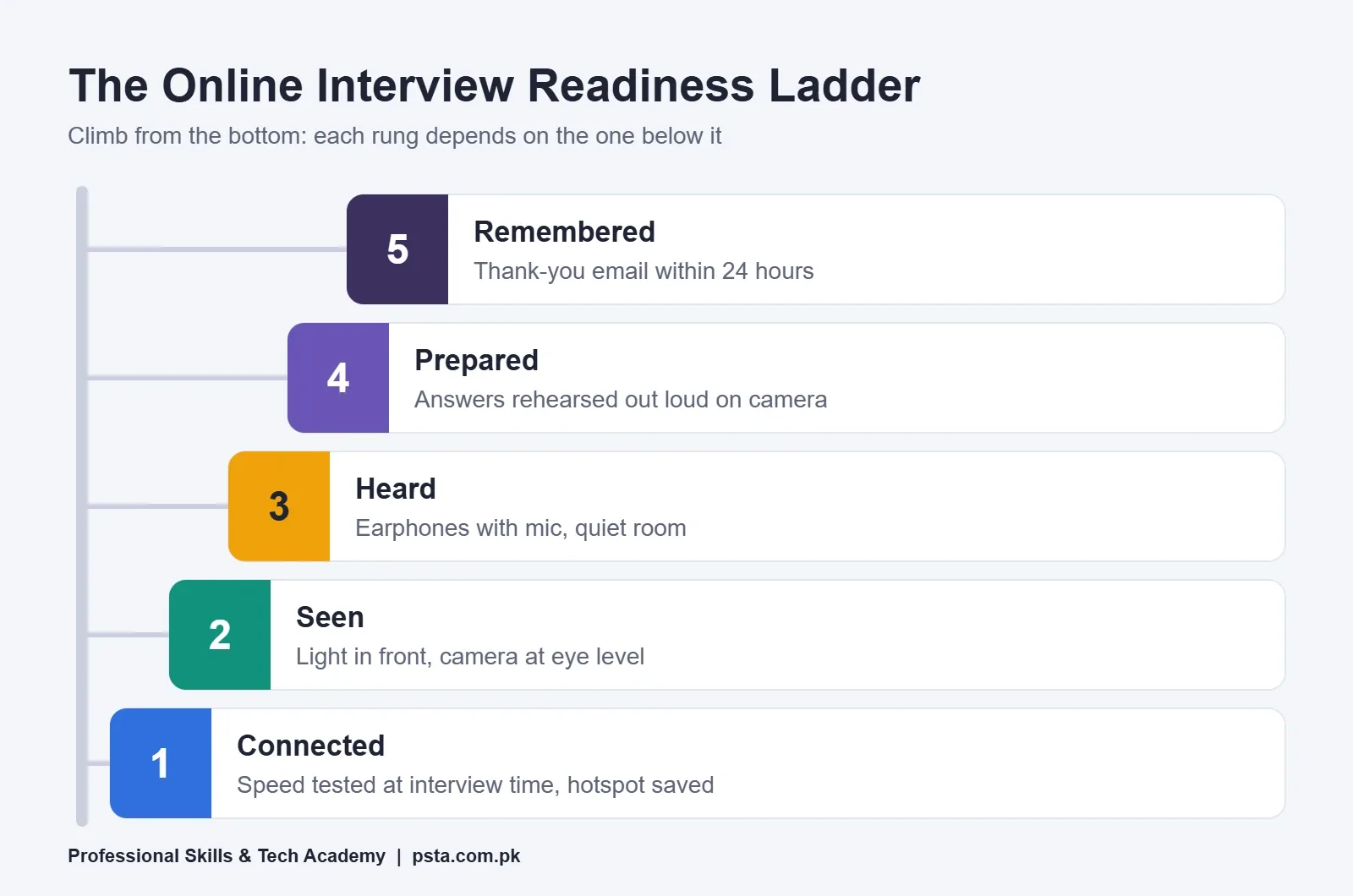
The ladder below shows the order in which these online interview tips pay off. Each rung depends on the one beneath it: perfect English will not help if the interviewer cannot hear you.
Steps 7 and 8: Join Early and Speak for the Microphone
On the day, treat the start time as the moment you are already seated and calm, not the moment you click the link.
Step 7: Dress Fully and Join 5 to 10 Minutes Early
Wear what you would wear to the office, including the parts the camera might not show. You may need to stand up to plug in a charger.
Open the link 10 minutes early. Many meetings use a waiting room or lobby, so you may sit there until the host lets you in. Use that time to check your name on screen. "Ali's iPhone" or a nickname looks careless; change it to your full name.
Step 8: Adjust How You Talk for a Video Call
- Look at the camera when you speak and at the screen when you listen.
- Pause for a second after the interviewer finishes. Lag can make you talk over each other.
- Speak a little slower than normal and finish your sentences clearly.
- Keep a sheet of notes below the camera with three key points and your questions for them. Glance, don't read.
- Mute only if there is real background noise; constant muting and unmuting makes you miss the start of your answer.
What Should You Say When the Call Drops or Lags?
Say what happened in one calm sentence, then carry on. Anyone who interviews online has seen frozen screens before, so the glitch itself rarely counts against you. What the interviewer remembers is how you handled it. Panic and long apologies leave a worse impression than the lag.
Keep these lines ready. They are short, polite and easy to say under pressure:
- "Sorry, you broke up for a moment. Could you please repeat the last part of the question?"
- "I think my video froze. Can you hear me clearly now?"
- "My connection dropped; I've rejoined from my phone. Shall I continue from where I stopped?"
- "There's a lag on my side, so I'll pause a little before answering."
If you get cut off and cannot rejoin within two or three minutes, send a short email or WhatsApp message to the contact person straight away. Offer to rejoin by phone or at another time. Google's help page also says you can dial in to a Meet call by phone if your browser does not support video meetings, so ask whether the organizer can share a dial-in number.
Online Interview Tips for One-Way Recorded Interviews
A one-way video interview feels strange because no one nods or smiles back. You see a question, a countdown, and then the recording starts. The University of Colorado Boulder's guide to HireVue, a widely used platform, says candidates typically get one minute of preparation time before each answer is recorded, and that practice questions are offered at the start.
- Always use the practice questions. They let you check your light, sound and timing for free.
- Use the prep minute to write three words on paper: your answer, your example, your result.
- Smile briefly before you start speaking, as you would when greeting a person.
- Stop when you have answered. You do not have to fill the whole timer.
- Read the instructions about retakes before you begin, because some employers allow none.
Step 9: Send a Short Follow-Up Within 24 Hours
Of all the online interview tips here, this is the one people forget once the call ends, which is why it helps you stand out. Send a three to five line email the same day or the next morning. Thank the interviewer by name, mention one specific thing you discussed, and restate your interest in the role. Do not attach your CV again unless they asked for it.
If you need help with the tone of a professional email, the structure in our guide to writing a job application email works for follow-ups too: a clear subject line, a polite opening, one purpose, and a simple sign-off.
Camera Habits: What Helps and What Hurts
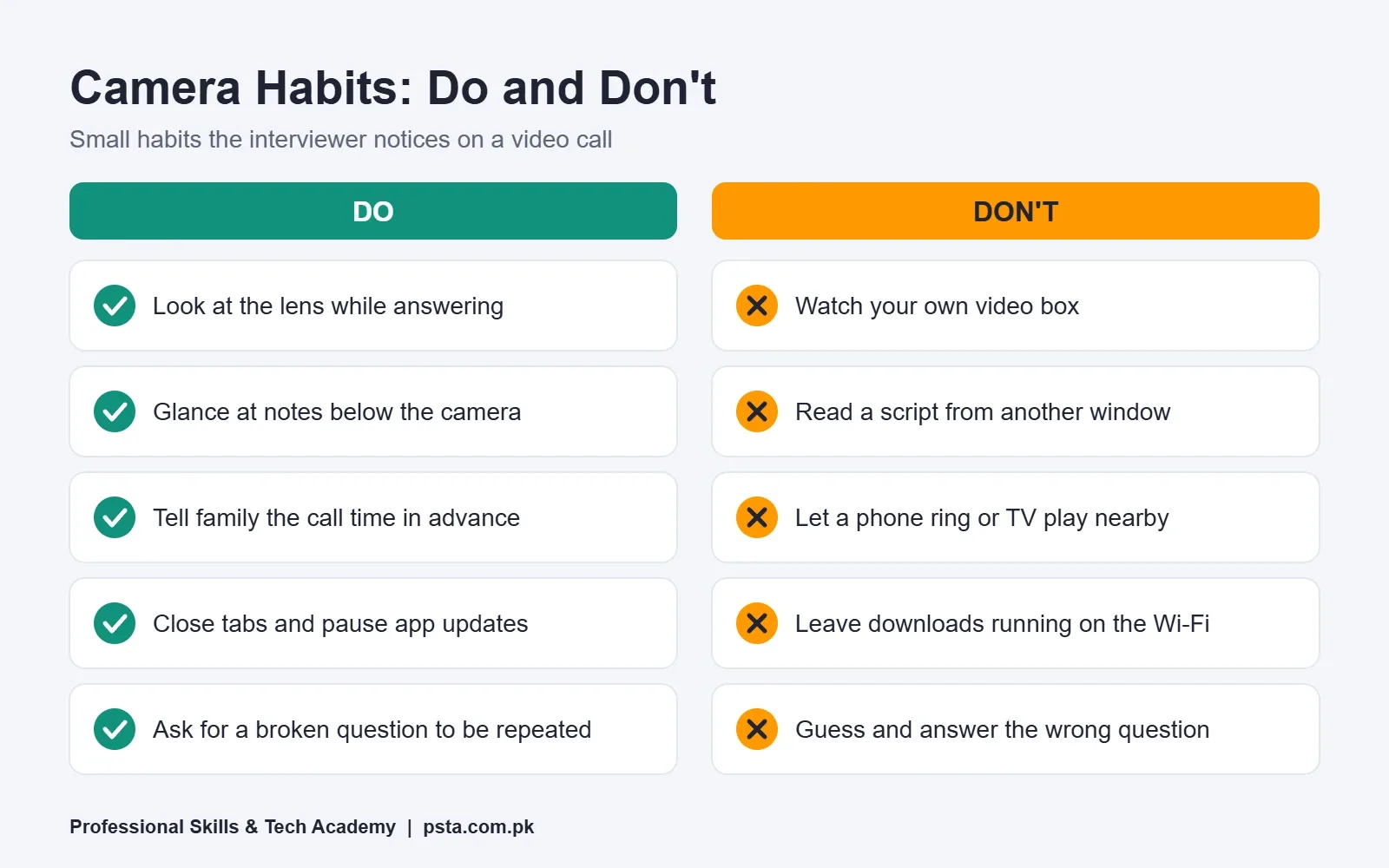
Small habits add up on video, because the interviewer sees only your face and shoulders for half an hour. The pairs below are some of the most useful online interview tips to check in a mock call before the real one.
| Do | Don't |
|---|---|
| Look at the lens while answering | Watch your own video box the whole time |
| Keep notes below the camera and glance at them | Read a script from a second window |
| Tell family the time of the call in advance | Let a phone ring or a TV play in the room |
| Close other tabs and pause app updates | Leave downloads running on the same Wi-Fi |
| Ask for a question to be repeated if it breaks up | Guess what was asked and answer the wrong question |
If you are applying to remote jobs from Pakistan, these habits matter twice over. Your interviewer is also judging what it would be like to work with you on video every day.
Practising Interview English With a Live Trainer at PSTA
Most people preparing for an online interview know what to say but freeze when they have to say it in English, live, to a stranger on a screen. That is a speaking skill, and it improves with guided practice and feedback rather than more reading.
PSTA (Professional Skills & Tech Academy) runs an English Spoken & Grammar Course that lasts 12 weeks at beginner level. Its published fee is Rs. 12,000, discounted from Rs. 14,000.
The course outline on psta.com.pk includes modules on speaking confidence for interviews, meetings and social talks, on role plays, group discussions and public speaking, on formal vs informal English, and on email, CV and message writing. It ends with a final presentation and a certification assessment.
Classes run at the Abbottabad campus, as live online sessions for learners elsewhere in the country, or as a mix of both. A new batch starts every month, with class slots between 9:00 AM and 9:30 PM, Monday to Saturday. Some employers also test Word, Excel and email during hiring. For those roles, the Office Automation course (12 weeks, Rs. 12,000) is a sensible second step. Every program is listed on the courses page.
Before Your Next Invitation Arrives: Run a 10-Minute Mock Call
You do not need an interview scheduled to start. Pick one evening this week. Sit in your camera corner, ask a friend to call you on Google Meet or Zoom, and have them ask you two questions from a job ad you would like to apply for. Record it if you can.
Then watch it back and fix one thing only: the light, the camera height, or the length of your answers. When the real invitation comes, the setup will already be done and these online interview tips will be habits instead of a checklist.
If you would like structured speaking practice before your next round, you can apply on the admission page. Questions about the next English batch are welcome on WhatsApp (+92 314 5424399).
Frequently asked questions
Can I give an online interview on my mobile phone?
Yes, most platforms work on phones. Google says the Meet app runs on Android 5.0 and up. A laptop is still better because the camera stays steady and you can see the interviewer clearly. If you must use a phone, put it on a stand at eye level, plug in the charger, switch on Do Not Disturb and install the app a day early.
Should I keep my camera on if my internet is slow?
Keep it on if you possibly can, because interviewers expect to see you. Close other apps, pause downloads and move closer to the router first. If the video keeps freezing, ask politely whether you may switch the camera off for a few minutes to keep the audio clear. Google lists audio-only Meet calls at about 100 Kbps each way, far less than video.
What should I wear for an online interview at home?
Dress exactly as you would for an office interview, top to bottom. Plain, solid colors usually look better on camera than busy patterns or very bright white. You may need to stand up during the call, so do not wear formal clothes only on top. Being fully dressed also helps you feel more serious and confident while you speak.
Is it okay to keep notes during a video interview?
Short notes are fine, as long as you do not read from them. Write three key points about yourself, one or two examples and your questions for the employer on a single sheet. Place it just below the camera so a quick glance does not look like you are looking away. Never read full answers from a second window; interviewers notice it quickly.
What should I do if a power cut makes me miss part of the interview?
Rejoin from your phone hotspot if you can, and say in one sentence what happened. If you cannot get back within two or three minutes, email or message the contact person right away, apologize briefly and offer to continue by phone or at another time. Most employers reschedule a genuine technical problem when the candidate communicates quickly and politely.
Can I use a virtual background in a job interview?
You can, but a plain real background is usually safer. Virtual backgrounds often blur the edges of your head and hands, and they flicker on slower laptops. A tidy wall or bookshelf with light falling on your face looks more natural. If your room is busy or private, a simple blur effect is a better choice than a bright picture.
How long should answers be in a one-way video interview?
Aim for about 60 to 90 seconds per answer unless the platform shows a different limit. On HireVue, candidates typically get one minute to prepare before each recording starts. Use it to note your answer, one example and the result. Stop when you have answered clearly; you do not need to fill the whole timer, and rambling usually hurts more than a short answer.
Sources & references
- Prepare your network for Meet meetings & live streams (Google Workspace Admin Help) support.google.com
- Learn what requirements you need to use Google Meet (Google Meet Help) support.google.com
- Prepare your organization's network for Microsoft Teams (Microsoft Learn) learn.microsoft.com
- What is HireVue and how does it help us hire you? (University of Colorado Boulder) colorado.edu
- 4G users and broadband growth in Pakistan, Cabinet Division reply to the Senate (ProPakistani) propakistani.pk
Last reviewed & updated on by Umar Qureshi. Written by the PSTA team in Abbottabad, Pakistan.

Umar Qureshi

English Spoken & Grammar Course in Pakistan – Build Confidence, Speak Fluently (Online & Campus)
Turn this guide into a career: hands-on training with real projects, online across Pakistan or on-campus in Abbottabad · 12 Weeks.
Comments
No comments yet — ask a question or share your experience.