Quick answer
Use Vite for new React projects. The React team deprecated Create React App for new apps on February 14, 2025, and CRA now runs in maintenance mode only. Vite suits client-only apps such as dashboards and class projects; pick Next.js or React Router as a framework when you need server rendering or SEO pages.
Key takeaways
- • The React team deprecated Create React App for new apps on February 14, 2025; existing apps keep working in maintenance mode.
- • Vite, Parcel and Rsbuild are the build tools React now names, and Vite is the one most tutorials use.
- • Key switches: npm run dev instead of npm start, VITE_ instead of REACT_APP_, and dist instead of build.
- • Choose Next.js or React Router as a framework when pages need SEO or server rendering, and Expo for mobile apps.
- • A small CRA project can usually move to Vite in an afternoon if you follow the migration steps in order.
Table of contents 12 sections
- Vite vs Create React App: The Short Verdict
- Why Was Create React App Deprecated?
- What Is Vite, and Why Did It Replace CRA in Tutorials?
- Side-by-Side: Commands, Folders and Settings
- Vite vs Create React App: Which Is Faster?
- Which Should You Pick: Vite, Next.js or React Router?
- What Vite Doesn't Give You Out of the Box
- How to Start a React Project With Vite
- How Do You Migrate an Old CRA Project to Vite?
- What This Means for Students and Job Seekers in Pakistan
- Where PSTA's React Course Fits In
- Try This Before Your Next Coding Session
Here is a situation we see at the start of many React batches, shared as an example rather than one student's story. A second-year BS student opens a two-year-old tutorial, types npx create-react-app my-app and waits. The terminal prints a deprecation notice, npm complains about conflicting dependencies, and the project either refuses to start or starts with warnings nobody can explain. The student then searches for Vite vs Create React App and finds a dozen opinions that don't agree.
This guide settles that question with the official React and Vite documentation, so you can choose once and get on with building. In the sections below, you will find:
- What the React team actually said when it retired Create React App, and what it means for old projects
- A side-by-side table of commands, folders and settings in both tools
- When Vite is the right pick, and when Next.js, React Router or Expo fits better
- Step-by-step commands to start a new React with Vite project and to move an old CRA project across
- What this change means for your CV, your final year project and freelance work in Pakistan
Vite vs Create React App: The Short Verdict
For any new React project in 2026, pick Vite over Create React App. This isn't a matter of taste. On February 14, 2025, the React team announced it was deprecating Create React App for new apps, noting that the project had no active maintainers. Fresh installs now print a warning that begins with "create-react-app is deprecated."
Vite, in contrast, is one of the build tools the React team names as a replacement, alongside Parcel and Rsbuild. It's also the one most current tutorials, courses and job tasks use. So the real decision in 2026 is no longer CRA or Vite. It's whether you need a plain build tool like Vite or a full framework like Next.js. We'll get to that choice in a later section.
If you already have a working CRA project, you don't need to panic. The React blog says CRA will keep working in maintenance mode. You can finish a semester project on it, but plan to move it when you have a free weekend.
Why Was Create React App Deprecated?
Create React App launched in 2016 and solved a real problem: it hid webpack and Babel setup behind one command. Over time, though, it fell behind. According to DevClass's report on the deprecation, CRA had seen little maintenance since 2021. When React 19 shipped, new CRA installs hit npm dependency errors, a situation Redux maintainer Mark Erikson described as a "perfect storm" of incompatibility.
The React team also pointed to deeper design gaps. In its announcement, it listed three things CRA never included:
- Routing. There is no built-in way to map URLs to pages, so many beginners keep the "current page" in state and lose shareable links.
- Data fetching. Fetching inside effects can create request waterfalls, where one request waits for another to finish.
- Code splitting. Without it, the whole app ships as one large bundle, which hurts load times on slow mobile connections.
Rather than turn CRA into yet another framework, the team chose to point developers to tools that already solve these problems.
What Is Vite, and Why Did It Replace CRA in Tutorials?
Vite is a build tool and development server. It serves your source files directly to the browser during development and bundles them for production when you run the build command. It isn't tied to React; the same tool powers Vue, Svelte and plain JavaScript projects too.
Three things made Vite the default for React learners:
- Fast feedback while coding. The dev server starts quickly and updates the page as you save, which matters on the mid-range laptops most students in Pakistan use.
- Active development. Vite 8 became stable on March 12, 2026, and the Vite 8 announcement says the tool is downloaded 65 million times a week.
- Developer approval. InfoQ's summary of the State of JavaScript 2025 survey reports 84% usage for Vite and a 98% satisfaction score.
None of this means you have to learn a new way of writing React. Your components, hooks and props work the same way. What changes is the tooling around them.
Side-by-Side: Commands, Folders and Settings
In practice, the Vite vs Create React App difference shows up in small details. Most of the confusion students face comes from those differences, such as a missing environment variable or a build folder the hosting panel can't find. The table below lists the differences you'll notice first, taken from the CRA getting started page and the Vite docs.
| Task | Create React App | Vite |
|---|---|---|
| Create a project | npx create-react-app my-app |
npm create vite@latest |
| Start the dev server | npm start on localhost:3000 |
npm run dev on localhost:5173 |
| Environment variable prefix | REACT_APP_ |
VITE_ |
| Read a variable in code | process.env |
import.meta.env |
| Production build folder | build |
dist |
| Where index.html lives | Inside public |
Project root, as the entry point |
| Node.js needed | Node 14 or newer (per its docs) | Node 20.19+ or 22.12+ |
| Maintenance status | Deprecated, maintenance mode only | Actively developed (Vite 8) |
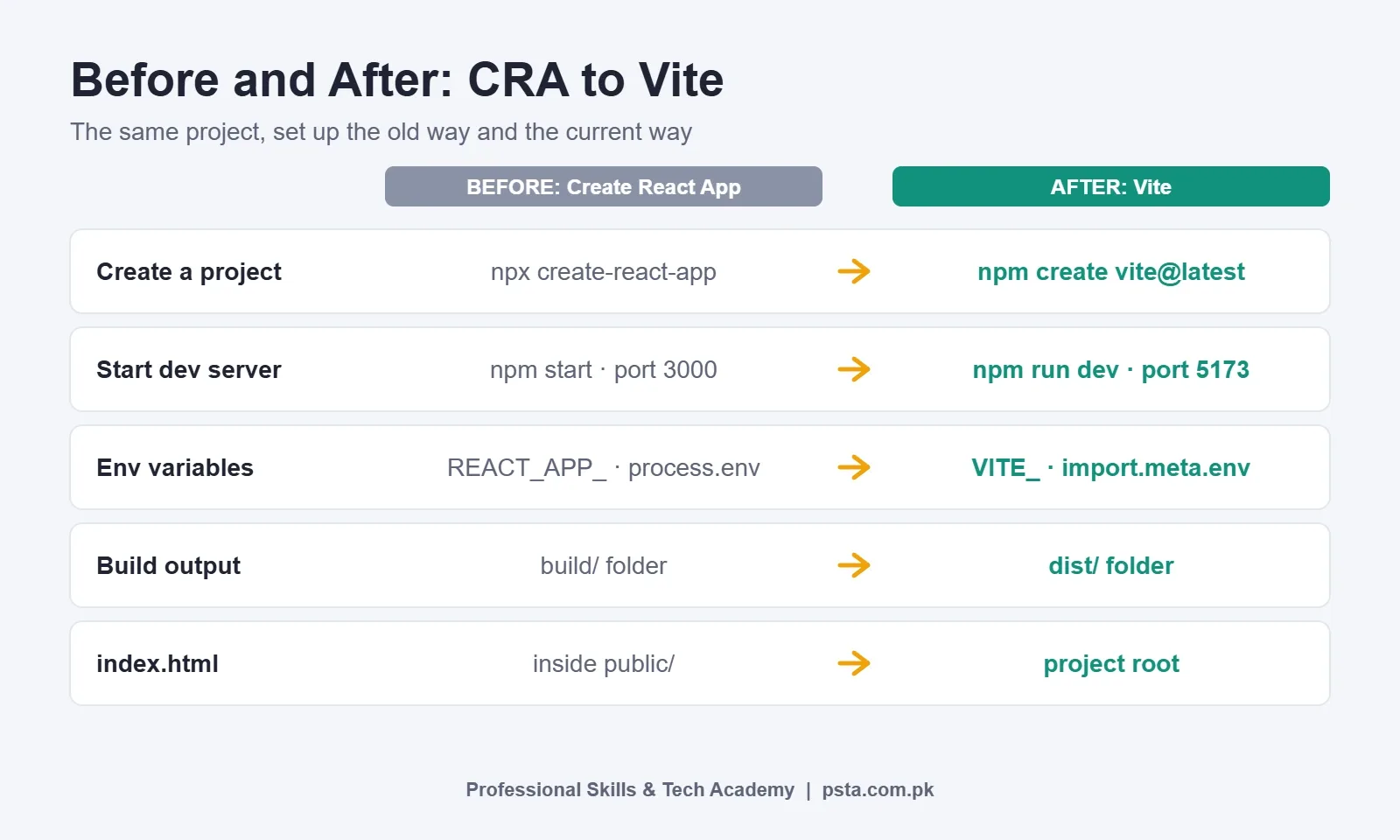
The environment variable rule catches many people. In CRA, only variables that start with REACT_APP_ reach your code, as the CRA environment variable docs explain. In Vite, the Vite env and mode guide says only variables with the VITE_ prefix are exposed to client code. Either way, never put a secret API key in these files, because anything exposed to the browser can be read by anyone who opens your site.
Vite vs Create React App: Which Is Faster?
For day-to-day work, you'll feel the difference in two places: how long the dev server takes to start, and how quickly a saved change shows up in the browser. CRA bundles your app through webpack before serving it, so start-up time grows with the project. Vite serves modules on demand during development, so a bigger project doesn't slow the first load in the same way.
Production builds got faster again with Vite 8. The release replaced the old pair of esbuild and Rollup with a single Rust-based bundler called Rolldown. The Vite team reports that Rolldown runs 10 to 30 times faster than Rollup in its benchmarks, and that Linear's production build dropped from 46 seconds to 6 seconds.
Treat those as best cases from large codebases. On a typical class project, both tools build in seconds. The speed you'll care about as a learner is the edit-and-refresh loop, and that's where Vite feels quicker on an ordinary laptop.
One trade-off is worth knowing. The same announcement says Vite 8's install is about 15 MB larger than Vite 7. On a slow connection or a nearly full hard drive, that's a small price, but it's real.
Which Should You Pick: Vite, Next.js or React Router?
Once CRA is off the table, you're choosing between a React build tool and a full framework. The React team's guide to building a React app from scratch is honest about this: starting from a bare build tool often means you end up assembling your own framework piece by piece.
Use this rule of thumb:
- Pick Vite for client-only apps, such as an admin panel, a POS screen for a shop, a school result dashboard, or a portfolio project that calls an existing API.
- Pick Next.js or React Router in framework mode when pages must rank on Google, load fast on first visit, or share a codebase with server code. A business website or a blog with product pages fits here.
- Pick Expo when the goal is an Android or iPhone app built with React Native.
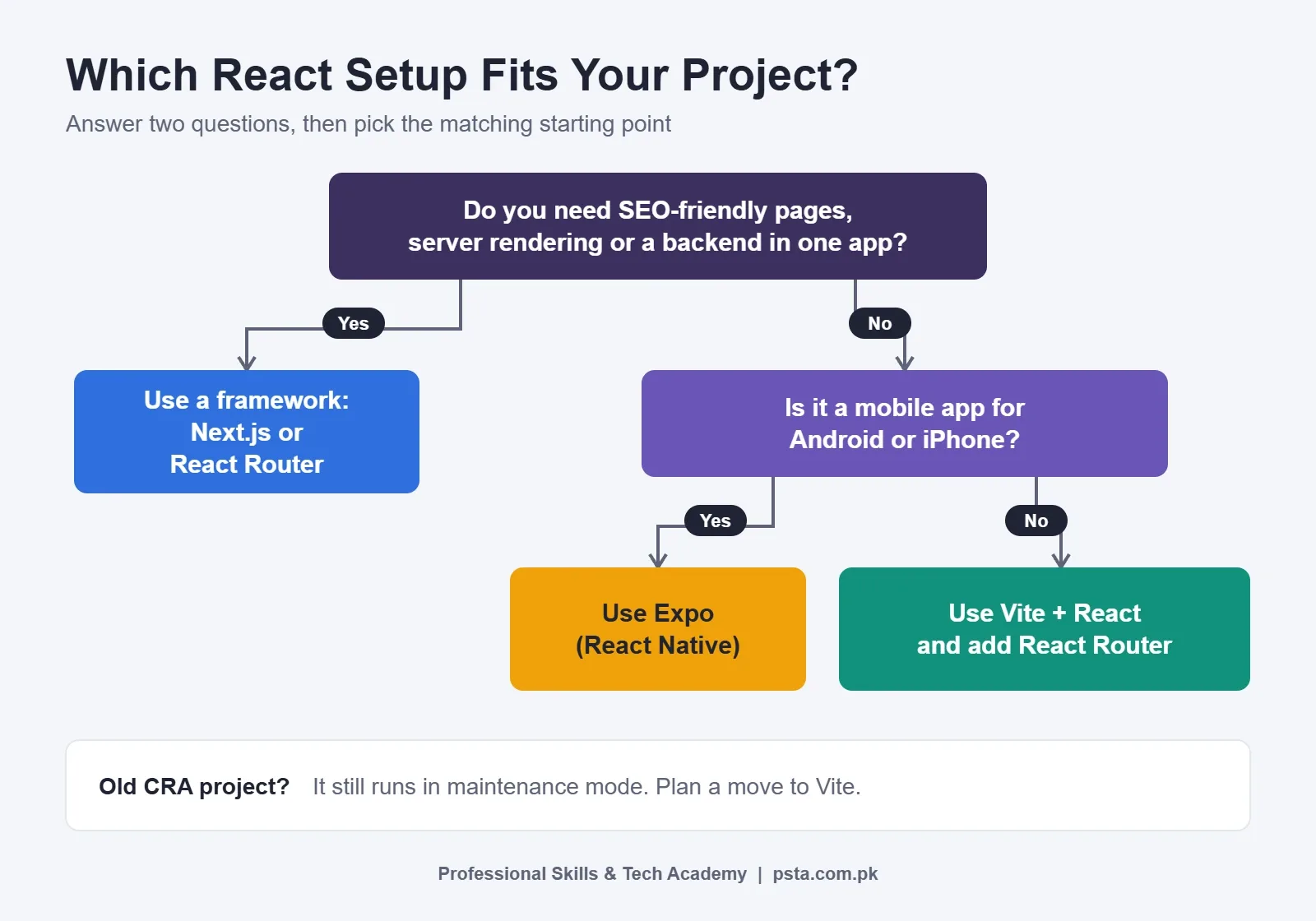
For most learners, we recommend starting with Vite. It keeps the moving parts few, so you learn React itself instead of fighting framework rules. Our post on React vs Next.js for beginners explains when to take the next step.
What Vite Doesn't Give You Out of the Box
Vite produces a client-side single-page app. That's a strength for learning, but it means a few jobs are left to you. The React docs name the usual choices:
- Routing: React Router or TanStack Router, so each page gets its own URL.
- Data fetching from REST APIs: TanStack Query, SWR or RTK Query, which handle loading states, errors and caching.
- GraphQL APIs: Apollo or Relay.
- Older browsers: Vite targets modern browsers by default. If a client's staff still use outdated machines, the official
@vitejs/plugin-legacyplugin adds support.
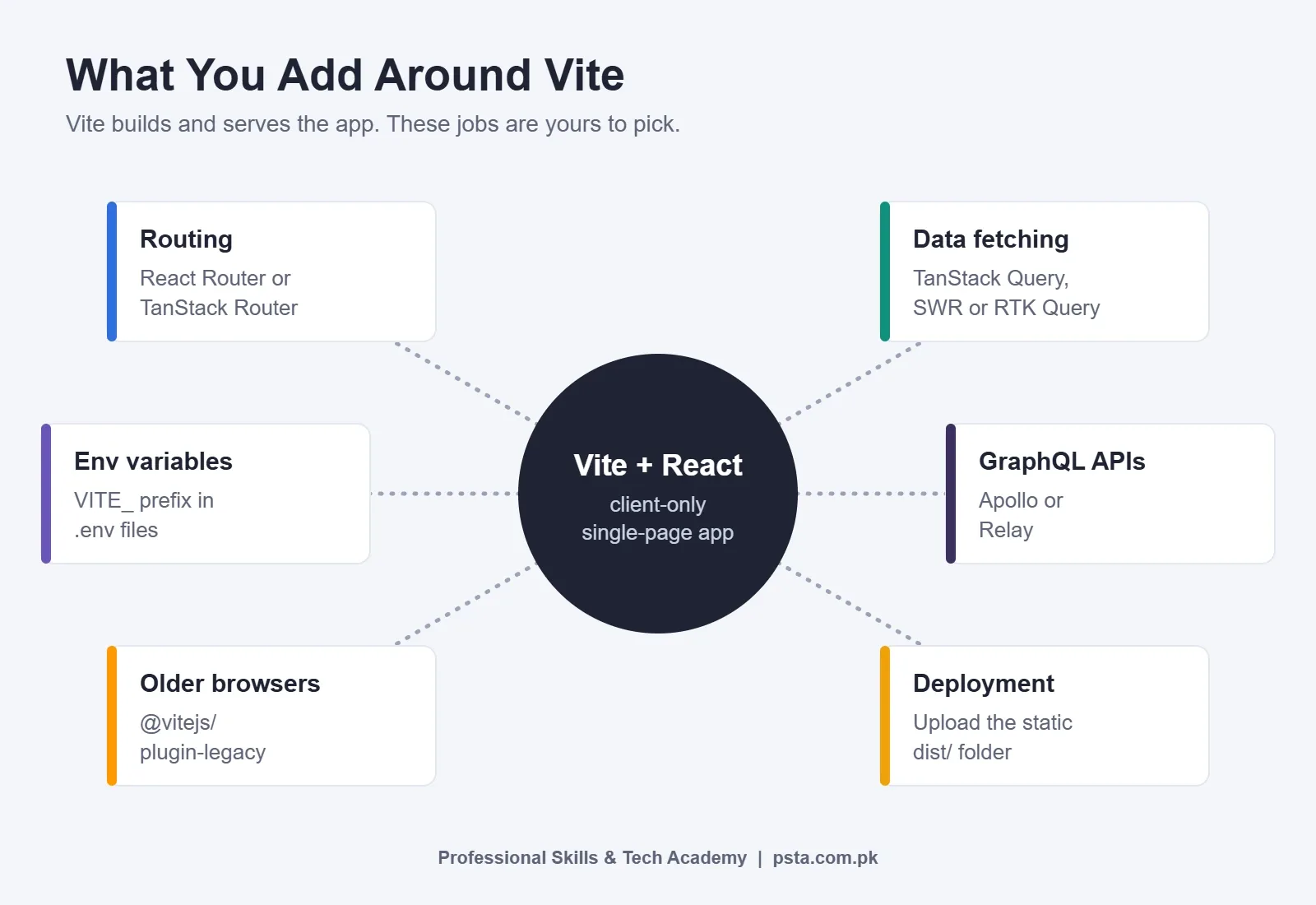
Don't install all of these on day one. Add React Router when your app needs a second page, and add a data library when your fetch logic starts repeating. Each addition then solves a problem you've actually felt.
How to Start a React Project With Vite
These steps work on Windows, macOS and Linux. Check your Node.js version first, because Vite needs Node 20.19+ or 22.12+.
- Open a terminal and run
node -v. If the version is older, install the current LTS release from the official Node.js site. - Run
npm create vite@latestand follow the prompts. To skip them, usenpm create vite@latest my-app -- --template react, orreact-tsif you want TypeScript. - Move into the folder with
cd my-app, then runnpm install. - Start the dev server with
npm run devand openhttp://localhost:5173. - Open
src/App.jsx, change some text and save. The page should update without a manual refresh. - When you're ready to publish, run
npm run build. Upload the contents of thedistfolder to any static host.
If you need a free place to put that dist folder, our comparison of free web hosting for students covers the main options.
How Do You Migrate an Old CRA Project to Vite?
If you need to migrate CRA to Vite, a small or medium project usually takes an afternoon. Commit your work to Git first, so you can roll back if something breaks.
- Create a fresh project from the Vite React template (
react) next to your old one. This gives you a cleanpackage.json,vite.config.jsand entry file to copy from. - Copy your
srcfolder into the new project. Rename files that contain JSX from.jsto.jsx, matching the template. - Move
index.htmlfrompublicto the project root. Remove%PUBLIC_URL%references and add a script tag that points to your entry file, such as<script type="module" src="/src/main.jsx"></script>. - Rename every
REACT_APP_variable in your.envfiles toVITE_, and changeprocess.env.REACT_APP_Xtoimport.meta.env.VITE_Xin your code. - Reinstall the libraries your app uses, such as React Router or Axios, then run
npm run devand fix any import errors one at a time. - Update your hosting settings so the publish folder is
dist, notbuild.
The most common slip is step 4. If an API URL suddenly shows as undefined, check the prefix before anything else.
What This Means for Students and Job Seekers in Pakistan
Many university labs and older YouTube playlists still teach CRA, so you may be the first in your class to switch. That's an advantage. Settling Vite vs Create React App early also saves you from debugging an abandoned tool during exams. When a software house in Islamabad or Lahore gives you a take-home task, a repo built with Vite and a clear README shows you follow current practice.
A few practical points:
- Update your CV wording. Write "React with Vite" or "React with Next.js" rather than just "React". It tells a reviewer what you've actually configured.
- Final year projects. If your project is a dashboard or a management system with a separate backend, Vite is enough. If it's a public website that must appear in search results, discuss Next.js with your supervisor.
- Freelance clients. Local clients rarely ask which build tool you use, but they do notice slow sites and broken links. Pick the tool that matches the job, and explain the choice in one sentence.
- Old code at work. If you join a team with a CRA codebase, don't rewrite it on your first day. Learn how it works, then suggest a migration plan with an estimate.
To see what a React portfolio should contain, our list of React projects for beginners gives seven builds in order, and each one makes a good first test of a fresh Vite setup.
Where PSTA's React Course Fits In
Learners who already know React basics can join the Advanced React.js Mastery course at PSTA. It runs for 12 weeks at intermediate level, with seats on campus in Abbottabad, in live online classes across Pakistan, or in a hybrid of the two. The current fee shown for it is Rs. 30,000.
Across eight modules, you move from advanced hooks to shared state (Context API, then Redux Toolkit), page navigation with React Router, and working with APIs. Later weeks deal with speed, including code splitting, followed by testing, login security and a capstone online store. Those are the same gaps the React team says a bare build tool leaves open, so the course picks up exactly where a Vite starter ends.
If you're still new to JavaScript itself, our beginner-to-React JavaScript program is the better first step. If you want backend skills as well, the Full-Stack Web Development with AI course covers both ends. Fees and durations for every program sit side by side on the PSTA courses list, and the online admission page takes about five minutes to fill in.
Try This Before Your Next Coding Session
The quickest way to understand Vite vs Create React App is to feel it yourself. Pick one old React project, even a small to-do app, and rebuild its setup with Vite using the migration steps above. Time yourself, note every error you hit, and write two lines about each fix in the README. You'll end the session with an up-to-date project and a short record of real debugging, which is far more useful in an interview than another finished tutorial.
If you'd like help choosing between the React and JavaScript courses, message us on WhatsApp at +92 314 5424399 or come and see a class at our Mandian campus in Abbottabad, across the road from FIMS College on Old College Road.
Frequently asked questions
Is Create React App still usable in 2026?
Existing CRA projects still run, because the React team says Create React App continues in maintenance mode. You can finish a current assignment on it. For any new project, though, start with Vite or a framework, since CRA has no active maintainers and new installs print a deprecation warning. Plan to move older projects when you have time.
Is Vite better than Create React App for beginners?
For a beginner starting today, yes. Vite is actively developed, current tutorials use it, and the dev server updates the page quickly as you save. Your React code stays the same, so nothing you learned about components, props or hooks is wasted. The main things to relearn are a few commands, the VITE_ prefix and the dist folder.
Do I need to learn webpack if I use Vite?
No. Vite handles bundling for you, and since Vite 8 it uses its own Rust-based bundler, Rolldown, for builds. You only need to edit vite.config.js when you add plugins or change settings such as the base path. Learning how bundling works in general is still useful later, but it is not a starting requirement.
Can I use TypeScript with Vite?
Yes. Choose the react-ts template when you run npm create vite@latest, or pass --template react-ts to skip the prompts. The React documentation itself uses the TypeScript template in its build-from-scratch example. If you are still learning JavaScript, the plain react template is fine, and you can add TypeScript to a later project.
Why does my environment variable show undefined in Vite?
Vite only exposes variables whose names start with VITE_ to your client code, and you read them through import.meta.env, not process.env. A variable named REACT_APP_API_URL copied from an old CRA project will be ignored. Rename it to VITE_API_URL, update the code that reads it, and restart the dev server.
Should I use Vite or Next.js for my final year project?
It depends on what you are building. A dashboard, inventory system or admin panel that talks to a separate backend works well with Vite. A public website that must appear in Google results, or an app that needs server rendering, suits Next.js better. Agree on the choice with your supervisor before you write much code.
Which Node.js version do I need for Vite?
Vite 8 needs Node.js 20.19 or newer, or 22.12 or newer, the same requirement as Vite 7. Run node -v in a terminal to check. If your version is older, install the current LTS release from the official Node.js website before creating a project, otherwise the setup may fail with confusing errors.
Sources & references
- Sunsetting Create React App (React Blog) react.dev
- Build a React App from Scratch (React Docs) react.dev
- Announcing Vite 8 (Vite Blog) vite.dev
- Env Variables and Modes (Vite Docs) vite.dev
- Getting Started (Create React App Docs) create-react-app.dev
- Adding Custom Environment Variables (Create React App Docs) create-react-app.dev
- React Team Formally Deprecates Create React App (DevClass) devclass.com
- State of JavaScript 2025 Survey (InfoQ) infoq.com
Last reviewed & updated on by Umar Qureshi. Written by the PSTA team in Abbottabad, Pakistan.

Umar Qureshi

Advanced React.js Mastery: Build Scalable Real-World Applications
Turn this guide into a career: hands-on training with real projects, online across Pakistan or on-campus in Abbottabad · 12 Weeks.

Comments
No comments yet — ask a question or share your experience.