Quick answer
In the Power BI vs Looker Studio choice, pick Power BI first for analyst and office reporting jobs built on Excel and SQL, and Looker Studio first for marketing reports on Google Ads, GA4 and Sheets. Both are free to learn; Power BI Pro costs $14 per user per month when teams share reports.
Key takeaways
- • Both tools are free to learn; costs start with team sharing.
- • Power BI Pro is $14.00 per user/month and Premium Per User $24.00, paid yearly.
- • Power BI is stronger at data modeling, Power Query and DAX.
- • Looker Studio (now called Data Studio by Google) is easier for Google marketing data.
- • Check your laptop: Power BI Desktop runs on 64-bit Windows 10 or later.
Table of contents 17 sections
- Power BI vs Looker Studio: The Short Answer
- What Is Each Tool, in Plain Words?
- Power BI
- Looker Studio (Data Studio)
- Side-by-Side Comparison Table
- How Much Does Each One Cost?
- Free Versions: What You Can and Can't Do
- Where Power BI Pulls Ahead
- Where Looker Studio Is Easier
- Will Power BI Desktop Run on Your Laptop?
- Which Should You Learn for Jobs in Pakistan?
- Example: One Shop, Two Reports
- What Employers Actually Test
- Learning Order That Works
- Common Mistakes When Choosing a Dashboard Tool
- Building Power BI Skills With PSTA
- Your First Step Tonight
A common belief among students is that Looker Studio is the free tool and Power BI is the expensive one. That is only half true. Both let you build dashboards at no cost; the money question starts when you want to share reports inside a team. The real Power BI vs Looker Studio decision depends on where your data lives and what kind of job you want, and this comparison from PSTA (Professional Skills & Tech Academy) walks through both.
One quick update before we begin. Google's own documentation now says Looker Studio is called Data Studio again, the name the tool carried in its early years. Most people still search for Looker Studio, so this guide uses both names.
By the end, you will know:
- What each tool costs today, using the vendors' own pages
- Where Power BI pulls ahead, and where Looker Studio is simply easier
- Which one fits office jobs, marketing work and freelancing in Pakistan
- What your laptop needs to run Power BI Desktop
- A sensible order for learning both
Power BI vs Looker Studio: The Short Answer
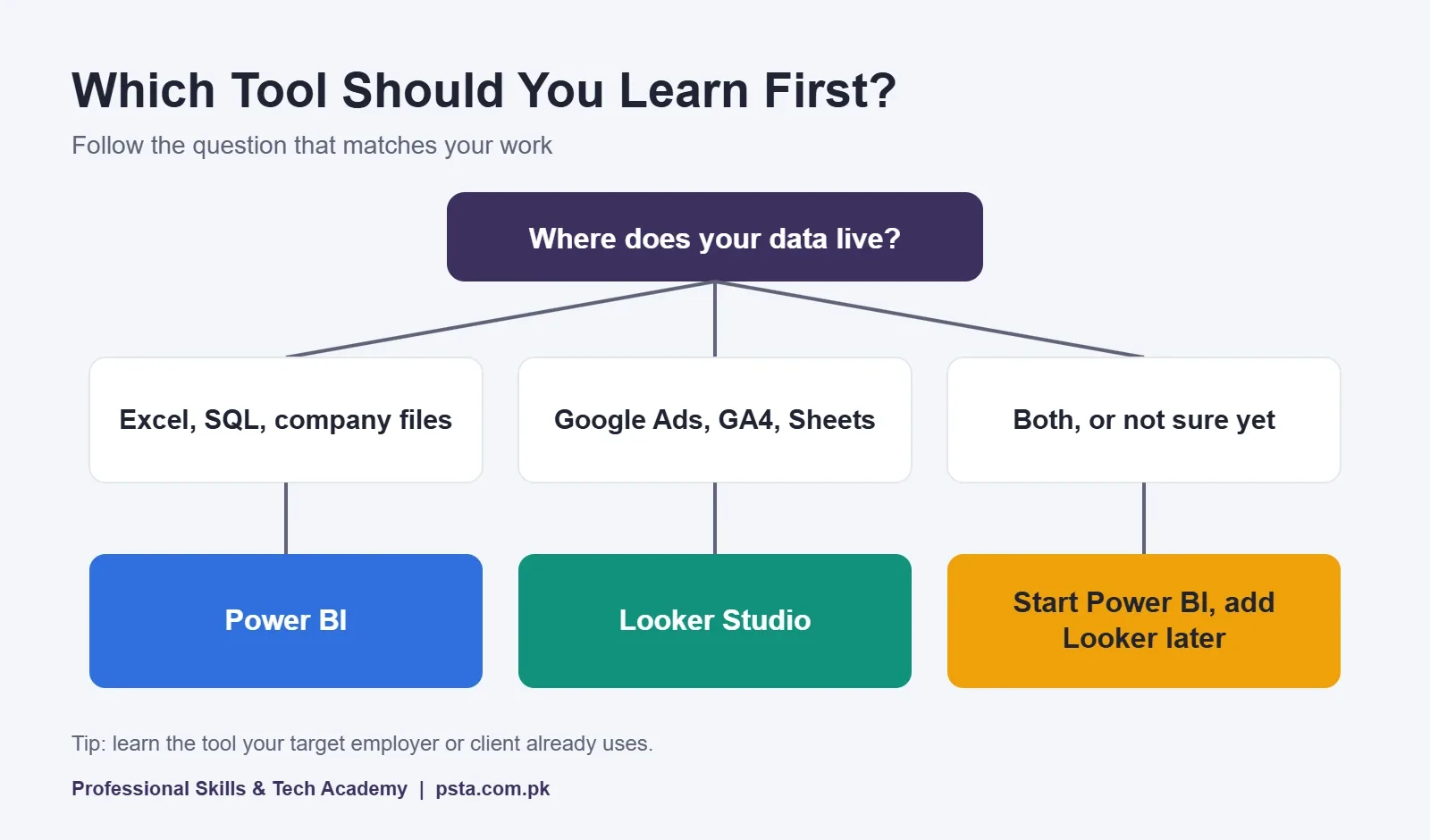
Learn Power BI first if you want an analyst or reporting role in a company that runs on Excel, SQL Server or Microsoft 365. Learn Looker Studio first if your work is digital marketing and your data already sits in Google Ads, Google Analytics 4 or Google Sheets. If you are unsure, start with Power BI, because its data modeling skills carry over, then pick up Looker Studio in a weekend.
That answer hides a lot of detail. The sections below explain the reasoning so you can apply it to your own situation.
What Is Each Tool, in Plain Words?
Power BI
Power BI comes from Microsoft and is built for business reporting and analysis. You usually build reports in Power BI Desktop, a Windows program, and then publish them to the Power BI service online so others can view them. Its strength is the work that happens before the chart: cleaning data in Power Query, linking tables in a data model and writing measures in DAX.
Looker Studio (Data Studio)
Google describes Data Studio as a no-cost tool that turns data into dashboards and reports you can share and customize. It runs entirely in the browser, so it works on any laptop, including a Mac or a Chromebook. It connects naturally to Google products, which is why marketers like it.
Side-by-Side Comparison Table
| Point | Power BI | Looker Studio (Data Studio) |
|---|---|---|
| Starting cost | Free account and free Desktop download | No-cost standard version |
| Paid tier | Pro at $14.00 per user/month, paid yearly | Pro subscription, billed monthly per license |
| Where you build | Power BI Desktop on Windows, plus the online service | Any web browser |
| Data preparation | Power Query, data models, DAX | Lighter blending and calculated fields |
| Best-fit data | Excel, SQL databases, company systems | Google Ads, GA4, Sheets, BigQuery |
| Typical users | Analysts, finance and operations teams | Marketers, agencies, small businesses |
How Much Does Each One Cost?
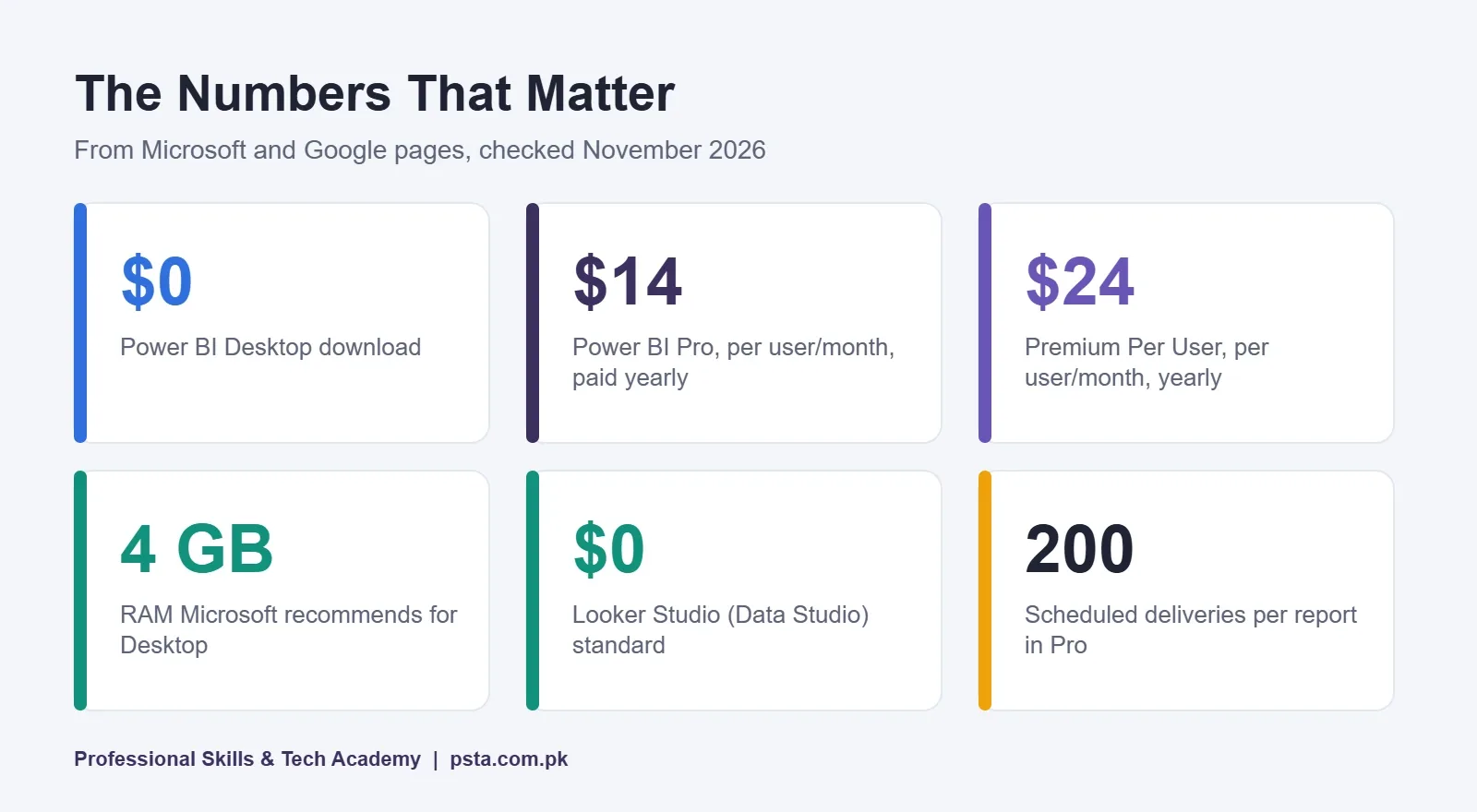
On Microsoft's Power BI pricing page, the free account lets you create reports in Power BI Desktop, and the Desktop app is listed as a free download. The Power BI Pro price is listed at $14.00 for each user monthly, billed on a yearly plan. Premium Per User costs $24.00 per user per month, paid yearly. The same page lists a 1 GB model memory limit for Pro and 100 GB for Premium Per User.
Google's Data Studio Pro overview explains that Pro is billed monthly per license and adds team features. Those include team workspaces, organization-owned reports, scheduled delivery of up to 200 schedules per report, and Gemini features. The page we checked did not print a price, so confirm the current rate with Google before you budget for it.
Because the Power BI Desktop free download covers report building, for a student the practical point is simple. You can learn either tool for free. Costs only appear when an employer or client wants secure sharing across a team, and at that stage they usually pay.
Free Versions: What You Can and Can't Do
Because Power BI Desktop is free, you can build complete reports, models and DAX measures without paying anything. What the free account doesn't give you is easy, secure sharing with colleagues; that is where Pro licenses come in. Looker Studio's no-cost version lets you build and share reports through Google accounts, while Pro adds the team management, scheduling and support layer that larger organizations want. For learning and for a portfolio, the free versions of both are enough.
A tip for portfolio work: in Power BI, save your .pbix file and take clear screenshots of each page; in Looker Studio, share a view-only link. Put both in one portfolio page so a recruiter can see the same skills in two tools. Students comparing Power BI vs Looker Studio often forget that a recruiter cares more about the business question you answered than the logo on the dashboard.
Where Power BI Pulls Ahead
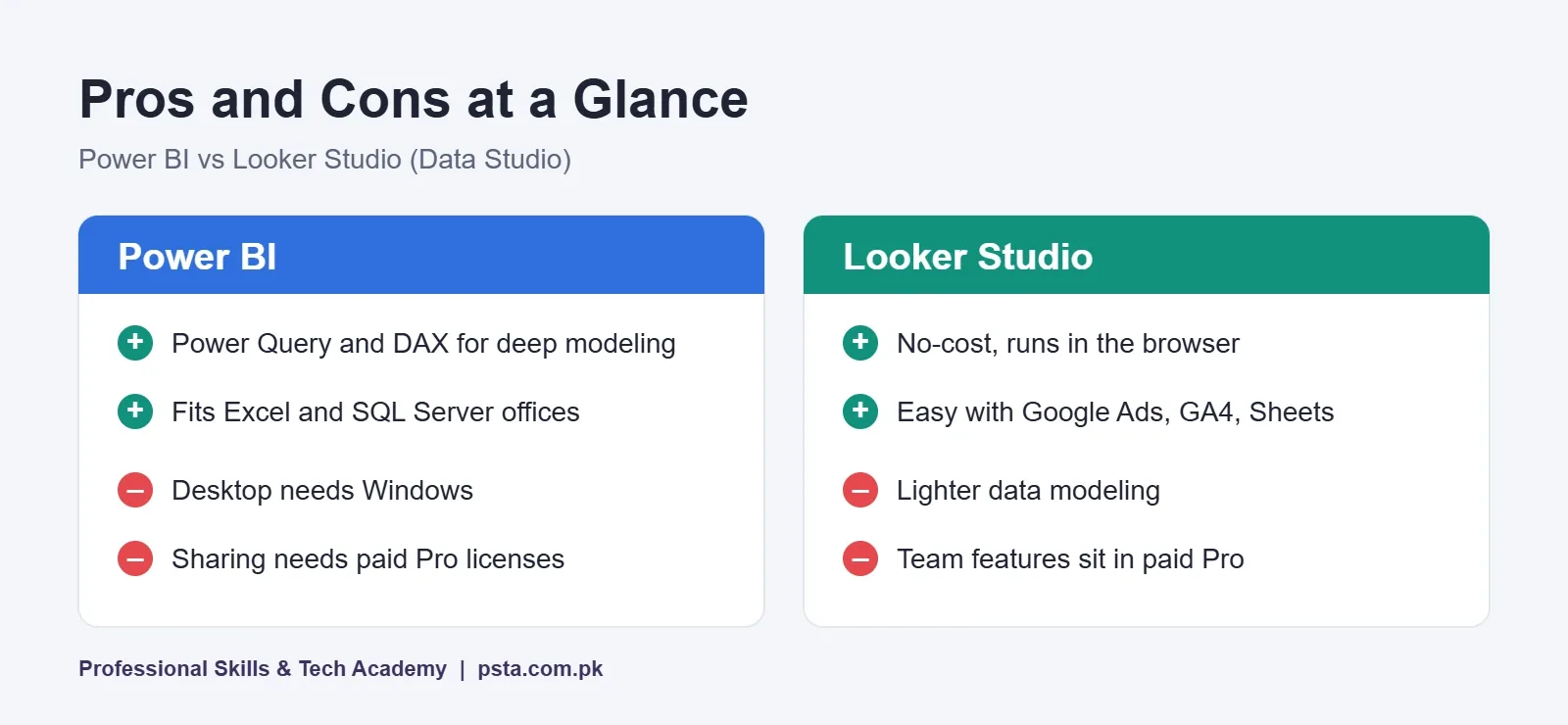
- Data modeling. You can link sales, products and customer tables and let one filter flow through all of them.
- Power Query. Repeatable cleaning steps save hours when the same messy Excel file arrives every month.
- DAX measures. Year-to-date totals, running balances and custom ratios are built in DAX, a skill employers test in interviews.
- Microsoft offices. Many Pakistani companies already pay for Microsoft 365, so Power BI fits their existing logins and files.
Microsoft's data sources page says Power BI Desktop can connect to data from many different sources and points to the full Power Query connector list. If you want to go deeper here, our DAX guide for beginners is a good next read.
Where Looker Studio Is Easier
- No install. Open a browser, sign in with a Google account and start.
- Marketing data. Pulling Google Ads or GA4 numbers into a client report takes minutes.
- Sharing. You share a report like a Google Doc, which suits freelancers sending monthly reports to clients.
- Any laptop. Mac and Chromebook owners are not left out.
The trade-off is depth. When a report needs several related tables, complex time calculations or heavy cleaning, Looker Studio becomes harder work than Power BI.
Will Power BI Desktop Run on Your Laptop?
Check this before you enroll anywhere. Microsoft's Power BI Desktop download page asks for a 64-bit copy of Windows 10 (or Windows Server 2016) or newer. Memory-wise, 2 GB free is the floor and Microsoft suggests 4 GB or above. Your display should reach 1440x900 at minimum, and 32-bit installs have been dropped.
The page describes only Windows installs. If you use a Mac, you can still learn Looker Studio right away, and you can run Power BI Desktop through a Windows virtual machine or a lab computer.
Which Should You Learn for Jobs in Pakistan?
Think about the work you want, then match the tool to it.
- Office or analyst roles. Banks, telecoms, textile exporters and software houses usually keep data in Excel and SQL. Power BI is the natural fit, so lead with it.
- Digital marketing roles. Agencies report on Google Ads, Meta and GA4. Looker Studio helps you send clean client dashboards quickly.
- Freelancing. Both appear in client requests. Power BI projects tend to need more modeling, while Looker Studio projects are often marketing reports.
- Students still deciding. Learn Power BI first for the deeper skills, then add Looker Studio as a quick second tool.
Before you choose, read three or four job ads for the role you want and note which tool they name. That small step beats any general advice, including ours.
Example: One Shop, Two Reports
Here is a realistic example to make the choice concrete. Imagine a small clothing brand that sells through its website and runs Google Ads. The owner wants two things each month: a sales report for the business partners and an ads report for the marketing freelancer.
The sales data comes from an Excel export of orders, a product list and a returns sheet. Linking those three tables, removing duplicate orders and calculating net sales after returns is classic Power BI work. Power Query cleans the exports the same way every month, and a DAX measure handles net sales.
The ads report is different. Spend, clicks and conversions already live in Google Ads and GA4. Looker Studio connects to both in a few clicks and the freelancer can share a live link with the owner. Rebuilding that in Power BI is possible but slower.
So in this example the honest answer to Looker Studio vs Power BI is "both, for different jobs." Many working analysts end up exactly there.
What Employers Actually Test
Interviews for reporting roles rarely ask which buttons you click. They ask how you would answer a business question: which product lines lost margin, which city's orders grew, which campaign brought paying customers. Whichever tool you learn, practise explaining your report in two minutes. That habit matters more in the Power BI vs Looker Studio debate than any single feature.
Learning Order That Works
If you plan to learn both, this sequence avoids confusion.
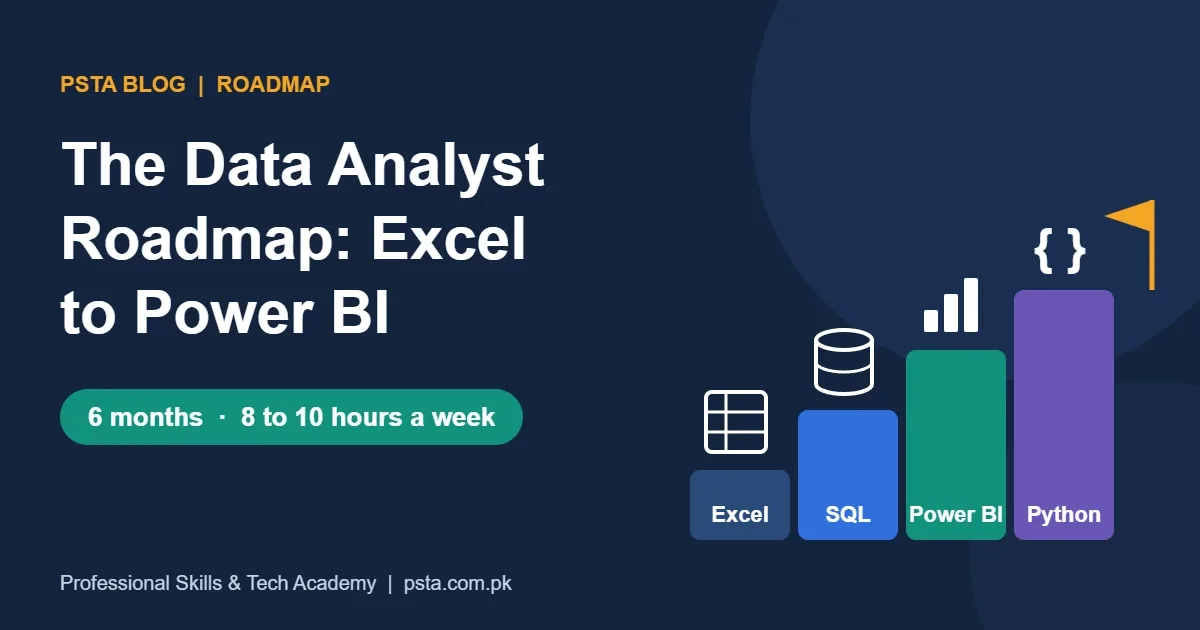
- Get comfortable with Excel tables, filters and pivot tables.
- Learn Power Query cleaning and a simple star-schema data model in Power BI.
- Write your first DAX measures and build one complete report.
- Rebuild a smaller version of the same report in Looker Studio using Google Sheets.
- Publish both in a portfolio with a short note on what each report answers.
Our Power BI projects for beginners list gives you datasets and report ideas for steps 3 to 5.
Common Mistakes When Choosing a Dashboard Tool
- Choosing by price alone. Both are free to learn, so price is rarely the deciding factor for a student.
- Skipping data preparation. A pretty chart on dirty data still gives the wrong answer in either tool.
- Ignoring your hardware. Find out whether your laptop runs Power BI Desktop before paying for a course.
- Learning only one chart type. Employers want answers to business questions, not a gallery of visuals.
Comparing other options? See our posts on Power BI vs Excel and Power BI vs Tableau.
Building Power BI Skills With PSTA
PSTA's Power BI Course: Data Analytics & Dashboards is an 8-week, beginner-level program. The course page covers connecting to SQL, Excel, web and cloud sources, cleaning data in Power Query, building data models, writing DAX and publishing reports with security roles in the Power BI service. Learning is project-based, built around business case work.
Study at the Mandian campus in Abbottabad, through live online classes from any city, or a mix of both. Marketing-focused learners who want Looker Studio for client reports can also look at the Advanced Digital Marketing course. Every program is listed at psta.com.pk on the courses page.
Your First Step Tonight
Download Power BI Desktop if you use Windows, or open Looker Studio in your browser if you don't. Load one small spreadsheet, such as a month of shop sales, and build a single chart that answers one question. When you are ready for structured practice with feedback, start your application on the PSTA admission page or ask about batch dates on WhatsApp, +92 314 5424399.
Frequently asked questions
Is Looker Studio really free?
Yes. Google describes the standard version, now called Data Studio, as a no-cost tool for building and sharing dashboards. A paid Pro subscription adds team workspaces, organization-owned reports, scheduled delivery and support. For learning and freelance client reports, the free version is usually enough.
Is Power BI free for students?
Power BI Desktop is a free download, and the free account lets you build reports, models and DAX measures. Paid Pro licenses, listed at $14.00 per user per month on a yearly plan, matter when a team needs to share reports securely. Most learners never need to pay while studying.
Can I use Power BI on a Mac?
Microsoft lists Windows 10 or Windows Server 2016 and newer for Power BI Desktop and describes only Windows installs. Mac users usually run it inside a Windows virtual machine or practise on a lab computer. Looker Studio works in any browser, so it runs on a Mac directly.
Which is better for digital marketing reports?
Looker Studio is usually quicker for marketing, because Google Ads, Google Analytics 4 and Google Sheets connect easily and clients can open a shared link. Power BI can do the same work but suits reports that combine many business tables, such as sales, stock and returns.
How long does it take to learn Power BI?
It depends on your Excel comfort and practice time. PSTA runs its Power BI course over 8 weeks at beginner level, covering Power Query, data modeling, DAX and publishing. Steady weekly practice on real datasets matters more than total hours.
Should I put both tools on my CV?
Only if you have built something real in each. List the tool next to a project, such as a sales dashboard in Power BI and a campaign report in Looker Studio, with one line on the question it answered. Recruiters trust projects more than a list of software names.
Is Looker Studio the same as Google Data Studio?
Yes, it is the same Google product. It started as Data Studio, was renamed Looker Studio, and Google documentation now calls it Data Studio again. Search results and job ads still use both names, so treat them as one tool.
Sources & references
- Power BI: Pricing Plan (Microsoft) microsoft.com
- Data Studio documentation (Google Cloud) docs.cloud.google.com
- Data Studio Pro subscription overview (Google Cloud) docs.cloud.google.com
- Download Power BI Desktop (Microsoft Learn) learn.microsoft.com
- Data sources in Power BI Desktop (Microsoft Learn) learn.microsoft.com
Last reviewed & updated on by Umar Qureshi. Written by the PSTA team in Abbottabad, Pakistan.

Umar Qureshi

Power BI Course: Data Analytics & Dashboards
Turn this guide into a career: hands-on training with real projects, online across Pakistan or on-campus in Abbottabad · 8 Weeks.
Comments
No comments yet — ask a question or share your experience.